
Template Library | Developer Documentation

Template Library

Updated: Nov 14, 2025
Template Library makes it faster and easier for businesses to create utility templates for common use cases, like payment reminders, delivery updates — and authentication templates for common identity verification use cases.
These pre-written templates have already been categorized as utility or authentication. Library templates contain fixed content that cannot be edited and parameters you can adapt for business or user-specific information.
You can browse and create templates using Template Library in WhatsApp Manager, or programmatically via the API.

Creating Templates via WhatsApp Manager (WAM)

Follow the instructions below to create templates using the Template Library in WhatsApp Manager.
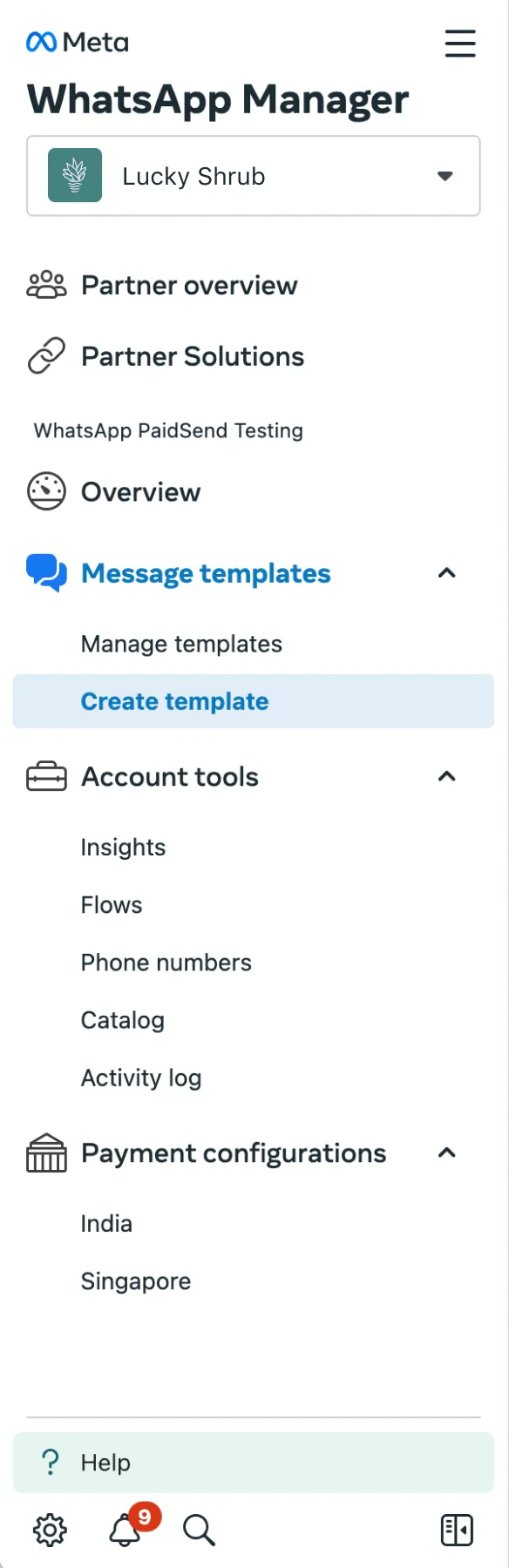
1: In the sidebar of WAM, under Message Templates, select Create Template.
Image
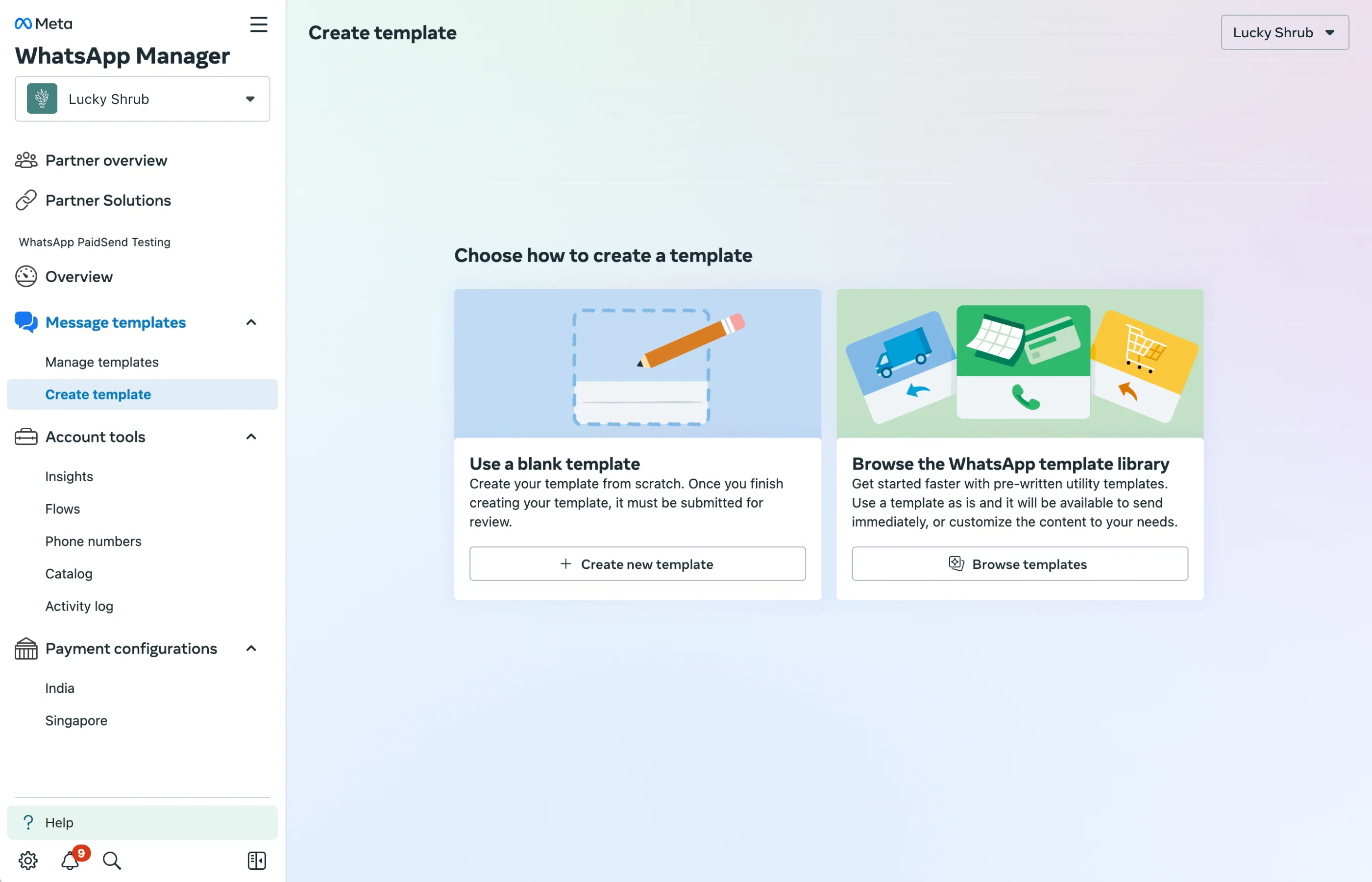
2: Under Browse the WhatsApp Template Library, select Browse Templates.
Image
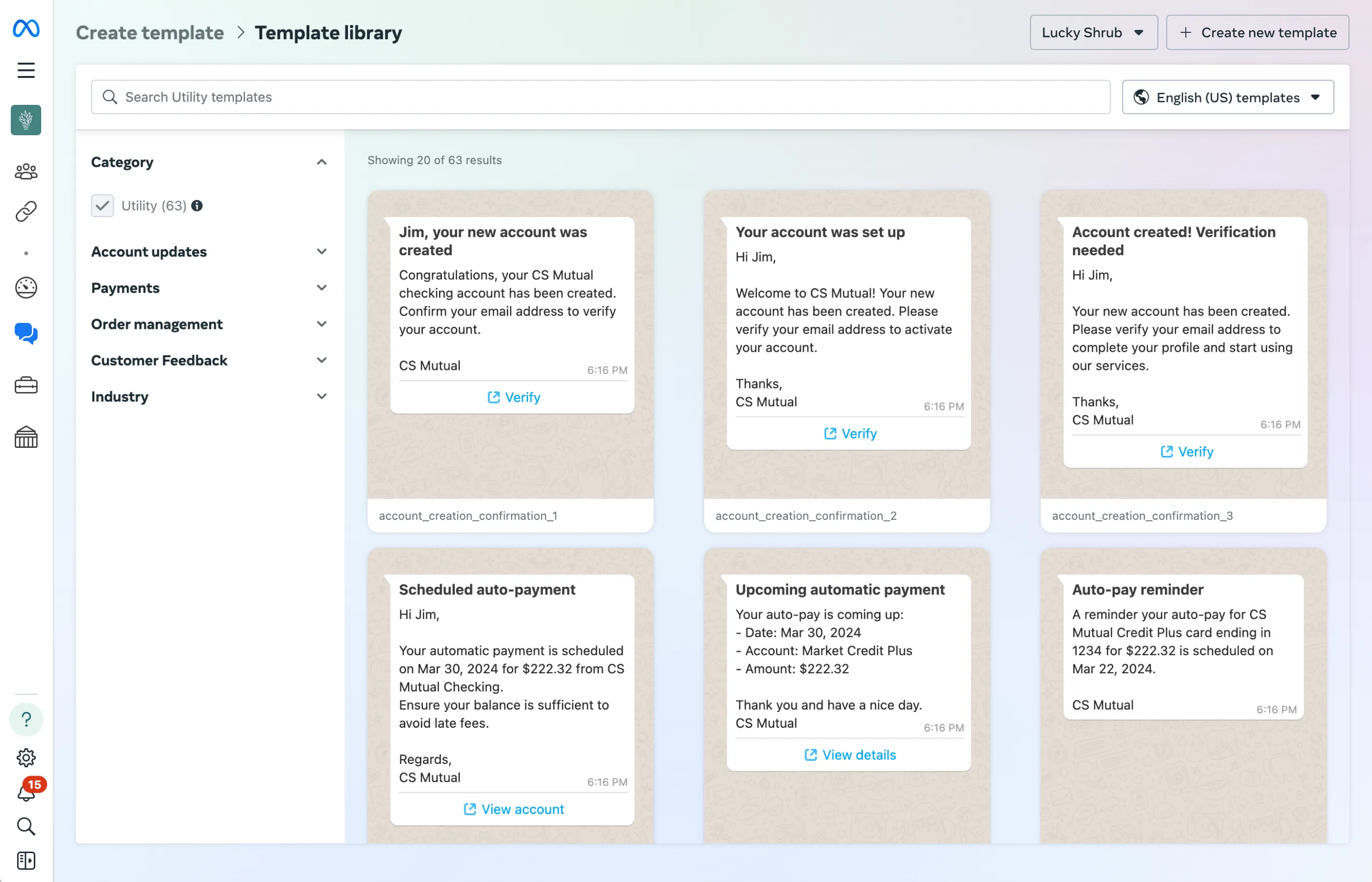
3: You will now see all currently available templates. Use the search bar to search by topic or use case, or use the dropdown options on the sidebar to filter the results.
Note that hovering over a template will show you its parameter values.
Image
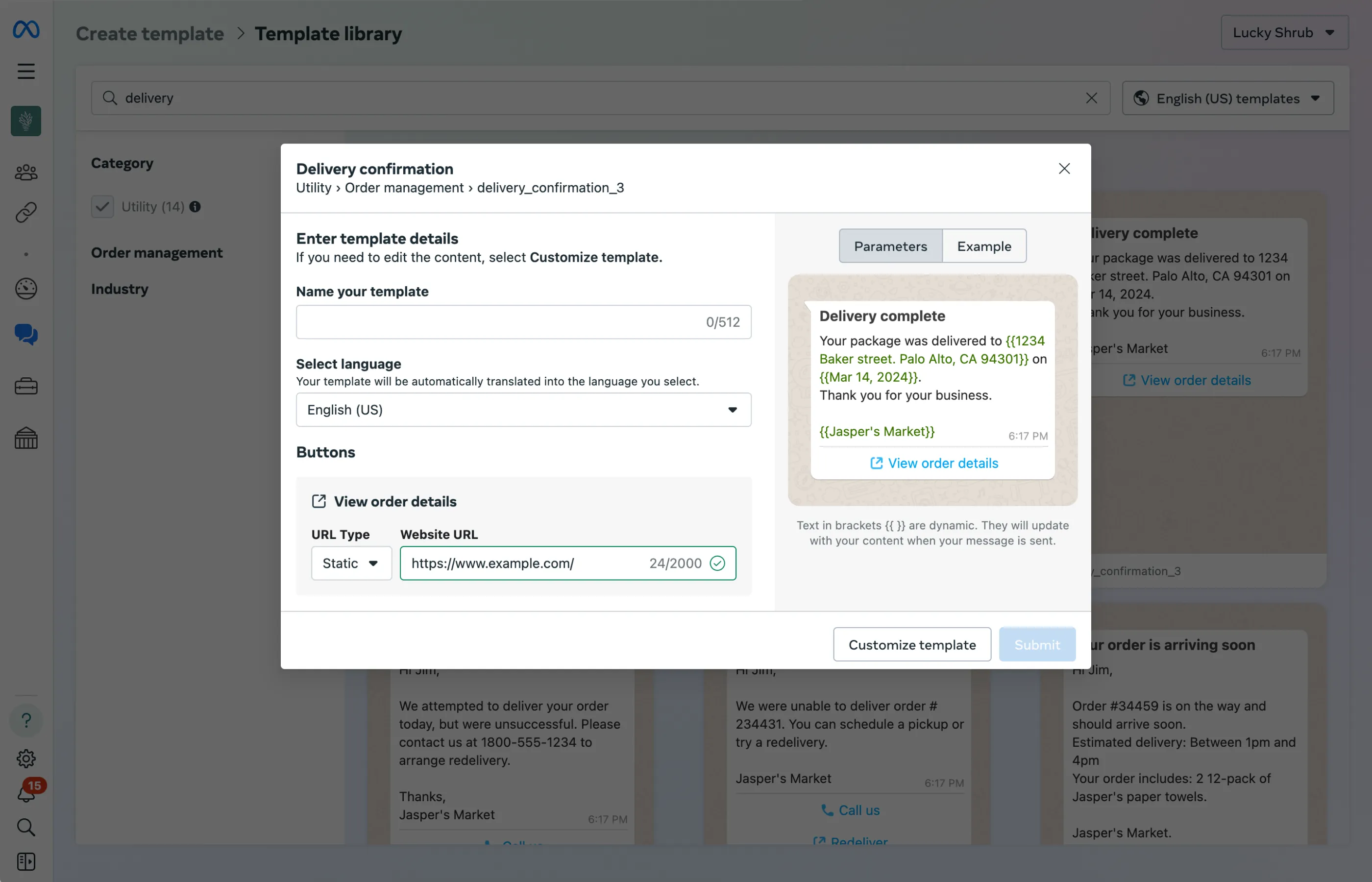
4: To create a template, select one by clicking on it. Then, add your template name, select the language, and fill out the button details. Once you have completed these steps, click Submit.
Note: If you choose Customize template, your template will have to go through review before you are able to send messages.
Image

Template Parameters and Restrictions

When a template contains the value library_template_name in the GET <WABAID>/message_templates?name=<TEMPLATE_NAME> response, it is a template created from the Template Library and is subject to type checks and restrictions.
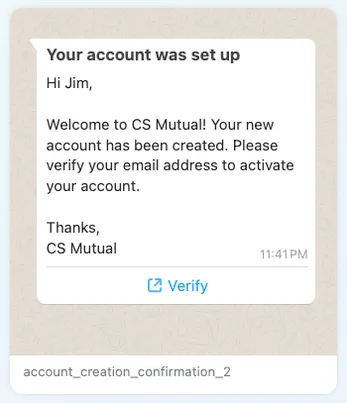
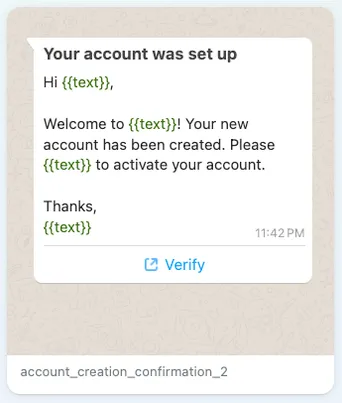
ImageImage
Templates in the library contain both fixed content and parameters. The parameters represent spaces in the template where variable information can be inserted, such as names, addresses, and phone numbers.
In the example above, parameters like the name Jim or the business name CS Mutual can be modified to accept variables like your customer’s name and your business’s name.
Messages sent using templates from Template Library are subject to parameter checks during send time. Values used in parameters that are outside of the established ranges listed below will cause the message send to fail.

List of parameters and sample values

All parameters are length restricted. If you receive an error, try again with a shorter value.
Parameter Type Description Sample Value
ADDRESS
A location address.
    Must be a valid address
      1 Hacker Way, Menlo Park, CA 94025
      TEXT
      Basic text.
        regarding your order.12 pack of paper towelsyour requestpurchaseJasper's Market
        AMOUNT
        A number signifying a quantity.
          May contain a prefix or suffix for monetary values such as USD or RSMay contain decimals (.) and commas (,)May contain valid currency symbols such as $ and €
            145USD $375.32€1,376.22 EURRS 1200
            DATE
            A standard calendar date.
              2021-04-1913/03/20215th January 198208.22.1991January 1st, 202405 12 2022
              PHONE NUMBER
              A telephone number.
                May contain numbers, spaces, dashes (-), parentheses, and plus symbols (+)
                  +1 4256789900+91-7884-789122+39 87 62232
                  EMAIL
                  A standard email address.
                    Must be a valid email address
                    NUMBER
                    A number.
                      Must be a number.Cannot contain spaces.
                        2344490001234921388904453638

                        Forms

                        Forms are only available to accounts who have had their message limits increased.
                        Image
                        Some templates in Template Library are interactive forms that are powered by WhatsApp Flows.
                        In WhatsApp Manager, you can identify these specific templates by the “Form” label they contain. The current supported use cases are Customer Feedback and Delivery Failure.

                        Identifying forms in the request response

                        When calling the GET /message_template_library endpoint, the type key in the buttons array will show as "FORMS".
                        {
                        "name""delivery_failed_2_form",
                        "language""en_US",
                        "category""UTILITY",
                        "topic""ORDER_MANAGEMENT",
                        "usecase""DELIVERY_FAILED",
                        "industry": [
                        "E_COMMERCE"
                              ],
                        "body""We were unable to deliver order {{1}} today.

                        Please {{2}} to schedule another delivery attempt.",
                        "body_params": [
                        "#12345",
                        "try a redelivery"
                              ],
                        "body_param_types": [
                        "TEXT",
                        "TEXT"
                              ],
                        "buttons": [
                                {
                        "type""FLOW",
                        "text""Reschedule"
                                }
                              ],
                        "id""7138055039625658"
                        },

                        Using the API

                        The Template Library API has two endpoints:
                        // Used to browse available library templates
                        GET /message_template_library
                        // Used when you are ready to create a template from the library.
                        POST /<WHATSAPP_BUSINESS_ACCOUNT_ID>/message_templates

                        Searching and Filtering Available Templates

                        Templates with Header parameter types of Document only support PDFs
                        To browse and filter available templates, use the message_template_library endpoint.
                        Once you find the template you are interested in, note the name as you will use it when creating the template via the POST method.

                        Request Syntax

                        // Get all available templates
                        GET /message_template_library
                        
                        // Search for substring
                        GET /message_template_library?search=<SEARCH_KEY>// Filter by template topic
                        GET/message_template_library?topic=<TOPIC>// Filter by template use case
                        GET/message_template_library?usecase=<USECASE>// Filter by template industry
                        GET/message_template_library?industry=<INDUSTRY>// Filter by template language
                        GET/message_template_library?language=<LANGUAGE>

                        Query String Parameters

                        Placeholder Description Sample Value
                        <SEARCH_KEY>
                        String
                        Optional.

                        A substring you are searching for in the content, name, header, body, or footer of the template.
                        payments
                        <TOPIC>
                        Enum
                        Optional.

                        The topic of the template.
                        See Template Filters below
                        ORDER_MANAGEMENT
                        <USECASE>
                        Enum
                        Optional.

                        The use case of the template.
                        See Template Filters below
                        SHIPMENT_CONFIRMATION
                        <INDUSTRY>
                        Enum
                        Optional.

                        The industry of the template.
                        See Template Filters below
                        E_COMMERCE
                        <LANGUAGE>
                        Enum
                        Optional.

                        The template language locale code.
                        See Supported Languages
                        en_US

                        Example Request

                        curl 'https://graph.facebook.com/v25.0/102290129340398/message_templates?search="payments"'-H 'Authorization: Bearer EAAJB...'

                        Example Response

                        {
                        "name""low_balance_warning_1",
                        "language""en_US",
                        "category""UTILITY",
                        "topic""PAYMENTS",
                        "usecase""LOW_BALANCE_WARNING",
                        "industry": [
                        "FINANCIAL_SERVICES"
                              ],
                        "header""Your account balance is low",
                        "body""Hi {{1}},
                        This is to notify you that your {{2}} in your {{3}} account, ending in {{4}} is below your pre-set {{5}} of {{6}}.
                        Click the button to deposit more {{7}}.
                        {{8}}",
                        "body_params": [
                        "Jim",
                        "available funds",
                        "CS Mutual checking plus",
                        "1234",
                        "limit",
                        "$75.00",
                        "funds",
                        "CS Mutual"
                              ],
                        "buttons": [
                                {
                        "type""URL",
                        "text""Make a deposit",
                        "url""https://www.example.com/"
                                },
                                {
                        "type""PHONE_NUMBER",
                        "text""Call us",
                        "phone_number""+18005551234"
                                }
                              ],
                        "id""7147013345418927"
                        }

                        Template Filters

                        There are several templates to choose from in the Template Library. You can use the API to filter them based on a few factors.
                        Industry
                          E_COMMERCEFINANCIAL_SERVICES
                          Topic
                            ACCOUNT_UPDATECUSTOMER_FEEDBACKORDER_MANAGEMENTPAYMENTS
                            Use case
                              ACCOUNT_CREATION_CONFIRMATIONAUTO_PAY_REMINDERDELIVERY_CONFIRMATIONDELIVERY_FAILEDDELIVERY_UPDATEFEEDBACK_SURVEYFRAUD_ALERTLOW_BALANCE_WARNINGORDER_ACTION_NEEDEDORDER_CONFIRMATIONORDER_DELAYORDER_OR_TRANSACTION_CANCELORDER_PICK_UPPAYMENT_ACTION_REQUIREDPAYMENT_CONFIRMATIONPAYMENT_DUE_REMINDERPAYMENT_OVERDUEPAYMENT_REJECT_FAILPAYMENT_SCHEDULEDRECEIPT_ATTACHMENTRETURN_CONFIRMATIONSHIPMENT_CONFIRMATIONSTATEMENT_ATTACHMENTSTATEMENT_AVAILABLETRANSACTION_ALERT

                              Creating Templates

                              Note: The modification of rules surrounding body properties for this endpoint is for the explicit purpose of showcasing how to use the endpoint with Template Library.
                              To create a new template using the Template Library, call the existing <WHATSAPP_BUSINESS_ACCOUNT_ID>/message_templates endpoint using the body properties below.

                              Request Syntax

                              POST /<WHATSAPP_BUSINESS_ACCOUNT_ID>/message_templates

                              Post Body

                              {
                              "name""<NAME>",
                              "category""UTILITY",
                              "language""en_US",
                                “library_template_name”: “<LIBRARY_TEMPLATE_NAME>”,
                              "library_template_button_inputs""[
                                  {'type': 'URL', 'url': {'base_url' : 'https://www.example.com/{{1}}',
                                  'url_suffix_example' : 'https://www.example.com/demo'}},
                                  {type: 'PHONE_NUMBER', 'phone_number': '+16315551010'}
                              ]"
                              }

                              Body Properties

                              Placeholder Description Sample Value
                              <NAME>
                              String
                              Required.

                              The name you are providing for your template.

                              Maximum 512 characters.
                              my_payment_template
                              <CATEGORY>
                              Enum
                              Required.

                              The template category.
                              Must be UTILITY for use with Template Library.
                              UTILITY
                              <LANGUAGE>
                              Enum
                              Required.

                              The template language locale code.
                              See Supported Languages
                              en_US
                              <LIBRARY_TEMPLATE_NAME>
                              String
                              Required.

                              The exact name of the Template Library template.
                              delivery_update_1
                              <LIBRARY_TEMPLATE_BUTTON_INPUTS>
                              Array of objects
                              Optional.

                              The website and/or phone number of the business being used in the template.
                              Note: For utility templates that have button inputs, this property is not optional.
                              “[
                              {'type': 'URL', 'url': {'base_url' : 'https://www.example.com/{{1}}',
                              'url_suffix_example' : 'https://www.example.com/demo'}},
                              {type: 'PHONE_NUMBER', 'phone_number': '+16315551010'}
                              ]"
                              

                              Library template button inputs

                              Placeholder Description Sample Value
                              type
                              enum
                              The button type
                              QUICK_REPLY, URL, PHONE_NUMBER, OTP, MPM, CATALOG, FLOW, VOICE_CALL, APP
                              Required
                              OTP
                              phone_number
                              String
                              Phone number for the button.
                              Optional
                              "+13057652345"
                              url
                              JSON Object
                              zero_tap_terms_accepted
                              boolean
                              Wether the zero tap terms were accepted by the user or not.
                              Optional
                              TRUE
                              otp_type
                              enum
                              The OTP type.
                              COPY_CODE, ONE_TAP, ZERO_TAP
                              Optional
                              TRUE
                              supported_apps
                              Array of JSON Object

                              Library template body inputs

                              Placeholder Description Sample Value
                              <LIBRARY_TEMPLATE_BODY_INPUTS>
                              JSON Object
                              Optional.

                              Optional data during creation of a template from Template Library. These are optional fields for the button component.
                              Learn how to create templates using Template Library
                              add_contact_number
                              boolean
                              Boolean value to add information to the template about contacting business on their phone number.
                              Optional
                              TRUE
                              add_learn_more_link
                              boolean
                              Boolean value to add information to the template about learning more information with a url link.
                              Not widely available and will be ignored if not available.
                              Optional
                              TRUE
                              add_security_recommendation
                              boolean
                              Boolean value to add information to the template about not sharing authentication codes with anyone.
                              Optional
                              TRUE
                              add_track_package_link
                              boolean
                              Boolean value to add information to the template to track delivery packages.
                              Not widely available and will be ignored if not available.
                              Optional
                              TRUE
                              code_expiration_minutes
                              int64
                              Integer value to add information to the template on when the code will expire.
                              Optional
                              5

                              Example Request

                              curl'https://graph.facebook.com/v19.0/102290129340398/message_templates'
                              -H'Authorization: Bearer EAAJB...'
                              -H'Content-Type: application/json'
                              -d'
                              {
                                "name": "my_delivery_update",
                                "language": "en_US",
                                "category": "UTILITY",
                                “library_template_name”: “delivery_update_1”,
                                "library_template_button_inputs": "[
                                  {'type': 'URL', 'url': {'base_url' : 'https://www.example.com/{{1}}',
                                  'url_suffix_example' : 'https://www.example.com/order_update}}
                                ]"
                              }

                              Example Response

                              {
                              "id""{hsm-id}",
                              "status""APPROVED",
                              "category""UTILITY"
                              }

                              Sending Template Messages

                              To learn how to send templated messages, view the Send Templates guide