Interactive list messages | Developer Documentation
Interactive list messages
Updated: Nov 3, 2025
Interactive list messages allow you to present WhatsApp users with a list of options to choose from (options are defined as rows in the request payload):
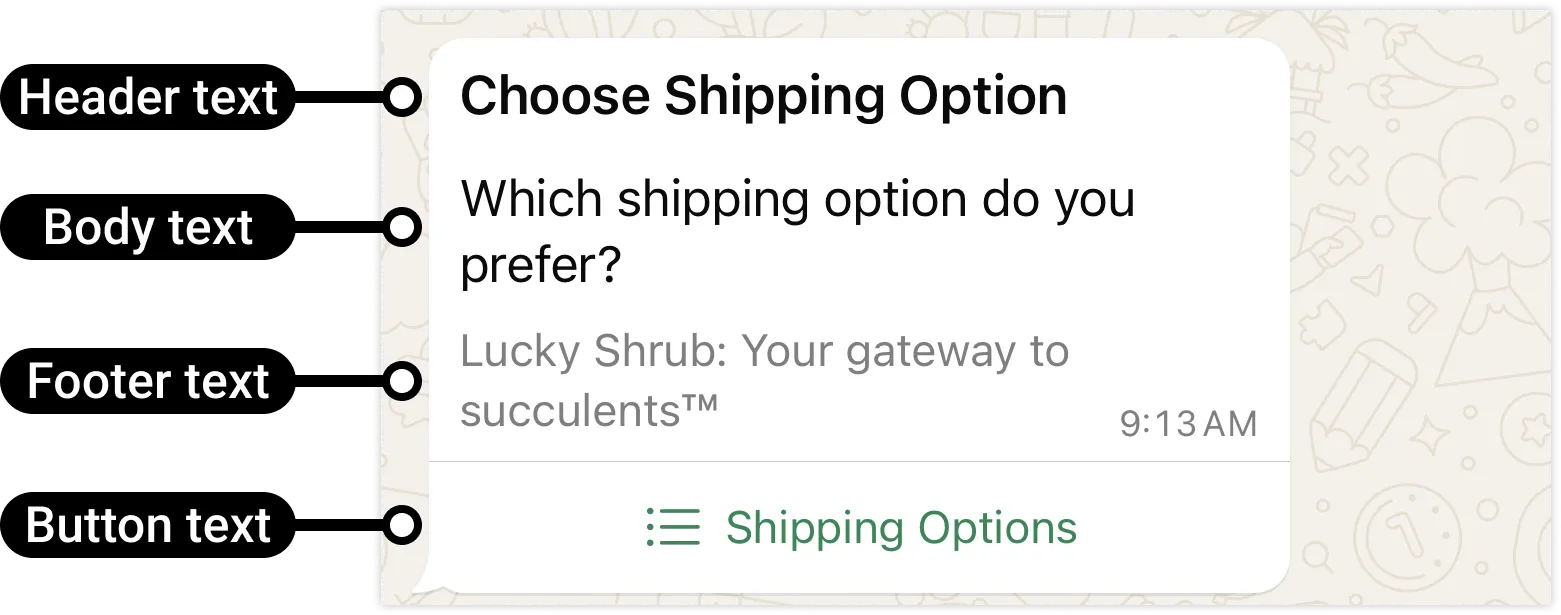
When a user taps the button in the message, it displays a modal that lists the options available:
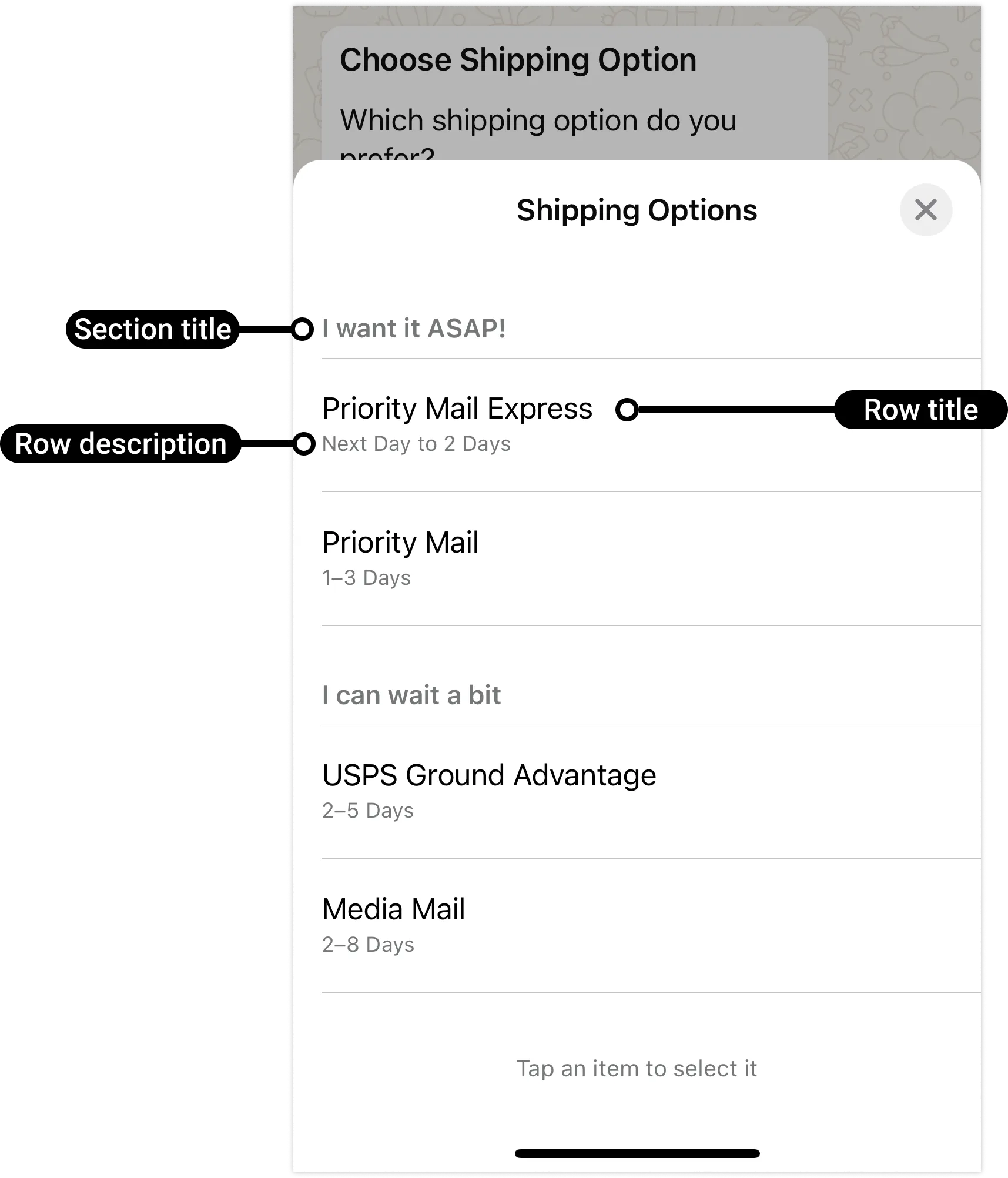
Users can then choose one option and their selection will be sent as a reply:
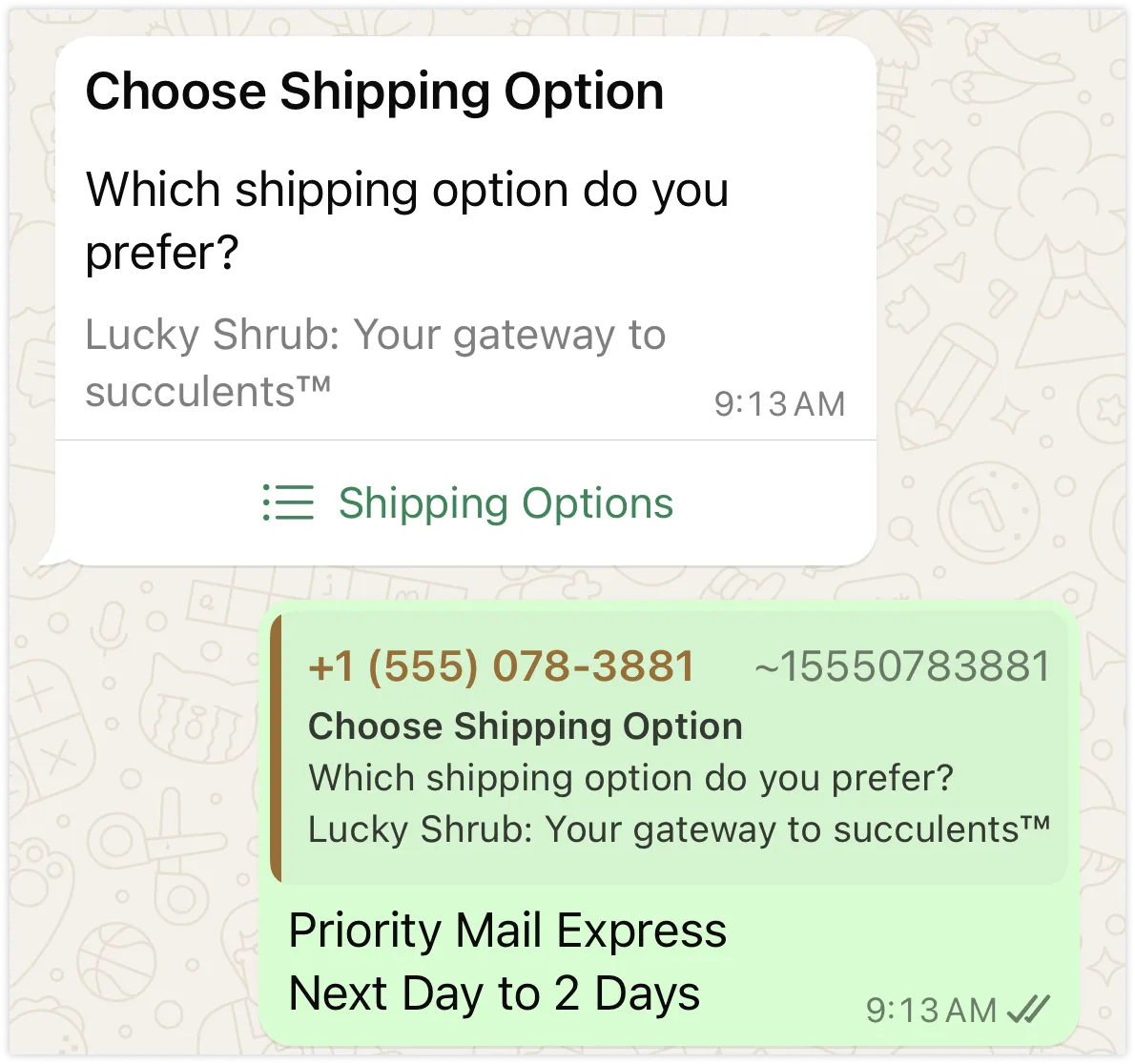
This triggers a webhook, which identifies the option selected by the user.
Interactive list messages support up to 10 sections, with up to 10 rows for all sections combined, and can include an optional header and footer.
Request Syntax
Use the POST /<WHATSAPP_BUSINESS_PHONE_NUMBER_ID>/messages endpoint to send an interactive list message to a WhatsApp user.
curl 'https://graph.facebook.com/<API_VERSION>/<WHATSAPP_BUSINESS_PHONE_NUMBER_ID>/messages' \
-H 'Content-Type: application/json' \
-H 'Authorization: Bearer <ACCESS_TOKEN>' \
-d '
{
"messaging_product": "whatsapp",
"recipient_type": "individual",
"to": "<WHATSAPP_USER_PHONE_NUMBER>",
"type": "interactive",
"interactive": {
"type": "list",
"header": {
"type": "text",
"text": "<MESSAGE_HEADER_TEXT>"
},
"body": {
"text": "<MESSAGE_BODY_TEXT>"
},
"footer": {
"text": "<MESSAGE_FOOTER_TEXT>"
},
"action": {
"button": "<BUTTON_TEXT>",
"sections": [
{
"title": "<SECTION_TITLE_TEXT>",
"rows": [
{
"id": "<ROW_ID>",
"title": "<ROW_TITLE_TEXT>",
"description": "<ROW_DESCRIPTION_TEXT>"
}
<!-- Additional rows would go here -->
]
}
<!-- Additional sections would go here -->
]
}
}
}'Request parameters
| Placeholder | Description | Sample Value |
|---|---|---|
<ACCESS_TOKEN>String | Required. | |
<API_VERSION>String | Optional. Graph API version. | v25.0 |
<BUTTON_TEXT>String | Required. Button label text. When tapped, reveals rows (options the WhatsApp user can tap). Supports a single button. Maximum 20 characters. | Shipping Options |
<MESSAGE_BODY_TEXT>String | Required. Message body text. Supports URLs. Maximum 4096 characters. | Which shipping option do you prefer? |
<MESSAGE_FOOTER_TEXT>String | Optional. Message footer text. Maximum 60 characters. | Lucky Shrub: Your gateway to succulents™ |
<MESSAGE_HEADER_TEXT>String | Optional. The header object is optional. Supports text header type only.Maximum 60 characters. | Choose Shipping Option |
<ROW_DESCRIPTION_TEXT>String | Optional. Row description. Maximum 72 characters. | Next Day to 2 Days |
<ROW_ID>String | Required. Arbitrary string identifying the row. This ID will be included in the webhook payload if the user submits the selection. At least one row is required. Supports up to 10 rows. Maximum 200 characters. | priority_express |
<ROW_TITLE_TEXT>String | Required. Row title. At least 1 row is required. Supports up to 10 rows. Maximum 24 characters. | Priority Mail Express |
<SECTION_TITLE_TEXT>String | Required. Section title text. At least 1 section is required. Supports up to 10 sections. Maximum 24 characters. | I want it ASAP! |
<WHATSAPP_BUSINESS_PHONE_NUMBER_ID>String | Required. WhatsApp business phone number ID. | 106540352242922 |
<WHATSAPP_USER_PHONE_NUMBER>String | Required. WhatsApp user phone number. | +16505551234 |
Example request
Example request to send an interactive list message with a header, body, footer, and two sections containing two rows each.
curl 'https://graph.facebook.com/v25.0/106540352242922/messages' \
-H 'Content-Type: application/json' \
-H 'Authorization: Bearer EAAJB...' \
-d '
{
"messaging_product": "whatsapp",
"recipient_type": "individual",
"to": "+16505551234",
"type": "interactive",
"interactive": {
"type": "list",
"header": {
"type": "text",
"text": "Choose Shipping Option"
},
"body": {
"text": "Which shipping option do you prefer?"
},
"footer": {
"text": "Lucky Shrub: Your gateway to succulents™"
},
"action": {
"button": "Shipping Options",
"sections": [
{
"title": "I want it ASAP!",
"rows": [
{
"id": "priority_express",
"title": "Priority Mail Express",
"description": "Next Day to 2 Days"
},
{
"id": "priority_mail",
"title": "Priority Mail",
"description": "1–3 Days"
}
]
},
{
"title": "I can wait a bit",
"rows": [
{
"id": "usps_ground_advantage",
"title": "USPS Ground Advantage",
"description": "2–5 Days"
},
{
"id": "media_mail",
"title": "Media Mail",
"description": "2–8 Days"
}
]
}
]
}
}
}'Example response
{
"messaging_product": "whatsapp",
"contacts": [
{
"input": "+16505551234",
"wa_id": "16505551234"
}
],
"messages": [
{
"id": "wamid.HBgLMTY0NjcwNDM1OTUVAgARGBI1RjQyNUE3NEYxMzAzMzQ5MkEA"
}
]
}Webhooks
When a WhatsApp user selects an option and sends their message, a messages webhook is triggered identifying the ID (
id) of the option they chose.{
"object": "whatsapp_business_account",
"entry": [
{
"id": "102290129340398",
"changes": [
{
"value": {
"messaging_product": "whatsapp",
"metadata": {
"display_phone_number": "15550783881",
"phone_number_id": "106540352242922"
},
"contacts": [
{
"profile": {
"name": "Pablo Morales"
},
"wa_id": "16505551234"
}
],
"messages": [
{
"context": {
"from": "15550783881",
"id": "wamid.HBgLMTY0NjcwNDM1OTUVAgARGBIwMjg0RkMxOEMyMkNEQUFFRDgA"
},
"from": "16505551234",
"id": "wamid.HBgLMTY0NjcwNDM1OTUVAgASGBQzQTZDMzFGRUFBQjlDMzIzMzlEQwA=",
"timestamp": "1712595443",
"type": "interactive",
"interactive": {
"type": "list_reply",
"list_reply": {
"id": "priority_express",
"title": "Priority Mail Express",
"description": "Next Day to 2 Days"
}
}
}
]
},
"field": "messages"
}
]
}
]
}
No comments to display