
Pre-filling screens | Developer Documentation
Pre-filling screens
Updated: Nov 10, 2025
If you know details about your customer’s business, such as its name and address, you can inject this data into Embedded Signup. This can pre-fill screens or bypass them altogether, dramatically reducing the amount of input and interaction required by your customers.
For example, here is the business portfolio screen, pre-filled with business’s name, email address, website, country, and a pre-verified business phone number:
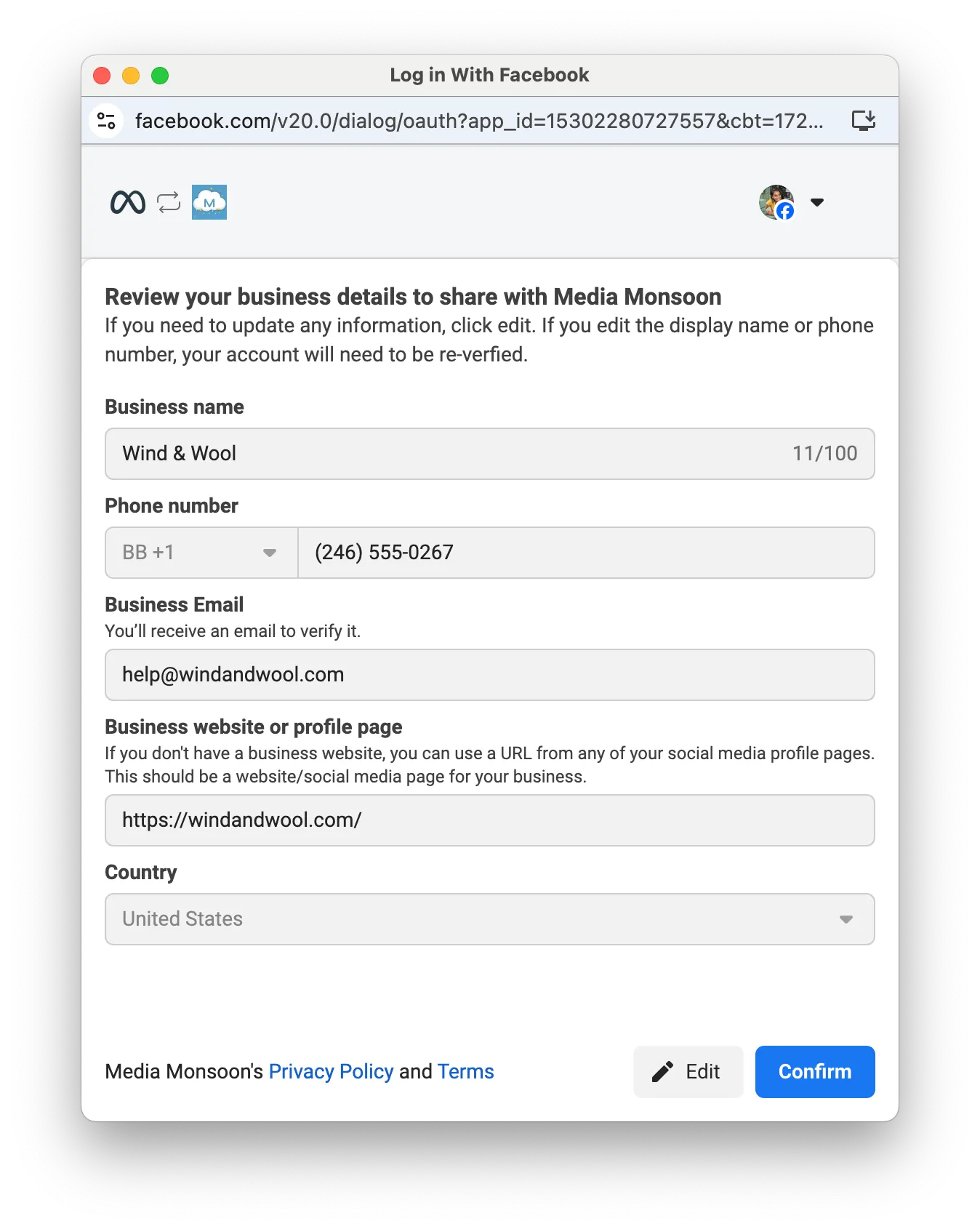
We recommend that you inject business portfolio data, a pre-verified number, and phone profile data. Injecting this data provides the best experience for your customer, as it:
entirely pre-fills the business portfolio screenbypasses the WhatsApp Business Account (WABA) selection and creation screensbypasses the business phone number selection and verification screensautomatically sets the business phone number’s profile information in the WhatsApp client
Embedded Signup Integration Helper
The Embedded Signup Integration Helper provides a convenient way for you to create pre-filled data payloads and test their impact on the flow. To access the payload tool:
Navigate to App Dashboard > WhatsApp > Embedded Signup Builder.Locate the Embedded Signup Setup section.Locate the Embedded Signup Pre-fill row.Click the Edit pre-fill data button.
Injecting Data
The
FB.login function, which gets called when a business customer launches Embedded Signup, accepts an object as an argument. Use this object’s extras.setup property to inject data:// Launch method and callback registrationconst launchWhatsAppSignup =()=>{
FB.login(fbLoginCallback,{
config_id:'<CONFIGURATION_ID>',// your configuration ID goes here
response_type:'code',
override_default_response_type:true,
extras:{
setup:{
business:{// Business portfolio data goes here},
preVerifiedPhone:{// Pre-verified phone number IDs go here},
phone:{// Phone number profile data goes here},
whatsAppBusinessAccount:{// WABA IDs go here}},
featureType:'',
sessionInfoVersion:'3',}});}Business portfolio data
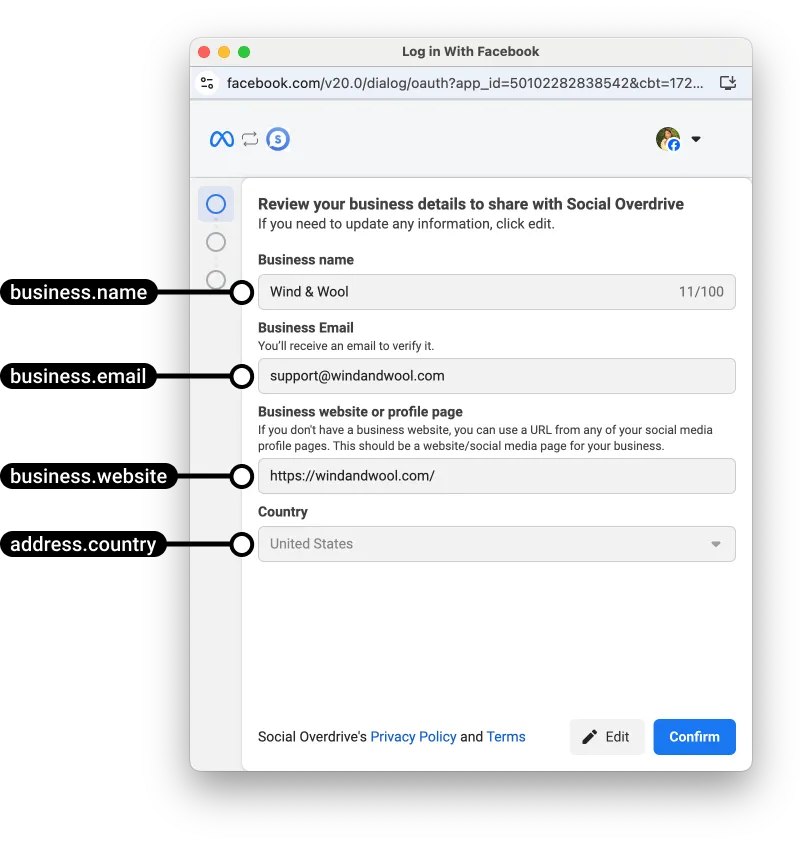
You can inject the following business portfolio details into the business portfolio screen:
business portfolio namebusiness portfolio email addressbusiness portfolio websitebusiness portfolio country (as well as additional address details)business phone number
Alternatively, you can inject just an existing business portfolio ID, and its existing details will automatically be injected into the screen. This can be useful if you want a pre-verified phone number to be associated with the customer’s existing business portfolio.
Injecting business portfolio data will pre-fill the business portfolio screen and also cause Embedded Signup to skip the WABA selection and WABA creation screens.
Injecting business phone number data will pre-fill the phone number addition screen:
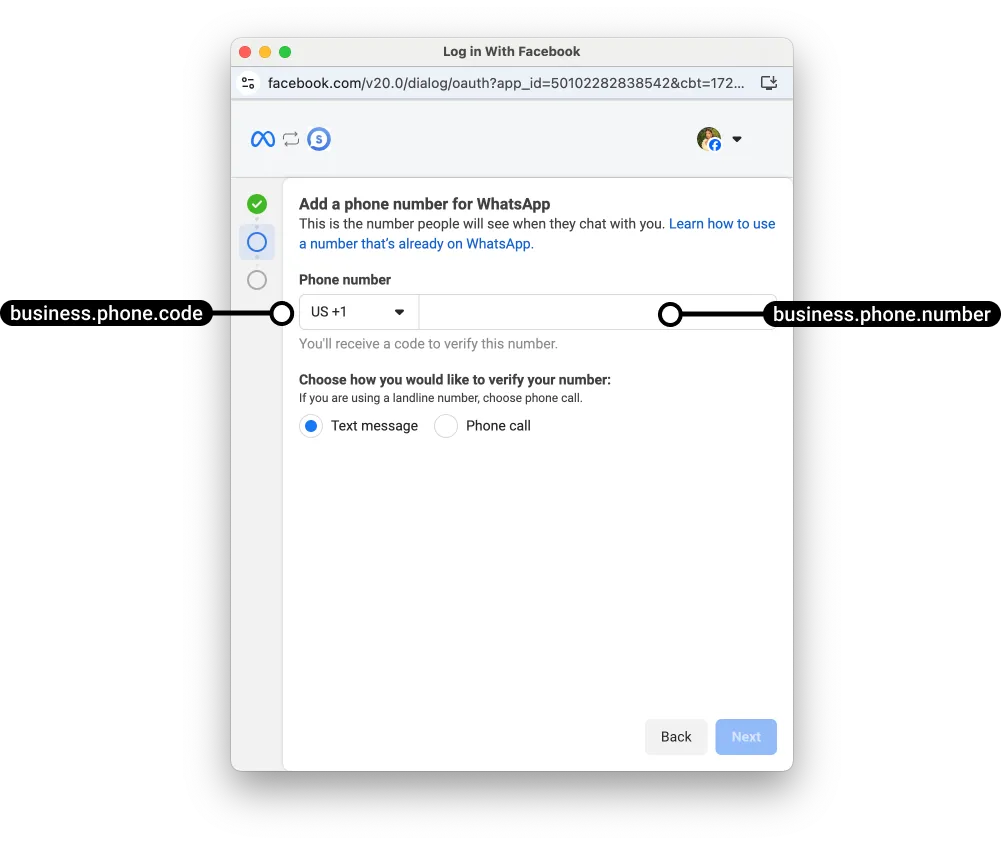
Note that even if you inject data, the business customer can still edit this data using the Edit button, if they wish.
When a business customer completes the flow, the business portfolio information you injected will be used to create the business customer’s business portfolio and WABA.
Business object syntax
setup: {
  business: {
    id: <BUSINESS_PORTFOLIO_ID>,
    name: '<BUSINESS_PORTFOLIO_NAME>',
    email: '<BUSINESS_PORTFOLIO_EMAIL_ADDRESS>',
    website: '<BUSINESS_PORTFOLIO_WEBSITE>',
    address: {
      streetAddress1: '<BUSINESS_PORTFOLIO_STREET_ADDRESS_LINE_1>',
      streetAddress2: '<BUSINESS_PORTFOLIO_STREET_ADDRESS_LINE_2>',
      city: '<BUSINESS_PORTFOLIO_CITY>',
      state: '<BUSINESS_PORTFOLIO_STATE>',
      zipPostal: '<BUSINESS_PORTFOLIO_ZIP_CODE>',
      country: '<BUSINESS_PORTFOLIO_COUNTRY>'
    },
    phone: {
      code: <BUSINESS_PORTFOLIO_COUNTRY_CALLING_CODE>,
      number: '<BUSINESS_PORTFOLIO_PHONE_NUMBER>'
    },
    timezone: '<BUSINESS_PORTFOLIO_TIME_ZONE>'
  }
}
Business object parameters
| Placeholder | Description | Example value |
|---|---|---|
<BUSINESS_PORTFOLIO_ID>Integer or null |
Required if using an existing business portfolio, otherwise set to null or omit to create a new portfolio.
Set to the business customer’s existing business portfolio ID if you want to pre-fill the screen with data already set on the business portfolio, or if you want to associate a pre-verified phone number with this portfolio.
If set to a portfolio ID, we will check if the business customer owns the portfolio.
If they own it, we will inject its existing data into the flow and ignore all other business object properties.
If they do not own it, we will inject
business.name, business.email, business.website, and address.country values, if they are all set. If any are not set, the flow will display the default business portfolio screen instead.Set to null (or omit the id property entirely) if you want to create a new business portfolio based on injected business.name, business.email, business.website, and address.country values. |
2729063490586005 |
<BUSINESS_PORTFOLIO_NAME>String |
Required if creating a new business portfolio.
Business portfolio name.
If this name matches the name of an existing business portfolio owned by the business customer, the existing portfolio will be used instead (it will be treated as if you assigned the existing portfolio’s ID to the
id property).This name will also be used as the WhatsApp Business Account name, which is only visible in the WhatsApp Manager.
Maximum 100 characters. |
Wind & Wool |
<BUSINESS_PORTFOLIO_EMAIL_ADDRESS>String |
Required if creating a new business portfolio.
The business’s email address.
This information will appear in the Meta Business Suite > Business portfolio > Settings > Business info panel. |
support@windandwool.com |
<BUSINESS_PORTFOLIO_COUNTRY_CALLING_CODE>Integer |
Required if injecting a business phone number.
Business phone number country calling code. |
1 |
<BUSINESS_PORTFOLIO_PHONE_NUMBER>String |
Required if injecting a business phone number.
Business phone number, without country calling code. |
6505559999 |
<BUSINESS_PORTFOLIO_WEBSITE>String |
Required if creating a new business portfolio.
The business’s website URL.
This information will appear in the Meta Business Suite > Business portfolio > Settings > Business info panel. |
https://windandwool.com/ |
<BUSINESS_PORTFOLIO_STREET_ADDRESS_LINE_1>String |
The business’s street address, line 1.
This information will appear in the Meta Business Suite > Business portfolio > Settings > Business info panel. |
1 Hacker Way |
<BUSINESS_PORTFOLIO_STREET_ADDRESS_LINE_2>String |
The business’s street address, line 2.
This information will appear in the Meta Business Suite > Business portfolio > Settings > Business info panel. |
Suite 1 |
<BUSINESS_PORTFOLIO_CITY>String |
The business’s city address.
This information will appear in the Meta Business Suite > Business portfolio > Settings > Business info panel. |
Menlo Park |
<BUSINESS_PORTFOLIO_STATE>String |
The business’s state address.
This information will appear in the Meta Business Suite > Business portfolio > Settings > Business info panel. |
California |
<BUSINESS_PORTFOLIO_ZIP_CODE>String |
The business’s zip code address.
This information will appear in the Meta Business Suite > Business portfolio > Settings > Business info panel. |
94025 |
<BUSINESS_PORTFOLIO_COUNTRY>String |
Required if creating a new business portfolio.
Business address ISO 3166-1 alpha-2 country code. |
US |
<BUSINESS_PORTFOLIO_TIME_ZONE>String |
The business’s time zone in UTC offset format. |
UTC-07:00 |
Example Business Object
setup:{
  business:{
    name:'Wind & Wool',
    email:'support@windandwool.com',
    website:'https://windandwool.com/',
    address:{
      streetAddress1:'1 Hacker Way',
      streetAddress2:'Suite 1',
      city:'Menlo Park',
      state:'California',
      zipPostal:'94025',
      country:'US'},
    phone:{
      code:1,
      number:'6505559999'},
    timezone:'UTC-07:00'}}
Pre-verified phone numbers
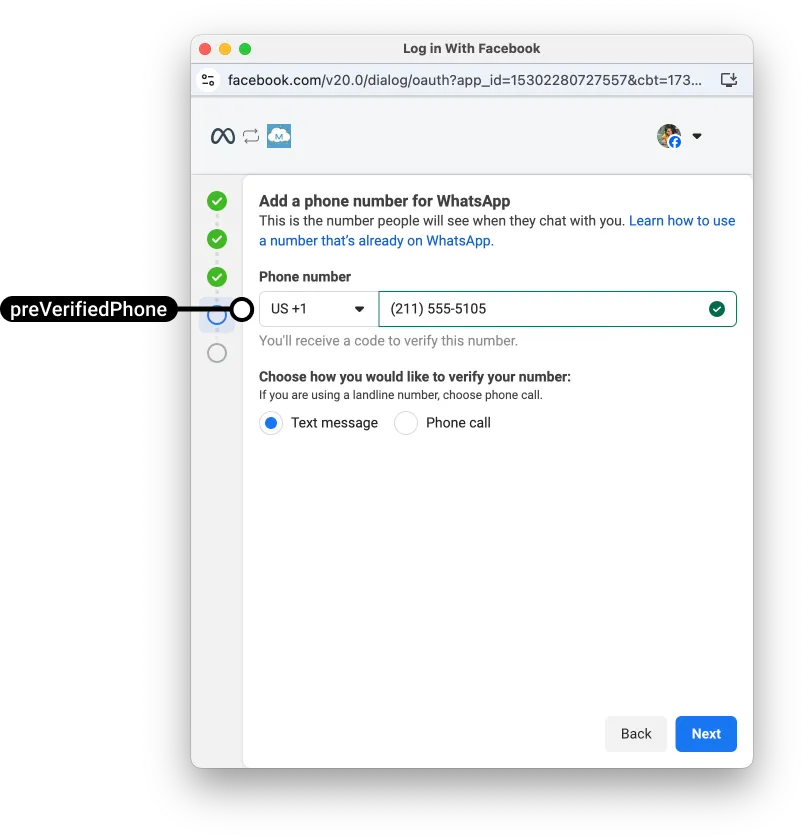
You can inject a pre-verified business phone number ID into Embedded Signup, which will cause Embedded Signup to skip the phone number addition and phone number verification screens.
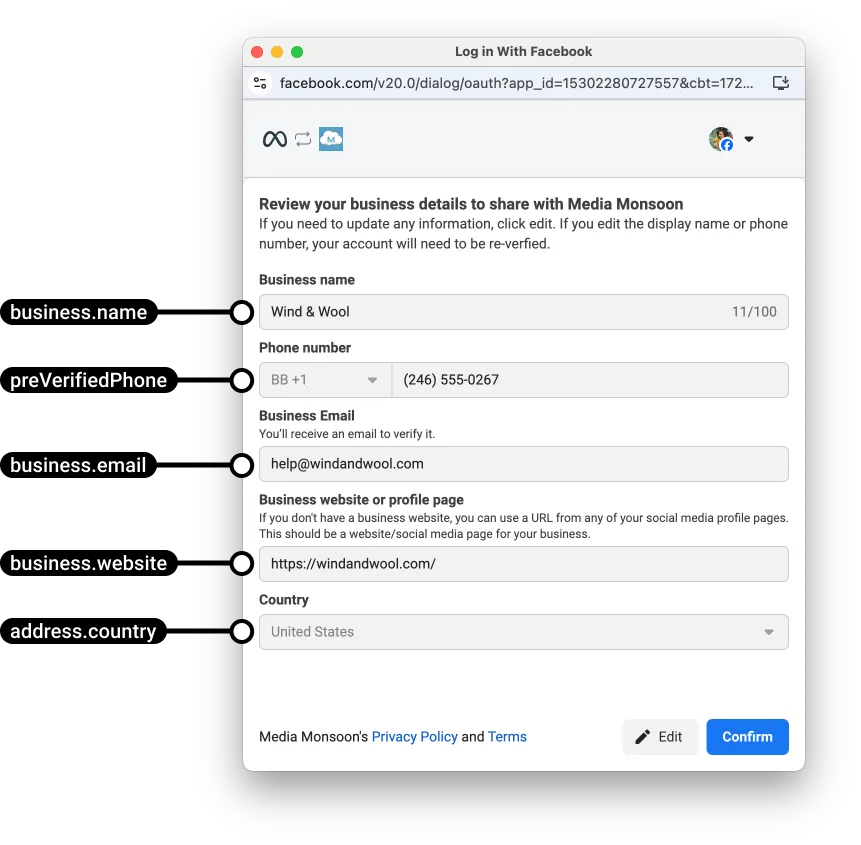
If you are injecting a pre-verified phone number along with business portfolio data (either creating a new portfolio or using an existing one), the business portfolio screen will be pre-filled with the pre-verified number:
If you are not injecting business portfolio data along with a pre-verified number ID, the number will appear in the WABA selection screen:
PreVerifiedPhone object syntax
setup: {
  preVerifiedPhone: {
    ids: [
      '<PRE-VERIFIED_PHONE_NUMBER_ID>'
    ]
  }
}
Replace
<PRE-VERIFIED_PHONE_NUMBER_ID> with a unique, pre-verified business phone number ID.Note that although the
ids value accepts an array of strings, if you include more than one pre-verified business phone number ID, only the first ID in the array will appear in the WABA selection screen.Phone profile data
You can inject the following phone number profile data. This data does not pre-fill any Embedded Signup screens, but it does populate the business phone number’s profile in the WhatsApp client, which is visible to WhatsApp users.
Phone number profile display namePhone number categoryPhone number description
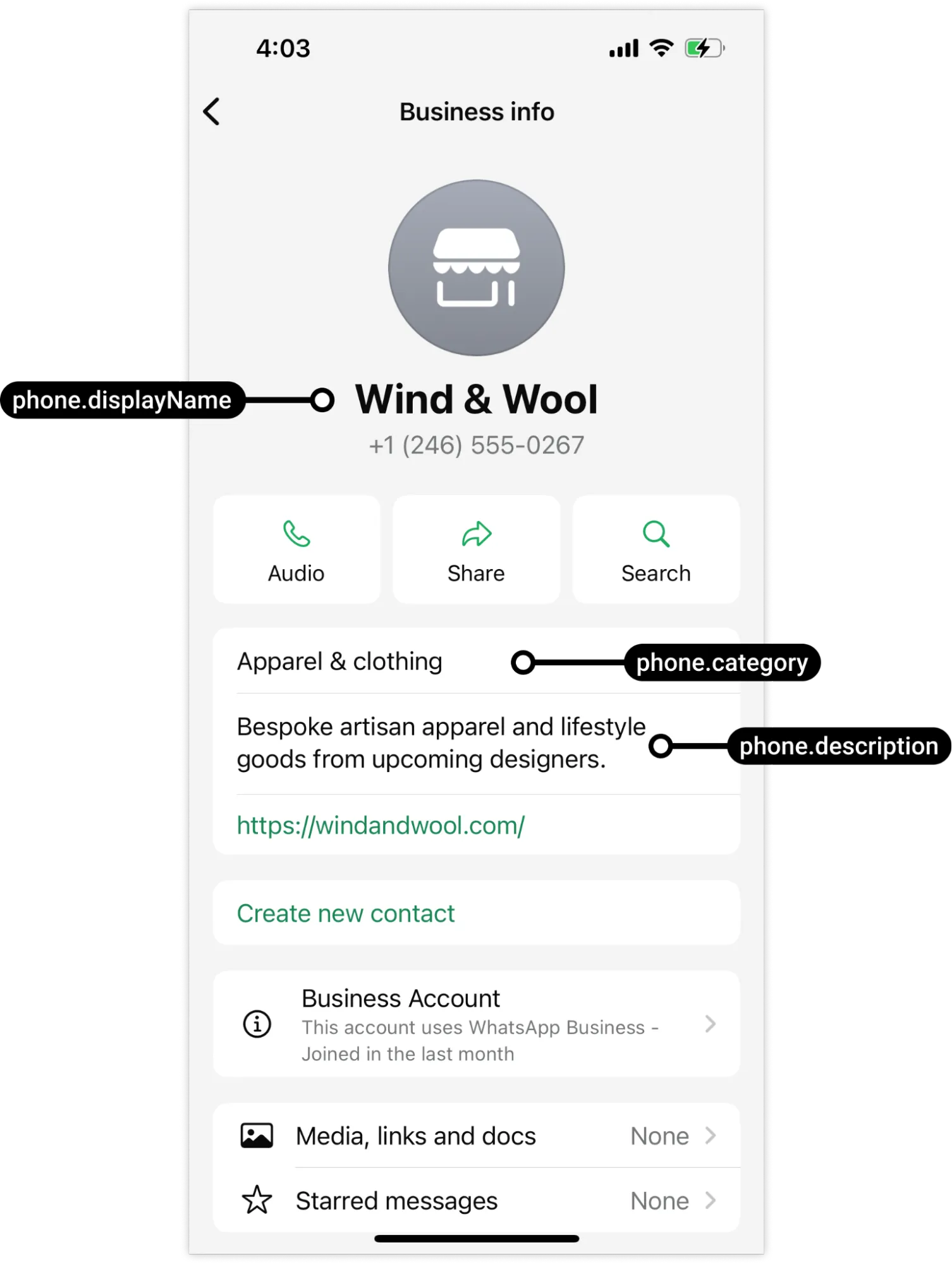
If you do not include this data, the category will be set to Other, and the business customer must set or edit their profile data on their own.
Phone object syntax
setup: {
  phone: {
    displayName: '<PHONE_PROFILE_DISPLAY_NAME>',
    category: '<PHONE_PROFILE_DISPLAY_CATEGORY>',
    description: '<PHONE_PROFILE_DISPLAY_DESCRIPTION>'
  }
}
Phone object parameters
| Placeholder | Description | Example value |
|---|---|---|
<PHONE_PROFILE_DISPLAY_NAME>String |
Required.
Business profile display name, visible to WhatsApp users in the WhatsApp client (see screenshot above). |
Wind & Wool |
<PHONE_PROFILE_DISPLAY_CATEGORY>String |
Required.
Business profile display category. |
APPAREL |
<PHONE_PROFILE_DISPLAY_DESCRIPTION>String |
Required.
Business phone number profile description. Maximum 512 characters.Rendered emojis are supported however their unicode values are not. Emoji unicode values must be Java- or JavaScript-escape encoded.Hyperlinks can be included but will not render as clickable links.Markdown is not supported. |
Bespoke artisan apparel and lifestyle goods from upcoming designers. |
Example phone object
setup:{
  phone:{
    displayName:'Wind & Wool',
    category:'APPAREL',
    description:'Bespoke artisan apparel and lifestyle goods from upcoming designers.'}}
WhatsApp Business Accounts
If you are injecting a pre-verified phone number, you can also include a WABA ID. This will associate the pre-verified number with the existing WABA instead of with a new one that the business customer would be prompted to create as part of the flow.
WhatsAppBusinessAccount object syntax
setup: {
  whatsAppBusinessAccount: {
    ids: '<WABA_ID>'
  }
}
Replace
<WABA_ID> with a unique WABA ID.Example whatsAppBusinessAccount object
This example associates a pre-verified phone number with an existing WABA.
setup:{
  preVerifiedPhone:{
    ids:['106540352242922']},
  whatsAppBusinessAccount:{
    id:['432428883295692']}}
Examples
New business portfolio, pre-verified number, and display profile
// Launch method and callback registrationconst launchWhatsAppSignup =()=>{
  FB.login(fbLoginCallback,{
    config_id:'31602279155865',
    response_type:'code',
    override_default_response_type:true,
    extras:{
      setup:{
        business:{
          name:'Wind & Wool',
          email:'support@windandwool.com',
          website:'https://windandwool.com/',
          address:{
            streetAddress1:'1 Hacker Way',
            streetAddress2:'Suite 1',
            city:'Menlo Park',
            state:'California',
            zipPostal:'94025',
            country:'US'},
          phone:{
            code:1,
            number:'6505559999'},
          timezone:'UTC-07:00'},
        preVerifiedPhone:{
          ids:['106540352242922']},
        phone:{
          displayName:'Wind & Wool',
          category:'APPAREL',
          description:'Bespoke artisan apparel and lifestyle goods from upcoming designers.'}},
      featureType:'',
      sessionInfoVersion:'3',}});}
Existing business portfolio, pre-verified number, and display profile
// Launch method and callback registrationconst launchWhatsAppSignup =()=>{
  FB.login(fbLoginCallback,{
    config_id:'31602279155865',
    response_type:'code',
    override_default_response_type:true,
    extras:{
      setup:{
        business:{
          id:'2729063490586005'},
        preVerifiedPhone:{
          ids:['106540352242922']},
        phone:{
          displayName:'Wind & Wool',
          category:'APPAREL',
          description:'Bespoke artisan apparel and lifestyle goods from upcoming designers.'}},
      featureType:'',
      sessionInfoVersion:'3',}});}
No comments to display
No comments to display