
User-initiated calls | Developer Documentation
User-initiated calls
Updated: Nov 13, 2025
Overview
The Calling API supports receiving calls made by WhatsApp users to your business.
Your business dictates when calls can be received by configuring business calling hours and holiday unavailability.
Consumer device eligibility
Currently, the WhatsApp Business Calling API can accept calls from a consumer’s primary and companion iPhone or Android phones.
A primary device is the consumer’s main device, typically a mobile phone, which holds the authoritative state for the user’s account. It has full access to messaging history and core functionalities. There is exactly one primary device per user account at any given time.
Companion devices are additional devices registered to the user’s account that can operate alongside the primary device. Examples include web clients, desktop apps, tablets, and smart glasses. Companion devices have access to some or all messaging history and core features but are limited compared to the primary device. For Cloud API Calling, only iPhone and Android phone companion devices are supported for user-initiated calls.
Callback permission functionality on companion devices
For businesses that have the callback setting enabled, this functionality is not supported on companion devices yet.
Prerequisites
Before you get started with user-initiated calling, ensure that:
Subscribe to the calls webhook fieldEnable Calling API features on your business phone number
Call sequence diagram
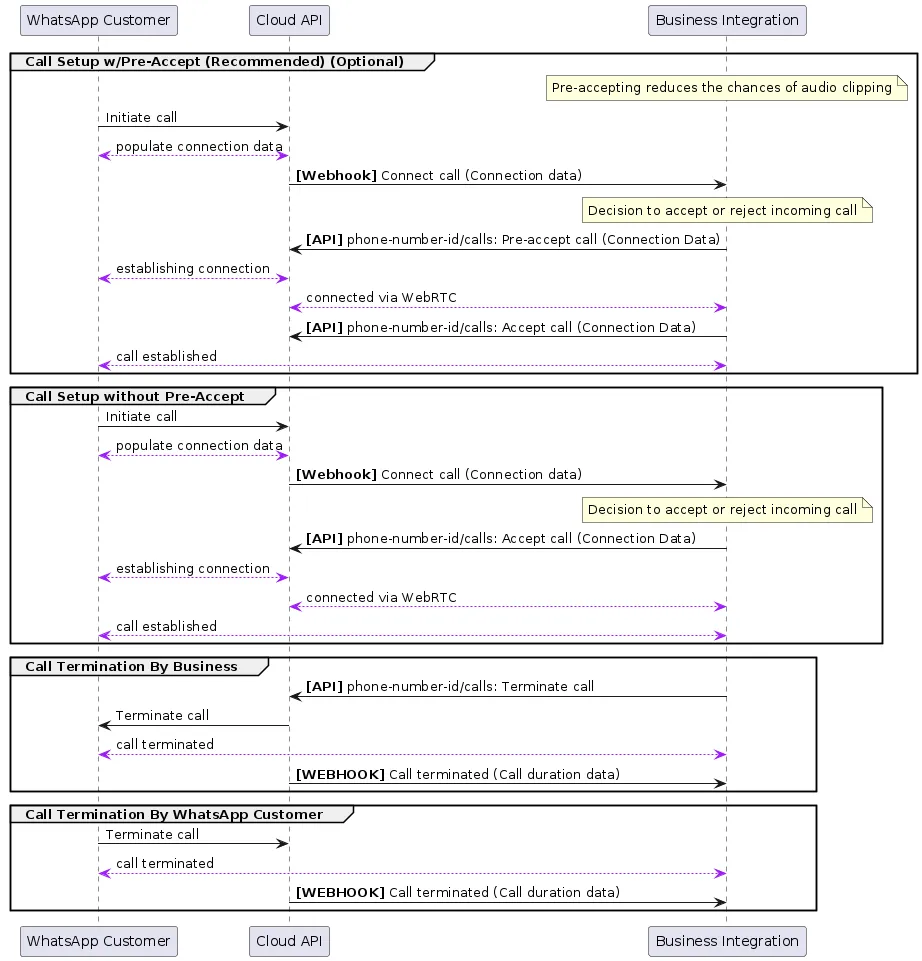
Endpoints for user-initiated calling
Pre-accept call
When you pre-accept an inbound call, you allow the calling media connection to be established before attempting to send call media through the connection.
When you then call the accept call endpoint, media begins flowing immediately since the connection has already been established.
Pre-accepting calls is recommended because it facilitates faster connection times and avoids audio clipping issues.
There is about 30 to 60 seconds after the Call Connect webhook is sent for the business to accept the phone call. If the business does not respond, the call is terminated on the WhatsApp user side with a “Not Answered” notification and a Terminate Webhook is delivered back to you.
Note: Since the WebRTC connection is established before calling the Accept Call endpoint, make sure to flow the call media only after you receive a 200 OK response back.
If call media flows too early, the caller will miss the first few words of the call. If call media flows too late, callers will hear silence.
Body parameters
| Parameter | Description | Sample Value |
|---|---|---|
call_idString |
Required
The ID of the phone call. For inbound calls, you receive a call ID from the Call Connect webhook when a WhatsApp user initiates the call. |
“wacid.ABGGFjFVU2AfAgo6V-Hc5eCgK5Gh” |
actionString |
Optional
The action being taken on the given call ID. Values can be connect | pre_accept | accept | reject | terminate |
“pre_accept” |
sessionJSON object |
Optional
Contains the session description protocol (SDP) type and description language. Requires two values:
sdp_type — (String) Required“offer”, to indicate SDP offer
sdp — (String) RequiredThe SDP info of the device on the other end of the call. The SDP must be compliant with RFC 8866.
|
Error response
Possible errors that can occur:
Invalid call-idInvalid phone-number-idError related to your payment methodInvalid Connection info, for example, SDP or ICEAccept/Reject an already In Progress/Completed/Failed callPermissions/Authorization errors
Accept call
Use this endpoint to connect to a call by providing a call agent’s SDP.
You have about 30 to 60 seconds after the Call Connect Webhook is sent to accept the phone call. If your business does not respond, the call is terminated on the WhatsApp user side with a “Not Answered” notification and a Terminate Webhook is delivered back to you.
Body parameters
Error response
Possible errors that can occur:
Invalid call-idInvalid phone-number-idError related to your payment methodInvalid Connection info, for example, SDP or ICEAccept/Reject an already In Progress/Completed/Failed callPermissions/Authorization errorsSDP answer provided in accept does not match the SDP answer given in the Pre-Accept endpoint for the same call-id
Reject call
Use this endpoint to reject a call.
You have about 30 to 60 seconds after the Call Connect webhook is sent to accept the phone call. If the business does not respond, the call is terminated on the WhatsApp user side with a “Not Answered” notification and a Terminate Webhook is delivered back to you.
Body parameters
| Parameter | Description | Sample Value |
|---|---|---|
call_idString |
Required
The ID of the phone call. For inbound calls, you receive a call ID from the Call Connect webhook when a WhatsApp user initiates the call. |
“wacid.ABGGFjFVU2AfAgo6V-Hc5eCgK5Gh” |
actionString |
Optional
The action being taken on the given call ID. Values can be connect | pre_accept | accept | reject | terminate |
“reject” |
Error response
Possible errors that can occur:
Invalid call-idInvalid phone-number-idAccept/Reject an already In Progress/Completed/Failed callPermissions/Authorization errors
Terminate call
Use this endpoint to terminate an active call.
This must be done even if there is an
RTCP BYE packet in the media path. Ending the call this way also ensures pricing is more accurate.When the WhatsApp user terminates the call, you do not have to call this endpoint. Once the call is successfully terminated, a Call Terminate Webhook will be sent to you.
Body parameters
| Parameter | Description | Sample Value |
|---|---|---|
call_idString |
Required
The ID of the phone call. For inbound calls, you receive a call ID from the Call Connect webhook when a WhatsApp user initiates the call. |
“wacid.ABGGFjFVU2AfAgo6V-Hc5eCgK5Gh” |
actionString |
Optional
The action being taken on the given call ID. Values can be connect | pre_accept | accept | reject | terminate |
“terminate” |
Error response
Possible errors that can occur:
Invalid call-idInvalid phone-number-idAccept/Reject an already In Progress/Completed/Failed callReject call is already in progressPermissions/Authorization errors
Webhooks for user-initiated calling
With all Calling API webhooks, there is a
”calls” object inside the ”value” object of the webhook response. The ”calls” object contains metadata about the call that is used to action on each call received by your business.To receive Calling API webhooks, subscribe to the calls webhook field.
Call Terminate webhook
A webhook notification is sent whenever the call has been terminated for any reason, such as when the WhatsApp user hangs up, or when the business calls the endpoint with an action of
terminate or reject.Webhook values for "calls"
| Placeholder | Description |
|---|---|
idString |
A unique ID for the call |
toInteger |
The number being called (callee) |
fromInteger |
The number of the caller |
eventInteger |
The calling event that this webhook is notifying the subscriber of |
timestampInteger |
The UNIX timestamp of the webhook event |
directionString |
The direction of the call being made.
Can contain either:
BUSINESS_INITIATED, for calls initiated by your business.USER_INITIATED, for calls initiated by a WhatsApp user. |
deeplink_payloadString |
Arbitrary string specified in
biz_payload query param on a call deeplink. Will only be returned if call was initiated from a deeplink with such param.See Call Button Messages and Deep Links for more details. |
cta_payloadString |
Arbitrary string specified in
payload field on a call button. Will only be returned if call was initiated from a call button with payload.See Call Button Messages and Deep Links for more details. |
start_timeInteger |
The UNIX timestamp of when the call started.
Only present when the call was picked up by the other party. |
end_timeInteger |
The UNIX timestamp of when the call ended.
Only present when the call was picked up by the other party. |
durationInteger |
Duration of the call in seconds.
Only present when the call was picked up by the other party. |
biz_opaque_callback_dateString |
Arbitrary string your business passes into the call for tracking and logging purposes.
Will only be returned if provided through an Initiate Call request or Accept Call request |
errors.codeInteger |
The errors object is present only for failed calls when there is error information available. Code is one of the calling error codes |
Dual tone multi frequency (DTMF) support
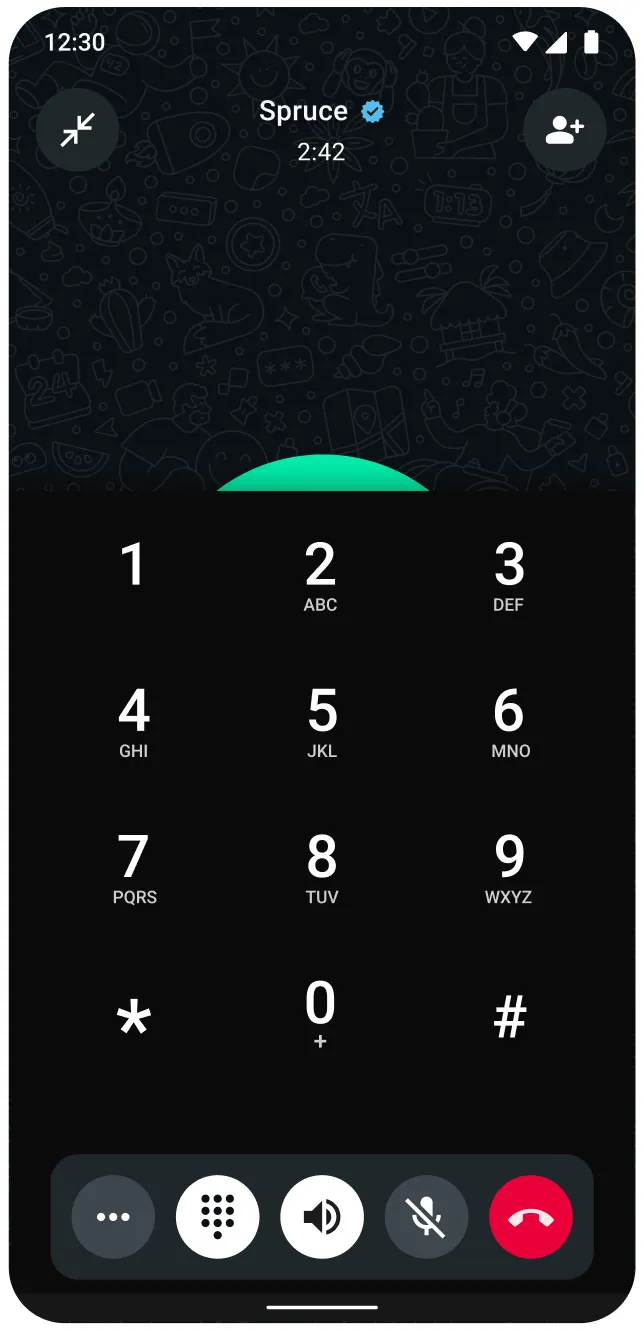
The dialpad provided by the Calling API only supports DTMF use cases.
It does not support consumer-to-consumer calls and does not change any other calling behaviors. For example, the dialpad cannot be used to dial a number and initiate a call or message on WhatsApp.
WhatsApp Business Calling API supports DTMF tones, with the intention to enable BSP applications to support IVR-based systems.
WhatsApp users can press tone buttons on their client app and these DTMF tones are injected into the WebRTC RTP stream established as a part of the VoIP connection.
Our WebRTC stream conforms to RFC 4733 for the transfer of DTMF Digits via RTP Payload.
There is no webhook for conveying DTMF digits.
DTMF clock rate
Only 8000 clock rate is supported in our SDPs. For user-initiated calls, our SDP offer includes only 8000 clock rate. For business-initiated calls, your SDP offer should have 8000 clock rate. Even if it is absent, the API still proceeds with 8000 clock rate against payload type 126.
The RTP packets representing DTMF events will use the same timestamp base and sequence number base as the regular audio packets. So you don’t have to worry about differing clock rates between audio packets and DTMF packets. The duration field of the DTMF packet is calculated using 8000 clock units.
The API does not support 48000 clock rate for DTMF.
Sending DTMF digits on consumer WhatsApp client
WhatsApp client applications are enhanced to have a dialpad for calls with CloudAPI business phone numbers. The WhatsApp user can press the buttons on the dialpad and send DTMF tones.
SDP overview and sample SDP structures
Session Description Protocol (SDP) is a text-based format used to describe the characteristics of multimedia sessions, such as voice and video calls, in real-time communication applications. SDP provides a standardized way to convey information about the session’s media streams, including the type of media, codecs, protocols, and other parameters necessary for establishing and managing the session.
In the context of WebRTC, SDP is used to negotiate the media parameters between the sender and receiver, enabling them to agree on the specifics of the media exchange.
No comments to display
No comments to display