
On-Behalf-Of account ownership model deprecation | Developer Documentation
Use current account evidence when an old migration notice resurfaces
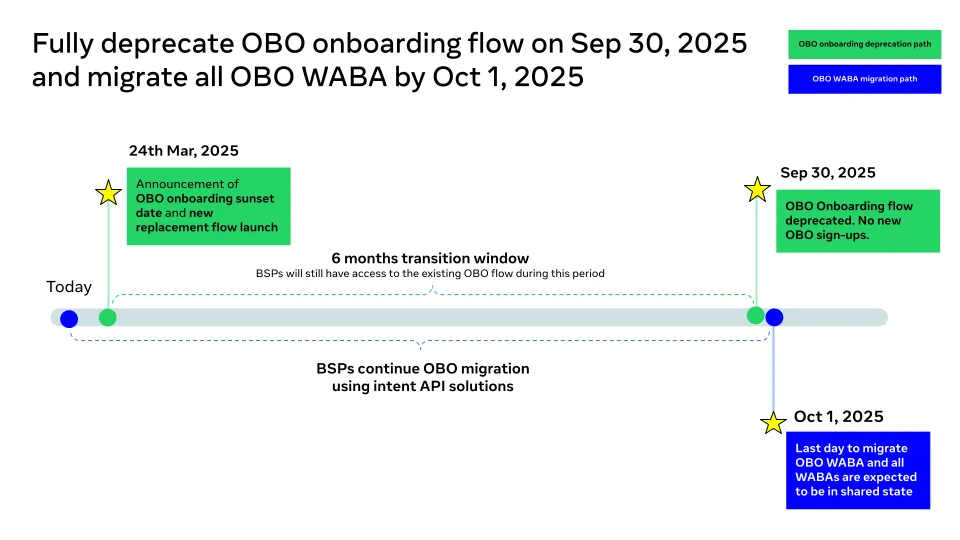
An old notice about Meta's On-Behalf-Of account model does not establish the current ownership of your business account or whether your ChatArchitect connection needs another migration. The previous timeline was historical provider documentation. It is not a deadline for a customer action described on this page.
Match the notice to the current account
- Record the notice's date, sender and the account or business identifiers it actually names.
- Ask the responsible business administrator to identify the current account and number. Compare them with the notice; similar business names alone are insufficient.
- Record who currently controls access and who maintains the working ChatArchitect connection. Being able to sign in is not proof of account ownership.
- Use the asset-control checklist for that review and the account-selection guide if an existing/new account choice is unresolved.
Ask what change is required now
If the notice refers to the relevant account, ask the administrator, originating provider or ChatArchitect support to explain its current consequence. Request the affected assets, required action, responsible person and effect on sending and receiving. Do not infer a current transfer status, automatic restoration or updated payment arrangement from the historical date.
If a change is needed, agree the change and recovery plan before removing an account, number or access. Confirm which workflows depend on the existing setup and how the result will be checked.
Verify an agreed change separately
Use the post-change acceptance checklist to compare the actual connection with the agreed result. A historical migration label does not establish that current messages, templates or CRM history have been transferred. Keep the notice and the current decision in the same work record, with any unresolved account-specific questions.
Historical Meta reference illustrations
These original illustrations show the separate Meta provider workflow retained from the former reference. They do not establish current screens, eligibility, a ChatArchitect customer control or supported parallel connections. Use the confirmed customer instructions above for your setup.
No comments to display
No comments to display