
Document messages | Developer Documentation
Prepare and check a WhatsApp document attachment
Use this checklist when sending an invoice, delivery instructions or another document through a CRM or help desk connected to ChatArchitect. Attachment support depends on the integration. For Bitrix24, Kommo/amoCRM, RetailCRM, Microsoft Teams, Slack or another connected tool, check which document attachment options are available in its WhatsApp conversation. If the controls are missing or the accepted types are unclear, ask ChatArchitect support about that specific connection.
Check the conversation and the document
A customer's message opens a 24-hour customer service window for ordinary replies. Check the window before attempting to send a document as a regular message. If it has closed, use the approved template workflow available for your integration; uploading a file does not reopen the window. The first-message guide covers testing the connection.
- Select the correct version. Open the source file and review every page or sheet, the intended recipient, dates and totals. Remove unrelated content before sharing the final copy.
- Use a meaningful filename. Keep the extension consistent with the actual file type. For example,
order-1042-delivery-details.pdfdescribes an illustrative PDF; use your real reference and contents. - Check the file type and size. Use a format accepted by both WhatsApp and the connected tool. Renaming an unsupported file to
.pdfdoes not convert it into a PDF. - Choose the attachment in the sending tool. Check the selected file and any accompanying text before submitting it. If the tool sends that text separately, check both messages in the received conversation.
Use the format limits as a starting check
Meta's current document message reference lists the following types, with a platform maximum of 100 MB per document:
| Document | Extensions |
|---|---|
.pdf | |
| Plain text | .txt |
| Word | .doc, .docx |
| Excel | .xls, .xlsx |
| PowerPoint | .ppt, .pptx |
Check your integration's own supported types and upload limit as well. The Meta maximum does not establish the size your CRM, help desk or ChatArchitect sending route accepts. For a rejected file, record its actual size and type rather than assuming that every listed format is available in that tool.
Check what the recipient can open
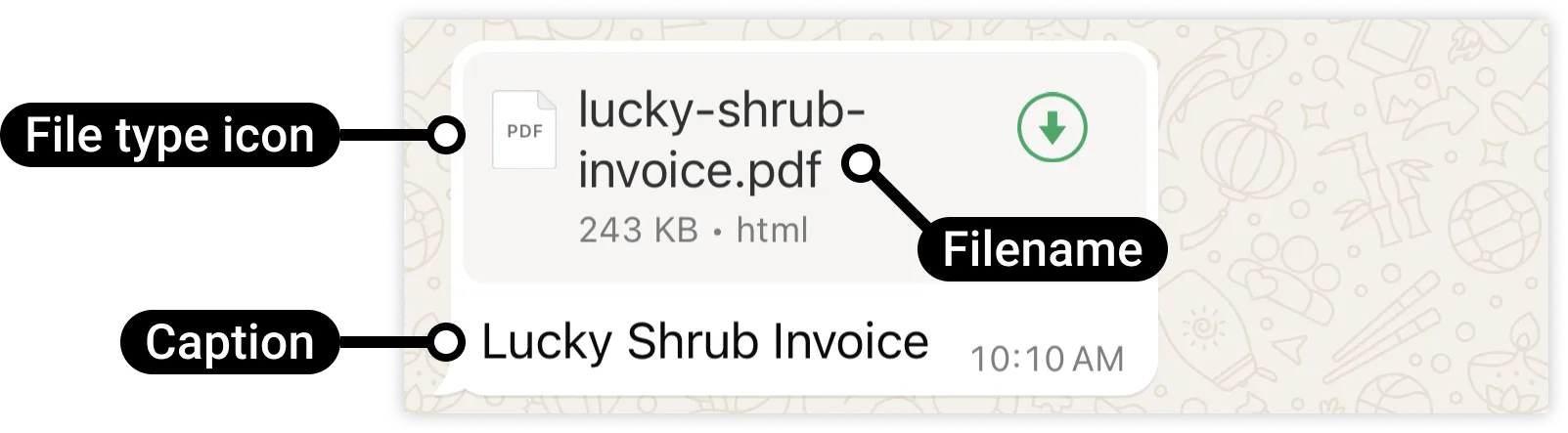
Test with a permitted contact in an open service window. On the recipient's device, download and open the received attachment. Verify the filename, complete contents, page or sheet count and readability. An upload preview in the CRM is not enough to establish that the customer received a usable document.
If your tool exposes delivery statuses, keep the message reference and later result together. If the outcome is unclear, investigate the original attempt before submitting another copy.
If the file fails to upload or open
- Open the original file locally. If it is damaged or uses an unsupported type, export a valid copy from the application that created it.
- Compare the actual file size with the connected tool's limit. For a size rejection, prepare a smaller valid copy and recheck its complete contents.
- Distinguish a tool upload failure, a message sending failure and a file that was received but cannot be opened. Record the exact stage and error.
- Give support the tool name, connected number, attempt time with time zone, actual extension/type/size and message reference if available. Share a nonconfidential sample when one reproduces the problem; do not send connection secrets.
No comments to display
No comments to display