
Integration Examples | Developer Documentation

Integration Examples

Updated: Feb 25, 2026
This guide explains integration of common VoIP platforms with WhatsApp Business Calling API.
This guide is for information purposes only with no support or warranties of any kind from Meta or any vendor. There are many ways to integrate and the guide explains just one way exclusively for illustrative purposes.

Asterisk using SIP

Overview

This guide explains how to set up WhatsApp Business Calling API using SIP signaling with Asterisk, an open-source PBX (Private Branch Exchange). You’ll learn how to configure your Asterisk server, connect SIP phones, and handle both incoming and outgoing WhatsApp calls.
User-initiated calls
    The WhatsApp user dials the business number.The call is received by Asterisk and routed through an IVR, prompting the user to enter an extension, registered to the same Asterisk server.The call is then connected to the specified extension.
    Business-initiated calls
      The business agent/user registers with Asterisk using SIP credentials (see “Configuring a VoIP Phone” section).The business user dials the b2c-sip (business to consumer) extension, which is handled by an IVR. The IVR prompts for the WhatsApp number to call.The call is then connected to the WhatsApp user.
      The WA to Asterisk leg uses SDES for media encryption key exchange and opus for audio codec
      The Asterisk to SIP UA leg uses SDES for media encryption key exchange and opus or G711 for audio codec

      Prerequisites

        Asterisk Deployment: Asterisk is deployed (for example, on a public cloud instance)Operating System: Any OS compatible for Asterisk. For example, CentOS 9Domain: Asterisk server is reachable via a public domain with valid certificateWhatsApp Business API: A WhatsApp business phone number is registered and calling is enabled.SIP Support: SIP is enabled on the WhatsApp Business NumberSDES: SDES is enabled on the WhatsApp Business Number

        Building and installing Asterisk

        This guide was tested using Asterisk version 22.5.2

        Asterisk configuration

        These configuration files are placed under /etc/asterisk/
        extensions.conf
        Replace the following placeholders with actual values
          {wa-business-phone-number}: WhatsApp Business Phone Number{asterisk-sip-server-dns}: DNS name of your Asterisk SIP serverincoming_welcome: incoming_welcome.wav (not provided) place this file under /var/lib/asterisk/soundsoutgoing_welcome: outgoing_welcome.wav (not provided) place this file under /var/lib/asterisk/sounds
          [c2b-sub-dial]
          exten => s,1,NoOp()
            same => n,Read(Digits,incoming_welcome,0,,5,500)
            same => n,Dial(PJSIP/${Digits})
            same => n,Hangup()[whatsapp]
          exten => _10XX,1,NoOp()
            same => n,Dial(PJSIP/${EXTEN})
            same => n,Hangup();Extensionfor B2C business call through Meta SIP gateway
          exten => b2c-sip,1,NoOp()
            same => n,Read(Digits,outgoing_welcome,0,,5,500)
            same => n,Dial(PJSIP/whatsapp/sip:${Digits}@wa.meta.vc);Extension to handle incoming invite requests fromMeta SIP gateway to <wa-business-phone-number>@<asterisk-sip-server-dns>
          exten => _+<wa-business-phone-number>,1,Goto(c2b-sub-dial,s,1)
          Pjsip.conf
          Replace the following placeholders with actual values
            {wa-business-phone-number} : the business phone number{local-net}: local network of the Asterisk server{external-media-address}: Public IP of the Asterisk server media{external-signaling-address}: Public IP of the Asterisk server signaling{sip-ua-password}: Chosen SIP User Agent password{domain-name}: domain name assigned to the Asterisk server
            Certificate files should be placed under /var/lib/asterisk/certs/fullchain.cer /var/lib/asterisk/certs/cer.key
            [transport-tls]
            type=transport
            protocol=tls
            bind=0.0.0.0:5061
            cert_file=/var/lib/asterisk/certs/fullchain.cer
            priv_key_file=/var/lib/asterisk/certs/cer.key
            method=sslv23
            allow_wildcard_certs=yes
            external_media_address={external-media-address};External address for SIP signalling
            external_signaling_address={external-signaling-address};Network to consider local used for NAT purposes
            local_net={local-net}[sdes_endpointtemplate](!)
            type=endpoint
            context=whatsapp
            disallow=all
            allow=OPUS
            direct_media=no
            rtp_symmetric=yes
            force_rport=yes
            rewrite_contact=no
            media_use_received_transport=yes
            media_encryption=sdes
            
            [authtemplate](!)
            type=auth
            auth_type=userpass
            password={sip-ua-password}[aortemplate](!)
            type=aor
            max_contacts=1
            remove_existing=yes
            
            [aoridentitytemplate](!)
            type=identify
            match_header=X-FB-External-Domain: wa.meta.vc
            
            ;SDES users
            [1000](sdes_endpointtemplate)
            auth=1000_auth
            aors=1000[1000_auth](authtemplate)
            username=1000[1000](aortemplate)[1000](aoridentitytemplate)
            endpoint=1000[1001](sdes_endpointtemplate)
            auth=1001_auth
            aors=1001[1001_auth](authtemplate)
            username=1001[1001](aortemplate)[1001](aoridentitytemplate)
            endpoint=1001[1002](sdes_endpointtemplate)
            auth=1002_auth
            aors=1002[1002_auth](authtemplate)
            username=1002[1002](aortemplate)[1002](aoridentitytemplate)
            endpoint=1002[1003](sdes_endpointtemplate)
            auth=1003_auth
            aors=1003[1003_auth](authtemplate)
            username=1003[1003](aortemplate)[1003](aoridentitytemplate)
            endpoint=1003[1004](sdes_endpointtemplate)
            auth=1004_auth
            aors=1004[1004_auth](authtemplate)
            username=1004[1004](aortemplate)[1004](aoridentitytemplate)
            endpoint=1004[1005](sdes_endpointtemplate)
            auth=1005_auth
            aors=1005[1005_auth](authtemplate)
            username=1005[1005](aortemplate)[1005](aoridentitytemplate)
            endpoint=1005;This endpoint maps to an IVR for C2B calls
            [c2b-sip](sdes_endpointtemplate)[c2b-sip](aortemplate)[c2b-sip]
            type=identify
            endpoint=c2b-sip
            match_header=X-FB-External-Domain: wa.meta.vc
            
            ;special endpoint forMeta SIP Gateway integration
            ;This endpoint maps to an IVR for B2C calls
            [b2c-sip](sdes_endpointtemplate)[b2c-sip](aortemplate)[whatsapp](sdes_endpointtemplate)
            type=endpoint
            transport=transport-tls
            disallow=all
            allow=opus,ulaw,alaw
            aors=whatsapp
            from_user={wa-business-phone-number}
            from_domain={domain-name}
            outbound_auth=whatsapp
            
            [whatsapp]
            type=aor
            contact=sip:wa.meta.vc
            
            [whatsapp]
            type=identify
            endpoint=whatsapp
            
            [whatsapp]
            type=auth
            auth_type=digest
            password={meta-sip-user-password}
            username={wa-business-phone-number}
            realm=*
            rtp.conf
            [general];Hostnameor address for the STUN server used for determining the external
            ; IP address and port an RTP session can be reached at.The port number is; optional.If omitted default value of 3478 will be used.This option is; disabled bydefault.Name resolution occurs at load time,andif DNS is; used, name resolution will occur repeatedly after the TTL expires.;;for example stundaddr=mystun.server.com:3478;
            stunaddr=stun.l.google.com:19302
            
            rtpstart=10000
            rtpend=60000

            Configuring a VoIP phone

            Download and install a softphone client (for example, Linphone) for testing both business-initiated and user-initiated calls.
            Account setup
              Select an extension to register as a SIP UA (extensions 1001–1005).Open Preferences.Under “SIP Accounts,” click “Add account.”Enter the following details:
                SIP Address: for example, sip:1001@{asterisk-sip-server-dns}SIP Server Address: for example, sip:{asterisk-sip-server-dns};transport=tlsTransport: TLSDisable ICEEnable AVPFDisable “Publish presence information”Confirm and save the account.Enter the password when prompted (viz. {sip-ua-password})Once connected, return to Preferences and select the “Audio” tab. Enable all audio codecs.In the “Calls and Chat” tab:
                  Select “Encryption”Choose “SRTP-SDES”Enable “Encryption is mandatory”Confirm settings

                  Final checklist

                    Double-check all configuration files for correct numbers, passwords, and domain names.Make sure your firewall allows SIP (5061/TLS) and RTP (10000-20000) ports.For more details on SIP password setup, see the WhatsApp Cloud API documentation.

                    Troubleshooting

                    Cannot register SIP UA
                    Confirm that the SIP URL is correct and the domain is pointing to the Asterisk server. Run host {domain-name} to verify that the IP address points to the Asterisk server.
                    Not receiving ACK from Meta OR Business audio stops around 30s OR Meta returns 404 response to BYE
                    For a user initiated call, Meta sends a SIP INVITE to your SIP server which then responds with 200 OK. Meta acks your 200 OK with an ACK but you never receive this ACK. So your SIP server keeps resending the 200 OK and ultimately the SIP dialog is terminated due to ACK timeout (typically 32s).
                    The most likely cause for this problem is incorrect Record-Route headers in your 200 OK to Meta. The 200 OK response is supposed to not modify the Record-Route headers included in the original Meta’s INVITE. Your SIP server can add new Record-Route headers but cannot modify those present in our INVITE
                    The solution to this problem is to change rewrite_contact=yes to rewrite_contact=no on the WhatsApp endpoint configuration in pjsip.conf file. After this make sure your 200 OK has following headers as the last 2 in the list of Record-Route headers
                    This problem is hard to detect or diagnose. Even with this bug, the call will get connected and media will flow both sides but around 32s later, your SIP server will terminate the call which won’t be propagated to WhatsApp client because your BYE request has incorrect Route headers. So WA user stops hearing business audio around 32s.
                    Record-Route:<sip:wa.meta.vc;transport=tls;lr>Record-Route:<sip:onevc-sip-proxy.fbinfra.net:8191;transport=tls;lr>

                    FreeSWITCH using SIP

                    Overview

                    This guide explains how to set up WhatsApp Business Calling API using SIP signaling with FreeSWITCH, an open-source communication framework. You’ll learn how to configure your FreeSWITCH server, connect SIP phones, and handle both user-initiated and business-initiated WhatsApp calls.
                    User-initiated calls
                      The WhatsApp user dials the business number.The call is received by FreeSWITCH and routed through an IVR, which prompts the user to enter an agent’s extension registered on the same FreeSWITCH server.Once the extension is entered, the call is connected to the specified recipient agent.
                      Business-initiated calls
                        The business agent or user registers with FreeSWITCH using SIP credentials (see the Configuring a VoIP Phone section for details).The business user dials the b2c-sip (business-to-consumer) extension, which is managed by an IVR. The IVR then prompts for the WhatsApp number to call.After the number is entered, the call is connected to the WhatsApp user via SIP.
                        The WA to FreeSWITCH leg uses SDES for media encryption key exchange with Opus as the audio codec. FreeSWITCH - SIP UA leg uses SDES for media encryption key exchange with Opus or G.711 audio codecs

                        Prerequisites

                          FreeSWITCH Deployment: FreeSWITCH is deployed (for example, on a public cloud instance)Operating System: Any OS compatible with FreeSWITCH. For example, CentOS 9Domain: FreeSWITCH server is reachable via a public domain with a valid certificateWhatsApp Business API: A WhatsApp business phone number is registered and calling is enabled.SIP Support: SIP is enabled on the WhatsApp Business Number
                            Note: FreeSWITCH is configured to listen on 5081 for TLSSDES: SDES is enabled on the WhatsApp Business Number

                            Building and installing FreeSWITCH

                            This guide was tested using FreeSWITCH version 1.10.12. FreeSWITCH uses sofia (an open-source SIP user agent library). Sofia v1.13.17 was used for this guide
                            FreeSWITCH configuration
                            These configuration files are placed under /usr/share/freeswitch/etc/freeswitch
                            wa-biz-api-dialplan.xml
                            Place the dial plan under /usr/share/freeswitch/etc/freeswitch/dialplan/default/wa-biz-api-dialplan.xml
                            <include><extensionname="c2b_calls_sip_ivr"><!--Dial plan is selected if the SIP request is coming from Meta--><conditionfield="${sip_from_host}"expression="^wa.meta.vc$"><!--Verify the IP from where the request is coming, compare the IP with the Meta allowlisted IPs--><actionapplication="check_acl"data="${network_addr} whatsapp_allow normal_clearing"/><!--Enable encrypted media using SDES--><actionapplication="set"data="rtp_secure_media=true"/><actionapplication="answer"/><!--Add silence stream for  1 sec so that the media path is established between whatsapp and freeswitch to avoid audio clipping--><actionapplication="playback"data="silence_stream://1000"/><actionapplication="play_and_get_digits"data="2 5 3 7000 # $${base_dir}/sounds/incoming_welcome.wav  $${base_dir}/sounds/incoming_invalid.wav extension \d+"/><!--While the call is being bridged, play a ringtone for the caller--><actionapplication="set"data="ringback=%(2000, 4000, 440.0, 480.0)"/><!--Offer G711 and Opus for FreeSWITCH-SIP UA leg --><actionapplication="export"data="nolocal:absolute_codec_string=PCMA,PCMU,OPUS@48000h@20i"/><actionapplication="bridge"data="user/${extension}"/><actionapplication="hangup"/></condition></extension><extensionname="b2c_calls_ivr"><conditionfield="destination_number"expression="^b2c-sip$"><!--Enable encrypted media using SDES--><actionapplication="set"data="rtp_secure_media=true"/><actionapplication="answer"/><actionapplication="playback"data="silence_stream://1000"/><actionapplication="set"data="caller_id_check=${caller_id_number}"/><actionapplication="play_and_get_digits"data="2 12 3 20000 # $${base_dir}/sounds/outgoing_welcome.wav $${base_dir}/sounds/outgoing_invalid.wav whatsapp_number \d+"/><actionapplication="log"data="INFO [whatsapp_number] is ${whatsapp_number}"/><!--While the call is being bridged, play a ringtone for the caller--><actionapplication="set"data="ringback=%(2000, 4000, 440.0, 480.0)"/><!--Offer only OPUS--><actionapplication="export"data="nolocal:absolute_codec_string=OPUS@48000h@20i,OPUS@8000h@20i"/><!--Bridge the call by calling META SIP with the WA Number--><actionapplication="bridge"data="sofia/gateway/whatsapp/+${whatsapp_number}"/><actionapplication="hangup"/></condition></extension></include>
                            Audio files should be placed under /usr/share/freeswitch/sounds (not provided)
                              incoming_welcome.wavIncoming_invalid.wavoutgoing_welcome.wavoutgoing_invalid.wav
                              whatsapp.xml
                              This file configures the WhatsApp gateway, copy the file to /usr/share/freeswitch/etc/freeswitch/sip_profiles/external/whatsapp.xml
                              <!--Gateway configuration for Meta SIP--><!--replace {phone-number},{meta-sip-password} and {domain-name} before starting FreeSWITCH--><include><gatewayname="whatsapp"><paramname="username"value="{phone-number}"/><paramname="password"value="{meta-sip-password}"/><paramname="register"value="false"/><paramname="realm"value="wa.meta.vc"/><paramname="from-user"value="{phone-number}"/><paramname="from-domain"value="{domain-name}"/></gateway></include>
                              Replace the following placeholders with actual values
                                {phone-number}: WhatsApp Business Phone Number{meta-sip-password}: SIP password issued by Meta. For more details on SIP password setup, see the WhatsApp Cloud API documentation.{domain-name}: DNS name of your FreeSWITCH SIP server
                                acl.conf.xml
                                Open /usr/share/freeswitch/etc/freeswitch/autoload_configs/acl.conf.xml
                                Add the following list under network-lists element
                                <!--IP addresses from Meta that are allowed to send SIP requests via the gateway. Keep this up to date--><listname="whatsapp_allow"default="deny"><nodetype="allow"cidr="31.13.24.0/21"/><nodetype="allow"cidr="31.13.64.0/18"/><nodetype="allow"cidr="45.64.40.0/22"/><nodetype="allow"cidr="57.141.0.0/21"/><nodetype="allow"cidr="57.141.8.0/22"/><nodetype="allow"cidr="57.141.12.0/23"/><nodetype="allow"cidr="57.144.0.0/14"/><nodetype="allow"cidr="66.220.144.0/20"/><nodetype="allow"cidr="69.63.176.0/20"/><nodetype="allow"cidr="69.171.224.0/19"/><nodetype="allow"cidr="74.119.76.0/22"/><nodetype="allow"cidr="102.132.96.0/20"/><nodetype="allow"cidr="103.4.96.0/22"/><nodetype="allow"cidr="129.134.0.0/16"/><nodetype="allow"cidr="147.75.208.0/20"/><nodetype="allow"cidr="157.240.0.0/16"/><nodetype="allow"cidr="163.70.128.0/17"/><nodetype="allow"cidr="163.77.128.0/17"/><nodetype="allow"cidr="173.252.64.0/18"/><nodetype="allow"cidr="179.60.192.0/22"/><nodetype="allow"cidr="185.60.216.0/22"/><nodetype="allow"cidr="185.89.216.0/22"/><nodetype="allow"cidr="204.15.20.0/22"/></list>
                                vars.xml
                                Modify /usr/share/freeswitch/etc/freeswitch/vars.xml
                                Add line <X-PRE-PROCESS cmd="set" data="rtp_secure_media=mandatory"/> under <include>Replace<X-PRE-PROCESS cmd="set" data="default_password=1234"/>with(substitute {sip_ua_password}with your password)<X-PRE-PROCESS cmd="set" data="default_password={sip-ua-password}"/>Replace<X-PRE-PROCESS cmd="set" data="domain=$${local_ip_v4}"/>with(substitute {domain-name}with your FreeSWITCH SIP server DNS)<X-PRE-PROCESS cmd="set" data="domain={domain-name}”/>
                                
                                Replace
                                  <X-PRE-PROCESS cmd="stun-set" data="external_sip_ip=stun:stun.freeswitch.org"/>
                                with (substitute {external-ip} with your FreeSWITCH public ip)
                                  <X-PRE-PROCESS cmd="set" data="external_sip_ip={external-ip}"/>
                                
                                Replace
                                  <X-PRE-PROCESS cmd="stun-set" data="external_rtp_ip=stun:stun.freeswitch.org"/>
                                with (substitute {external-ip} with your FreeSWITCH public ip)
                                  <X-PRE-PROCESS cmd="stun-set" data="external_rtp_ip={external-ip}"/>
                                internal.xml
                                Modify /usr/share/freeswitch/etc/freeswitch/sip_profiles/internal.xml Look for:
                                <paramname="sip-trace"value="no"/>
                                Replace it with
                                <paramname="sip-trace"value="yes"/>
                                external.xml Modify /usr/share/freeswitch/etc/freeswitch/sip_profiles/external.xml
                                Replace<param name="sip-trace" value="no"/>with<param name="sip-trace" value="yes"/>Replace<param name="tls" value="$${external_ssl_enable}"/>with<param name="tls" value="true"/>Replace<!--<param name="tls-cert-dir" value=""/>-->with<param name="tls-cert-dir" value="/usr/share/freeswitch/etc/freeswitch/certs"/>
                                Make sure certificates are placed under /usr/share/freeswitch/etc/freeswitch/certs

                                Final checklist

                                  Double-check all configuration files for correct numbers, passwords, and domain names.Make sure your firewall allows SIP (5081/TLS) and RTP (10000-20000) ports.For more details on SIP password setup, see the WhatsApp Cloud API documentation.

                                  Troubleshooting

                                  Cannot register SIP UA
                                  Confirm that the SIP URL is correct and the domain is pointing to the FreeSWITCH server. Run host {domain-name} to verify that the IP address points to the FreeSWITCH server.
                                  Trace SIP messages
                                  Start CLI (/usr/share/freeswitch/bin/fs_cli) to view SIP messages

                                  FreeSWITCH using Graph API with Janus

                                  Overview

                                  This guide explains how to set up WhatsApp Business Calling API using WhatsApp Cloud API signaling with FreeSWITCH, an open-source communication framework and Janus, a general purpose WebRTC server. You’ll learn how to configure your FreeSWITCH server, connect SIP phones, and handle both incoming and outgoing WhatsApp calls.

                                  Architecture diagram showing FreeSWITCH with Janus integration
                                  User-initiated calls
                                    The WhatsApp user dials the business number.The call is received by Webhook server which forwards it to FreeSWITCH server via Janus SIP plugin.The call is received by FreeSWITCH and routed through an IVR, prompting the user to enter an extension, registered to the same FreeSWITCH server.The call is then connected to the specified extension.
                                    Business-initiated calls
                                      The business agent/user registers with FreeSWITCH using SIP credentials (see “Configuring a VoIP Phone” section).The business user dials the b2c-sip (business to consumer) extension, which is handled by an IVR. The IVR prompts for the WhatsApp number to call.FreeSWITCH bridges the call to extension registered to Janus SIP plugin which translates it to an API request to MetaThe call is then connected to the WhatsApp user.
                                      The Janus server sits between WA and FreeSWITCH and converts media from WA (WebRTC complaint with DTLS key exchange) to FreeSWITCH negotiated media (SDES key exchange).
                                      FreeSWITCH - Sip UA will be using SDES for media encryption key exchange and opus or G711 for audio codec

                                      Prerequisites

                                        FreeSWITCH Deployment: FreeSWITCH is deployed (for example, on a public cloud instance)Janus Deployment: Can be deployed on the same machine as FreeSWITCHOperating System: Any OS compatible with FreeSWITCH. For example, CentOS 9Domain: FreeSWITCH server and Webhook server are reachable via a public domain with valid certificateWhatsApp Business API: A WhatsApp business phone number is registered and calling is enabled.Webhooks: Configure Webhook callback URL pointing to domain name of the Webhook server

                                        Integration with Cloud API signaling

                                        You will need to implement an integration module which sits between WA and Janus and translates Cloud API Signalling messages to Janus SIP plugin messages and vice versa.
                                        You will need
                                          A webhook server to receive calls webhook events from MetaA Graph API module to send call messages to MetaAn implementation of Janus SIP plugin to connect to Janus. The Janus plugin implementation will connect to FreeSWITCH using extension 1000 which is reserved for bridging
                                          Business initiated calls
                                            The module will receive a SIP INVITE via Janus SIP plugin on extension 1000. The SIP INVITE is converted to a Graph API request. The SDP received in the SIP INVITE is sent verbatim as the SDP offer to WA via the Graph API callWhen the call is accepted by the WA user, an accepted webhook is received. On receiving the webhook, the Janus SIP Plugin accepts the SIP INVITE passing the answer SDP in the connect webhook
                                            User Initiated calls
                                              The webhook server receives an incoming call via a webhook message containing the offer SDP. On receiving the call invite, the Janus SIP plugin sends an invite to FreeSWITCH via extension 1000. The destination extension is c2b-sip.When the Janus SIP plugin receives the SIP 200 OK, a Graph API accept call request is sent to Meta to accept the incoming call by passing the SDP received as part of SIP answer

                                              Building and installing Janus

                                              Refer to https://github.com/meetecho/janus-gateway This guide was tested using version 1.2.3

                                              Janus configuration

                                              janus.jcfg
                                              Modify janus.jcfg which can be found at /usr/share/janus/etc/janus/janus.jcfg Set nat_1_1_mapping to the public IP of the Janus Server
                                              To start Janus
                                              /usr/share/janus/bin/janus  --debug-level=6--libnice-debug=on -S stun.l.google.com:19302--log-file=/var/log/janus.log --config=/usr/share/janus/etc/janus/janus.jcfg

                                              Building and installing FreeSWITCH

                                              This guide was tested using FreeSWITCH version 1.10.12. FreeSWITCH uses sofia (an open-source SIP user agent library). Sofia v1.13.17 was used for this guide
                                              FreeSWITCH Configuration These configuration files are placed under /usr/share/freeswitch/etc/freeswitch
                                              wa-biz-api-dialplan.xml
                                              Place the dial plan under /usr/share/freeswitch/etc/freeswitch/dialplan/default/wa-biz-api-dialplan.xml
                                              <include><extensionname="c2b_calls_ivr"><conditionfield="destination_number"expression="^c2b-sip$"><actionapplication="set"data="rtp_secure_media=true"/><actionapplication="answer"/><!--Add silence stream for  1 sec so that the media path is established between whatsapp and freeswitch to avoid audio clipping. TODO: Investigate if silence can be removed--><actionapplication="playback"data="silence_stream://1000"/><actionapplication="play_and_get_digits"data="2 5 3 7000 # $${base_dir}/sounds/incoming_welcome.wav  $${base_dir}/sounds/incoming_invalid.wav extension \d+"/><!--While the call is being bridged, play a ringtone for the caller--><actionapplication="set"data="ringback=%(2000, 4000, 440.0, 480.0)"/><!--WA calls bridged via Janus through extension 1000 only support OPUS. However, the callee might be restricted to other codecs for example G722--><!--Therefore , don't restrict to OPUS for C2B calls and offer more codecs to the caller. Transcoding between OPUS and the negotiated codec by the caller--><!--will happen in freeswitch--><actionapplication="export"data="nolocal:absolute_codec_string=PCMA,PCMU,OPUS@48000h@20i,G722"/><actionapplication="bridge"data="user/${extension}"/><actionapplication="hangup"/></condition></extension><extensionname="b2c_calls_ivr"><conditionfield="destination_number"expression="^b2c-sip$"><actionapplication="set"data="rtp_secure_media=true"/><actionapplication="answer"/><actionapplication="playback"data="silence_stream://1000"/><actionapplication="set"data="caller_id_check=${caller_id_number}"/><actionapplication="log"data="INFO [caller id ] is ${caller_id_check}"/><actionapplication="play_and_get_digits"data="2 12 3 20000 # $${base_dir}/sounds/outgoing_welcome.wav $${base_dir}/sounds/outgoing_invalid.wav whatsapp_number \d+"/><actionapplication="log"data="INFO [whatsapp_number] is ${whatsapp_number}"/><!--Add the whatsapp number entered by the user as a custom SIP header, Janus will use this WA user number in API request to Meta--><actionapplication="export"data="sip_h_X-WhatsApp-Number=${whatsapp_number"/><!--While the call is being bridged, play a ringtone for the caller--><actionapplication="set"data="ringback=%(2000, 4000, 440.0, 480.0)"/><!--WA calls bridged via Janus through extension 1000 only support OPUS. However, the caller might be restricted to other codecs for example G722--><!--Therefore , don't restrict to OPUS for B2C calls and let caller select other codecs--><!--However, force transcoding to OPUS by only offering OPUS to Janus--><actionapplication="export"data="nolocal:absolute_codec_string=OPUS@48000h@20i,PCMU,PCMA"/><!--Bridge the call to extension 1000 to which capi-calling is registered via Janus to route calls to WhatsApp--><actionapplication="bridge"data="user/1000"/><actionapplication="hangup"/></condition></extension></include>
                                              Audio files should be placed under /usr/share/freeswitch/sounds (not provided)
                                                incoming_welcome.wavIncoming_invalid.wavoutgoing_welcome.wavoutgoing_invalid.wav
                                                internal.xml
                                                Modify /usr/share/freeswitch/etc/freeswitch/sip_profiles/internal.xml Look for:
                                                <paramname="sip-trace"value="no"/>
                                                Replace it with
                                                <paramname="sip-trace"value="yes"/>

                                                Configuring a VoIP phone

                                                Refer to the earlier section

                                                Final checklist

                                                  Double-check all configuration files for correct numbers, passwords, and domain names.Make sure your firewall allows SIP (5061/TLS) and RTP (10000-20000) ports.For more details on SIP password setup, see the WhatsApp Cloud API documentation.

                                                  Troubleshooting

                                                  Cannot register SIP UA
                                                  Confirm that the SIP URL is correct and the domain is pointing to the FreeSWITCH server. Run host {domain-name} to verify that the IP address points to the FreeSWITCH server.
                                                  Trace SIP messages
                                                  Start CLI (/usr/share/freeswitch/bin/fs_cli) to view SIP messages

                                                  Asterisk using Graph API with RtpEngine

                                                  Overview

                                                  This guide explains how to set up WhatsApp Business Calling API using WhatsApp Cloud API signaling with Asterisk, an open-source PBX (Private Branch Exchange) and RtpEngine, an open-source proxy used for relaying, manipulating, and controlling RTP streams. You’ll learn how to configure your Asterisk server, connect SIP phones, and handle both incoming and outgoing WhatsApp calls.
                                                  User-initiated calls
                                                    The WhatsApp user dials the business number.The call is received by the Webhook server which after bridging media using RtpEngine, forwards it to Asterisk using SIP.The call is received by Asterisk and routed through an IVR, prompting the user to enter an extension, registered to the same Asterisk server.The call is then connected to the specified extension.
                                                    Business-initiated calls
                                                      The business agent/user registers with Asterisk using SIP credentials (see “Configuring a VoIP Phone” section).The business user dials the b2c-sip (business to consumer) extension, which is handled by an IVR. The IVR prompts for the WhatsApp number to call.Asterisk bridges the call to extension registered by the integration module (see “Integration with Cloud API Signalling”)On receiving the call, the integration module bridges the media using RtpEngine and then translates it to an API request to MetaThe call is then connected to the WhatsApp user.
                                                      RtpEngine acts as a media proxy and sits between the media stream of WA (WebRTC complaint with DTLS key exchange) and Asterisk (SDES key exchange)

                                                      Prerequisites

                                                        Asterisk Deployment: Asterisk is deployed (for example, on a public cloud instance)RtpEngine Deployment: Can be deployed on the same machine as AsteriskOperating System: Any OS compatible with Asterisk and RtpEngine. For example, CentOS 9Domain: Asterisk server and Webhook server are reachable via a public domain with valid certificateWhatsApp Business API: A WhatsApp business phone number is registered and calling is enabled.Webhooks: Configure Webhook callback URL pointing to domain name of the Webhook server

                                                        Integration with Cloud API signaling

                                                        You will need to implement an integration module that acts as a bridge between WhatsApp and Asterisk. This module will:
                                                          Translate Cloud API Signaling messages from WhatsApp to SIP for Asterisk, and vice versaUse SIP signaling for communication between the SIP UA inside the module and AsteriskBridge the media between WhatsApp and Asterisk via RtpEngine
                                                          You will need following components, which are part of the integration module for the purpose of this setup
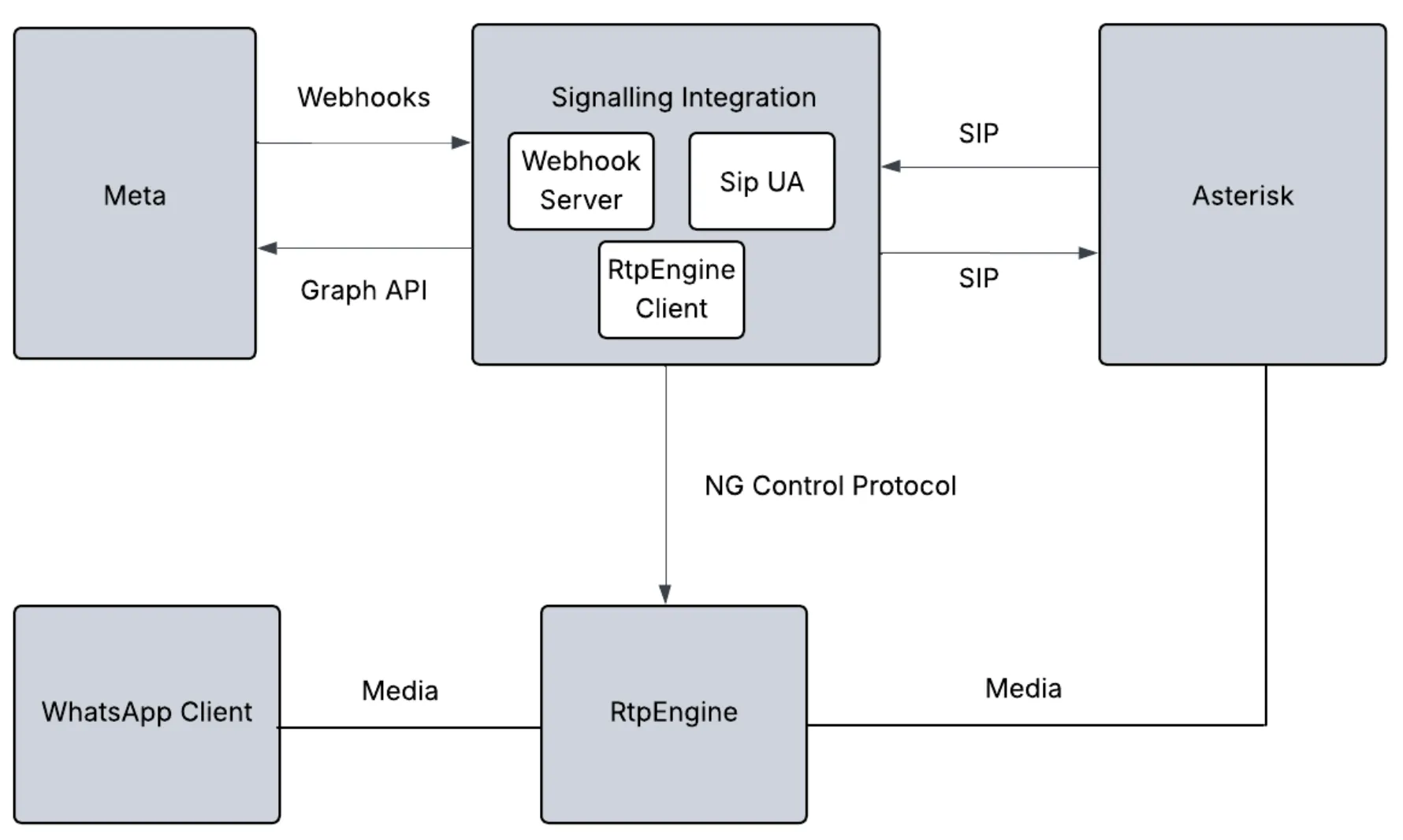
                                                            Webhook Server: Receives call webhook events from Meta (WhatsApp Cloud API)Graph API client: Sends call-related requests to Meta using the Graph APISIP User Agent (UA) such as PJSIP: Connects to Asterisk using extension 1000, which is reserved for bridging calls between WhatsApp and Asterisk.RtpEngineClient: To control RtpEngine via ng control protocol for bridging media
                                                            Architecture diagram showing Asterisk integration with RtpEngine for WhatsApp Business Calling
                                                            Business initiated calls
                                                              Business agent registered to the same Asterisk server dials b2c-sip extension to initiate a call to WhatsApp userThe extension prompts the business agent to enter WA user’s phone numberAsterisk sends a SIP INVITE request to extension 1000 with a custom header containing the dialed WA user phone numberThe SIP UA inside the module would’ve registered at extension 1000 and hence receives the SIP INVITE from AsteriskThe SDP included in the SIP INVITE is sent to RtpEngine which returns a new SDPThe new SDP is included in the Graph API request to initiate a new callWhen the WhatsApp user accepts the call, an “accepted” webhook is receivedUpon receiving this webhook, the answer SDP received in the webhook is sent to RtpEngine which returns a new SDPThe SIP UA accepts the original SIP INVITE (step 3), passing along the new SDP received from RtpEngineThe call is now bridged between WA user, RtpEngine, and Asterisk
                                                              User Initiated calls
                                                                The webhook server inside the module receives an incoming call webhook from Meta, which includes the offer SDPUpon receiving this call invite, the SDP included in the offer is sent to RtpEngine which returns a new SDPThe SIP UA inside the module sends a SIP INVITE to Asterisk using extension 1000 passing the new SDP from RtpEngine in the SIP INVITE. The destination extension is c2b-sip.The extension prompts WA user to dial the extension of the business agent to connect toAsterisk dials the specified extension and waits for an answerAfter the agent answers the call, Asterisk sends SIP 200 OK to the SIP UA extension 1000 inside the module. The SDP in SIP 200 OK is sent to RtpEngine which returns a new SDPA Graph API request is sent to Meta to accept the incoming call, with the new SDP received from RtpEngine

                                                                Building and installing Asterisk

                                                                Refer to https://docs.asterisk.org/Getting-Started/Installing-Asterisk/Installing-Asterisk-From-Source/Building-and-Installing-Asterisk/
                                                                This guide was tested using Asterisk version 22.5.2

                                                                Building and installing RtpEngine

                                                                Refer to https://github.com/sipwise/rtpengine to build and install RtpEngine This guide was tested using RtpEngine version 13.3.1.4
                                                                Refer to https://rtpengine.readthedocs.io/en/latest/ng_control_protocol.html for details on ng control protocol
                                                                To start RtpEngine run
                                                                /usr/bin/rtpengine --listen-ng={local-ip}:22222--interface={local-ip}\!{public-ip}-f -E
                                                                Replace
                                                                  {local-ip} with the local IP of the RtpEngine server{public-ip} with the public IP of the RtpEngine server
                                                                  Asterisk Configuration These configuration files are placed under /etc/asterisk/
                                                                  extensions.conf
                                                                  Replace the following placeholders with actual values
                                                                    incoming_welcome: incoming_welcome.wav (not provided) place this file under /var/lib/asterisk/soundsoutgoing_welcome: outgoing_welcome.wav (not provided) place this file under /var/lib/asterisk/sounds
                                                                    [handler];Set headers on callee channel
                                                                    exten => addheader,1,Set(PJSIP_HEADER(add,X-WhatsApp-Number)=${DIGITS})
                                                                    same => n,Return()[default]
                                                                    exten => _10XX,1,NoOp()
                                                                    same => n,Dial(PJSIP/${EXTEN})
                                                                    same => n,Hangup()
                                                                    
                                                                    exten => b2c-sip,1,NoOp()
                                                                    same => n,Read(Digits,outgoing_welcome,0,,5,500)
                                                                    same => n,Set(GLOBAL(DIGITS)=${Digits});Before starting a business initiated call, add customer WA header to store the WA user number captured from agent entered digits (DTMF)
                                                                    same => n,Dial(PJSIP/1000,,b(handler^addheader^1))
                                                                    same => n,Hangup()
                                                                    
                                                                    exten => c2b-sip,1,NoOp()
                                                                    same => n,Read(Digits,incoming_welcome,0,,5,500)
                                                                    same => n,Dial(PJSIP/${Digits})
                                                                    same => n,Hangup()
                                                                    pjsip.conf
                                                                    Replace the following placeholders with actual values
                                                                      {external-media-address}: Public IP of the Asterisk server for media{external-signaling-address}: Public IP of the Asterisk server for signaling{local-net}: local network of the Asterisk server{sip-ua-password}: Chosen SIP User Agent password
                                                                      Note:
                                                                      Extension 1000 is used to bridge WA calls with Asterisk see section Integration with Cloud API Signaling
                                                                      [global]
                                                                      type=global
                                                                      debug=yes ;Enable/Disable SIP debug logging.Valid options include yes|no[transport-tcp]
                                                                      type=transport
                                                                      protocol=tcp
                                                                      bind=0.0.0.0;External IP address to usein RTP handling
                                                                      external_media_address={external-media-address};External address for SIP signalling
                                                                      external_signaling_address={external-signaling-address};Network to consider local used for NAT purposes
                                                                      local_net={local-net}[endpointtemplate](!)
                                                                      type=endpoint
                                                                      context=default
                                                                      disallow=all
                                                                      allow=OPUS,g722,g729,ulaw
                                                                      ;No audio if direct_media isset to yes
                                                                      direct_media=no
                                                                      rtp_symmetric=yes
                                                                      use_avpf=yes
                                                                      media_encryption=sdes
                                                                      media_use_received_transport=yes
                                                                      rtcp_mux=yes
                                                                      
                                                                      [authtemplate](!)
                                                                      type=auth
                                                                      auth_type=userpass
                                                                      password={sip-ua-password}[aortemplate](!)
                                                                      type=aor
                                                                      max_contacts=1
                                                                      remove_existing=yes
                                                                      
                                                                      [1000](endpointtemplate)
                                                                      disallow=all
                                                                      ;extension 1000is used byRtpEngine to bridge whatsapp calls
                                                                      ;WhatsApp only support OPUS
                                                                      allow=OPUS
                                                                      auth=1000_auth
                                                                      aors=1000[1000_auth](authtemplate)
                                                                      username=1000[1000](aortemplate)[1001](endpointtemplate)
                                                                      auth=1001_auth
                                                                      aors=1001[1001_auth](authtemplate)
                                                                      username=1001[1001](aortemplate)[1002](endpointtemplate)
                                                                      auth=1002_auth
                                                                      aors=1002[1002_auth](authtemplate)
                                                                      username=1002[1002](aortemplate)[1003](endpointtemplate)
                                                                      auth=1003_auth
                                                                      aors=1003[1003_auth](authtemplate)
                                                                      username=1003[1003](aortemplate)[1004](endpointtemplate)
                                                                      auth=1004_auth
                                                                      aors=1004[1004_auth](authtemplate)
                                                                      username=1004[1004](aortemplate)[1005](endpointtemplate)
                                                                      auth=1005_auth
                                                                      aors=1005[1005_auth](authtemplate)
                                                                      username=1005[1005](aortemplate)

                                                                      Configuring a VoIP phone

                                                                      Refer to the earlier section

                                                                      Final checklist

                                                                        Double-check all configuration files for correct numbers, passwords, and domain names.Make sure your firewall allows SIP (5060/TCP) and RTP (10000-20000) ports.For more details on SIP password setup, see the WhatsApp Cloud API documentation.

                                                                        Troubleshooting

                                                                        Cannot register SIP UA
                                                                        Confirm that the SIP URL is correct and the domain is pointing to the Asterisk server. Run host {domain-name} to verify that the IP address points to the Asterisk server.

                                                                        Asterisk with built-in WebRTC using Graph API

                                                                        This approach is similar to Asterisk using Graph API with RtpEngine except that it uses the built-in WebRTC support in Asterisk and hence does not require RtpEngine.
                                                                        The RtpEngineClient component is hence not required in this approach
                                                                        In terms of configuration and setup, only difference is the configuration of extension 1000 which is given below
                                                                        ...;Rest of content omitted for brevity
                                                                        
                                                                        [1000](endpointtemplate)
                                                                        disallow=all
                                                                        ;extension 1000is used by SIP UA of the integration module to bridge WhatsApp calls
                                                                        ;WhatsApp only support OPUS
                                                                        allow=OPUS
                                                                        auth=1000_auth
                                                                        aors=1000
                                                                        dtls_auto_generate_cert=yes
                                                                        webrtc=yes
                                                                        ;Setting webrtc=yes is a shortcut for setting the following options:; use_avpf=yes
                                                                        ; media_encryption=dtls
                                                                        ; dtls_verify=fingerprint
                                                                        ; dtls_setup=actpass
                                                                        ; ice_support=yes
                                                                        ; media_use_received_transport=yes
                                                                        ; rtcp_mux=yes