
Catalog templates | Developer Documentation

Catalog templates

Updated: Mar 3, 2026
This document explains how to create catalog templates. See Sell Products & Services to learn more about product catalogs and ways to showcase your products.
Catalog templates are marketing templates that allow you to showcase your product catalog entirely within WhatsApp. Catalog templates display a product thumbnail header image of your choice and custom body text, along with a fixed text header and fixed text sub-header.
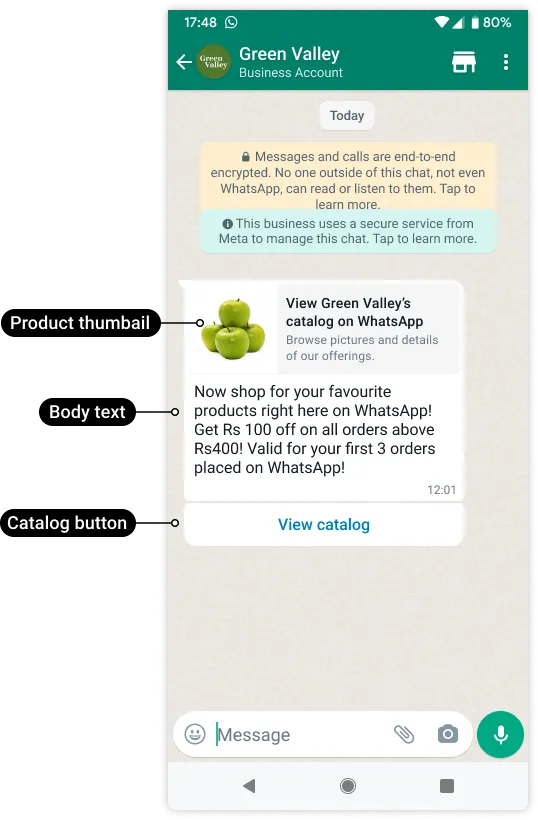
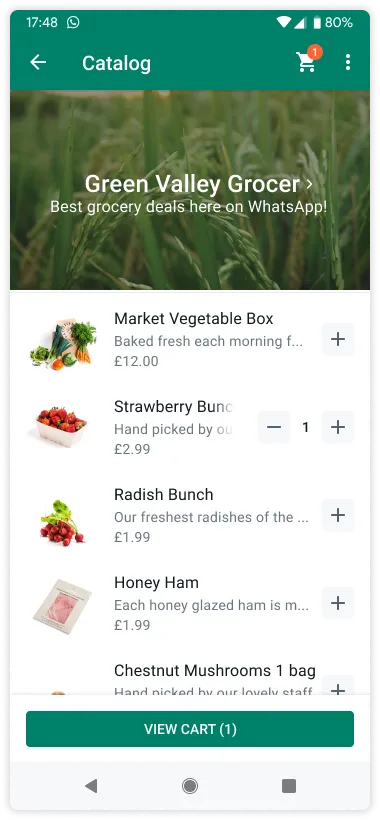
When a customer taps the View catalog button in a catalog template message, your product catalog appears within WhatsApp.
Creating catalog templates

Requirements

Request syntax

Use the WhatsApp Business Account > Message Templates endpoint to create a catalog template. Once your template is approved, you can use Cloud API to send it in a template message.
curl -X POST "https://graph.facebook.com/<API_VERSION>/<WHATSAPP_BUSINESS_ACCOUNT_ID>/message_templates" \
  -H "Authorization: Bearer <ACCESS_TOKEN>" \
  -H "Content-Type: application/json" \
  -d '
{
    "name": "<NAME>",
    "language": "<LANGUAGE>",
    "category": "MARKETING",
    "components": [
      {
        "type": "BODY",
        "text": "<BODY_TEXT>",
        "example": {
          "body_text": [
            [
              "<EXAMPLE_BODY_TEXT>"
            ]
          ]
        }
      },
      {
        "type": "FOOTER",
        "text": "<FOOTER_TEXT>"
      },
      {
        "type": "BUTTONS",
        "buttons": [
          {
            "type": "CATALOG",
            "text": "View catalog"
          }
        ]
      }
    ]
  }'

Request parameters

Placeholder Description Sample Value
<BODY_TEXT>
String
Required.

Template body text. Variables are supported.

Maximum 1024 characters.
Now shop for your favorite products right here on WhatsApp! Get Rs {{1}} off on all orders above {{2}}Rs! Valid for your first {{3}} orders placed on WhatsApp!
<EXAMPLE_BODY_TEXT>
String (of an array of strings)
Required if body text uses variables.

Sample strings to replace variable placeholders in <BODY_TEXT> string.

Maximum 1024 characters.
100
<FOOTER_TEXT>
String
Optional.

Template footer text. Variables are supported.

Maximum 60 characters.
Best grocery deals on WhatsApp!
<LANGUAGE>
String
Required.
en_US
<NAME>
String
Required.

Template name.

Maximum 512 characters.
intro_catalog_offer

Example request

curl 'https://graph.facebook.com/v17.0/102290129340398/message_templates' \
-H 'Content-Type: application/json' \
-H 'Authorization: Bearer EAAJB...' \
-d '
{
  "name": "intro_catalog_offer",
  "language": "en_US",
  "category": "MARKETING",
  "components": [
    {
      "type": "BODY",
      "text": "Now shop for your favorite products right here on WhatsApp! Get Rs {{1}} off on all orders above {{2}}Rs! Valid for your first {{3}} orders placed on WhatsApp!",
      "example": {
        "body_text": [
          [
            "100",
            "400",
            "3"
          ]
        ]
      }
    },
    {
      "type": "FOOTER",
      "text": "Best grocery deals on WhatsApp!"
    },
    {
      "type": "BUTTONS",
      "buttons": [
        {
          "type": "CATALOG",
          "text": "View catalog"
        }
      ]
    }
  ]
}'

Example response

{
  "id": "546151681022936",
  "status": "PENDING",
  "category": "MARKETING"
}

Sending catalog template messages

You can send approved catalog templates in a template message. See Sell Products & Services to learn more about product catalogs and ways to showcase your products.

Requirements

Request syntax

Use the WhatsApp Business Phone Number > Messages endpoint to send a catalog template message using a catalog template with an APPROVED status.
curl -X POST "https://graph.facebook.com/v19.0/<WHATSAPP_BUSINESS_PHONE_NUMBER_ID>/messages" \
  -H "Authorization: Bearer <ACCESS_TOKEN>" \
  -H "Content-Type: application/json" \
  -d '
{
    "messaging_product": "whatsapp",
    "recipient_type": "individual",
    "to": "<TO>",
    "type": "template",
    "template": {
      "name": "<NAME>",
      "language": {
        "code": "<CODE>"
      },
      "components": [
        {
          "type": "body",
          "parameters": [
            {
              "type": "<TYPE>",
              "text": "<TEXT>"
            }
          ]
        },
        {
          "type": "button",
          "sub_type": "CATALOG",
          "index": 0,
          "parameters": [
            {
              "type": "action",
              "action": {
                "thumbnail_product_retailer_id": "<THUMBNAIL_PRODUCT_RETAILER_ID>"
              }
            }
          ]
        }
      ]
    }
  }'

Request parameters

Placeholder Description Sample Value
<CODE>
String
Required.
en_US
<NAME>
String
Required.

Template name.
intro_catalog_offer
<THUMBNAIL_PRODUCT_RETAILER_ID>
String
Optional.

Item SKU number. Labeled as Content ID in the Commerce Manager.

The thumbnail of this item will be used as the message’s header image.

If the parameters object is omitted, the product image of the first item in your catalog will be used.
2lc20305pt
<TEXT>
String
Required if template uses variables.

Template variable.
100
<TO>
String
Required.

Customer phone number.
+16505551234
<TYPE>
String
Required if template uses variables.

Template variable type.
text

Example request

curl 'https://graph.facebook.com/v17.0/106540352242922/messages' \
-H 'Content-Type: application/json' \
-H 'Authorization: Bearer EAAJB...' \
-d '
{
  "messaging_product": "whatsapp",
  "recipient_type": "individual",
  "to": "+16505551234",
  "type": "template",
  "template": {
    "name": "intro_catalog_offer",
    "language": {
      "code": "en_US"
    },
    "components": [
      {
        "type": "body",
        "parameters": [
          {
            "type": "text",
            "text": "100"
          },
          {
            "type": "text",
            "text": "400"
          },
          {
            "type": "text",
            "text": "3"
          }
        ]
      },
      {
        "type": "button",
        "sub_type": "CATALOG",
        "index": 0,
        "parameters": [
          {
            "type": "action",
            "action": {
              "thumbnail_product_retailer_id": "2lc20305pt"
            }
          }
        ]
      }
    ]
  }
}'

Example response

{
  "messaging_product": "whatsapp",
  "contacts": [
    {
      "input": "+16505551234",
      "wa_id": "16505551234"
    }
  ],
  "messages": [
    {
      "id": "wamid.HBgLMTY1MDM4Nzk0MzkVAgARGBI5RkEwM0EyODFEQzQ2NDYzQTMA"
    }
  ]
}

See also

    Sell Products & ServicesCatalog Messages