
Billdesk Payment Gateway Integration Guide | Developer Documentation
Billdesk Payment Gateway Integration Guide
Updated: Nov 14, 2025
The purpose of this document is to lay down the payment integration with Billdesk that is required for a merchant, or a Solution Partner, that has implemented a chatbot using WhatsApp Business APIs and needs to accept payments from WhatsApp users.
This document outlines the necessary APIs that must be integrated and how the integration works in conjunction with the WhatsApp Business API integration. While not a comprehensive guide, it serves as a general overview to assist in understanding the payment gateway integration process. Any specific or unique details related to the payment gateway must be determined by the merchant or Solution Partner.
In terms of integrating with the WA P2M product, this document covers the requests and responses highlighted in red in the flow diagram.
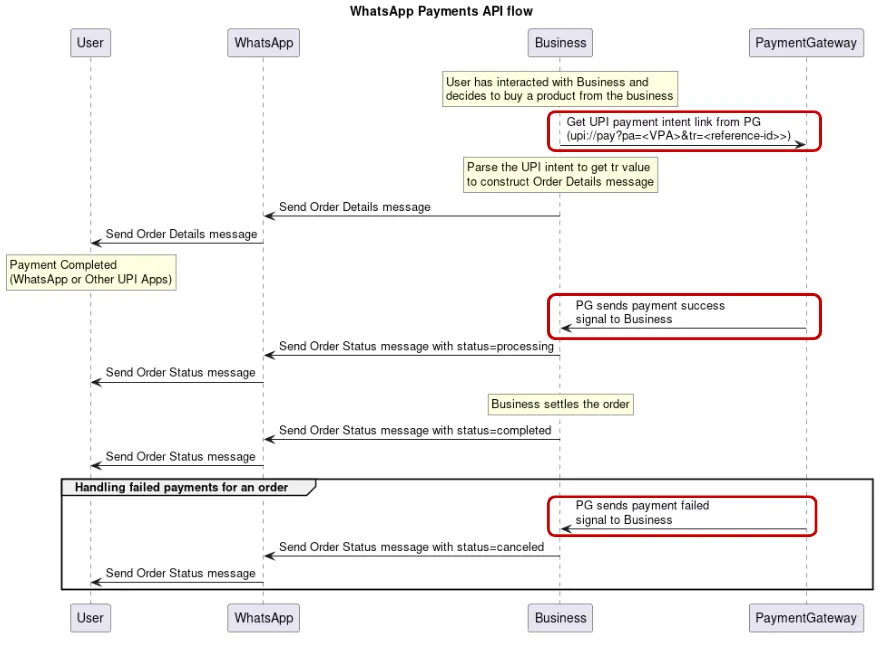
Billdesk payment integration
Setup
To authenticate with Billdesk's API, a client must be created and an authentication method must be selected between HMAC and Javascript Object Signing and Encryption (JOSE) with JOSE being the preferred method. These methods are used to encrypt/decrypt the request/response from Billdesk's APIs.
To simplify the explanation, the following examples will only address the body of final payload that will ultimately be included in the final object required for successful authentication with their API. It is important to consult Billdesk's documentation for guidance on how this final object must be structured.
You must have the following details before you can proceed:
Parse the response
Use the value of
wa_txnid on the response and pass it as the reference_id while setting up the parameters object to send for the order details message using the API.Make sure to verify the values in the intent you receive:
intent key has the base64 encoded value of the intentDecoding the intent should give a value that should be similar to this: upi://pay?pa=billdesk@hdfcbank&pn=SIDDHIVINKamp;mc=6300&tr=XHD50477676443&tn=Pay&am=2.00&malORSThe value of pa is the merchant VPA. This value must match the VPA on the payment_configuration you send in the parameters object
Status webhook
Billdesk will post a transaction object to the return URL (
ru) you specified in the initiate payment API.| Key | Data type | Description |
|---|---|---|
|
objectid (Mandatory) |
string |
String representing the object's type. This value will be fixed as transaction |
|
transactionid |
string |
Unique transaction ID generation by BillDesk for the transaction |
|
orderid |
string |
Unique orderid generated by merchant to for the transaction |
|
mercid |
string |
Unique identifier as defined by BillDesk for each merchant |
|
transaction_date |
timestamp |
BillDesk transaction date and time in YYYY-MM DDThh:mm:ssTZD format |
|
amount |
string |
Transaction amount in two decimals |
|
surcharge |
string |
Customer surcharge in two decimals applied to the transaction amount, if any |
|
discount |
string |
Customer discount in two decimals applied to the transaction amount, if any |
|
charge_amount |
string |
Total charge to the customer |
|
currency |
integer |
ISO currency of the transaction amount |
|
txn_process_type |
string |
Indicates transaction processing type.
Intent for payment_method_type is upi and the method of payment is UPI intent |
|
bankid |
string |
BillDesk defined unique identifier for bank or acquirer |
|
txn_process_type |
string |
Indicates transaction processing type.
Intent for payment_method_type is upi and the method of payment is UPI intent. |
|
ru |
string |
Merchant return url |
|
additional_info |
object |
Array of 10 additional_info values that can be attached to the transaction. Note: Merchant is advised to not pass customer PII information in additional info fields. |
|
itemcode |
string |
Itemcode value provided by BillDesk, with a default value of DIRECT |
|
bank_ref_no |
string |
Transaction reference number generated by bank or acquirer |
|
auth_status |
string |
Represents the authorization status of the transaction with the possible values:
0300 - transaction is successful0002 - transaction is pending for authorization0399 - transaction failed |
|
settlement_lob |
string |
Settlement line of business pre-configured by BillDesk for funds settlement to merchant account |
|
customer |
object |
Customer object |
|
device |
object |
Device object |
|
transaction_error_code |
string |
Represents the error code for a transaction with 0399 status |
|
transaction_error_type |
string |
Represents the standard error category for a transaction with 0399 status |
|
transaction_error_desc |
string |
Represents the description of the error code for a transaction with 0399 status |
|
authcode |
string |
Authorization code received from the acquirer for a successfully authorized card transaction |
|
eci |
string |
eci value for the authentication taken for the card transaction |
|
payment_method_type |
string |
Represents the method of payment e.g. upi |
|
card |
Object |
Payment method object (applicable when payment method is card) |
|
customer_refid |
string |
Unique customer identifier as per merchant |
|
links |
object |
Associated links with the object |
Parsing the response
Use the
auth_status retrieved from the response above and transmit the corresponding status message via the WhatsApp API.
No comments to display
No comments to display