Copy code authentication templates | Developer Documentation
Copy code authentication templates
Updated: Nov 4, 2025
Copy code authentication templates allow you to send a one-time password or code along with a copy code button to your users. When a WhatsApp user taps the copy code button, the WhatsApp client copies the password or code to the device’s clipboard. The user can then switch to your app and paste the password or code into your app.
Note: The “I didn’t request a code” button is currently in beta and is being rolled out incrementally to business customers.
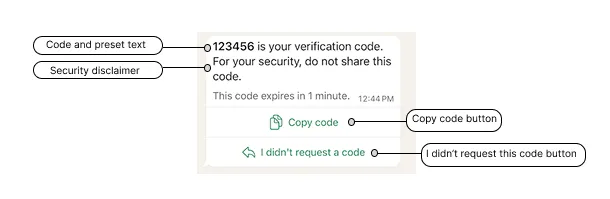
Copy code button authentication templates consist of:
Limitations
URLs, media, and emojis are not supported.
Creating authentication templates
Use the WhatsApp Business Account > Message Templates endpoint to create authentication templates.
Request Syntax
curl 'https://graph.facebook.com/<API_VERSION>/<WHATSAPP_BUSINESS_ACCOUNT_ID>/message_templates' \
-H 'Content-Type: application/json' \
-H 'Authorization: Bearer EAAJB...' \
-d '
{
"name": "<TEMPLATE_NAME>",
"language": "<TEMPLATE_LANGUAGE>",
"category": "authentication",
"message_send_ttl_seconds": <TIME_TO_LIVE>, // Optional
"components": [
{
"type": "body",
"add_security_recommendation": <SECURITY_RECOMMENDATION> // Optional
},
{
"type": "footer",
"code_expiration_minutes": <CODE_EXPIRATION> // Optional
},
{
"type": "buttons",
"buttons": [
{
"type": "otp",
"otp_type": "copy_code",
"text": "<COPY_CODE_BUTTON_TEXT>" // Optional
}
]
}
]
}'Note that in your template creation request the button
type is designated as OTP, but upon creation the button type will be set to URL. You can confirm this by performing a GET request on a newly created authentication template and analyzing its components.Request parameters
| Placeholder | Description | Example Value |
|---|---|---|
<CODE_EXPIRATION>Integer | Optional. Indicates the number of minutes the password or code is valid. If included, the code expiration warning and this value will be displayed in the delivered message. If omitted, the code expiration warning will not be displayed in the delivered message. Minimum 1, maximum 90. | 5 |
<COPY_CODE_BUTTON_TEXT>String | Optional. Copy code button label text. If omitted, the text will default to a pre-set value localized to the template’s language. For example, Copy Code for English (US).Maximum 25 characters. | Copy Code |
<SECURITY_RECOMMENDATION>Boolean | Optional. Set to true if you want the template to include the string, For your security, do not share this code. Set to false to exclude the string. | true |
<TEMPLATE_LANGUAGE>String | Required. Template language and locale code. | en_US |
<TEMPLATE_NAME>String | Required. Template name. Maximum 512 characters. | verification_code |
<TIME_TO_LIVE>Integer | Optional. Authentication message time-to-live value, in seconds. See Time-To-Live below. | 60 |
Example request
curl 'https://graph.facebook.com/v25.0/102290129340398/message_templates' \
-H 'Content-Type: application/json' \
-H 'Authorization: Bearer EAAJB...' \
-d '
{
"name": "authentication_code_copy_code_button",
"language": "en_US",
"category": "authentication",
"message_send_ttl_seconds": 60,
"components": [
{
"type": "body",
"add_security_recommendation": true
},
{
"type": "footer",
"code_expiration_minutes": 5
},
{
"type": "buttons",
"buttons": [
{
"type": "otp",
"otp_type": "copy_code",
"text": "Copy Code"
}
]
}
]
}'
Example response
{
"id": "594425479261596",
"status": "PENDING",
"category": "AUTHENTICATION"
}Webhooks
The button messages webhook is triggered whenever a user taps the “I didn’t request a code” button within the message.
Example webhook
{
"object": "whatsapp_business_account",
"entry": [
{
"id": "320580347795883",
"changes": [
{
"value": {
"messaging_product": "whatsapp",
"metadata": {
"display_phone_number": "12345678",
"phone_number_id": "1234567890"
},
"contacts": [
{
"profile": {
"name": "John"
},
"wa_id": "12345678"
}
],
"messages": [
{
"context": {
"from": "12345678",
"id": "wamid.HBgLMTIxMTU1NTE0NTYVAgARGBJDMDEyMTFDNTE5NkFCOUU3QTEA"
},
"from": "12345678",
"id": "wamid.HBgLMTIxMTU1NTE0NTYVAgASGCBBQ0I3MjdCNUUzMTE0QjhFQkM4RkQ4MEU3QkE0MUNEMgA=",
"timestamp": "1753919111",
"from_logical_id": "131063108133020",
"type": "button",
"button": {
"payload": "DID_NOT_REQUEST_CODE",
"text": "I didn't request a code"
}
}
]
},
"field": "messages"
}
]
}
]
}Sample app
See our WhatsApp One-Time Password (OTP) Sample App for Android on Github. The sample app demonstrates how to send and receive OTP passwords and codes via the API, how to integrate the one-tap autofill and copy code buttons, how to create a template, and how to spin up a sample server.
Sending authentication templates
This document explains how to send approved authentication templates with one-time password buttons.
Note that you must first initiate a handshake between your app and the WhatsApp client. See Handshake above.
Request syntax
curl -X POST "https://graph.facebook.com/<API_VERSION>/<WHATSAPP_BUSINESS_PHONE_NUMBER_ID>/messages" \
-H "Authorization: Bearer <ACCESS_TOKEN>" \
-H "Content-Type: application/json" \
-d '
{
"messaging_product": "whatsapp",
"recipient_type": "individual",
"to": "<CUSTOMER_PHONE_NUMBER>",
"type": "template",
"template": {
"name": "<TEMPLATE_NAME>",
"language": {
"code": "<TEMPLATE_LANGUAGE_CODE>"
},
"components": [
{
"type": "body",
"parameters": [
{
"type": "text",
"text": "<ONE-TIME PASSWORD>"
}
]
},
{
"type": "button",
"sub_type": "url",
"index": "0",
"parameters": [
{
"type": "text",
"text": "<ONE-TIME PASSWORD>"
}
]
}
]
}
}'Request parameters
| Placeholder | Description | Sample Value |
|---|---|---|
<CUSTOMER_PHONE_NUMBER> | The customer’s WhatsApp phone number. | 12015553931 |
<ONE-TIME PASSWORD> | The one-time password or verification code to be delivered to the customer. Note that this value must appear twice in the payload. Maximum 15 characters. | J$FpnYnP |
<TEMPLATE_LANGUAGE_CODE> | The template’s language and locale code. | en_US |
<TEMPLATE_NAME> | The template’s name. | verification_code |
Response
Upon success, the API will respond with:
{
"messaging_product": "whatsapp",
"contacts": [
{
"input": "<INPUT>",
"wa_id": "<WA_ID>"
}
],
"messages": [
{
"id": "<ID>"
}
]
}Response parameters
| Placeholder | Description | Sample Value |
|---|---|---|
<INPUT>String | The customer phone number that the message was sent to. This may not match wa_id. | +16315551234 |
<WA_ID>String | WhatsApp ID of the customer who the message was sent to. This may not match input. | +16315551234 |
<ID>String | WhatsApp message ID. You can use the ID listed after “wamid.” to track your message status. | wamid.HBgLMTY1MDM4Nzk0MzkVAgARGBI3N0EyQUJDMjFEQzZCQUMzODMA |
Example request
curl -L 'https://graph.facebook.com/v25.0/105954558954427/messages' \
-H 'Content-Type: application/json' \
-H 'Authorization: Bearer EAAJB...' \
-d '{
"messaging_product": "whatsapp",
"recipient_type": "individual",
"to": "12015553931",
"type": "template",
"template": {
"name": "verification_code",
"language": {
"code": "en_US"
},
"components": [
{
"type": "body",
"parameters": [
{
"type": "text",
"text": "J$FpnYnP"
}
]
},
{
"type": "button",
"sub_type": "url",
"index": "0",
"parameters": [
{
"type": "text",
"text": "J$FpnYnP"
}
]
}
]
}
}'
Example response
{
"messaging_product": "whatsapp",
"contacts": [
{
"input": "12015553931",
"wa_id": "12015553931"
}
],
"messages": [
{
"id": "wamid.HBgLMTY1MDM4Nzk0MzkVAgARGBI4Qzc5QkNGNTc5NTMyMDU5QzEA"
}
]
}
No comments to display