
Receive UPI Payments Through WhatsApp | Developer Documentation
ChatArchitect availability: UPI payment integration. ChatArchitect supports ordinary links to an external payment website. The imported native UPI payment integration is not provided through ChatArchitect.
Use the external payment-link guide for the supported customer workflow. Your payment service handles checkout and transaction confirmation; WhatsApp delivery callbacks do not confirm payment. The imported Meta implementation below is retained as a separate reference and does not describe an available ChatArchitect setup.
ChatArchitect scope: Native Meta product catalogs, product cards, shopping carts and catalog order events are not supported by ChatArchitect. Review catalog availability in ChatArchitect when this imported payment reference mentions product messages. Confirm support for the payment operation separately for your ChatArchitect connection before implementing it.
Receive UPI Payments Through WhatsApp
order_details) messages, then get notified about payment status updates via webhook notifications from Payment Gateway.Overview
How It Works
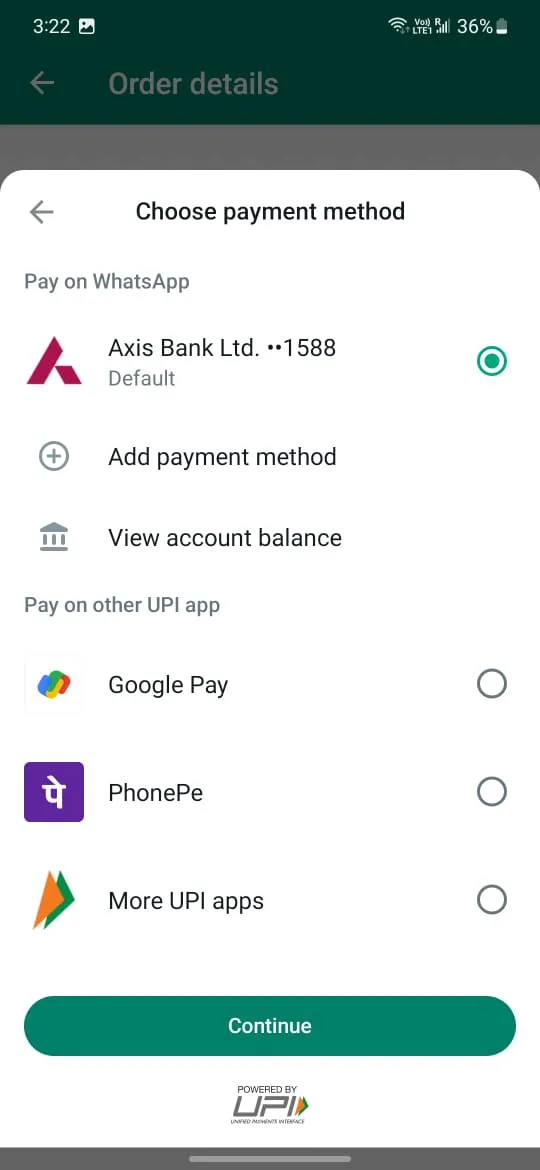
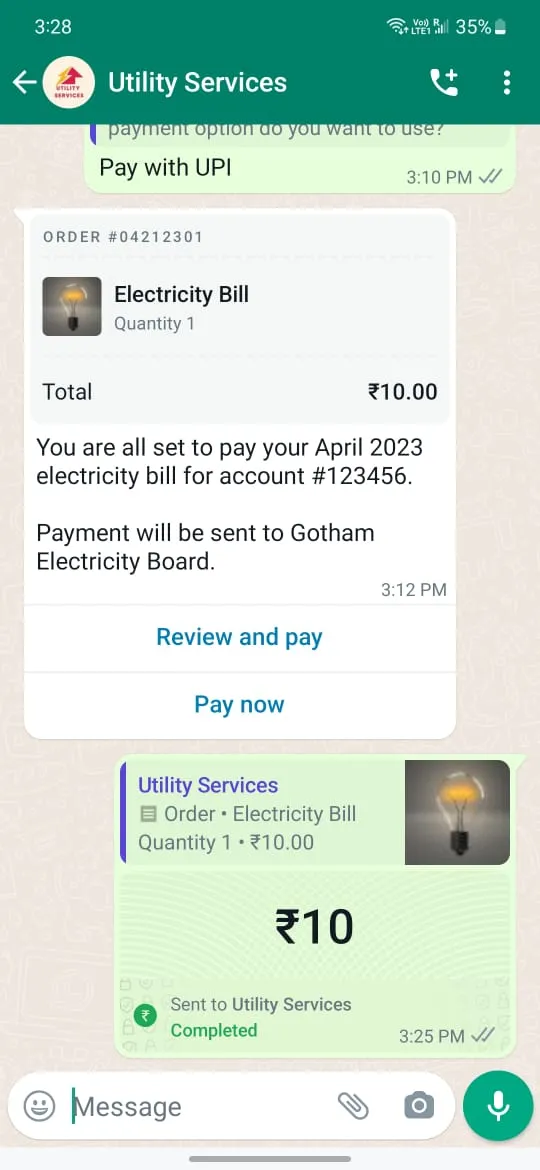
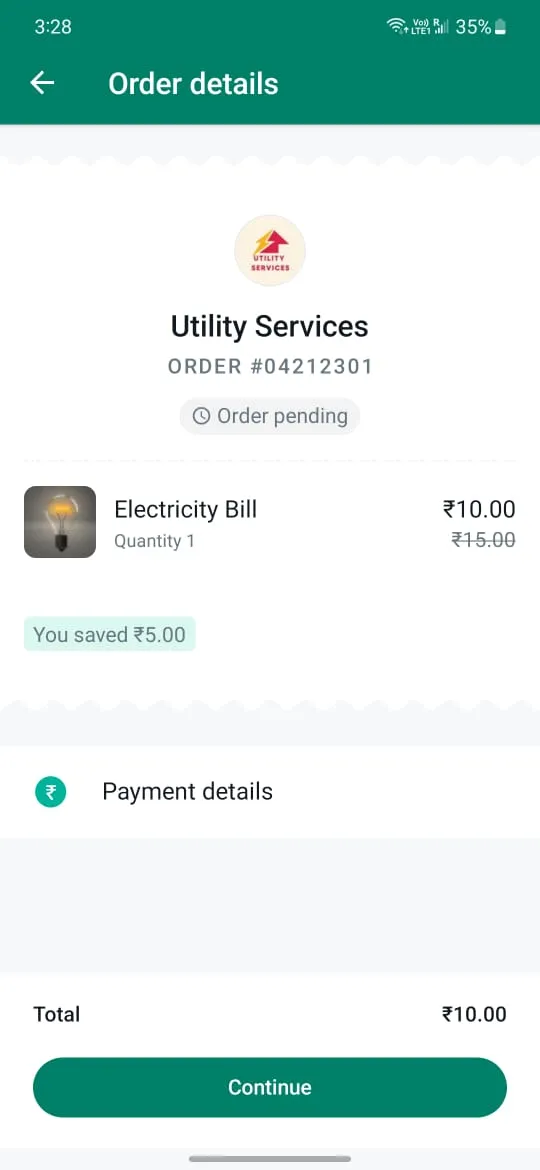
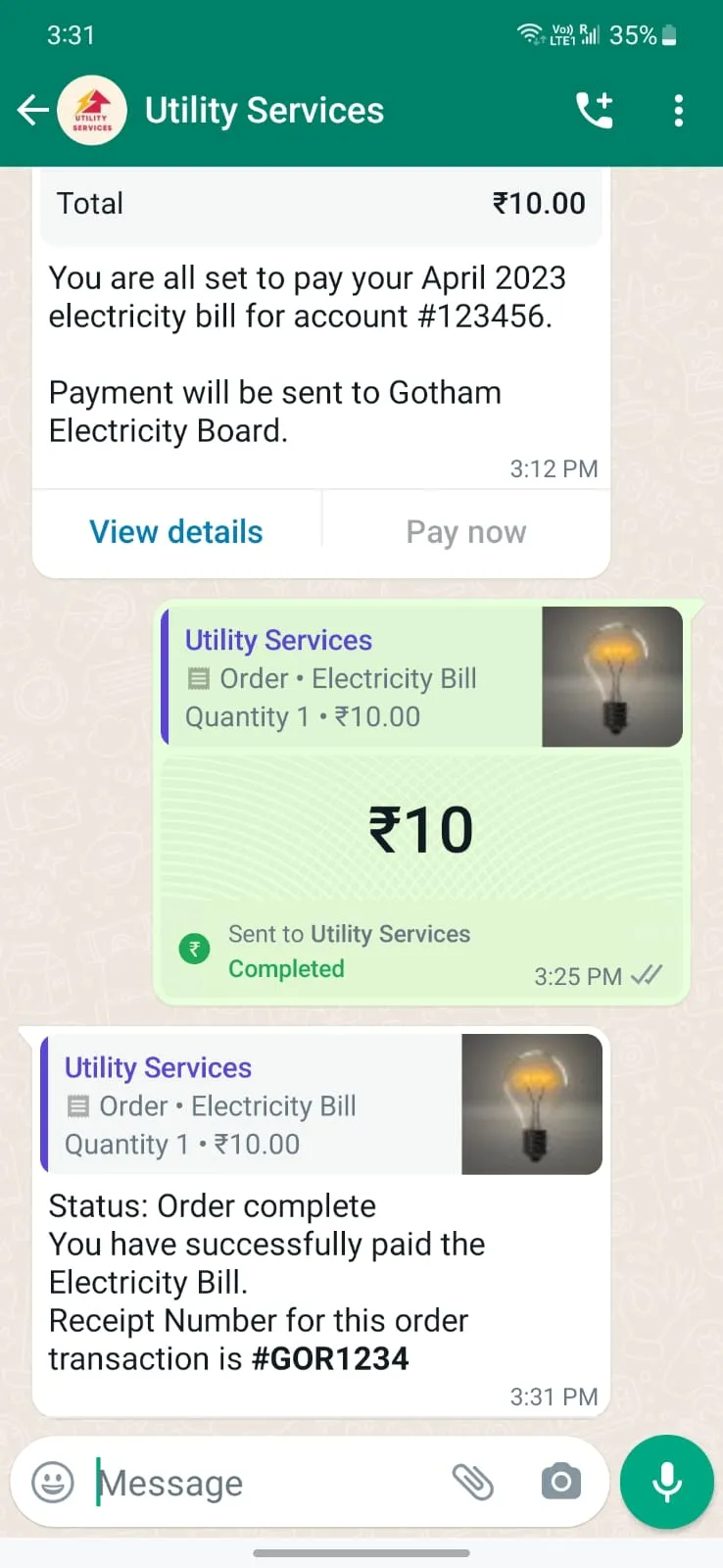
order_details message for the consumer to initiate payment. This type of message is a new type of interactive message, which always contains the same 4 main components: header, body, footer, and action. Inside the action component, the business includes all the information needed for the customer to complete their payment.order_details message contains a unique reference_id provided by the business, and that unique number is used throughout the flow to track the order. This reference_id is fetched from UPI intent link(tr value from the UPI payment intent) generated for a business order from Payment Gateway.order_status) message.Purchase Flow in App
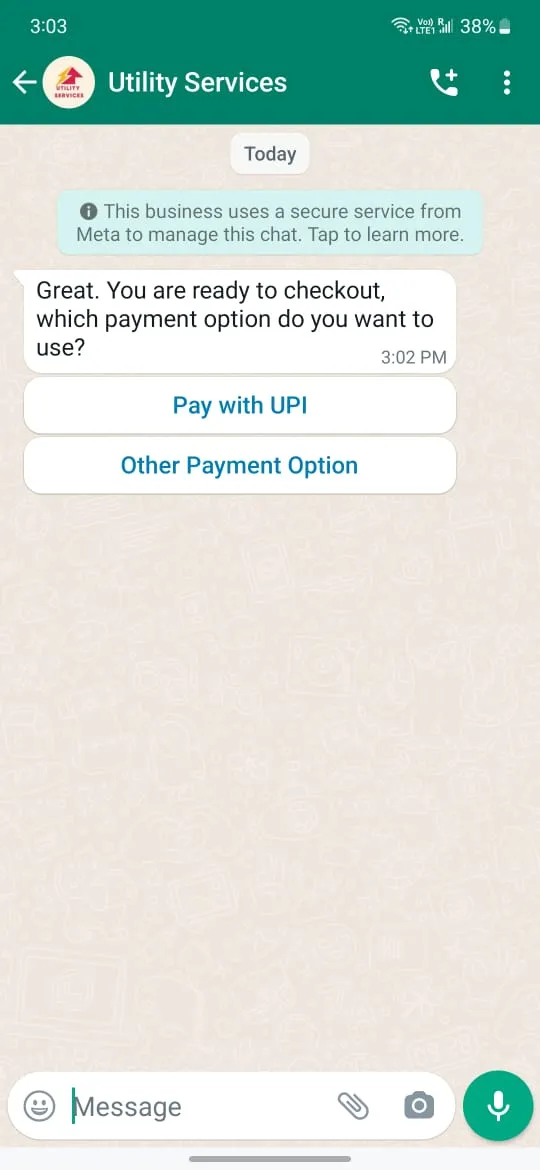
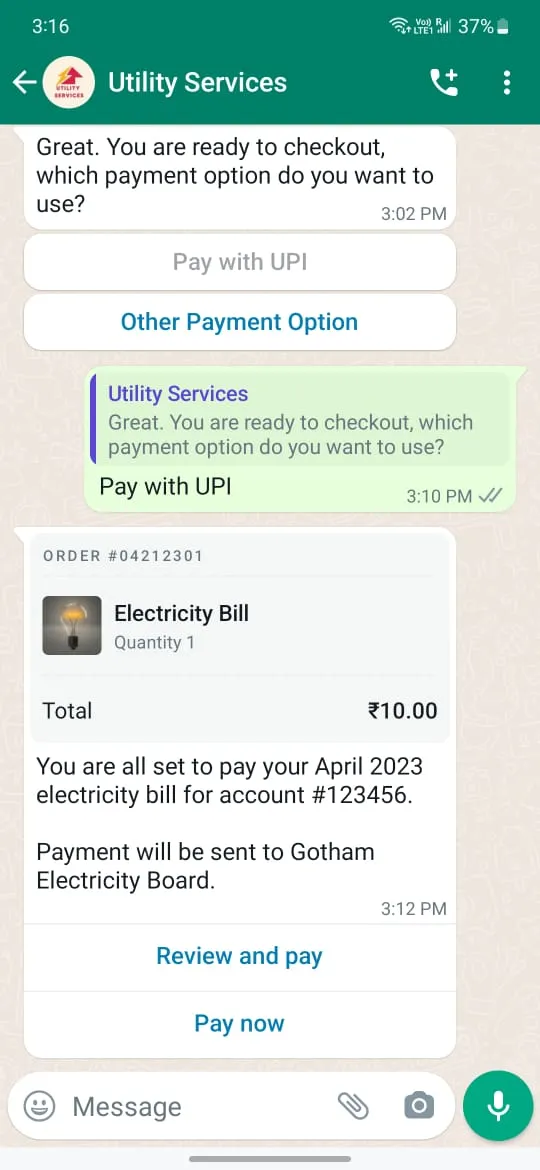
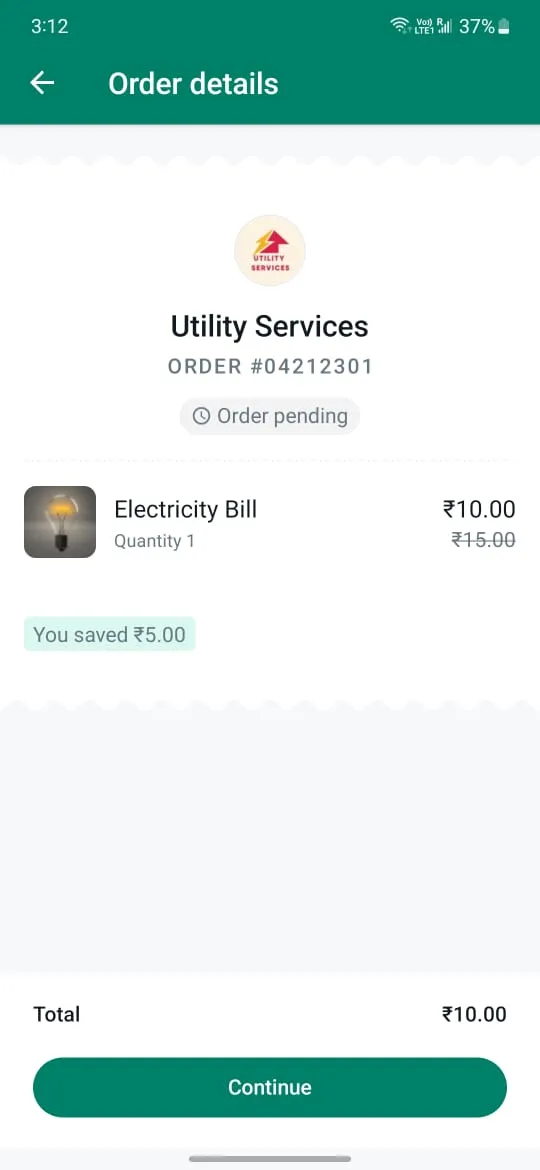
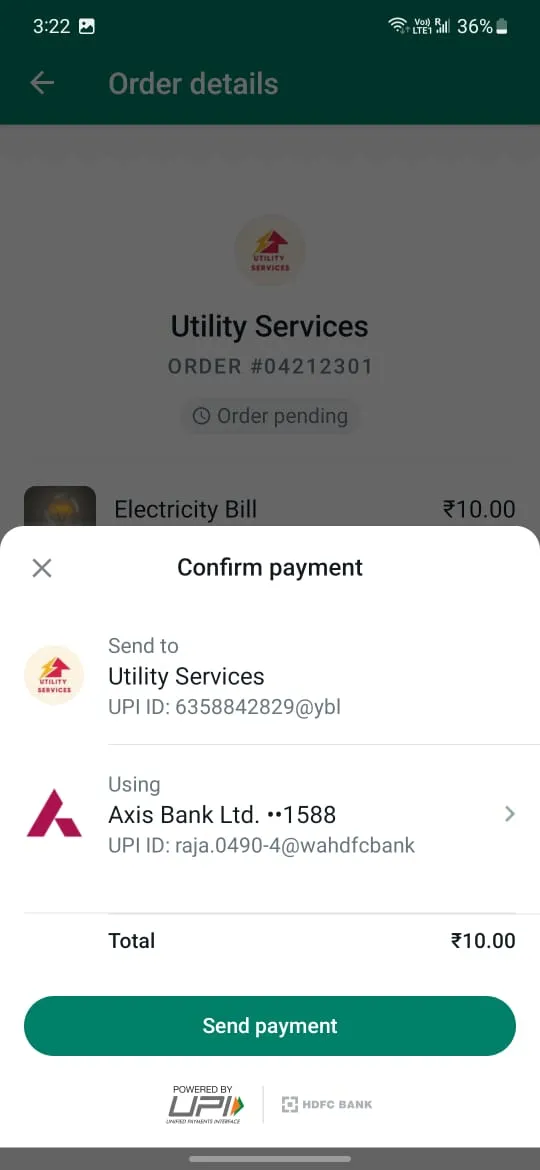
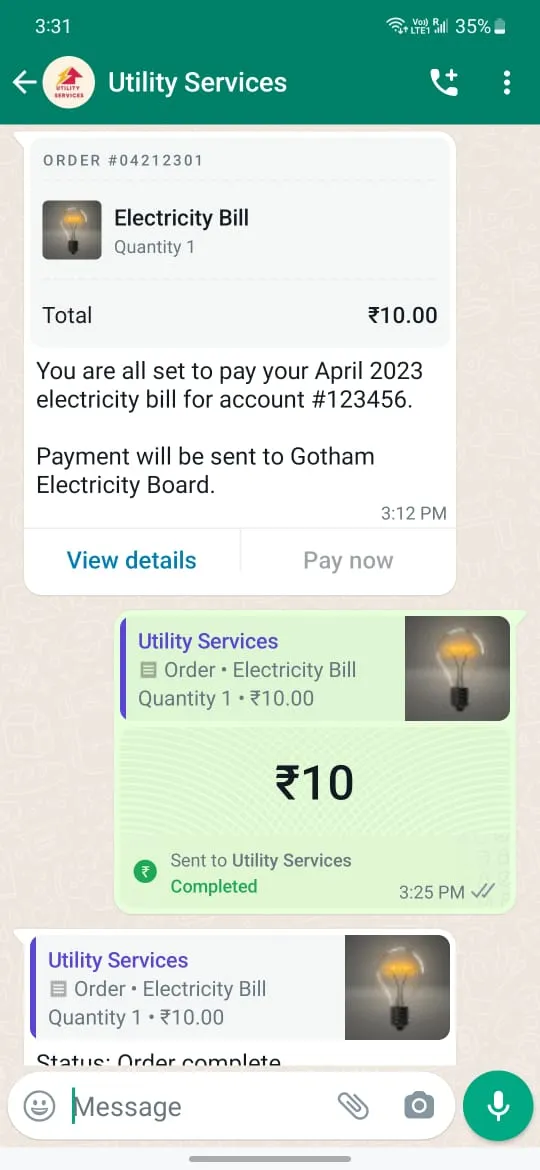
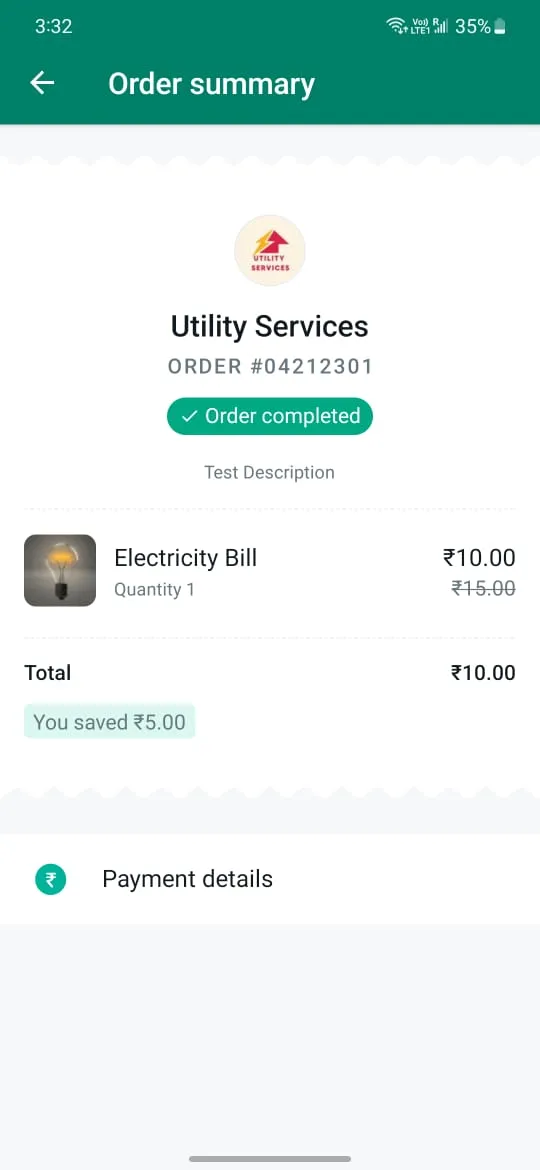
Before You Start
payment_configuration field in order_details message.name for each payment type must be unique. name will be used to reference the specific configurations for each payment type. If WA is unable to find a payment configuration name, the user will not be able to make the payment upon receiving the order_details message. mcc refers to a merchant categorization code for the items in the order. upi_pc refers to the purpose of the transaction. Some sample codes are below:| Code | Title |
|---|---|
|
00 |
Default |
|
01 |
SEMI |
|
02 |
AMC |
|
03 |
Travel |
|
04 |
Hospitality |
|
05 |
Hospital |
|
06 |
Telecom |
|
07 |
Insurance |
|
08 |
Education |
|
09 |
Gifting |
|
10 |
Others |
Manage Your Payment Methods (Beta Feature)
order_details) messages to users with the corresponding payment configuration to collect payments.Pre-requisites
Steps to link Payment Configuration for a Business Service Provider
order_details message to customers with the payment configuration to receive payments.Steps to unlink Payment Configuration
Integration Steps
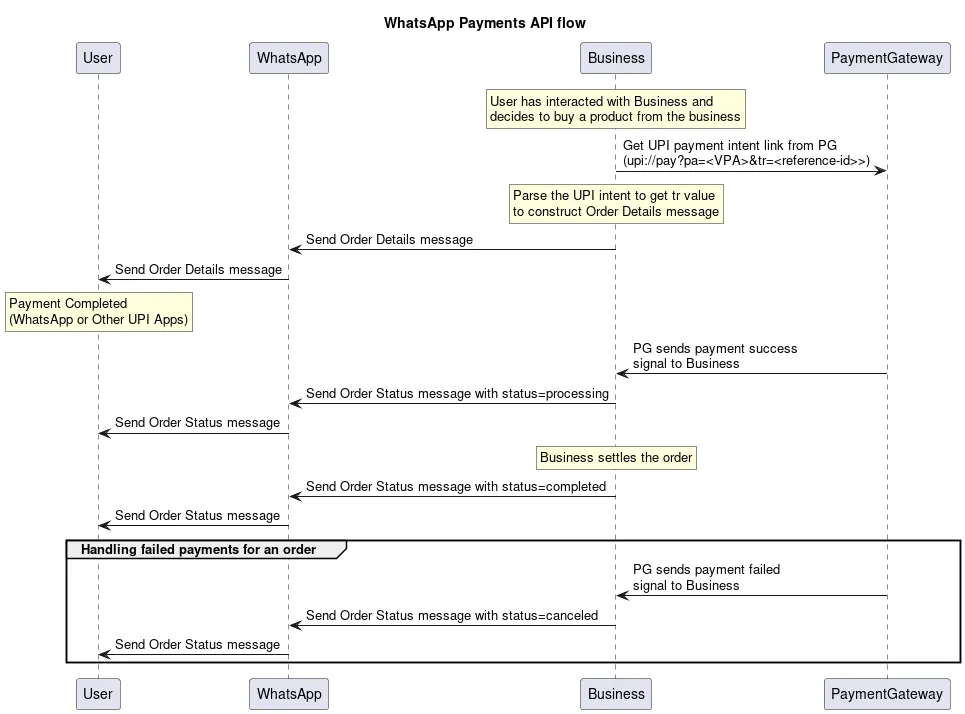
Step 1: Get UPI Intent from Payment Gateway
upi://pay?pa=cfsukoonaa@yesbank&pn=Sukoon&tr=877376394&
  am=10.00&cu=INR&mode=00&purpose=00&mc=5399&tn=877376394
tr value from the above URI and use this as the reference id in invoice(order_details) interactive message.Step 2: Assemble the Interactive Object
order_details message, businesses must assemble an interactive object of type order_details with the following components:| Object | Description |
|---|---|
typeobject |
Required.
Must be “order_details”. |
headerobject |
Optional.
Header content displayed on top of a message. If a header is not provided, the API uses an image of the first available product as the header |
bodyobject |
Required.
An object with the body of the message. The object contains the following field:
text stringbody is present. The content of the message. Emojis and markdown are supported. Maximum length is 1024 characters |
footerobject |
Optional.
An object with the footer of the message. The object contains the following fields:
text stringfooter is present. The footer content. Emojis, markdown, and links are supported. Maximum length is 60 characters |
actionobject |
Required.
An action object you want the user to perform after reading the message. This action object contains the following fields:
name stringparameters object |
Parameters Object
| Object | Description |
|---|---|
reference_idstring |
Required.
Unique identifier for the order or invoice provided by the business. This cannot be an empty string and can only contain English letters, numbers, underscores, dashes, or dots, and should not exceed 35 characters.
The reference_id must be unique for each order_details message for the same business. If the partner would like to send multiple order_details messages for the same order, invoice, etc. it is recommended to include a sequence number in the reference_id (for example, <order-or-invoice-id>-<sequence-number>) to ensure reference_id uniqueness. |
typeobject |
Required.
The type of goods being paid for in this order. Current supported options are digital-goods and physical-goods |
beneficiariesarray |
Required for shipped physical-goods.
An array of beneficiaries for this order. A beneficiary is an intended recipient for shipping the physical goods in the order. It contains the following fields:
Beneficiary information isn’t shown to users but is needed for legal and compliance reasons. name stringaddress_line1 stringaddress_line2 stringcity stringstate stringcountry stringpostal_code string |
payment_type |
Required.
Must be “upi”. |
payment_configuration |
Required.
The name of the pre-configured payment configuration to use for this order and must not exceed 60 characters. |
currency |
Required.
The currency for this order. Currently the only supported value is INR. |
total_amountobject |
Required.
The
total_amount object contains the following fields:offset integer100 for INR.
value integertotal_amount.value must be equal to order.subtotal.value + order.tax.value + order.shipping.value - order.discount.value. |
orderobject |
Required.
See order object for more information. |
Order Object
| Object | Description |
|---|---|
statusstring |
Required.
Only supported value in the
order_details message is pending.In an order_status message, status can be: pending, captured, or failed. |
typestring |
Optional.
Only supported value is quick_pay. When this field is passed in we hide the “Review and Pay” button and only show the “Pay Now” button in the order details bubble. |
itemsobject |
Required.
An object with the list of items for this order, containing the following fields:
retailer_id stringname stringimage objectUsing this image field will limit the items array to a maximum of 10 items and this cannot be used with retailer_id or catalog_id.amount amount object with value and offset -- refer total amount field abovesale_amount amount objectquantity integercountry_of_origin stringcatalog_id is not present. The country of origin of the product
importer_name stringcatalog_id is not present. Name of the importer company
importer_adress stringcatalog_id is not present. Address of importer company |
subtotalobject |
Required.
The value must be equal to
order.amount.value multiplied by order.amount.quantity.Refer to
total_amount description for explanation of offset and value fieldsThe following fields are part of the
subtotal object:offset integer100 for INR
value integer |
taxobject |
Required.
The tax information for this order which contains the following fields:
offset integer100 for INR
value integerdescription string |
shippingobject |
Optional.
The shipping cost of the order. The object contains the following fields:
offset integer100 for INR
value integerdescription string |
discountobject |
Optional.
The discount for the order. The object contains the following fields:
offset integer100 for INR
value integerdescription stringdiscount_program_name string |
catalog_idobject |
Optional.
Unique identifier of the Facebook catalog being used by the business. |
expirationobject |
Optional.
Expiration for that order. Business must define the following fields inside this object:
timestamp string – UTC timestamp in seconds of time when order should expire. Minimum threshold is 300 secondsdescription string – Text explanation for expiration. Max character limit is 120 characters |
Item Image Object
| Object | Description |
|---|---|
link string |
Required. A link to the image that will be shown to the user. Must be an image/jpeg or image/png and 8-bit, RGB or RGBA. Follows same requirements as image in media |
Step 3: Add Common Message Parameters
recipient_type, to, and type. Remember to set the type to interactive.Step 4:Make a POST Call to Messages Endpoint
/[PHONE_NUMBER_ID]/messages endpoint with the JSON object you have assembled. If your message is sent successfully, you get the following response:Step 5: Consumer Pays for the Order
Step 6: Get Notified About Transaction Status Updates from payment gateway
order_details message) can be used to map the transaction to the consumer invoice or interactive order details message.Step 7: Update order status
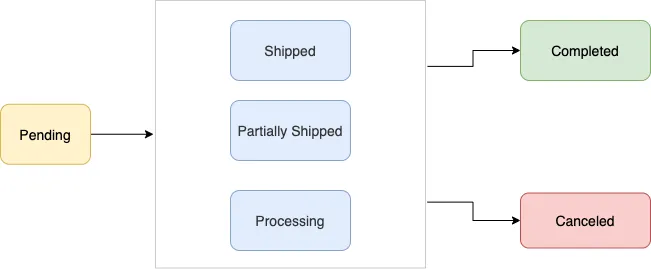
| Value | Description |
|---|---|
pending |
User has not successfully paid yet |
processing |
User payment authorized, merchant/partner is fulfilling the order, performing service, etc. |
partially-shipped |
A portion of the products in the order have been shipped by the merchant |
shipped |
All the products in the order have been shipped by the merchant |
completed |
The order is completed and no further action is expected from the user or the partner/merchant |
canceled |
The partner/merchant would like to cancel the order_details message for the order/invoice. The status update will fail if there is already a successful or pending payment for this order_details message |
order_status using either the WhatsApp payment status change notifications or their own internal processes. To update order_status, the partner sends an order_status message to the user.| Value | Description |
|---|---|
reference_id |
The ID provided by the partner in the order_details message |
status |
The new order status |
description |
Optional text for sharing status related information in order_details. Could be useful while sending cancellation. Max character limit is 120 characters |
Step 8: Reconcile Payments
reference_id provided in the order_details messages.Merchant Preferred UPI Payment Method
one UPI Payment app to showup in checkout flow. Merchant preferred payment app will be shown on top of the list of available UPI apps in - “Choose payment method” screen. To enable this capability we require partners to specify the external app-id in the Order Details or order-invoice message.Updates to Order Details Payload
List of supported apps:
| UPI Application | Application ID to be passed in Order Details payload |
|---|---|
|
Google Pay |
gpay |
|
PhonePe |
phonepe |
|
PayTm |
paytm |
|
Amazon Pay |
amazonpay |
|
CRED |
cred |
|
Mobikwik |
mobikwik |
Checklist for Integrated Merchants
order_status message is send to consumer informing them about updates to an order after receiving transaction updates for an order.
No comments to display
No comments to display