
Coupon code templates | Developer Documentation
Include a coupon code in a WhatsApp template with ChatArchitect
Use a Marketing text template to tell customers about a real coupon and how to redeem it. ChatArchitect's Submit template form at wtargeted.com does not provide the special copy-code button described in Meta's coupon template format. Put the code and essential redemption instructions in the approved body.
Check the coupon before preparing the message
- Confirm the code in the store, booking system or other service that accepts it. Check the discount or benefit, eligible items or customers, minimum spend and any usage restrictions that apply.
- Record the expiry date, time and time zone. Make sure the message and redemption service show consistent terms.
- If codes differ by recipient, identify which source record supplies the code. Keep the mapping separate from sample values used for template review.
- Choose an audience that expects the promotion. Use the marketing template guide for category and submission checks.
Write the code and redemption step clearly
For an illustrative offer, the body could be:
Use code {{1}} for 10% off selected items until {{2}}. Enter the code at checkout.
For review, supply meaningful samples for both variables, such as SAVE10 and 21 October 2026, 18:00 UTC. Use that wording only when the discount, item selection, expiry and checkout process match your actual offer. Add any important restrictions needed to understand it.
| Value | Check in the sending workflow |
|---|---|
| {{1}} — coupon code | The intended customer's valid code is used, with its exact spelling. |
| {{2}} — expiry | The date, time and time zone match the redemption service. |
| Redemption instructions | The customer can identify where to enter the code and which purchase qualifies. |
Submit, select and test
- In wtargeted.com, choose Submit template, an available language and the Marketing type, then enter the body and samples. The template parts guide explains text and variables.
- Add a button only when an available type helps with the next step. Check its behavior in the connected sending tool; do not label it as a working copy-code control.
- After review, refresh Approved templates and check the approved text, category and language. Use the review guide if the version is missing or rejected.
- Select that version in your CRM, help desk or other sending tool. Run a permitted test using the received-message checklist. Inspect the actual code and expiry on the recipient's phone.
- Check redemption in your own service using its permitted test process. Template approval does not establish that the store accepts the coupon or applies the intended benefit.
If the coupon does not work
Compare the received code and terms with the redemption service. Check the recipient's eligibility, qualifying items, expiry and earlier use where those restrictions apply. If the message contains the wrong value, review the source record and variable mapping before another send. If the code is correct but redemption fails, investigate the service that accepts it.
For time-sensitive offers, use the deadline checklist. If the message itself is missing, identify the sending attempt before retrying using the sending guide.
Meta's special coupon format
Meta documents a separate coupon code format with a copy-code button. The illustration below shows that Meta format for reference; it is not the ChatArchitect Submit template interface and does not show a feature available in that form.
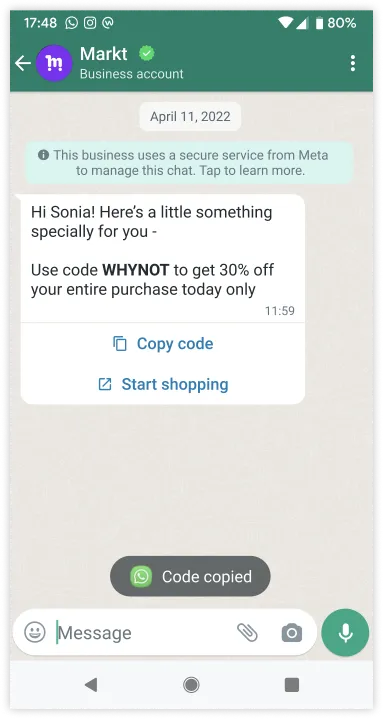
Meta reference illustration: the special Copy code control shown here is unavailable in ChatArchitect's Submit template form.
No comments to display
No comments to display