
Bypassing the phone number addition screen | Developer Documentation
Bypassing the phone number addition screen
Updated: Nov 14, 2025
This document describes how to customize Embedded Signup to bypass the phone number addition screen (shown below) and phone number verification screen.
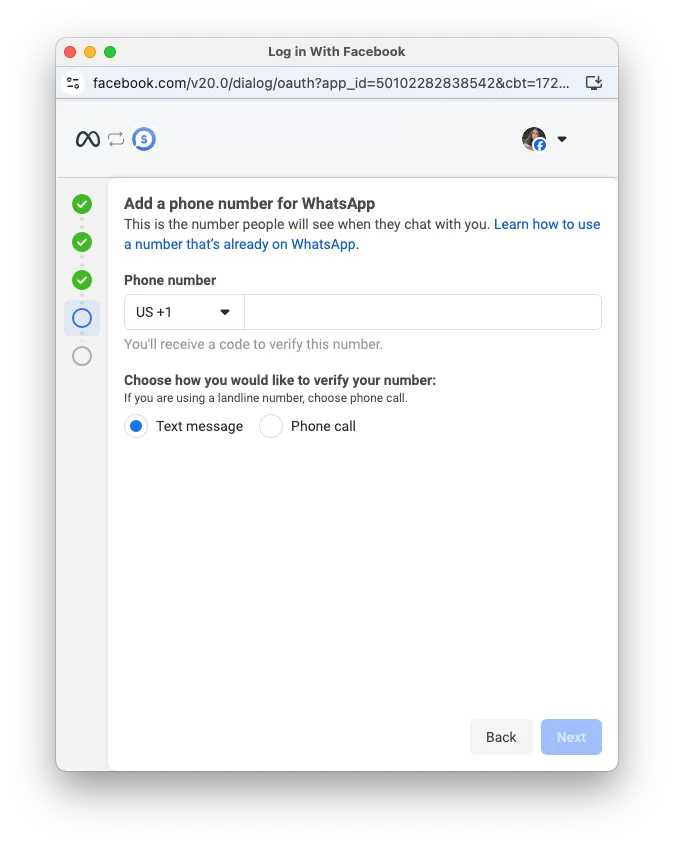
If you don’t want your business customers to have to enter or choose a business phone number in the phone number addition screen, you can customize Embedded Signup to skip the screen entirely. However, after a customer successfully completes the customized flow, you must programmatically create and register their business phone number, or build a UI in your app that allows them to do this.
Enabling the feature
To enable this feature, set
featureType to only_waba_sharing in the launch method and callback registration portion of the Embedded Signup code:// Launch method and callback registrationconst launchWhatsAppSignup =()=>{
FB.login(fbLoginCallback,{
config_id:'<CONFIGURATION_ID>',// your configuration ID goes here
response_type:'code',
override_default_response_type:true,
extras:{
setup:{},
featureType:'only_waba_sharing',// set to only_waba_sharing
sessionInfoVersion:'3',}});}When a business customer successfully completes the flow, the session logging message event will have
event set to FINISH_ONLY_WABA:{
data: {
phone_number_id: "<CUSTOMER_BUSINESS_PHONE_NUMBER_ID>",
waba_id: "<CUSTOMER_WABA_ID>"
},
type: "WA_EMBEDDED_SIGNUP",
event: "FINISH_ONLY_WABA",
version: 3
}
No comments to display
No comments to display