
Tap target title URL override | Developer Documentation
Clickable template areas in ChatArchitect
ChatArchitect does not support Meta's tap-target override. You cannot configure an entire template image or text area to open the first URL button's destination through this feature.
Plan the recipient's action around the message text and the buttons actually available in your ChatArchitect account and sending tool. A button in a template does not make the surrounding image or text a clickable button.
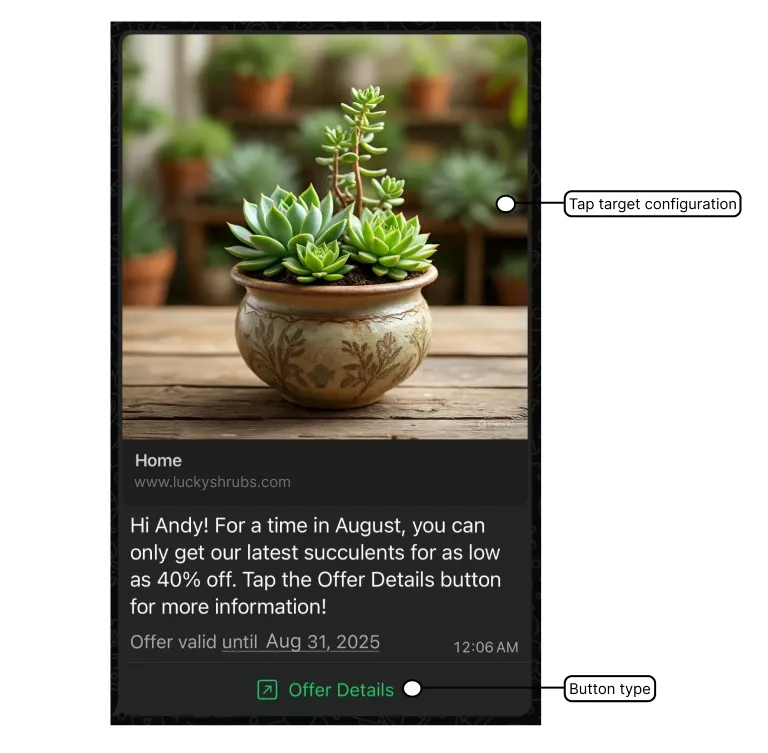
Choose an action your connection supports
- For a template button, use a button type offered in Submit template at wtargeted.com. Check the template components guide for the confirmed text, variable and button options.
- If an ordinary web link meets the need, include it in the message text using a workflow your sending tool supports. Explain what the recipient will find at the destination.
- If your campaign depends on tapping the entire image or text area, change that design before scheduling it. There is no tap-target override setting to enable in ChatArchitect.
Create and test the template
- Sign in to wtargeted.com using the App key and Secret for your connection, then open Submit template.
- Choose the language and category for the message, enter the text and sample values for any variables, and add the buttons offered in the form that you need.
- After review, find the template in Approved templates. Confirm its final text and category before using it in your connected sending tool.
- Send a test to a number you control through the same tool you will use for the campaign. Check the rendered message and each available action on the recipient's phone.
Check the destination and the sending tool
For a web link, verify the final destination and the action the recipient can complete there. Check the actual button or link; do not treat a tap on the surrounding image as the test. Template approval does not establish that every connected tool implements every button type.
The tap_target_configuration parameter in a Meta API reference is not an additional option in the ChatArchitect template workflow.
No comments to display
No comments to display