
Integration Patterns | Developer Documentation
Integration Patterns
Updated: Feb 25, 2026
Possible high-level approaches
| Approach | Number setup | Business Solution Provider responsibilities | Calling Tech Provider responsibilities | End business responsibilities |
|---|---|---|---|---|
|
Message BSP capable of Calling |
Existing messaging number extended for calling or new number |
Messaging BSP reuses their app and subscribes it to calls webhooks. Creation of new calling specific app also works but not recommendedProcess calls webhooks and coordinate with real-time media infraMake calls related Graph API calls similar to messaging Graph API calls |
Not applicable because there is only a single partner involved. |
Enable and use callingContinue paying the bill from BSP which now has calls related usage line items |
|
Single number independently operated by both messaging BSP and Calling BSP/TP |
Messaging BSP does no changes |
Calling BSP/TP hosts ES on their own website pointing to their own appGets end-biz to go through their ES |
Onboard using calling partner’s ESPay the bills to Messaging BSP like beforeFor Calling partner incurred activity, pay the bill to calling partner if they are a BSP or to Meta if they are not a BSP | |
|
Exclusive Calling ISV |
New number for calling |
Not applicable because there is no messaging BSP |
Calling ISV hosts Embedded Signup (ES) on their website pointing to their own appGets end-biz to go through their ESIf ISV is a tech provider or partner, Meta bills end-biz directly. ISV and end-biz figure out their own billingIf ISV is a BSP, they can extend their credit line to end-biz |
Onboard using ES on TPIf ISV is Tech Provider or Partner, pay Meta directly This requires end-biz to have a direct payment relation with Meta. Setting up this relation may take several weeksIf ISV is BSP, pay the bill from BSP |
|
Multi-platform solution using Calling ISV registered as Tech Provider (TP) |
New calling exclusive number serviced (only) by Calling TP |
BSP and TP work together to create / approve a multi-partner solution. BSP and TP have their own appsWork out Messaging BSP <> Calling ISV commercial relationExtend credit line to end businessCan receive messages or calls but cannot send messages or calls because you can select only one of the two partners to send messages/calls in a multi-platform solution |
BSP and TP work together to create / approve a multi-partner solution. BSP and TP have their own appsWork out Messaging BSP <> Calling ISV commercial relationOnboard end clients using ES pointing to created solutionSend/receive messages or calls |
Onboard using ES on TPBiz is informed about TP in ESPay the bill from BSP |
Multi-solution conversations (MSC)
Multi-solution Conversations allow multiple solutions on the same phone number, localizing messaging and calling in a single chat thread.
Integrating using a third party calling provider detailed design
The following logical architecture illustrates how to integrate WhatsApp Business Calling using a third party (3p) calling provider.
In this scenario, you would use the 3p vendor behind the scenes, and that 3p vendor would not be visible to Meta. This pattern is similar to any other SaaS service you may be using.
The diagram also illustrates how this architecture can be optionally extended to integrate with the SIP infrastructure on your side.
Our terms disallow use of PSTN on any leg of the WhatsApp call in the overall call flow.
Even if you bridge WA call into the SIP world, you must ensure it still stays exclusively on VoIP and never touches the PSTN. SIP trunk by itself is not disallowed because technically a SIP trunk can be used without any PSTN at all.
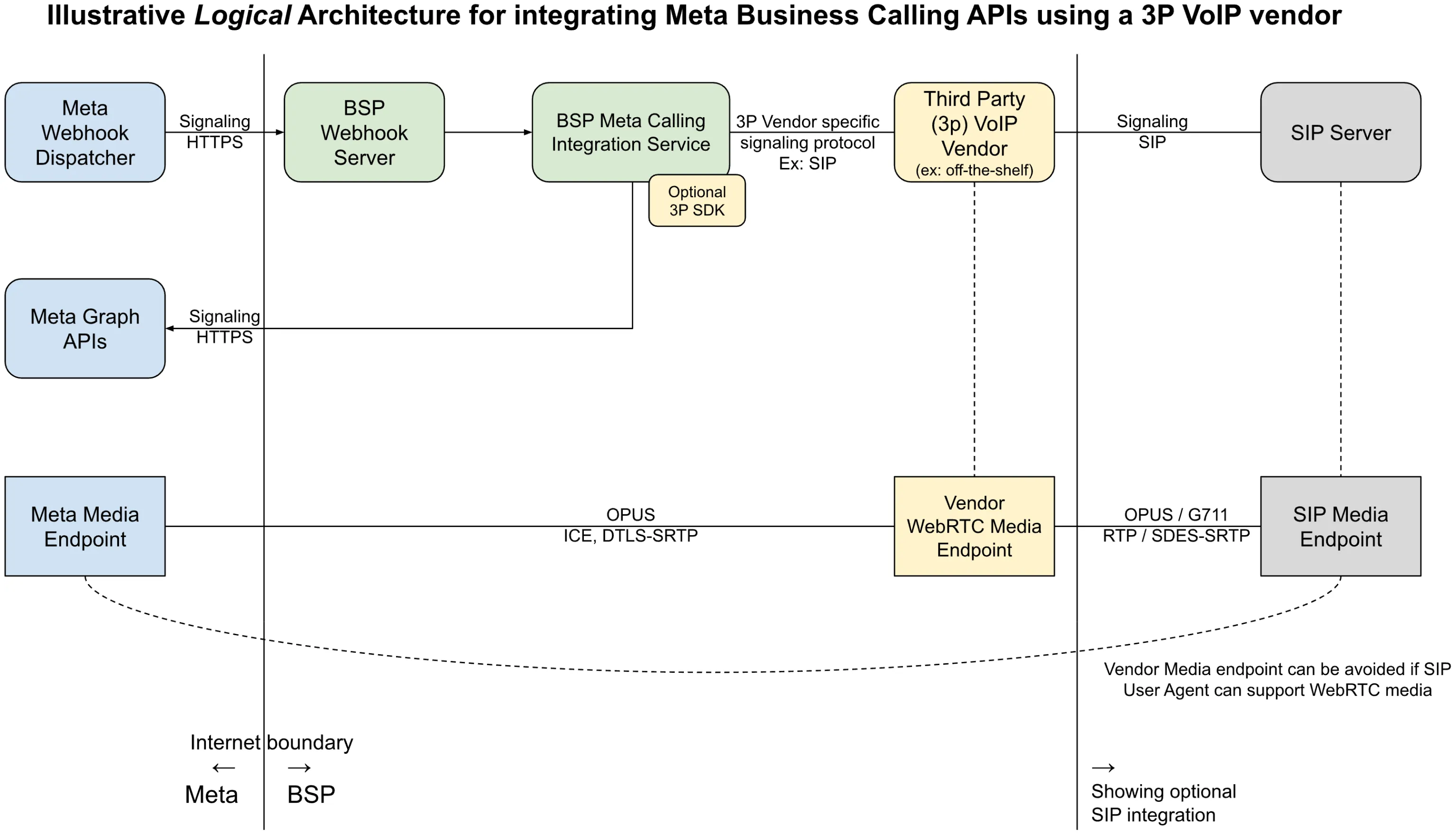 (Right click image and choose “Open in new tab” for enlarged image)
Single app vs. multiple apps
This section covers guidelines and considerations for reusing your existing messaging app for calling vs. creating a new app specifically for Calling API features.
To integrate with the WhatsApp Calling API, you need to call Graph API endpoints and process Webhooks from Meta. This requires you to have an app, and almost always, you should already have an app that is used for messaging.
In short, you can reuse an existing app which is used for Embedded Signup and for a messaging use case.
Reusing the same app offers the following benefits:
Reduced operational overhead (for example, app review, ongoing maintenance)Simplified footprint on MetaEquality between the app used for embedded signup and the one used for invoking Graph APIs and receiving webhooksThere would be no impact to existing functionality by reusing that app for calling. You just need to make sure the Webhook server is able to gracefully handle ‘calls’ related webhooks.
Having separate apps is still supported, see the Get Started FAQ for details.
Guidelines for Media path integration
The WhatsApp Business Calling VoIP stack is designed to be compatible with WebRTC. However, to ensure smooth integration with the WhatsApp protocol, Meta restricts the supported functionalities. As a result, the following requirements and recommendations apply.
Mandatory requirements
If any mandatory requirement is unmet, the call will fail. This failure can occur either during the call signaling phase, leading to a rejected call, or during the media packet decoding phase.
Use only the Opus audio codec.Set the media clock rate to 48 kHz.Set the DTMF clock rate to 8 kHz.Use a ptime of 20ms.Audio must use a single SSRC. The Meta relay server overwrites the SSRC of all business audio packets to a fixed SSRC before these packets reach the WA client. WA clients handle only one audio source from their peers. Using multiple SSRCs causes undefined behavior. This includes severe media corruption, audio glitches, and likely total media failure.
Recommendations
While the following aspects are not mandatory, they are recommended to achieve high call quality and reliability.
ICE ProcessOur VoIP stack is ICE-LITE, so it is recommended that BSPs’ VoIP stack is ICE-FULL. (RFC 5245 Section 2.7)BSPs’ VoIP stack should initiate the ICE process by sending STUN connectivity checks.BSPs’ VoIP stack should assume the ICE CONTROLLING role, as Meta will only assume the CONTROLLED role.Use regular nomination instead of aggressive nomination. (RFC 5245 Section 8.1.1.2)Wait for the ICE process to complete before nominating the candidate and starting DTLS.Do not switch the candidate in the middle of the call.DTLSUse ECDH keys for the DTLS certificates to prevent packet fragmentation during transmission.BSP should act as a DTLS client. (RFC 6347 Section 4.2)Addressing Audio ClippingDelay the audio from the SIP leg until the media connection with Meta is established.Integrate with the pre-accept API to help mitigate audio clipping in user-initiated calls.
No comments to display
No comments to display