
Send Marketing Messages | Developer Documentation
Send Marketing Messages
Updated: Mar 20, 2026
Marketing Messages API for WhatsApp (formerly known as Marketing Messages Lite API) is now generally available.
Marketing Messages API for WhatsApp allows you to send marketing template messages only. To send other message types or receive messages, use Cloud API in parallel with Marketing Messages API for WhatsApp on the same business phone number.
If you use a partner’s UI portals or APIs to configure and send marketing messages, you can continue to do so, and do not need to use any of the capabilities described in this document - your partner will take care of integrating with MM API for WhatsApp’s message sending functions on your behalf.
Create marketing templates
Marketing templates can be created in several ways:
See documentation on how to Create and manage templates.
When you create a new marketing template, it takes up to 10 minutes to sync with the corresponding Ad account. This sync allows messages to be optimized and enables measurement of clicks and downstream conversions. Templates inactive for longer than 7 days also require 10 minutes to sync after first use. Wait 10 minutes after creating new marketing templates before sending marketing traffic. The same applies after sending the first marketing message on a dormant template.
Marketing Messages API for WhatsApp supports all marketing templates. In addition, Marketing Messages API for WhatsApp provides the following features that are not available to marketing templates on Cloud API:
Automatic
creative optimizations
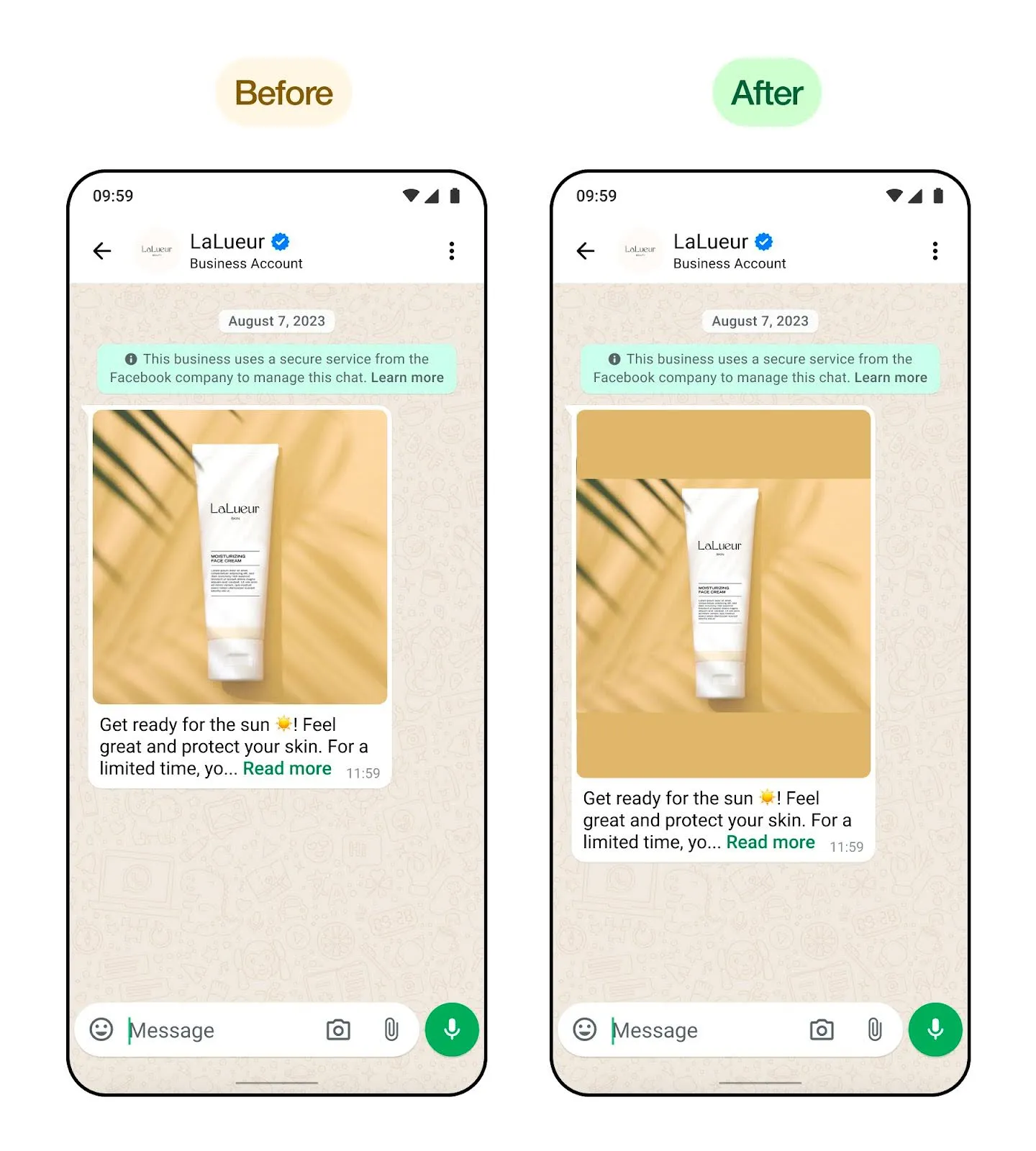
Image filtering
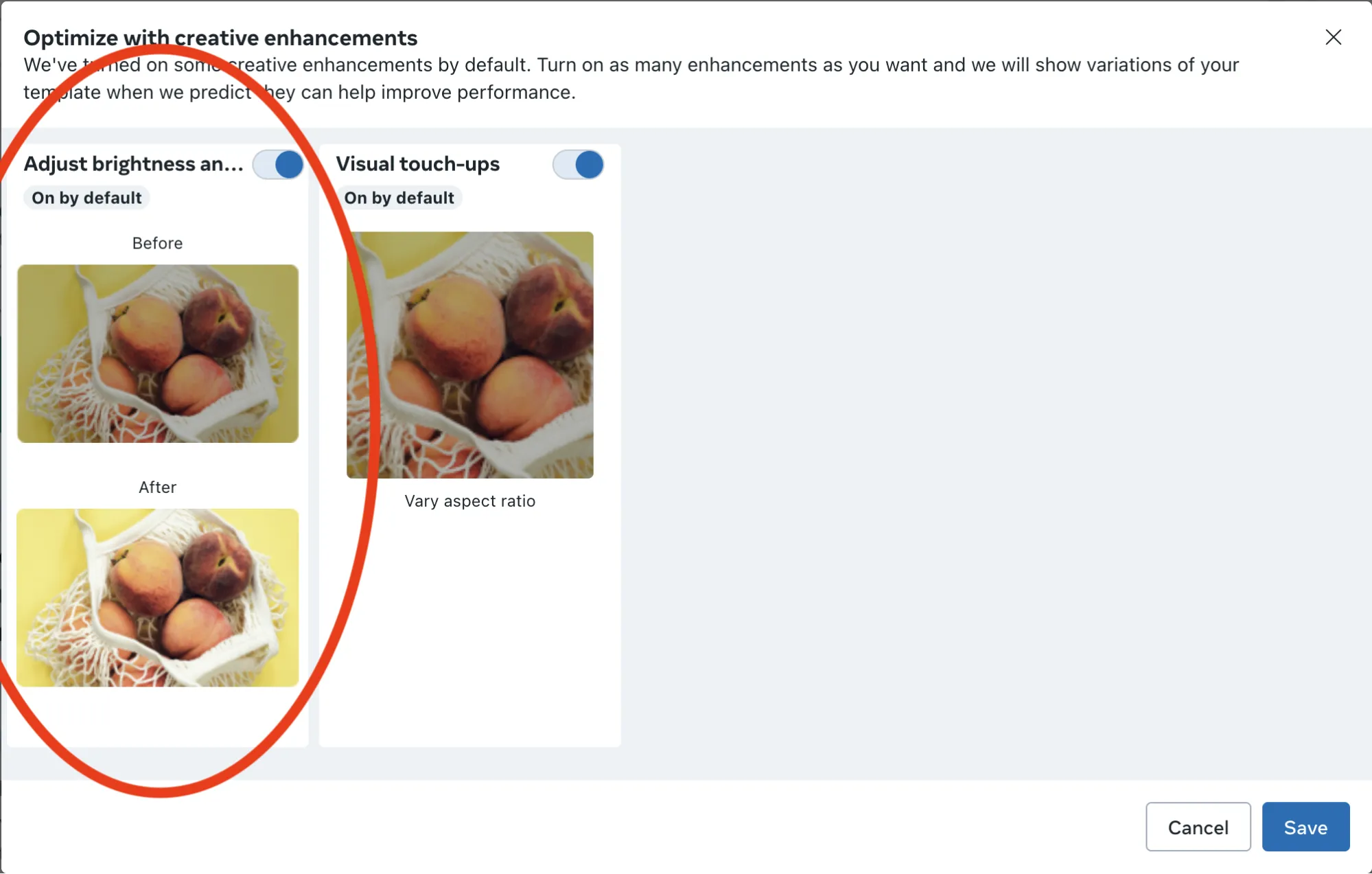
Headline extraction
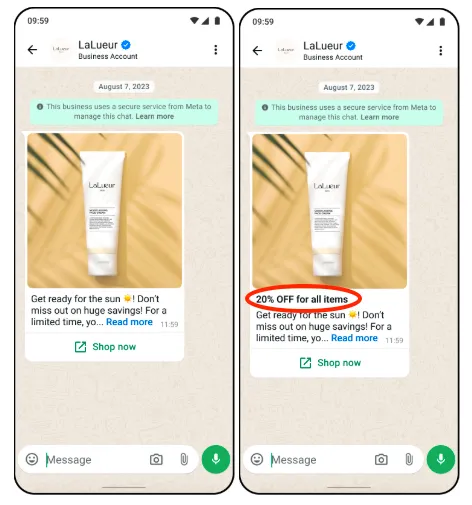
Tap-target title extraction
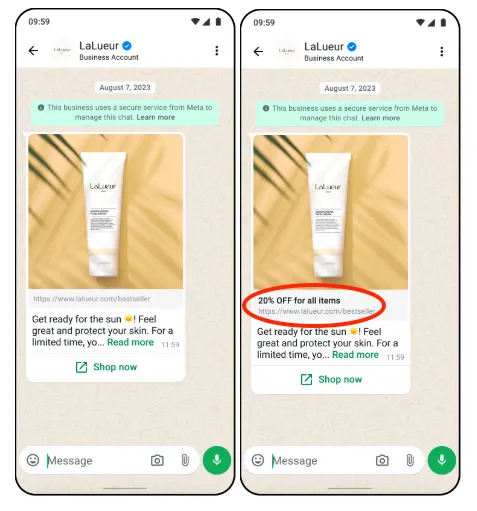
Text formatting
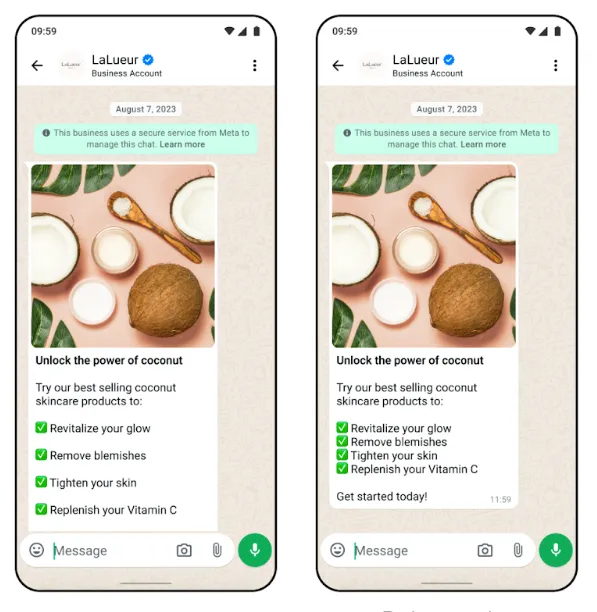
Coming soon
Product extensions
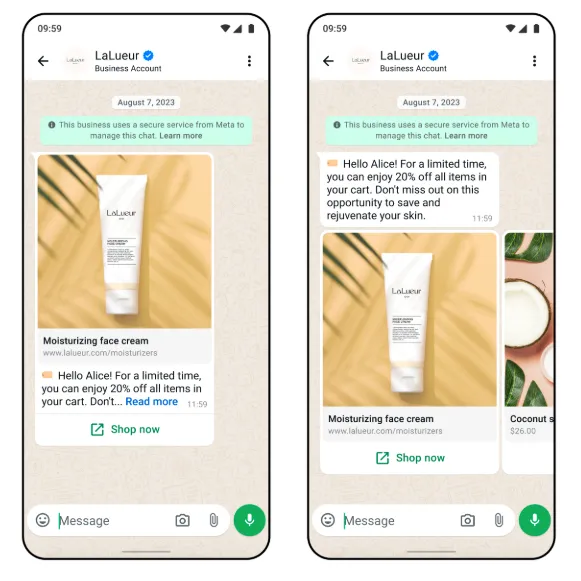
Auto promotion tag
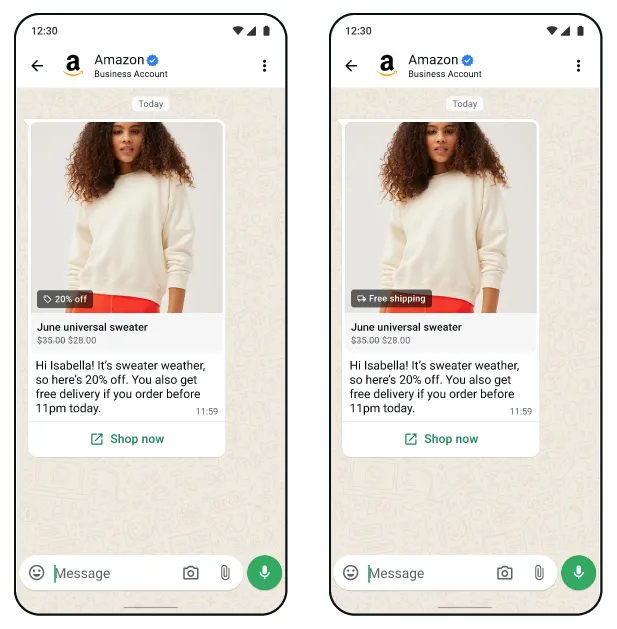
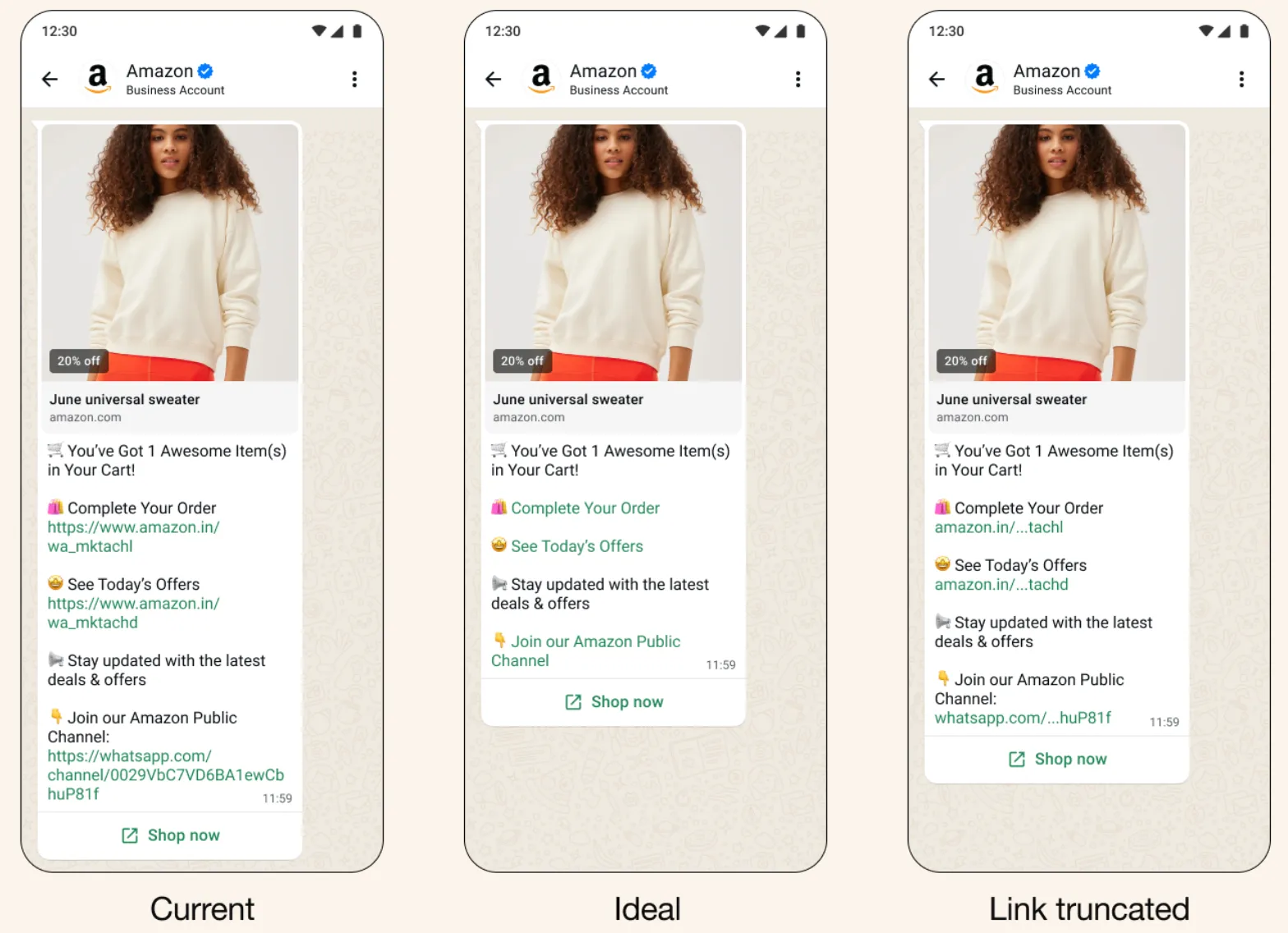
Link formatting (hyperlinks)
Paused or deprecated
Footnotes
Configure automatic creative optimizations (template-level)
creative_features_specenroll_statusOPT_INOPT_OUTRequest syntax
POST /<WHATSAPP_BUSINESS_ACCOUNT_ID>/message_templates
{
  "name": "<TEMPLATE_NAME>",
  "language": "<TEMPLATE_LANGUAGE_AND_LOCALE_CODE>",
  "components": [<TEMPLATE_COMPONENTS>],
  "degrees_of_freedom_spec": {
    "creative_features_spec": {
      "image_brightness_and_contrast": {
        "enroll_status": "OPT_OUT"
      },
      "image_touchups": {
        "enroll_status": "OPT_IN"
      },
      "add_text_overlay": {
        "enroll_status": "OPT_OUT"
      },
      "image_animation": {
        "enroll_status": "OPT_IN"
      },
      "image_background_gen": {
        "enroll_status": "OPT_IN"
      },
      "auto_promotion_tag": {
        "enroll_status": "OPT_IN"
      },
     "text_extraction_for_headline": {
       "enroll_status": "OPT_IN"
     },
     "text_extraction_for_tap_target": {
       "enroll_status": "OPT_IN"
     },
      "product_extensions": {
        "enroll_status": "OPT_OUT"
      },
      "text_formatting_optimization": {
        "enroll_status": "OPT_OUT"
      }
    }
  }
}
Request syntax
GET /<TEMPLATE_ID>?fields=degrees_of_freedom_spec
Example response
{
  "degrees_of_freedom_spec": {
    "creative_features_spec": [
      {
        "key": "IMAGE_BRIGHTNESS_AND_CONTRAST",
        "value": { "enroll_status": "OPT_OUT" }
      },
      {
        "key": "IMAGE_TOUCHUPS",
        "value": { "enroll_status": "OPT_OUT" }
      },
      {
        "key": "ADD_TEXT_OVERLAY",
        "value": { "enroll_status": "OPT_IN" }
      },
      {
        "key": "IMAGE_ANIMATION",
        "value": { "enroll_status": "OPT_OUT" }
      },
      {
        "key": "IMAGE_BACKGROUND_GEN",
        "value": { "enroll_status": "OPT_OUT" }
      },
      {
        "key": "AUTO_PROMOTION_TAG",
        "value": { "enroll_status": "OPT_OUT" }
      },
      {
        "key": "TEXT_EXTRACTION_FOR_HEADLINE",
        "value": { "enroll_status": "OPT_OUT" }
      },
      {
        "key": "TEXT_EXTRACTION_FOR_TAP_TARGET",
        "value": { "enroll_status": "OPT_OUT" }
      },
      {
        "key": "PRODUCT_EXTENSIONS",
        "value": { "enroll_status": "OPT_IN" }
      },
      {
        "key": "TEXT_FORMATTING_OPTIMIZATION",
        "value": { "enroll_status": "OPT_IN" }
      }
    ]
  },
  "id": "123456789"
}
Configure automatic creative optimizations (WhatsApp Business Account-level)
creative_features_specenroll_statusOPT_INOPT_OUTRequest syntax
POST /<WHATSAPP_BUSINESS_ACCOUNT_ID>
{
  "degrees_of_freedom_spec": {
    "creative_features_spec": {
      "image_touchups": {
        "enroll_status": "OPT_IN"
      },
      "image_animation": {
        "enroll_status": "OPT_IN"
      },
      "image_brightness_and_contrast": {
        "enroll_status": "OPT_IN"
      },
      "add_text_overlay": {
        "enroll_status": "OPT_IN"
      },
      "image_background_gen": {
        "enroll_status": "OPT_IN"
      },
      "auto_promotion_tag": {
        "enroll_status": "OPT_IN"
      },
      "text_extraction_for_headline": {
        "enroll_status": "OPT_IN"
      },
      "product_extensions": {
        "enroll_status": "OPT_IN"
      },
      "text_extraction_for_tap_target": {
        "enroll_status": "OPT_IN"
      },
      "text_formatting_optimization": {
        "enroll_status": "OPT_OUT"
      }
    }
  }
}
Request syntax
GET /<WHATSAPP_BUSINESS_ACCOUNT_ID>?fields=degrees_of_freedom_spec
Example response
{
  "degrees_of_freedom_spec": {
    "data": [
      {
        "creative_features_spec": [
          {
            "image_brightness_and_contrast": "OPT_IN",
            "image_touchups": "OPT_IN",
            "add_text_overlay": "OPT_IN",
            "image_animation": "OPT_IN",
            "image_background_gen": "OPT_IN",
            "auto_promotion_tag": "OPT_IN",
            "text_extraction_for_headline": "OPT_IN",
            "product_extensions": "OPT_IN",
            "text_extraction_for_tap_target": "OPT_IN",
            "text_formatting_optimization": "OPT_IN"
          }
        ]
      }
    ]
  },
  "id": "1234567890"
}
Other optimizations
Text truncation
Meta truncates text to a specific line-count to increase performance. No text content is changed, the original text is still accessible through the “Read more” button. The exact line count truncation rules are as follows:
Send marketing template messages
Sending messages follows the same API payload syntax as Sending Messages on Cloud API, and requires the same permissions.
The
/marketing_messages endpoint supports only marketing template messages for MM API for WhatsApp and Cloud API. All other message types (freeform, Authentication, Service, Utility) are not supported, and will produce an error.Marketing messages will only be sent via MM API for WhatsApp when the business customer has met all onboarding requirements. If onboarding requirements are not met, the marketing messages will still be routed via Cloud API. You may disable the ability to route to Cloud API by setting the optional field
product_policy to STRICT.Note: You may still use the
/messages endpoint to send marketing messages through the Cloud API.|
| |
|---|---|
| |
Request syntax
POST
MM API for WhatsApp provides the following additional features that are not available to Marketing template messages on Cloud API:
Product fallback policy: Set
product_policy to CLOUD_API_FALLBACK to have the API send the outgoing message via Cloud API, if onboarding requirements have not been met. Set to STRICT if you do not want the API to fallback to sending the message via Cloud API.Message activity sharing:
message_activity_sharing is an optional parameter at the message level that enables or disables sharing message activities (for example, message read) for that specific marketing message to Meta to help optimize marketing messages. If this parameter is not provided, the default WABA-level setting will be applied. You can always edit your default setting in Business Settings (see Changelog for a screenshot of this).For details on message types, reference the Cloud API Message Types documentation, as MM API for WhatsApp uses the same message send formatting.
Receiving message status webhooks
MM API for WhatsApp triggers status messages webhooks (sent, delivered, read). In addition, status messages webhooks that describe a message sent via MM API for WhatsApp, and that include pricing information, will have
pricing.category and conversation.type set to marketing_lite. If the message is routed via Cloud API, pricing.category will be set to marketing.{Maintain logs of each outgoing message ID, and whether that ID was sent via Cloud API or MM API for WhatsApp, in order to use the unique message ID returned in message status webhooks to identify the origin of the sent message.
Receiving incoming messages
MM API for WhatsApp is a send-only API. It does not receive incoming messages from consumers. To receive incoming messages on a business phone number, use Cloud API in parallel with MM API for WhatsApp on the same phone number.