
Orders | Developer Documentation
Orders
Updated: Mar 25, 2026
Payments API introduces two new types of interactive messages:
order_details and order_status. They are the entrypoint to collect payment in WhatsApp.order_details messages are sent to create an order in the buyer’s WhatsApp client app. This message includes the payment settings used to collect payment and can optionally include an order object with itemized products, fees, and discounts. Without the order object, you can send a simplified order details message with just the total amount and payment settings. The payment settings will vary depending on the integration type (Pix, payment links, Boleto, One Click Payments).order_status messages are sent when businesses update the order status either based on the WhatsApp payment status change notification or based on their internal processes. You can also send a simplified status update without the order object.
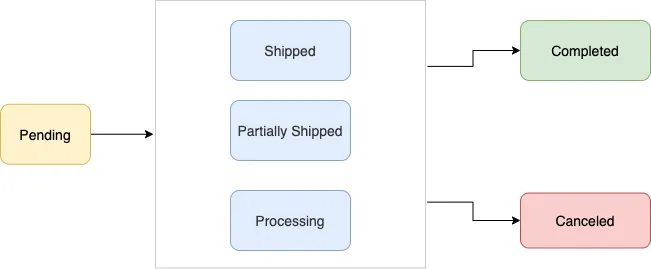
When attached to an order details message, orders start in
pending status. When the merchant has fully fulfilled the order and the buyer should not expect any further updates, it must be marked as completed.Sending
order messages
order_detailsorder_statusorderinteractiveOrder details example
Endpoint
POST /{PHONE_NUMBER_ID}/messages
Request body
{
  "recipient_type": "individual",
  "to": "<PHONE_NUMBER>",
  "type": "interactive",
  "interactive": {
    "type": "order_details",
    "body": {
      "text": "Your message content"
    },
    "action": {
      "name": "review_and_pay",
      "parameters": {
        "reference_id": "unique-reference-id",
        "type": "digital-goods",
        "payment_type": "br",
        "payment_settings": [
          {
            "type": "payment_link",
            "payment_link": {
              "uri": "https://my-payment-link-url"
            }
          }
        ],
        "currency": "BRL",
        "total_amount": {
          "value": 50000,
          "offset": 100
        },
        "order": {
          "status": "pending",
          "tax": {
            "value": 0,
            "offset": 100,
            "description": "optional text"
          },
          "items": [
            {
              "retailer_id": "1234567",
              "name": "Cake",
              "amount": {
                "value": 50000,
                "offset": 100
              },
              "quantity": 1
            }
          ],
          "subtotal": {
            "value": 50000,
            "offset": 100
          }
        }
      }
    }
  }
}
Simplified order details message
Endpoint
POST /{PHONE_NUMBER_ID}/messages
Request body
{
  "recipient_type": "individual",
  "to": "<PHONE_NUMBER>",
  "type": "interactive",
  "interactive": {
    "type": "order_details",
    "body": {
      "text": "Your message content"
    },
    "action": {
      "name": "review_and_pay",
      "parameters": {
        "reference_id": "unique-reference-id",
        "type": "digital-goods",
        "payment_type": "br",
        "payment_settings": [
          {
            "type": "payment_link",
            "payment_link": {
              "uri": "https://my-payment-link-url"
            }
          }
        ],
        "currency": "BRL",
        "total_amount": {
          "value": 50000,
          "offset": 100
        }
      }
    }
  }
}
Order status example
Endpoint
POST /{PHONE_NUMBER_ID}/messages
Request body
{
  "recipient_type": "individual",
  "to": "<PHONE_NUMBER>",
  "type": "interactive",
  "interactive": {
    "type": "order_status",
    "body": {
      "text": "your-mandatory-text-body-content"
    },
    "footer": {
      "text": "your-optional-text-footer-content"
    },
    "action": {
      "name": "review_order",
      "parameters": {
        "reference_id": "unique-reference-id",
        "order": {
          "status": "processing"
        },
        "payment": {
          "status": "captured",
          "timestamp": 1722445231
        }
      }
    }
  }
}
Simplified order status example
Endpoint
POST /{PHONE_NUMBER_ID}/messages
Request body
{
  "recipient_type": "individual",
  "to": "<PHONE_NUMBER>",
  "type": "interactive",
  "interactive": {
    "type": "order_status",
    "body": {
      "text": "your-mandatory-text-body-content"
    },
    "footer": {
      "text": "your-optional-text-footer-content"
    },
    "action": {
      "name": "review_order",
      "parameters": {
        "reference_id": "unique-reference-id",
        "payment": {
          "status": "captured",
          "timestamp": 1722445231
        }
      }
    }
  }
}
Message response
{
  "messaging_product": "whatsapp",
  "contacts": [
    {
      "input": "[PHONE_NUMBER_ID]",
      "wa_id": "[PHONE-NUMBER_ID]"
    }
  ],
  "messages": [
    {
      "id": "wamid.HBgLMTY1MDUwNzY1MjAVAgARGBI5QTNDQTVCM0Q0Q0Q2RTY3RTcA"
    }
  ]
}
Full API Reference
Order Details
To send an order_details message, businesses must assemble an interactive object of type order_details with the following components:
Interactive Object
type
Required
String
Must be
order_details.header
Optional
Object
Thumbnail image for order details message. It has the following fields:
type: Must be image.image: See Image Object.
If the header is not present, the API finds the first product with an image and uses that for the thumbnail image.
body
Required
Object
An object with the body of the message. The object contains the following field:
text string: The content of the message. Emojis and markdown are supported. Maximum length is 1024 characters.footer
Optional
Object
An object with the footer of the message. The object contains the following field:
text string: Required if footer is present. The footer content. Emojis, markdown, and links are supported. Maximum length is 60 characters.action
Required
Action Object
See Action Object below.
Image Object
link
Required
String
Url of the image.
provider
Optional
String
Name of the url provider.
Action Object
name
Required
String
Must be
review_and_pay.parameters
Required
Parameters Object
See Parameters Object.
Parameters Object
reference_id
Required
String
Unique identifier for the order or invoice provided by the business. This cannot be an empty string and can only contain English letters, numbers, underscores, dashes, or dots, and should not exceed 60 characters.
The reference_id must be unique for each order_details message for the same business. If the partner would like to send multiple order_details messages for the same order, invoice, etc. it is recommended to include a sequence number in the reference_id to ensure reference_id uniqueness.
type
Required
String
Must be one of
digital-goods or physical-goods.payment_type
Required
String
Must be
br.payment_settings
Optional
List of payment related configuration objects.
currency
Required
String
ISO 4217 currency code for the order. Must be
BRL (Brazilian Real).total_amount
Required
Amount Object
See Amount Object.
total_amount.value must be equal to order.subtotal.value + order.tax.value + order.shipping.value - order.discount.valueorder
Optional
Order Object
See Order Object.
Payment Settings
typeRequired
String
One of
pix_dynamic_code, payment_link, boleto.One of the following objects:
pix_dynamic_code, payment_link, boleto.Required
Object
Payment instructions which will be displayed to buyers during the checkout process.
Order Object
status
Required
String
Status of the order. Only supported value here is
pending.catalog_id
Optional
String
Unique identifier of the Facebook catalog being used by the business.
expiration
Optional
Expiration Object
Expiration for that order. The CTA for payment will be disabled after expiry on the user end. See Expiration Object.
items
Required
List of Item Objects
List must have at least one item. See Item Object.
subtotal
Required
Amount Object
See Amount Object.
The value must be equal to sum of (
item.amount.value or item.sale_amount.value) * item.quantity.The following fields are part of the
subtotal object:offset string100 for BRL.
value stringtax
Required
Amount With Description Object
The tax information for this order. Even though the object is required, the amount can be zero. When zero is used, the tax line is not rendered in the client. See Amount With Description Object.
shipping
Optional
Amount With Description Object
See Amount Object.
discount
Optional
Discount Object
The discount for the order. See Discount object.
Expiration Object
timestamp
Required
String
UTC time in seconds. Minimum threshold is 300 seconds.
description
Required
String
Text explanation for when the order will expire. Max character limit is 120 characters.
Item Object
retailer_id
Required
String
Content ID for an item in the order from your catalog.
name
Required
String
The item’s name to be displayed to the user. Cannot exceed 60 characters.
amount
Required
Amount Object
The price per item. See Amount Object.
quantity
Required
Integer
Number of items in this order.
sale_amount
Optional
Amount Object
The discounted price per item. This should be less than the original amount. If included, this field is used to calculate the subtotal amount. See Amount Object.
Discount Object
value
Required
Integer
Positive integer representing the amount value multiplied by offset. For example, 12.34 BRL has value 1234.
offset
Required
Integer
Must be
100 for BRL.description
Optional
String
Max character limit is 60 characters.
discount_program_name
Optional
String
Text used for defining incentivised orders. If order is incentivised, the merchant needs to define this information. Max character limit is 60 characters.
Amount Object
value
Required
Integer
Positive integer representing the amount value multiplied by offset. For example, 12.34 BRL has value 1234.
offset
Required
Integer
Must be
100 for BRL.Amount Object (With Description)
value
Required
Integer
Positive integer representing the amount value multiplied by offset. For example, 12.34 BRL has value 1234.
offset
Required
Integer
Must be
100 for BRL.description
Optional
String
Max character limit is 60 characters.
Order Status
To send an order_status message, businesses must assemble an interactive object of type order_status with the following components:
Interactive Object
type
Required
String
Must be
order_status.header
Optional
Object
Optional object for the message’s header for the message.
body
Required
Object
An object with the body of the message. The object contains the following field:
text string: The content of the message. Emojis and markdown are supported. Maximum length is 1024 characters.footer
Optional
Object
An object with the footer of the message. The object contains the following field:
text string: Required if footer is present. The footer content. Emojis, markdown, and links are supported. Maximum length is 60 characters.action
Required
Action Object
See Action Object below.
Action Object
name
Required
String
Must be
review_order.parameters
Required
Parameters Object
See Parameters Object.
Parameters Object
reference_id
Required
String
The unique ID provided in the
order_details message.order
Optional
Order Object
See Order Object.
payment
Optional
Payment Object
See Payment Object.
Order Object
status
Required
String
The new order status. See supported order status.
description
Optional
String
Optional text for sharing status related information in order-details page. Could be useful while sending cancellation. Length should not exceed 120 characters.
Payment Object
status
Required
String
The new payment status. See supported payment status.
timestamp
Optional
Integer
Optional epoch timestamp in seconds
Supported Order Status
Currently we support the following order status values:
pendingOrder is pending / not processed yet.
processingMerchant/partner is fulfilling the order, performing service, etc.
partially-shippedPart of the products in order have been shipped by the merchant.
shippedAll the products in order have been shipped by the merchant.
completedThe order is completed and no further action is expected from the user or the partner/merchant.
canceledThe partner/merchant would like to cancel the order_details message for the order/invoice. The status update will fail if there is already a successful or pending payment for this order_details message.
Supported Payment Status
Currently we support the following payment status values:
pendingPayment is pending.
capturedPayment was successfully captured. Receiving this payment status will update the order bubble to include the “paid” label (with green checkmark).
failedPayment failed.
Errors and Statuses
These are the relevant errors for the WhatsApp Payments API:
2040 - Message is not supportedThe message you are trying to send cannot be received by this user
2046 - Order status invalid transitionThe order status cannot be updated from the existing value to the new one
2047 - Order cancellation failureThe order could not be cancelled
For a comprehensive list with detailed descriptions of error codes and HTTP status codes, please refer to our Error Codes document.