
Offsite Pix payments | Developer Documentation
Offsite Pix payments
Updated: Nov 14, 2025
Payments API also enables businesses to collect payments from their customers via WhatsApp using dynamic Pix codes.
When using this integration, WhatsApp only facilitates the communication between merchants and buyers. Merchants are responsible for integrating with a bank or PSP in order to generate dynamic Pix codes, and confirm their payment.
Before you start
Integration steps
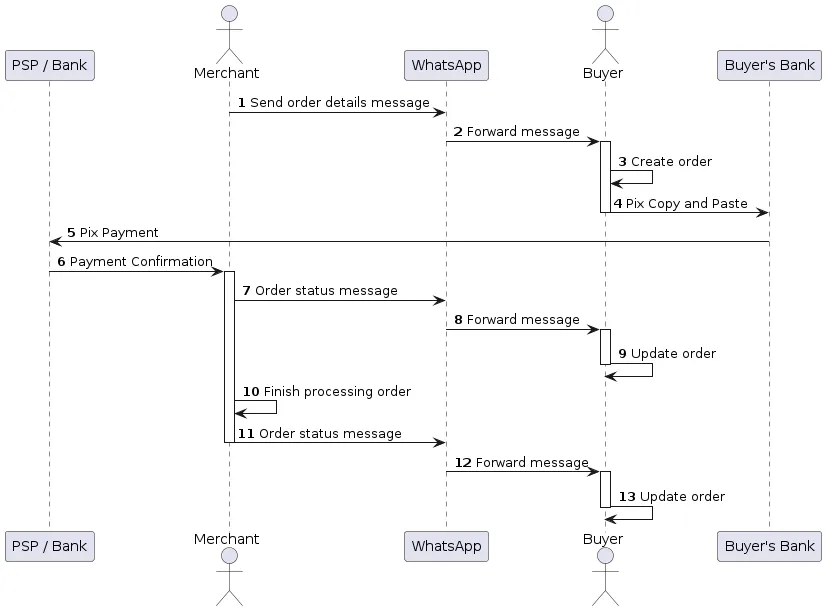
1. Send an Order Details message
pix_dynamic_codepayment_settingsEndpoint
POST /{PHONE_NUMBER_ID}/messagesPayload example
{
  "recipient_type": "individual",
  "to": "<PHONE_NUMBER>",
  "type": "interactive",
  "interactive": {
    "type": "order_details",
    "body": {
      "text": "Your message content"
    },
    "action": {
      "name": "review_and_pay",
      "parameters": {
        "reference_id": "unique-reference-id",
        "type": "digital-goods",
        "payment_type": "br",
        "payment_settings": [
          {
            "type": "pix_dynamic_code",
            "pix_dynamic_code": {
              "code": "00020101021226700014br.gov.bcb.pix2548pix.example.com...",
              "merchant_name": "Account holder name",
              "key": "39580525000189",
              "key_type": "CNPJ"
            }
          }
        ],
        "currency": "BRL",
        "total_amount": {
          "value": 50000,
          "offset": 100
        },
        "order": {
          "status": "pending",
          "tax": {
            "value": 0,
            "offset": 100,
            "description": "optional text"
          },
          "items": [
            {
              "retailer_id": "1234567",
              "name": "Cake",
              "amount": {
                "value": 50000,
                "offset": 100
              },
              "quantity": 1
            }
          ],
          "subtotal": {
            "value": 50000,
            "offset": 100
          }
        }
      }
    }
  }
}
Parameters object
|
Payment settings
| | ||
|
Dynamic Pix code object
| |||
| |||
| |||
| |