
Conversational Components | Developer Documentation
Conversational Components
Updated: Mar 27, 2026
Conversational components are in-chat features that you can enable on business phone numbers. They make it easier for WhatsApp users to interact with your business. You can configure easy-to-use commands and provide pre-written ice breakers that users can tap.
Limitations
If a WhatsApp user taps a universal link? (that is, wa.me link) configured with pre-filled text, the user interfaces for ice breakers are automatically dismissed.
Configure using WhatsApp Manager (WAM)
You can configure all of these features in WhatsApp Manager on the specific numbers you choose:
Solution Partners can configure these features for their customers as well if they have access to their customer’customer's WhatsApp Business Account in WhatsApp Manager.
Ice
breakers
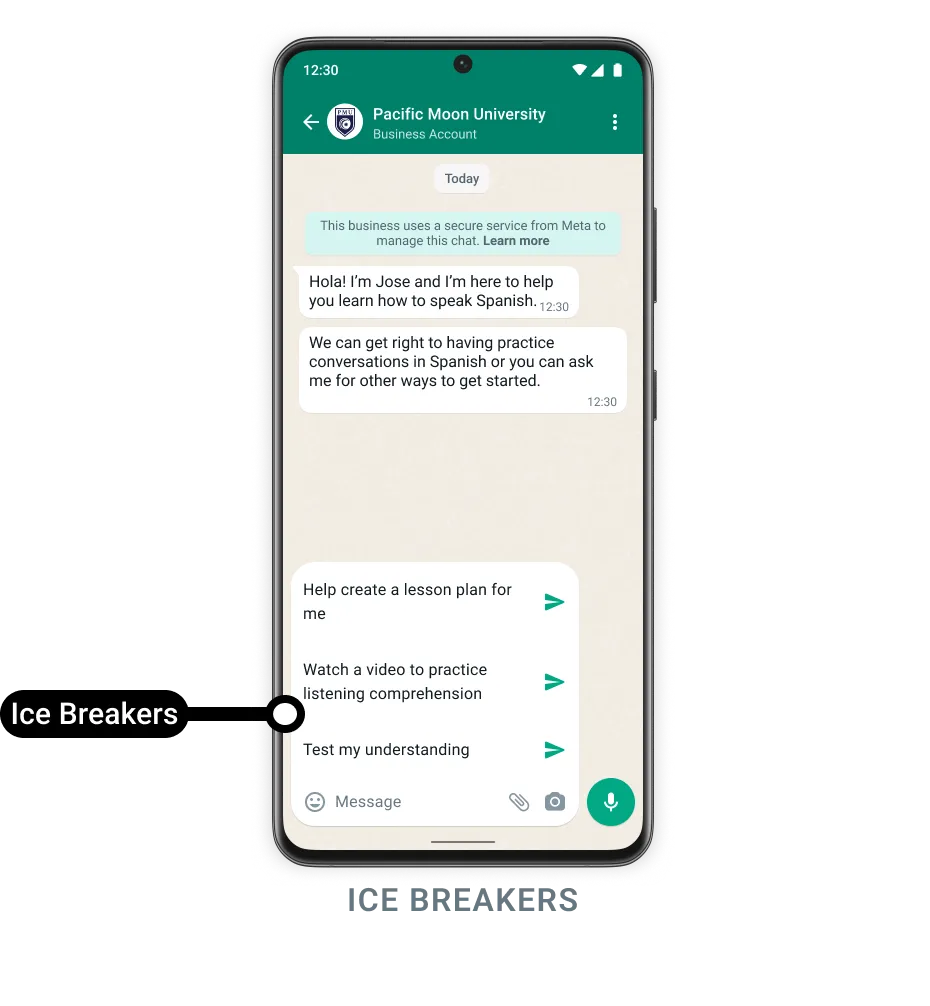
bodyWebhook payload
{
  "object": "whatsapp_business_account",
  "entry": [
    {
      "id": "<WHATSAPP_BUSINESS_ACCOUNT_ID>",
      "changes": [
        {
          "value": {
            "messaging_product": "whatsapp",
            "metadata": {
              "display_phone_number": "<BUSINESS_DISPLAY_PHONE_NUMBER>",
              "phone_number_id": "<BUSINESS_PHONE_NUMBER_ID>"
            },
            "contacts": [
              {
                "profile": {
                  "name": "<WHATSAPP_USER_NAME>"
                },
                "wa_id": "<WHATSAPP_USER_ID>"
              }
            ],
            "messages": [
              {
                "from": "<WHATSAPP_USER_PHONE_NUMBER_ID>",
                "id": "<WHATSAPP_MESSAGE_ID>",
                "timestamp": "<TIMESTAMP>",
                "text": {
                  "body": "Plan a trip"
                },
                "type": "text"
              }
            ]
          },
          "field": "messages"
        }
      ]
    }
  ]
}
Commands
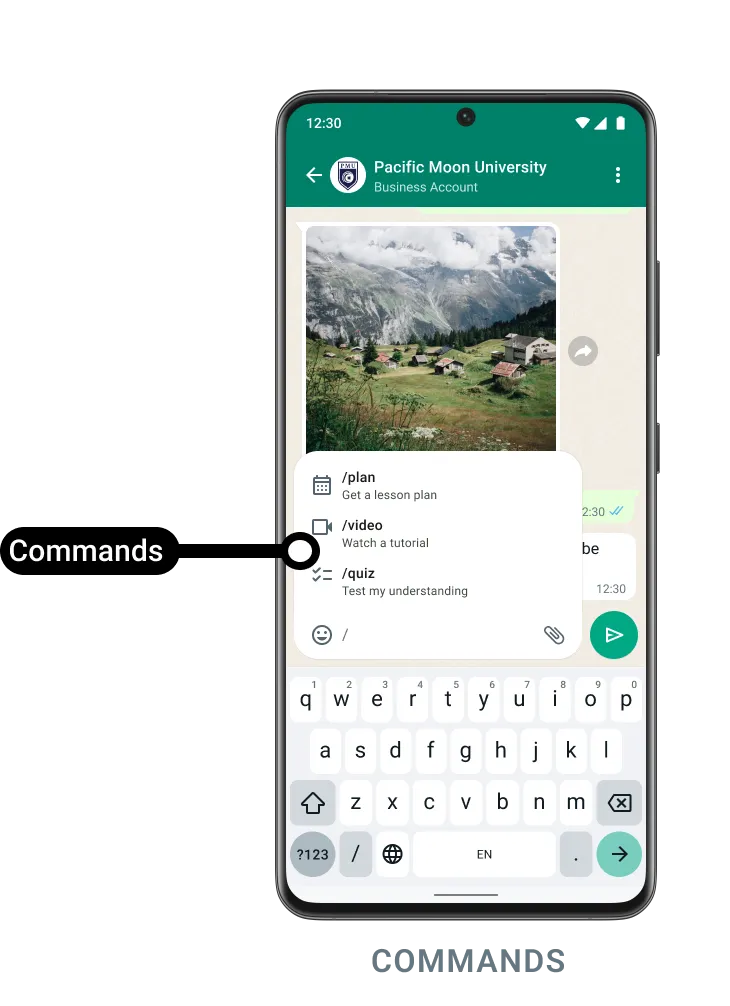
/imagine - Create images using a text promptbodyWebhook payload
{
  "object": "whatsapp_business_account",
  "entry": [
    {
      "id": "<WHATSAPP_BUSINESS_ACCOUNT_ID>",
      "changes": [
        {
          "value": {
            "messaging_product": "whatsapp",
            "metadata": {
              "display_phone_number": "<BUSINESS_DISPLAY_PHONE_NUMBER>",
              "phone_number_id": "<BUSINESS_PHONE_NUMBER_ID>"
            },
            "contacts": [
              {
                "profile": {
                  "name": "<WHATSAPP_USER_NAME>"
                },
                "wa_id": "<WHATSAPP_USER_ID>"
              }
            ],
            "messages": [
              {
                "from": "<WHATSAPP_USER_PHONE_NUMBER_ID>",
                "id": "<WHATSAPP_MESSAGE_ID>",
                "timestamp": "<TIMESTAMP>",
                "text": {
                  "body": "/imagine cars racing on Mars"
                },
                "type": "text"
              }
            ]
          },
          "field": "messages"
        }
      ]
    }
  ]
}
Configure using the API
POST /<PHONE_NUMBER_ID>/conversational_automationGET /<PHONE_NUMBER_ID>/conversational_automationConfigure conversational components via the API
Request syntax
// Configure Commands with names and descriptions
POST /<PHONE_NUMBER_ID>/conversational_automation?commands=<COMMAND_LIST>

// Configure Prompts
POST /<PHONE_NUMBER_ID>/conversational_automation?prompts=<PROMPT>
Body properties
| | |
|
| |
| |
Sample request
   curl -X POST \
 'https://graph.facebook.com/v22.0/PHONE_NUMBER_ID/conversational_automation' \
 -H 'Authorization: Bearer ACCESS_TOKEN' \
 -H 'Content-Type: application/json' \
 -d '{
   "commands": [
     {
       "command_name": "tickets",
       "command_description": "Book flight tickets"
     },
     {
       "command_name": "hotel",
       "command_description": "Book hotel"
     }
   ],
   "prompts": ["Book a flight", "plan a vacation"]
}'
Sample response
{
  "success": true
}
View the current configuration using the API
Request syntax
GET /<PHONE_NUMBER_ID>?fields=conversational_automation
Sample response
{
  "conversational_automation": {
    "prompts": [
      "Find the best hotels in the area",
      "Find deals on rental cars"
    ],
    "commands": [
      {
        "command_name": "tickets",
        "command_description": "Book flight tickets"
      },
      {
        "command_name": "hotel",
        "command_description": "Book hotel"
      }
    ]
  },
  "id": "123456"
}
Testing
To test conversational components once they have been configured, open the WhatsApp client and open a chat with your business phone number.
For ice breakers, if you already have a chat thread going with the business phone number, you must first delete the chat thread:
You can then send a message to the business phone number to test your ice breakers.