
Audio messages | Developer Documentation
Audio messages
Updated: Feb 17, 2026
On March 17th, 2026, voice messages will start receiving a “played” status webhook the first time a WhatsApp user plays a voice message shared by the business.
You can use Cloud API to send voice messages and basic audio messages.
Voice messages
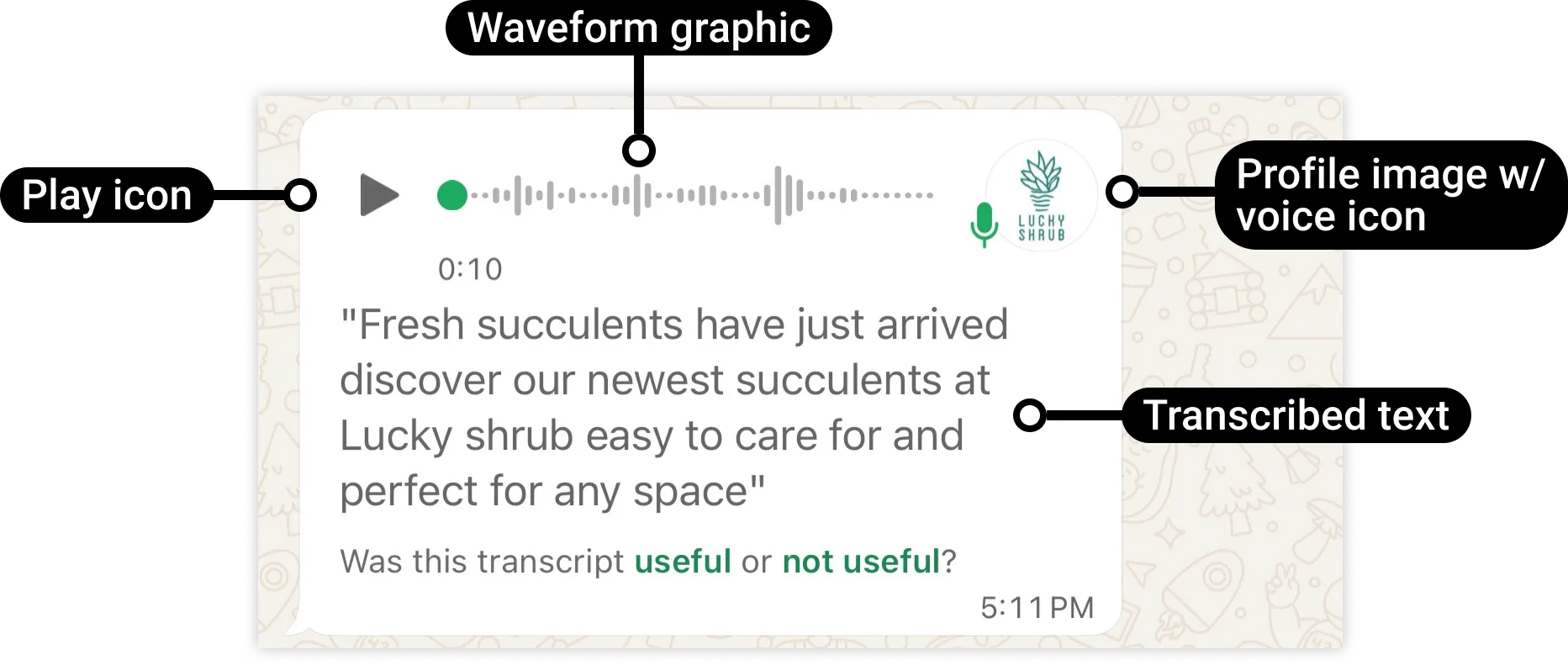
A voice message (sometimes referred to as a voice note, voice memo, or audio) is a recording of one or more persons speaking, and can include background sounds like music. Voice messages include features like automatic download, profile picture, and voice icon. These features are not available with basic audio messages. If the user sets voice message transcripts to Automatic, the message includes a text transcription.
Basic audio messages
Basic audio messages display a download icon and a music icon. When the WhatsApp user taps the play icon, the user manually download the audio message for the WhatsApp client to load and then play the audio file.

Request
syntax
curl 'https://graph.facebook.com/<API_VERSION>/<WHATSAPP_BUSINESS_PHONE_NUMBER_ID>/messages' \-H 'Content-Type: application/json' \-H 'Authorization: Bearer<ACCESS_TOKEN>' \-d '{"messaging_product": "whatsapp","recipient_type": "individual","to": "<WHATSAPP_USER_PHONE_NUMBER>","type": "audio","audio": {"id": "<MEDIA_ID>",<!-- Only if using uploaded media -->"link": "<MEDIA_URL>",<!-- Only if using hosted media (not recommended)-->"voice":<IS_VOICE?><!-- Only include if sending voice message -->}}'
Request parameters
<ACCESS_TOKEN>String
Required.
EAAAN6tcBzAUBOZC82CW7iR2LiaZBwUHS4Y7FDtQxRUPy1PHZClDGZBZCgWdrTisgMjpFKiZAi1FBBQNO2IqZBAzdZAA16lmUs0XgRcCf6z1LLxQCgLXDEpg80d41UZBt1FKJZCqJFcTYXJvSMeHLvOdZwFyZBrV9ZPHZASSqxDZBUZASyFdzjiy2A1sippEsF4DVV5W2IlkOSr2LrMLuYoNMYBy8xQczzOKDOMccqHEZD<API_VERSION>String
Optional.
Graph API version.
v25.0
<IS_VOICE?>Boolean
Optional.
Set to
true if sending a voice message. Voice messages must be Ogg files encoded with the OPUS codec.To send a basic audio message, set to
false or omit entirely.true<MEDIA_ID>String
Required if using uploaded media, otherwise omit.
ID of the uploaded media asset.
1013859600285441<MEDIA_URL>String
Required if using hosted media, otherwise omit.
URL of the media asset hosted on your public server. For better performance, we recommend using
id and an uploaded media asset ID instead.https://www.luckyshrub.com/media/ringtones/wind-chime.mp3<WHATSAPP_BUSINESS_PHONE_NUMBER_ID>String
Required.
WhatsApp business phone number ID.
106540352242922<WHATSAPP_USER_PHONE_NUMBER>String
Required.
WhatsApp user phone number.
+16505551234Supported audio formats
AAC
.aac
audio/aac
16 MB
AMR
.amr
audio/amr
16 MB
MP3
.mp3
audio/mpeg
16 MB
MP4 Audio
.m4a
audio/mp4
16 MB
OGG Audio
.ogg
audio/ogg (OPUS codecs only; base audio/ogg not supported; mono input only)
16 MB
The most common errors associated with audio files are mismatched MIME types (MIME type doesn’t match the file type indicated by the file name) and invalid encoding for Ogg files (OPUS codec only). If you encounter an error when sending a media file, verify that your audio file’s MIME type matches its extension and is a supported type. For Ogg files, use the OPUS codec for encoding.
Example request
curl 'https://graph.facebook.com/v25.0/106540352242922/messages' \
-H 'Content-Type: application/json' \
-H 'Authorization: Bearer EAAJB...' \
-d '
{
  "messaging_product": "whatsapp",
  "recipient_type": "individual",
  "to": "+16505551234",
  "type": "audio",
  "audio": {
    "id" : "1013859600285441",
    "voice": true
  }
}'
Example Response
{"messaging_product":"whatsapp","contacts": [{"input":"+16505551234","wa_id":"16505551234"}],"messages": [{"id":"wamid.HBgLMTY0NjcwNDM1OTUVAgARGBI1RjQyNUE3NEYxMzAzMzQ5MkEA"}]}