Obtain User Call Permissions | Developer Documentation

Obtain User Call Permissions

Updated: Nov 13, 2025
As of November 3, 2025, permanent permissions is now available. Users can now grant a business ongoing permission to call. Users can review and change calling permission for a business at any time in the business profile.
Call permission related features are available only in regions where business initiated calling is available.

Overview

If you want to place a call to a WhatsApp user, your business must receive user permission first. When a WhatsApp user grants call permissions, they can be either temporary or permanent.
Business does not have control over this permission as it is only granted by the user and can only be revoked by the user, at any time. Permanent permission data will be stored until it is revoked.
You can obtain calling permission from a WhatsApp user in any of the following ways:
    Send a call permission request to the user — Send a free-form or templated message requesting calling permission from the user. User has the option to choose between temporary or permanent.Callback permission is provided by the WhatsApp user — The WhatsApp user automatically provides temporary call permissions by placing a call to the business. The callback setting must be enabled on the business phone number.WhatsApp user provides call permission via Business Profile — The WhatsApp user provides call permissions to the business through their business profile.

    Limits (Per business + WhatsApp user pair)

      Temporary permissions are granted for 7 calendar days (168 hours)
        Calculated as the number of seconds in a day multiplied by 7, from time of user’s approval.Permanent permissions do not expire, but they have the same connected calls limit.Your business can make a maximum of 100 connected calls every 24 hoursThese limits are on the business phone number
        These limits are in place to protect WhatsApp users from unwanted calls.
        When you test your WhatsApp Calling integration using public test numbers (PTNs) and sandbox accounts, Calling API restrictions are relaxed.

        Call permission request basics

        You may proactively request a calling permission from a WhatsApp user by sending a permission request message, either as a:
          Free form interactive messageTemplate message
          The WhatsApp user may approve (temporary or permanent), decline, or simply not respond to a call permission request.
          With permissions, the WhatsApp user is in control. Even if the user provides calling permission, they can revoke that granted permission request at any time. Conversely, if the user declines a permission request, they can still grant calling permission, up until the permission request expires.
          A call permission request expires when any of the following occurs:
            The WhatsApp user interacts with a subsequent new call permission request from the business7 days after the permission was accepted or declined by the consumer7 days after the permission was delivered if the consumer does not respond to the request
            To ensure an optimal user experience around business initiated calling, the following limits are enforced:
              When sending a calling permission request message
                Maximum of 1 permission request in 24hMaximum 2 permission requests within 7 days.
                    These limits reset when any connected call (business-initiated/user-initiated) is made between the business and WhatsApp user.These limits apply toward permissions requests sent either as free form or template messages.When business-initiated calls go unanswered or are rejected
                      2 consecutive unanswered calls result in a system message to reconsider an approved permission4 consecutive unanswered calls result in an approved permission being automatically revoked. The user may again update this if they so choose.

                      Free form vs template call permission request message

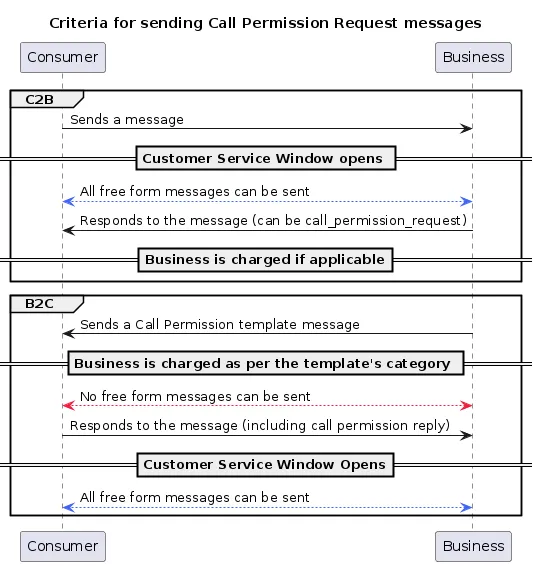
                      Call permission request messages are subject to messaging charges
                      A call permission request message can be sent to users in one of the following ways:
                      Send a free form message
                        When you are within a customer service window with a WhatsApp user, you can send a free form message with a call permission request.Although a text body will be optional, you should send one to build context with the user. In the case of free form calling permission request messages, header and footer sections are not supported.Since the customer service window is open, there is no need to create a conversation window.
                        Create and send a template message
                          Sending a template message allows you to initiate a user conversation with a call permission request.Context (that is, a text body) is required when sending a template message with a call permission request.With template messages, you can further customize your permission request by adding a message header and footer.
                          Criteria for sending call permission request messages

                          Client application UI experience

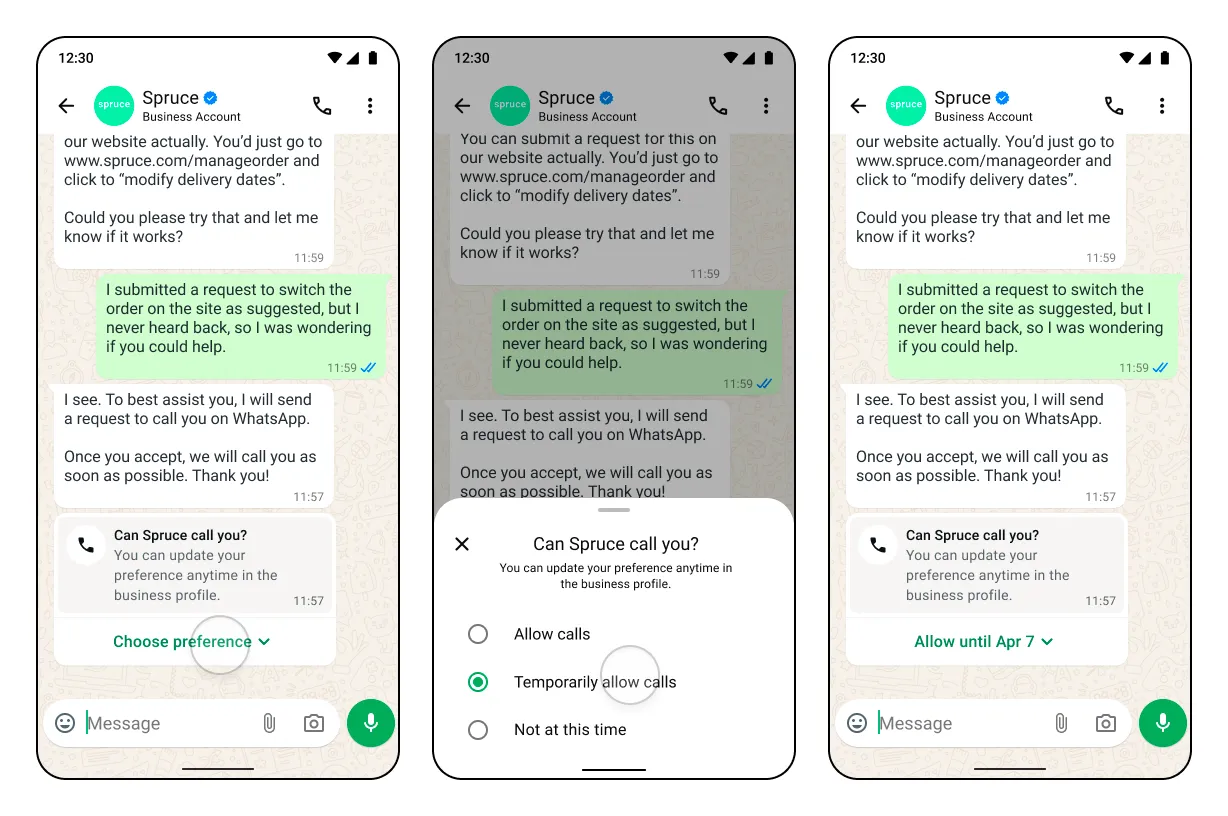
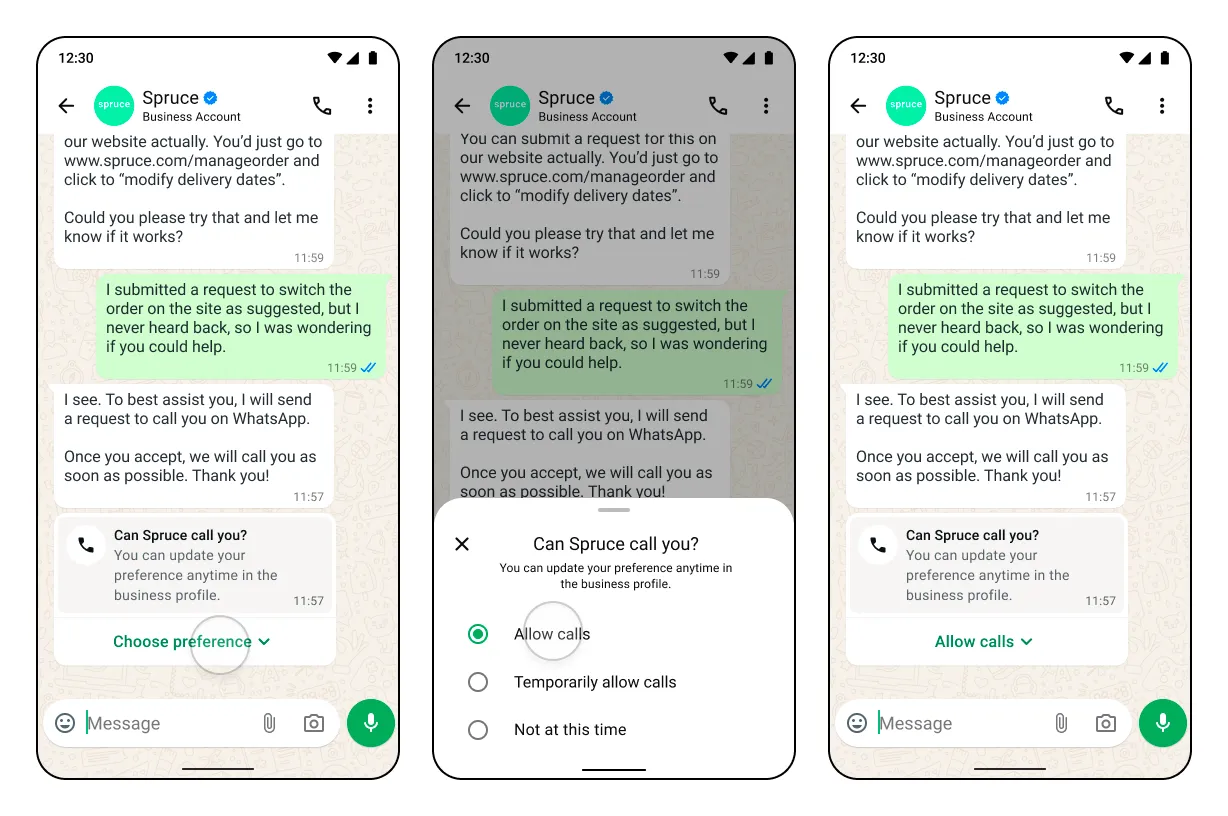
                          Call permission request flow and sample messages

                          Allow calls
                          Image
                          Temporarily allow calls
                          Image

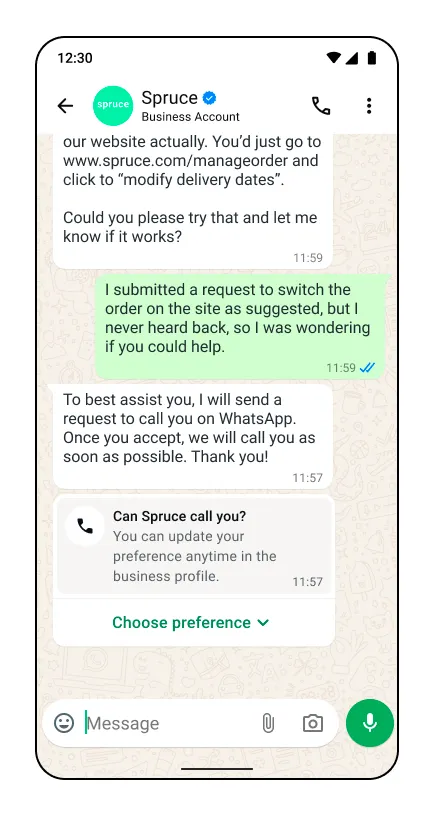
                          Template message

                          With header, footer and body Image
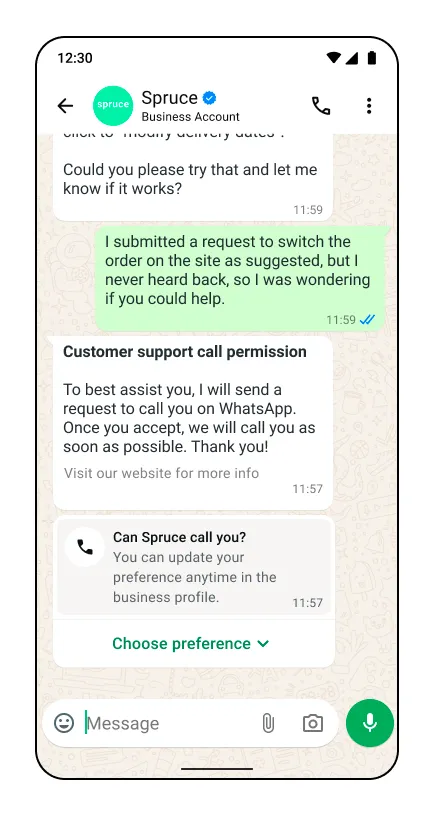
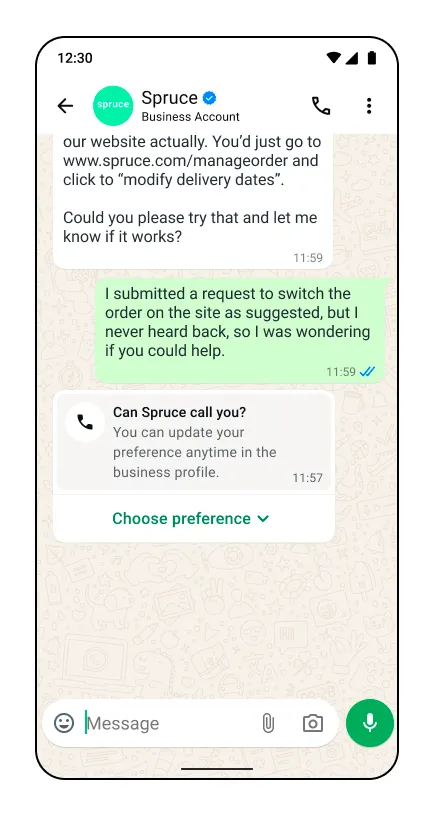
                          With body only Free form message with body only
                          With no text body Free form message with no text body
                          Free form message types
                          With no text body Template message with no text body
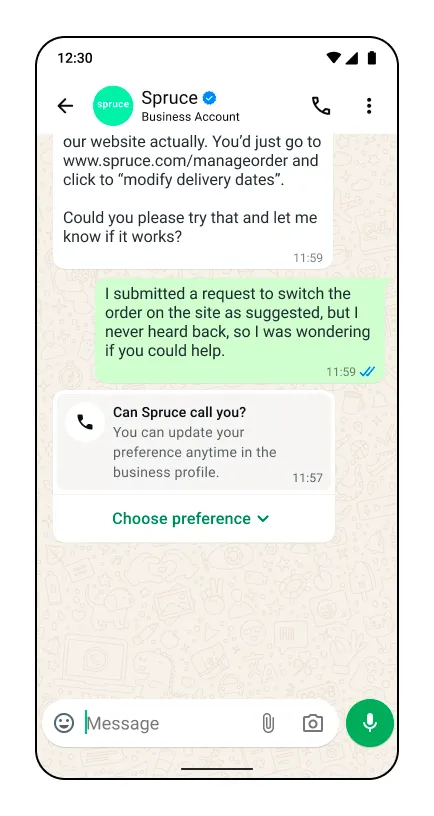
                          With text body only Image

                          Updating call permission on business profile

                          Users always have the option to change the permission using a new option on the business profile.
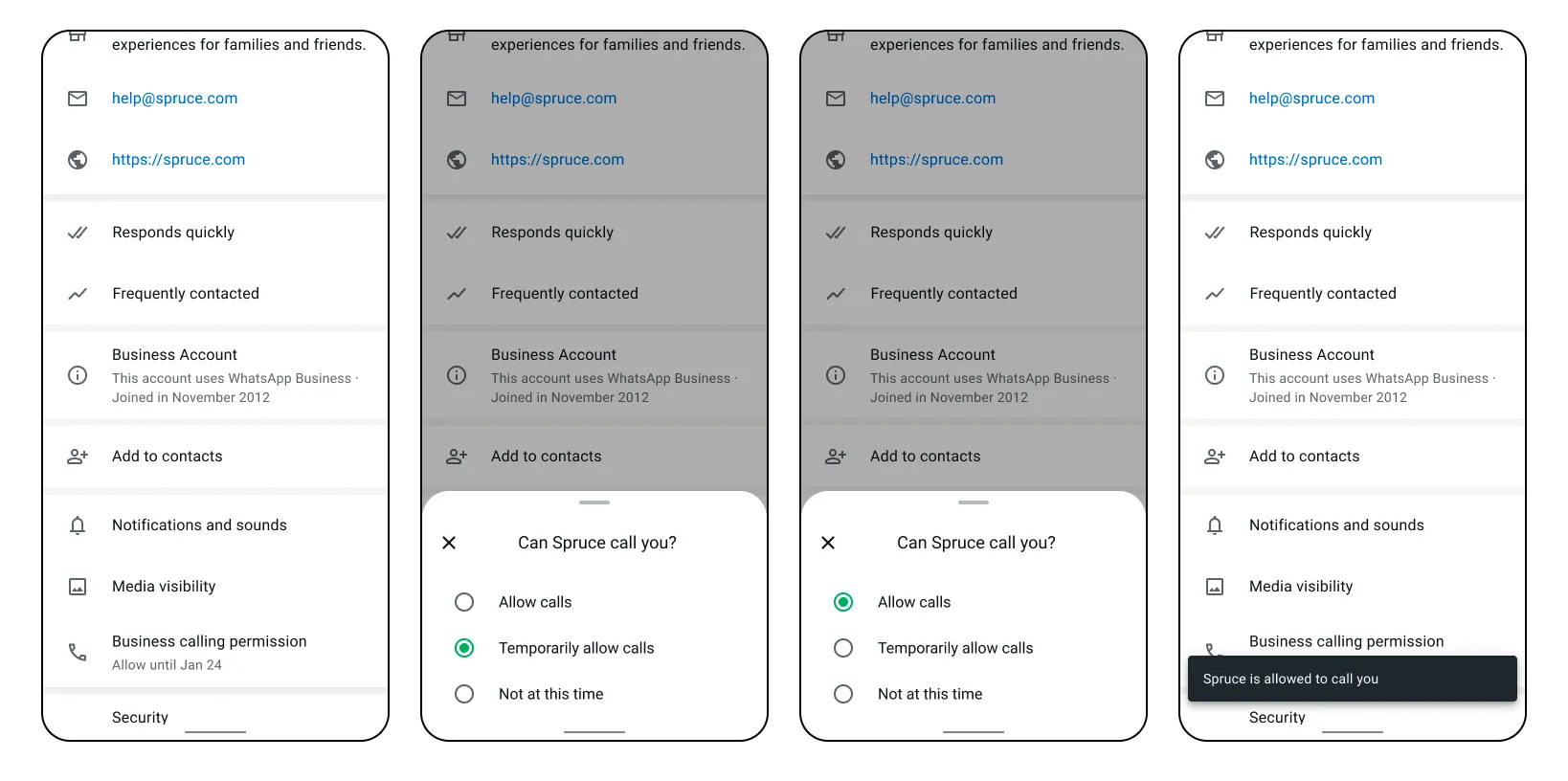
                          Update call permission on business profile
                          Business profile screen showing call permission update options

                          Consecutive unanswered calls

                          Consecutive unanswered calls
                          2 consecutive unanswered calls — System message for user to update permission
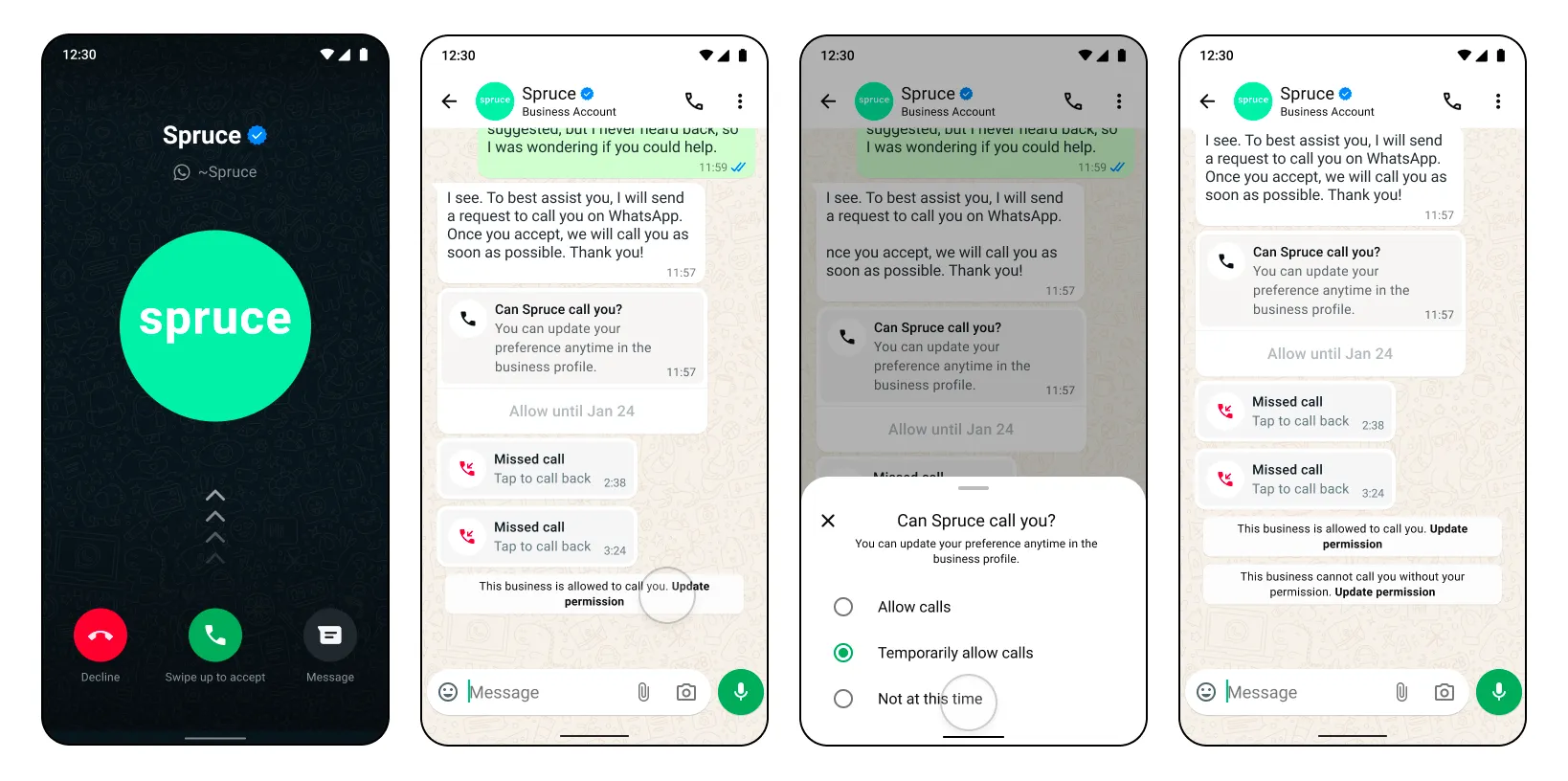
                          System message displayed after 2 consecutive unanswered calls
                          4 consecutive unanswered calls — Permissions automatically revoked
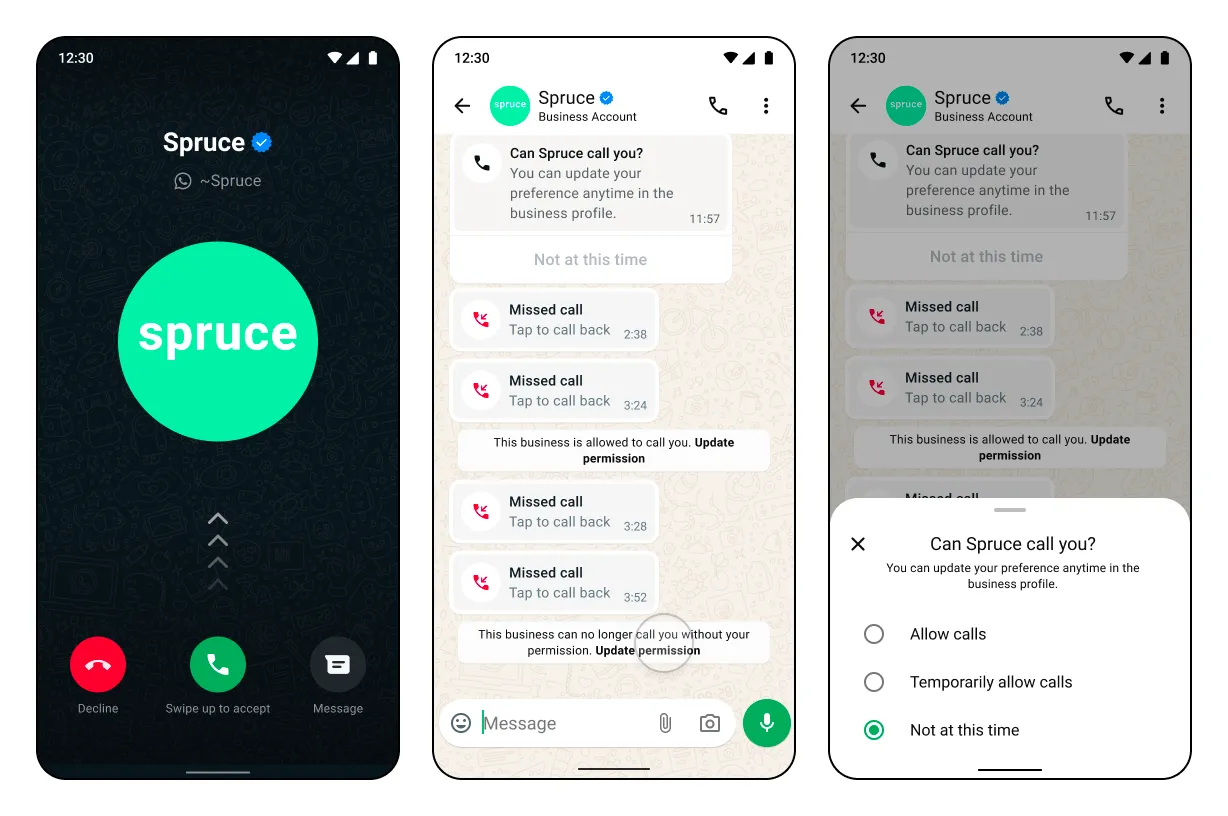
                          Notification shown when permissions are automatically revoked after 4 unanswered calls

                          Call permission request expiration scenarios

                          Permission request expires after 7 days — User interacts with request Permission request expires after 7 days — User interacts with request
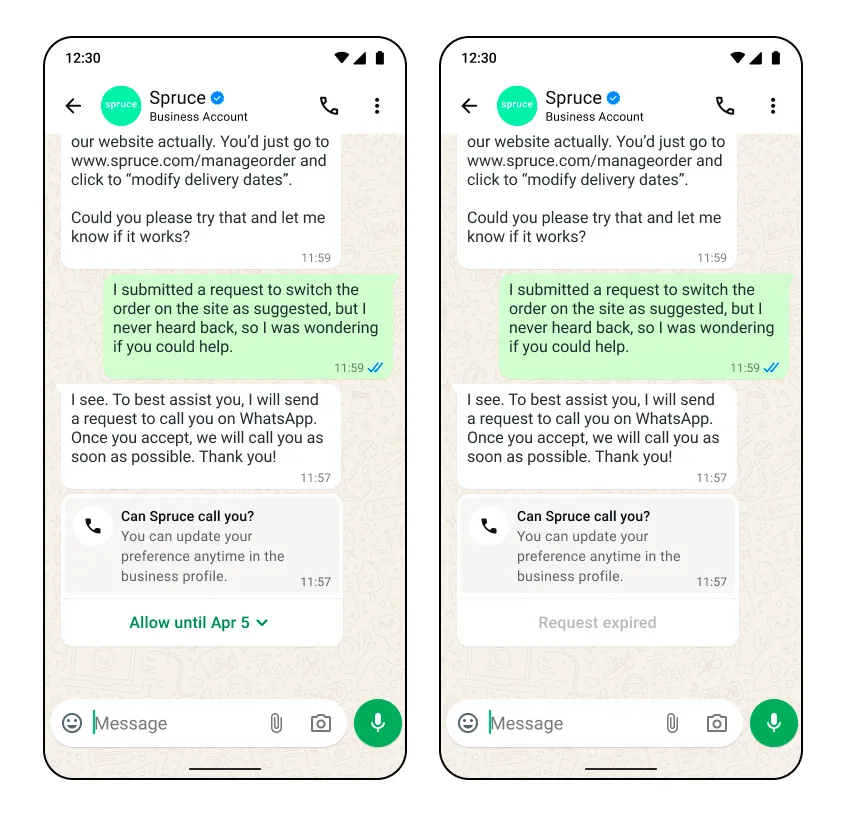
                          Permission request expires after 7 days — User does not interact Permission request expires after 7 days — User does not interact
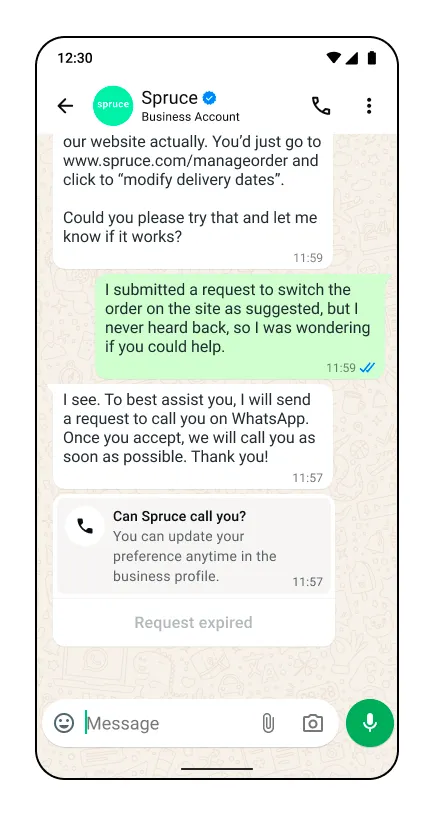
                          Previous permission request expires immediately — User does not interact / New call permission request is received Previous permission request expires immediately — User does not interact / New call permission request is received
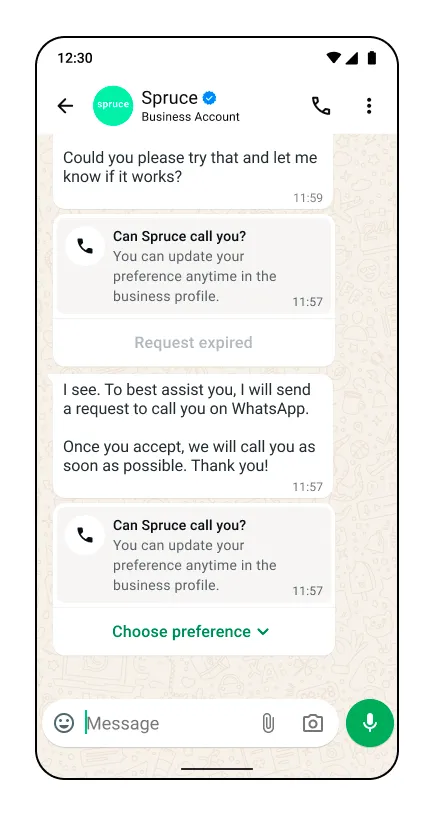
                          Previous permission request expires immediately — User allows / Interacts with the new request Image
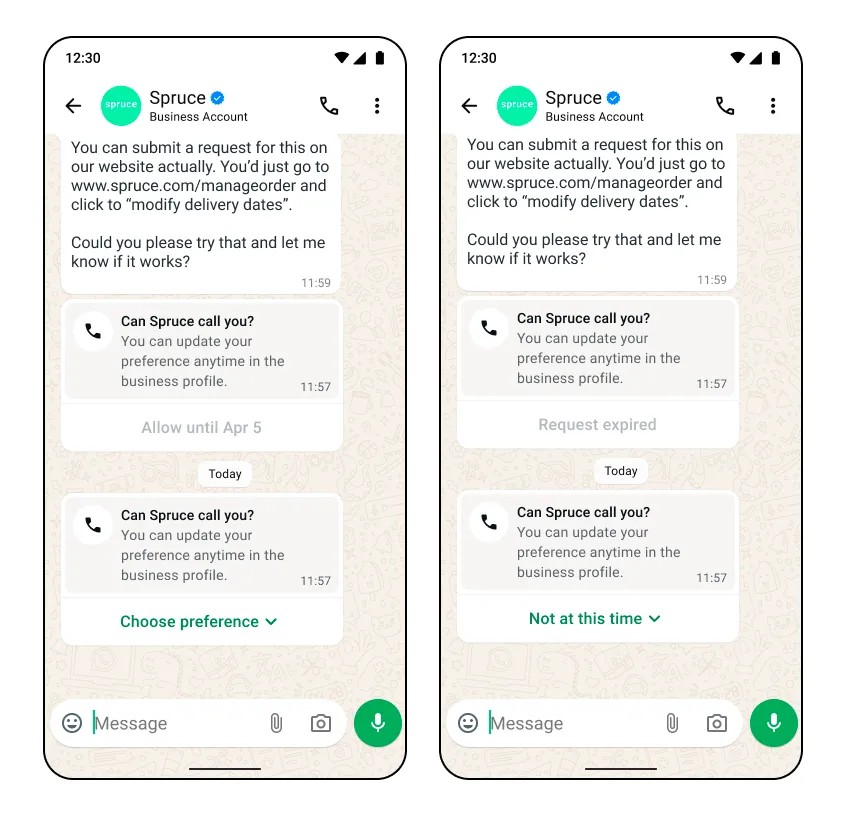
                          Send free form call permission request message

                          Call permission request messages are subject to messaging charges
                          Use this endpoint to send a free form interactive message with a call permission request during a customer service window. A standard message status webhook will be sent in response to this message send.
                          Note: The call permission request interactive object cannot be edited by the business. Only the message body can be customized.
                          RequestBody syntaxparameters
                          POST
                          <PHONE_NUMBER_ID>/messages
                          Parameter Description Sample Value
                          <PHONE_NUMBER_ID>to
                          Integer
                          Required

                          The business phone number whichof the WhatsApp user you are sendingmessaging
                          messages from.
                          +18274459827
                          Request body
                          {"messaging_product":"whatsapp","recipient_type":"individual","to":"<PHONE_NUMBER_ID> or <WHATSAPP_ID>","type":"interactive","interactive":{"type":"call_permission_request","action":{"name":"call_permission_request"},"body":{"text":"We would like to call you to help support your query on Order No: ON-12853."}}}
                          Body parameters
                          Parameter Description Sample Value
                          to
                          Integer
                          Required

                          The phone number of the WhatsApp user you are messaging
                          +17863476655
                          type
                          String
                          Required

                          The type of interactive message you are sending.
                          In this case, you are sending a call_permission_request.
                          “call_permission_request”
                          action
                          String
                          Required

                          The action of your interactive message.
                          Must be call_permission_request.
                          “call_permission_request”
                          body
                          String
                          Optional

                          The body of your message.
                          Although this field is optional, it is highly recommended you give context to the WhatsApp user when you request permission to call them.
                          "Allow us to call you so we can support you with your order."
                          Success response
                          
                          
                          {
                          "messaging_product": "whatsapp", "contacts": [{ "input": "+1-408-555-1234", "wa_id": "14085551234", }] "messages": [{ "id": "wamid.gBGGFlaCmZ9plHrf2Mh-o", }] }
                          Error response
                          Possible errors that can occur:
                            Invalid phone-number-idPermissions/Authorization errorsRate limit reachedSending this message to users on older app versions will result in error webhook with error code 131026Calling not enabledCalling restriction errors

                            Create and send call permission request template messages

                            Call permission request messages are subject to messaging charges
                            Use these endpoints to create and send a call permission request message template.
                            Once your permission request template message is created, your business can send the template message to the user as a call permission request outside of a customer service window.

                            Create message template

                            Use this endpoint to create a call permission request message template.
                            Request syntax
                            POST/<WHATSAPP_BUSINESS_ACCOUNT_ID>/message_templates
                            Parameter Description Sample Value
                            <WHATSAPP_BUSINESS_ACCOUNT_ID>
                            String
                            Required

                            Your WhatsApp Business Account ID.
                            “waba-90172398162498126”
                            Request body
                            {
                              "name": "sample_cpr_template",
                              "language": "en",
                              "category": "[MARKETING|UTILITY]",
                              "components": [
                                 {
                                  "type": "HEADER",
                                  "text": "Support of Order No: {{1}}",
                                  "example": {
                                    "body_text": [
                                      [
                                        "ON-12345"
                                      ]
                                    ]
                                  }
                                },
                                {
                                  "type": "BODY",
                                  "text": "We would like to call you to help support your query on Order No: {{1}} for the item {{2}}.",
                                  "example": {
                                    "body_text": [
                                      [
                                        "ON-12345",
                                        "Avocados"
                                      ]
                                    ]
                                  }
                                },
                                {
                                  "type": "FOOTER",
                                  "text": "Talk to you soon!"
                                },
                                {
                                  "type": "call_permission_request"
                                }
                              ]
                            }
                            Body parameters
                            Creating and managing template messages can be done both through Cloud API and the WhatsApp Business Manager interface.
                            When creating your call permission request template, ensure you configure type as call_permission_request.
                            Parameter Description Sample Value
                            type
                            String
                            Required

                            The type of template message you are creating.
                            In this case, you are creating a call_permission_request.
                            “call_permission_request”
                            Template status response
                            {"id":"<ID>","status":"<STATUS>","category":"<CATEGORY>"}
                            Error response
                            Possible errors that can occur:
                              Invalid WABA idPermissions/Authorization errorsTemplate structure/component validation alerts

                              Send message template

                              Use this endpoint to send a call permission request message template
                              The following is a simplified sample of the send template message request, however you can learn more about how to send message templates here.
                              Request syntax
                              POST/<PHONE_NUMBER_ID>/messages
                              Parameter Description Sample Value
                              <PHONE_NUMBER_ID>
                              String
                              Required

                              The business phone number which you are sending a message from.
                              +18762639988
                              Request body
                              {"messaging_product":"whatsapp","recipient_type":"individual","to":"+13287759822",// The WhatsApp user who will receive the template message"type":"template","template":{"name":"sample_cpr_template",// The call permission request template name"language":{"code":"en"},"components":[// Body text parameters such as customer name and order number{"type":"body","parameters":[{"type":"text","text":"John Smith"},{"type":"text","text":"order #1522"}]}]}}

                              Get current call permission state

                              Use this endpoint to get the call permission state for a business phone number with a single WhatsApp user phone number.

                              Request syntax

                              GET /<PHONE_NUMBER_ID>/call_permissions?user_wa_id=<CONSUMER_WHATSAPP_ID>

                              Request parameters

                              Parameter Description Sample Value
                              <PHONE_NUMBER_ID>
                              String
                              Required

                              The business phone number you are fetching permissions against.
                              +18762639988
                              <CONSUMER_WHATSAPP_ID>
                              Integer
                              Required

                              The phone number of the WhatsApp user who you are requesting call permissions from.
                              +13057765456
                              Response body
                              {"messaging_product":"whatsapp","permission":{"status":"temporary","expiration_time":1745343479},"actions":[{"action_name":"send_call_permission_request","can_perform_action":true,"limits":[{"time_period":"PT24H","max_allowed":1,"current_usage":0,},{"time_period":"P7D","max_allowed":2,"current_usage":1,}]},{"action_name":"start_call","can_perform_action":false,"limits":[{"time_period":"PT24H","max_allowed":5,"current_usage":5,"limit_expiration_time":1745622600,}]}}}
                              Response parameters
                              Parameter
                              Description
                              permission
                              JSON Object
                              The permission object contains two values:
                              status (String) — The current status of the permission.
                              Can be either:
                                “no_permission”"temporary"“permanent”
                                expiration (Integer) — The Unix time at which the permission will expire in UTC timezone.
                                If the permission is permanent, this field won’t be present.
                                actions
                                JSON Object
                                A list of actions a business phone number may undertake to facilitate a call permission or a business initiated call.
                                Current actions are:
                                send_call_permission_request: Represents the action of sending new call permissions request messages to the WhatsApp user.
                                start_call: Represents the action of establishing a new call with the WhatsApp user. Establishing a new call means that the call was successfully picked up by the consumer.
                                For example, send_call_permission_request having a can_perform_action of true means that your business can send a call permission request to the WhatsApp user in question
                                can_perform_action (Boolean) —
                                A flag indicating whether the action can be performed now, taking into account all limits.
                                limits
                                JSON Object
                                A list of time-bound restrictions for the given action_name.
                                Each action_name has 1 or more restrictions depending on the timeframe.
                                For example, a business can only send 2 permission requests in a 24-hour period.
                                limits contains the following fields:
                                time_period (String) — The span of time in which the limit applies, represented in the ISO 8601 format.
                                max_allowed (Integer) — The maximum number of actions allowed within the specified time period.
                                current_usage (Integer) — The current number of actions the business has taken within the specified time period.
                                limit_expiration_time (Integer) — The Unix time at which the limit will expire in UTC timezone.
                                If current_usage is under the max allowed for the limit, this field won’t be present.
                                Error response
                                Possible errors that can occur:
                                  Invalid phone-number-idIf the consumer phone number is uncallable, the api response will be no_permission.Permissions/Authorization errors.Rate limit reached. A maximum of 100 requests in a 1 second window can be made to the API.Calling is not enabled for the business phone number.

                                  User call permission reply webhook

                                  This webhook is delivered whenever a user selects or updates their calling permissions. It could be in response to a call permission request sent by the business or it could be the user proactively making a decision.
                                  The webhook fields values change depending on the circumstances of the user permission decision:
                                    the user accepts or rejects the requestthe user approves permission by responding to a request or by calling the businessthe user permission is an automatic callback permission in response to a user-initiated callthe user permission is automatically revoked in response to 4 consecutive unanswered business-initiated calls
                                    Lastly, the user can grant permanent calling permission to the business, which is represented in the is_permanent parameter.
                                    No webhook is sent when a temporary permission expires. The expiration_timestamp field included in the accepted permission webhook indicates the time this permission will expire. Alternatively the current permission state can be queried from the get current call permission state endpoint.
                                    Webhook sample
                                    {..."messages":[{"from":"{customer_phone_number}","id":"wamid.sH0kFlaCGg0xcvZbgmg90lHrg2dL","timestamp":"{timestamp}","context":{"from":"{customer_phone_number}","id":"wamid.gBGGFlaCmZ9plHrf2Mh-o"},"interactive":{"type":"call_permission_reply","call_permission_reply":{"response":"accept","is_permanent":false,"expiration_timestamp":"{timestamp}","response_source":"user_action"}}],...}
                                    Webhook values
                                    Placeholder Description
                                    customer_phone_number
                                    String
                                    The phone number of the customer
                                    context.id
                                    String
                                    Can be either of two values
                                      Message ID of the permission request message sent by the business to the customer number. Shows when a permission decision is made by the user in response to a call permission request.Call ID of the missed call placed by the business to the customer number. Shows when callback permission is enabled in settings and the user calls the business.
                                      response
                                      String
                                      The WhatsApp users response to the call permission request message
                                      Can be accept or reject
                                      is_permanent
                                      Boolean
                                      Indicates if the permission is permanent or not. For temporary permission this will always be false.
                                      expiration_timestamp
                                      Integer
                                      Time in seconds when this call permission expires if the WhatsApp user approved it
                                      response_source
                                      String
                                      The source of this permission
                                      Possible values for accepted call permissions are:
                                        user_action: User approved or rejected the permissionautomatic: An automatic permission approval due to the WhatsApp user initiating the call
                                        Webhook sample scenarios
                                        Scenario Webhook sample
                                        The WhatsApp user approves a temporary call permission from a call permission request message
                                        {..."messages":[{"from":"{customer_phone_number}","id":"wamid.sH0kFlaCGg0xcvZbgmg90lHrg2dL","timestamp":"1767168000","context":{"from":"{customer_phone_number}","id":"wamid.gBGGFlaCmZ9plHrf2Mh-o"},"interactive":{"type":"call_permission_reply","call_permission_reply":{"response":"accept","is_permanent":false,"expiration_timestamp":"1768550400","response_source":"user_action"}}],...}
                                        The WhatsApp users approves a permanent call permission from a call permission request message
                                        {..."messages":[{"from":"{customer_phone_number}","id":"wamid.sH0kFlaCGg0xcvZbgmg90lHrg2dL","timestamp":"1767168000","context":{"from":"{customer_phone_number}","id":"wamid.gBGGFlaCmZ9plHrf2Mh-o"},"interactive":{"type":"call_permission_reply","call_permission_reply":{"response":"accept","is_permanent":true,"response_source":"user_action"}}],...}
                                        The WhatsApp users approves a permanent call permission from the business profile
                                        {..."messages":[{"from":"{customer_phone_number}","id":"wamid.sH0kFlaCGg0xcvZbgmg90lHrg2dL","timestamp":"1767168000","interactive":{"type":"call_permission_reply","call_permission_reply":{"response":"accept","is_permanent":true,"response_source":"user_action"}}],...}
                                        The WhatsApp users rejects a call permission after receiving a call permission request message
                                        {..."messages":[{"from":"{customer_phone_number}","id":"wamid.sH0kFlaCGg0xcvZbgmg90lHrg2dL","timestamp":"1767168000","context":{"from":"{customer_phone_number}","id":"wamid.gBGGFlaCmZ9plHrf2Mh-o"},"interactive":{"type":"call_permission_reply","call_permission_reply":{"response":"reject","response_source":"user_action"}}],...}
                                        An automatic temporary callback permission is granted to the business when the WhatsApp user calls the business
                                        {..."messages":[{"from":"{customer_phone_number}","id":"wamid.sH0kFlaCGg0xcvZbgmg90lHrg2dL","timestamp":"1767168000","context":{"from":"{customer_phone_number}","id":"wacid.gBGGF4lasdnlasdHrf2Mh-o"},"interactive":{"type":"call_permission_reply","call_permission_reply":{"response":"accept","is_permanent":false,"expiration_timestamp":"1768550400","response_source":"automatic"}}],...}
                                        A call permission is automatically revoked when a business makes 4 consecutive unanswered calls to the WhatsApp user
                                        {..."messages":[{"from":"{customer_phone_number}","id":"wamid.sH0kFlaCGg0xcvZbgmg90lHrg2dL","timestamp":"1767168000","interactive":{"type":"call_permission_reply","call_permission_reply":{"response":"reject","response_source":"automatic"}}],...}