
Enhanced Payment Links | Developer Documentation
Enhanced Payment Links
Updated: Dec 12, 2025
Overview

Enhanced Payment Links is a feature that transforms existing payment gateway URLs into rich, native payment experiences within WhatsApp.
It converts existing payment links into an in-app checkout flow - no changes to your payment backend, reconciliation, or callback setup are required. When a supported payment link is sent through a message template, it automatically renders as a structured payment bubble featuring:
This feature significantly improves payment conversion rates by reducing checkout friction and increasing consumer trust.
Superfast Setup: Merchants can independently create the required WhatsApp templates and embed payment links from supported payment gateways - no BSP involvement is needed.
This feature is not publicly available yet. To request access, please reach out to your BSP or Meta representative with your WABA ID, sample payment link, and preferred Payment Gateway (Razorpay, PayU, or Cashfree).
User Experience
On supported WhatsApp versions, the payment link renders as an enhanced bubble:
Prerequisites
Enhanced Payment Links is an experience that works with both existing BSP APIs and WhatsApp Business Cloud API. Neither BSPs nor merchants need to make any backend, API, reconciliation, or callback changes to enable this feature. Your existing payment gateway integration remains completely unchanged.
To use Enhanced Payment Links:
Allowlisted WABA
Your WABA ID must be enabled for Enhanced Payment Links. Submit a request to your BSP or Meta representative with your WABA ID, preferred payment gateway(s), and sample payment links for validation.
Supported Payment Gateway
An active account with Razorpay, PayU, or Cashfree
Compliant Template
A message template configured with no header and a dynamic URL button (see Template Requirements)
Supported Payment Gateways
Razorpay
✅ Supported
PayU
✅ Supported
Cashfree
✅ Supported
Integration Flow
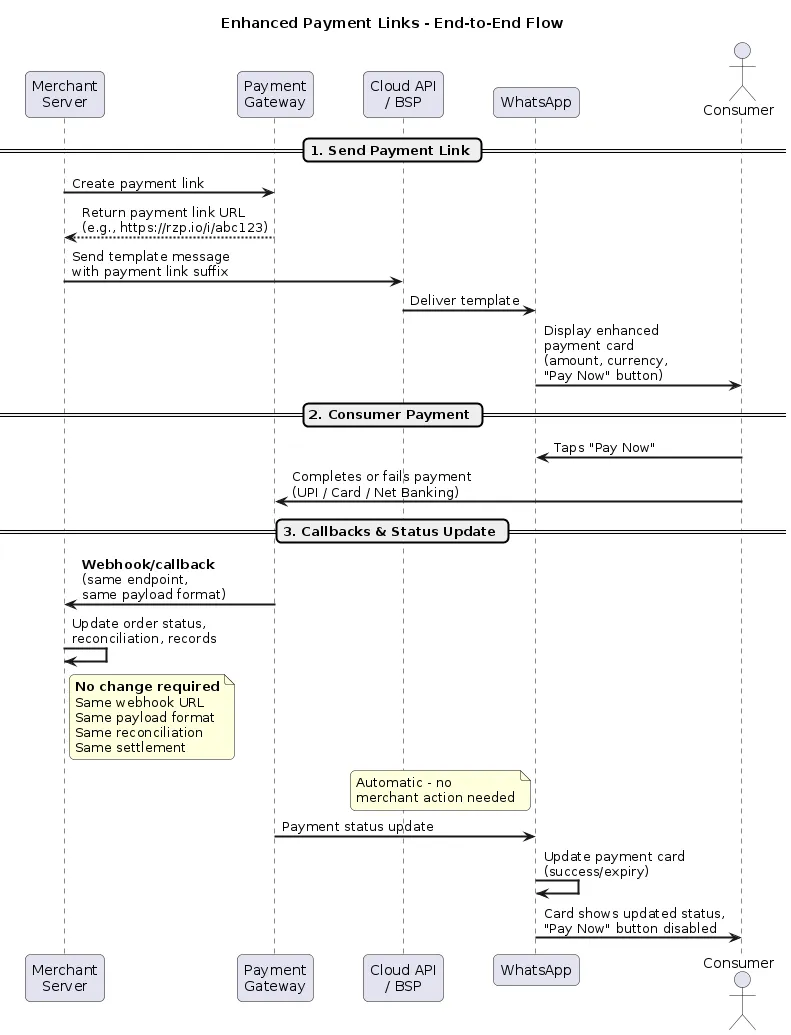
The following diagram illustrates the end-to-end flow, from sending an Enhanced Payment Link to payment completion and callbacks:
Steps:
https://rzp.io/i/abc123XYZ).Send template message - Your server sends a template message via the Cloud API or your BSP, embedding the dynamic portion of the payment link (the suffix) in the button component.Message delivered on WhatsApp - The consumer receives an enhanced payment bubble with the amount, currency, and a “Pay Now” button for in-app checkout.Consumer completes payment - The consumer taps “Pay Now” and pays via UPI apps, cards, net banking, or wallets within WhatsApp.Payment gateway sends callback to merchant - Your existing webhook endpoint receives the payment status callback with the same payload format as before. No changes to your webhook URL, payload handling, or reconciliation logic are needed.WhatsApp updates the payment card - The payment card automatically reflects the payment status (success, or expiry) and disables the “Pay Now” button to prevent duplicate payments. This happens independently and requires no merchant action.
Template Requirements
Enhanced Payment Link templates must follow these constraints:
Header
None — templates must not include a media header (image, video, or document)
Button
Exactly one dynamic URL button with a supported PG link prefix
Merchants can independently create these templates without involving their BSP. Templates can be created using any one of the following methods:
Example Template Configuration
Your business can enable customers to pay using their favorite UPI apps or other payment methods accepted by supporting Payment Gateways without leaving WhatsApp.
Body:"Hi 1, reminder to pay for your insurance renewal #2. Amount: ₹3"Button:-Type of Action:"Visit website"-ButtonText:"Pay Now"- URL Type:Dynamic-Website URL: https://pg.io/i/Important: The button URL must be configured as dynamic to pass the payment link at send time.
Dynamic URL Prefix Configuration
When creating your template, the dynamic URL button requires a URL prefix that matches your payment gateway’s domain. Use one of the following prefixes based on your PG:
Razorpay
https://rzp.io/rzp/https://rzp.io/i/PayU
https://pmny.in/PAYUMN/https://api.payu.in/https://u.payu.in/PAYUMN/Cashfree
https://payments.cashfree.com/linkshttps://payments.cashfree.com/link/https://cfre.in/CSHFRE/Note: The URL prefix you configure in your template must match the format of payment links generated by your PG. When sending the message, pass only the dynamic portion (e.g., the link ID) in the button parameter.
Payment Link Requirements
Environment
Must be from production environment (not sandbox/test mode)
Status
Link must be active and not expired
Gateway
Must be from a supported PG (see Supported Payment Gateways)
URL Format
Must match one of the supported URL prefixes for your PG
Using wrapped or redirected payment links? Enhanced Payment Links requires direct payment gateway URLs that match the supported URL prefixes. If your implementation wraps payment gateway links under your own domain (e.g.,
yourdomain.com/pay/...) or redirects to the payment gateway from a hosted page, the enhanced experience will not render automatically. In such cases, you will need to update your workflow to pass the direct payment gateway link in the template button instead of your wrapped or redirected URL.Generating Payment Links
Refer to your payment gateway’s documentation:
Sending
Payment Links
Request
POST /{phone-number-id}/messagesExample
curl -X POST "https://graph.facebook.com/v21.0/{PHONE_NUMBER_ID}/messages" \
  -H "Authorization: Bearer {ACCESS_TOKEN}" \
  -H "Content-Type: application/json" \
  -d '{
    "messaging_product": "whatsapp",
    "to": "919876543210",
    "type": "template",
    "template": {
      "name": "payment_reminder",
      "language": {
        "code": "en"
      },
      "components": [
        {
          "type": "body",
          "parameters": [
            {"type": "text", "text": "Rishi"},
            {"type": "text", "text": "ORD-12345"},
            {"type": "text", "text": "1,999"}
          ]
        },
        {
          "type": "button",
          "sub_type": "url",
          "index": "0",
          "parameters": [
            {
              "type": "text",
              "text": "abc123XYZ"
            }
          ]
        }
      ]
    }
}'{"type":"button","sub_type":"url","index":"0","parameters": [{"type":"text","text":"{PAYMENT_LINK_SUFFIX}"}]}
Payment Reconciliation and Callbacks
Enhanced Payment Links does not modify your existing payment processing or backend infrastructure. This means:
Payment callbacks/webhooks
No change. Your existing webhook endpoints and callback flows from your payment gateway continue to work as-is.
Reconciliation
No change. Reconciliation remains the same as configured on your payment gateway (Razorpay, PayU, or Cashfree).
Settlement
No change. Settlement flows and timelines are unaffected.
No backend integration changes are required to adopt Enhanced Payment Links.
Reporting
Reporting for Enhanced Payment Links is split across two sources:
Link clicks
WhatsApp
Click metrics on payment gateway links are available from WhatsApp analytics.
Payment status, success/failure rates, refunds, settlements
Payment gateway
All payment-level reporting remains on your payment gateway (Razorpay, PayU, or Cashfree). Use your existing dashboards and reports.
No additional reporting setup is required. WhatsApp provides visibility into link engagement, while your payment gateway continues to be the source of truth for all payment and transaction metrics.
Best Practices
Use production links
Sandbox/test links will not render enhanced bubbles
Set reasonable expiry
24-48 hours balances conversion and security
Include context
Add amount and order details in the message body
One button only
Multiple buttons are not supported
Match URL prefix
Ensure template URL prefix matches your PG’s link format
Limitations
Troubleshooting
Payment link not rendering as enhanced bubble
WABA allowlisted?
Confirm with your BSP or Meta representative
Supported PG?
Must be Razorpay, PayU, or Cashfree
URL prefix correct?
Template URL prefix must match your PG’s supported formats
Link active?
Verify link hasn’t expired
Template compliant?
No header, single dynamic URL button
Note: If your template gets miscategorized, you can appeal the assigned category. See the Template Categorization Guide for details on the appeal process. To avoid categorization uncertainty altogether, consider using a Utility Template from the template library, this ensures correct categorization and provides guidance on template content structure.