
Catalog messages | Developer Documentation
Catalog messages
Updated: Mar 3, 2026
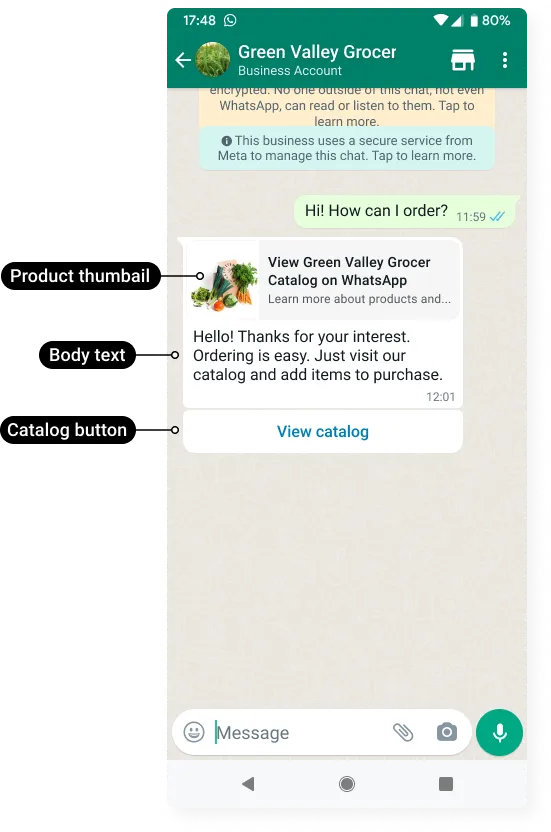
Catalog messages let you showcase your product catalog entirely within WhatsApp.
Catalog messages display a product thumbnail header image of your choice, custom body text, a fixed text header, a fixed text sub-header, and a View catalog button.
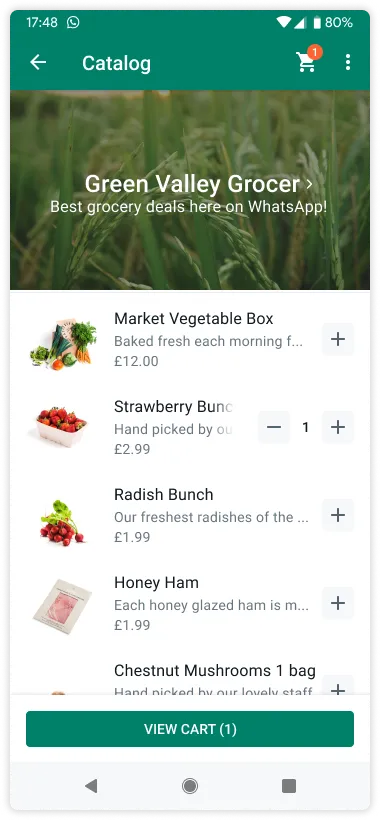
When a customer taps the View catalog button, your product catalog appears within WhatsApp.
Requirements
You must have inventory uploaded to Meta in an ecommerce catalog connected to your WhatsApp Business Account?.
Request
syntax
POST /<WHATSAPP_BUSINESS_PHONE_NUMBER_ID>/messages
Post body
{
Properties
<BODY_TEXT>String
Required.
Hello! Thanks for your interest. Ordering is easy. Just visit our catalog and add items to purchase.<FOOTER_TEXT>String
Optional.
Best grocery deals on WhatsApp!<THUMBNAIL_PRODUCT_RETAILER_ID>String
Optional.
parameters object is omitted, the product image of the first item in your catalog will be used.2lc20305pt<TO>String
Customer phone number.
+16505551234Example request
curl 'https://graph.facebook.com/v17.0/106540352242922/messages' \
-H 'Content-Type: application/json' \
-H 'Authorization: Bearer EAAJB...' \
-d '
{
  "messaging_product": "whatsapp",
  "recipient_type": "individual",
  "to": "+16505551234",
  "type": "interactive",
  "interactive": {
    "type": "catalog_message",
    "body": {
      "text": "Hello! Thanks for your interest. Ordering is easy. Just visit our catalog and add items to purchase."
    },
    "action": {
      "name": "catalog_message",
      "parameters": {
        "thumbnail_product_retailer_id": "2lc20305pt"
      }
    },
    "footer": {
      "text": "Best grocery deals on WhatsApp!"
    }
  }
}'
Example response
{
  "messaging_product": "whatsapp",
  "contacts": [
    {
      "input": "+16505551234",
      "wa_id": "16505551234"
    }
  ],
  "messages": [
    {
      "id": "wamid.HBgLMTY1MDM4Nzk0MzkVAgARGBI0ODVEREUwQzEzQkVBRjQ1RUUA"
    }
  ]
}