
Business phone numbers | Developer Documentation
Business phone numbers
Updated: Feb 27, 2026
This document describes WhatsApp business phone numbers, their requirements, management information, and unique features.
Registering business phone numbers
A valid business phone number must be registered before it can be used to send and receive messages via Cloud API. Registered numbers can still be used for everyday purposes, such as calling and text messages, but cannot be used with WhatsApp Messenger (“WhatsApp”).
Numbers already in use with WhatsApp cannot be registered unless they are deleted first. If your number is banned on WhatsApp and you wish to register it, it must be unbanned via the appeal process first.
Note that when you complete the steps in our Get Started document, a test business phone number will be generated and registered for you automatically.
Eligibility requirements
Eligible phone numbers must be:
If you are registering a 1-800 number, see 1-800 and toll free numbers for additional information.
Registration methods
Note: The methods above add a phone number to your WhatsApp Business Account and verify your ownership, but they do not register the number for Cloud API use. To complete registration, call the register endpoint. If you are a Solution Partner or Tech Provider using Embedded Signup, see Registering business phone numbers.
Business phone number types
This table categorizes phone number types and evaluates their suitability for receiving OTPs via SMS, international phone calls, and flash calls. It provides likelihood assessments for successful delivery based on number type and carrier characteristics. Additionally, it offers actionable recommendations for users to improve delivery success without changing their phone number type.
| Phone type | Description | SMS OTP | Voice OTP | Actions |
|---|---|---|---|---|
|
Mobile (recommended) |
Assigned to mobile devices/SIMs |
Standard |
Standard |
Enable International reception of SMS/Calls, ensure device is connected to Cellular Network, Grant App permissions |
|
Fixed line |
Assigned to physical locations (landline) |
Not Recommended |
Standard |
Enable International reception of SMS/Calls, ensure line is ready for incoming calls and disable call forwarding or IVR features |
|
Freephone |
Toll-Free, recipient pays |
Not Recommended |
Standard |
Ensure with Phone provider that the number is able to receive International SMS/Calls, check that line is ready for incoming calls and disable call forwarding or IVR features |
|
Premium rate |
Higher charges for special services |
Not Recommended |
Standard |
Ensure with Phone provider that the number is able to receive International SMS/Calls, check that line is ready for incoming calls and disable call forwarding or IVR features |
|
Shared cost |
Cost shared between caller and recipient |
Not Recommended |
Not Recommended |
Ensure with Phone provider that the number is able to receive International SMS/Calls, check that line is ready for incoming calls and disable call forwarding or IVR features |
|
Universal access |
Reachable globally for customer service |
Not Recommended |
Standard |
Ensure with Phone provider that the number is able to receive International SMS/Calls, check that line is ready for incoming calls and disable call forwarding or IVR features |
|
Personal number |
Assigned to individuals, not tied to device |
Not Recommended |
Not Recommended |
Ensure with Phone provider that the number is able to receive International SMS/Calls, check that line is ready for incoming calls and disable call forwarding or IVR features |
|
VoIP |
Internet telephony, not tied to physical line |
Not Recommended |
Standard |
Confirm that the VoIP provider supports international SMS/calls for OTPs; check provisioning and account settings; keep app/service running and notifications enabled; ensure device is online and permissions granted |
|
Inbound only |
Only accept incoming calls/messages |
Not Recommended |
Standard |
Ensure with Phone provider that the number is able to receive International SMS/Calls, check that line is ready for incoming calls and disable call forwarding or IVR features |
|
Pager |
Assigned to pagers (rare) |
Not supported |
Not supported |
Not supported |
|
M2M/IoT |
Machine-to-machine, smart devices |
Not Recommended |
Not Recommended |
Ensure device and SIM are allowed for incoming International SMS/calls |
Status
Business phone numbers have a status, which reflects their quality rating and current messaging limit. Business phone numbers must have a status of “connected” in order to send and receive messages via the API.
Viewing status via WhatsApp Manager
Your business phone number’s current status appears in the Status column in the WhatsApp Manager > Account tools > Phone numbers panel.
See our About your WhatsApp Business phone number’s quality rating help center article to learn more about quality ratings and statuses as they appear in WhatsApp Manager.
Getting status via API
Request the
status field on your WhatsApp Business Phone Number ID. See the GET /<WHATSAPP_BUSINESS_PHONE_NUMBER_ID> reference for a list of returnable status values and their meanings.Display names
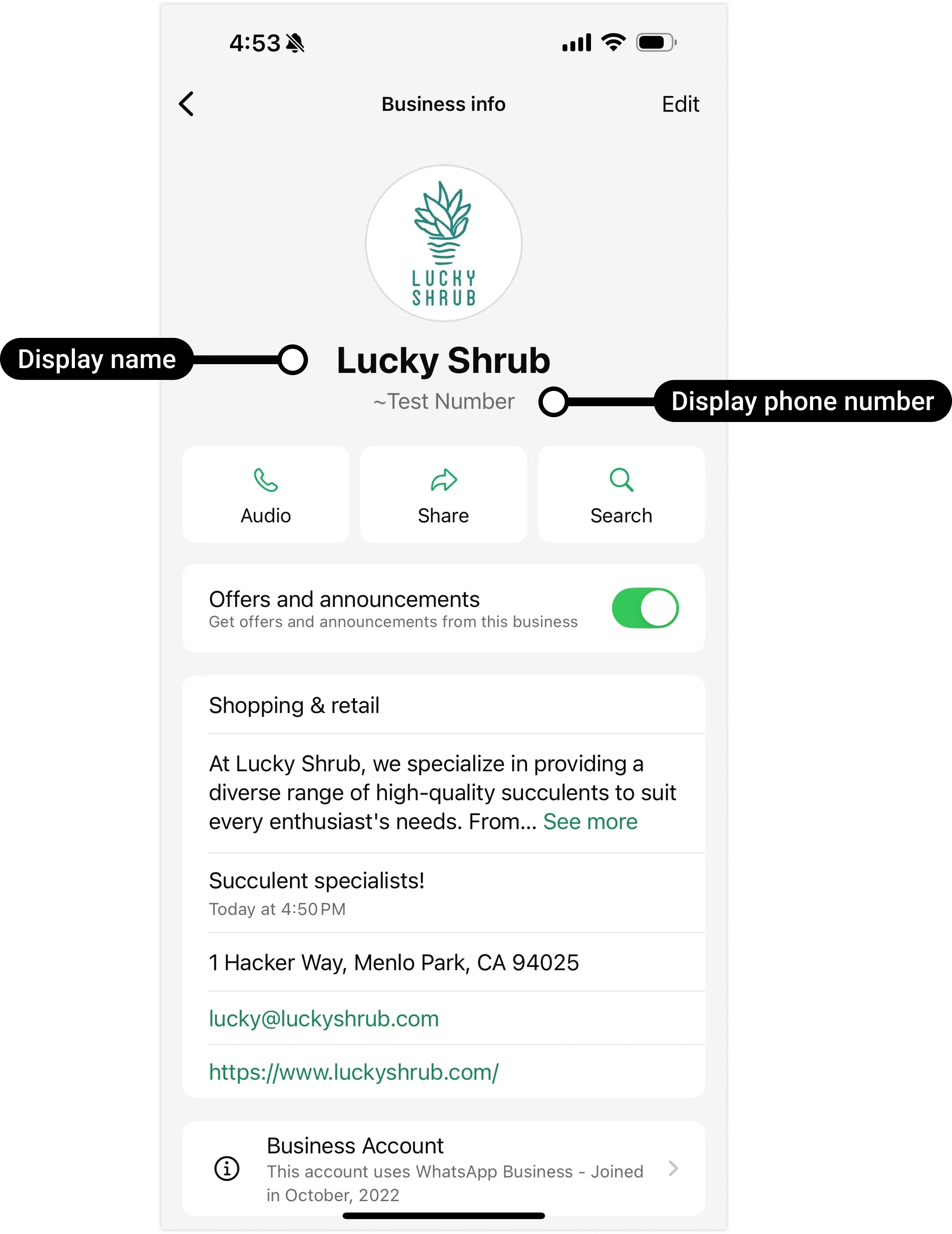
You must provide display name information when registering a business phone number. The display name appears in your business phone number’s WhatsApp profile, and can also appear at the top of individual chat threads and the chat list if certain conditions are met. See our Display names document to learn how display names work.
Business profiles
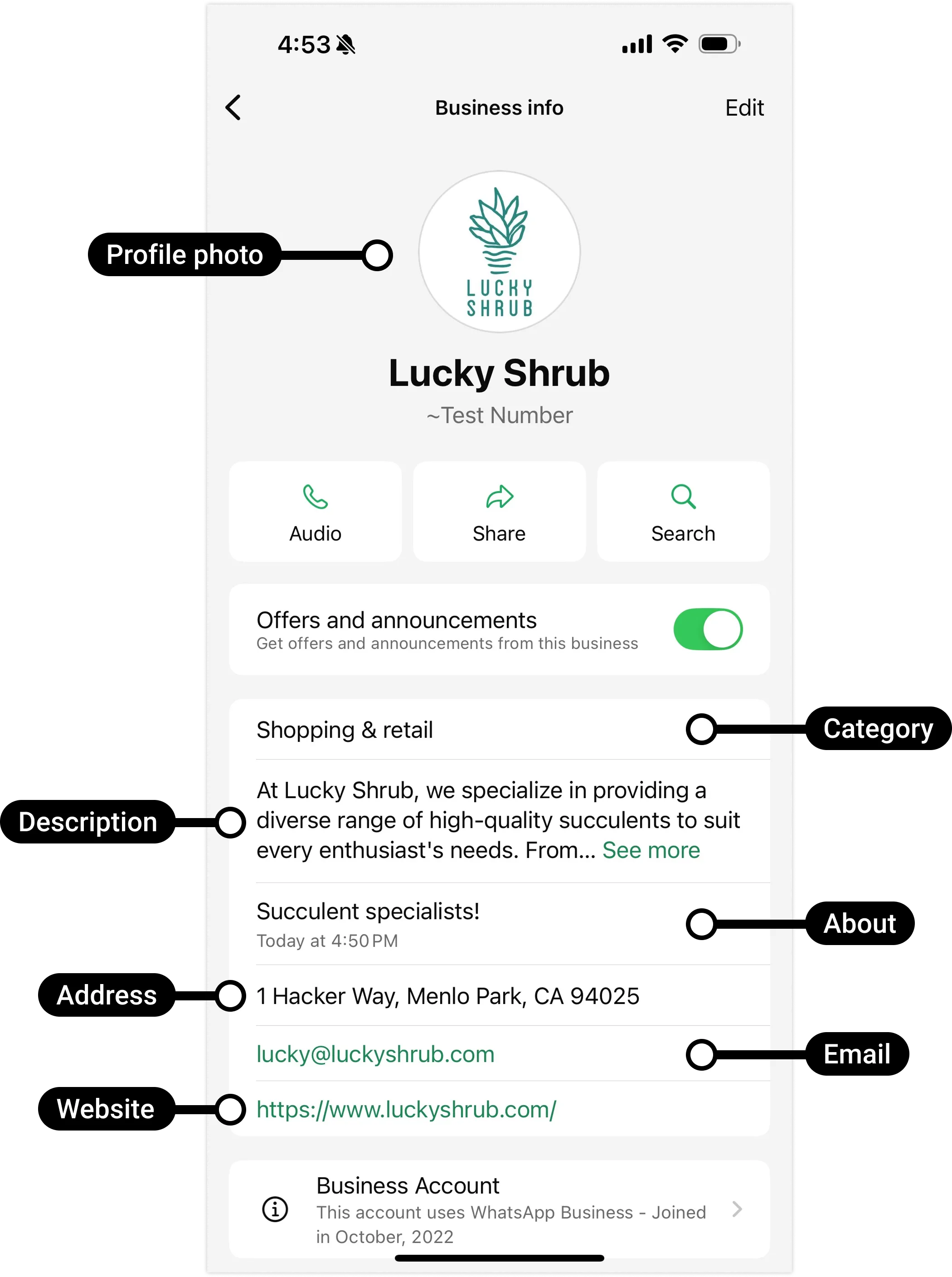
A business profile provides additional information about your business, such as its address, website, description, and so on. You can supply this information when registering your business phone number. See our Business profiles document to learn how business profiles work.
Official Business Account status
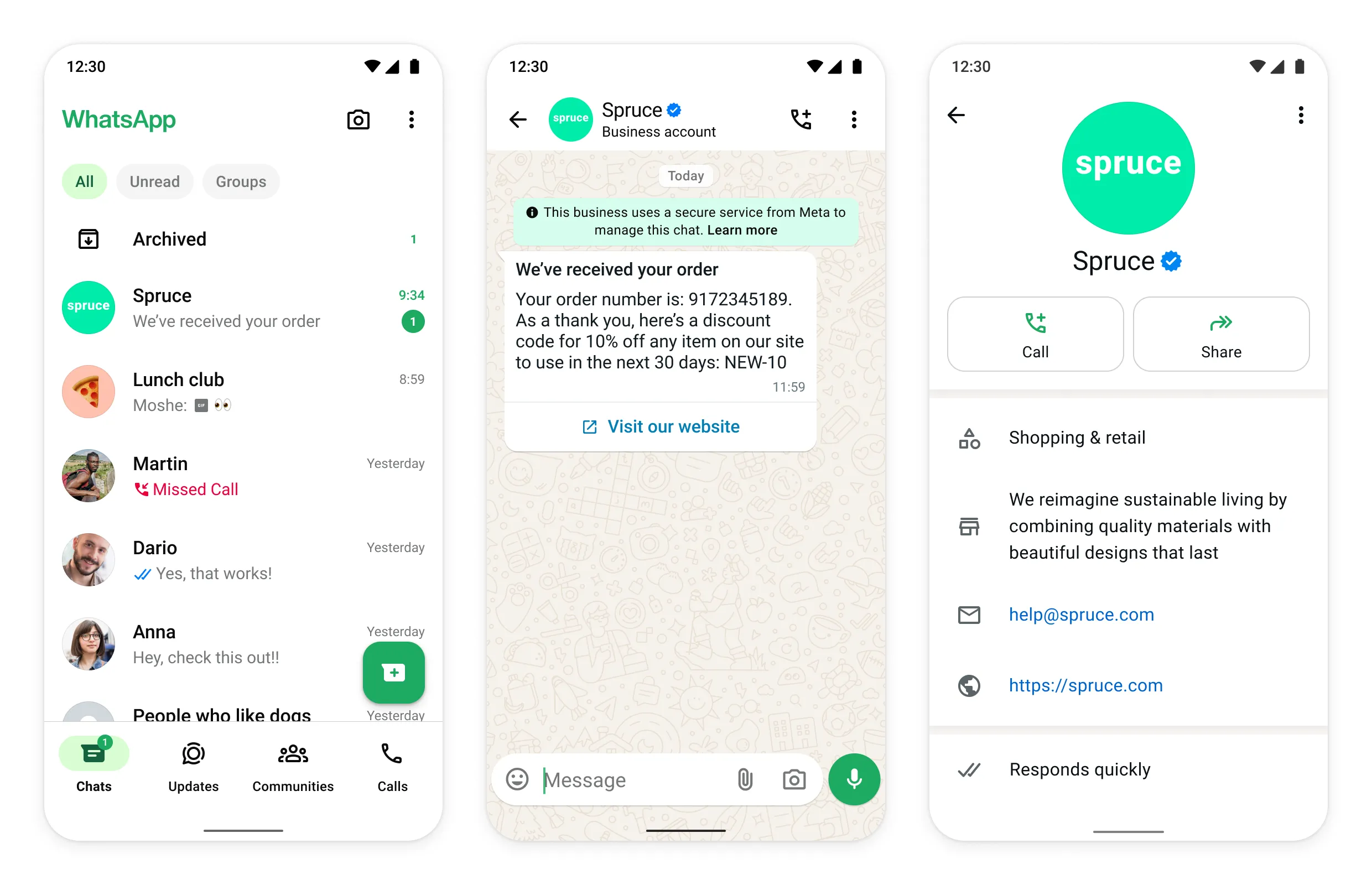
Business phone numbers can gain Official Business Account (OBA) status. OBA numbers have a blue checkmark beside their name in the contacts view.
See our Official Business Account document to learn how to request OBA status for a business phone number.
1-800 and toll free numbers
You may want to register a 1-800 or other toll free number on the platform. These numbers are usually behind an Interactive Voice Response (IVR) system. A WhatsApp registration call cannot navigate an IVR. Phone numbers behind an IVR system can be registered, but must be able to accept calls from international numbers and be able to redirect our SMS message or voice call to a real person.
To register a phone number that is behind an IVR system:
Phone numbers behind an IVR system that are unable to receive registration calls are not supported.
Registered number cap
New business portfolios are initially capped at 2 registered business phone numbers.
If your business becomes verified, or if you have reached a messaging limit of 2,000, Meta will automatically increase your cap to 20. Upon increase, a Meta Business Suite notification will be sent, informing you of your new cap, and a business_capability_update webhook will be triggered with
max_phone_numbers_per_business set to your new cap.WhatsApp user phone number formats
Plus signs (
+), hyphens (-), parenthesis ((,)), and spaces are supported in send message requests.We highly recommend that you include both the plus sign and country calling code when sending a message to a customer. If the plus sign is omitted, your business phone number’s country calling code is prepended to the customer’s phone number. This can result in undelivered or misdelivered messages.
For example, if your business is in India (country calling code
91) and you send a message to the following customer phone number in various formats:| Number In Send Message Request | Number Message Delivered To | Outcome |
|---|---|---|
+16315551234 |
+16315551234 |
Correct number |
+1 (631) 555-1234 |
+16315551234 |
Correct number |
(631) 555-1234 |
+916315551234 |
Potentially wrong number |
1 (631) 555-1234 |
+9116315551234 |
Potentially wrong number |
Note: For Brazil and Mexico, the extra added prefix of the phone number may be modified by the Cloud API. This is a standard behavior of the system and is not considered a bug.
Identity change check
You may want Meta to verify a customer’s identity before delivering your message to them. You can have us do this by enabling the identity change check setting on your business phone number.
If a customer performs an action in WhatsApp that is considered an identity change, Meta generates a new identity hash for the user. To get this hash when messaging a customer, enable the identity change check setting on your business phone number. Once enabled, anytime the customer messages you, or you message the customer without an identity hash, any incoming messages webhooks or status messages webhooks will include their hash. You can then capture and store this hash for future use.
To use the hash, include it in a send message request. Meta compares the hash in the request to the customer’s current hash. If the hashes match, the message will be delivered. If there is a mismatch, it means the customer has changed their identity since you last messaged them and the message will not be delivered. Instead, you will receive a status messages webhook with error code
137000, notifying you of the failure and mismatch.When you receive a mismatched hash webhook, assume the customer’s phone number can no longer be trusted. To reestablish trust, verify the customer’s identity again using other, non-WhatsApp channels. Once you have reestablished trust, resend the failed message to the new identity (if any), without a hash. Then store the customer’s new hash included in the message status delivery webhook.
Post body
{
  "user_identity_change" : {
    "enable_identity_key_check": <ENABLE_IDENTITY_KEY_CHECK>
}
Set
<ENABLE_IDENTITY_KEY_CHECK> to true to enable identity check, or false to disable it.Example enable request
Example enable response
{
  "success": true
}
Get throughput level
Use the WhatsApp Business Phone Number endpoint to get a phone number’s current throughput level:
GET /<WHATSAPP_BUSINESS_PHONE_NUMBER_ID>?fields=throughputGet a single phone number
To get information about a phone number, send a GET request to the WhatsApp Business Phone Number endpoint:
Get display name status (beta)
Include
fields=name_status as a query string parameter to get the status of a display name associated with a specific phone number. This field is currently in beta and not available to all developers.Deleting business phone numbers
Only business portfolio admins can delete business phone numbers, and numbers can’t be deleted if they have been used to send paid messages within the last 30 days.
Deleting business phone numbers via WhatsApp Manager
If your business phone number has a Connected status, you will need your two-step verification PIN to delete your number.
If the number has been used to send paid messages within the last 30 days, you will be redirected to the Insights panel, showing the date of the last paid message. You can delete the number 30 days from this date.
Deleting business phone numbers via API
You cannot delete a business phone number via API.
Migrating business phone numbers
Conversational components
You can enable helpful message UI components to make it easier for WhatsApp users to interact with your business. See Conversational components.