
Business-Initiated Calls | Developer Documentation
Business-Initiated Calls
Updated: Nov 13, 2025
Overview
The Calling API supports making calls to WhatsApp users from your business.
The user dictates when calls can be received by granting call permissions to the business phone number.
Call sequence diagram
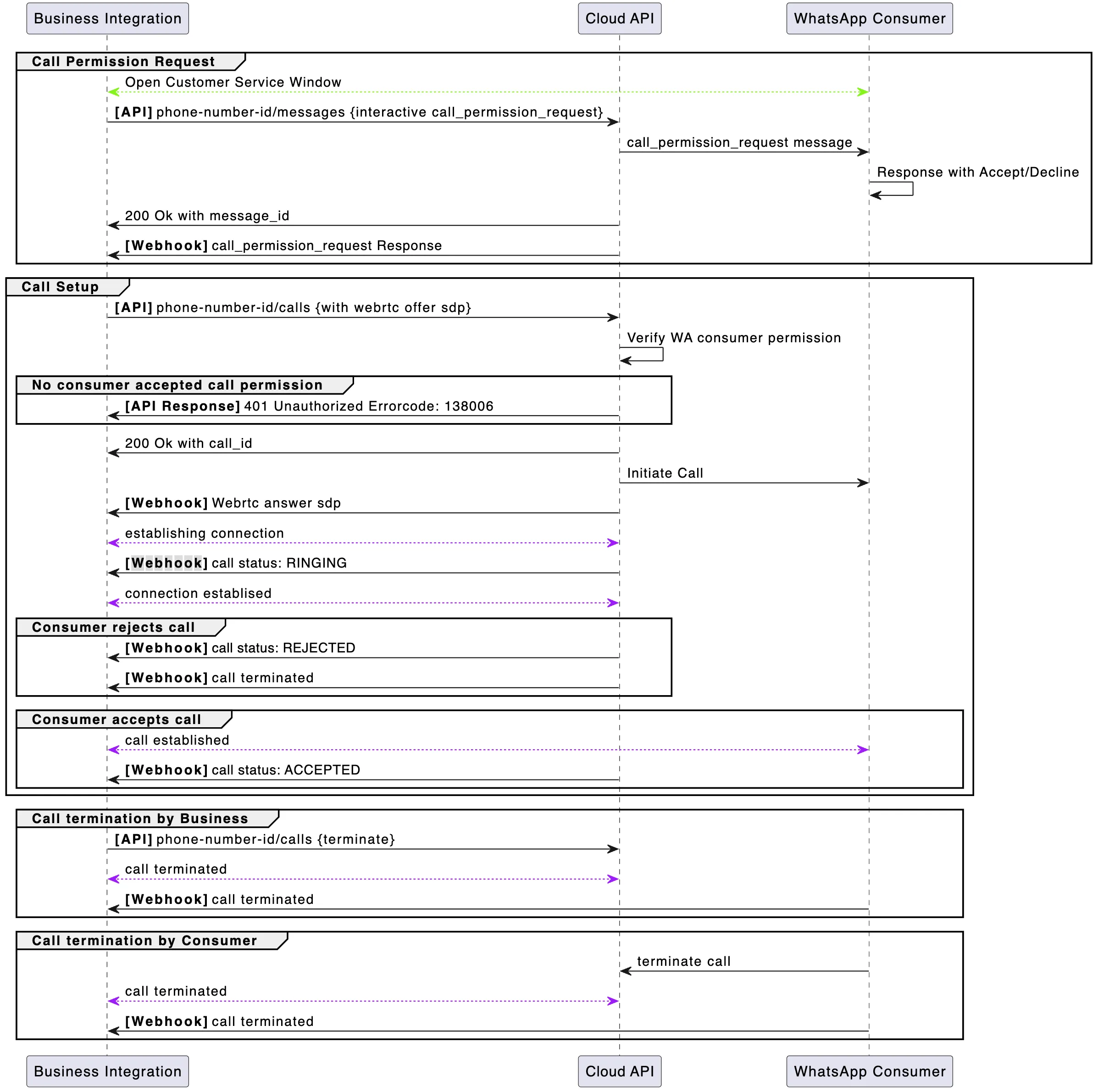
Note: The
ACCEPTED call status webhook will typically arrive after the call has been established. The Cloud API primarily sends it for call event auditing.Prerequisites
Before you get started with business-initiated calling, ensure that:
Lastly, before you can call a WhatsApp user, you must obtain their permission to do so.
Business-initiated calling flow
Part 1: Obtain permission to call the WhatsApp user
You can obtain call permissions from the WhatsApp user in one of the following ways:
Send a call permission request message
You can request call permissions by sending the WhatsApp user a permission request. Send it as a free form message during an open customer service window, or use a template message.
Enable callback_permission_status in call settings
When
callback_permission_status is enabled, the user automatically provides call permission to your business when they place a call to you.WhatsApp user grants permanent permissions
The user can also grant permanent permissions to the business at any time through their business profile.
Part 2: Your business initiates a new call to the WhatsApp user
Now that you have user permission, you can initiate a new call to the WhatsApp user in question.
You can now call the
POST <PHONE_NUMBER_ID>/calls endpoint with the following request body to initiate a new call:If there are no errors, you will receive a successful response:
Note: Response with error code
138006 indicates a lack of a call request permission for this business number from the WhatsApp user.Part 3: You establish the call connection using webhook signaling
After you successfully initiate a new call, you receive a Call Connect webhook response containing an
SDP Answer from Cloud API. Your business will then apply the SDP Answer from this webhook to your WebRTC stack to initiate the media connection.You then receive an appropriate status webhook, indicating that the call is
RINGING, ACCEPTED, or REJECTED:Endpoints for business-initiated calling
Initiate call
Use this endpoint to initiate a call to a WhatsApp user by providing a phone number and a WebRTC call offer. There is a rate limit of 10000 per 24 hours for initiating new calls per business phone number.
Body parameters
Success response
Error response
Possible errors that can occur:
phone-number-idPermissions/Authorization errorsRequest format validation errors, for example connection info, sdp, iceSDP validation errorsCalling restriction errors
Terminate call
Use this endpoint to terminate an active call.
This must be done even if there is an
RTCP BYE packet in the media path. Ending the call this way also ensures pricing is more accurate.When the WhatsApp user terminates the call, you do not have to call this endpoint. Once the call is successfully terminated, you will receive a Call Terminate Webhook.
Body parameters
| Parameter | Description | Sample Value |
|---|---|---|
call_idString |
Required
The ID of the phone call. For inbound calls, you receive a call ID from the Call Connect webhook when a WhatsApp user initiates the call. |
“wacid.ABGGFjFVU2AfAgo6V-Hc5eCgK5Gh” |
actionString |
Required
The action being taken on the given call ID. Values can be connect | pre_accept | accept | reject | terminate |
“terminate” |
Success response
Error response
Possible errors that can occur:
call idInvalid phone-number-idThe WhatsApp user has already terminated the callReject call is already in progressPermissions/Authorization errors
Webhooks for business-initiated calling
With all Calling API webhooks, there is a
”calls” object inside the ”value” object of the webhook response. The ”calls” object contains metadata about the call that is used to action on each call placed or received by your business.To receive Calling API webhooks, subscribe to the “calls” webhook field.
Call status webhook
This webhook is sent during the following calling events:
The webhook structure here is similar to the Status webhooks used for the Cloud API messages.
Webhook values for "statuses"
| Placeholder | Description |
|---|---|
idString |
A unique ID for the call |
timestampInteger |
The UNIX timestamp of the webhook event |
recipient_idInteger |
The phone number of the WhatsApp user receiving the call |
statusInteger |
The current call status.
Possible values:
RINGING: Business initiated call is ringing the userACCEPTED: Business initiated call is accepted by the userREJECTED: Business initiated call is rejected by the user |
biz_opaque_callback_dataString |
Arbitrary string your business passes into the call for tracking and logging purposes.
Will only be returned if provided through Initiate New Call API requests |
Call terminate webhook
A webhook notification is sent whenever the call has been terminated for any reason, such as when the WhatsApp user hangs up, or when the business calls the
POST /<PHONE_NUMBER_ID>/calls endpoint with an action of terminate or reject.Webhook values for "calls"
| Placeholder | Description |
|---|---|
idString |
A unique ID for the call |
toInteger |
The number being called (callee) |
fromInteger |
The number of the caller |
eventInteger |
The calling event that this webhook is notifying the subscriber of |
timestampInteger |
The UNIX timestamp of the webhook event |
directionString |
The direction of the call being made.
Can contain either:
BUSINESS_INITIATED, for calls initiated by your business.USER_INITIATED, for calls initiated by a WhatsApp user. |
start_timeInteger |
The UNIX timestamp of when the call started.
Only present when the call was picked up by the other party. |
end_timeInteger |
The UNIX timestamp of when the call ended.
Only present when the call was picked up by the other party. |
durationInteger |
Duration of the call in seconds.
Only present when the call was picked up by the other party. |
biz_opaque_callback_dataString |
Arbitrary string your business passes into the call for tracking and logging purposes.
Will only be returned if provided through an Initiate Call API request or Accept Call request |
errors.codeInteger |
The errors object is present only for failed calls when there is error information available. Code is one of the calling error codes |
SDP overview and sample structures
Session Description Protocol (SDP) is a text-based format used to describe the characteristics of multimedia sessions, such as voice and video calls, in real-time communication applications. SDP provides a standardized way to describe the session’s media streams. This includes media type, codecs, protocols, and parameters for establishing and managing the session.
In the context of WebRTC, SDP is used to negotiate the media parameters between the sender and receiver, enabling them to agree on the specifics of the media exchange.