# Marketing Messages
# Marketing Messages API for WhatsApp | Developer Documentation
## Marketing Messages API for WhatsApp
Updated: Feb 10, 2026
Marketing Messages API for WhatsApp (formerly known as Marketing Messages Lite API) is now generally available.
MM API for WhatsApp is our next-generation marketing solution built to enhance the customer experience and deliver the right message to more of the right people.
1. **Boost and measure business results**: With our automatic delivery optimizations, you can reach more of the people who will find your messages valuable and may drive more reads and clicks. You can also access exclusive measurement insights:
1. *Performance benchmarks*, to understand how your message performed compared to similar businesses
1. *Tailored recommendations*, to improve campaign performance
1. **Enhance customer experience and engagement**: MM API for WhatsApp helps deliver more relevant and timely marketing messages to customers with exclusive features like:
1. Automatic creative optimizations (in testing), to apply creative treatments like image animation and filtering for more engaging messages.
1. Richer media formats, like GIFs.
1. Time-to-live, to avoid irrelevant or delayed message delivery for time-sensitive campaigns.
1. **Upgrade easily, with consistent reliability and security**: MM API for WhatsApp is easy-to-use, reliable, and secure. It offers a similar technical schema and same billing model as Cloud API, and businesses can use existing phone numbers and MM templates.
Send all your marketing traffic to the `/marketing_messages` endpoint for automatic routing of eligible business’ messages.
1. \*An AB test was conducted with approximately 12 million delivered marketing messages sent by advertisers in India between January 1, 2025, and January 31, 2025. The test compared MM API for WhatsApp optimized delivery to standard Cloud API delivery for high engagement messages only (For example, messages with more reads, clicks, etc.) and the analysis consisted of a t-test at a 95% confidence level.
## Get started
Updated: Feb 10, 2026
Marketing Messages API for WhatsApp (formerly known as Marketing Messages Lite API) is now generally available.
Learn how to send a template message with the Marketing Messages API for WhatsApp (MM API for WhatsApp).
You have an active WhatsApp Business Account and are in a [country eligible for MM API for WhatsApp](/books/meta-whatsapp/page/get-started-developer-documentation).You have an approved [marketing template message](/books/meta-whatsapp/page/marketing-templates-developer-documentation).You are subscribed to the [messages](/books/meta-whatsapp/page/messages-webhook-reference-developer-documentation) webhook.### Step 1: Accept Terms of Service
### Step 3: Verify message was sent through the `status` webhook
### Geographic availability of features
Some advanced features and reporting capabilities of MM API for WhatsApp are available only in particular geographies due to Meta policy and/or local regulation.
#### European Economic Area, United Kingdom, Japan, South Korea
#### Cuba, Iran, North Korea, Syria, and three sanctioned regions in the Ukraine (Crimea, Donetsk, Luhansk):
Starting June 20, 2025, businesses in Russia will be able to use MM API for WhatsApp with the following feature exceptions:
Messages sent by a business with a Meta business profile in Russia, or using a payment method with a Russian address, will not receive delivery optimizations.Messages sent from a business phone number in these countries, or to a consumer in these countries, will not have click and conversion reporting metrics available. For businesses in these countries, metrics are not available on Ads Manager UI or Insights API. As with Cloud API, metrics will continue to be available via Business Management API and WhatsApp Manager UI conversation metrics.All other features of MM API for WhatsApp continue to be available.Learn about additional [marketing message formats](/books/meta-whatsapp/page/marketing-templates-developer-documentation)## Features
Updated: Feb 10, 2026
Marketing Messages API for WhatsApp (formerly known as Marketing Messages Lite API) is now generally available.
Marketing Messages API for WhatsApp offers added features that are not available on Cloud API, such as performance benchmarks and recommendations, time-to-live, and automated creative optimizations (in testing).
For more detail, see the comparison tables below.
### Optimization features
| Description | Marketing Messages API for WhatsApp (Supports Marketing) | Cloud API (Supports Auth, Utility, Service, Marketing) |
|---|
**Quality-based delivery:** Improving deliveries of high engagement messages. | **Yes:** Marketing Messages API for WhatsApp factors if a message is high engagement into delivery decisions, offering up to 9% higher deliveries vs. Cloud API (see footnote below). High engagement marketing messages refers to messages that are expected by users, relevant, and timely, and therefore more likely to be read and clicked. | **No:** Message quality does not factor into per-user marketing message limits. No ability to increase delivery for high engagement messages. |
**Automated creative optimizations:** Automatic enhancements to creative to increase message performance. | **Yes (pilot):** Automatically enhance the visual appeal and engagement of marketing template messages. See full list of capabilities [here](/books/meta-whatsapp/page/send-marketing-messages-developer-documentation). | |
### Marketing message formats
| Description | Marketing Messages API for WhatsApp (Supports Marketing) | Cloud API (Supports Auth, Utility, Service, Marketing) |
|---|
**Animated Image (GIF) Header:** Marketing message templates support a GIF [media type in the header](/books/meta-whatsapp/page/template-components-developer-documentation). | | |
**Android App Deep Links:** [Links](/books/meta-whatsapp/page/deep-links-developer-documentation) that directly open up the app on a customer’s phone. | | |
**Customizable Message Validity Periods:** Set a [time-to-live for messages](/books/meta-whatsapp/page/send-marketing-messages-developer-documentation) that should expire if they cannot be delivered soon enough. | **Yes:** TTL can range from 12 hours to 30 days. | **Limited:** Only supports Authentication and Utility messages. |
**Basic marketing message formats:** [Media, carousel, product catalog, flow, interactive list, interactive reply, etc.](/books/meta-whatsapp/page/marketing-templates-developer-documentation) | | |
| Description | Marketing Messages API for WhatsApp (Supports Marketing) | Cloud API (Supports Auth, Utility, Service, Marketing) |
|---|
**Benchmarks:** Comparison of read and click rates versus similar templates from businesses in your region. | | |
**Recommendations:** Evidence-based recommendations to improve the performance of your template. | | |
| Description | Marketing Messages API for WhatsApp (Supports Marketing) | Cloud API (Supports Auth, Utility, Service, Marketing) |
|---|
**Conversion metrics:** Conversions on Web and App. | **Yes:** [Measure marketing messages](/books/meta-whatsapp/page/setting-up-conversion-measurement-developer-documentation) leading users to perform app events, such as “Add to Cart”, “Checkout Initiated”, and “Purchase”. | |
**Cost metrics:** [Spend per Template, Cost per click, Cost per delivery.](/books/meta-whatsapp/page/viewing-metrics-developer-documentation) | | |
**Basic metrics:** [Sent, delivered, read, clicked, errors.](/books/meta-whatsapp/page/viewing-metrics-developer-documentation) | | |
### Enterprise, Security 5 & Compliance Features
| Description | Marketing Messages API for WhatsApp (Supports Marketing) | Cloud API (Supports Auth, Utility, Service, Marketing) |
|---|
**Local Storage Support:** Phone numbers with [Local Storage enabled.](/books/meta-whatsapp/page/local-storage-developer-documentation) | | |
**Compliance certification:** Compliance resources available on the [Business Messaging Compliance Center](https://www.facebook.com/business/business-messaging/compliance). | **Yes:** Certification for LGPD, GDPR, System Audit Report, SOC, ISO27001. | **Yes:** Certification for LGPD, GDPR, System Audit Report, SOC, ISO27001. |
**Automatic throughput upgrades:** Automatic upgrades (and webhook notifications) to a phone number’s [messaging throughput](/books/meta-whatsapp/page/throughput-developer-documentation). | | |
**Real-time service status updates:** [Uptime and availability metrics](/documentation/business-messaging/whatsapp/support/api-status-page) are live on [metastatus.com](https://l.facebook.com/l.php?u=https%3A%2F%2Fmetastatus.com%2Fwhatsapp-business-api%3Ffbclid%3DIwY2xjawM2uLNleHRuA2FlbQIxMQBicmlkETFPWE5PUldSeE95a2tuMnA1AR4r-Af63nidsmVRDdEJ4WtriGpxdlenOA60_uzhuqXHr06lE0-d2S9pnJm_Ww_aem_WtrDEZEwN2EZflsD4vmusQ&h=AT76QDI6has-EB-CuH2jOsRXVyjN54_lh4YppOHo-KCDE-kwTG7tP12WNayzTeMYgG5YSKkZopUPH_SGdXFHzFS6tpDxNkk3pTvwpjVDUYPq--u2c42C4yWtPwGGmyGYD3Btd5YtajA1JoghZwqMBA). | | |
| Description | Marketing Messages API for WhatsApp (Supports Marketing) | Cloud API (Supports Auth, Utility, Service, Marketing) |
|---|
**Streamlined Onboarding:** [Onboard via Embedded Signup, Intent API, and Intent UI](/books/meta-whatsapp/page/onboard-developer-documentation). | | **Limited:** Embedded signup only. |
**Error Codes:** Graph API [error codes](/documentation/business-messaging/whatsapp/support/error-codes#marketing-messages-api-for-whatsapp-error-codes). | **Yes:** [Specific Marketing Messages API for WhatsApp error codes](/documentation/business-messaging/whatsapp/support/error-codes#marketing-messages-api-for-whatsapp-error-codes). | |
**Onboarding Status via API:** Granular [eligibility status data and error codes](/documentation/business-messaging/whatsapp/marketing-messages/changelog#july-15--2025). | **Yes:** A [new eligibility status field](/books/meta-whatsapp/page/onboard-developer-documentation) has been introduced to better report on the API onboarding status. | |
**Coexistence:** [Onboarding WhatsApp business app users.](/books/meta-whatsapp/page/onboard-business-customers-developer-documentation) | | |
The A/B test was conducted with ~12 million delivered marketing messages sent by advertisers in India between 1st Jan 2025 to 31st Jan 2025. It compared Marketing Messages API for WhatsApp optimized delivery to standard Cloud API delivery for high engagement messages only (that is to say, more reads, clicks, etc.) and the analysis consisted of a t-test at 95% confidence.
## Onboard
Updated: Feb 10, 2026
Marketing Messages API for WhatsApp (formerly known as Marketing Messages Lite API) is now generally available.
Onboarding to the Marketing Messages API for WhatsApp (MM API for WhatsApp) is a low-effort upgrade to sending marketing messages with optimizations on Cloud API. See the directions below to onboard your business, whether you integrate with the API directly or work with a partner.
When a business registers for the MM API for WhatsApp, read-only Ad accounts are created that are linked to each of the marketing templates that exist under their business portfolio.
These linked accounts allow a business to:
fetch their MM API for WhatsApp insights from the Marketing API “Insights API” to view the sameThese read-only ad accounts are kept in sync with any changes to marketing templates, so that any changes to marketing templates are reflected in the linked ad entity.
Follow the steps below to Onboard to MM API for WhatsApp.
### Eligibility requirements
In order to use the Marketing Messages API for WhatsApp (MM API for WhatsApp), a business must comply with applicable legal, vertical and content restrictions (country dependent) outlined in [WhatsApp Business Messaging Policies](https://l.facebook.com/l.php?u=https%3A%2F%2Fbusiness.whatsapp.com%2Fpolicy&h=AT5NSg0c3v5O8rslKMZUp262bKaeD-F7CwUdyFnHjCP-Ips2yG_fjrB-EExkVgCOTTveomyPB2O1FM60dGr00I7NGGZhIPg-wg80bvWXUY_eu4fV7D_ejbySmOT__vNlAXbSMdT9-5Jy98K8F7nw3g).
In addition, the following requirements must be met:
WABA is active and not restricted from messaging due to any violationsWABA tax country is not in sanctioned regionsOwner Business country is not in sanctioned regionsMM API for WhatsApp will continuously update vertical eligibility and policies to comply with various policies and regulations internationally, so these requirements may change.
#### Checking eligibility status (alternative)
This field will be deprecated in version 24.0. We recommend using the [`marketing_messages_onboarding_status` field](#bkmrk-check-waba-onboardin-1) instead.
For partner-managed WABAs, businesses can find eligible WABAs using the following endpoint:
### Register a phone number on Cloud API
In order to send a message via MM API for WhatsApp, a business phone number must also be registered on Cloud API. MM API for WhatsApp and Cloud API are used together on the same phone number:
Cloud API allows a business to send Authentication, Service, Utility, and non-Optimized Marketing template messages and freeform messages, and receive inbound messages from consumers on a business phone number.
MM API for WhatsApp allows a business to send marketing messages with optimizations, over the same phone number as is registered on Cloud API.
WhatsApp Business phone numbers that are not registered on Cloud API cannot be used with MM API for WhatsApp.
If a business phone number is already registered on Cloud API, phone number verification is not required when registering for MM API for WhatsApp, as no new phone numbers are registered during the MM API for WhatsApp registration process. Existing Phone Numbers remain registered on Cloud API, and will now be eligible to use MM API for WhatsApp in addition to and simultaneously with Cloud API for sending marketing messages.
### For solution providers
If you are a solution provider onboarding your end businesses, refer to [onboard business customers](/books/meta-whatsapp/page/onboard-business-customers-developer-documentation).
### Onboarding business customers
You can instruct your business customers to have someone with full control to the business portfolio to accept the Terms of Service and onboard MM API for WhatsApp via WhatsApp Manager.
Open WhatsApp Manager > Overview.In the Alerts section, click Accept terms to get started for Marketing Messages API for WhatsApp.Follow the steps to finish signing MM API for WhatsApp Terms of Service.Your business customers should be able to start sending messages via MM API for WhatsApp.
If you are unable to access your WhatsApp Manager, [find your business portfolio admin here](/books/meta-whatsapp/page/faqs-developer-documentation).
### For business customers without a partner
If your business directly integrates with Cloud API without a partner, follow the instructions below to accept the Terms of Service and onboard to MM API for WhatsApp.
Navigate to the **[App Dashboard](/apps)** > **WhatsApp** > **Quickstart** panel.On the **Quickstart** page, locate the “Improve ROI with Marketing Messages API for WhatsApp” card and click the “Get started” button.Click on “Continue to integration guide” to accept the Terms of Service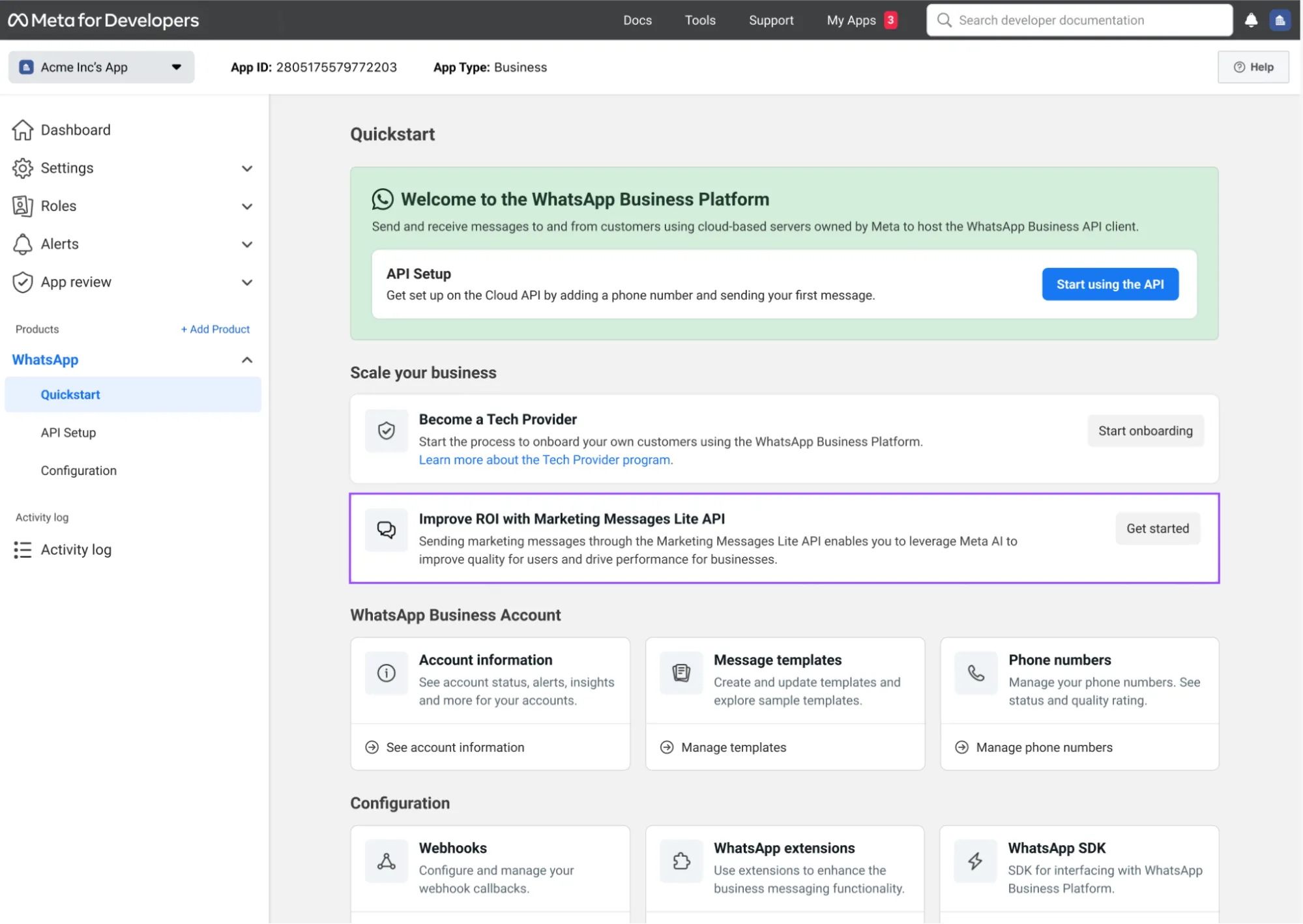
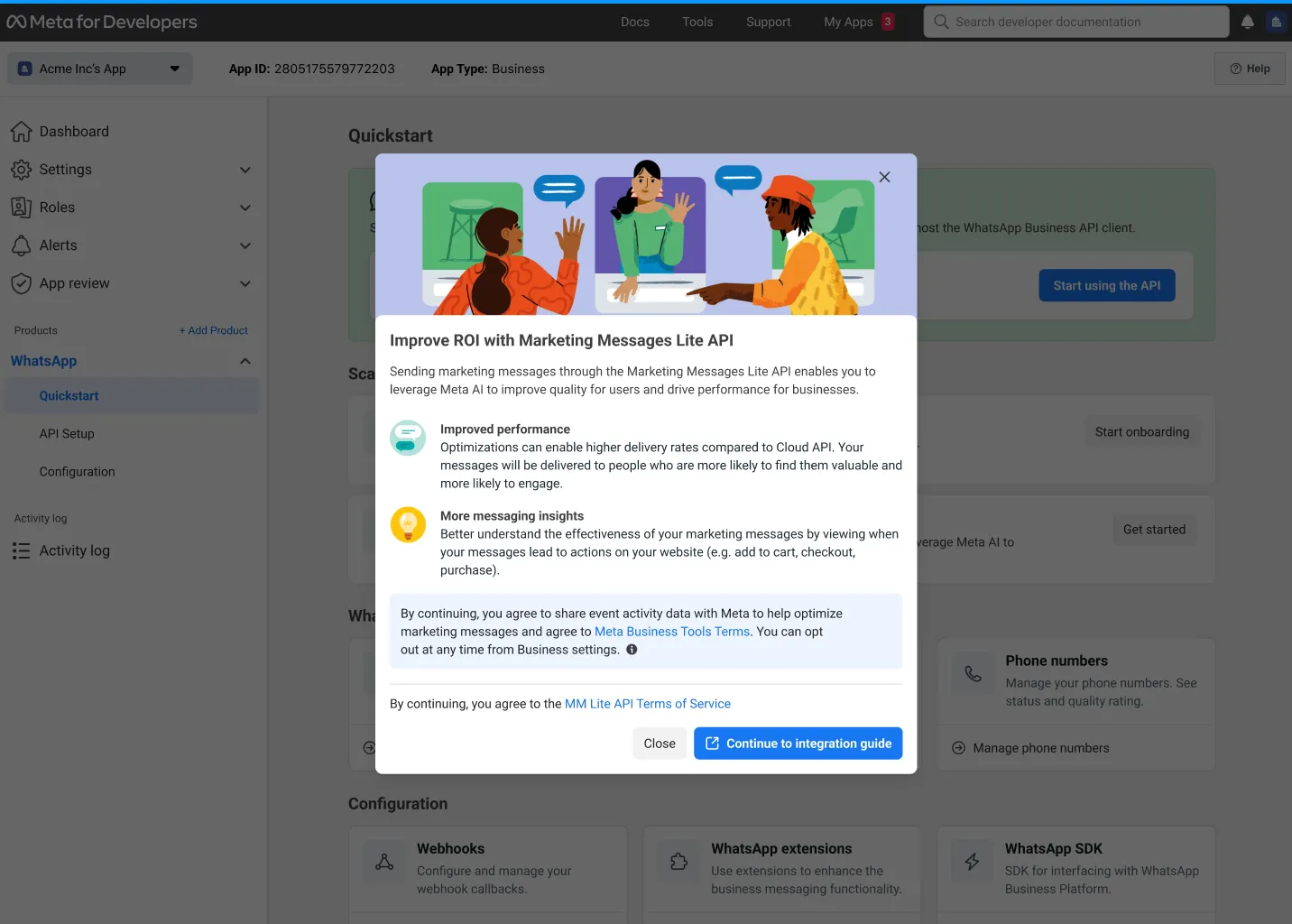
### Receive MM API for WhatsApp Terms of Service signed webhook (Preferred)
Note: The ToS event value will be available from September 8th, 2025. Refer to the legacy webhook below.
When the MM API for WhatsApp Terms of Service (ToS) is signed for a business, a new [`account_update`](/documentation/business-messaging/whatsapp/webhooks/reference/account_update) webhook will be sent for each WhatsApp Business Account (WABA) under your business portfolio. The webhook indicates that the WABA’s business has successfully accepted the MM API for WhatsApp ToS. When the webhook is triggered, your WABA will be allowed to send messages through MM API for WhatsApp.
You can use the included business portfolio ID and WABA ID to verify compliance and begin sending messages, or trigger subsequent onboarding actions as needed. This webhook is the preferred webhook to track MM API for WhatsApp onboarding and eligibility status.
### Receive onboarding completion webhook (Legacy)
Once you have completed onboarding and linked Ad accounts have been set up, an [`account_update`](/documentation/business-messaging/whatsapp/webhooks/reference/account_update) webhook will be sent for each WABA under your business portfolio to indicate that onboarding has successfully completed. This webhook contains the ID of the read-only Ad account that each WABA is linked to, for use when calling Insights APIs.
Note: This webhook is considered legacy for MM API for WhatsApp onboarding. Please use the MM API for WhatsApp Terms of Service signed webhook.
Important: The `ad_account_linked` webhook event will no longer be fired since partners will not receive access to ad accounts.
## Setting up conversion measurement
Updated: Mar 27, 2026
Marketing Messages API for WhatsApp (formerly known as Marketing Messages Lite API) is now generally available.
Using Marketing Messages API for WhatsApp, you can integrate your marketing messages with events, allowing you to measure the rate and cost at which a Marketing message sent via Marketing Messages API for WhatsApp leads to a downfunnel event like “purchase” on your website or app.
Conversion measurement is built on the same events that you can send to Meta when using Ads, making it seamless for businesses who are already integrated with Events for Ads purposes (for example, via Pixel or Conversions API for websites, or Meta SDK in their mobile app), to leverage the same reporting automatically with no setup.
If a business is using both marketing messages on Marketing Messages API for WhatsApp and Ad Campaigns on the same business portfolio, conversion events reported will be automatically attributed to the last Meta touch (either Marketing Messages API for WhatsApp click or Ad click) before the event, based on the attribution window settings of each. For example, if a business is running both an Instagram Ad campaign and a Marketing message campaign on MM API for WhatsApp, each with a URL pointing to the same website for a sale, a user who purchases after clicking on both the Instagram Ad and the Marketing message will be attributed to either the MM API for WhatsApp click or the Ad click, based on the attribution window settings of each. This helps businesses better understand the holistic picture of their Ad and Marketing message campaigns in driving outcomes.
### Understanding linked Ad entities
When a business registers for Marketing Messages API for WhatsApp, read-only Ad accounts are created under their business portfolio, which are synced to each WhatsApp Business Account under the same portfolio. Note that marketing messages are separate and distinct from Ads - the use of “Ads” terminology below represents the use of Ads entities as technical constructs only.
No action is needed on the part of the business or partner - these linked read-only Ad accounts are kept in sync with any changes made to Marketing templates, so that any new or updated marketing templates are reflected by their linked ad entity.
Linking Marketing templates to Ad accounts provides several benefits:
**Common UI and API for marketing teams:** Businesses can view their Marketing Messages API for WhatsApp marketing campaigns and campaign metrics as “Campaigns” in Ads Manager’s “Marketing Messages” tab, and via API using the Marketing API “[Insights API](https://developers.facebook.com/docs/marketing-api/insights)”. Using these interfaces helps a business’ marketing teams view their Ads and Marketing message campaigns using common interfaces and terminology, instead of viewing Ad campaigns in one place and marketing campaigns sent via WhatsApp in another.
**New metrics:** The Ads Manager UI and Insights API report new Conversion metrics (for example, Web, App) that Cloud API and the Business Management API do not support. When Marketing template messages sent via MM API for WhatsApp lead to Conversion events (for example, add to cart, purchase) that a business reports from their website or app, these conversion events are attributed to the Marketing message and are shown in metrics, leading to a better understanding of Marketing message ROI. Reporting events is done via integration with Pixel or Conversions API for Web and App Events and the Meta SDK.### Template-to-Ad-sync guidelines
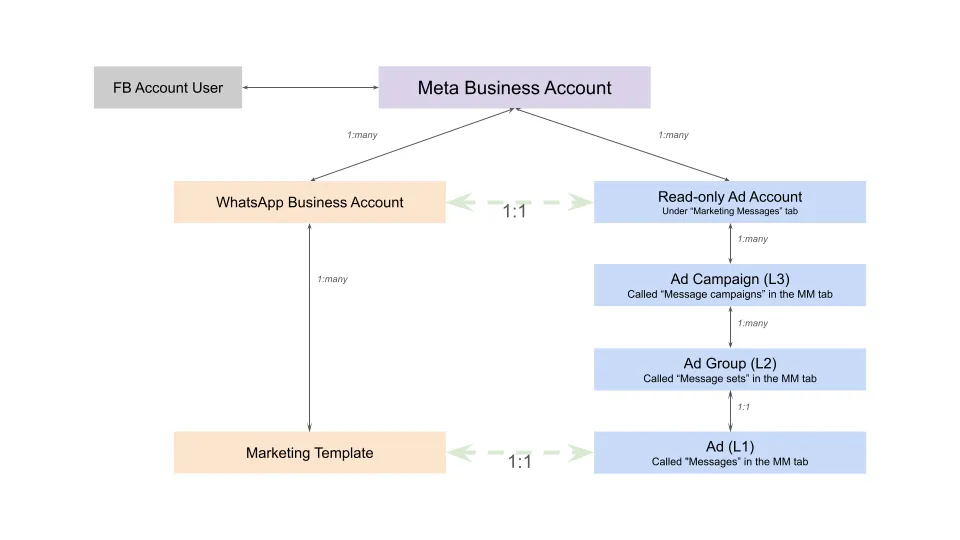
### Understanding automatic objective setting
In order to measure Conversion events, Marketing Messages API for WhatsApp automatically syncs Marketing templates to corresponding Ads entities (Campaigns, Message sets, and Ads) with configurations that allow for Conversion reporting of an assumed objective.
This linking process happens automatically, to reduce the integration complexity of Marketing Messages API for WhatsApp for businesses. For those familiar with Meta’s Ads ecosystem, note that these Campaign and Ad Set parameters will not change how messages are delivered via Marketing Messages API for WhatsApp - they are only set so that reported events can be correctly attributed.
The following table shows how Marketing templates are mapped to Ads entities.
| Campaign parameters | Message Set parameters |
|---|
Marketing templates with no CTA URL button | | OptimizationGoal: Impression |
Marketing templates with a CTA URL button that points to a website or app without event reporting enabled. | | OptimizationGoal: LinkClicks |
Marketing templates with a CTA URL button that points to a website or app with event reporting enabled. | | OptimizationGoal: OffsiteConversion |
While most changes to Templates will be automatically synced with Ads (for example, text content), Campaign and Message set parameters are synced only once when a business first onboards to Marketing Messages API for WhatsApp or creates a new Template, in order to maintain a consistent campaign and message set structure when reporting on clicks and conversions from messages sent using that Template. This means that if you wish to add, edit, or remove a URL from a CTA button on a Template, you must create a new Template in order to correctly capture click and conversion metrics for the updated URL.
### URL requirements for conversion measurement
Meta appends a click ID to the URLs you send in CTA buttons on marketing template messages. The purpose of the click ID is to attribute events you report via Meta Pixel, Conversions API (web or app events), or the Meta SDK.
The click ID is Meta-generated and is commonly attached as the `fbclid` query parameter.
Example URL with `fbclid` query parameter:
```
https://www.jaspersmarket.com/?fbclid=IwAR2F4-dbP0l7Mn1IawQQGCINEz7PYXQvwjNwB_qa2ofrHyiLjcbCRxTDMgk
```
#### URL compatibility (short links, redirects, and URL rewriting)
Some short-link and redirect services can interfere with conversion measurement if they strip, overwrite, or fail to forward query parameters that Meta appends. If you use a short-link provider or URL rewriting service, ensure it preserves all query parameters end-to-end.
**Example where fbclid is dropped:**
You configure your CTA destination as: `https://www.jaspersmarket.com/checkout?campaign=whatsapp_template`Your link partner rewrites it to a short link that redirects to your site: `https://www.example.com/jaspersmarket`Before sending, Meta appends a click ID to the short link: `https://www.example.com/jaspersmarket?fbclid=xyz789`When the user clicks, the short-link service redirects to your site but drops the query string, sending the user to: `https://www.jaspersmarket.com/checkout?campaign=whatsapp_template` (missing `fbclid=xyz789`)The click ID is not preserved through the redirect, which can reduce Meta’s ability to attribute conversions to the originating click.
#### URL parameter ordering issues
Appending additional query parameters after the `fbclid` parameter can cause redirection issues on some platforms. If your system adds custom parameters to a URL, ensure that the `fbclid` parameter is not disrupted or truncated by subsequent parameters. Test the full URL (with all parameters) to confirm that the destination resolves correctly and that `fbclid` is accessible to your site or app.
If you use short links or redirects:
Test that the final URL retains all query parameters (including `fbclid`).Validate conversion reporting in Ads Manager and Insights API before sending production workloads.Avoid appending parameters after `fbclid` in ways that could disrupt the URL structure.If you experience issues, work with your partner to ensure query parameters are preserved, or reach out to Meta with details.
### Android deep links for conversion measurement
Android routes deep links using intent filters declared by apps. A deep link URL has three parts:
Scheme (for example, `https`, `myapp`) — helps determine which app can open the linkPath (for example, `/product/123`) — the route inside the appQuery parameters (for example, `?fbclid=...`) — includes attribution data like `fbclid`, `campaignId`, `al_applink_data`, and othersWhen a user taps a deep link, Android:
Finds apps with intent filters that match the URL (scheme/host/path).Creates an implicit Intent.Delivers it to the target Activity (often via `onCreate()` and/or `onNewIntent()`), where the app must read the full URL (including query parameters).Android passes the URL, but your app must explicitly capture and persist attribution parameters. If you don’t, they can be effectively “lost” after the first screen.
Attribution parameters like `fbclid` can be stripped, cached incorrectly, or not passed through as expected due to one or more of:
Android intent resolution behavior (multiple handlers, re-launch behavior, or activity launch modes)How WhatsApp invokes app links (intermediary parsing and handoff to Android)Receiving app implementation gaps, for example:
Only reading the URL in `onCreate()` but not `onNewIntent()`Not persisting the parameters for later use (install/deferred deep linking/session attribution)Redirecting internally and dropping query params when rebuilding a new URI#### Implementation checklist
To ensure the click ID works correctly, the receiving Android app should:
Read the full URI from the incoming Intent
Handle both cold start (`onCreate()`) and warm start/re-use (`onNewIntent()`)Extract attribution params (at minimum `fbclid`, and any others you rely on)Persist them for later conversion reporting/session attribution
Store in a durable place (for example, `SharedPreferences` or a database) with a timestampRefresh if a newer value arrives (these identifiers can change over sessions)Do not drop query parameters when redirecting internally
If your app converts a URI to an internal route, ensure you carry attribution params forward or persist them before routing#### Test deep link parameter preservation on Android
When you open a deep link that includes `fbclid`, your app should be able to log (or otherwise confirm) that it received the URI including `fbclid`, and that it persisted it for subsequent events.
Use a test link like:
```
myapp://some/path?fbclid=TEST123&campaignId=TESTCAMPAIGN
```
Or an `https://` app link equivalent if you support it.
You can simulate what Android does by sending an Intent yourself:
```
adb shell am start -W -a android.intent.action.VIEW \
-d "myapp://some/path?fbclid=TEST123&campaignId=TESTCAMPAIGN"
```
Then confirm your app receives `fbclid` and persists it.
### Measure website conversions with Meta Pixel or Conversions API
Businesses who are reporting events from their website using Meta Pixel or Conversions API for web, can measure when clicking on a URL in a marketing message sent via Marketing Messages API for WhatsApp leads to one of 3 conversion events.
If a business is not yet reporting Offsite Conversion events from their website, see the following documentation to set up event reporting:
**Tutorial**: [Get started with the Meta Pixel and Conversions API](https://l.facebook.com/l.php?u=https%3A%2F%2Fwww.facebookblueprint.com%2Fstudent%2Factivity%2F212737&h=AT7n_g2s-Zsk7wFZdkBb9xkHKoX1G9hD7oYeT2bSBjPn99KDB7-9Kr6QK0FCKtBnBJqtHVtUGggfSE1rzVDEI0HFWjjYYojoZUJKTN2RA_YR2YqNrNlvr1-SQylPxmnCD4qRzqlOUqWePQb9_Jz6mQ)
Once a business is reporting events via Pixel or Conversions API, the following 3 standard events are automatically associated with website visitors who arrived at the site via a CTA URL from a marketing message sent via MM API for WhatsApp:
Add to cartInitiate checkoutPurchasePurchase valueWhen a user clicks a CTA URL in a Marketing Messages API for WhatsApp message and performs any of the above 3 events, Meta will automatically attribute the conversion event to the MM API for WhatsApp Campaign, and make those analytics available to you or your Partner via the Insights API, which your Partner may surface on their own reporting surfaces that you are accustomed to using.
Note that if this conversion event is also being used to measure the efficacy of Ads on Facebook or Instagram, Meta will attribute the conversion to the ‘last touch’ interaction of the user. For example, if a user arrives at your website via an ad on Facebook, and then closes their browser window and later that day returns to your website via clicking a link from a MM API for WhatsApp message and purchases an item, that purchase conversion event will be attributed to the MM API for WhatsApp campaign (and not the ad on Facebook) as the most recent interaction.
## Tracking click events
Updated: Feb 10, 2026
Marketing Messages API for WhatsApp (formerly known as Marketing Messages Lite API) is now generally available.
*Available using Marketing Messages API for WhatsApp (MM API for WhatsApp) and Ads Manager only*
At the moment, this feature is not available for all usersClick events are only available for messages sent in the last 7 days## Viewing metrics
Updated: Feb 10, 2026
Marketing Messages API for WhatsApp (formerly known as Marketing Messages Lite API) is now generally available.
Conversion metrics will be solely available in the WhatsApp Manager UI and WhatsApp Business Management API that businesses use with Cloud API in October 2025.
As a result, the following conversion metrics will be depreciated:
Viewing conversion metrics via Ads Manager UI (**September 8th, 2025**).Viewing conversion metrics via Ads Insights API (**Q1 2026**).Businesses that use Marketing Messages API for WhatsApp can view metrics from 4 surfaces:
Via WhatsApp Business Platform surfaces
WhatsApp Manager UI[WhatsApp Business Management API](/books/meta-whatsapp/page/about-the-whatsapp-business-platform-developer-documentation)Via Ads surfaces (optional)
Ads Manager UI “Marketing Messages” tabMarketing API “[Insights API](https://developers.facebook.com/docs/marketing-api/insights)”| ROI Reporting | WhatsApp Business Management surfaces | Ads surfaces |
|---|
Messages sent, delivered, read | | |
| | |
| | |
| | |
| | |
| | |
| | |
Checkout initiated (Web + App) | | |
Purchase, purchase value (Web + App) | | |
| | |
| | |
`*` Requires a business to report this conversion event via Meta Pixel or Conversions API for App Events [see Get started with the Meta Pixel and Conversions API](https://l.facebook.com/l.php?u=https%3A%2F%2Fwww.facebookblueprint.com%2Fstudent%2Factivity%2F212737&h=AT4ezKSnMUTXnZNrECFGxgDwTzO_Ioxp8YVcCI1JI5kh2aRptBOJJIM-YtlALemkt3-tcDvhyyXskwLTuFidU7d0oDOSZovrq9ngTVYkhhtO5aWVv3jqKuupW26LTw6Bze0dM54qm59eMiLmeFF7Ow).
After sending Marketing Messages via Marketing Messages API for WhatsApp, view read-only metrics on sends, clicks, and conversions from two UIs:
WhatsApp ManagerAds Manager “Marketing Messages” tabMarketing Messages API for WhatsApp metrics, can be viewed in WhatsApp Manager on both Phone Number and Template screens:
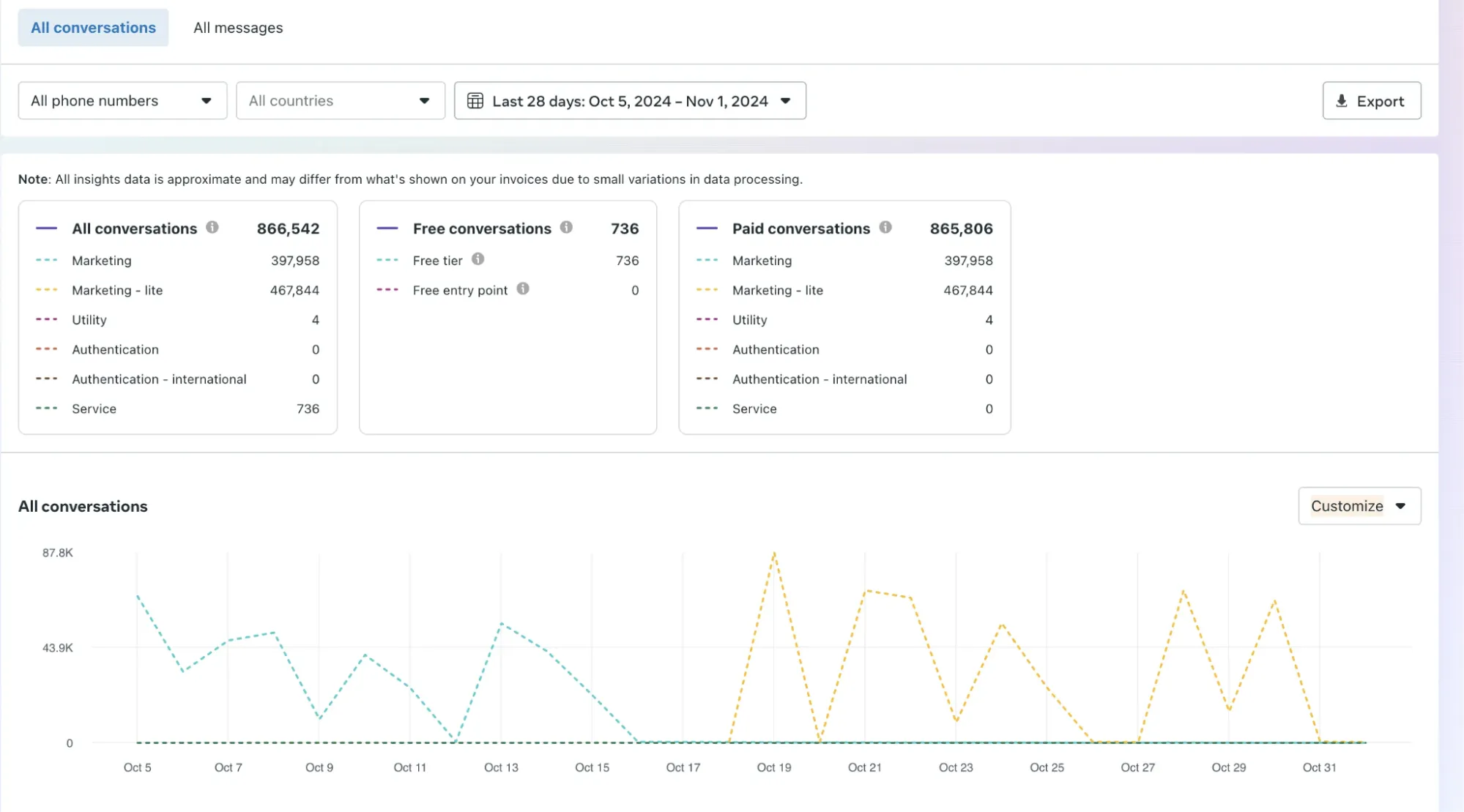
Benchmark metrics provide insights into how your business is performing compared to similar businesses in your industry. These metrics are based on data from the past 30 days and take into account various factors that define similar businesses. Based on the benchmark metrics, we provide personalized recommendations to help you improve your template’s performance. If your template’s read rate or click rate falls below the benchmark, we provide suggestions to boost engagement.
#### Calculating benchmarks
To calculate benchmark metrics, we consider the following characteristics:
**Business Country or Region**: We use the business country as the default cohort, but if the cohort size is too small, we switch to the business region.**Business Industry**: We compare your business with others in the same industry or vertical to provide relevant benchmarks.**Template Categories**: We only compare templates within the same category (e.g., marketing templates with other marketing templates) to ensure accurate and relevant benchmarks.We then calculate two key benchmark metrics:
**Read Rate Benchmark**: We calculate this metric as the 75th percentile of read rates across similar businesses, representing the percentage of messages read out of total messages delivered.**Click Rate Benchmark**: We calculate this metric as the 75th percentile of click rates across similar businesses, representing the percentage of link clicks out of total messages delivered.#### Understanding your ranking and how to use benchmark metrics
When you view your benchmark metrics, you will see a ranking that indicates how your template performs compared to templates in the same category. This ranking is calculated by comparing your template’s performance with the read rate or click rate performance of peer templates with high engagement over the past 30 days.
Use the benchmark metrics to compare your template’s performance to templates from similar businesses over the past 30 days. Benchmarks are calculated daily, with a delay of up to 2 days. This ensures that you have access to updated and relevant data to inform your business decisions.
To access the benchmark and recommendations metrics:
Go to the WhatsApp Manager and select “Manage templates”.Choose the template you want to view.Select the “Marketing Messages API for WhatsApp” option from the dropdown menu highlighted in red.The benchmark metrics and recommendation cards will be displayed below the preview card in the left panel.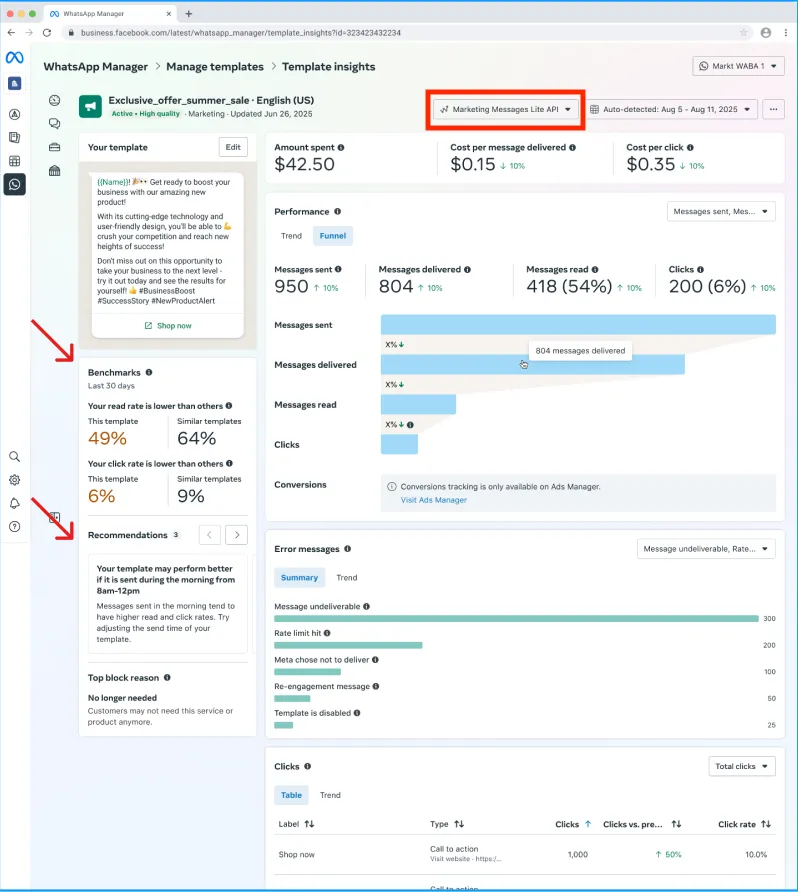
You can see a summary of error messages your template encountered within a given period of time by navigating to the [**WhatsApp Manager**](https://business.facebook.com/latest/whatsapp_manager/) > **Message templates** > **Manage templates** panel and clicking on the template. Errors are displayed in the **Error messages** section.
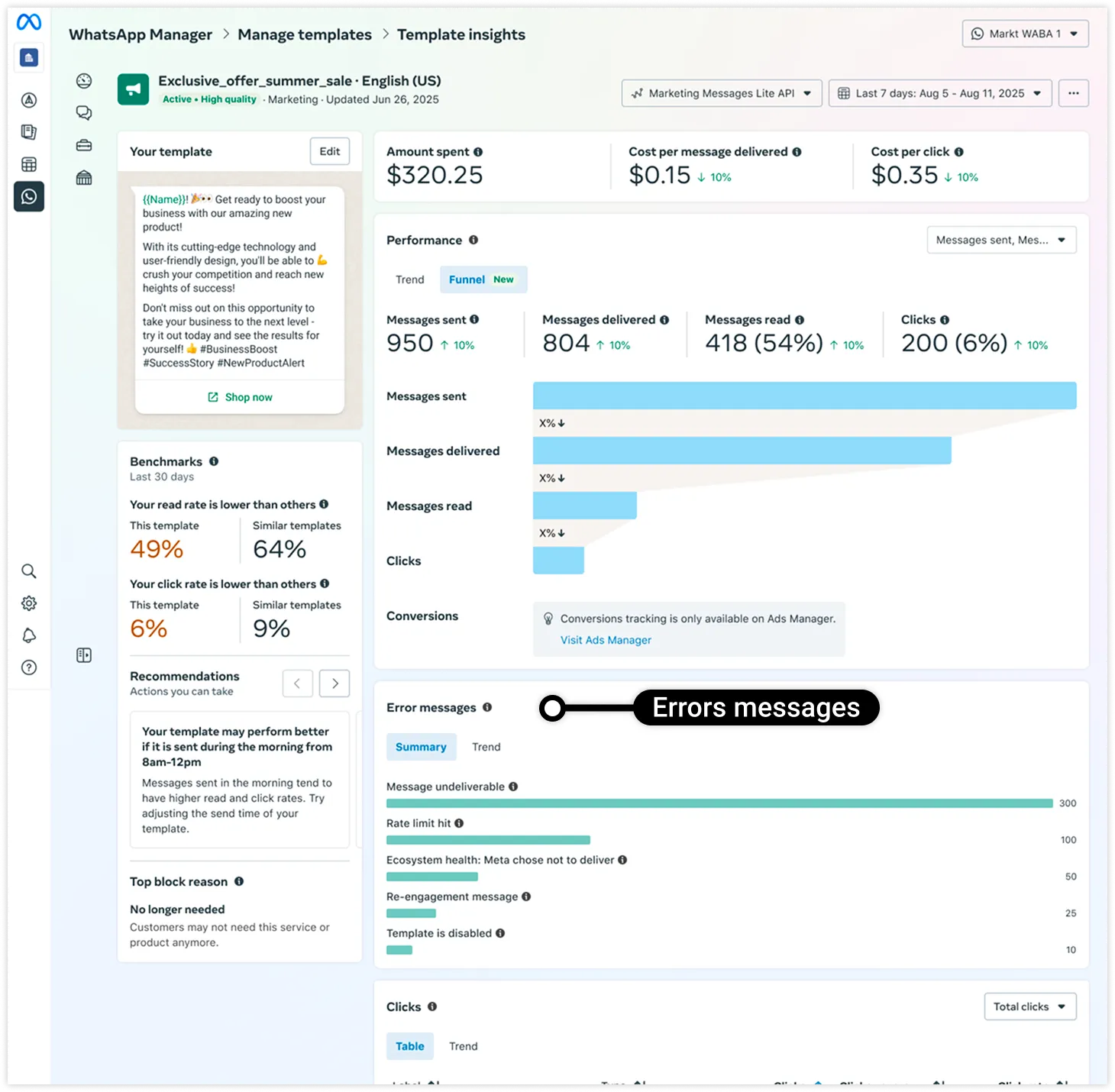
The period of time can be defined using the date selector dropdown at the top of the page. See [Cloud API error codes](/documentation/business-messaging/whatsapp/support/error-codes) for a list of error codes and their descriptions.
The most frequently encountered message delivery errors are displayed in the **Summary** tab:
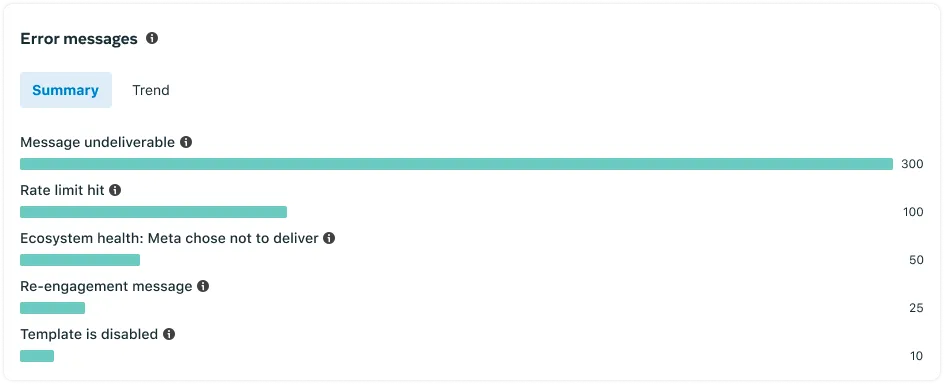
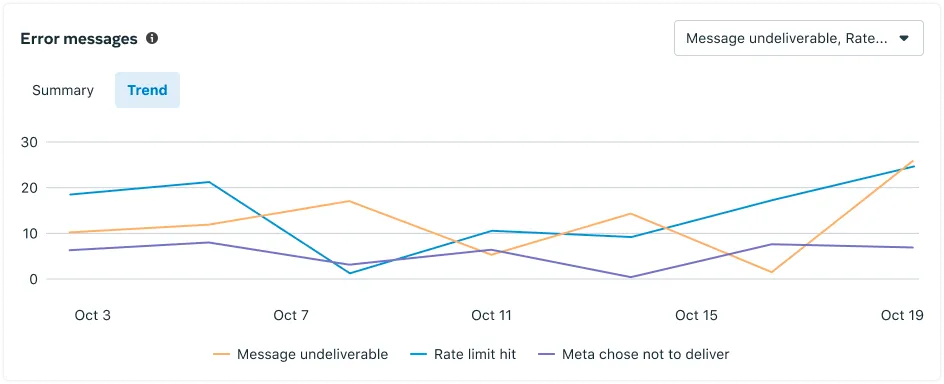
This information is also displayed as trend lines in the **Trend** tab:
## Deep links
Updated: Feb 10, 2026
Marketing Messages API for WhatsApp (formerly known as Marketing Messages Lite API) is now generally available.
You can map an [Android deep link?](https://l.facebook.com/l.php?u=https%3A%2F%2Fdeveloper.android.com%2Ftraining%2Fapp-links%2Fdeep-linking&h=AT5ztASnqn8MtmdCz4OqQ1_YbODtOwkw3MgzqS0ctYDkm0V_-i7Ix2zbrfkjsZ-pFSxHxJhP9ioBcpWrWb5HQIgr5sbBKLTKIIKilr2G-wfQ4QKHky0l3AZqICPBies8dH6zhRAyL8Mqcq2OIy5dQg) to a marketing template URL button that, when tapped, loads a particular location or content within your app.
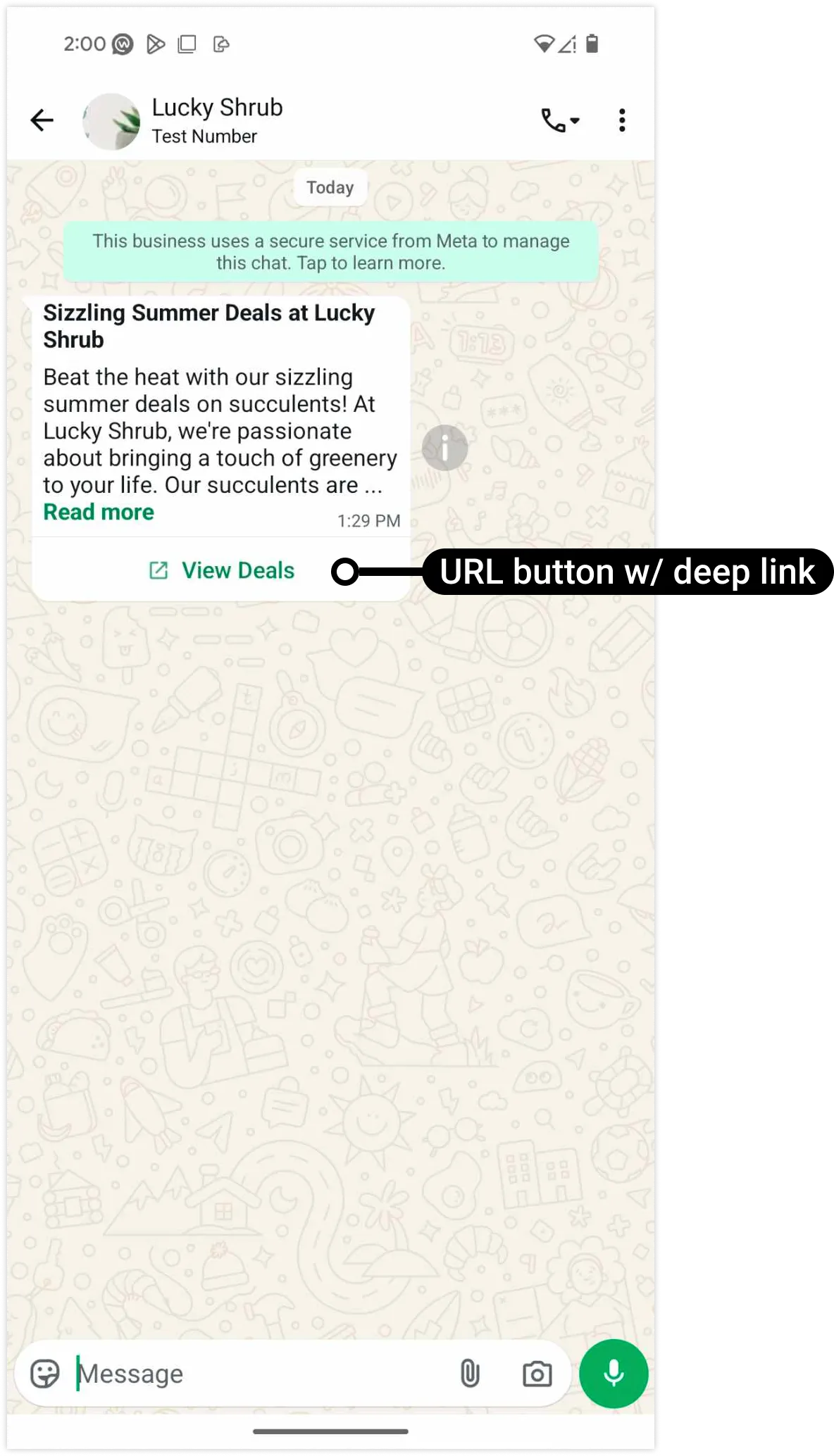
If you have not onboarded to the Marketing Messages API for WhatsApp (MM API for WhatsApp), your marketing templates will not display any conversion metrics. Learn more about how to [measure conversion](/books/meta-whatsapp/page/setting-up-conversion-measurement-developer-documentation).
### Template creation via WhatsApp Manager
To create a template with a button mapped to an Android deep link:
Access [WhatsApp Manager?](https://business.facebook.com/latest/whatsapp_manager/).Navigate to the **Message templates** > **Manage templates** panel and click the **Create template** button.Select **Marketing** (tab) > **Custom** (radio button) and click the **Next** button.In the **Buttons** section, click the **+ Add buttons** dropdown menu and select **Visit website**.Check the **Track app conversions** checkbox to reveal the deep link fields (pictured below).Complete each field using their tooltips or [form field](#bkmrk-form-fields-1) descriptions below as guidance.Add any additional components you'd like your template to use, name your template, and submit it for approval.Note that you can also use the **Manage templates** panel to edit an existing template and add a deep link-mapped button, but the template will have to undergo template review again.
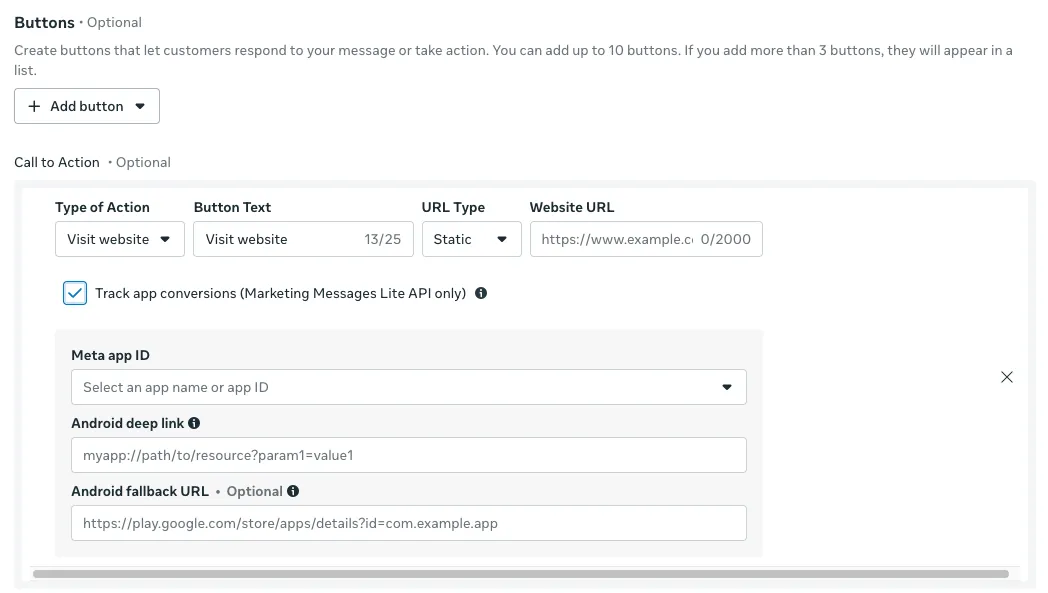
| Field label | Description | Example value |
|---|
| **Required.** Android deep link URI. | luckyshrub://deals/summer_solstice |
| **Optional.** Fallback URL. If the WhatsApp client cannot load the deep link URI, the client will load this URL in the device's default web browser. If omitted, the client will attempt to load the URL specified in the Website URL field instead. | https://www.luckyshrub.com/deals/summer_solstice |
| **Required.** Button label text. Maximum 25 characters. | |
| **Required.** This is a list of the Meta app(s) associated with your business portfolio. Select the app whose access token you will use to send the template. | Lucky Shrub (634974688087057) |
| Required. Must be set to **Visit website**. | |
| **Required.** Set to **Static** if your Android deep link or Android fallback URL has no dynamic values, otherwise set to **Dynamic**. | |
| **Required.** URL of a website to load if the WhatsApp user views the message on a non-Android device, or if the WhatsApp client cannot load your Android deep link URI and no Android fallback URL is specified. | https://www.luckyshrub.com/ |
See our [Viewing metrics](/books/meta-whatsapp/page/viewing-metrics-developer-documentation) document.
## Send Marketing Messages
Updated: Mar 20, 2026
Marketing Messages API for WhatsApp (formerly known as Marketing Messages Lite API) is now generally available.
Marketing Messages API for WhatsApp allows you to send marketing template messages only. To send other message types or receive messages, use Cloud API in parallel with Marketing Messages API for WhatsApp on the same business phone number.
If you use a partner’s UI portals or APIs to configure and send marketing messages, you can continue to do so, and do not need to use any of the capabilities described in this document - your partner will take care of integrating with MM API for WhatsApp’s message sending functions on your behalf.
### Create marketing templates
Marketing templates can be created in several ways:
Via WhatsApp Business Manager UIVia the Business Management API “Message Templates” endpointIf you work with a partner, your partner may offer their own API or user interfaces for template creation, which leverage the “Message Templates” endpointSee documentation on how to [Create and manage templates](/books/meta-whatsapp/page/templates-developer-documentation).
When you create a new marketing template, it takes up to 10 minutes to sync with the corresponding Ad account. This sync allows messages to be optimized and enables measurement of clicks and downstream conversions. Templates inactive for longer than 7 days also require 10 minutes to sync after first use. Wait 10 minutes after creating new marketing templates before sending marketing traffic. The same applies after sending the first marketing message on a dormant template.
Marketing Messages API for WhatsApp supports all marketing templates. In addition, Marketing Messages API for WhatsApp provides the following features that are not available to marketing templates on Cloud API:
**Time-To-Live (TTL) for Marketing template messages:** If Meta is unable to deliver a message to a WhatsApp user, Meta will retry the delivery for a period of time known as a time-to-live, TTL, or the message validity period. TTL is available for Authentication and Utility template messages on Cloud API, but TTL for Marketing template messages is exclusively available on MM API for WhatsApp. See documentation on how to [Create and Manage Templates via API](/books/meta-whatsapp/page/templates-developer-documentation) or [How to set a custom message validity period via UI](https://www.facebook.com/business/help/1305007343713790) for details on how to set TTLs for Marketing template messages.Meta truncates text to a specific line-count to increase performance. No text content is changed, the original text is still accessible through the “Read more” button. The exact line count truncation rules are as follows:
**Messages without any CTA, but with a link in the message body** (overrides the below rules): truncated to 5 lines**Messages with a media header** ([Image](/books/meta-whatsapp/page/image-messages-developer-documentation), [Video](/books/meta-whatsapp/page/video-messages-developer-documentation), [Document](/books/meta-whatsapp/page/document-messages-developer-documentation), [Location](/books/meta-whatsapp/page/template-messages-developer-documentation), and [GIF](/books/meta-whatsapp/page/template-components-developer-documentation)): truncated to 3 lines**Messages without a header** (that is, [Text messages](/books/meta-whatsapp/page/template-messages-developer-documentation)): truncated to 4 lines### Send marketing template messages
Sending messages follows the same API payload syntax as Sending Messages on Cloud API, and requires the same permissions.
The `/marketing_messages` endpoint supports **only** marketing template messages for MM API for WhatsApp and Cloud API. All other message types (freeform, Authentication, Service, Utility) are not supported, and will produce an error.
Marketing messages will only be sent via MM API for WhatsApp when the business customer has met all [onboarding requirements](/books/meta-whatsapp/page/onboard-developer-documentation). If onboarding requirements are not met, the marketing messages will still be routed via Cloud API. You may disable the ability to route to Cloud API by setting the optional field `product_policy` to `STRICT`.
Note: You may still use the `/messages` endpoint to send marketing messages through the Cloud API.
MM API for WhatsApp provides the following additional features that are not available to Marketing template messages on Cloud API:
**Product fallback policy:** Set `product_policy` to `CLOUD_API_FALLBACK` to have the API send the outgoing message via Cloud API, if [onboarding requirements](/books/meta-whatsapp/page/onboard-developer-documentation) have not been met. Set to `STRICT` if you do not want the API to fallback to sending the message via Cloud API.
**Message activity sharing:** `message_activity_sharing` is an optional parameter at the message level that enables or disables sharing message activities (for example, message read) for that specific marketing message to Meta to help optimize marketing messages. If this parameter is not provided, the default WABA-level setting will be applied. You can always edit your default setting in Business Settings (see Changelog for a screenshot of this).
For details on message types, reference the Cloud API [Message Types documentation](/books/meta-whatsapp/page/sending-messages-developer-documentation), as MM API for WhatsApp uses the same message send formatting.
### Receiving message status webhooks
MM API for WhatsApp triggers status [messages](/books/meta-whatsapp/page/status-messages-webhook-reference-developer-documentation) webhooks (sent, delivered, read). In addition, status messages webhooks that describe a message sent via MM API for WhatsApp, and that include pricing information, will have `pricing.category` and `conversation.type` set to `marketing_lite`. If the message is routed via Cloud API, `pricing.category` will be set to `marketing`.
Maintain logs of each outgoing message ID, and whether that ID was sent via Cloud API or MM API for WhatsApp, in order to use the unique message ID returned in message status webhooks to identify the origin of the sent message.
### Receiving incoming messages
MM API for WhatsApp is a send-only API. It does not receive incoming messages from consumers. To receive incoming messages on a business phone number, use Cloud API in parallel with MM API for WhatsApp on the same phone number.
## Onboard business customers
Updated: Feb 10, 2026
Marketing Messages API for WhatsApp (formerly known as Marketing Messages Lite API) is now generally available.
The MM API for WhatsApp onboarding process is designed to be simple for you as a partner to adopt, making it quick and easy for [solution providers](/books/meta-whatsapp/page/solution-providers-developer-documentation) (including Solution Partners, Tech Providers, and Tech Partners) to onboard current customers from Cloud API onto the MM API for WhatsApp. If your business directly integrates with Cloud API without a partner, follow the instructions below to accept the Terms of Service and onboard to the MM API for WhatsApp via WhatsApp Manager.
Your app must have advanced access for the following permissions:
**`whatsapp_business_messaging`**: This permission allows the app to call the MM API for WhatsApp to send messages.**`whatsapp_business_management`**: This permission enables the app to manage WABAs, Phone Numbers, and Templates via [WhatsApp Business Management API](/books/meta-whatsapp/page/analytics-developer-documentation).**`ads_read`** (optional): This permission grants the app access to the [Insights API](https://developers.facebook.com/docs/marketing-api/insights), allowing partners to retrieve metrics on conversions.If your app does not already have advanced access for these permissions, request advanced access via [App Review](/books/meta-whatsapp/page/app-review-developer-documentation).
### Solution partner integration overview
To assist your customers in using the MM API for WhatsApp, several steps are required:
| Step | Notes |
|---|
| Enroll via [App Dashboard](https://developers.facebook.com/apps) and follow instructions under the [Onboarding yourself](#bkmrk-onboarding-yourself-1). |
| Same Template endpoint and message send payload as Cloud API - only the ‘send message’ endpoint changes. |
| **New!** Integrate with the Insights API to view the metrics as Cloud API (sent/read/delivered), plus new metrics like Website and App conversions. |
#### Register yourself for MM API for WhatsApp
To enroll, a solution provider must:
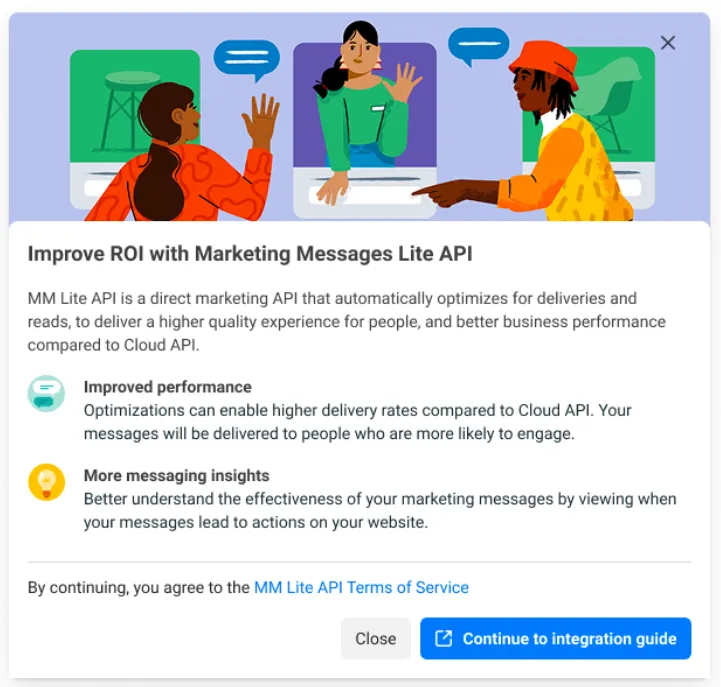
Navigate to the **[App Dashboard](/apps)** > **WhatsApp** > **Quickstart** panelOn the **Quickstart** page, locate the “Improve ROI with Marketing Messages API for WhatsApp” card and click the “Get started” buttonRequest any missing app review permissions by clicking the “Request permission” button. See “[Submit for app review](/books/meta-whatsapp/page/app-review-developer-documentation)” for more informationClick on “Continue to integration guide” to accept the Terms of Service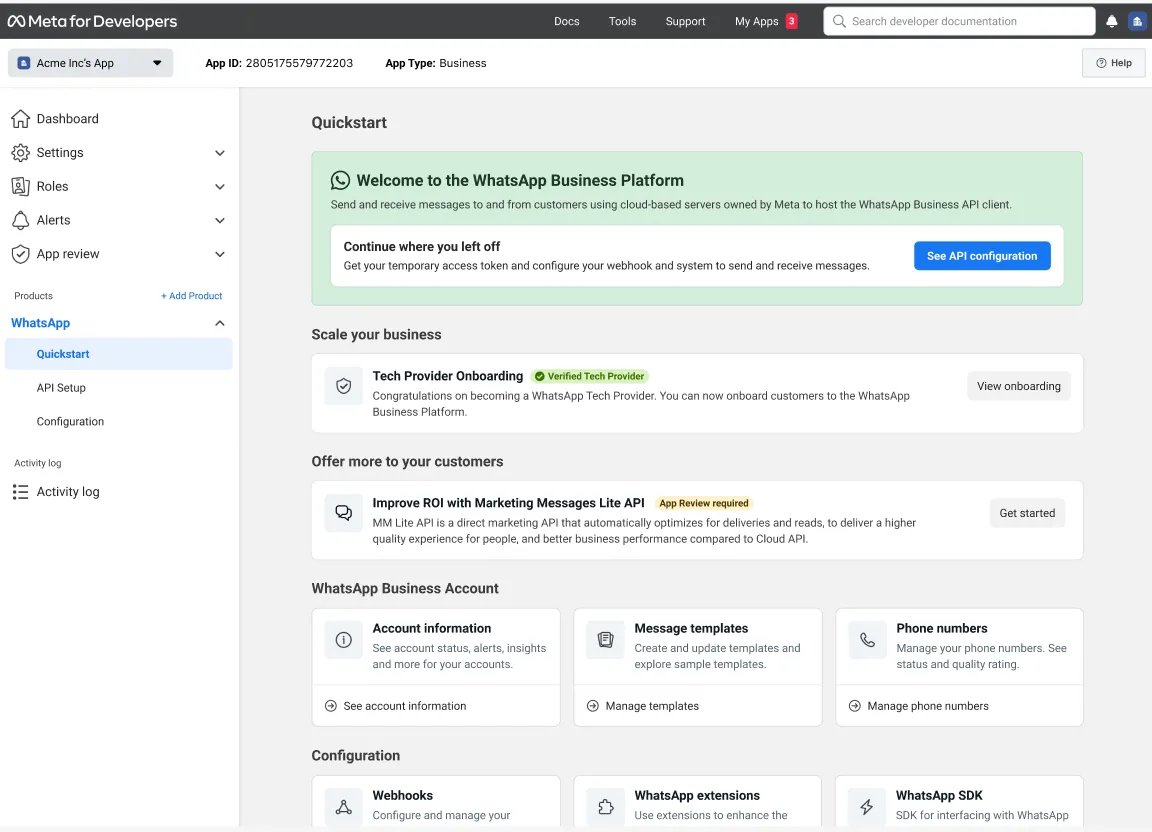
#### Submit for app review for Advanced App permissions
Solution Providers must use an App with the following Advanced App permissions, when using the MM API for WhatsApp.
If you do not already have an App with the following Advanced App Permissions, it is necessary for your App to go through [App review](/books/meta-whatsapp/page/app-review-developer-documentation):
| Advanced App Permission | Required in order to do the following on behalf of your customer |
|---|
`whatsapp_business_messaging` | Call the MM API for WhatsApp ‘send messages’ endpoint, to send messages via Marketing Messages API for WhatsApp |
`whatsapp_business_management` | Call WABA, Phone Number, and Template endpoints, for managing WABAs, Phone Numbers, and Templates; and retrieve basic metrics via [WhatsApp Business Management API](/books/meta-whatsapp/page/analytics-developer-documentation) |
| This permission is optional, and is only required to call the [Insights API](https://developers.facebook.com/docs/marketing-api/insights), allowing a partner to fetch advanced metrics on conversions (e.g. Web conversions, App conversions) |
For the app review submission, prepare a screen recording of how each permission is used. It is recommended to show a sample of each action in the “Required in order to do …” column above, to demonstrate each permission in use.
### Help the business set up Conversion measurement
See [Setting up conversion measurement](/books/meta-whatsapp/page/setting-up-conversion-measurement-developer-documentation) for details on how businesses can measure when a marketing message from MM API for WhatsApp leads to a conversion (e.g. add to cart, purchase).
Partners are **strongly recommended** to work with their clients to set up Conversion reporting, so that they can take advantage of measuring the improved metrics and optimizations MM API for WhatsApp provides.
See [Sending messages](/books/meta-whatsapp/page/send-marketing-messages-developer-documentation) for documentation on how to send messages and receive webhooks on behalf of your customers via MM API for WhatsApp.
See the Guide to [Viewing metrics](/books/meta-whatsapp/page/viewing-metrics-developer-documentation) for documentation on how to:
Fetch the IDs of the Ad entities mapped to a business’ WABAs and Templates, in order to call Insights APIs.Fetch metrics for messages sent via MM API for WhatsApp.Partners are **strongly recommended** to fetch metrics using the Ads Insights APIs (not Business Management APIs), as these APIs provide richer metrics reporting, including conversion reporting from sources such as Web and App conversion events.
After integrating with reporting APIs (Insights API recommended), surface these metrics in your dashboards and APIs for your customers to use.
Reach out to your Partner Manager for suggestions on metrics best practices, including a copy of Meta’s “**Business Messaging Reporting Dashboards Playbook**” for partners.
## Set a max-price for marketing messages (BETA)
Updated: Mar 17, 2026
Marketing Messages API for WhatsApp (formerly known as Marketing Messages Lite API) is now generally available.
Amidst our introduction of the max-price feature on the Marketing Messages API for WhatsApp, there is no change to how we charge on the WhatsApp Business Platform. We continue to charge on a per-message basis, as outlined [here](/books/meta-whatsapp/page/pricing-on-the-whatsapp-business-platform-developer-documentation).
The max-price feature will become available via Limited Beta as of mid-May and be **optional** throughout 2026.
As announced in March 2026 -- in 2026, we're introducing new pricing features on the Marketing Messages API for WhatsApp to enable businesses to *drive higher ROI* and *have more control* to optimize spend for their marketing messaging campaigns.
Our first pricing feature allows businesses to **set a maximum price (max-price) per marketing message delivery; when a max-price is set, Meta will charge that max-price or lower for delivery**. Businesses can choose to set a max-price the same as, lower than, or higher than the published rate to achieve their objectives per campaign.
*Lower costs while maintaining delivery rates similar to current WhatsApp campaigns*, by setting max-prices the same as published rates.*Target a broader range of customer cohorts on WhatsApp at lower cost*, by setting max-prices lower than published rates.*Increase delivery rates when customer engagement matters most*, like during holidays and peak sales periods, by setting max-prices higher than published rates.The second pricing feature is the **reach estimation tool**, which helps businesses set the right max-price by helping them understand estimated delivery rates and costs at different max-prices.
The max-price feature allows you to set the maximum price you are willing to pay per message delivery. You are charged your max-price or lower. In the API, you express this as a `bid_amount` value per 1,000 deliveries within the `bid_spec` object.
[Max-price explainer PDF](https://l.facebook.com/l.php?u=https%3A%2F%2Fscontent-ams2-1.xx.fbcdn.net%2Fv%2Ft39.8562-6%2F652260051_2871429753198389_1292317443132886324_n.pdf%3F_nc_cat%3D107%26ccb%3D1-7%26_nc_sid%3Db8d81d%26_nc_ohc%3DR6IMKT9-QbUQ7kNvwHjw-7R%26_nc_oc%3DAdqbSrK358oRJw-PoC_zAuZTJyCer5yWR5--ujHnbN32-ShuqTNKhzSg-kI5nHf1DrY%26_nc_zt%3D14%26_nc_ht%3Dscontent-ams2-1.xx%26_nc_gid%3DG3aCMxUEd71RXXgD-zWp7A%26_nc_ss%3D7a389%26oh%3D00_Af2SIuA8sYJ1__1IsCmPyeiqoqLnMBYindACx8faFemOfg%26oe%3D69D2BE07&h=AT6NcVZ1hYYwjZeFVS2UBzDwiLgHPEtHRqVr9M9YL6gQxyWuqVcSwXsqepxwE5g5kUOm73CmgWOvdEOLoDyeVRK6g4wAB4OsKQmiIfPQGqZmg74zyCs399JaiOa2tiR6G-H1L_r0IQrNZo1j6rx09g)### Phased roll-out of the max-price feature
We plan to roll out our max-price feature in 3 phases:
Limited Beta starting **mid-May 2026** -- Any partner and any directly-integrated business can integrate and use the max-price feature and reach estimation tool. Each partner can enable these features for a limited number of clients.Open Beta starting **October 2026** -- Any partner can enable these features for all their clients.General Availability (GA) as of **Q2 2027** -- The max-price feature will become required in eligible geographies and fixed, published rates for marketing messages will only apply on the Cloud API.To use the max-price feature, you must:
Have an active WhatsApp Business Account that has been [onboarded](/books/meta-whatsapp/page/onboard-developer-documentation) to the Marketing Messages API for WhatsApp.Be in a [country eligible for MM API for WhatsApp](/books/meta-whatsapp/page/get-started-developer-documentation).Set your max-price at the template level. The `bid_amount` in `bid_spec` is what Meta's delivery system optimizes against. Setting the right max-price when you create the template gives the system the best signal for delivery optimization.
The `per_message_bid_multiplier` scales the template's `bid_amount` up or down for individual messages, but the delivery system generally gives better performance optimizing based on the original template-level `bid_amount` on large amount.
For example, if you set a template's `bid_amount` to 50,000 and then apply a multiplier of 2.0 on every message, delivery performance might differ from setting the template's `bid_amount` to 100,000 directly -- even though the effective max-price is the same. Hence we recommend setting up the bid at template level and update the template's `bid_spec` if needed rather than changing the message level multiplier as a workaround.
Ramp up traffic gradually. When sending messages with a new max-price template for the first time, increase volume slowly before sending at scale. This aligns with [Template pacing](/books/meta-whatsapp/page/template-pacing-developer-documentation) best practices and helps the delivery system optimize effectively.
### Create templates with max-price
If `bid_spec` is not included, the template uses standard rate card pricing.
| Placeholder | Description | Example Value |
|---|
| **Required.** [System token](/books/meta-whatsapp/page/access-tokens-guide-developer-documentation) or [business token](/books/meta-whatsapp/page/access-tokens-guide-developer-documentation). | `EAAAN6tcBzAUBOZC82CW...DOMccqHEZD` |
| **Optional.** Graph API version. | |
| **Required.** WhatsApp Business Account ID. | |
| **Required.** Maximum price per 1,000 message deliveries, expressed in your WABA currency's smallest unit (cents for USD, paise for INR, peso for MXN). See [supported currencies](/books/meta-whatsapp/page/pricing-on-the-whatsapp-business-platform-developer-documentation) for a list of currencies. | |
#### Calculating max-price amounts
The `bid_amount` represents your max-price per 1,000 deliveries in your WABA currency's smallest unit. To convert from your desired per-delivery price:
Convert your desired per-delivery price to your WABA currency's smallest unitMultiply by 1,000 to express the value per 1,000 deliveries**Example**: To set a max-price of ?0.87 per delivery:
Convert to paise: 0.87 Rupees = 87 paiseMultiply by 1,000: 87 x 1,000 = 87,000Set `bid_amount` to `87000`.
**Example**: To set a max-price of $0.05 USD per delivery:
Convert to cents: $0.05 = 5 centsMultiply by 1,000: 5 x 1,000 = 5,000Set `bid_amount` to `5000`.
Messages sent with or without the max-price feature use the same **Marketing Lite** product type (SKU) for billing purposes.
Marketing messages sent with max-price appear in analytics with the following identifiers:
**Pricing Analytics**[`/?fields=pricing_analytics`](/books/meta-whatsapp/page/analytics-developer-documentation): `pricing_category` = `MARKETING_LITE`**Template Analytics**[`/?fields=template_analytics`](/books/meta-whatsapp/page/analytics-developer-documentation): `product_type` = `MARKETING_MESSAGES_LITE_API`Webhooks use lowercase `marketing_lite` for `pricing.category`, while analytics APIs use uppercase `MARKETING_LITE` for `pricing_category`.
#### Pricing analytics response example
#### Template analytics response example
For more details on metrics, see [Viewing metrics](/books/meta-whatsapp/page/viewing-metrics-developer-documentation).
| Code | Message | Possible reasons and solutions |
|---|
| Marketing templates containing bid_spec are not supported by the Cloud API. To use templates with bid_spec, please use the Marketing Messages API for WhatsApp. | You are sending a template with `bid_spec` to the Cloud API `/messages` endpoint. Send to the `/marketing_messages` endpoint instead. |
| You need to sign the testing legal agreement before sending out messages. | You have not signed the testing legal agreement. Please sign the agreement to gain access to this feature. |
For a full list of error codes, see [Error codes](/documentation/business-messaging/whatsapp/support/error-codes).