# Groups
# Groups API | Developer Documentation
## Groups API
Updated: Nov 14, 2025
**Eligibility for Groups API**
The Groups API is now open to all businesses with an [Official Business Account (OBA)](/books/meta-whatsapp/page/official-business-accounts-developer-documentation)
The Groups API enables you to programmatically create groups for messaging and collaboration.
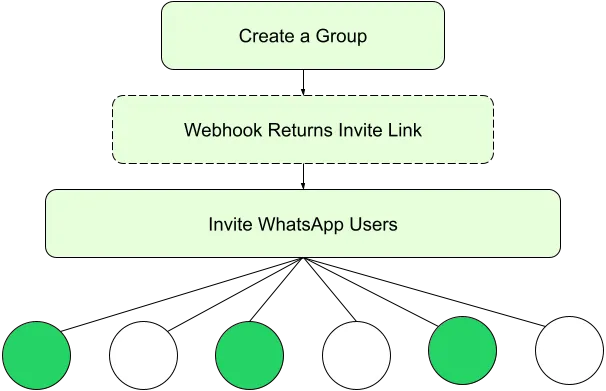
Groups are an invite-only experience where participants join using a group invite link you send them. This invite link provides context about the group, helping the user decide whether they want to join.
When you are ready to start using the Groups API, head on over to our “Get Started” guide for more information:
[Get Started with Groups API](/books/meta-whatsapp/page/get-started-with-groups-api-developer-documentation)
**Max group participants:** 8**Supported message types:** Text, media, text-based templates, and media-based templates**Max groups you can create:** 10,000 per business number**Max Cloud API businesses per group:** 1**Performance metrics are not available for message templates used in Groups.**
Please create new templates specifically for Groups use instead of repurposing templates used for one-to-one messaging.
**Eligibility for Groups API**
To qualify for groups features, your business must be an [Official Business Account (OBA)](/books/meta-whatsapp/page/official-business-accounts-developer-documentation)
*Groups are **not available** for [Coexistence users](/books/meta-whatsapp/page/onboarding-whatsapp-business-app-users-aka-coexistence-developer-documentation) and phone numbers onboarded to [Multi-solution Conversations](/books/meta-whatsapp/page/how-to-use-multi-solution-conversations-msc-developer-documentation)*.
*The [Calling API](/books/meta-whatsapp/page/cloud-api-calling-developer-documentation) is not supported in groups.*
**Non-supported message types:**
CallingDisappearing messagesView-onceAuthCommerce messagesInteractive messages
**Non-supported actions:**
Admin hide group participant listEdit messageDelete messageMarking message as readThe Groups API uses [per-message pricing](/books/meta-whatsapp/page/pricing-on-the-whatsapp-business-platform-developer-documentation).
[Learn more about Groups API pricing here](/books/meta-whatsapp/page/groups-api-pricing-developer-documentation)
### Features and reference
#### Group management features
[*View Group Management reference*](/books/meta-whatsapp/page/groups-api-developer-documentation)
#### Group messaging features
[*View Group Messaging reference*](/books/meta-whatsapp/page/group-messaging-developer-documentation)
## Get started with Groups API
Updated: Nov 14, 2025
**Eligibility for Groups API**
To qualify for groups features, your business must be an [Official Business Account (OBA)](/books/meta-whatsapp/page/official-business-accounts-developer-documentation)
Groups on are invite-only, meaning that potential group participants are ultimately in control of wether they want to join the group or not.
When you create a group, a unique invite link that is generated which you can share to potential group participants. This link includes information about the group, enabling users to make an informed decision about wether or not they want to join the group.
Once a user joins the group, a webhook is triggered, signaling that you are now eligible to send messages to the group.
For a complete overview of available features, see the [Groups API Features](/books/meta-whatsapp/page/get-started-with-groups-api-developer-documentation) below.
### How to start using groups
Before you get started with the Groups API, ensure that:
Your business number is in use with Cloud API (not the WhatsApp Business app).Your webhook server is set up for use with Cloud API.Your app is subscribed to the following groups webhook fields:
`group_lifecycle_update``group_participants_update``group_settings_update``group_status_update`Your app is subscribed to the WhatsApp Business Account of your business phone number.Your app has the `whatsapp_business_messaging` permission for the business number.#### Step 2: Create a group
Use the [Create Group endpoint](/books/meta-whatsapp/page/groups-api-developer-documentation) to create a group, providing a subject and an optional description. Once a group has been successfully created, a [`group_lifecycle_update` webhook for successful group creation](/books/meta-whatsapp/page/group-messages-webhook-reference-developer-documentation) will be returned. This webhook will include a `invite_link` field with the invite link that you can now share with potential group participants.
#### Step 3: Invite WhatsApp users to the group
##### 3.1 Add a group invite link template in [Template Library](https://business.facebook.com/wa/manage/template-library) to your account templates:
##### 3.2 Send the invite link to potential group participants
Once the template has been approved, use the template to invite members to the group using the invite link provided in the webhook from Step 2.
You can follow the instructions in the [Send Group Invite Link Template Message reference](/books/meta-whatsapp/page/groups-api-developer-documentation) to send the invite link with the template you just added to your account.
##### 3.3 Notification of when participants join the group
When a participant joins, a [`group_participants_update` webhook for a group participant joining webhook](/books/meta-whatsapp/page/group-messages-webhook-reference-developer-documentation) will be triggered.
#### Step 4: Send and receive messages
You can now use the [Cloud API send message endpoint](/books/meta-whatsapp/page/group-messaging-developer-documentation) to send messages to the group.
[Sent, delivered, and read status webhooks](/books/meta-whatsapp/page/group-messages-webhook-reference-developer-documentation) will be triggered when there are updates in the group. Replies from participants will also trigger webhooks.
[Learn more about how to send and receive group messages](/books/meta-whatsapp/page/group-messaging-developer-documentation)
To learn more about all the features available in groups:
Visit the [Group Management reference](/books/meta-whatsapp/page/groups-api-developer-documentation) to learn more about features available for managing groups.Visit the [Group Messaging reference](/books/meta-whatsapp/page/group-messaging-developer-documentation) to understand sending, receiving, and other messaging functions in groups.## Group management
Updated: Mar 25, 2026
The Groups API gives you simple functions to control groups through their lifecycle.
When you create a new group, an invite link is created for inviting participants to the group.
Since you cannot manually add participants to the group, simply send a message with your invite link to WhatsApp users who you would like to join the group.
### Group management features
To learn how to message groups, view the [Group Messaging reference](/books/meta-whatsapp/page/group-messaging-developer-documentation).
### Subscribe to groups metadata webhooks
In order to receive webhook notifications for metadata about your groups, please subscribe to the following webhook fields:
`group_lifecycle_update``group_participants_update``group_settings_update``group_status_update`For a full reference of webhooks for the Groups API, please visit our [Webhooks for Groups API reference](/books/meta-whatsapp/page/group-messages-webhook-reference-developer-documentation).
### Groups with join requests
You can create groups that require join request approval. Once enabled, WhatsApp users who click the group invitation link can submit a request to join the group, or cancel a prior request:
When a WhatsApp user joins the group using a join request, a [`group_participants_update` webhook for a user accepting the join request] (/documentation/business-messaging/whatsapp/groups/webhooks#user-accepts-or-cancels-join-request) is triggered. You can also [get a list of open join requests via API](#bkmrk-get-join-requests-1). Use the contents of the webhook or API response to approve or reject requests.
#### Approve join requests
| Placeholder | Description | Sample Value |
|---|
| | `Y2FwaV9ncm91cDoxNzA1NTU1MDEzOToxMjAzNjM0MDQ2OTQyMzM4MjAZD` |
##### Response parameters
| Placeholder | Description | Sample Value |
|---|
| ID of approved join request, or ID of failed join request, if we were unable to approve. | `MTY0NjcwNDM1OTU6MTIwMzYzNDA0Njk0MjMzODIw` |
| Error code, if unable to approve. | |
| Error message, if unable to approve. | `(#131203) Recipient has not accepted our new Terms of Service and Privacy Policy.` |
| Error title, if unable to approve. | `Unable to add participant to group` |
| Error details, if unable to approve. | `Recipient has not accepted our new Terms of Service and Privacy Policy.` |
#### Reject join requests
| Placeholder | Description | Sample Value |
|---|
| | `Y2FwaV9ncm91cDoxNzA1NTU1MDEzOToxMjAzNjM0MDQ2OTQyMzM4MjAZD` |
| **Required.** ID of join request to reject. | `MTY0NjcwNDM1OTU6MTIwMzYzNDA0Njk0MjMzODIw` |
##### Response parameters
| Placeholder | Description | Sample Value |
|---|
| ID of rejected join request, or ID of failed join request, if we were unable to reject. | `MTY0NjcwNDM1OTU6MTIwMzYzNDA0Njk0MjMzODIw` |
| Error code, if unable to reject. | |
| Error message, if unable to reject. | `(#131203) Recipient has not accepted our new Terms of Service and Privacy Policy.` |
| Error title, if unable to reject. | `Unable to add participant to group` |
| Error details, if unable to reject. | `Recipient has not accepted our new Terms of Service and Privacy Policy.` |
| Placeholder | Description | Sample Value |
|---|
| **Required**
The ID of the group you want to delete. | `Y2FwaV9ncm91cDoxOTUwNTU1MDA3OToxMjAzNjMzOTQzMjAdOTY0MTUZD` |
### Group message status webhooks
When you send a message to a group, you receive a status **messages** webhook when the message is delivered or read by group participants.
Status webhooks for individual group participants may be aggregated into a single webhook containing multiple `status` objects in the `statuses` array. However, aggregation is not guaranteed. If multiple participants' statuses are generated at approximately the same time, they may be combined into a single webhook. If statuses are generated at different times, you may receive separate webhooks for each participant.
Each webhook only ever references a single message sent to a single group and a single status type (for example, `delivered`). Statuses for different messages, groups, or status types are never combined into a single webhook.
Status **messages** webhooks that contain pricing information will have `` set to one of:
`group_marketing` - Indicates a group marketing conversation.`group_utility` - Indicates a group utility conversation.`group_service` - Indicates a group service conversation.## Group messaging
Updated: Nov 14, 2025
This document provides comprehensive information on the APIs and webhooks available for sending and receiving messages within groups. It details support for various message types, including:
Text messagesMedia messagesText-based templatesMedia-based templates### Subscribe to groups metadata webhooks
In order to receive webhook notifications for metadata about your groups, please subscribe to the following webhook fields:
`group_lifecycle_update``group_participants_update``group_settings_update``group_status_update`For a full reference of webhooks for the Groups API, please visit our [Webhooks for Groups API reference](/books/meta-whatsapp/page/group-messages-webhook-reference-developer-documentation).
### Receive group messages
You can use the following webhooks to receive statuses on messages received in the group.
The `message` object includes a `group_id` field to indicate this is a group message. The `from` field in the `message` object and the contact object point to the same participant who sends this message.
### Group message status webhooks
When you send messages to a group, you will receive a webhook when the message is delivered or read.
Instead of sending multiple webhooks for each status update, we will send an aggregated webhook.
This means that if you send a message and are set to receive several `read` or `delivered` statuses, we will send you a single, aggregated webhook that contains multiple `status` objects.
Each webhook you receive is only ever in reference to a single message sent to a single group and a single status type.
[Learn more about the Group Message Status webhook](/books/meta-whatsapp/page/group-messages-webhook-reference-developer-documentation)
## Webhooks for Groups API
Updated: Feb 11, 2026
In order to receive webhook notifications for metadata about your groups, please subscribe to the following webhook fields:
`group_lifecycle_update``group_participants_update``group_settings_update``group_status_update`### `group_lifecycle_update` webhooks
A `group_lifecycle_update` webhook is triggered when a group is either created or deleted.
#### Group create succeed
#### Delete group succeed
### `group_participants_update` webhooks
A `group_participants_update` webhook is triggered when a WhatsApp user joins a group with an invite link, requests to join a group, cancels their request, or when one or more join requests are approved.
#### User joined group using invite link succeed
#### User accepts or cancels join request
#### Group participant remove succeed
#### Group participant remove with participants partially fails
#### Group participant remove fails
#### Group participant leaves webhook
This webhook is sent when a group participant leaves the group. The `initiated_by` field and only the `wa_id` in the `removed_participants` list will point to the participant who left the group.
### `group_settings_update` webhooks
#### Group settings update succeed
#### Group settings update partial fail
#### Group settings update total fail
### `group_status_update` webhooks
WhatsApp uses advanced machine learning technology to evaluate group information including group subjects, profile photos, and group descriptions. We also provide simple options for users to make reports to us from any chat.
We may prevent further activity in chat groups to comply with our legal obligations. We may also prevent further chat activity when a group admin is in violation of our [Terms of Service?](https://l.facebook.com/l.php?u=https%3A%2F%2Fwww.whatsapp.com%2Flegal%2Fterms-of-service&h=AT4BhNTA02QxnzNWjNYpK9p8jkgEN46tOTpiHDJN4M8lRopGlFDdLblJu1Pt0-Dbo9XXmlpxceMWD5CsznaZ6B2RWcczcam1C9B-SaXB_JkABwbsYV1lWEU9W7q0yq64rBbgtY-ozMOb4gxK-KdYdA).
You may receive a webhook if a group you manage is suspended. You may also receive a webhook if a suspended group you manage becomes clear of suspensions.
#### Group suspension cleared
### Group Message Status Webhooks
When you send messages to a group, you will receive a status webhook when the message is sent, delivered, and read. Instead of sending multiple webhooks for each status update, we may send an aggregated webhook.
There are two types of aggregated message status webhooks you can receive.
#### Multiple Participants, Single Message
If you send a message and are set to receive several `read` or `delivered` statuses from participants, we will send you a single, aggregated webhook that contains multiple `status` objects.
Each webhook you receive will be in reference to a single message sent to a single group and a single status type, i.e single group, single status by multiple participants for a single message.
**Aggregated group message status**
#### Multiple Messages, Single Participant
If you send multiple messages to a group and are set to receive several 'read' or `delivered` statuses from a single participant, we may send you a single, aggregated webhook that contains multiple `status` objects.
Each webhook you receive will be in reference to multiple messages sent to a single group and a single status type, i.e single group, single status by single participant for multiple messages.
**Aggregated group message status**
#### Group message delivered
Status messages webhooks that contain pricing information will have:
`CONVERSATION_CATEGORY` set to one of: `group_marketing` - Indicates a marketing conversation.`group_utility` - Indicates a utility conversation.`group_service` - Indicates a service conversation.`IS_BILLABLE` set to one of: `true` - Indicates a billable conversation.`false` - Indicates a non-billable conversation.`PRICING_MODEL` set to `PMP`.[Learn more about Groups API pricing](/books/meta-whatsapp/page/groups-api-pricing-developer-documentation)
##### Group message read (*With pricing*)
##### Group message read (*Without pricing*)
## Groups API Error Codes and Troubleshooting
Updated: Oct 31, 2025
| Code | Description | HTTP Status Code |
|---|
| Cannot send messages to single member groups. | |
| The group was not found, either because it doesn’t exist or you are not a member. | |
| The cursor has either expired or become corrupted. Start pagination from the beginning again. | |
`131201` Request partially succeeded | Not all participant-level operations in the request succeeded. | `206` Partial Content Success |
`131202` Duplicate participant | Duplicate participants in the participant array input. | |
`131204` Participant overlimit | Group participant size exceeds limit. | |
| The group violates platform policies. | |
`131208` Group Rate Limit Hit | Group operation failed because there were too many group operations from this phone number in a short period. | |
`131209` Invalid Group Profile Picture Aspect Ratio | Width and height of the image must be equal. | |
`131210` Image is Too Small to Process | Image width and height must be greater than 192px. | |
`131211` Group create limit reached | Reached the limit for the maximum number of groups that can be created for this number. | |
`131212` Participant is not a part of the group. | Participant is not a part of the group. | |
`131213` Group join request does not exist. | Group join request does not exist. | |
`131214` Group creation is temporarily disabled | Group creation is temporarily disabled due to excessive marketing messages sent by the WABA in customer service window over the past 7 days. | |
`131215` This phone number is not eligible to access Groups APIs | Groups APIs are only available for eligible phone numbers. Please check eligibility for Groups APIs in our documentation - /documentation/business-messaging/whatsapp/groups/get-started | |
## Groups API Pricing
Updated: Oct 22, 2025
### Per-message pricing on Groups API
Groups API uses Cloud API's [per-message pricing model](/books/meta-whatsapp/page/pricing-on-the-whatsapp-business-platform-developer-documentation) to determine if a given message is billable. However, **you are charged each time a billable message is delivered to someone in the group.**
For example, if you send a (billable) marketing template message to a group with 5 WhatsApp users and it is delivered to all 5 users, you would be charged for 5 delivered messages at the going marketing message rate for each recipient's country calling code.
If the message was delivered to only 4 of the 5 users, you would only be charged for the 4 delivered messages.
### How customer service windows work with Groups API
Customer service windows work differently when using Groups API.
When any WhatsApp user in the group messages you, a [customer service window](/books/meta-whatsapp/page/sending-messages-developer-documentation) is opened between you and the entire group (or is refreshed, if one already exists). This allows you to send utility and marketing template messages, or free form messages, for free.
This is different from 1:1 messaging, where when a WhatsApp user messages you, a [customer service window](/books/meta-whatsapp/page/sending-messages-developer-documentation) is opened between you and that customer (or is refreshed, if one already exists).
Everything else about [customer service windows](/books/meta-whatsapp/page/sending-messages-developer-documentation) remains the same.
Pricing information for messages sent using Groups API is included in [messages status webhooks](/books/meta-whatsapp/page/group-messages-webhook-reference-developer-documentation).
#### How `read` and `delivered` message status webhooks are processed
In order for a message status to be considered `read`, it must have been at least `delivered`.
In some scenarios, such as when a user is present in the chat thread when a message arrives, the message is marked `delivered` and `read` nearly simultaneously. In this and other similar scenarios, the `delivered` webhook is not sent back. This is because it is implied that the message was delivered since it has been read.
#### How pricing data is displayed in the Message Status webhook
Not all Message Status webhooks include pricing information.
With the introduction of [Per-message Pricing](/books/meta-whatsapp/page/pricing-on-the-whatsapp-business-platform-developer-documentation), pricing data can be present in `sent`, `delivered` or `read` status webhook. If a message is **charged**, you can expect that at least one webhook (`delivered` or `read`) will contain the pricing information.
#### Sent message status webhook
#### Delivered / Read message status webhook
| Placeholder | Description |
|---|
| Version 24.0 and higher:
The `conversation` object will be omitted entirelyVersion 23.0 and lower:
Value will now be set to a unique ID per-message, instead of per-conversation. |
| |
| |
| Not changing. However, the `billable` property will be deprecated in a future [versioned release](https://developers.facebook.com/docs/graph-api/guides/versioning#calling_older_versions), so we recommend that you start using `pricing.type` and `pricing.category` together to determine if a message is billable, and if so, its [billing rate](#bkmrk-identifying-billable-1). |
| New property. Values can be:
`regular` - indicates the message is billable.`free_group_customer_service` - indicates the message is free because it was either a utility template message or non-template message sent within a [customer service window](/books/meta-whatsapp/page/sending-messages-developer-documentation). |
| Values are not changing, but can now be interpreted as follows:
`group_marketing` - indicates a marketing template message.`group_utility` - indicates a utility template message.`group_service` - indicates a non-template message. |
#### Identifying billable messages
Billable messages have `pricing.type` set to regular. The `pricing.category` value indicates the rate (`group_marketing` or `group_utility`).
#### Identifying free messages
Free messages have `pricing.type` set to `free_group_customer_service`. The `pricing.category` value tells you why it was free:
`group_utility` - the message was sent within an open group customer service window.`group_service` - all non-templates messages are free.### Messaging analytics for Groups API
The `analytics` field provides the number and type of messages sent and delivered by the phone numbers associated with a specific WABA - for conversation metrics, see Conversation Analytics.
You can use the following endpoint to retrieve analytics for messages sent using Groups API:
```
/?fields=analytics.....
```
#### Filter parameters for messaging analytics
For a full list of messaging analytics filter parameters, view the [Messaging Analytics reference](/books/meta-whatsapp/page/analytics-developer-documentation).
#### Changes to filter parameters for Groups API
| Name | Description |
|---|
`product_types` type: Array | *Optional.* The types of messages (notification messages and/or customer support messages) for which you want to retrieve notifications. Provide an array and include:
`101` for group notification messages`102` for group customer support messages.`103` for inbound group messagesIf the above values are not provided, the API call will be return analytics for all messages together. Inbound product type cannot be queried together with other product types, or you will see an error similar to the one below: |
Successful responses to the analytics API when querying Groups API message data will return an object similar to the following:
**Note: The country code filter is not supported for group sent messages.**
### Pricing analytics for Groups API
The `pricing_analytics` field allows you to get pricing breakdowns for any messages delivered within a specified date range.
```
GET /
?fields=pricing_analytics
.start()
.end()
.granularity()
.phone_numbers()
.country_codes()
.metric_types()
.pricing_types()
.pricing_categories()
.dimensions()
```
#### Filter parameters for pricing analytics
For a full list of messaging analytics filter parameters, view the [Messaging Analytics reference](/books/meta-whatsapp/page/analytics-developer-documentation).
#### Changes to filter parameters for Groups API
| Name | Description |
|---|
| *Optional.* Array of pricing categories. If you send an empty array, we return results for all pricing categories. Values can be:
`GROUP_MARKETING`: Group messages charged the marketing rate.`GROUP_SERVICE`: Group messages that were not charged. Includes all non-template messages and utility messages sent inside of a customer service window.`GROUP_UTILITY`: Group messages charged the utility rate. |
| *Optional.* Array of pricing types. If you send an empty array, we return results for all pricing types. Values can be:
`FREE_GROUP_CUSTOMER_SERVICE`: Free group messages. These are non-template messages and utility messages sent within group customer service windows.`REGULAR`: Billable messages. Includes all authentication and marketing template messages, and any utility template messages sent outside of a customer service window. |
Group utility messages are not eligible for volume tiers.
Messaging rates for Groups API are the same as per-messaging pricing rates for 1 to 1 messaging.
[View per-message pricing rate cards](/books/meta-whatsapp/page/pricing-on-the-whatsapp-business-platform-developer-documentation)
## Groups API FAQ
Updated: Oct 22, 2025
#### What happens when I delete a group?
#### Why can’t a participant join the group using my invite link?
Some possible reasons include:
The invite link may have been deleted.You may have removed the participant from the group previously.The group may already be full.#### How can I send my invite link to users?
#### What countries is Groups available in?