# Calling
# Cloud API Calling | Developer Documentation
## Cloud API Calling
Updated: Mar 10, 2026
The WhatsApp Business Calling API enables you to initiate and receive calls with users on WhatsApp using Voice over Internet Protocol (VoIP).
### Value proposition (concise)
**WhatsApp Business Calling: Trusted, Multi-Modal, Feature-Rich Global Connection.**
| Value | Description |
|---|
**Unified Communication** | One Number. Message and call. Worldwide. |
**Branding and Trust** | Branding that is built-in, trusted, and global. |
**Customer Relationship** | Increase Stickiness. Deepen Personal Touch. |
**Sales and Support** | Unify Marketing and Support. Unlock Upsell. |
**Rich Features** | Video*, Screen Share*, and Full Call Customization. |
**Call Deflection** | Call in WhatsApp. Improve deflection rates. |
**Customer Convenience** | Free, Universal Access for your customers. |
**Record Keeping** | One Thread. Centralized, Long-Term Record. |
#### Benefits for end-users
| Value | Description |
|---|
**Universal Access** | Simple, free, and familiar global connection. |
**Enhanced Safety** | Safer due to built-in platform trust/verification. |
**Centralized History** | One unified thread for all voice and text history. |
**Voicemail Integrated** | A voicemail* playable within the chat context. |
Disclaimer: * Feature planned or in development. Reach out to your Meta or partner for more details
### Value proposition (detailed)
The WhatsApp Business Calling API allows businesses to integrate voice and video* calling directly into their customer engagement strategy, offering a trusted, unified, and feature-rich communication channel.
| Feature | Benefit for Your Business |
|---|
**Unified Communication** | **One Number. All Communication. Multi-modal.**Use a single, verified WhatsApp number for all messaging and calling (inbound and outbound), enabling a seamless flow between chat and call, and even chatting while on a call. |
| **Branding that is built-in, trusted, and global.**WhatsApp has native support for brand identity with security and verification, which provides instant trust globally, eliminating the need for region-specific third-party trust providers. |
**Customer Relationship** | **Increase Stickiness. Deepen Personal Touch.**A single point of contact for both inbound and outbound communication enhances personal touch, increases customer stickiness, and ensures lasting customer loyalty. |
| **Unify Marketing and Support. Unlock Upsell.**Centralize lead management by unifying support and marketing channels, which streamlines operations and unlocks opportunities for product upsell and cross-sell. |
| **More Than a Call. Get Video*, Screen Sharing*, and Advanced Control.**Beyond voice, businesses can engage customers with video calls and screen sharing for richer, more detailed support and service. Businesses also control the calling experience by configuring calling hours, managing call icon visibility, sending call buttons with expiry, using call deeplinks. |
| **Call in WhatsApp. Improve deflection rates.**By moving calls to WhatsApp, businesses can seamlessly guide customers to a richer chat experience, leveraging interactive messaging templates to improve deflection and reduce voice-only support costs. |
| **Always Free, Always Universal Access.**Offer your customers a convenient and globally accessible communication method that is free for them to use. |
| **One Thread. Centralized, Long-Term Record.**Maintain a single, persistent thread of all text and voice communications with the customer, serving as a centralized, long-term record for reference. |
Disclaimer: * Feature planned or in development. Reach out to your Meta or partner for more details
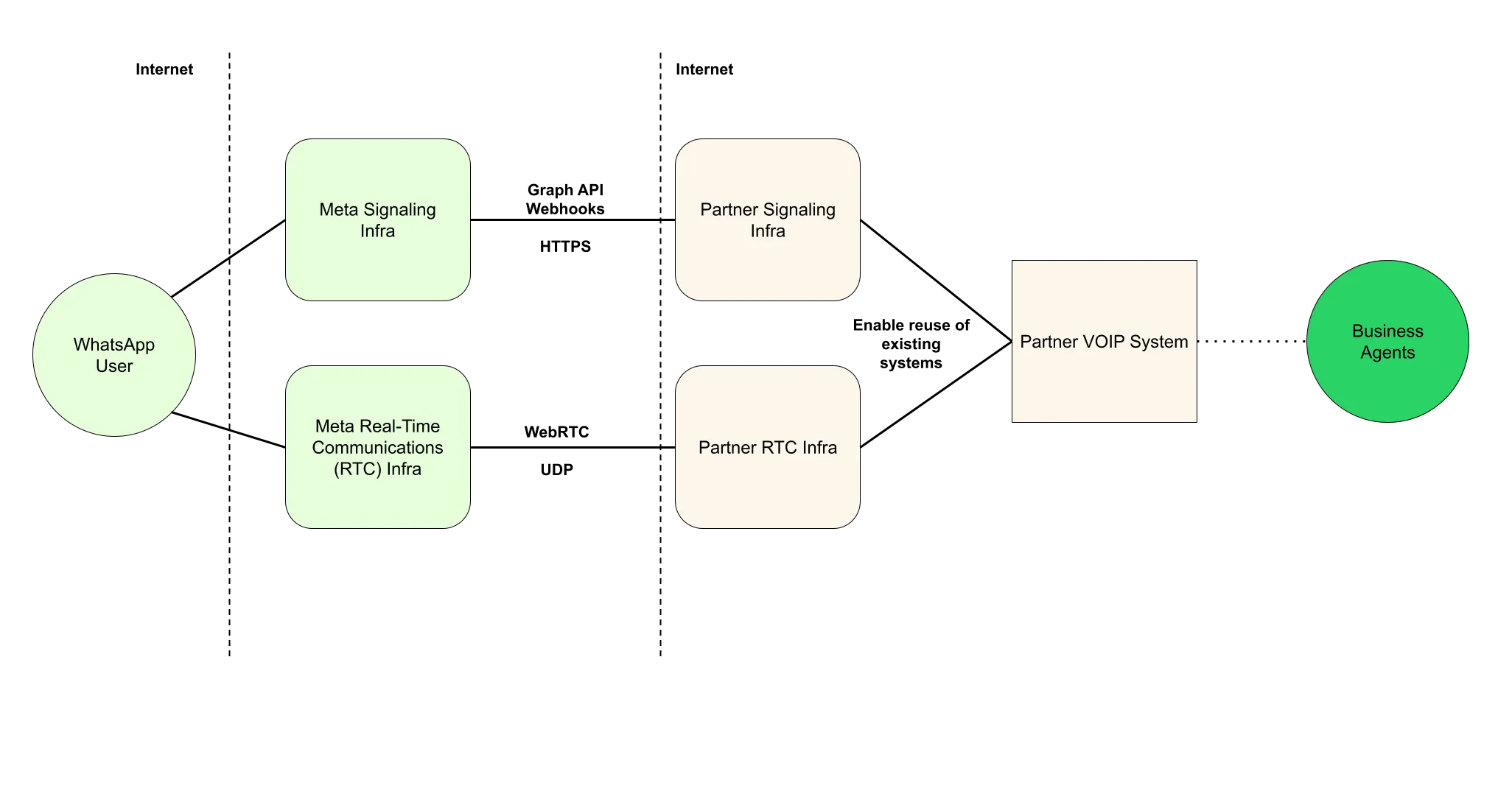(*Right click image and choose “Open in new tab” for enlarged image*)
| Default configuration after enabling calling | SIP with WebRTC | SIP with SDES media |
|---|
| | SIP (needs explicit [enablement](/books/meta-whatsapp/page/sip-configuration-guide-whatsapp-business-calling-developer-documentation)) | SIP (needs explicit [enablement](/books/meta-whatsapp/page/sip-configuration-guide-whatsapp-business-calling-developer-documentation)) |
| | | |
| WebRTC (ICE + DTLS1 + SRTP) | WebRTC (ICE + DTLS + SRTP) | [SDES](https://l.facebook.com/l.php?u=https%3A%2F%2Fdatatracker.ietf.org%2Fdoc%2Fhtml%2Frfc4568&h=AT4ICNy6ccJ6BY2qfVHlO1Ho3TprO7bBA7ECl0AhYSK2yu-kwaIrXcC7Sjdh_SynPr9uS_gqg_9hbQbVkvAtqRmgdxXZjVI7eqKNxWwt_UnyxFHle5EUNnVgNeVDsqNYTvHseEMfiHoQyfOnHF9rzA) SRTP (needs explicit [enablement](/books/meta-whatsapp/page/sip-configuration-guide-whatsapp-business-calling-developer-documentation)) |
| | | |
**Notes**
You can use SDES instead of ICE+DTLS with Graph API + Webhook signalingAdditional audio codecs supported: PCMA, PCMU#### Step 1: Prerequisites
Before you get started with the Calling API, ensure that:
[Your business number is in use with Cloud API](/books/meta-whatsapp/page/business-phone-numbers-developer-documentation) (not the WhatsApp Business app)Subscribe your app to the `calls` webhook field (unless you plan to use [SIP](/books/meta-whatsapp/page/sip-configuration-guide-whatsapp-business-calling-developer-documentation))The same app should also be [subscribed to the WhatsApp Business Account](/books/meta-whatsapp/page/create-a-webhook-endpoint-developer-documentation) of your business phone number.This app should have messaging permissions (`whatsapp_business_messaging`) for the business numberThe business must have a daily [messaging limit](/books/meta-whatsapp/page/messaging-limits-developer-documentation) of at least 2,000 unique recipients. More details on [scaling your account capabilities](https://www.facebook.com/business/help/595597942906808).[Enable Calling features on your business phone number](/books/meta-whatsapp/page/configure-call-settings-developer-documentation)The WhatsApp Business Calling API offers a number of features that affect when and how calling features appear to users on your WhatsApp profile
Inbound call control allows you to prevent users from placing calls from your business profileBusiness call hours allows you to avoid missed calls and direct users to message when your call center is closedCallback requests offer users the option to request a callback when you don’t pick up a call or if your call center is closed[Learn more about call control settings](/books/meta-whatsapp/page/configure-call-settings-developer-documentation)
#### Step 3: Make and receive calls
You can test your WhatsApp Calling integration using public test numbers and Sandbox WhatsApp Business Account.
[Learn more about testing your WhatsApp Calling API integration](/books/meta-whatsapp/page/cloud-api-calling-developer-documentation)
Cloud API Calling offers two call initiation paths:
**User-initiated calls:** Calls that are made from a WhatsApp user to your business**Business-initiated calls:** Calls that are made from your business to a WhatsApp user### Testing and Sandbox accounts
Sandbox accounts are only available to Tech Partners.
[Sandbox accounts](/books/meta-whatsapp/page/set-up-a-sandbox-account-for-calling-developer-documentation) and public test numbers enable you to test you WhatsApp Calling API integration with relaxed calling limitations. Specifically business initiated calling limits are relaxed for Sandbox accounts and public test numbers to help integration and testing efforts.
##### Limits (Per business + WhatsApp user pair)
You obtain a public test number after completing the [Get Started flow.](/books/meta-whatsapp/page/get-started-developer-documentation)
Your business is not required to have a daily [messaging limit](/books/meta-whatsapp/page/messaging-limits-developer-documentation) of 2,000 unique recipients to test Calling API features when using public test numbers and Sandbox accounts.
Calling is disabled by default on test numbers. You must [configure calling features in phone number call settings](/books/meta-whatsapp/page/configure-call-settings-developer-documentation) before using the Calling API on a test number.
[Learn more about Sandbox Accounts for Calling](/books/meta-whatsapp/page/embedded-signup-developer-documentation)
##### User-initiated calling
User-initiated calling is available in [every location Cloud API is available](/books/meta-whatsapp/page/faqs-developer-documentation).
##### Business-initiated calling
Business-initiated calling is currently available in [every location Cloud API is available](/books/meta-whatsapp/page/faqs-developer-documentation), **except the following countries:**
USACanadaEgyptVietnamNigeria**Note:** The business phone number’s country code must be in this supported list. The consumer phone number can be from any [country where Cloud API is available.](/books/meta-whatsapp/page/faqs-developer-documentation)
Use the guides below to integrate calling features in your application:
[Learn how to receive user-initiated calls](/books/meta-whatsapp/page/user-initiated-calls-developer-documentation)[Learn how to place business-initiated calls](/books/meta-whatsapp/page/business-initiated-calls-developer-documentation)[Learn how to drive consumer awareness of calling availability in your business](/books/meta-whatsapp/page/send-whatsapp-call-button-messages-and-deep-links-developer-documentation)Use this table as a centralized place to keep track of feature updates related to WhatsApp Business Calling APIs
| Date | Title | Description |
|---|
| Support for G.711 (PCMA, PCMU) audio codec | New section for G.711 (PCMA/PCMU) audio codec configuration in call settings, including guidelines on transcoding, audio quality, and bandwidth considerations. [Learn more about audio codec settings](/books/meta-whatsapp/page/configure-call-settings-developer-documentation). |
| Calling restrictions based on user feedback are now in effect | Learn more about [calling restrictions based on user feedback](/books/meta-whatsapp/page/configure-call-settings-developer-documentation). |
| Update in business initiated call limit | The number of business-initiated calls per user has been increased to 100 per day from 10 per day. [Learn more about business-initiated call limits](/books/meta-whatsapp/page/obtain-user-call-permissions-developer-documentation) |
| Introduced `restrict_to_user_countries` for call icon settings | Now you can control in which countries the call icon should be visible. [Learn more about call icon country settings](/books/meta-whatsapp/page/configure-call-settings-developer-documentation). |
|
Update in business initiated call limitAdded “Testing and Sandbox” section to documentation | The number of business-initiated calls per user has been increased to 10 per day from 5 per day. [Learn more about business-initiated call limits](/books/meta-whatsapp/page/obtain-user-call-permissions-developer-documentation) A [Testing and Sandbox accounts](/books/meta-whatsapp/page/cloud-api-calling-developer-documentation) has been added to the documentation |
| Asterisk integration guide | New guide to [integrate with Asterisk](/books/meta-whatsapp/page/integration-examples-developer-documentation) |
| Context propagation from call buttons and deep links | Specify an opaque string in call buttons or call deep links to help with tracking the origin of user-initiated calls. [Learn more](/books/meta-whatsapp/page/send-whatsapp-call-button-messages-and-deep-links-developer-documentation) |
| Health status API calling update | [Health Status API](/documentation/business-messaging/whatsapp/support/health-status) is now extended to include a new `can_receive_call_sip` field to help you self-diagnose issues related to [SIP](/books/meta-whatsapp/page/sip-configuration-guide-whatsapp-business-calling-developer-documentation) setup |
| Introduced new low call pickup calling restrictions | Low call pickup rate restrictions are now in effect. Learn more at [Calling Restriction for Low Call Pickup Rates](/books/meta-whatsapp/page/configure-call-settings-developer-documentation) |
| Account settings update webhooks | Get webhooks when settings are updated. [Learn more](/books/meta-whatsapp/page/configure-call-settings-developer-documentation). |
## Configure Call Settings
Updated: Mar 23, 2026
**Calling is not enabled by default on a business phone number**
Use the endpoint to enable Calling API features on a business phone number.
**Calling Eligibility**
To qualify for Calling API features, your business must have a messaging limit of at least 2000 business-initiated conversations in a rolling 24-hour period.
[Learn more about Quality Ratings and Messaging Limits](/books/meta-whatsapp/page/messaging-limits-developer-documentation)
When you test your WhatsApp Calling integration using public test numbers (PTNs) and sandbox accounts, Calling API restrictions are relaxed.
[Learn more about testing your WhatsApp Calling API integration](/books/meta-whatsapp/page/cloud-api-calling-developer-documentation)
Use these endpoints to view and configure call settings for the WhatsApp Business Calling API.
You can also [configure session initiation protocol (SIP)](/books/meta-whatsapp/page/sip-configuration-guide-whatsapp-business-calling-developer-documentation) for call signaling instead of using Graph API endpoint calls and webhooks.
Use this endpoint to update call settings configuration for an individual business phone number.
**WhatsApp clients reflecting latest calling config**
After you update call configuration, WhatsApp users may take up to 7 days to reflect those changes. Most users refresh much sooner. You can force an immediate refresh in WhatsApp by entering the chat window with business and open the chat info page. Regardless of WhatsApp client behavior, the semantics of settings are still honored on the server side.
| Placeholder | Description | Sample Value |
|---|
| **Required**
ID of the business phone number for which you are updating Calling API settings. | |
When the `status` parameter is set to `“ENABLED”`, calling features are enabled for the business phone number. WhatsApp client applications will render the call button icon in both the business chat and business chat profile.
When the `status` parameter is set to `“DISABLED”`, calling features are **disabled**, and both the business chat and business chat profile **do not display the call button icon.**
Updates to `status` will update the call button icon in existing business chats in near real-time when the business phone number is in the WhatsApp user’s contacts.
Otherwise, updates are real-time for a limited number of users in conversation with the business, and are eventual for the rest of the conversations.
When Calling API features are enabled for a business number, you can still choose whether to show the call button icon or not by using the `call_icon_visibility` parameter. Note: Disabling call button icon visibility **does not** disable a WhatsApp user’s ability to make unsolicited calls to your business.
The behavior for supported options is as follows:
`DEFAULT`
The Call button icon will be displayed in the chat menu bar and the business info page, allowing for unsolicited calls to the business by WhatsApp users.
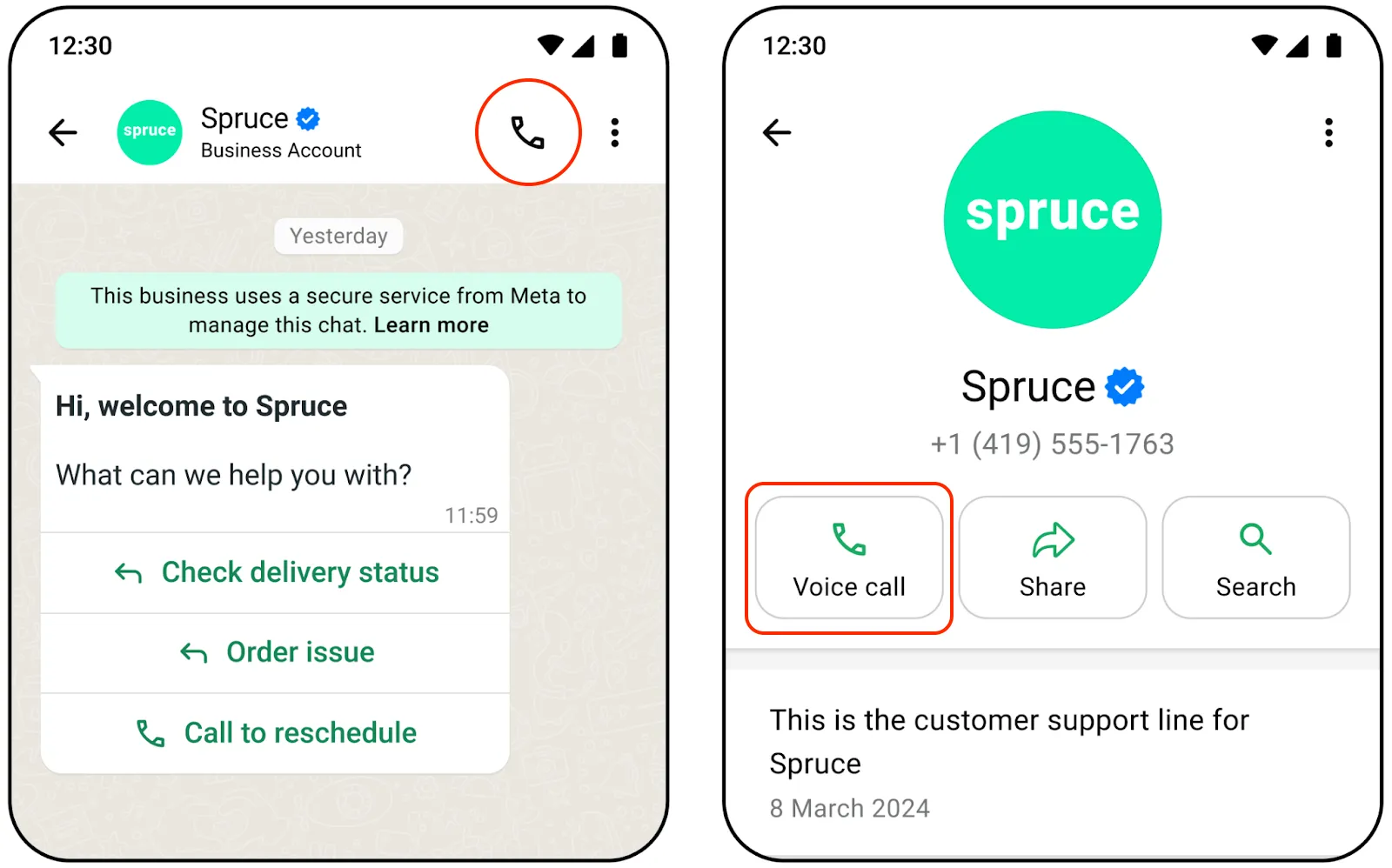
`DISABLE_ALL`
The call button icon is hidden in the chat menu bar and the business info page, and all other entry points external to the chat are also disabled. Consumers cannot make unsolicited calls to the business.
Your business can still [send interactive messages](/books/meta-whatsapp/page/send-whatsapp-call-button-messages-and-deep-links-developer-documentation) or [template messages](/books/meta-whatsapp/page/send-whatsapp-call-button-messages-and-deep-links-developer-documentation) with a Calling API CTA button.
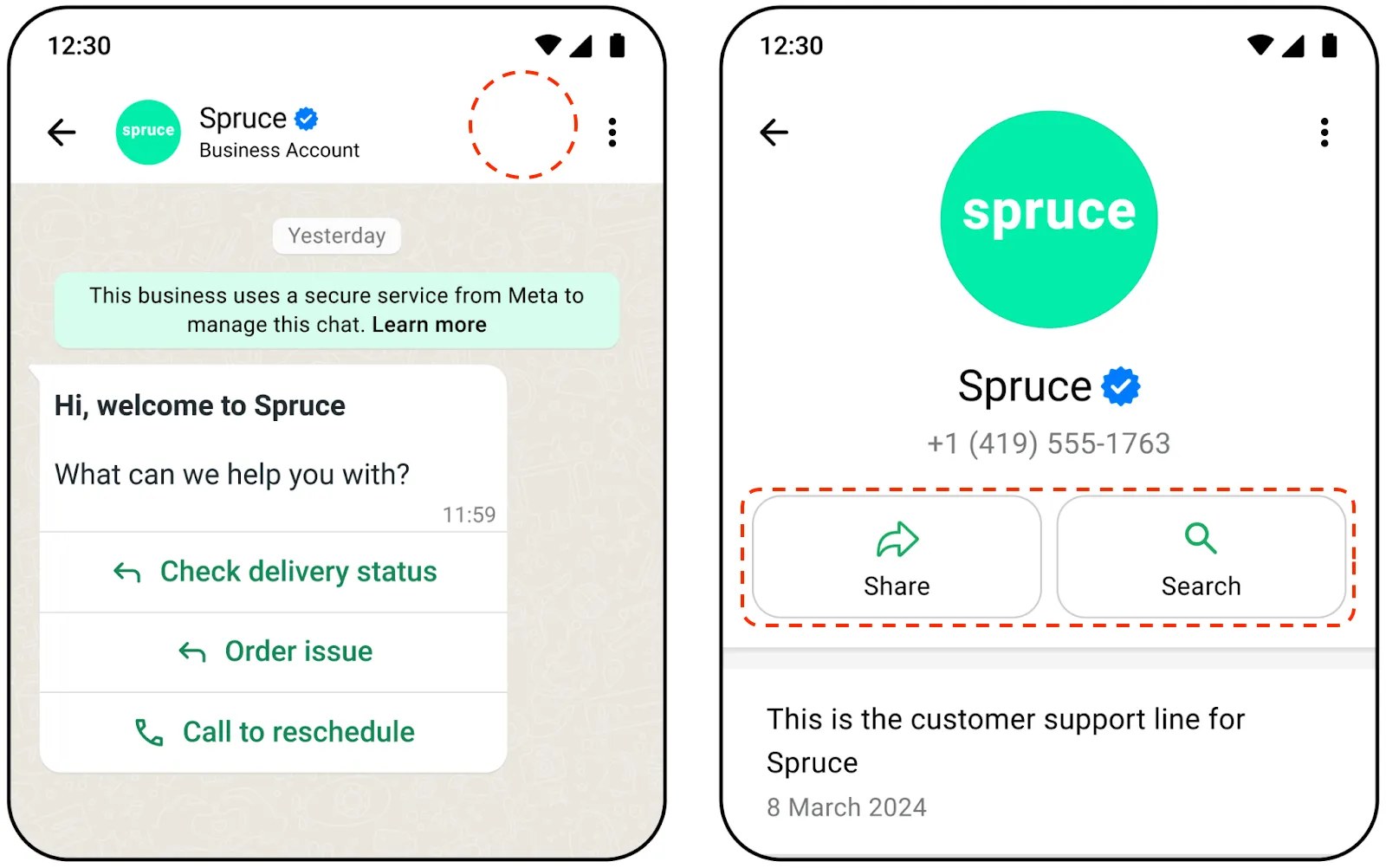
#### Callback permissions
Calling a WhatsApp user requires explicit permission from the user. One way to obtain calling permissions is to request permission when a WhatsApp user calls your business.
You can configure the call permission UI to automatically show in the WhatsApp user’s client app when they call your business number. The user may change their permission selection at any time.
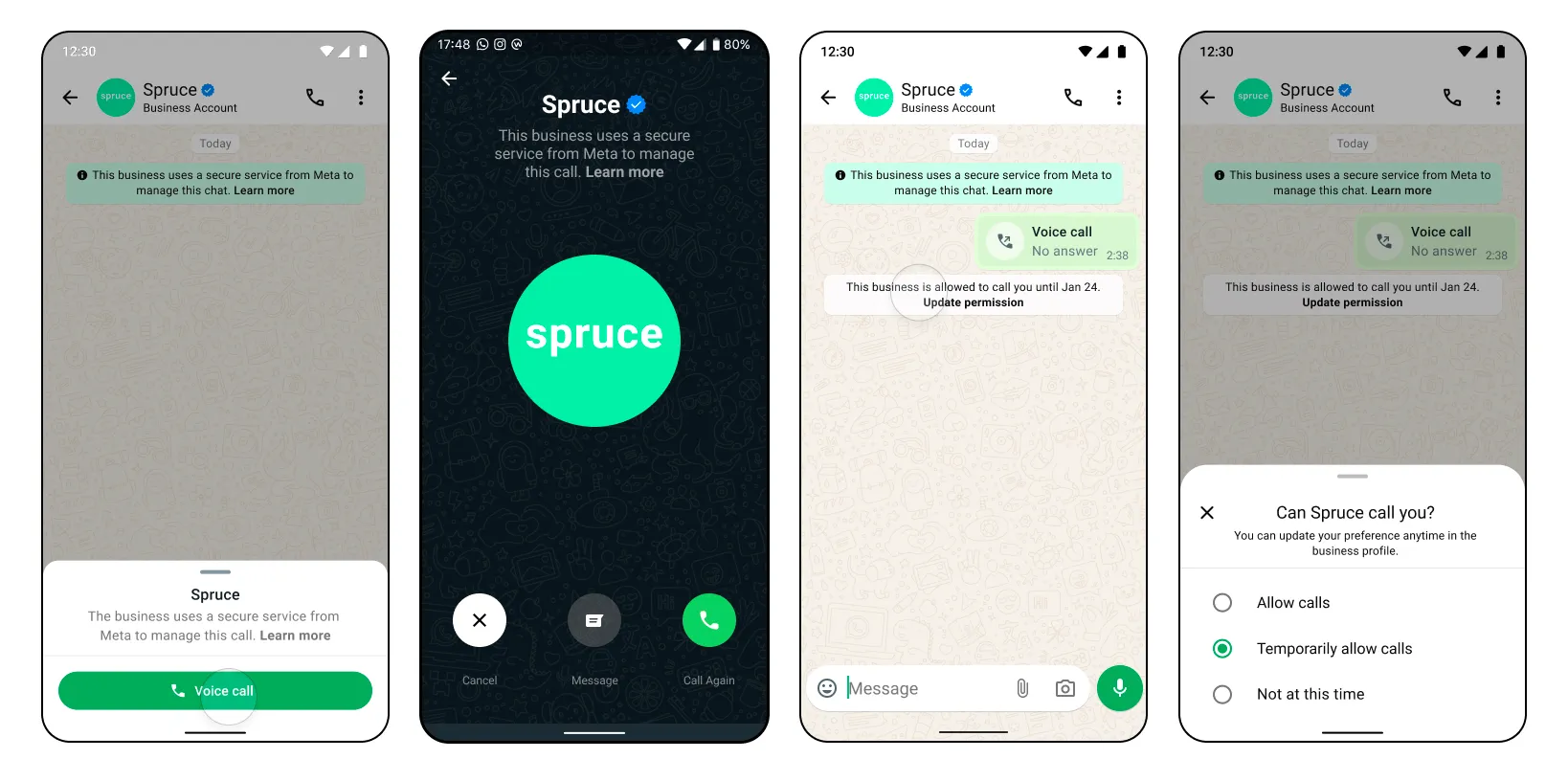
With the `call_icons` setting, you can specify the countries where these icons should show up.
Opus is the default audio codec for all WhatsApp calls. You can enable G.711 (PCMA/PCMU) codecs for interoperability with legacy telephony systems or PSTN gateways.
##### Guidelines and considerations
Possible errors that can occur:
Permissions/Authorization errorsInvalid statusInvalid schedule for `call_hours`Holiday given in `call_hours` is a past dateTimezone is invalid in `call_hours``weekly_operating_hours` in `call_hours` cannot be emptyDate format in `holiday_schedule` for call\_hours is invalidMore than 2 entries not allowed in `weekly_operating_hours` schedule in `call_hours`Overlapping schedule in `call_hours` is not allowed[View Calling API Error Codes and Troubleshooting for more information](/books/meta-whatsapp/page/troubleshoot-whatsapp-calling-errors-reference-guide-developer-documentation)
[View general Cloud API Error Codes here](/documentation/business-messaging/whatsapp/support/error-codes)
### Get phone number calling settings
Use this endpoint to check the configuration of your Calling API feature settings.
This endpoint can return information for other Cloud API feature settings.
| Parameter | Description | Sample Value |
|---|
| **Required**
ID of the business phone number for which you are getting Calling API settings. | |
#### App permission required
`whatsapp_business_management`: Advanced access is required to use the API for end business clients
Possible errors that can occur:
Permissions/Authorization errors[View Calling API Error Codes and Troubleshooting for more information](/books/meta-whatsapp/page/troubleshoot-whatsapp-calling-errors-reference-guide-developer-documentation)
[View general Cloud API Error Codes here](/documentation/business-messaging/whatsapp/support/error-codes)
### Call settings in WhatsApp Manager
You can also control your call settings via [WhatsApp Manager](https://business.facebook.com/latest/whatsapp_manager/).
To access calling controls in WhatsApp Manager:
Click on **Account tools** > **Phone numbers** panelClick the gear icon next to the phone number you are using for callingClick the **Calls** tab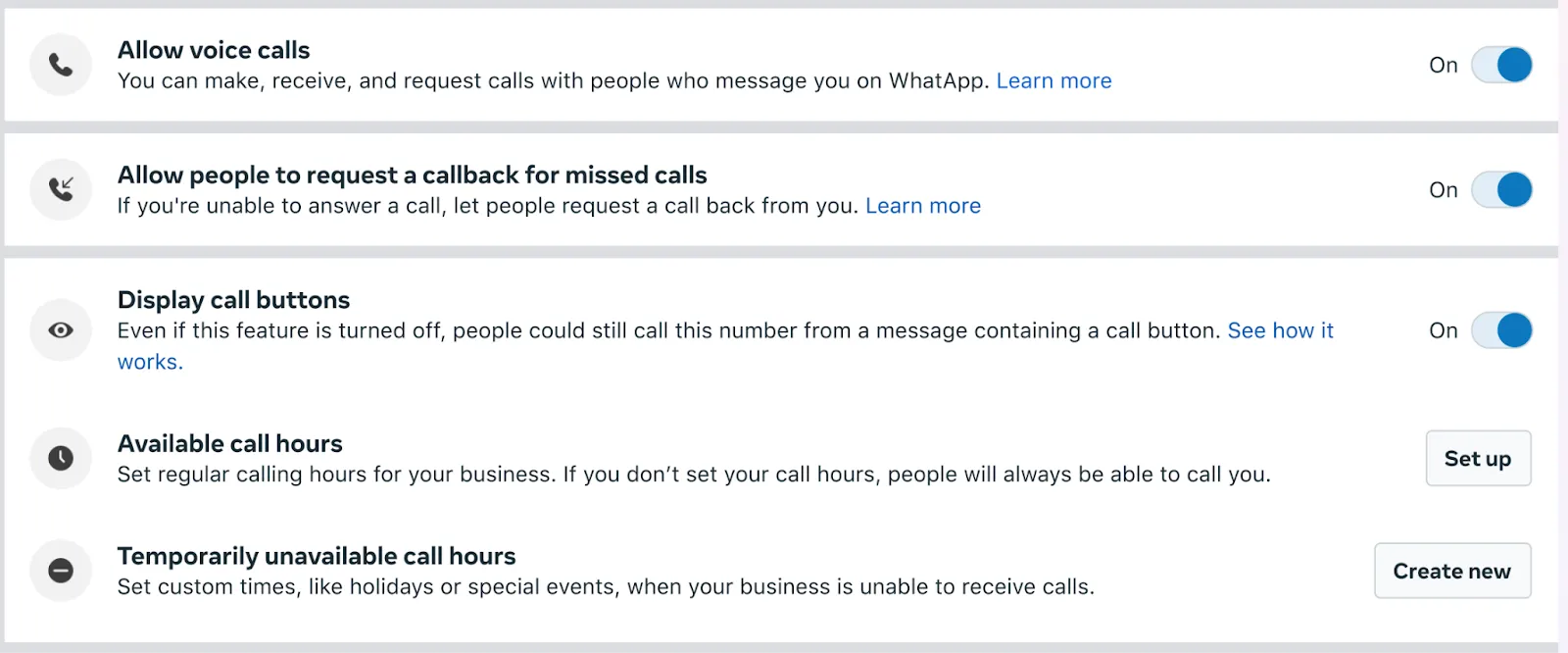
Session Initiation Protocol (SIP) is a signaling protocol used for initiating, maintaining, modifying, and terminating real-time communication sessions between two or more endpoints. You can send and receive call signals using SIP instead of Graph API endpoints.
[Learn more about how to use and configure SIP](/books/meta-whatsapp/page/sip-configuration-guide-whatsapp-business-calling-developer-documentation)
### Calling restrictions for user feedback
If your calls receive a high negative user feedback, such as blocks and reports, business initiated calling, user initiated calling, or both functionalities on your phone number can be restricted.
You will be notified when the business phone number is close to being paused as an early warning. The early warning notifications will be communicated via below channels
Enforcement emails are sent to the email addresses of all users and admins associated with the business. If you did not receive an email, confirm which email you have designated as the contact email for your app and make sure that it is active, can receive new email, and does not flag the email as junk or spam mail.
#### Pause in calling functionality
Once the negative user feedback reaches a threshold, Cloud API will automatically restrict calling functionality on your phone number for a period of 7 days. While paused the calling phone number will be unable to
*Make business initiated calls to users**Send call permissions requests*Once your phone number has been paused, notifications will be communicated via below channels.
Note: Any call permissions approved or declined by the users while paused, will still be valid.
Enforcement emails are sent to the email addresses of all users and admins associated with the business. If you did not receive an email, confirm which email you have designated as the contact email for your app and make sure that it is active, can receive new email, and does not flag the email as junk or spam mail.
#### Pause in user initiated calling functionality
Once the negative user feedback reaches a threshold, Cloud API will automatically restrict user initiated calling functionality on your phone number for a period of 7 days. While paused the calling phone number will be unable to
*Receive calls from users**Have call icon visible*Once your phone number has been paused, notifications will be communicated via below channels.
Enforcement emails are sent to the email addresses of all users and admins associated with the business. If you did not receive an email, confirm which email you have designated as the contact email for your app and make sure that it is active, can receive new email, and does not flag the email as junk or spam mail.
### Calling restrictions for low call pickup rates
When calling is enabled on your business phone number, you are expected to pick up calls that users place to you.
If a significant number of calls placed to your calling-enabled business phone number are not picked up, you will be notified and expected to make a change.
#### What happens if you do not pick up calls
#### How to mitigate the situation
##### *If you receive a warning*
## Business-Initiated Calls
Updated: Nov 13, 2025
The Calling API supports making calls to WhatsApp users from your business.
The user dictates when calls can be received by [granting call permissions to the business phone number](/books/meta-whatsapp/page/obtain-user-call-permissions-developer-documentation).
#### Call sequence diagram
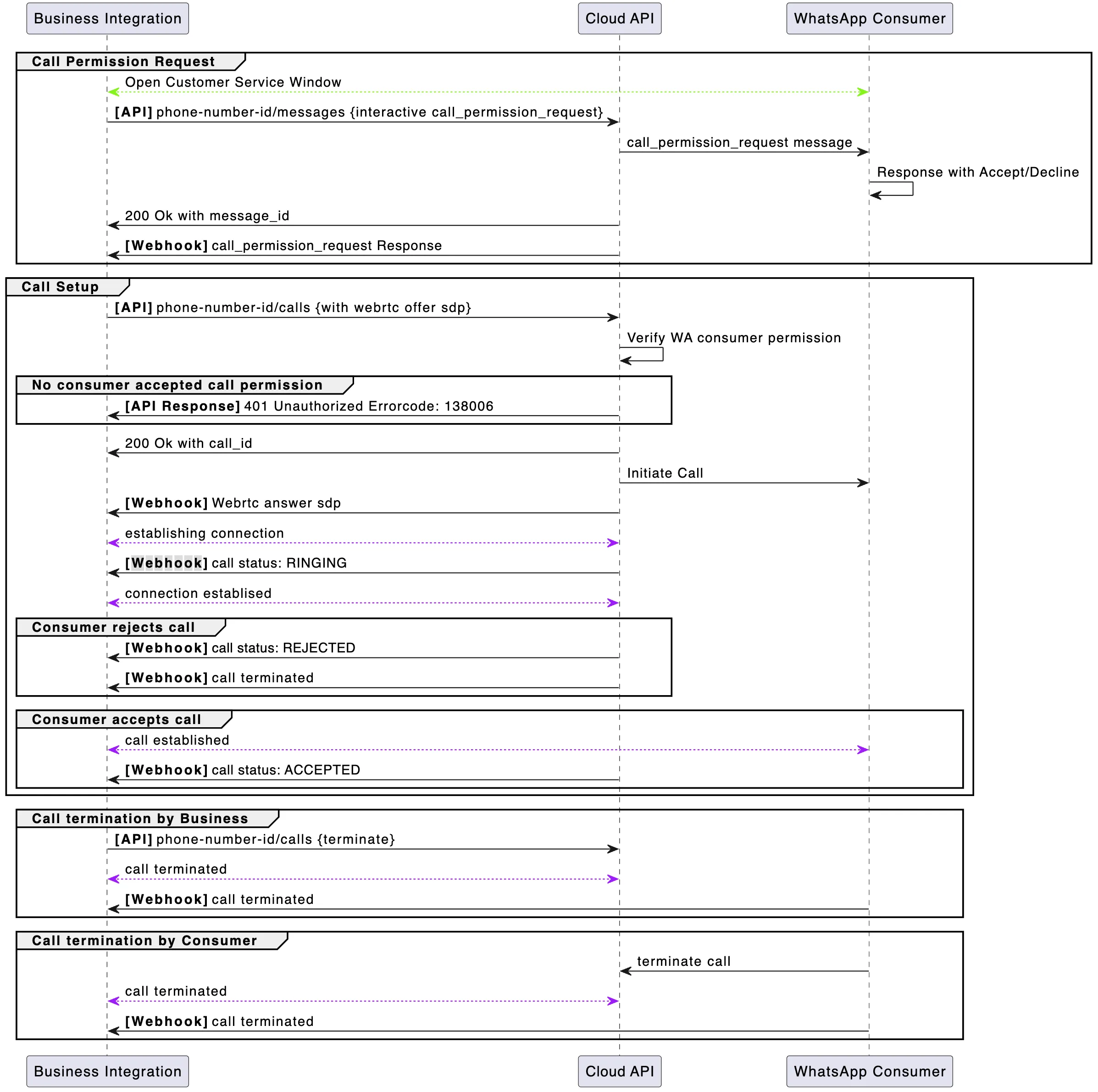
*Note: The `ACCEPTED` call status webhook will typically arrive after the call has been established. The Cloud API primarily sends it for call event auditing.*
Before you get started with business-initiated calling, ensure that:
[Subscribe](/books/meta-whatsapp/page/create-a-webhook-endpoint-developer-documentation) to the “calls” webhook field[Calling APIs are enabled on your business phone number](/books/meta-whatsapp/page/configure-call-settings-developer-documentation)Lastly, **before you can call a WhatsApp user, you must obtain their permission to do so.**
[Learn how to obtain WhatsApp user calling permissions here](/books/meta-whatsapp/page/obtain-user-call-permissions-developer-documentation)
### Business-initiated calling flow
#### Part 1: Obtain permission to call the WhatsApp user
You can obtain call permissions from the WhatsApp user in one of the following ways:
##### Send a call permission request message
You can request call permissions by sending the WhatsApp user a permission request. Send it as a free form message during an open customer service window, or use a template message.
[Learn how to send a **free form** call permission request](/books/meta-whatsapp/page/obtain-user-call-permissions-developer-documentation)[Learn how to send a **template** call permission request](/books/meta-whatsapp/page/obtain-user-call-permissions-developer-documentation)##### Enable `callback_permission_status` in call settings
When `callback_permission_status` is enabled, the user automatically provides call permission to your business when they place a call to you.
[Learn how to enable `callback_permission_status`](/books/meta-whatsapp/page/configure-call-settings-developer-documentation)
##### WhatsApp user grants permanent permissions
The user can also grant permanent permissions to the business at any time through their business profile.
#### Part 2: Your business initiates a new call to the WhatsApp user
Now that you have user permission, you can initiate a new call to the WhatsApp user in question.
If there are no errors, you will receive a successful response:
*Note: Response with error code `138006` indicates a lack of a call request permission for this business number from the WhatsApp user.*
#### Part 3: You establish the call connection using webhook signaling
After you successfully initiate a new call, you receive a Call Connect webhook response containing an `SDP Answer` from Cloud API. Your business will then apply the `SDP Answer` from this webhook to your WebRTC stack to initiate the media connection.
You then receive an appropriate status webhook, indicating that the call is `RINGING`, `ACCEPTED`, or `REJECTED`:
### Endpoints for business-initiated calling
Use this endpoint to initiate a call to a WhatsApp user by providing a phone number and a WebRTC call offer. There is a rate limit of 10000 per 24 hours for initiating new calls per business phone number.
Possible errors that can occur:
Invalid `phone-number-id`Permissions/Authorization errorsRequest format validation errors, for example connection info, sdp, iceSDP validation errorsCalling restriction errors[View Calling API Error Codes and Troubleshooting for more information](/books/meta-whatsapp/page/troubleshoot-whatsapp-calling-errors-reference-guide-developer-documentation)
[View general Cloud API Error Codes here](/documentation/business-messaging/whatsapp/support/error-codes)
Use this endpoint to terminate an active call.
This must be done even if there is an `RTCP BYE` packet in the media path. Ending the call this way also ensures pricing is more accurate.
When the WhatsApp user terminates the call, you do not have to call this endpoint. Once the call is successfully terminated, you will receive a [Call Terminate Webhook](/books/meta-whatsapp/page/business-initiated-calls-developer-documentation).
| Parameter | Description | Sample Value |
|---|
| **Required**
The ID of the phone call. For inbound calls, you receive a call ID from the [Call Connect webhook](/books/meta-whatsapp/page/business-initiated-calls-developer-documentation) when a WhatsApp user initiates the call. | `“wacid.ABGGFjFVU2AfAgo6V-Hc5eCgK5Gh”` |
| **Required**
The action being taken on the given call ID. Values can be `connect` | `pre_accept` | `accept` | `reject` | `terminate` | |
Possible errors that can occur:
Invalid `call id`Invalid `phone-number-id`The WhatsApp user has already terminated the callReject call is already in progressPermissions/Authorization errors[View Calling API Error Codes and Troubleshooting for more information](/books/meta-whatsapp/page/troubleshoot-whatsapp-calling-errors-reference-guide-developer-documentation)
[View general Cloud API Error Codes here](/documentation/business-messaging/whatsapp/support/error-codes)
### Webhooks for business-initiated calling
With all Calling API webhooks, there is a `”calls”` object inside the `”value”` object of the webhook response. The `”calls”` object contains metadata about the call that is used to action on each call placed or received by your business.
To receive Calling API webhooks, subscribe to the “calls” webhook field.
[Learn more about Cloud API webhooks here](/books/meta-whatsapp/page/status-messages-webhook-reference-developer-documentation)
This webhook is sent during the following calling events:
Ringing: When the WhatsApp user’s client device begins ringingAccepted: When the WhatsApp user accepts the callRejected: When the WhatsApp user rejects the call. You also receive the call terminate webhook in this caseThe webhook structure here is similar to the Status webhooks used for the Cloud API messages.
[*Learn more about Cloud API status webhooks*](/books/meta-whatsapp/page/status-messages-webhook-reference-developer-documentation)
##### Webhook values for `"statuses"`
| Placeholder | Description |
|---|
| |
| The UNIX timestamp of the webhook event |
| The phone number of the WhatsApp user receiving the call |
| The current call status. Possible values: `RINGING`: Business initiated call is ringing the user `ACCEPTED`: Business initiated call is accepted by the user `REJECTED`: Business initiated call is rejected by the user |
`biz_opaque_callback_data` *String* | Arbitrary string your business passes into the call for tracking and logging purposes. Will only be returned if provided through [Initiate New Call API requests](/books/meta-whatsapp/page/business-initiated-calls-developer-documentation) |
#### Call terminate webhook
A webhook notification is sent whenever the call has been terminated for any reason, such as when the WhatsApp user hangs up, or when the business calls the endpoint with an action of `terminate` or `reject`.
##### Webhook values for `"calls"`
| Placeholder | Description |
|---|
| |
| The number being called (callee) |
| |
| The calling event that this webhook is notifying the subscriber of |
| The UNIX timestamp of the webhook event |
| The direction of the call being made. Can contain either: `BUSINESS_INITIATED`, for calls initiated by your business. `USER_INITIATED`, for calls initiated by a WhatsApp user. |
| The UNIX timestamp of when the call started. Only present when the call was picked up by the other party. |
| The UNIX timestamp of when the call ended. Only present when the call was picked up by the other party. |
| Duration of the call in seconds. Only present when the call was picked up by the other party. |
`biz_opaque_callback_data` *String* | Arbitrary string your business passes into the call for tracking and logging purposes. Will only be returned if provided through an [Initiate Call API request](/books/meta-whatsapp/page/business-initiated-calls-developer-documentation) or [Accept Call request](/books/meta-whatsapp/page/api-and-webhook-reference-developer-documentation) |
| The `errors` object is present only for failed calls when there is error information available. Code is one of the [calling error codes](/books/meta-whatsapp/page/troubleshoot-whatsapp-calling-errors-reference-guide-developer-documentation) |
### SDP overview and sample structures
Session Description Protocol (SDP) is a text-based format used to describe the characteristics of multimedia sessions, such as voice and video calls, in real-time communication applications. SDP provides a standardized way to describe the session’s media streams. This includes media type, codecs, protocols, and parameters for establishing and managing the session.
In the context of WebRTC, SDP is used to negotiate the media parameters between the sender and receiver, enabling them to agree on the specifics of the media exchange.
[View SDP sample structures for business-initiated calls](/books/meta-whatsapp/page/api-and-webhook-reference-developer-documentation)
## Obtain User Call Permissions
Updated: Nov 13, 2025
As of November 3, 2025, permanent permissions is now available. Users can now grant a business ongoing permission to call. Users can review and change calling permission for a business at any time in the business profile.
Call permission related features are available only in regions where [business initiated calling is available](/books/meta-whatsapp/page/cloud-api-calling-developer-documentation).
If you want to place a call to a WhatsApp user, your business must receive user permission first. When a WhatsApp user grants call permissions, they can be either temporary or permanent.
Business does not have control over this permission as it is only granted by the user and can only be revoked by the user, at any time. Permanent permission data will be stored until it is revoked.
You can obtain calling permission from a WhatsApp user in any of the following ways:
**Send a call permission request to the user** — Send a free-form or templated message requesting calling permission from the user. User has the option to choose between temporary or permanent.**Callback permission is provided by the WhatsApp user** — The WhatsApp user automatically provides temporary call permissions by placing a call to the business. The [callback setting must be enabled](/books/meta-whatsapp/page/configure-call-settings-developer-documentation) on the business phone number.**WhatsApp user provides call permission via Business Profile** — The WhatsApp user provides call permissions to the business through their business profile.#### Limits (Per business + WhatsApp user pair)
These limits are in place to protect WhatsApp users from unwanted calls.
When you test your WhatsApp Calling integration using public test numbers (PTNs) and sandbox accounts, Calling API restrictions are relaxed.
[Learn more about testing your WhatsApp Calling API integration](/books/meta-whatsapp/page/cloud-api-calling-developer-documentation)
### Call permission request basics
You may proactively request a calling permission from a WhatsApp user by sending a permission request message, either as a:
Free form interactive messageTemplate messageThe WhatsApp user may approve (temporary or permanent), decline, or simply not respond to a call permission request.
**With permissions, the WhatsApp user is in control.** Even if the user provides calling permission, they can revoke that granted permission request at any time. Conversely, if the user declines a permission request, they can still grant calling permission, up until the permission request expires.
**A call permission request expires** when any of the following occurs:
The WhatsApp user interacts with a subsequent new call permission request from the business7 days after the permission was accepted or declined by the consumer7 days after the permission was delivered if the consumer does not respond to the request[View client UI behavior for expired permission requests](/books/meta-whatsapp/page/obtain-user-call-permissions-developer-documentation)
To ensure an optimal user experience around business initiated calling, the following limits are enforced:
**When sending a calling permission request message** Maximum of 1 permission request in 24hMaximum 2 permission requests within 7 days. *These limits reset when any connected call (business-initiated/user-initiated) is made between the business and WhatsApp user.**These limits apply toward permissions requests sent either as free form or template messages.***When business-initiated calls go unanswered or are rejected** 2 consecutive unanswered calls result in a system message to reconsider an approved permission4 consecutive unanswered calls result in an approved permission being automatically revoked. The user may again update this if they so choose.[View client UI behavior for consecutive unanswered calls](/books/meta-whatsapp/page/obtain-user-call-permissions-developer-documentation)
Call permission request messages are subject to [messaging charges](/books/meta-whatsapp/page/pricing-on-the-whatsapp-business-platform-developer-documentation)
A call permission request message can be sent to users in one of the following ways:
**Send a free form message**
When you are within a customer service window with a WhatsApp user, you can send a free form message with a call permission request.Although a text body will be optional, you should send one to build context with the user. In the case of free form calling permission request messages, header and footer sections are not supported.Since the customer service window is open, there is no need to create a conversation window.**Create and send a template message**
Sending a template message allows you to initiate a user conversation with a call permission request.Context (that is, a text body) is required when sending a template message with a call permission request.With template messages, you can further customize your permission request by adding a message header and footer.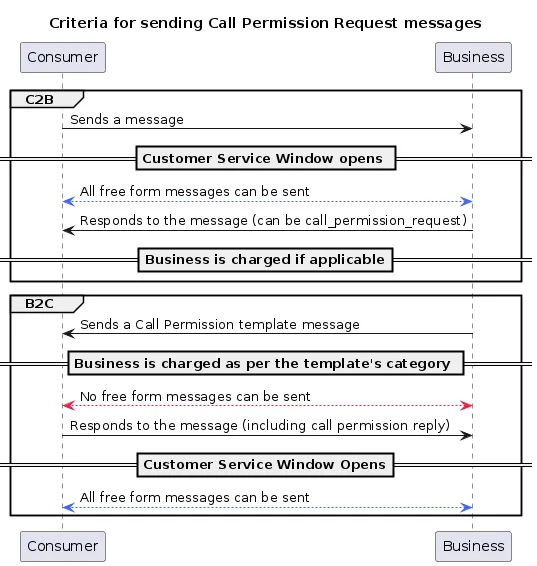
### Client application UI experience
#### Call permission request flow and sample messages
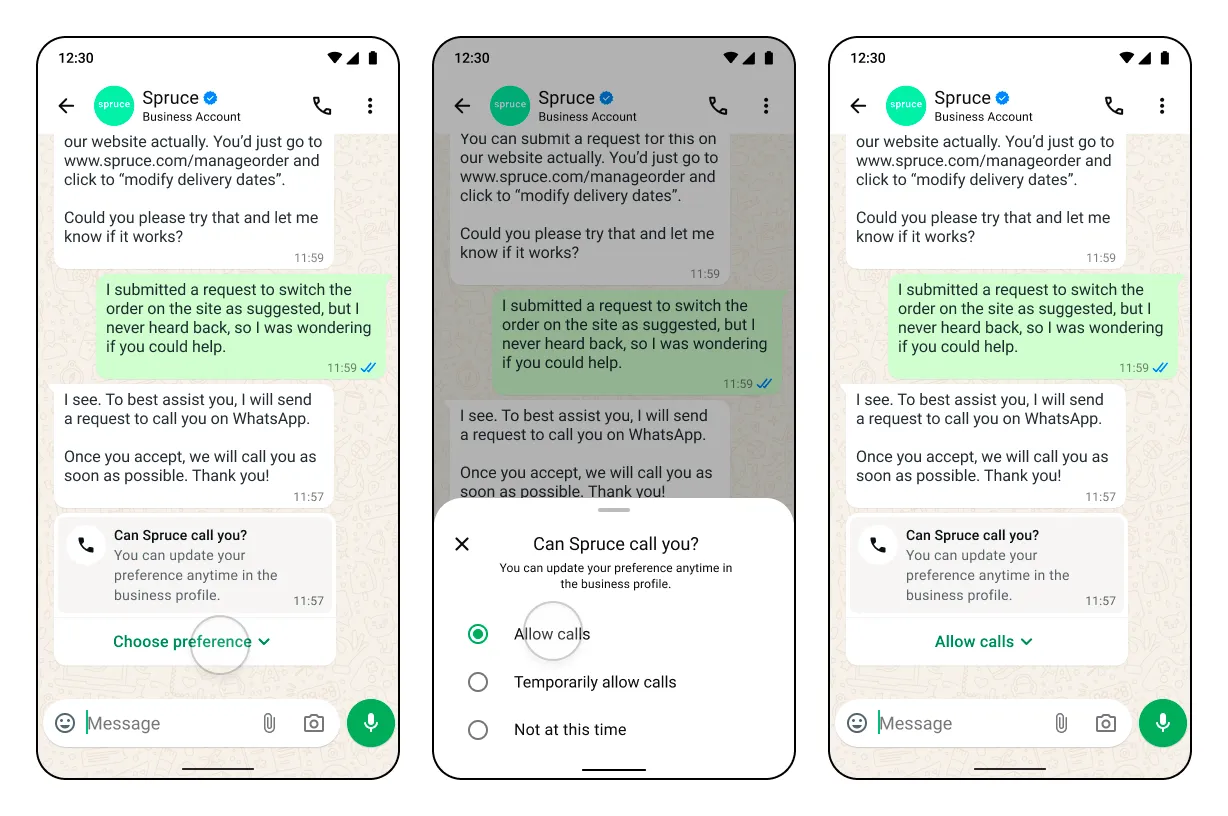
##### Temporarily allow calls
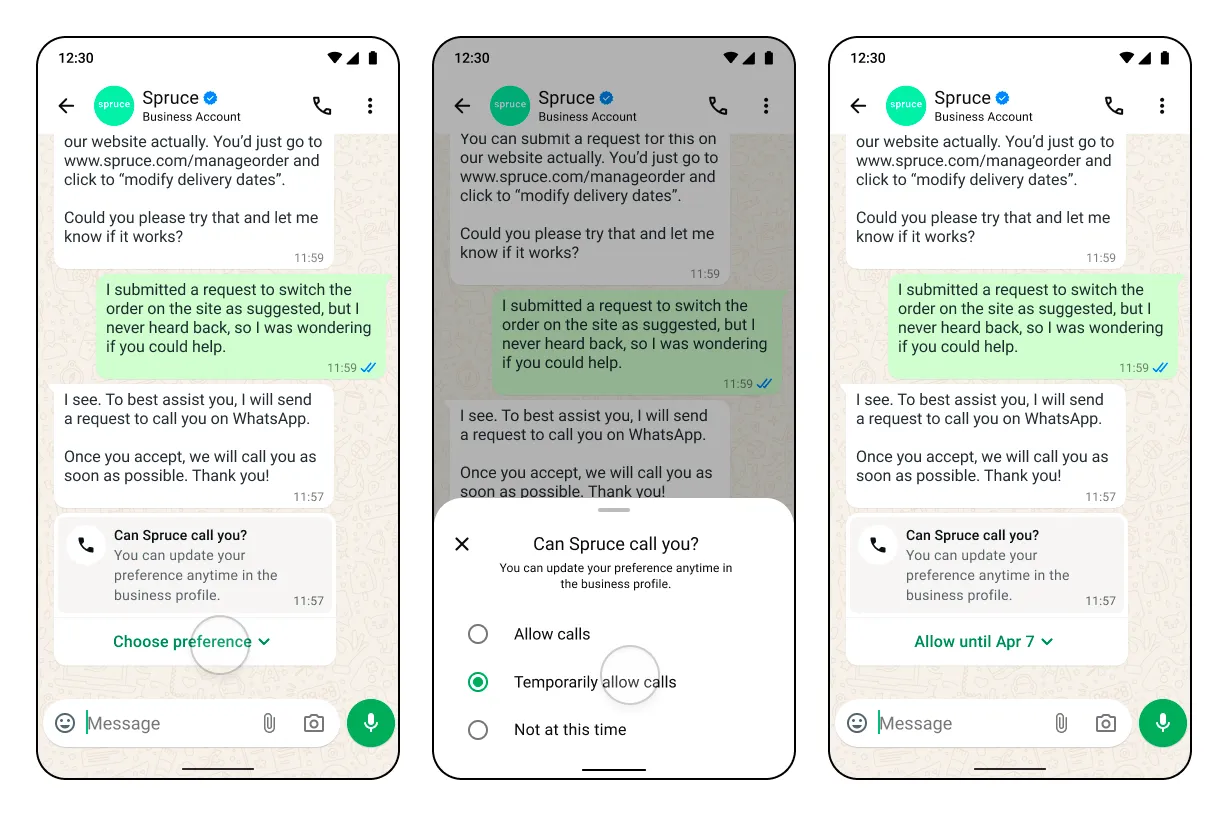
With header, footer and body 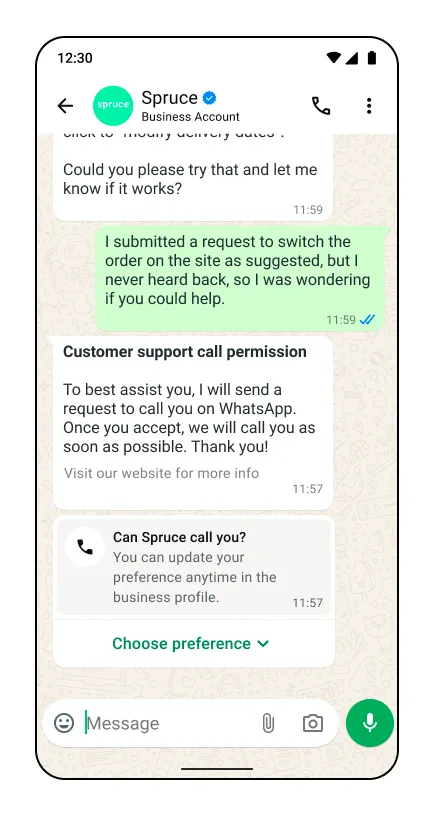
With body only 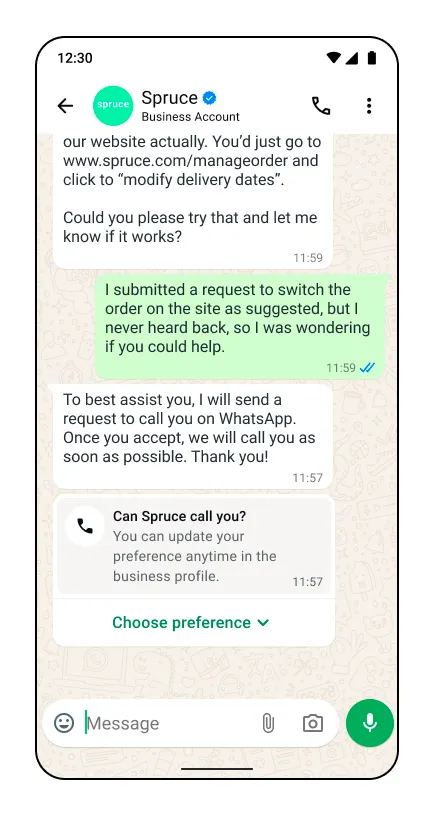
With no text body 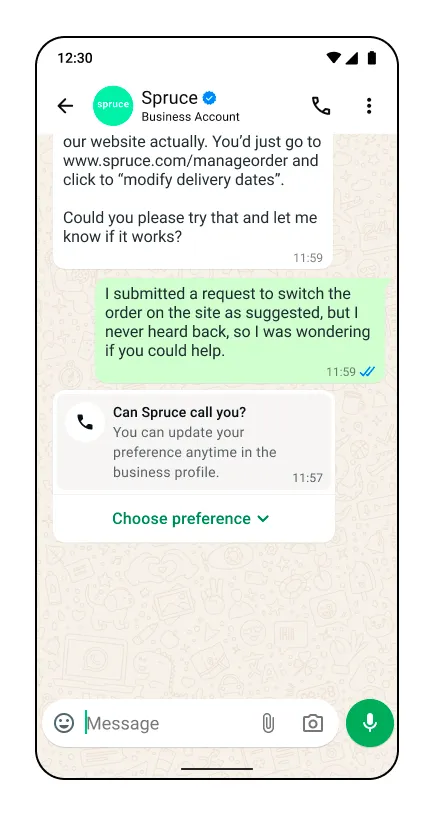
With no text body 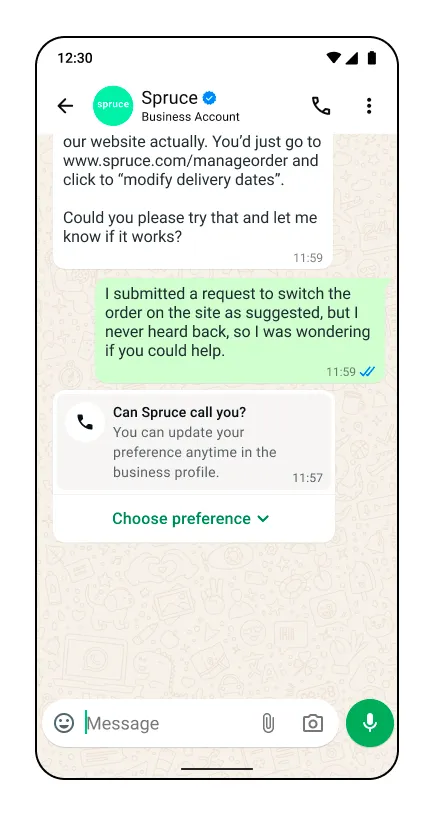
With text body only 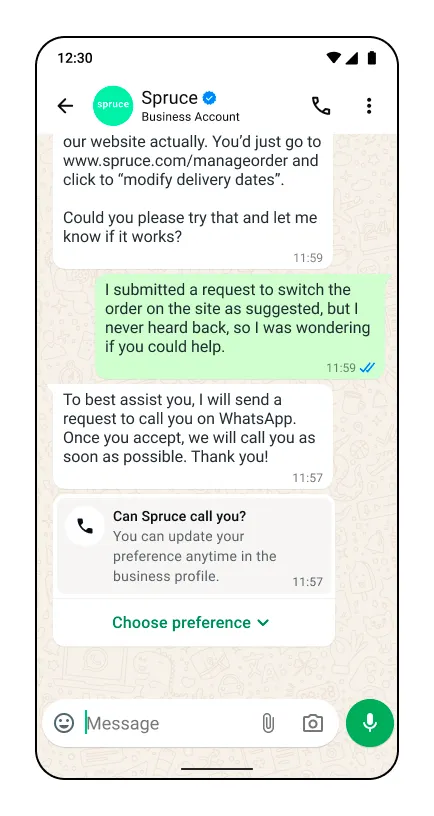
#### Updating call permission on business profile
Users always have the option to change the permission using a new option on the business profile.
| Update call permission on business profile |
|---|
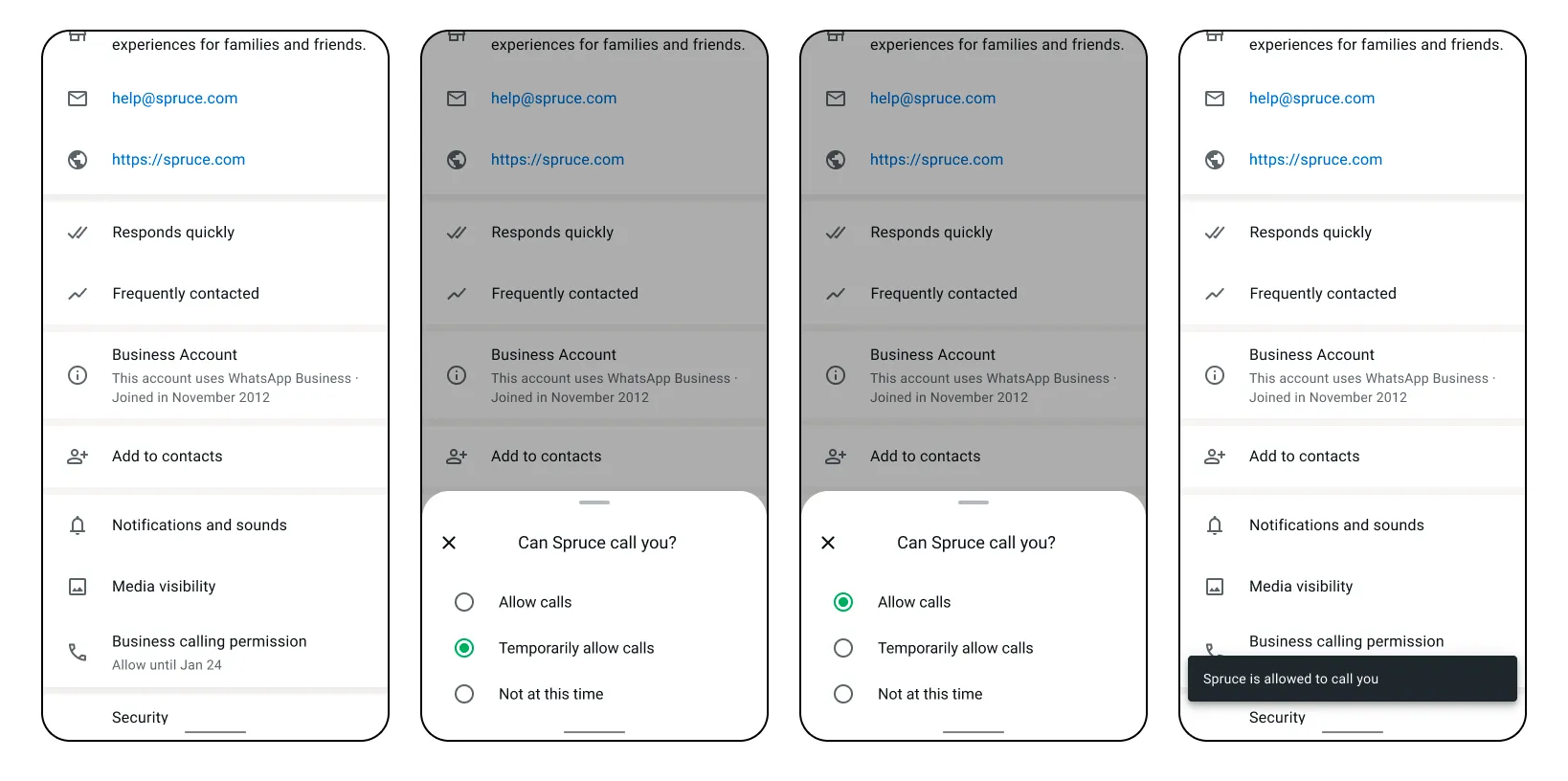 |
#### Consecutive unanswered calls
| Consecutive unanswered calls |
|---|
2 consecutive unanswered calls — System message for user to update permission 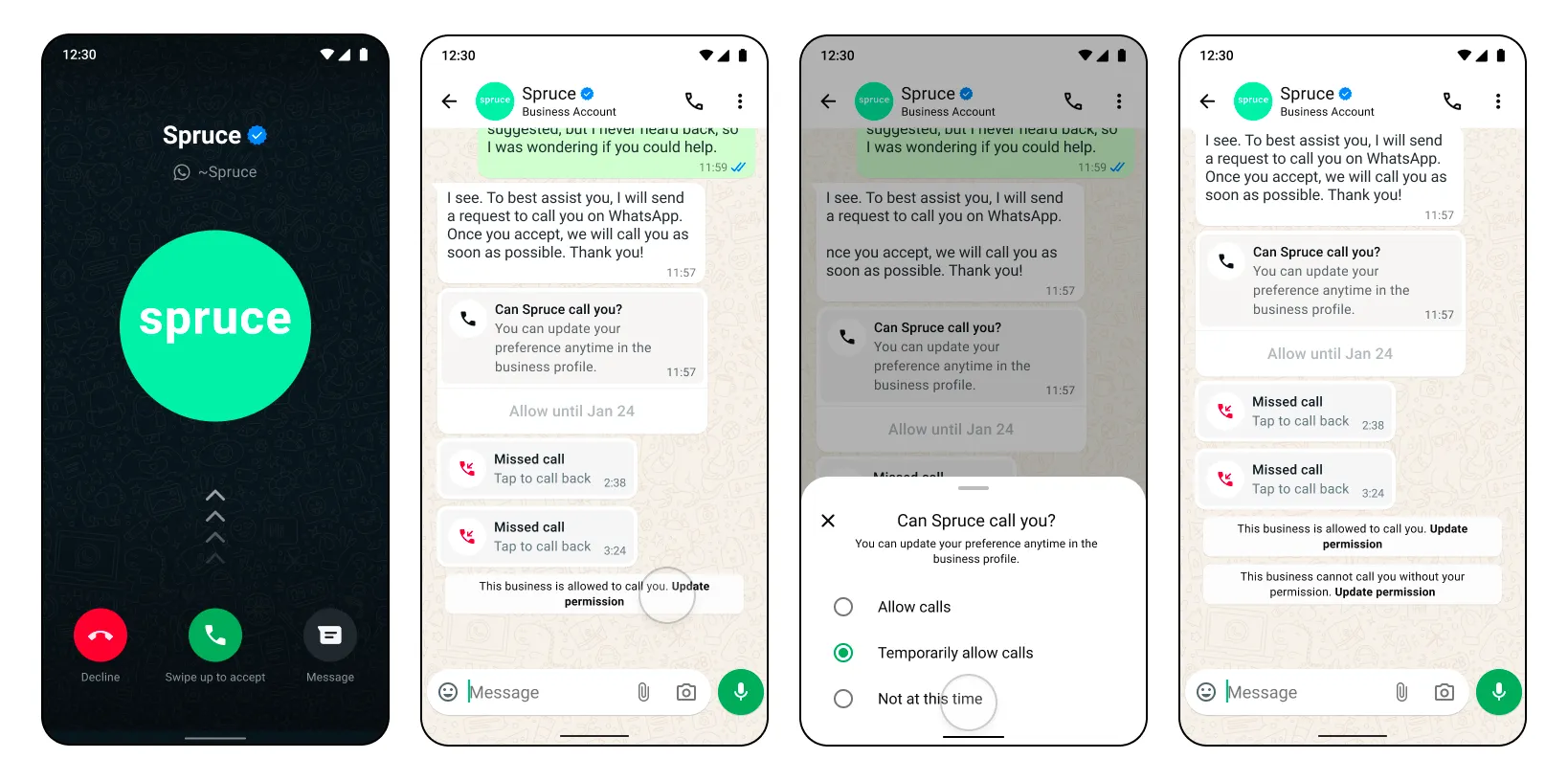 |
4 consecutive unanswered calls — Permissions automatically revoked 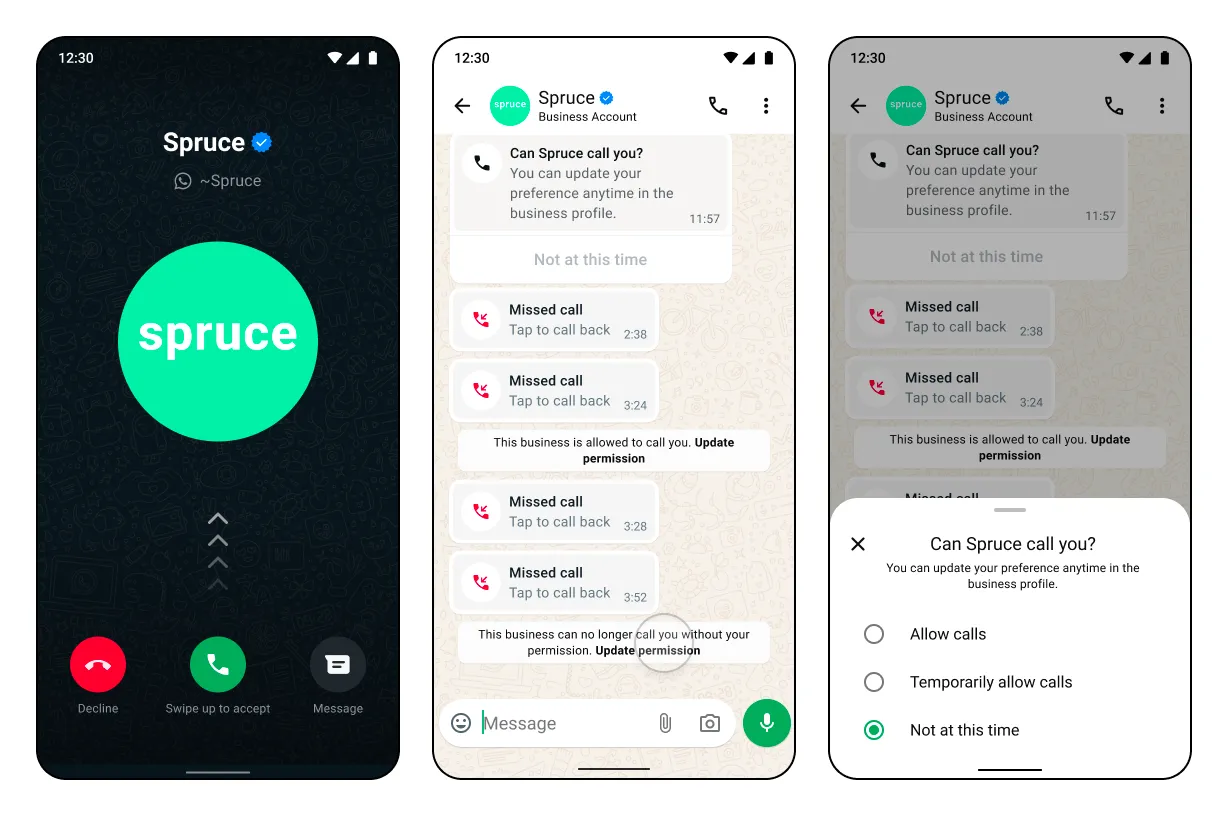 |
#### Call permission request expiration scenarios
Permission request expires after 7 days — User interacts with request 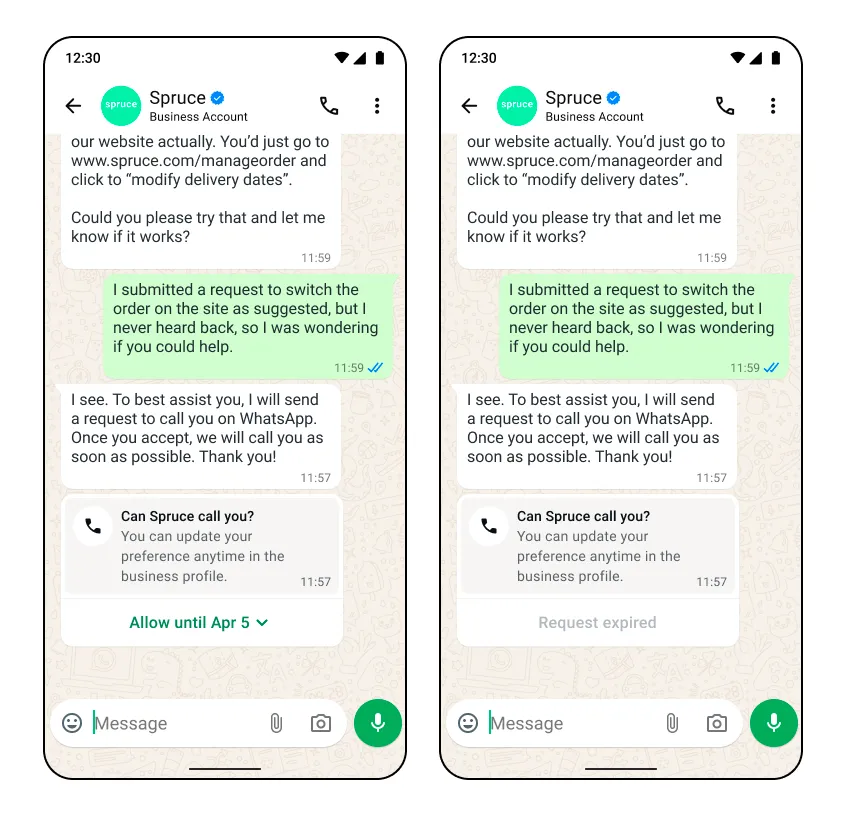
Permission request expires after 7 days — User does not interact 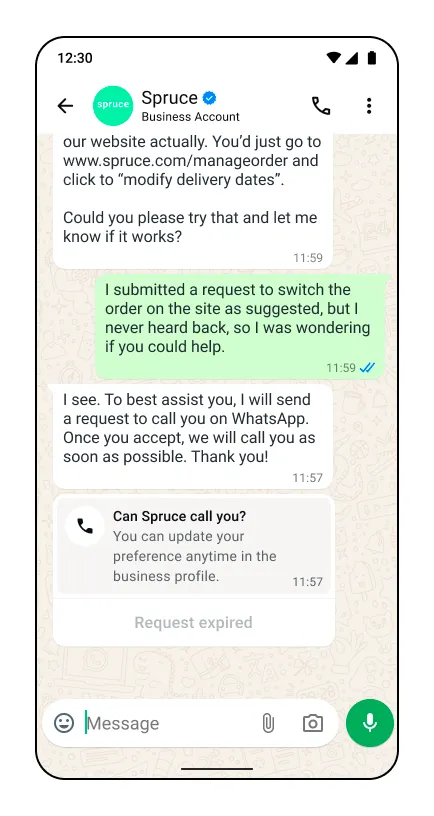
Previous permission request expires immediately — User does not interact / New call permission request is received 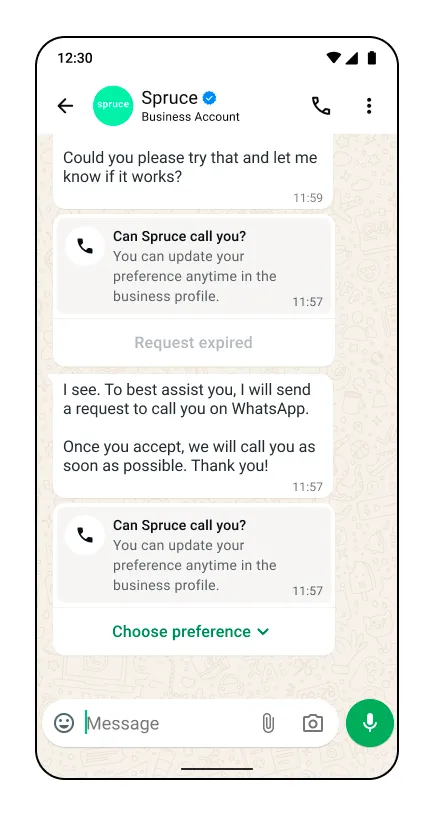
Previous permission request expires immediately — User allows / Interacts with the new request 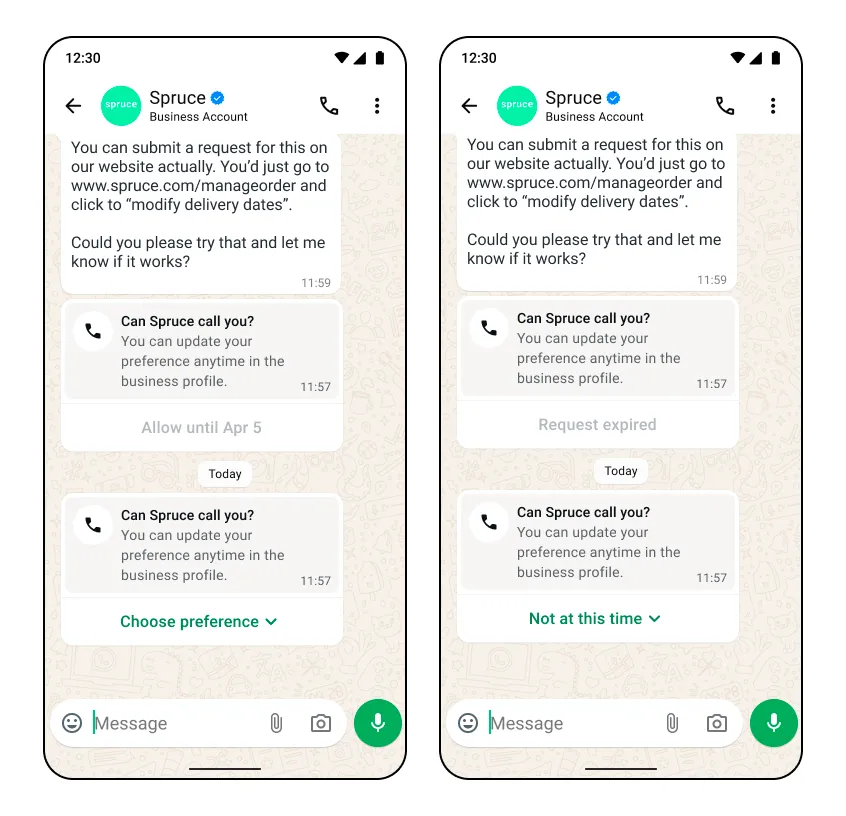
Call permission request messages are subject to [messaging charges](/books/meta-whatsapp/page/pricing-on-the-whatsapp-business-platform-developer-documentation)
Use this endpoint to send a free form interactive message with a call permission request during a [customer service window](/books/meta-whatsapp/page/sending-messages-developer-documentation). A standard [message status webhook](/books/meta-whatsapp/page/status-messages-webhook-reference-developer-documentation) will be sent in response to this message send.
**Note:** The call permission request interactive object cannot be edited by the business. Only the message body can be customized.
[See how this message is rendered on the WhatsApp client](/books/meta-whatsapp/page/obtain-user-call-permissions-developer-documentation)
| Parameter | Description | Sample Value |
|---|
| **Required**
The phone number of the WhatsApp user you are messaging [Learn more about formatting phone numbers in Cloud API](/documentation/business-messaging/whatsapp/reference/whatsapp-business-phone-number/whatsapp-business-account-phone-number-api) | |
| **Required**
The type of interactive message you are sending. In this case, you are sending a `call_permission_request`. [Learn more about interactive messages](/books/meta-whatsapp/page/sending-messages-developer-documentation) | `“call_permission_request”` |
| **Required**
The action of your interactive message. Must be `call_permission_request`. | `“call_permission_request”` |
| **Optional**
The body of your message. Although this field is optional, it is highly recommended you give context to the WhatsApp user when you request permission to call them. | `"Allow us to call you so we can support you with your order."` |
[*Learn more about messaging success responses*](/books/meta-whatsapp/page/sending-messages-developer-documentation)
Possible errors that can occur:
Invalid `phone-number-id`Permissions/Authorization errorsRate limit reachedSending this message to users on older app versions will result in error webhook with error code [131026](/documentation/business-messaging/whatsapp/support/error-codes)Calling not enabledCalling restriction errors[View general Cloud API Error Codes here](/documentation/business-messaging/whatsapp/support/error-codes)
### Create and send call permission request template messages
Call permission request messages are subject to [messaging charges](/books/meta-whatsapp/page/pricing-on-the-whatsapp-business-platform-developer-documentation)
Use these endpoints to create and send a call permission request message template.
Once your permission request template message is created, your business can send the template message to the user as a call permission request outside of a customer service window.
[Learn more about creating and managing message templates](/books/meta-whatsapp/page/templates-developer-documentation)
#### Create message template
Use this endpoint to create a call permission request message template.
Creating and managing template messages can be done both through Cloud API and the WhatsApp Business Manager interface.
When creating your call permission request template, ensure you configure `type` as `call_permission_request`.
[Learn more about creating and managing message templates](/books/meta-whatsapp/page/templates-developer-documentation)
| Parameter | Description | Sample Value |
|---|
| **Required**
The type of template message you are creating. In this case, you are creating a `call_permission_request`. | `“call_permission_request”` |
##### Template status response
[*Learn more about template status response*](/books/meta-whatsapp/page/templates-developer-documentation)
Possible errors that can occur:
Invalid WABA idPermissions/Authorization errorsTemplate structure/component validation alerts[View general Cloud API Error Codes here](/documentation/business-messaging/whatsapp/support/error-codes)
### Get current call permission state
Use this endpoint to get the call permission state for a business phone number with a single WhatsApp user phone number.
| Parameter | Description | Sample Value |
|---|
| **Required**
The business phone number you are fetching permissions against. [Learn more about formatting phone numbers in Cloud API](/documentation/business-messaging/whatsapp/reference/whatsapp-business-phone-number/whatsapp-business-account-phone-number-api) | |
| **Required**
The phone number of the WhatsApp user who you are requesting call permissions from. [Learn more about formatting phone numbers in Cloud API](/documentation/business-messaging/whatsapp/reference/whatsapp-business-phone-number/whatsapp-business-account-phone-number-api) | |
Possible errors that can occur:
Invalid `phone-number-id`If the consumer phone number is uncallable, the api response will be `no_permission`.Permissions/Authorization errors.Rate limit reached. A maximum of 100 requests in a 1 second window can be made to the API.Calling is not enabled for the business phone number.[View Calling API Error Codes and Troubleshooting for more information](/books/meta-whatsapp/page/troubleshoot-whatsapp-calling-errors-reference-guide-developer-documentation)
[View general Cloud API Error Codes here](/documentation/business-messaging/whatsapp/support/error-codes)
### User call permission reply webhook
This webhook is delivered whenever a user selects or updates their calling permissions. It could be in response to a call permission request sent by the business or it could be the user proactively making a decision.
The webhook fields values change depending on the circumstances of the user permission decision:
the user accepts or rejects the requestthe user approves permission by responding to a request or by calling the businessthe user permission is an automatic callback permission in response to a user-initiated callthe user permission is automatically revoked in response to 4 consecutive unanswered business-initiated callsLastly, the user can grant permanent calling permission to the business, which is represented in the `is_permanent` parameter.
No webhook is sent when a temporary permission expires. The `expiration_timestamp` field included in the accepted permission webhook indicates the time this permission will expire. Alternatively the current permission state can be queried from the [get current call permission state](#bkmrk-get-current-call-per-1) endpoint.
| Placeholder | Description |
|---|
`customer_phone_number` *String* | The phone number of the customer |
| Can be either of two values Message ID of the permission request message sent by the business to the customer number. Shows when a permission decision is made by the user in response to a call permission request.Call ID of the missed call placed by the business to the customer number. Shows when callback permission is enabled in settings and the user calls the business. |
| The WhatsApp users response to the call permission request message Can be `accept` or `reject` |
| Indicates if the permission is permanent or not. For temporary permission this will always be false. |
`expiration_timestamp` *Integer* | Time in seconds when this call permission expires if the WhatsApp user approved it |
`response_source` *String* | The source of this permission Possible values for accepted call permissions are: `user_action`: User approved or rejected the permission`automatic`: An automatic permission approval due to the WhatsApp user initiating the call |
##### Webhook sample scenarios
| Scenario | Webhook sample |
|---|
The WhatsApp user approves a temporary call permission from a call permission request message | |
The WhatsApp users approves a permanent call permission from a call permission request message | |
The WhatsApp users approves a permanent call permission from the business profile | |
The WhatsApp users rejects a call permission after receiving a call permission request message | |
An automatic temporary callback permission is granted to the business when the WhatsApp user calls the business | |
A call permission is automatically revoked when a business makes 4 consecutive unanswered calls to the WhatsApp user | |
## User-initiated calls
Updated: Nov 13, 2025
The Calling API supports receiving calls made by WhatsApp users to your business.
Your business dictates when calls can be received by [configuring business calling hours and holiday unavailability](/books/meta-whatsapp/page/configure-call-settings-developer-documentation).
**Consumer device eligibility**
Currently, the WhatsApp Business Calling API can accept calls from a consumer’s primary and companion iPhone or Android phones.
A **primary device** is the consumer’s main device, typically a mobile phone, which holds the authoritative state for the user’s account. It has full access to messaging history and core functionalities. There is exactly one primary device per user account at any given time.
**Companion devices** are additional devices registered to the user’s account that can operate alongside the primary device. Examples include web clients, desktop apps, tablets, and smart glasses. Companion devices have access to some or all messaging history and core features but are limited compared to the primary device. For Cloud API Calling, **only iPhone and Android phone companion devices are supported for user-initiated calls**.
**Callback permission functionality on companion devices**
For businesses that have the [callback setting](/books/meta-whatsapp/page/configure-call-settings-developer-documentation) enabled, this functionality is not supported on companion devices yet.
Before you get started with user-initiated calling, ensure that:
[Subscribe](/books/meta-whatsapp/page/create-a-webhook-endpoint-developer-documentation) to the **calls** webhook field[Enable Calling API features on your business phone number](/books/meta-whatsapp/page/configure-call-settings-developer-documentation)#### Call sequence diagram
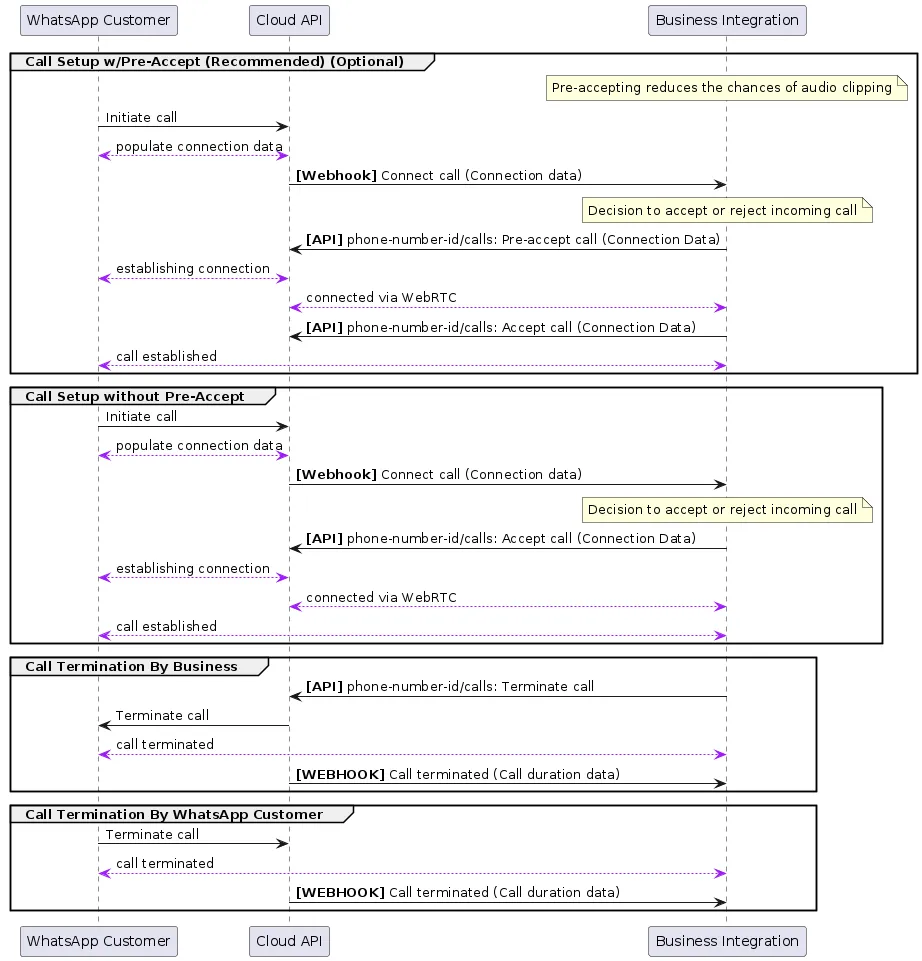
### Endpoints for user-initiated calling
When you pre-accept an inbound call, you allow the calling media connection to be established before attempting to send call media through the connection.
When you then call the accept call endpoint, media begins flowing immediately since the connection has already been established.
Pre-accepting calls is recommended because it facilitates faster connection times and avoids [audio clipping issues](/books/meta-whatsapp/page/troubleshoot-whatsapp-calling-errors-reference-guide-developer-documentation).
There is about 30 to 60 seconds after the [Call Connect webhook](/books/meta-whatsapp/page/user-initiated-calls-developer-documentation) is sent for the business to accept the phone call. If the business does not respond, the call is terminated on the WhatsApp user side with a “Not Answered” notification and a [Terminate Webhook](/books/meta-whatsapp/page/user-initiated-calls-developer-documentation) is delivered back to you.
**Note:** Since the WebRTC connection is established before calling the [Accept Call endpoint](/books/meta-whatsapp/page/user-initiated-calls-developer-documentation), make sure to flow the call media only after you receive a 200 OK response back.
If call media flows too early, the caller will miss the first few words of the call. If call media flows too late, callers will hear silence.
| Parameter | Description | Sample Value |
|---|
| **Required**
The ID of the phone call. For inbound calls, you receive a call ID from the [Call Connect webhook](/books/meta-whatsapp/page/user-initiated-calls-developer-documentation) when a WhatsApp user initiates the call. | `“wacid.ABGGFjFVU2AfAgo6V-Hc5eCgK5Gh”` |
| **Optional**
The action being taken on the given call ID. Values can be `connect` | `pre_accept` | `accept` | `reject` | `terminate` | |
| **Optional**
Contains the session description protocol (SDP) type and description language. Requires two values: `sdp_type` — (*String*) **Required** “offer”, to indicate SDP offer `sdp` — (*String*) **Required** The SDP info of the device on the other end of the call. The SDP must be compliant with [RFC 8866](https://l.facebook.com/l.php?u=https%3A%2F%2Fdatatracker.ietf.org%2Fdoc%2Fhtml%2Frfc8866&h=AT4zZJ9FzVQ3vNp7-OCABiqHLC3SPrGAQtzla4yYj9jwhSTiuCZ2EKCnf-0cMLGDfqMr7vChT5WqyVtsmzBWeBYJOdkhM4SK2yuxDvEMd71LwzH7HChGIeKD-eZLKpI_Cky4wQvRzj0SmR0ODAIvKA). [Learn more about Session Description Protocol (SDP)](https://l.facebook.com/l.php?u=https%3A%2F%2Fwww.rfc-editor.org%2Frfc%2Frfc8866.html&h=AT4zZJ9FzVQ3vNp7-OCABiqHLC3SPrGAQtzla4yYj9jwhSTiuCZ2EKCnf-0cMLGDfqMr7vChT5WqyVtsmzBWeBYJOdkhM4SK2yuxDvEMd71LwzH7HChGIeKD-eZLKpI_Cky4wQvRzj0SmR0ODAIvKA) [View example SDP structures](/books/meta-whatsapp/page/api-and-webhook-reference-developer-documentation) | |
Possible errors that can occur:
Invalid `call-id`Invalid `phone-number-id`Error related to your payment methodInvalid Connection info, for example, SDP or ICEAccept/Reject an already In Progress/Completed/Failed callPermissions/Authorization errors[View Calling API Error Codes and Troubleshooting for more information](/books/meta-whatsapp/page/troubleshoot-whatsapp-calling-errors-reference-guide-developer-documentation)
[View general Cloud API Error Codes here](/documentation/business-messaging/whatsapp/support/error-codes)
Use this endpoint to connect to a call by providing a call agent’s SDP.
You have about 30 to 60 seconds after the [Call Connect Webhook](/books/meta-whatsapp/page/user-initiated-calls-developer-documentation) is sent to accept the phone call. If your business does not respond, the call is terminated on the WhatsApp user side with a “Not Answered” notification and a [Terminate Webhook](/books/meta-whatsapp/page/user-initiated-calls-developer-documentation) is delivered back to you.
Possible errors that can occur:
Invalid `call-id`Invalid `phone-number-id`Error related to your payment methodInvalid Connection info, for example, SDP or ICEAccept/Reject an already In Progress/Completed/Failed callPermissions/Authorization errorsSDP answer provided in accept does not match the SDP answer given in the [Pre-Accept endpoint](/books/meta-whatsapp/page/user-initiated-calls-developer-documentation) for the same `call-id`[View Calling API Error Codes and Troubleshooting for more information](/books/meta-whatsapp/page/troubleshoot-whatsapp-calling-errors-reference-guide-developer-documentation)
[View general Cloud API Error Codes here](/documentation/business-messaging/whatsapp/support/error-codes)
Use this endpoint to reject a call.
You have about 30 to 60 seconds after the [Call Connect webhook](/books/meta-whatsapp/page/user-initiated-calls-developer-documentation) is sent to accept the phone call. If the business does not respond, the call is terminated on the WhatsApp user side with a “Not Answered” notification and a [Terminate Webhook](/books/meta-whatsapp/page/user-initiated-calls-developer-documentation) is delivered back to you.
| Parameter | Description | Sample Value |
|---|
| **Required**
The ID of the phone call. For inbound calls, you receive a call ID from the [Call Connect webhook](/books/meta-whatsapp/page/user-initiated-calls-developer-documentation) when a WhatsApp user initiates the call. | `“wacid.ABGGFjFVU2AfAgo6V-Hc5eCgK5Gh”` |
| **Optional**
The action being taken on the given call ID. Values can be `connect` | `pre_accept` | `accept` | `reject` | `terminate` | |
Possible errors that can occur:
Invalid `call-id`Invalid `phone-number-id`Accept/Reject an already In Progress/Completed/Failed callPermissions/Authorization errors[View Calling API Error Codes and Troubleshooting for more information](/books/meta-whatsapp/page/troubleshoot-whatsapp-calling-errors-reference-guide-developer-documentation)
[View general Cloud API Error Codes here](/documentation/business-messaging/whatsapp/support/error-codes)
Use this endpoint to terminate an active call.
This must be done even if there is an `RTCP BYE` packet in the media path. Ending the call this way also ensures pricing is more accurate.
When the WhatsApp user terminates the call, you do not have to call this endpoint. Once the call is successfully terminated, a [Call Terminate Webhook](/books/meta-whatsapp/page/user-initiated-calls-developer-documentation) will be sent to you.
| Parameter | Description | Sample Value |
|---|
| **Required**
The ID of the phone call. For inbound calls, you receive a call ID from the [Call Connect webhook](/books/meta-whatsapp/page/user-initiated-calls-developer-documentation) when a WhatsApp user initiates the call. | `“wacid.ABGGFjFVU2AfAgo6V-Hc5eCgK5Gh”` |
| **Optional**
The action being taken on the given call ID. Values can be `connect` | `pre_accept` | `accept` | `reject` | `terminate` | |
Possible errors that can occur:
Invalid `call-id`Invalid `phone-number-id`Accept/Reject an already In Progress/Completed/Failed callReject call is already in progressPermissions/Authorization errors[View Calling API Error Codes and Troubleshooting for more information](/books/meta-whatsapp/page/troubleshoot-whatsapp-calling-errors-reference-guide-developer-documentation)
[View general Cloud API Error Codes here](/documentation/business-messaging/whatsapp/support/error-codes)
### Webhooks for user-initiated calling
With all Calling API webhooks, there is a `”calls”` object inside the `”value”` object of the webhook response. The `”calls”` object contains metadata about the call that is used to action on each call received by your business.
To receive Calling API webhooks, subscribe to the calls webhook field.
[Learn more about Cloud API webhooks here](/books/meta-whatsapp/page/managing-webhooks-developer-documentation)
#### Call Terminate webhook
A webhook notification is sent whenever the call has been terminated for any reason, such as when the WhatsApp user hangs up, or when the business calls the endpoint with an action of `terminate` or `reject`.
##### Webhook values for `"calls"`
| Placeholder | Description |
|---|
| |
| The number being called (callee) |
| |
| The calling event that this webhook is notifying the subscriber of |
| The UNIX timestamp of the webhook event |
| The direction of the call being made. Can contain either: `BUSINESS_INITIATED`, for calls initiated by your business. `USER_INITIATED`, for calls initiated by a WhatsApp user. |
`deeplink_payload` *String* | Arbitrary string specified in `biz_payload` query param on a call deeplink. Will only be returned if call was initiated from a deeplink with such param. See [Call Button Messages and Deep Links ](/books/meta-whatsapp/page/send-whatsapp-call-button-messages-and-deep-links-developer-documentation)for more details. |
| Arbitrary string specified in `payload` field on a call button. Will only be returned if call was initiated from a call button with payload. See [Call Button Messages and Deep Links ](/books/meta-whatsapp/page/send-whatsapp-call-button-messages-and-deep-links-developer-documentation)for more details. |
| The UNIX timestamp of when the call started. Only present when the call was picked up by the other party. |
| The UNIX timestamp of when the call ended. Only present when the call was picked up by the other party. |
| Duration of the call in seconds. Only present when the call was picked up by the other party. |
`biz_opaque_callback_date` *String* | Arbitrary string your business passes into the call for tracking and logging purposes. Will only be returned if provided through an [Initiate Call request](/books/meta-whatsapp/page/api-and-webhook-reference-developer-documentation) or [Accept Call request](/books/meta-whatsapp/page/user-initiated-calls-developer-documentation) |
| The `errors` object is present only for failed calls when there is error information available. Code is one of the [calling error codes](/books/meta-whatsapp/page/troubleshoot-whatsapp-calling-errors-reference-guide-developer-documentation) |
### Dual tone multi frequency (DTMF) support
**The dialpad provided by the Calling API only supports DTMF use cases.**
It does not support consumer-to-consumer calls and does not change any other calling behaviors. For example, the dialpad cannot be used to dial a number and initiate a call or message on WhatsApp.
WhatsApp Business Calling API supports DTMF tones, with the intention to enable BSP applications to support IVR-based systems.
WhatsApp users can press tone buttons on their client app and these DTMF tones are injected into the WebRTC RTP stream established as a part of the VoIP connection.
Our WebRTC stream conforms to [RFC 4733](https://l.facebook.com/l.php?u=https%3A%2F%2Fdatatracker.ietf.org%2Fdoc%2Fhtml%2Frfc4733&h=AT4zZJ9FzVQ3vNp7-OCABiqHLC3SPrGAQtzla4yYj9jwhSTiuCZ2EKCnf-0cMLGDfqMr7vChT5WqyVtsmzBWeBYJOdkhM4SK2yuxDvEMd71LwzH7HChGIeKD-eZLKpI_Cky4wQvRzj0SmR0ODAIvKA) for the transfer of DTMF Digits via RTP Payload.
There is no webhook for conveying DTMF digits.
Only 8000 clock rate is supported in our SDPs. For user-initiated calls, our SDP offer includes only 8000 clock rate. For business-initiated calls, your SDP offer should have 8000 clock rate. Even if it is absent, the API still proceeds with 8000 clock rate against payload type 126.
The RTP packets representing DTMF events will use the same timestamp base and sequence number base as the regular audio packets. So you don’t have to worry about differing clock rates between audio packets and DTMF packets. The [duration field](https://l.facebook.com/l.php?u=https%3A%2F%2Fdatatracker.ietf.org%2Fdoc%2Fhtml%2Frfc4733%23section-2.3.5&h=AT4zZJ9FzVQ3vNp7-OCABiqHLC3SPrGAQtzla4yYj9jwhSTiuCZ2EKCnf-0cMLGDfqMr7vChT5WqyVtsmzBWeBYJOdkhM4SK2yuxDvEMd71LwzH7HChGIeKD-eZLKpI_Cky4wQvRzj0SmR0ODAIvKA) of the DTMF packet is calculated using 8000 clock units.
The API does not support 48000 clock rate for DTMF.
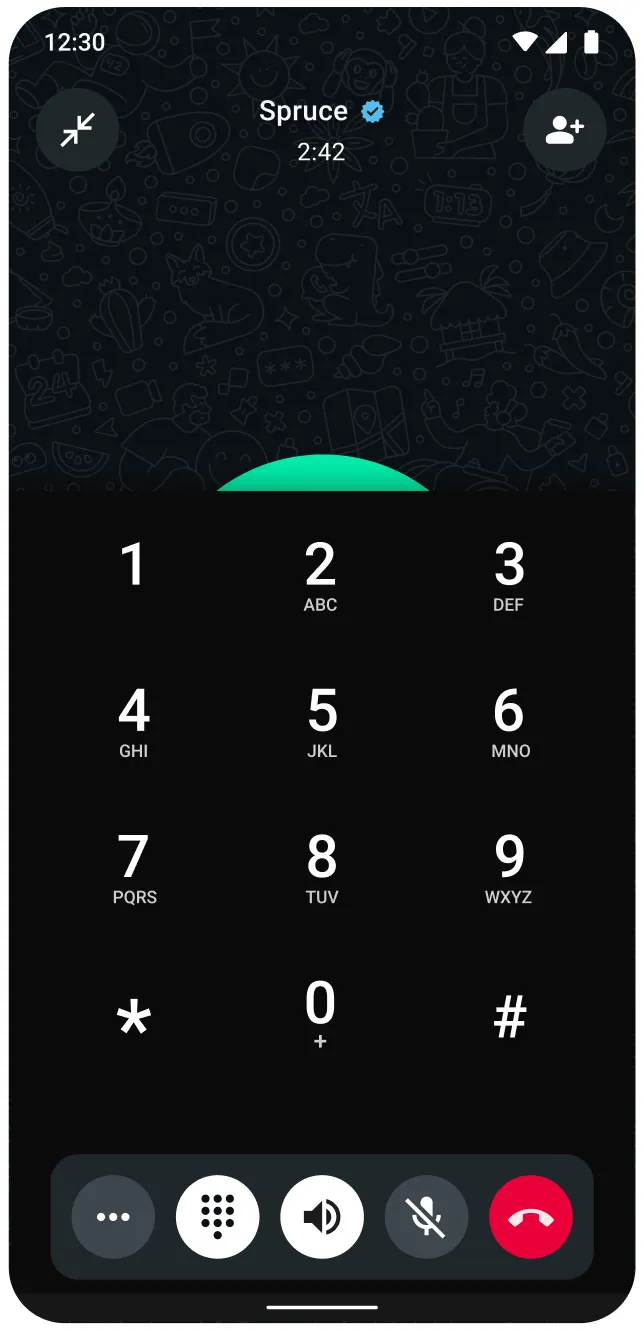
#### Sending DTMF digits on consumer WhatsApp client
WhatsApp client applications are enhanced to have a dialpad for calls with CloudAPI business phone numbers. The WhatsApp user can press the buttons on the dialpad and send DTMF tones.
### SDP overview and sample SDP structures
Session Description Protocol (SDP) is a text-based format used to describe the characteristics of multimedia sessions, such as voice and video calls, in real-time communication applications. SDP provides a standardized way to convey information about the session’s media streams, including the type of media, codecs, protocols, and other parameters necessary for establishing and managing the session.
In the context of WebRTC, SDP is used to negotiate the media parameters between the sender and receiver, enabling them to agree on the specifics of the media exchange.
[View SDP sample structures for user-initiated calls](/books/meta-whatsapp/page/api-and-webhook-reference-developer-documentation)
## SIP Configuration Guide - WhatsApp Business Calling
Updated: Dec 15, 2025
When SIP is enabled, you **cannot use calling related Graph API endpoints** and **calling related webhooks are not sent**.
Session Initiation Protocol ([SIP](https://l.facebook.com/l.php?u=https%3A%2F%2Fdatatracker.ietf.org%2Fdoc%2Fhtml%2Frfc3261&h=AT7eqXkQ2fvXOPMM7YJQGbF-MXwzrOmc1cstVebkR11eOFvFkhJJ7_PwqyI4ltvMnLo3jPSWi6l9JPL5aKp2F-YAwCSpU-RYHm3FexgPyULXK4stJivFB1wf7LGSnGWq9GYIiyr4pkTvj3-IHRTyBQ)) is a signaling protocol used for initiating, maintaining, modifying, and terminating real-time communication sessions between two or more endpoints.
WhatsApp Business Calling API supports use of SIP as the signaling protocol instead of our Graph API endpoints and Webhooks.
#### Before you get started
Before you get started with SIP call signaling, confirm the following:
You meet overall [calling pre-requisites](/books/meta-whatsapp/page/cloud-api-calling-developer-documentation)Your app has messaging permissions for the business phone number you want to enable SIP for. Test this by sending and receiving messages using Graph API messaging endpoints, then use the same app to configure your SIP server on the business phone number for calling.Double confirm this by using [health status API](/documentation/business-messaging/whatsapp/support/health-status) with `PHONE_NUMBER_ID`Your app mode is “Live”, not “Development”.You have a standards compliant third party SIP server that supports [TLS](/books/meta-whatsapp/page/sip-configuration-guide-whatsapp-business-calling-developer-documentation) transport and digest authenticationSee [Signaling and media possible configurations](/books/meta-whatsapp/page/cloud-api-calling-developer-documentation) for more info
### Calling flows using SIP
Before you start, make sure you have [enabled and configured SIP on the business phone number](/books/meta-whatsapp/page/sip-configuration-guide-whatsapp-business-calling-developer-documentation). Meta generates a unique SIP user password for each business phone number + app combination. You will need this information and can retrieve it by using the [get Call Settings endpoint.](/books/meta-whatsapp/page/sip-configuration-guide-whatsapp-business-calling-developer-documentation)
TLS transport is mandatory for SIP. Meta will present a valid server cert with subject name that covers our SIP domain wa.meta.vc. Your SIP server should do the same as Meta ensures your cert is valid and subject name covers SIP domain you configured on the business phone number Meta does NOT support mutual TLS (aka mTLS). This means, when Meta takes the role of a TLS client, your TLS server should not request Client certificate. If you still request client cert, Meta will present a client cert but the cert subject name would refer to a random dynamic host which will not pass certificate validation.Meta adds `transport=TLS` to request URI as part of its SIP requests to your SIP serverFor business initiated calls, SIP invite from your SIP server will be challenged using digest auth. See [business-initiated calls](/books/meta-whatsapp/page/sip-configuration-guide-whatsapp-business-calling-developer-documentation) for more detailsFor user initiated calls, it is highly recommended that you challenge SIP INVITE request from Meta, to use digest auth for more security. See [user-initiated calls](/books/meta-whatsapp/page/sip-configuration-guide-whatsapp-business-calling-developer-documentation) for more details#### How to test if you have a valid TLS certificate
When a WhatsApp user calls a business, a common reason for your SIP server to **not** receive the SIP INVITE from Meta is the certificate validation error. You can use information here to confirm valid setup.
Run the command `openssl s_client -quiet -verify_hostname {hostname} -connect {hostname}:{port}` by properly substituting hostname and port with your values
##### Example of valid server cert
```
$ openssl s_client -quiet -verify_hostname meta-voip.example.com -connect meta-voip.example.com:5061Connecting to 64:ff9b::68f8:b0b8
depth=2 C=US, ST=NewJersey, L=JerseyCity, O=The USERTRUST Network, CN=USERTrust RSA CertificationAuthority
verify return:1
depth=1 C=AT, O=ZeroSSL, CN=ZeroSSL RSA DomainSecureSite CA
verify return:1
depth=0 CN=example.com
verify return:1
```
##### Example of hostname:port not listening on TLS
```
openssl s_client -quiet -verify_hostname lb01.voice.usw2.pure.cloud -connect lb01.voice.usw2.pure.cloud:5060Connecting to 34.211.206.63009F0DFB01000000:error:0A000126:SSL routines::unexpected eof while reading:ssl/record/rec_layer_s3.c:693:
```
##### Example of invalid cert
```
$ openssl s_client -quiet -verify_hostname meta-inb.byoc.mypurecloud.com -connect meta-inb.byoc.mypurecloud.com:5061Connecting to 64:ff9b::3652:f1c0
depth=0 jurisdictionC=US, jurisdictionST=California, businessCategory=PrivateOrganization, serialNumber=1515861, C=US, ST=Indiana, L=Indianapolis, O=GenesysCloudServices,Inc., CN=voice.mypurecloud.com
verify error:num=62:hostname mismatch
verify return:1
depth=2 C=US, O=DigiCertInc, OU=www.digicert.com, CN=DigiCertHighAssurance EV Root CA
verify return:1
depth=1 C=US, O=DigiCertInc, OU=www.digicert.com, CN=DigiCert SHA2 ExtendedValidationServer CA
verify return:1
depth=0 jurisdictionC=US, jurisdictionST=California, businessCategory=PrivateOrganization, serialNumber=1515861, C=US, ST=Indiana, L=Indianapolis, O=GenesysCloudServices,Inc., CN=voice.mypurecloud.com
verify return:1
```
In this case, you can alter the certificate to match your hostname or [change your configured SIP server hostname](/books/meta-whatsapp/page/sip-configuration-guide-whatsapp-business-calling-developer-documentation) to match your certificate
#### Business-initiated calls
#### User-initiated calls
If you are not receiving SIP INVITE from Meta, refer to [SIP specific FAQ](/books/meta-whatsapp/page/faqs-developer-documentation) to troubleshoot further
[View sample SIP requests](/books/meta-whatsapp/page/sip-configuration-guide-whatsapp-business-calling-developer-documentation)
[Learn more about Session Description Protocol (SDP)](https://l.facebook.com/l.php?u=https%3A%2F%2Fwww.rfc-editor.org%2Frfc%2Frfc8866.html&h=AT7eqXkQ2fvXOPMM7YJQGbF-MXwzrOmc1cstVebkR11eOFvFkhJJ7_PwqyI4ltvMnLo3jPSWi6l9JPL5aKp2F-YAwCSpU-RYHm3FexgPyULXK4stJivFB1wf7LGSnGWq9GYIiyr4pkTvj3-IHRTyBQ)
[View example SDP structures](/books/meta-whatsapp/page/api-and-webhook-reference-developer-documentation)
The following custom SIP headers are common to both business and user initiated calls
| Header name | Metadata | Description |
|---|
| | Call duration in seconds. This is present on SIP BYE requests from Meta for termination of an established call. |
| | WhatsApp call ID. This is present on SIP INVITE request from Meta for a user-initiated call and SIP BYE requests from Meta for termination of an established call. |
The following custom SIP headers are specific to user-initiated calls
| Header name | Metadata | Description |
|---|
| | Present when user-initiates a call from call button that has business specified payload. [Learn more](/books/meta-whatsapp/page/send-whatsapp-call-button-messages-and-deep-links-developer-documentation) |
x-wa-meta-deeplink-payload | | Present when user-initiates a call from call deeplink that has business specified payload. [Learn more](/books/meta-whatsapp/page/send-whatsapp-call-button-messages-and-deep-links-developer-documentation) |
Use this endpoint to update call settings configuration for an individual business phone number.
| Placeholder | Description | Sample Value |
|---|
| **Required**
The business phone number for which you are updating Calling API settings. [Learn more about formatting phone numbers in Cloud API](/books/meta-whatsapp/page/business-phone-numbers-developer-documentation) | |
| Parameter | Description |
|---|
| **Optional**
Enable or disable SIP call signaling for the given business phone number. Default is `DISABLED`. When `status` is `ENABLED`, this phone number will exclusively use SIP for call signaling and will not work with Graph APIs. No webhooks are sent. When `status` is set to `DISABLED`, the SIP `servers` values are not reset. If you enable SIP on the same phone number again, the previously configured `servers` values will take effect. You can configure both status and SIP servers in the same request |
| **Optional**
The SIP server routing configuration. Each phone number can have only one SIP server configured. The servers is an array to be futureproof. Previously we allowed multiple apps each with their own SIP server but this setup will not work because Meta will terminate the call after receiving BYE from any of the SIP servers. In the GET payload, if you see multiple SIP servers, it means you’ve used the POST API with different access tokens that belong to different apps. The associated app is extracted from the access token used to make the API call. To delete a previously configured SIP server, pass an empty array to this field. If you still see some servers remaining after you clear, those servers may belong to different apps, so you need to use the corresponding access tokens to clear them. Note that at-least 1 SIP server of any app must exist when SIP status is ENABLED. To clear servers for all applications being used with a business phone number, the SIP status should be DISABLED. `hostname` — (*String*) **Required** The host name of the SIP server. Requests must use TLS. `port` — (*String*) **Required** The port within your SIP server that will accept requests. Requests must use TLS. Default port is 5061 `request_uri_user_params` — (*String*) **Optional** An optional field for passing any parameters you want included in the user portion of the request URI used in our SIP INVITE to your SIP server. Max key/value size is 128 characters. An example use case would be Trunk Groups ([RFC 4904](https://l.facebook.com/l.php?u=https%3A%2F%2Fdatatracker.ietf.org%2Fdoc%2Fhtml%2Frfc4904&h=AT7eqXkQ2fvXOPMM7YJQGbF-MXwzrOmc1cstVebkR11eOFvFkhJJ7_PwqyI4ltvMnLo3jPSWi6l9JPL5aKp2F-YAwCSpU-RYHm3FexgPyULXK4stJivFB1wf7LGSnGWq9GYIiyr4pkTvj3-IHRTyBQ)) sip:+1234567890@sip.example.comtgrp=wacalltrunk-context=byoc.example.comThis example has two user parameters for tgrp, and trunk-context. The effective SIP request URI line for this would be `sip:+1234567890;tgrp=wacall;trunk-context=byoc.example.com@sip.example.com` |
[View Calling API Error Codes and Troubleshooting for more information](/books/meta-whatsapp/page/troubleshoot-whatsapp-calling-errors-reference-guide-developer-documentation)
[View general Cloud API Error Codes here](/documentation/business-messaging/whatsapp/support/error-codes)
### Get phone number calling settings (SIP)
Use this endpoint to check the configuration of your Calling API feature settings, including SIP values.
This endpoint can return information for other Cloud API feature settings.
| Placeholder | Description | Sample Value |
|---|
| **Required**
The business phone number for which you are retrieving Calling API settings. [Learn more about formatting phone numbers in Cloud API](/books/meta-whatsapp/page/business-phone-numbers-developer-documentation) | |
##### App permission required
`whatsapp_business_management`: Advanced access is required to update use the API for end business clients
[View Calling API Error Codes and Troubleshooting for more information](/books/meta-whatsapp/page/troubleshoot-whatsapp-calling-errors-reference-guide-developer-documentation)
[View general Cloud API Error Codes here](/documentation/business-messaging/whatsapp/support/error-codes)
#### Business-initiated calls (with WebRTC media)
##### Initial SIP INVITE request
```
INVITE sip:+12195550714@wa.meta.vc;transport=tls SIP/2.0Record-Route:<sip:+159.65.244.171:5061;transport=tls;lr;ftag=Kc9QZg4496maQ;nat=yes>Via: SIP/2.0/TLS 159.65.244.171:5061;received=2803:6081:798c:93f8:5f9b:bfe8:300:0;branch=z9hG4bK0da2.36614b8977461b486ceabc004c723476.0;i=617261Via: SIP/2.0/TLS 137.184.87.1:35181;rport=56533;received=137.184.87.1;branch=z9hG4bKQNa6meey5Dj2g
Max-Forwards:69From:<sip:+17125550259@meta-voip.example.com>;tag=Kc9QZg4496maQTo:<sip:+12195550714@wa.meta.vc>Call-ID: dc2c5b33-1b81-43ee-9213-afb56f4e56ba
CSeq:96743476 INVITE
Contact:<sip:mod_sofia@137.184.87.1:35181;transport=tls;swrad=137.184.87.1~56533~3>User-Agent:SignalWireAllow: INVITE, ACK, BYE, CANCEL, OPTIONS, MESSAGE, INFO, UPDATE, REGISTER, REFER, NOTIFY
Supported: timer, path, replaces
Allow-Events: talk, hold, conference, refer
Session-Expires:600;refresher=uac
Min-SE:90Content-Type: application/sdp
Content-Disposition: session
Content-Length:2427
X-Relay-Call-ID: dc2c5b33-1b81-43ee-9213-afb56f4e56ba
Remote-Party-ID:<sip:+17125550259@meta-voip.example.com>;party=calling;screen=yes;privacy=off
Content-Type: application/sdp
Content-Length:2427<<SDP omitted for brevity>>
```
##### 407 response from Meta
```
SIP/2.0407ProxyAuthenticationRequiredVia: SIP/2.0/TLS 159.65.244.171:5061;received=2803:6081:798c:93f8:5f9b:bfe8:300:0;branch=z9hG4bK0da2.36614b8977461b486ceabc004c723476.0;i=617261Via: SIP/2.0/TLS 137.184.87.1:35181;rport=56533;received=137.184.87.1;branch=z9hG4bKQNa6meey5Dj2g
Record-Route:<sip:+159.65.244.171:5061;transport=tls;lr;ftag=Kc9QZg4496maQ;nat=yes>Call-ID: dc2c5b33-1b81-43ee-9213-afb56f4e56ba
From:<sip:+17125550259@meta-voip.example.com>;tag=Kc9QZg4496maQTo:<sip:+12195550714@wa.meta.vc>;tag=z9hG4bK0da2.36614b8977461b486ceabc004c723476.0CSeq:96743476 INVITE
Proxy-Authenticate:Digest realm="wa.meta.vc",nonce="419ac2415577f8e1",opaque="440badfc05072367",algorithm=MD5,qop="auth"
```
##### Second SIP INVITE sent with authorization
```
INVITE sip:+12195550714@wa.meta.vc;transport=tls SIP/2.0Record-Route:<sip:+159.65.244.171:5061;transport=tls;lr;ftag=Kc9QZg4496maQ;nat=yes>Via: SIP/2.0/TLS 159.65.244.171:5061;received=2803:6081:798c:93f8:5f9b:bfe8:300:0;branch=z9hG4bK1da2.ed8900012befced853927008d619d374.0;i=617261Via: SIP/2.0/TLS 137.184.87.1:35181;rport=56533;received=137.184.87.1;branch=z9hG4bKry3yp9y12p8mc
Max-Forwards:69From:<sip:+17125550259@meta-voip.example.com>;tag=Kc9QZg4496maQTo:<sip:+12195550714@wa.meta.vc>Call-ID: dc2c5b33-1b81-43ee-9213-afb56f4e56ba
CSeq:96743477 INVITE
Contact:<sip:mod_sofia@137.184.87.1:35181;transport=tls;swrad=137.184.87.1~56533~3>User-Agent:SignalWireAllow: INVITE, ACK, BYE, CANCEL, OPTIONS, MESSAGE, INFO, UPDATE, REGISTER, REFER, NOTIFY
Supported: timer, path, replaces
Allow-Events: talk, hold, conference, refer
Proxy-Authorization:Digest username="17125550259", realm="wa.meta.vc", nonce="419ac2415577f8e1", uri="sip:+12195550714@wa.meta.vc;transport=tls", response="blah", algorithm=MD5, cnonce="/mVZtYFCEj65YQJCrBEAAg", opaque="440badfc05072367", qop=auth, nc=00000001Session-Expires:600;refresher=uac
Min-SE:90Content-Type: application/sdp
Content-Disposition: session
Content-Length:2427
X-Relay-Call-ID: dc2c5b33-1b81-43ee-9213-afb56f4e56ba
Remote-Party-ID:<sip:+17125550259@meta-voip.example.com>;party=calling;screen=yes;privacy=off
Content-Type: application/sdp
Content-Length:2427<<SDP omitted for brevity>>
```
##### Example error response
```
SIP/2.0403 SIP server wa.meta.vc from INVITE does not match any SIP server configured for phone number id {ID}Via: SIP/2.0/TLS [2803:6080:c954:b533:ecfb:5cec:300:0]:39459;rport=39459;received=2803:6080:c954:b533:ecfb:5cec:300:0;branch=z9hG4bKPjf9f3d0bddb3dbe0c9b1e3b486f39784a;aliasVia: SIP/2.0/TLS 148.72.155.236:5061;rport=30498;received=2803:6080:d014:8e40:ddbb:4ed7:300:0;branch=z9hG4bKPjfd270ec8-7aaf-4a65-b290-4bef3b50b7b7;aliasRecord-Route:<sip:onevc-sip-proxy-dev.fbinfra.net:8191;transport=tls;lr>Record-Route:<sip:wa.meta.vc;transport=tls;lr>Call-ID:91578781-44f1-4268-9a7f-d7efec1abf72
From:<sip:+17125550259@wa.meta.vc>;tag=3a63b370-a697-4a5a-82b4-e8105e23f176
To:<sip:+12195550714@wa.meta.vc>;tag=e0d30a05-657b-47ec-a668-e05ca79f9f05
CSeq:15659 INVITE
Allow: INVITE, ACK, BYE, CANCEL, NOTIFY, OPTIONS
X-FB-External-Domain: wa.meta.vc
Warning:399 wa.meta.vc "SIP server wa.meta.vc from INVITE does not match any SIP server configured for phone number id {ID}"Content-Length:0Content-Length:0
```
```
BYE sip:+5559800000693@wa.meta.vc;transport=tls;ob SIP/2.0Via: SIP/2.0/TLS 137.184.4.155:5061;received=2803:6080:c074:cac:10ed:4b05:400:0;i=8d2dc2Via: SIP/2.0/TLS 143.198.136.243:35181;rport=38087;received=143.198.136.243Route:<sip:wa.meta.vc;transport=tls;lr>Route:<sip:onevc-sip-proxy.fbinfra.net:8191;transport=tls;lr>Max-Forwards:69From:<sip:+12145551869@meta-voip.example.com>;tag=NcKQ6mtDKSDQBTo:"5559800000693"<sip:+5559800000693@wa.meta.vc>;tag=92a01092-ee78-4870-865f-bc176203a6bd
Call-ID: outgoing:wacid.HBgPMjAwNzU2OTA0ODY5OTY1FRIAEhggMjQ4QzUwOUQ1REQ0NDUwNENEQzRFMTgwRTNGQjAwNjEcGAsxMjE0NTU1MTg2ORUCAAACSeq:98734935 BYE
User-Agent:SignalWireAllow: INVITE, ACK, BYE, CANCEL, OPTIONS, MESSAGE, INFO, UPDATE, REGISTER, REFER, NOTIFY
Supported: timer, path, replaces
Reason: Q.850;cause=16;text="NORMAL_CLEARING"Content-Length:0
X-Relay-Call-ID: b72c0c65-e319-41b3-afb7-19ebcca05d38Content-Length:0
```
##### SIP INVITE (with SDES)
```
INVITE sip:+12195550714@wa.meta.vc;transport=tls SIP/2.0Record-Route:<sip:54.172.60.1:5061;transport=tls;lr;r2=on>Record-Route:<sip:54.172.60.1;lr;r2=on>CSeq:2 INVITE
From:"12145551869"<sip:+12145551869@meta-voip.example.com>;tag=28460006_c3356d0b_5cdada8c-cbf0-4369-b02d-cc97d3c36f2b
To:<sip:+12195550714@wa.meta.vc>Max-Forwards:66
P-Asserted-Identity:<sip:+12145551869@meta-voip.example.com>Min-SE:120Call-ID: f304a1d2cafb8139c1f9ff93a7733586@0.0.0.0Contact:"12145551869"<sip:+12145551869@172.25.10.217:5060;transport=udp>Allow: INVITE, ACK, CANCEL, OPTIONS, BYE, REFER, NOTIFY
Via: SIP/2.0/TLS 54.172.60.1:5061;received=2803:6080:f934:8894:7eb5:24f9:300:0;branch=z9hG4bK1e5a.0da2ace9cc912d9e5f2595ca4acb9847.0Via: SIP/2.0/UDP 172.25.10.217:5060;rport=5060;branch=z9hG4bK5cdada8c-cbf0-4369-b02d-cc97d3c36f2b_c3356d0b_54-457463274351249162Supported: timer
User-Agent:TwilioGatewayProxy-Authorization:Digest username="12145551869", realm="wa.meta.vc", nonce="2a487cb01d4ed43b", uri="sip:+12195550714@wa.meta.vc;transport=tls", response="3f58df7af575b948625aeffd51bf9060", algorithm=MD5, cnonce="b338deb7f0e004e66353e26d34ad62b7", opaque="725a06fb2cd89a32", qop=auth, nc=00000002Content-Type: application/sdp
X-Twilio-CallSid: CA93eac6be615da5e6836c7059e9555348
Content-Length:422Content-Type: application/sdp
Content-Length:422
v=0
o=root 11854148721185414872 IN IP4 172.18.155.180
s=TwilioMediaGateway
c=IN IP4 168.86.138.232
t=00
m=audio 19534 RTP/SAVP 10708101
a=crypto:**************************************************************************
a=rtpmap:0 PCMU/8000
a=rtpmap:107 opus/48000/2
a=fmtp:107 useinbandfec=1
a=rtpmap:8 PCMA/8000
a=rtpmap:101 telephone-event/8000
a=fmtp:1010-16
a=ptime:20
a=maxptime:20
a=sendrecv
```
```
SIP/2.0200 OK
Via: SIP/2.0/TLS 54.172.60.1:5061;received=2803:6080:f934:8894:7eb5:24f9:300:0;branch=z9hG4bK1e5a.0da2ace9cc912d9e5f2595ca4acb9847.0Via: SIP/2.0/UDP 172.25.10.217:5060;rport=5060;branch=z9hG4bK5cdada8c-cbf0-4369-b02d-cc97d3c36f2b_c3356d0b_54-457463274351249162Record-Route:<sip:onevc-sip-proxy.fbinfra.net:8191;transport=tls;lr>Record-Route:<sip:wa.meta.vc;transport=tls;lr>Record-Route:<sip:54.172.60.1:5061;transport=tls;lr;r2=on>Record-Route:<sip:54.172.60.1;lr;r2=on>Call-ID: f304a1d2cafb8139c1f9ff93a7733586@0.0.0.0From:"12145551869"<sip:+12145551869@meta-voip.example.com>;tag=28460006_c3356d0b_5cdada8c-cbf0-4369-b02d-cc97d3c36f2b
To:<sip:+12195550714@wa.meta.vc>;tag=0d185053-2615-46c7-8ff2-250bda494cf1CSeq:2 INVITE
Allow: INVITE, ACK, BYE, CANCEL, NOTIFY, OPTIONS
Supported: timer
X-FB-External-Domain: wa.meta.vc
Contact:<sip:+12195550714@wa.meta.vc;transport=tls;ob;X-FB-Sip-Smc-Tier=collaboration.sip_gateway.sip.prod>;isfocus
Content-Type: application/sdp
Content-Length:645
v=0
o=-17466572865952 IN IP4 127.0.0.1
s=-
t=00
a=group:BUNDLE audio
a=msid-semantic: WMS 42da9643-cb50-4eca-95d3-ca41b3f1f4bb
m=audio 3480 RTP/SAVP 107101
c=IN IP4 157.240.19.130
a=rtcp:9 IN IP4 0.0.0.0
a=mid:audio
a=sendrecv
a=msid:42da9643-cb50-4eca-95d3-ca41b3f1f4bb WhatsAppTrack1
a=rtcp-mux
a=crypto:**************************************************************************
a=rtpmap:107 opus/48000/2
a=fmtp:107 maxaveragebitrate=20000;maxplaybackrate=16000;minptime=20;sprop-maxcapturerate=16000;useinbandfec=1
a=rtpmap:101 telephone-event/8000
a=maxptime:20
a=ptime:20
a=ssrc:1238967757 cname:WhatsAppAudioStream1
```
#### User-initiated calls (with WebRTC media)
```
INVITE sip:+17015558857@meta-voip.example.com;transport=tls SIP/2.0Via: SIP/2.0/TLS [2803:6080:e888:51aa:d4a4:c5e0:300:0]:33819;rport=33819;received=2803:6080:e888:51aa:d4a4:c5e0:300:0;branch=z9hG4bKPjNvs.IZBnUa1W4l8oHPpk3SUMmcx3MMcE;aliasMax-Forwards:70From:"12195550714"<sip:+12195550714@wa.meta.vc>;tag=bbf1ad6e-79bb-4d9c-8a2c-094168a10beaTo:<sip:+17015558857@meta-voip.example.com>Contact:<sip:+12195550714@wa.meta.vc;transport=tls;ob>;isfocus
Call-ID: outgoing:wacid.HBgLMTIxOTU1NTA3MTQVAgASGCAzODg1NTE5NEU1NTBEMTc1RTFFQUY5NjNCQ0FCRkEzRhwYCzE3MDE1NTU4ODU3FQIAAA==CSeq:2824 INVITE
Route:<sip:onevc-sip-proxy-dev.fbinfra.net:8191;transport=tls;lr>
X-FB-External-Domain: wa.meta.vc
Allow: INVITE, ACK, BYE, CANCEL, NOTIFY, OPTIONS
User-Agent:FacebookSipGatewayContent-Type: application/sdp
Content-Length:1028
v=0
o=-17411131863672 IN IP4 127.0.0.1
s=-
t=00
a=group:BUNDLE audio
a=msid-semantic: WMS 632a909f-1060-4369-96a4-7bd03e291ee7
a=ice-lite
m=audio 3480 UDP/TLS/RTP/SAVPF 111126
c=IN IP4 57.144.135.35
a=rtcp:9 IN IP4 0.0.0.0
a=candidate:17754698871 udp 212226022357.144.135.353480 typ host generation 0 network-cost 50
a=candidate:33557151111 udp 21222627832a03:2880:f343:131:face:b00c:0:699c3480 typ host generation 0 network-cost 50
a=ice-ufrag:RmDDkfzkwbexPfbC
a=ice-pwd:*************************
a=fingerprint:********************************************************************************************************
a=setup:actpass
a=mid:audio
a=sendrecv
a=msid:632a909f-1060-4369-96a4-7bd03e291ee7WhatsAppTrack1
a=rtcp-mux
a=rtpmap:111 opus/48000/2
a=rtcp-fb:111 transport-cc
a=fmtp:111 maxaveragebitrate=20000;maxplaybackrate=16000;minptime=20;sprop-maxcapturerate=16000;useinbandfec=1
a=rtpmap:126 telephone-event/8000
a=maxptime:20
a=ptime:20
a=ssrc:849255537 cname:WhatsAppAudioStream1
```
```
BYE sip:+5559800000693@wa.meta.vc;transport=tls;ob SIP/2.0Via: SIP/2.0/TLS 137.184.4.155:5061;received=2803:6080:c074:cac:10ed:4b05:400:0;i=8d2dc2Via: SIP/2.0/TLS 143.198.136.243:35181;rport=38087;received=143.198.136.243Route:<sip:wa.meta.vc;transport=tls;lr>Route:<sip:onevc-sip-proxy.fbinfra.net:8191;transport=tls;lr>Max-Forwards:69From:<sip:+12145551869@meta-voip.example.com>;tag=NcKQ6mtDKSDQBTo:"5559800000693"<sip:+5559800000693@wa.meta.vc>;tag=92a01092-ee78-4870-865f-bc176203a6bd
Call-ID: outgoing:wacid.HBgPMjAwNzU2OTA0ODY5OTY1FRIAEhggMjQ4QzUwOUQ1REQ0NDUwNENEQzRFMTgwRTNGQjAwNjEcGAsxMjE0NTU1MTg2ORUCAAACSeq:98734935 BYE
User-Agent:SignalWireAllow: INVITE, ACK, BYE, CANCEL, OPTIONS, MESSAGE, INFO, UPDATE, REGISTER, REFER, NOTIFY
Supported: timer, path, replaces
Reason: Q.850;cause=16;text="NORMAL_CLEARING"Content-Length:0
X-Relay-Call-ID: b72c0c65-e319-41b3-afb7-19ebcca05d38Content-Length:0
```
##### SIP INVITE (with SDES)
```
INVITE sip:+12145551869@meta-voip.example.com;transport=tls SIP/2.0Via: SIP/2.0/TLS [2803:6080:f948:9597::]:57363;rport;branch=z9hG4bKPj3a9f2ad89e4a3df61408aa84f7d9a63e;aliasRecord-Route:<sip:wa.meta.vc;transport=tls;lr>Record-Route:<sip:onevc-sip-proxy.fbinfra.net:8191;transport=tls;lr>Via: SIP/2.0/TLS [2803:6080:f948:9597:d33c:e00:400:0]:5061;branch=z9hG4bKPj3a9f2ad89e4a3df61408aa84f7d9a63e
Via: SIP/2.0/TLS [2803:6080:f948:9597:1ac5:cdf8:300:0]:63057;rport=63057;received=2803:6080:f948:9597:1ac5:cdf8:300:0;branch=z9hG4bKPj-phic0sbns27DiP0OlrxRxgLtNg4mio7;aliasMax-Forwards:69From:"12195550714"<sip:+12195550714@wa.meta.vc>;tag=8a0f7e65-6e9e-4801-bf92-85c3ef2485d9To:<sip:+12145551869@meta-voip.example.com>Contact:<sip:+12195550714@wa.meta.vc;transport=tls;ob>;isfocus
Call-ID: outgoing:wacid.HBgLMTIxOTU1NTA3MTQVAgASGCA4QkY1MTJCQkNFNTgxMEVFRERFRTUzNTFERkE1MDU0MhwYCzEyMTQ1NTUxODY5FQIAAACSeq:31159 INVITE
X-FB-External-Domain: wa.meta.vc
Allow: INVITE, ACK, BYE, CANCEL, NOTIFY, OPTIONS
User-Agent:FacebookSipGatewayContent-Type: application/sdp
Content-Length:645
v=0
o=-17466599669802 IN IP4 127.0.0.1
s=-
t=00
a=group:BUNDLE audio
a=msid-semantic: WMS 07092115-d151-427e-8722-26c70936b104
m=audio 3480 RTP/SAVP 111126
c=IN IP4 157.240.19.130
a=rtcp:9 IN IP4 0.0.0.0
a=mid:audio
a=sendrecv
a=msid:07092115-d151-427e-8722-26c70936b104WhatsAppTrack1
a=rtcp-mux
a=crypto:**************************************************************************
a=rtpmap:111 opus/48000/2
a=fmtp:111 maxaveragebitrate=20000;maxplaybackrate=16000;minptime=20;sprop-maxcapturerate=16000;useinbandfec=1
a=rtpmap:126 telephone-event/8000
a=maxptime:20
a=ptime:20
a=ssrc:1615009994 cname:WhatsAppAudioStream1
```
```
SIP/2.0200 OK
CSeq:31159 INVITE
Call-ID: outgoing:wacid.HBgLMTIxOTU1NTA3MTQVAgASGCA4QkY1MTJCQkNFNTgxMEVFRERFRTUzNTFERkE1MDU0MhwYCzEyMTQ1NTUxODY5FQIAAAFrom:"12195550714"<sip:+12195550714@wa.meta.vc>;tag=8a0f7e65-6e9e-4801-bf92-85c3ef2485d9To:<sip:+12145551869@meta-voip.example.com>;tag=66596922_c3356d0b_fee164be-566a-4679-a80d-5bfdf1d0aa9eVia: SIP/2.0/TLS 157.240.229.209:5061;rport=51830;received=69.171.251.115;branch=z9hG4bKPj3a9f2ad89e4a3df61408aa84f7d9a63e;aliasVia: SIP/2.0/TLS [2803:6080:f948:9597:d33c:e00:400:0]:5061;branch=z9hG4bKPj3a9f2ad89e4a3df61408aa84f7d9a63e
Via: SIP/2.0/TLS [2803:6080:f948:9597:1ac5:cdf8:300:0]:63057;rport=63057;received=2803:6080:f948:9597:1ac5:cdf8:300:0;branch=z9hG4bKPj-phic0sbns27DiP0OlrxRxgLtNg4mio7;aliasRecord-Route:<sip:54.172.60.1:5060;lr;r2=on;twnat=sip:69.171.251.115:51830>Record-Route:<sip:54.172.60.1:5061;transport=tls;lr;r2=on;twnat=sip:69.171.251.115:51830>Record-Route:<sip:wa.meta.vc;transport=tls;lr>Record-Route:<sip:onevc-sip-proxy.fbinfra.net:8191;transport=tls;lr>Server:TwilioContact:<sip:+172.25.16.223:5060>Allow: INVITE, ACK, CANCEL, OPTIONS, BYE, REFER, NOTIFY
Content-Type: application/sdp
X-Twilio-CallSid:CAb0d74508fe5fcdf6ec70ea3cf4e9b90bContent-Length:446Content-Type: application/sdp
Content-Length:446
v=0
o=root 13536703851353670385 IN IP4 172.18.164.24
s=TwilioMediaGateway
c=IN IP4 168.86.138.176
t=00
m=audio 15822 RTP/SAVP 111126
a=rtpmap:111 opus/48000/2
a=fmtp:111 maxplaybackrate=16000;sprop-maxcapturerate=16000;maxaveragebitrate=20000;useinbandfec=1
a=rtpmap:126 telephone-event/8000
a=fmtp:1260-16
a=crypto:**************************************************************************
a=ptime:20
a=maxptime:20
a=sendrecv
```
#### User-initiated calls with digest auth (with SDES media)
Meta SIP server supports digest auth for user initiated calls. Your SIP server should respond with digest auth challenge and Meta will resend the SIP INVITE with challenge response. The username used for digest auth is the (normalized) business phone number and the password is generated by Meta and retrievable using the [get Call settings endpoint](/books/meta-whatsapp/page/sip-configuration-guide-whatsapp-business-calling-developer-documentation).
##### First INVITE request from Meta
```
INVITE sip:+12145551869@meta-voip.example.com;transport=tls SIP/2.0Via: SIP/2.0/TLS [2803:6080:f948:9597::]:47237;rport;branch=z9hG4bKPj1e6c665db16b3ecacf32cadb4497fe77;aliasRecord-Route:<sip:wa.meta.vc;transport=tls;lr>Record-Route:<sip:onevc-sip-proxy.fbinfra.net:8191;transport=tls;lr>Via: SIP/2.0/TLS [2803:6080:f948:9597:7253:922a:400:0]:5061;branch=z9hG4bKPj1e6c665db16b3ecacf32cadb4497fe77
Via: SIP/2.0/TLS [2803:6080:f8bc:9272:e488:9927:400:0]:58279;rport=58279;received=2803:6080:f8bc:9272:e488:9927:400:0;branch=z9hG4bKPjr33j97A1mx5J8HWHEy2zIgqZYCCIb4Fb;aliasMax-Forwards:69From:"12195550714"<sip:+12195550714@wa.meta.vc>;tag=ece2da15-39e7-4983-ac65-e312f325d94a
To:<sip:+12145551869@meta-voip.example.com>Contact:<sip:+12195550714@wa.meta.vc;transport=tls;ob>;isfocus
Call-ID: outgoing:wacid.HBgLMTIxOTU1NTA3MTQVAgASGCA2MUI2QUY0MDRCMTUyOTM4QkE5ODEwN0ZGQTAwODkxORwYCzEyMTQ1NTUxODY5FQIAFRoACSeq:9989 INVITE
X-FB-External-Domain: wa.meta.vc
Allow: INVITE, ACK, BYE, CANCEL, NOTIFY, OPTIONS
User-Agent:FacebookSipGatewayContent-Type: application/sdp
Content-Length:643
v=0
o=-17507168679132 IN IP4 127.0.0.1
s=-
t=00
a=group:BUNDLE audio
a=msid-semantic: WMS 4e37b099-8aef-45d0-be4f-1cde2ca5a37d
m=audio 3480 RTP/SAVP 111126
c=IN IP4 57.144.219.49
a=rtcp:9 IN IP4 0.0.0.0
a=mid:audio
a=sendrecv
a=msid:4e37b099-8aef-45d0-be4f-1cde2ca5a37dWhatsAppTrack1
a=rtcp-mux
a=crypto:**************************************************************************
a=rtpmap:111 opus/48000/2
a=fmtp:111 maxaveragebitrate=20000;maxplaybackrate=16000;minptime=20;sprop-maxcapturerate=16000;useinbandfec=1
a=rtpmap:126 telephone-event/8000
a=maxptime:20
a=ptime:20
a=ssrc:215879358 cname:WhatsAppAudioStream1
```
##### 407 Response from partner SIP server
```
SIP/2.0407ProxyAuthentication required
CSeq:9989 INVITE
Call-ID: outgoing:wacid.HBgLMTIxOTU1NTA3MTQVAgASGCA2MUI2QUY0MDRCMTUyOTM4QkE5ODEwN0ZGQTAwODkxORwYCzEyMTQ1NTUxODY5FQIAFRoAFrom:"12195550714"<sip:+12195550714@wa.meta.vc>;tag=ece2da15-39e7-4983-ac65-e312f325d94a
To:<sip:+12145551869@meta-voip.example.com>;tag=45065608_c3356d0b_16001fd8-76d2-45f0-bb35-e0441d6dc4a2
Via: SIP/2.0/TLS 31.13.66.215:5061;rport=62080;received=69.171.251.112;branch=z9hG4bKPj1e6c665db16b3ecacf32cadb4497fe77;aliasVia: SIP/2.0/TLS [2803:6080:f948:9597:7253:922a:400:0]:5061;branch=z9hG4bKPj1e6c665db16b3ecacf32cadb4497fe77
Via: SIP/2.0/TLS [2803:6080:f8bc:9272:e488:9927:400:0]:58279;rport=58279;received=2803:6080:f8bc:9272:e488:9927:400:0;branch=z9hG4bKPjr33j97A1mx5J8HWHEy2zIgqZYCCIb4Fb;aliasContact:<sip:+172.25.58.54:5060>Proxy-Authenticate:Digest realm="sip.twilio.com",nonce="eyOam_8-l5FVugxsyxFRjnlxq9vy1TjQIMB3mBfJuAvB5gV4",opaque="4a6a068be2ca2032a57912b9a2a6adf7",qop="auth"Content-Length:0Content-Length:0
```
##### Second INVITE with authorization from Meta
```
INVITE sip:+12145551869@meta-voip.example.com;transport=tls SIP/2.0Via: SIP/2.0/TLS 31.13.66.215:5061;rport;branch=z9hG4bKPj16be0694dc6763eb66de5ec5f262db03;aliasRecord-Route:<sip:wa.meta.vc;transport=tls;lr>Record-Route:<sip:onevc-sip-proxy.fbinfra.net:8191;transport=tls;lr>Via: SIP/2.0/TLS [2803:6080:f948:9597:7253:922a:400:0]:5061;branch=z9hG4bKPj16be0694dc6763eb66de5ec5f262db03
Via: SIP/2.0/TLS [2803:6080:f8bc:9272:e488:9927:400:0]:58279;rport=58279;received=2803:6080:f8bc:9272:e488:9927:400:0;branch=z9hG4bKPjYp9LqI0D8zJ.wly5wyMyVaH9fUwIU921;aliasMax-Forwards:69From:"12195550714"<sip:+12195550714@wa.meta.vc>;tag=ece2da15-39e7-4983-ac65-e312f325d94a
To:<sip:+12145551869@meta-voip.example.com>Contact:<sip:+12195550714@wa.meta.vc;transport=tls;ob>;isfocus
Call-ID: outgoing:wacid.HBgLMTIxOTU1NTA3MTQVAgASGCA2MUI2QUY0MDRCMTUyOTM4QkE5ODEwN0ZGQTAwODkxORwYCzEyMTQ1NTUxODY5FQIAFRoACSeq:9990 INVITE
X-FB-External-Domain: wa.meta.vc
Allow: INVITE, ACK, BYE, CANCEL, NOTIFY, OPTIONS
User-Agent:FacebookSipGatewayProxy-Authorization:Digest username="12145551869", realm="sip.twilio.com", nonce="eyOam_8-l5FVugxsyxFRjnlxq9vy1TjQIMB3mBfJuAvB5gV4", uri="sip:+12145551869@meta-voip.example.com", response="b28ed6b8bf1418e3c6eca05ef8c7a0b1", cnonce="TY2SszvYCKitUCBlVLpGiPKMQfmBbj", opaque="4a6a068be2ca2032a57912b9a2a6adf7", qop=auth, nc=00000001Content-Type: application/sdp
Content-Length:643
v=0
o=-17507168679132 IN IP4 127.0.0.1
s=-
t=00
a=group:BUNDLE audio
a=msid-semantic: WMS 4e37b099-8aef-45d0-be4f-1cde2ca5a37d
m=audio 3480 RTP/SAVP 111126
c=IN IP4 57.144.219.49
a=rtcp:9 IN IP4 0.0.0.0
a=mid:audio
a=sendrecv
a=msid:4e37b099-8aef-45d0-be4f-1cde2ca5a37dWhatsAppTrack1
a=rtcp-mux
a=crypto:**************************************************************************
a=rtpmap:111 opus/48000/2
a=fmtp:111 maxaveragebitrate=20000;maxplaybackrate=16000;minptime=20;sprop-maxcapturerate=16000;useinbandfec=1
a=rtpmap:126 telephone-event/8000
a=maxptime:20
a=ptime:20
a=ssrc:215879358 cname:WhatsAppAudioStream1
```
##### SIP OK from partner SIP server
```
SIP/2.0200 OK
CSeq:9990 INVITE
Call-ID: outgoing:wacid.HBgLMTIxOTU1NTA3MTQVAgASGCA2MUI2QUY0MDRCMTUyOTM4QkE5ODEwN0ZGQTAwODkxORwYCzEyMTQ1NTUxODY5FQIAFRoAFrom:"12195550714"<sip:+12195550714@wa.meta.vc>;tag=ece2da15-39e7-4983-ac65-e312f325d94a
To:<sip:+12145551869@meta-voip.example.com>;tag=29360930_c3356d0b_4933dc58-f035-4597-b075-04b19e552329Via: SIP/2.0/TLS 31.13.66.215:5061;rport=62080;received=69.171.251.112;branch=z9hG4bKPj16be0694dc6763eb66de5ec5f262db03;aliasVia: SIP/2.0/TLS [2803:6080:f948:9597:7253:922a:400:0]:5061;branch=z9hG4bKPj16be0694dc6763eb66de5ec5f262db03
Via: SIP/2.0/TLS [2803:6080:f8bc:9272:e488:9927:400:0]:58279;rport=58279;received=2803:6080:f8bc:9272:e488:9927:400:0;branch=z9hG4bKPjYp9LqI0D8zJ.wly5wyMyVaH9fUwIU921;aliasRecord-Route:<sip:54.172.60.0:5060;lr;r2=on;twnat=sip:69.171.251.112:62080>Record-Route:<sip:54.172.60.0:5061;transport=tls;lr;r2=on;twnat=sip:69.171.251.112:62080>Record-Route:<sip:wa.meta.vc;transport=tls;lr>Record-Route:<sip:onevc-sip-proxy.fbinfra.net:8191;transport=tls;lr>Contact:<sip:+172.25.43.84:5060>Allow: INVITE, ACK, CANCEL, OPTIONS, BYE, REFER, NOTIFY
Content-Type: application/sdp
X-Twilio-CallSid:CAd4d6e59a356c4d1b0ee85323b2d9dab5Content-Length:444Content-Type: application/sdp
Content-Length:444
v=0
o=root 477560318477560318 IN IP4 172.18.156.61
s=TwilioMediaGateway
c=IN IP4 168.86.137.174
t=00
m=audio 12710 RTP/SAVP 111126
a=rtpmap:111 opus/48000/2
a=fmtp:111 maxplaybackrate=16000;sprop-maxcapturerate=16000;maxaveragebitrate=20000;useinbandfec=1
a=rtpmap:126 telephone-event/8000
a=fmtp:1260-16
a=crypto:**************************************************************************
a=ptime:20
a=maxptime:20
a=sendrecv
```
The Secure Real-time Transport Protocol (SRTP) key exchange is a cryptographic protocol used to securely exchange encryption keys between two parties over an insecure communication channel.
You can configure SRTP key exchange to one of two options:
DTLS (default) — Industry-standard encrypted key exchange. Recommended.SDES — Plain text key is included in the SDP which is sent over secure signaling protocol like SIP or Graph API. When SDES is used, there is no need for STUN, ICE and DTLS which could help shorten the call setup time.[View Calling API Error Codes and Troubleshooting for more information](/books/meta-whatsapp/page/troubleshoot-whatsapp-calling-errors-reference-guide-developer-documentation)
[View general Cloud API Error Codes here](/documentation/business-messaging/whatsapp/support/error-codes)
#### Get SRTP key exchange protocol
##### Endpoint parameters
| Placeholder | Description | Sample Value |
|---|
| **Required**
The business phone number for which you are updating Calling API settings. [Learn more about formatting phone numbers in Cloud API](/books/meta-whatsapp/page/business-phone-numbers-developer-documentation) | |
##### Response parameters
| Parameter | Description | Sample Value |
|---|
`srtp_key_exchange_protocol` *String* | The type of SRTP key exchange protocol configured for the business phone number queried Possible values are `SDES` and `DTLS`. Default is `DTLS`. **Note: If this field has not been explicitly set, it will not be returned.** | |
[View Calling API Error Codes and Troubleshooting for more information](/books/meta-whatsapp/page/troubleshoot-whatsapp-calling-errors-reference-guide-developer-documentation)
[View general Cloud API Error Codes here](/documentation/business-messaging/whatsapp/support/error-codes)
The IP addresses used for SIP configuration are the same as those listed for the Webhooks in the [Cloud API Webhooks IP Addresses section](/books/meta-whatsapp/page/managing-webhooks-developer-documentation).
This reference is solely to indicate the IP addresses to allow-list for SIP traffic. When SIP is enabled, calling related webhooks are not sent.
Refer to [SIP FAQ](/books/meta-whatsapp/page/faqs-developer-documentation) for additional SIP specific questions and answers and [SIP Errors](/books/meta-whatsapp/page/troubleshoot-whatsapp-calling-errors-reference-guide-developer-documentation) for SIP specific errors and solutions
## Send WhatsApp Call Button Messages and Deep Links
Updated: Feb 25, 2026
After you adopt Cloud API Calling features, you can raise awareness with your customers in two core ways:
Send them a message with a WhatsApp call buttonEmbed a calling deep link into your brand surfaces (website, application, and so on)### Send interactive message with a WhatsApp call button
Use this endpoint to send a free-form interactive message with a WhatsApp call button during a [customer service window](/books/meta-whatsapp/page/sending-messages-developer-documentation) or an [open conversation window](/books/meta-whatsapp/page/pricing-on-the-whatsapp-business-platform-developer-documentation).
When a WhatsApp user clicks the call button, it initiates a WhatsApp call to the business number that sent the message.
A standard [message status webhook](/books/meta-whatsapp/page/status-messages-webhook-reference-developer-documentation) will be sent in response to this message send.
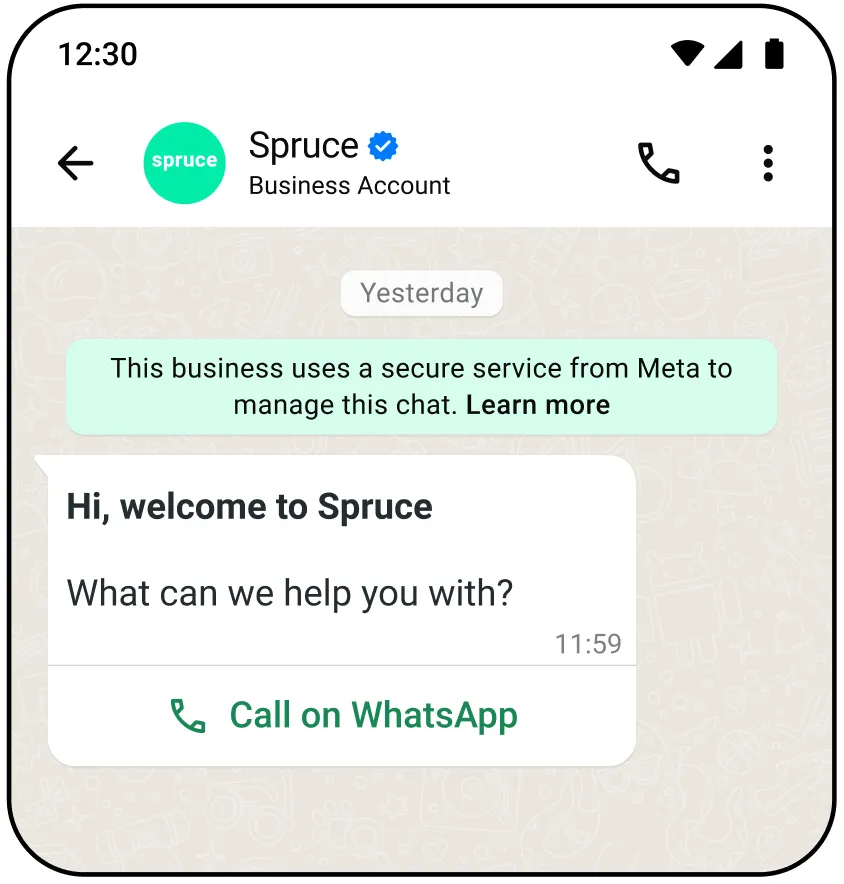
[Learn more about sending interactive free form messages](/books/meta-whatsapp/page/sending-messages-developer-documentation)
| Parameter | Description | Sample Value |
|---|
| **Required**
The phone number of the WhatsApp user you are messaging. [Learn more about formatting phone numbers in Cloud API](/documentation/business-messaging/whatsapp/reference/whatsapp-business-phone-number/whatsapp-business-account-phone-number-api) | |
| **Required**
The type of interactive message you are sending. In this case, you are sending a `voice_call`. [Learn more about interactive messages](/books/meta-whatsapp/page/sending-messages-developer-documentation) | |
| **Required**
The action of your interactive message. Must be `voice_call`. | |
`parameters` *JSON Object* | **Optional** Optional parameters for the WhatsApp calling button sent to the user. Contains three values: `display_text`, `ttl_minutes`, and `payload` `display_text` — (*String*) **Optional** The display text on the WhatsApp calling button sent to the user. Default is “Call Now” Max length: 20 characters `ttl_minutes` — (*Integer*) **Optional** Time to live for the call-to-action (CTA) button in minutes. Must be between 1 and 43200 (30 days) Default value is 10080 (7 days) `payload` — (*String*) **Optional** An arbitrary string, useful for tracking. Any app subscribed to the `calls` webhook field on the WhatsApp Business Account can get this string, as it is included in the `connect` and `terminate` webhook payloads under the `cta_payload` field. Cloud API does not process this field, it just returns it as part of the webhooks. Maximum 512 characters. Payload is only available to WhatsApp client starting on version 2.25.27. | |
[Learn more about messaging success responses](/books/meta-whatsapp/page/sending-messages-developer-documentation)
Possible errors that can occur:
Sending this message to users on older app versions results in an error webhook with error code `131026`.
[View general Cloud API error codes](/documentation/business-messaging/whatsapp/support/error-codes)
### Create and send WhatsApp call button template message
Use these endpoints to create and send a WhatsApp call button template message.
Once your call button template message is created, you can send a message to a WhatsApp user, inviting them to call your business.
[Learn more about creating and managing message templates](/books/meta-whatsapp/page/templates-developer-documentation)
Use this endpoint to create a call button message template.
You can create and manage template messages through both Cloud API and the WhatsApp Business Manager interface.
When creating your call button template, ensure you configure `type` as `voice_call`.
[Learn more about creating and managing message templates](/books/meta-whatsapp/page/templates-developer-documentation)
| Parameter | Description | Sample Value |
|---|
| **Required**
The type of template message you are creating. In this case, you are creating a `voice_call`. | |
| **Optional**
The display text on the WhatsApp calling button sent to the user. Default is “Call Now” Max length: 20 characters | |
| **Optional**
Time to live for the CTA button in minutes. Must be between 1440 (1 day) and 43200 (30 days). You can override this value when sending the message. | |
[*Learn more about messaging success responses*](/books/meta-whatsapp/page/sending-messages-developer-documentation)
Possible errors that can occur:
Invalid `whatsapp-business-account-id`Permissions/Authorization errorsTemplate structure/component validation alerts[View general Cloud API error codes](/documentation/business-messaging/whatsapp/support/error-codes)
Calling deep links are hyperlinks that route WhatsApp users to call your business.
The process to create a calling deep link is similar to a [chat deep link](https://l.facebook.com/l.php?u=https%3A%2F%2Ffaq.whatsapp.com%2F5913398998672934%2F%3Flocale%3Den_US&h=AT55bCfphq4HFZzZyyeAV8v8FEB_7Aky-XZSSALR56S6zcPUYSREt-BiusaRcW-Eg5-m7AljaLV7O5b5H85UEUR7_qY2-HIN1B2EepBQvxo_RxS3fgTxwWDNzOAs7sJX-JGBLnpu8YgUyGrMRVnG4Q), except the format for the call deep link is `wa.me/call/`
Note that deep links are not supported on WhatsApp desktop clients.
#### Embed calling deep links
You can use calling deep links to advertise WhatsApp calling for your business.
Use these links anywhere where calling can be useful, like your website, primary application, or even as a QR code to be shared.
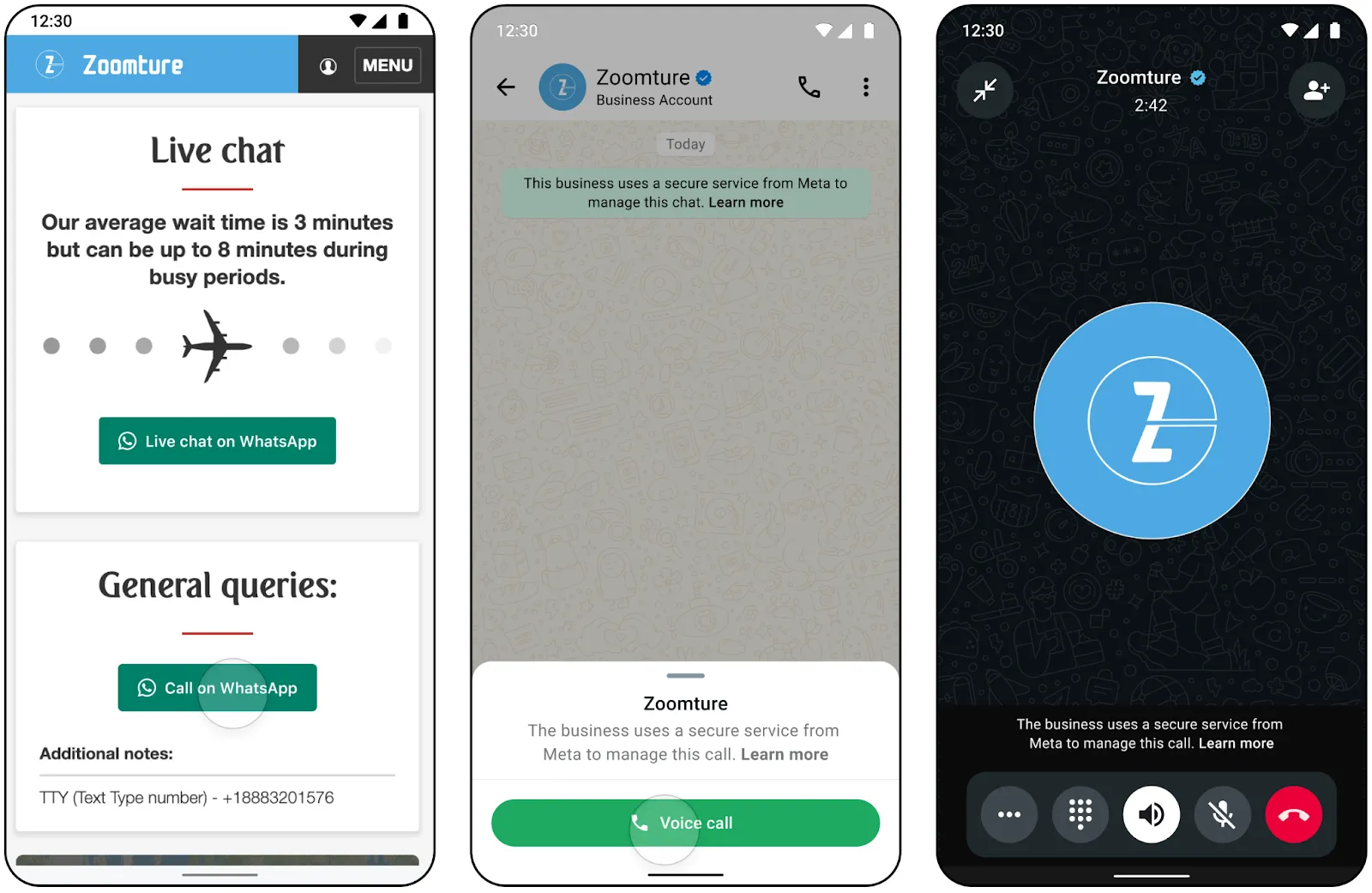
#### Send calling deep links
You can also send messages to WhatsApp users with a calling deep link.
Since deep links can be made per business phone number, you can use calling deep links to prompt WhatsApp users to contact a different phone number with voice enabled.
The `wa.me/call/` format is easy to copy, paste, and send, and does not require you to make a template in Business Manager.
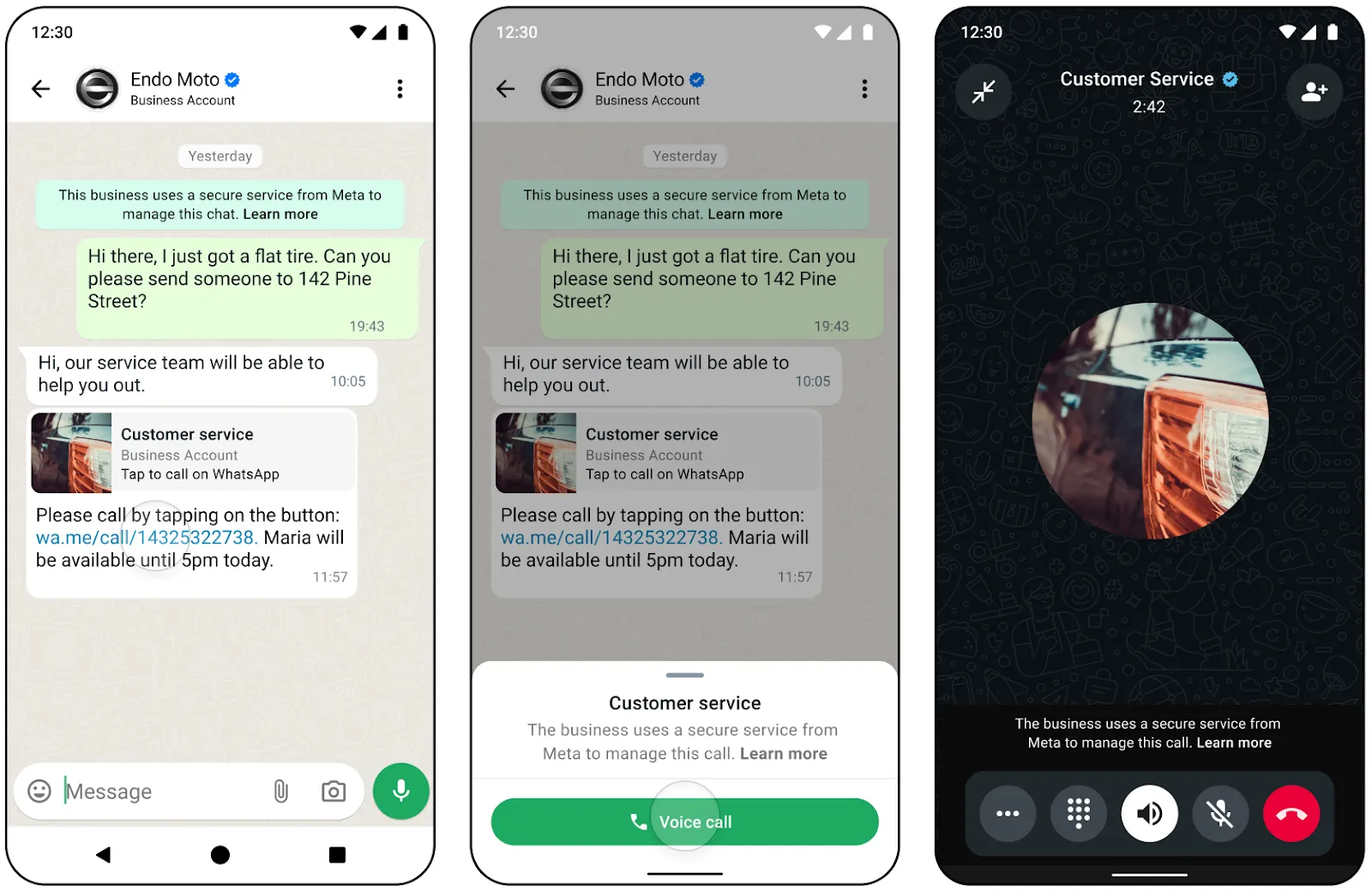
#### Send payload data in call deep link
You can also send a payload with the deep link. You can use the `biz_payload` query string when sending the call deep link to any user (`wa.me/call/?biz_payload=payload`).
When a user calls using the provided deep link with the `biz_payload` any app subscribed to the `calls` webhook field on the WhatsApp Business Account can get this string, as it is included in the `connect` and `terminate` webhook payloads under the `deeplink_payload` field.
Payload in call deep link is only available to WhatsApp client starting on version 2.25.27.
## Integration Patterns
Updated: Feb 25, 2026
### Possible high-level approaches
| Approach | Number setup | Business Solution Provider responsibilities | Calling Tech Provider responsibilities | End business responsibilities |
|---|
**Message BSP capable of Calling** | Existing messaging number extended for calling or new number | Messaging BSP reuses their app and subscribes it to calls webhooks. Creation of new calling specific app also works but [not recommended](/books/meta-whatsapp/page/integration-patterns-developer-documentation)Process calls webhooks and coordinate with real-time media infraMake calls related Graph API calls similar to messaging Graph API calls | Not applicable because there is only a single partner involved. | Enable and use callingContinue paying the bill from BSP which now has calls related usage line items |
[**Multi-solution Conversation**](/books/meta-whatsapp/page/how-to-use-multi-solution-conversations-msc-developer-documentation) | Single number independently operated by both messaging BSP and Calling BSP/TP | Messaging BSP does no changes | Calling BSP/TP hosts ES on their own website pointing to their own appGets end-biz to go through their ES | Onboard using calling partner’s ESPay the bills to Messaging BSP like beforeFor Calling partner incurred activity, pay the bill to calling partner if they are a BSP or to Meta if they are not a BSP |
| | Not applicable because there is no messaging BSP | Calling ISV hosts Embedded Signup (ES) on their website pointing to their own appGets end-biz to go through their ESIf ISV is a tech provider or partner, Meta bills end-biz directly. ISV and end-biz figure out their own billingIf ISV is a BSP, they can extend their credit line to end-biz | Onboard using ES on TPIf ISV is Tech Provider or Partner, pay Meta directly This requires end-biz to have a direct payment relation with Meta. Setting up this relation may take several weeksIf ISV is BSP, pay the bill from BSP |
[Multi-platform solution](/books/meta-whatsapp/page/multi-partner-solutions-developer-documentation) using Calling ISV registered as Tech Provider (TP) | New calling exclusive number serviced (**only**) by Calling TP | BSP and TP work together to create / approve a multi-partner solution. BSP and TP have their own appsWork out Messaging BSP <> Calling ISV commercial relationExtend credit line to end businessCan receive messages or calls but cannot send messages or calls because you can select only one of the two partners to send messages/calls in a multi-platform solution | BSP and TP work together to create / approve a multi-partner solution. BSP and TP have their own appsWork out Messaging BSP <> Calling ISV commercial relationOnboard end clients using ES pointing to created solutionSend/receive messages or calls | Onboard using ES on TPBiz is informed about TP in ESPay the bill from BSP |
### Multi-solution conversations (MSC)
Multi-solution Conversations allow multiple solutions on the same phone number, localizing messaging and calling in a single chat thread.
[Learn more about Multi-Solution Conversations](/books/meta-whatsapp/page/how-to-use-multi-solution-conversations-msc-developer-documentation)
### Integrating using a third party calling provider detailed design
The following logical architecture illustrates how to integrate WhatsApp Business Calling using a third party (3p) calling provider.
In this scenario, you would use the 3p vendor behind the scenes, and that 3p vendor would not be visible to Meta. This pattern is similar to any other SaaS service you may be using.
The diagram also illustrates how this architecture can be optionally extended to integrate with the SIP infrastructure on your side.
**Our terms disallow use of PSTN on *any* leg of the WhatsApp call in the overall call flow.**
Even if you bridge WA call into the SIP world, you must ensure it still stays exclusively on VoIP and never touches the PSTN. SIP trunk by itself is not disallowed because technically a SIP trunk can be used without any PSTN at all.
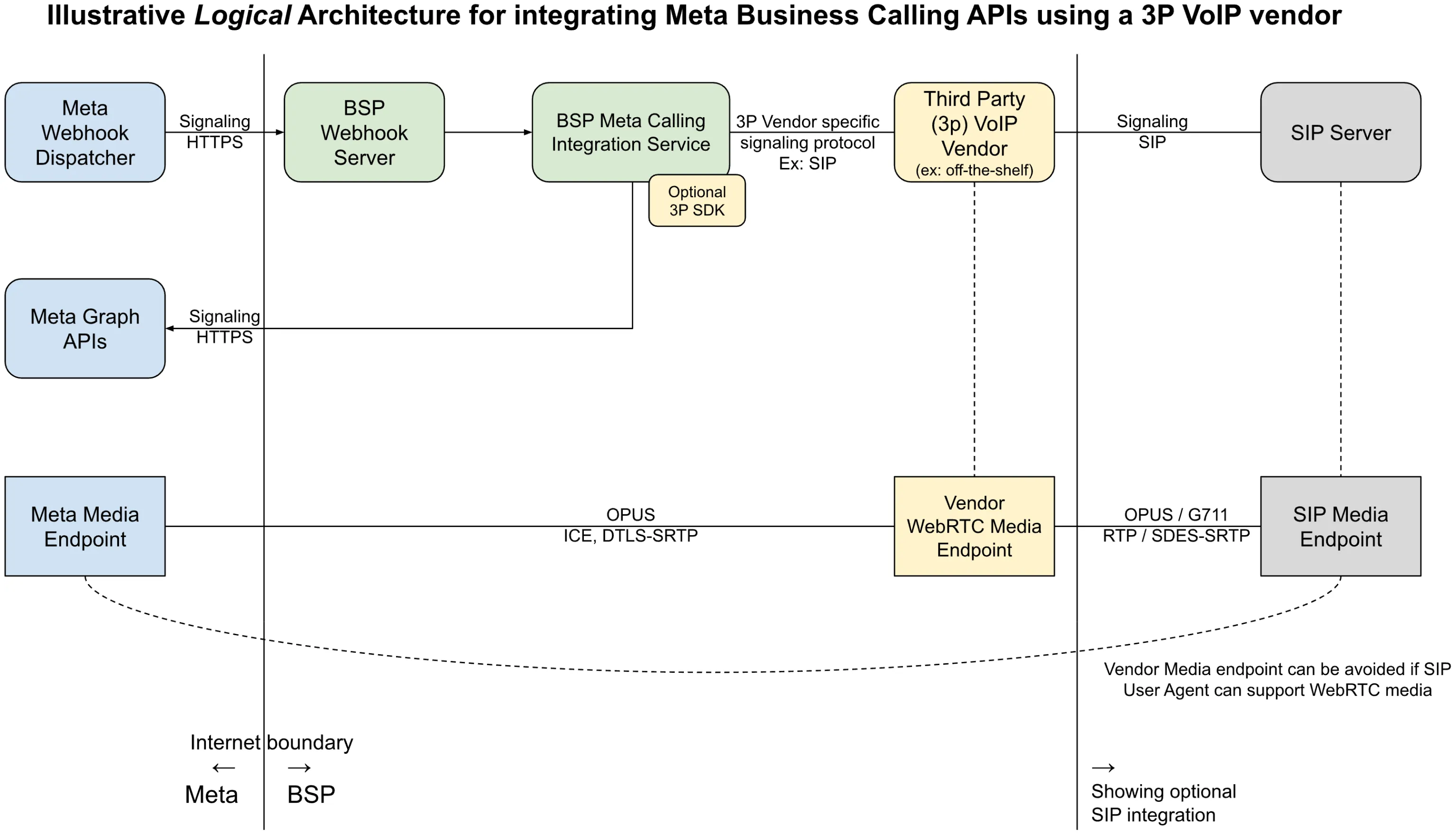 (*Right click image and choose “Open in new tab” for enlarged image*)
### Single app vs. multiple apps
This section covers guidelines and considerations for reusing your existing messaging app for calling vs. creating a new app specifically for Calling API features.
To integrate with the WhatsApp Calling API, you need to call [Graph API endpoints](/books/meta-whatsapp/page/about-the-whatsapp-business-platform-developer-documentation) and process Webhooks from Meta. This [requires you to have an app](https://developers.facebook.com/docs/development/create-an-app), and almost always, you should already have an app that is used for messaging.
In short, you can reuse an existing app which is used for [Embedded Signup](/books/meta-whatsapp/page/embedded-signup-developer-documentation) and for a messaging use case.
Reusing the same app offers the following benefits:
Reduced operational overhead (for example, app review, ongoing maintenance)Simplified footprint on MetaEquality between the app used for embedded signup and the one used for invoking Graph APIs and receiving webhooksThere would be no impact to existing functionality by reusing that app for calling. You just need to make sure the Webhook server is able to gracefully handle ‘calls’ related webhooks.Having separate apps is still supported, see the [Get Started FAQ](/books/meta-whatsapp/page/faqs-developer-documentation) for details.
The WhatsApp Business Calling VoIP stack is designed to be compatible with WebRTC. However, to ensure smooth integration with the WhatsApp protocol, Meta restricts the supported functionalities. As a result, the following requirements and recommendations apply.
#### Mandatory requirements
If any mandatory requirement is unmet, the call will fail. This failure can occur either during the call signaling phase, leading to a rejected call, or during the media packet decoding phase.
Use only the Opus audio codec.Set the media clock rate to 48 kHz.Set the DTMF clock rate to 8 kHz.Use a ptime of 20ms.Audio must use a single SSRC. The Meta relay server overwrites the SSRC of all business audio packets to a fixed SSRC before these packets reach the WA client. WA clients handle only one audio source from their peers. Using multiple SSRCs causes undefined behavior. This includes severe media corruption, audio glitches, and likely total media failure.While the following aspects are not mandatory, they are recommended to achieve high call quality and reliability.
**ICE Process**Our VoIP stack is ICE-LITE, so it is recommended that BSPs’ VoIP stack is ICE-FULL. ([RFC 5245 Section 2.7](https://l.facebook.com/l.php?u=https%3A%2F%2Fdatatracker.ietf.org%2Fdoc%2Fhtml%2Frfc5245%23section-2.7&h=AT55JFlfZ0WttiPyV8ANcbMYKU5Oq_gCFYADeeo43EFABebRR_DCrTJtj0zJG0HtSv2tQombfFYYGpIGZp-vuXLGlT8p5VVhvBBUwlhM4LDH0yDBI6ofzgfVEFmaFJ_gow4XrChErfIz9UJ_pSfPHA))BSPs’ VoIP stack should initiate the ICE process by sending STUN connectivity checks.BSPs’ VoIP stack should assume the ICE CONTROLLING role, as Meta will only assume the CONTROLLED role.Use regular nomination instead of aggressive nomination. ([RFC 5245 Section 8.1.1.2](https://l.facebook.com/l.php?u=https%3A%2F%2Fdatatracker.ietf.org%2Fdoc%2Fhtml%2Frfc5245%23section-8.1.1.2&h=AT55JFlfZ0WttiPyV8ANcbMYKU5Oq_gCFYADeeo43EFABebRR_DCrTJtj0zJG0HtSv2tQombfFYYGpIGZp-vuXLGlT8p5VVhvBBUwlhM4LDH0yDBI6ofzgfVEFmaFJ_gow4XrChErfIz9UJ_pSfPHA))Wait for the ICE process to complete before nominating the candidate and starting DTLS.Do not switch the candidate in the middle of the call.**DTLS**Use ECDH keys for the DTLS certificates to prevent packet fragmentation during transmission.BSP should act as a DTLS client. ([RFC 6347 Section 4.2](https://l.facebook.com/l.php?u=https%3A%2F%2Fdatatracker.ietf.org%2Fdoc%2Fhtml%2Frfc6347%23section-4.2&h=AT55JFlfZ0WttiPyV8ANcbMYKU5Oq_gCFYADeeo43EFABebRR_DCrTJtj0zJG0HtSv2tQombfFYYGpIGZp-vuXLGlT8p5VVhvBBUwlhM4LDH0yDBI6ofzgfVEFmaFJ_gow4XrChErfIz9UJ_pSfPHA))**Addressing Audio Clipping**Delay the audio from the SIP leg until the media connection with Meta is established.Integrate with the [pre-accept API](/books/meta-whatsapp/page/api-and-webhook-reference-developer-documentation) to help mitigate audio clipping in user-initiated calls.## Integration Examples
Updated: Feb 25, 2026
This guide explains integration of common VoIP platforms with WhatsApp Business Calling API.
This guide is for information purposes only with no support or warranties of any kind from Meta or any vendor. There are many ways to integrate and the guide explains just one way exclusively for illustrative purposes.
This guide explains how to set up [WhatsApp Business Calling API](/books/meta-whatsapp/page/cloud-api-calling-developer-documentation) using SIP signaling with [Asterisk](https://l.facebook.com/l.php?u=https%3A%2F%2Fwww.asterisk.org%2F&h=AT4Se4Z9JKJ_RQKHLUeLTw9ppBfyr2A-7HBX-JfTqYdGUa_A--Vzc7GDfjf3KHaiJhDKOXMqHde_aCljQXrPQ8J7e_7QekpvVbzUNRQXtWWXZKWYXf1kYJg95rkVpZMijB5IKPOe_Hk9REOhQX7P2g), an open-source PBX (Private Branch Exchange). You’ll learn how to configure your Asterisk server, connect SIP phones, and handle both incoming and outgoing WhatsApp calls.
##### User-initiated calls
##### Business-initiated calls
The WA to Asterisk leg uses SDES for media encryption key exchange and opus for audio codec
The Asterisk to SIP UA leg uses SDES for media encryption key exchange and opus or G711 for audio codec
Asterisk Deployment: Asterisk is deployed (for example, on a public cloud instance)Operating System: Any OS compatible for Asterisk. For example, CentOS 9Domain: Asterisk server is reachable via a public domain with valid certificateWhatsApp Business API: A WhatsApp business phone number is registered and calling is enabled.SIP Support: [SIP is enabled](/books/meta-whatsapp/page/sip-configuration-guide-whatsapp-business-calling-developer-documentation) on the WhatsApp Business NumberSDES: [SDES is enabled](/books/meta-whatsapp/page/sip-configuration-guide-whatsapp-business-calling-developer-documentation) on the WhatsApp Business Number#### Building and installing Asterisk
Refer to [https://docs.asterisk.org/Getting-Started/Installing-Asterisk/Installing-Asterisk-From-Source/Building-and-Installing-Asterisk/](https://l.facebook.com/l.php?u=https%3A%2F%2Fdocs.asterisk.org%2FGetting-Started%2FInstalling-Asterisk%2FInstalling-Asterisk-From-Source%2FBuilding-and-Installing-Asterisk%2F&h=AT4Se4Z9JKJ_RQKHLUeLTw9ppBfyr2A-7HBX-JfTqYdGUa_A--Vzc7GDfjf3KHaiJhDKOXMqHde_aCljQXrPQ8J7e_7QekpvVbzUNRQXtWWXZKWYXf1kYJg95rkVpZMijB5IKPOe_Hk9REOhQX7P2g)
This guide was tested using Asterisk version 22.5.2
#### Asterisk configuration
These configuration files are placed under /etc/asterisk/
Replace the following placeholders with actual values
{wa-business-phone-number}: WhatsApp Business Phone Number{asterisk-sip-server-dns}: DNS name of your Asterisk SIP serverincoming\_welcome: incoming\_welcome.wav (not provided) place this file under /var/lib/asterisk/soundsoutgoing\_welcome: outgoing\_welcome.wav (not provided) place this file under /var/lib/asterisk/sounds```
[c2b-sub-dial]
exten => s,1,NoOp()
same => n,Read(Digits,incoming_welcome,0,,5,500)
same => n,Dial(PJSIP/${Digits})
same => n,Hangup()[whatsapp]
exten => _10XX,1,NoOp()
same => n,Dial(PJSIP/${EXTEN})
same => n,Hangup();Extensionfor B2C business call through Meta SIP gateway
exten => b2c-sip,1,NoOp()
same => n,Read(Digits,outgoing_welcome,0,,5,500)
same => n,Dial(PJSIP/whatsapp/sip:${Digits}@wa.meta.vc);Extension to handle incoming invite requests fromMeta SIP gateway to <wa-business-phone-number>@<asterisk-sip-server-dns>
exten => _+<wa-business-phone-number>,1,Goto(c2b-sub-dial,s,1)
```
Replace the following placeholders with actual values
{wa-business-phone-number} : the business phone number{local-net}: local network of the Asterisk server{external-media-address}: Public IP of the Asterisk server media{external-signaling-address}: Public IP of the Asterisk server signaling{sip-ua-password}: Chosen SIP User Agent password{domain-name}: domain name assigned to the Asterisk serverCertificate files should be placed under /var/lib/asterisk/certs/fullchain.cer /var/lib/asterisk/certs/cer.key
```
[transport-tls]
type=transport
protocol=tls
bind=0.0.0.0:5061
cert_file=/var/lib/asterisk/certs/fullchain.cer
priv_key_file=/var/lib/asterisk/certs/cer.key
method=sslv23
allow_wildcard_certs=yes
external_media_address={external-media-address};External address for SIP signalling
external_signaling_address={external-signaling-address};Network to consider local used for NAT purposes
local_net={local-net}[sdes_endpointtemplate](!)
type=endpoint
context=whatsapp
disallow=all
allow=OPUS
direct_media=no
rtp_symmetric=yes
force_rport=yes
rewrite_contact=no
media_use_received_transport=yes
media_encryption=sdes
[authtemplate](!)
type=auth
auth_type=userpass
password={sip-ua-password}[aortemplate](!)
type=aor
max_contacts=1
remove_existing=yes
[aoridentitytemplate](!)
type=identify
match_header=X-FB-External-Domain: wa.meta.vc
;SDES users
[1000](sdes_endpointtemplate)
auth=1000_auth
aors=1000[1000_auth](authtemplate)
username=1000[1000](aortemplate)[1000](aoridentitytemplate)
endpoint=1000[1001](sdes_endpointtemplate)
auth=1001_auth
aors=1001[1001_auth](authtemplate)
username=1001[1001](aortemplate)[1001](aoridentitytemplate)
endpoint=1001[1002](sdes_endpointtemplate)
auth=1002_auth
aors=1002[1002_auth](authtemplate)
username=1002[1002](aortemplate)[1002](aoridentitytemplate)
endpoint=1002[1003](sdes_endpointtemplate)
auth=1003_auth
aors=1003[1003_auth](authtemplate)
username=1003[1003](aortemplate)[1003](aoridentitytemplate)
endpoint=1003[1004](sdes_endpointtemplate)
auth=1004_auth
aors=1004[1004_auth](authtemplate)
username=1004[1004](aortemplate)[1004](aoridentitytemplate)
endpoint=1004[1005](sdes_endpointtemplate)
auth=1005_auth
aors=1005[1005_auth](authtemplate)
username=1005[1005](aortemplate)[1005](aoridentitytemplate)
endpoint=1005;This endpoint maps to an IVR for C2B calls
[c2b-sip](sdes_endpointtemplate)[c2b-sip](aortemplate)[c2b-sip]
type=identify
endpoint=c2b-sip
match_header=X-FB-External-Domain: wa.meta.vc
;special endpoint forMeta SIP Gateway integration
;This endpoint maps to an IVR for B2C calls
[b2c-sip](sdes_endpointtemplate)[b2c-sip](aortemplate)[whatsapp](sdes_endpointtemplate)
type=endpoint
transport=transport-tls
disallow=all
allow=opus,ulaw,alaw
aors=whatsapp
from_user={wa-business-phone-number}
from_domain={domain-name}
outbound_auth=whatsapp
[whatsapp]
type=aor
contact=sip:wa.meta.vc
[whatsapp]
type=identify
endpoint=whatsapp
[whatsapp]
type=auth
auth_type=digest
password={meta-sip-user-password}
username={wa-business-phone-number}
realm=*
```
```
[general];Hostnameor address for the STUN server used for determining the external
; IP address and port an RTP session can be reached at.The port number is; optional.If omitted default value of 3478 will be used.This option is; disabled bydefault.Name resolution occurs at load time,andif DNS is; used, name resolution will occur repeatedly after the TTL expires.;;for example stundaddr=mystun.server.com:3478;
stunaddr=stun.l.google.com:19302
rtpstart=10000
rtpend=60000
```
#### Configuring a VoIP phone
Download and install a softphone client (for example, [Linphone](https://l.facebook.com/l.php?u=https%3A%2F%2Fwww.linphone.org%2Fen%2Fdownload&h=AT4Se4Z9JKJ_RQKHLUeLTw9ppBfyr2A-7HBX-JfTqYdGUa_A--Vzc7GDfjf3KHaiJhDKOXMqHde_aCljQXrPQ8J7e_7QekpvVbzUNRQXtWWXZKWYXf1kYJg95rkVpZMijB5IKPOe_Hk9REOhQX7P2g)) for testing both business-initiated and user-initiated calls.
Select an extension to register as a SIP UA (extensions 1001–1005).Open Preferences.Under “SIP Accounts,” click “Add account.”Enter the following details:
SIP Address: for example, sip:1001@{asterisk-sip-server-dns}SIP Server Address: for example, sip:{asterisk-sip-server-dns};transport=tlsTransport: TLSDisable ICEEnable AVPFDisable “Publish presence information”Confirm and save the account.Enter the password when prompted (viz. {sip-ua-password})Once connected, return to Preferences and select the “Audio” tab. Enable all audio codecs.In the “Calls and Chat” tab:
Select “Encryption”Choose “SRTP-SDES”Enable “Encryption is mandatory”Confirm settings
Double-check all configuration files for correct numbers, passwords, and domain names.Make sure your firewall allows SIP (5061/TLS) and RTP (10000-20000) ports.For more details on SIP password setup, see the [WhatsApp Cloud API documentation](/books/meta-whatsapp/page/sip-configuration-guide-whatsapp-business-calling-developer-documentation).##### Cannot register SIP UA
Confirm that the SIP URL is correct and the domain is pointing to the Asterisk server. Run host {domain-name} to verify that the IP address points to the Asterisk server.
##### Not receiving ACK from Meta OR Business audio stops around 30s OR Meta returns 404 response to BYE
For a user initiated call, Meta sends a `SIP INVITE` to your SIP server which then responds with `200 OK`. Meta acks your `200 OK` with an `ACK` but you never receive this ACK. So your SIP server keeps resending the `200 OK` and ultimately the SIP dialog is terminated due to ACK timeout (typically 32s).
The most likely cause for this problem is incorrect `Record-Route` headers in your `200 OK` to Meta. The `200 OK` response is supposed to not modify the `Record-Route` headers included in the original Meta’s `INVITE`. Your SIP server can add new `Record-Route` headers but cannot modify those present in our `INVITE`
The solution to this problem is to change `rewrite_contact=yes` to `rewrite_contact=no` on the WhatsApp endpoint configuration in pjsip.conf file. After this make sure your `200 OK` has following headers as the last 2 in the list of `Record-Route` headers
This problem is hard to detect or diagnose. Even with this bug, the call will get connected and media will flow both sides but around 32s later, your SIP server will terminate the call which won’t be propagated to WhatsApp client because your BYE request has incorrect `Route` headers. So WA user stops hearing business audio around 32s.
```
Record-Route:<sip:wa.meta.vc;transport=tls;lr>Record-Route:<sip:onevc-sip-proxy.fbinfra.net:8191;transport=tls;lr>
```
This guide explains how to set up [WhatsApp Business Calling API](/books/meta-whatsapp/page/cloud-api-calling-developer-documentation) using SIP signaling with [FreeSWITCH](https://l.facebook.com/l.php?u=https%3A%2F%2Fsignalwire.com%2Ffreeswitch&h=AT4Se4Z9JKJ_RQKHLUeLTw9ppBfyr2A-7HBX-JfTqYdGUa_A--Vzc7GDfjf3KHaiJhDKOXMqHde_aCljQXrPQ8J7e_7QekpvVbzUNRQXtWWXZKWYXf1kYJg95rkVpZMijB5IKPOe_Hk9REOhQX7P2g), an open-source communication framework. You’ll learn how to configure your FreeSWITCH server, connect SIP phones, and handle both user-initiated and business-initiated WhatsApp calls.
##### User-initiated calls
##### Business-initiated calls
The WA to FreeSWITCH leg uses SDES for media encryption key exchange with Opus as the audio codec. FreeSWITCH - SIP UA leg uses SDES for media encryption key exchange with Opus or G.711 audio codecs
FreeSWITCH Deployment: FreeSWITCH is deployed (for example, on a public cloud instance)Operating System: Any OS compatible with FreeSWITCH. For example, CentOS 9Domain: FreeSWITCH server is reachable via a public domain with a valid certificateWhatsApp Business API: A WhatsApp business phone number is registered and [calling is enabled](https://support.chatarchitect.com/books/meta-whatsapp/page/configure-call-settings-%7C-developer-documentation).SIP Support: [SIP is enabled](/books/meta-whatsapp/page/sip-configuration-guide-whatsapp-business-calling-developer-documentation) on the WhatsApp Business Number
Note: FreeSWITCH is configured to listen on 5081 for TLSSDES: [SDES is enabled](/books/meta-whatsapp/page/sip-configuration-guide-whatsapp-business-calling-developer-documentation) on the WhatsApp Business Number#### Building and installing FreeSWITCH
Refer to [https://developer.signalwire.com/freeswitch/FreeSWITCH-Explained/Installation/](https://l.facebook.com/l.php?u=https%3A%2F%2Fdeveloper.signalwire.com%2Ffreeswitch%2FFreeSWITCH-Explained%2FInstallation%2F&h=AT4Se4Z9JKJ_RQKHLUeLTw9ppBfyr2A-7HBX-JfTqYdGUa_A--Vzc7GDfjf3KHaiJhDKOXMqHde_aCljQXrPQ8J7e_7QekpvVbzUNRQXtWWXZKWYXf1kYJg95rkVpZMijB5IKPOe_Hk9REOhQX7P2g)
This guide was tested using FreeSWITCH version 1.10.12. FreeSWITCH uses sofia (an open-source SIP user agent library). Sofia v1.13.17 was used for this guide
##### FreeSWITCH configuration
These configuration files are placed under /usr/share/freeswitch/etc/freeswitch
**wa-biz-api-dialplan.xml**
Place the dial plan under /usr/share/freeswitch/etc/freeswitch/dialplan/default/wa-biz-api-dialplan.xml
```
name="c2b_calls_sip_ivr">field="${sip_from_host}"expression="^wa.meta.vc$">application="check_acl"data="${network_addr} whatsapp_allow normal_clearing"/>application="set"data="rtp_secure_media=true"/>application="answer"/>application="playback"data="silence_stream://1000"/>application="play_and_get_digits"data="2 5 3 7000 # $${base_dir}/sounds/incoming_welcome.wav $${base_dir}/sounds/incoming_invalid.wav extension \d+"/>application="set"data="ringback=%(2000, 4000, 440.0, 480.0)"/>application="export"data="nolocal:absolute_codec_string=PCMA,PCMU,OPUS@48000h@20i"/>application="bridge"data="user/${extension}"/>application="hangup"/>name="b2c_calls_ivr">field="destination_number"expression="^b2c-sip$">application="set"data="rtp_secure_media=true"/>application="answer"/>application="playback"data="silence_stream://1000"/>application="set"data="caller_id_check=${caller_id_number}"/>application="play_and_get_digits"data="2 12 3 20000 # $${base_dir}/sounds/outgoing_welcome.wav $${base_dir}/sounds/outgoing_invalid.wav whatsapp_number \d+"/>application="log"data="INFO [whatsapp_number] is ${whatsapp_number}"/>application="set"data="ringback=%(2000, 4000, 440.0, 480.0)"/>application="export"data="nolocal:absolute_codec_string=OPUS@48000h@20i,OPUS@8000h@20i"/>application="bridge"data="sofia/gateway/whatsapp/+${whatsapp_number}"/>application="hangup"/>
```
Audio files should be placed under /usr/share/freeswitch/sounds (not provided)
incoming\_welcome.wavIncoming\_invalid.wavoutgoing\_welcome.wavoutgoing\_invalid.wav**whatsapp.xml**
This file configures the WhatsApp gateway, copy the file to /usr/share/freeswitch/etc/freeswitch/sip_profiles/external/whatsapp.xml
```
name="whatsapp">name="username"value="{phone-number}"/>name="password"value="{meta-sip-password}"/>name="register"value="false"/>name="realm"value="wa.meta.vc"/>name="from-user"value="{phone-number}"/>name="from-domain"value="{domain-name}"/>
```
Replace the following placeholders with actual values
{phone-number}: WhatsApp Business Phone Number{meta-sip-password}: SIP password issued by Meta. For more details on SIP password setup, see the [WhatsApp Cloud API documentation](/books/meta-whatsapp/page/sip-configuration-guide-whatsapp-business-calling-developer-documentation).{domain-name}: DNS name of your FreeSWITCH SIP server**acl.conf.xml**
Open /usr/share/freeswitch/etc/freeswitch/autoload_configs/acl.conf.xml
Add the following list under `network-lists` element
```
name="whatsapp_allow"default="deny">type="allow"cidr="31.13.24.0/21"/>type="allow"cidr="31.13.64.0/18"/>type="allow"cidr="45.64.40.0/22"/>type="allow"cidr="57.141.0.0/21"/>type="allow"cidr="57.141.8.0/22"/>type="allow"cidr="57.141.12.0/23"/>type="allow"cidr="57.144.0.0/14"/>type="allow"cidr="66.220.144.0/20"/>type="allow"cidr="69.63.176.0/20"/>type="allow"cidr="69.171.224.0/19"/>type="allow"cidr="74.119.76.0/22"/>type="allow"cidr="102.132.96.0/20"/>type="allow"cidr="103.4.96.0/22"/>type="allow"cidr="129.134.0.0/16"/>type="allow"cidr="147.75.208.0/20"/>type="allow"cidr="157.240.0.0/16"/>type="allow"cidr="163.70.128.0/17"/>type="allow"cidr="163.77.128.0/17"/>type="allow"cidr="173.252.64.0/18"/>type="allow"cidr="179.60.192.0/22"/>type="allow"cidr="185.60.216.0/22"/>type="allow"cidr="185.89.216.0/22"/>type="allow"cidr="204.15.20.0/22"/>
```
**vars.xml**
Modify /usr/share/freeswitch/etc/freeswitch/vars.xml
```
Add line <X-PRE-PROCESS cmd="set" data="rtp_secure_media=mandatory"/> under Replace<X-PRE-PROCESS cmd="set" data="default_password=1234"/>with(substitute {sip_ua_password}with your password)<X-PRE-PROCESS cmd="set" data="default_password={sip-ua-password}"/>Replace<X-PRE-PROCESS cmd="set" data="domain=$${local_ip_v4}"/>with(substitute {domain-name}with your FreeSWITCH SIP server DNS)<X-PRE-PROCESS cmd="set" data="domain={domain-name}”/>
Replace
with (substitute {external-ip} with your FreeSWITCH public ip)
Replace
with (substitute {external-ip} with your FreeSWITCH public ip)
```
**internal.xml**
Modify /usr/share/freeswitch/etc/freeswitch/sip_profiles/internal.xml Look for:
```
name="sip-trace"value="no"/>
```
Replace it with
```
name="sip-trace"value="yes"/>
```
**external.xml**Modify /usr/share/freeswitch/etc/freeswitch/sip_profiles/external.xml
```
Replace<param name="sip-trace" value="no"/>with<param name="sip-trace" value="yes"/>Replace<param name="tls" value="$${external_ssl_enable}"/>with<param name="tls" value="true"/>Replacewith<param name="tls-cert-dir" value="/usr/share/freeswitch/etc/freeswitch/certs"/>
```
Make sure certificates are placed under /usr/share/freeswitch/etc/freeswitch/certs
Double-check all configuration files for correct numbers, passwords, and domain names.Make sure your firewall allows SIP (5081/TLS) and RTP (10000-20000) ports.For more details on SIP password setup, see the [WhatsApp Cloud API documentation](/books/meta-whatsapp/page/sip-configuration-guide-whatsapp-business-calling-developer-documentation).##### Cannot register SIP UA
Confirm that the SIP URL is correct and the domain is pointing to the FreeSWITCH server. Run host {domain-name} to verify that the IP address points to the FreeSWITCH server.
Start CLI (/usr/share/freeswitch/bin/fs_cli) to view SIP messages
### FreeSWITCH using Graph API with Janus
This guide explains how to set up [WhatsApp Business Calling API](/books/meta-whatsapp/page/cloud-api-calling-developer-documentation) using [WhatsApp Cloud API signaling](/books/meta-whatsapp/page/business-initiated-calls-developer-documentation) with [FreeSWITCH](https://l.facebook.com/l.php?u=https%3A%2F%2Fsignalwire.com%2Ffreeswitch&h=AT4Se4Z9JKJ_RQKHLUeLTw9ppBfyr2A-7HBX-JfTqYdGUa_A--Vzc7GDfjf3KHaiJhDKOXMqHde_aCljQXrPQ8J7e_7QekpvVbzUNRQXtWWXZKWYXf1kYJg95rkVpZMijB5IKPOe_Hk9REOhQX7P2g), an open-source communication framework and [Janus](https://l.facebook.com/l.php?u=https%3A%2F%2Fjanus.conf.meetecho.com%2F&h=AT4Se4Z9JKJ_RQKHLUeLTw9ppBfyr2A-7HBX-JfTqYdGUa_A--Vzc7GDfjf3KHaiJhDKOXMqHde_aCljQXrPQ8J7e_7QekpvVbzUNRQXtWWXZKWYXf1kYJg95rkVpZMijB5IKPOe_Hk9REOhQX7P2g), a general purpose WebRTC server. You’ll learn how to configure your FreeSWITCH server, connect SIP phones, and handle both incoming and outgoing WhatsApp calls.

##### User-initiated calls
##### Business-initiated calls
The Janus server sits between WA and FreeSWITCH and converts media from WA (WebRTC complaint with DTLS key exchange) to FreeSWITCH negotiated media (SDES key exchange).
FreeSWITCH - Sip UA will be using SDES for media encryption key exchange and opus or G711 for audio codec
FreeSWITCH Deployment: FreeSWITCH is deployed (for example, on a public cloud instance)Janus Deployment: Can be deployed on the same machine as FreeSWITCHOperating System: Any OS compatible with FreeSWITCH. For example, CentOS 9Domain: FreeSWITCH server and Webhook server are reachable via a public domain with valid certificateWhatsApp Business API: A WhatsApp business phone number is registered and [calling is enabled](https://support.chatarchitect.com/books/meta-whatsapp/page/configure-call-settings-%7C-developer-documentation).Webhooks: Configure Webhook callback URL pointing to domain name of the Webhook server#### Integration with Cloud API signaling
You will need to implement an integration module which sits between WA and Janus and translates Cloud API Signalling messages to Janus SIP plugin messages and vice versa.
You will need
A webhook server to receive calls webhook events from MetaA Graph API module to send call messages to MetaAn implementation of [Janus SIP plugin](https://l.facebook.com/l.php?u=https%3A%2F%2Fjanus.conf.meetecho.com%2Fdocs%2Fsip&h=AT4Se4Z9JKJ_RQKHLUeLTw9ppBfyr2A-7HBX-JfTqYdGUa_A--Vzc7GDfjf3KHaiJhDKOXMqHde_aCljQXrPQ8J7e_7QekpvVbzUNRQXtWWXZKWYXf1kYJg95rkVpZMijB5IKPOe_Hk9REOhQX7P2g) to connect to Janus. The Janus plugin implementation will connect to FreeSWITCH using extension 1000 which is reserved for bridgingBusiness initiated calls
The module will receive a SIP INVITE via Janus SIP plugin on extension 1000. The SIP INVITE is converted to a [Graph API request](https://support.chatarchitect.com/books/meta-whatsapp/page/business-initiated-calls-%7C-developer-documentation#initiate-call). The SDP received in the SIP INVITE is sent verbatim as the SDP offer to WA via the Graph API callWhen the call is accepted by the WA user, an accepted webhook is received. On receiving the webhook, the Janus SIP Plugin accepts the SIP INVITE passing the answer SDP in the [connect webhook](https://support.chatarchitect.com/books/meta-whatsapp/page/business-initiated-calls-%7C-developer-documentation#call-connect-webhook)User Initiated calls
The webhook server receives an incoming call via a webhook message containing the offer SDP. On receiving the call invite, the Janus SIP plugin sends an invite to FreeSWITCH via extension 1000. The destination extension is **c2b-sip.**When the Janus SIP plugin receives the SIP 200 OK, a Graph API accept call request is sent to Meta to accept the incoming call by passing the SDP received as part of SIP answer#### Building and installing Janus
Refer to [https://github.com/meetecho/janus-gateway](https://l.facebook.com/l.php?u=https%3A%2F%2Fgithub.com%2Fmeetecho%2Fjanus-gateway&h=AT4Se4Z9JKJ_RQKHLUeLTw9ppBfyr2A-7HBX-JfTqYdGUa_A--Vzc7GDfjf3KHaiJhDKOXMqHde_aCljQXrPQ8J7e_7QekpvVbzUNRQXtWWXZKWYXf1kYJg95rkVpZMijB5IKPOe_Hk9REOhQX7P2g)This guide was tested using version 1.2.3
**janus.jcfg**
Modify janus.jcfg which can be found at /usr/share/janus/etc/janus/janus.jcfg Set nat_1_1_mapping to the public IP of the Janus Server
To start Janus
```
/usr/share/janus/bin/janus --debug-level=6--libnice-debug=on -S stun.l.google.com:19302--log-file=/var/log/janus.log --config=/usr/share/janus/etc/janus/janus.jcfg
```
#### Building and installing FreeSWITCH
Refer to [https://developer.signalwire.com/freeswitch/FreeSWITCH-Explained/Installation/](https://l.facebook.com/l.php?u=https%3A%2F%2Fdeveloper.signalwire.com%2Ffreeswitch%2FFreeSWITCH-Explained%2FInstallation%2F&h=AT4Se4Z9JKJ_RQKHLUeLTw9ppBfyr2A-7HBX-JfTqYdGUa_A--Vzc7GDfjf3KHaiJhDKOXMqHde_aCljQXrPQ8J7e_7QekpvVbzUNRQXtWWXZKWYXf1kYJg95rkVpZMijB5IKPOe_Hk9REOhQX7P2g)
This guide was tested using FreeSWITCH version 1.10.12. FreeSWITCH uses sofia (an open-source SIP user agent library). Sofia v1.13.17 was used for this guide
**FreeSWITCH Configuration**These configuration files are placed under /usr/share/freeswitch/etc/freeswitch
**wa-biz-api-dialplan.xml**
Place the dial plan under /usr/share/freeswitch/etc/freeswitch/dialplan/default/wa-biz-api-dialplan.xml
```
name="c2b_calls_ivr">field="destination_number"expression="^c2b-sip$">application="set"data="rtp_secure_media=true"/>application="answer"/>application="playback"data="silence_stream://1000"/>application="play_and_get_digits"data="2 5 3 7000 # $${base_dir}/sounds/incoming_welcome.wav $${base_dir}/sounds/incoming_invalid.wav extension \d+"/>application="set"data="ringback=%(2000, 4000, 440.0, 480.0)"/>application="export"data="nolocal:absolute_codec_string=PCMA,PCMU,OPUS@48000h@20i,G722"/>application="bridge"data="user/${extension}"/>application="hangup"/>name="b2c_calls_ivr">field="destination_number"expression="^b2c-sip$">application="set"data="rtp_secure_media=true"/>application="answer"/>application="playback"data="silence_stream://1000"/>application="set"data="caller_id_check=${caller_id_number}"/>application="log"data="INFO [caller id ] is ${caller_id_check}"/>application="play_and_get_digits"data="2 12 3 20000 # $${base_dir}/sounds/outgoing_welcome.wav $${base_dir}/sounds/outgoing_invalid.wav whatsapp_number \d+"/>application="log"data="INFO [whatsapp_number] is ${whatsapp_number}"/>application="export"data="sip_h_X-WhatsApp-Number=${whatsapp_number"/>application="set"data="ringback=%(2000, 4000, 440.0, 480.0)"/>application="export"data="nolocal:absolute_codec_string=OPUS@48000h@20i,PCMU,PCMA"/>application="bridge"data="user/1000"/>application="hangup"/>
```
Audio files should be placed under /usr/share/freeswitch/sounds (not provided)
incoming\_welcome.wavIncoming\_invalid.wavoutgoing\_welcome.wavoutgoing\_invalid.wav**internal.xml**
Modify /usr/share/freeswitch/etc/freeswitch/sip_profiles/internal.xml Look for:
```
name="sip-trace"value="no"/>
```
Replace it with
```
name="sip-trace"value="yes"/>
```
#### Configuring a VoIP phone
Refer to the [earlier section](/books/meta-whatsapp/page/integration-examples-developer-documentation)
Double-check all configuration files for correct numbers, passwords, and domain names.Make sure your firewall allows SIP (5061/TLS) and RTP (10000-20000) ports.For more details on SIP password setup, see the [WhatsApp Cloud API documentation](/books/meta-whatsapp/page/sip-configuration-guide-whatsapp-business-calling-developer-documentation).##### Cannot register SIP UA
Confirm that the SIP URL is correct and the domain is pointing to the FreeSWITCH server. Run host {domain-name} to verify that the IP address points to the FreeSWITCH server.
Start CLI (/usr/share/freeswitch/bin/fs_cli) to view SIP messages
### Asterisk using Graph API with RtpEngine
This guide explains how to set up [WhatsApp Business Calling API](/books/meta-whatsapp/page/cloud-api-calling-developer-documentation) using [WhatsApp Cloud API signaling](/books/meta-whatsapp/page/business-initiated-calls-developer-documentation) with [Asterisk](https://l.facebook.com/l.php?u=https%3A%2F%2Fwww.asterisk.org%2F&h=AT4Se4Z9JKJ_RQKHLUeLTw9ppBfyr2A-7HBX-JfTqYdGUa_A--Vzc7GDfjf3KHaiJhDKOXMqHde_aCljQXrPQ8J7e_7QekpvVbzUNRQXtWWXZKWYXf1kYJg95rkVpZMijB5IKPOe_Hk9REOhQX7P2g), an open-source PBX (Private Branch Exchange) and [RtpEngine](https://l.facebook.com/l.php?u=https%3A%2F%2Fgithub.com%2Fsipwise%2Frtpengine&h=AT4Se4Z9JKJ_RQKHLUeLTw9ppBfyr2A-7HBX-JfTqYdGUa_A--Vzc7GDfjf3KHaiJhDKOXMqHde_aCljQXrPQ8J7e_7QekpvVbzUNRQXtWWXZKWYXf1kYJg95rkVpZMijB5IKPOe_Hk9REOhQX7P2g), an open-source proxy used for relaying, manipulating, and controlling RTP streams. You’ll learn how to configure your Asterisk server, connect SIP phones, and handle both incoming and outgoing WhatsApp calls.
##### User-initiated calls
##### Business-initiated calls
RtpEngine acts as a media proxy and sits between the media stream of WA (WebRTC complaint with DTLS key exchange) and Asterisk (SDES key exchange)
Asterisk Deployment: Asterisk is deployed (for example, on a public cloud instance)RtpEngine Deployment: Can be deployed on the same machine as AsteriskOperating System: Any OS compatible with Asterisk and RtpEngine. For example, CentOS 9Domain: Asterisk server and Webhook server are reachable via a public domain with valid certificateWhatsApp Business API: A WhatsApp business phone number is registered and [calling is enabled](https://support.chatarchitect.com/books/meta-whatsapp/page/configure-call-settings-%7C-developer-documentation).Webhooks: Configure Webhook callback URL pointing to domain name of the Webhook server#### Integration with Cloud API signaling
You will need to implement an integration module that acts as a bridge between WhatsApp and Asterisk. This module will:
Translate Cloud API Signaling messages from WhatsApp to SIP for Asterisk, and vice versaUse SIP signaling for communication between the SIP UA inside the module and AsteriskBridge the media between WhatsApp and Asterisk via RtpEngineYou will need following components, which are part of the integration module for the purpose of this setup
Webhook Server: Receives call webhook events from Meta (WhatsApp Cloud API)Graph API client: Sends call-related requests to Meta using the Graph APISIP User Agent (UA) such as PJSIP: Connects to Asterisk using extension 1000, which is reserved for bridging calls between WhatsApp and Asterisk.RtpEngineClient: To control RtpEngine via [ng control protocol](https://l.facebook.com/l.php?u=https%3A%2F%2Frtpengine.readthedocs.io%2Fen%2Flatest%2Fng_control_protocol.html&h=AT4Se4Z9JKJ_RQKHLUeLTw9ppBfyr2A-7HBX-JfTqYdGUa_A--Vzc7GDfjf3KHaiJhDKOXMqHde_aCljQXrPQ8J7e_7QekpvVbzUNRQXtWWXZKWYXf1kYJg95rkVpZMijB5IKPOe_Hk9REOhQX7P2g) for bridging media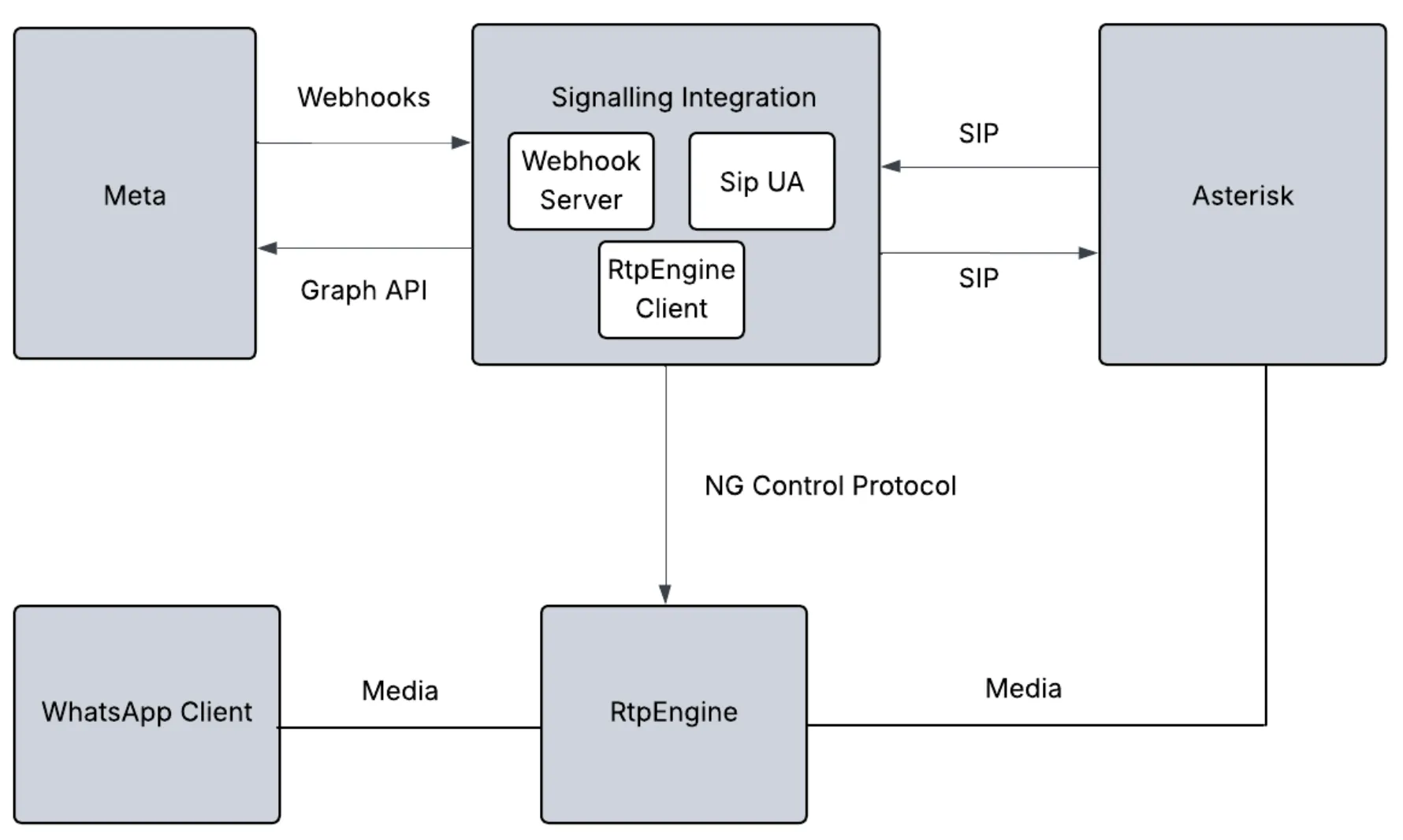
Business initiated calls
Business agent registered to the same Asterisk server dials b2c-sip extension to initiate a call to WhatsApp userThe extension prompts the business agent to enter WA user’s phone numberAsterisk sends a SIP INVITE request to extension 1000 with a custom header containing the dialed WA user phone numberThe SIP UA inside the module would’ve registered at extension 1000 and hence receives the SIP INVITE from AsteriskThe SDP included in the SIP INVITE is sent to RtpEngine which returns a new SDPThe new SDP is included in the [Graph API request](/books/meta-whatsapp/page/business-initiated-calls-developer-documentation) to initiate a new callWhen the WhatsApp user accepts the call, an “accepted” webhook is receivedUpon receiving this webhook, the answer SDP received in the webhook is sent to RtpEngine which returns a new SDPThe SIP UA accepts the original SIP INVITE (step 3), passing along the new SDP received from RtpEngineThe call is now bridged between WA user, RtpEngine, and AsteriskUser Initiated calls
The webhook server inside the module receives an [incoming call webhook](/books/meta-whatsapp/page/user-initiated-calls-developer-documentation) from Meta, which includes the offer SDPUpon receiving this call invite, the SDP included in the offer is sent to RtpEngine which returns a new SDPThe SIP UA inside the module sends a SIP INVITE to Asterisk using extension 1000 passing the new SDP from RtpEngine in the SIP INVITE. The destination extension is c2b-sip.The extension prompts WA user to dial the extension of the business agent to connect toAsterisk dials the specified extension and waits for an answerAfter the agent answers the call, Asterisk sends SIP 200 OK to the SIP UA extension 1000 inside the module. The SDP in SIP 200 OK is sent to RtpEngine which returns a new SDPA Graph API request is sent to Meta to [accept the incoming call](/books/meta-whatsapp/page/user-initiated-calls-developer-documentation), with the new SDP received from RtpEngine#### Building and installing Asterisk
Refer to https://docs.asterisk.org/Getting-Started/Installing-Asterisk/Installing-Asterisk-From-Source/Building-and-Installing-Asterisk/
This guide was tested using Asterisk version 22.5.2
#### Building and installing RtpEngine
Refer to [https://github.com/sipwise/rtpengine](https://l.facebook.com/l.php?u=https%3A%2F%2Fgithub.com%2Fsipwise%2Frtpengine&h=AT4Se4Z9JKJ_RQKHLUeLTw9ppBfyr2A-7HBX-JfTqYdGUa_A--Vzc7GDfjf3KHaiJhDKOXMqHde_aCljQXrPQ8J7e_7QekpvVbzUNRQXtWWXZKWYXf1kYJg95rkVpZMijB5IKPOe_Hk9REOhQX7P2g) to build and install RtpEngine This guide was tested using RtpEngine version 13.3.1.4
Refer to https://rtpengine.readthedocs.io/en/latest/ng_control_protocol.html for details on ng control protocol
To start RtpEngine run
```
/usr/bin/rtpengine --listen-ng={local-ip}:22222--interface={local-ip}\!{public-ip}-f -E
```
Replace
{local-ip} with the local IP of the RtpEngine server{public-ip} with the public IP of the RtpEngine server**Asterisk Configuration**These configuration files are placed under /etc/asterisk/
**extensions.conf**
Replace the following placeholders with actual values
incoming\_welcome: incoming\_welcome.wav (not provided) place this file under /var/lib/asterisk/soundsoutgoing\_welcome: outgoing\_welcome.wav (not provided) place this file under /var/lib/asterisk/sounds```
[handler];Set headers on callee channel
exten => addheader,1,Set(PJSIP_HEADER(add,X-WhatsApp-Number)=${DIGITS})
same => n,Return()[default]
exten => _10XX,1,NoOp()
same => n,Dial(PJSIP/${EXTEN})
same => n,Hangup()
exten => b2c-sip,1,NoOp()
same => n,Read(Digits,outgoing_welcome,0,,5,500)
same => n,Set(GLOBAL(DIGITS)=${Digits});Before starting a business initiated call, add customer WA header to store the WA user number captured from agent entered digits (DTMF)
same => n,Dial(PJSIP/1000,,b(handler^addheader^1))
same => n,Hangup()
exten => c2b-sip,1,NoOp()
same => n,Read(Digits,incoming_welcome,0,,5,500)
same => n,Dial(PJSIP/${Digits})
same => n,Hangup()
```
**pjsip.conf**
Replace the following placeholders with actual values
{external-media-address}: Public IP of the Asterisk server for media{external-signaling-address}: Public IP of the Asterisk server for signaling{local-net}: local network of the Asterisk server{sip-ua-password}: Chosen SIP User Agent passwordNote:
Extension 1000 is used to bridge WA calls with Asterisk see section **Integration with Cloud API Signaling**
```
[global]
type=global
debug=yes ;Enable/Disable SIP debug logging.Valid options include yes|no[transport-tcp]
type=transport
protocol=tcp
bind=0.0.0.0;External IP address to usein RTP handling
external_media_address={external-media-address};External address for SIP signalling
external_signaling_address={external-signaling-address};Network to consider local used for NAT purposes
local_net={local-net}[endpointtemplate](!)
type=endpoint
context=default
disallow=all
allow=OPUS,g722,g729,ulaw
;No audio if direct_media isset to yes
direct_media=no
rtp_symmetric=yes
use_avpf=yes
media_encryption=sdes
media_use_received_transport=yes
rtcp_mux=yes
[authtemplate](!)
type=auth
auth_type=userpass
password={sip-ua-password}[aortemplate](!)
type=aor
max_contacts=1
remove_existing=yes
[1000](endpointtemplate)
disallow=all
;extension 1000is used byRtpEngine to bridge whatsapp calls
;WhatsApp only support OPUS
allow=OPUS
auth=1000_auth
aors=1000[1000_auth](authtemplate)
username=1000[1000](aortemplate)[1001](endpointtemplate)
auth=1001_auth
aors=1001[1001_auth](authtemplate)
username=1001[1001](aortemplate)[1002](endpointtemplate)
auth=1002_auth
aors=1002[1002_auth](authtemplate)
username=1002[1002](aortemplate)[1003](endpointtemplate)
auth=1003_auth
aors=1003[1003_auth](authtemplate)
username=1003[1003](aortemplate)[1004](endpointtemplate)
auth=1004_auth
aors=1004[1004_auth](authtemplate)
username=1004[1004](aortemplate)[1005](endpointtemplate)
auth=1005_auth
aors=1005[1005_auth](authtemplate)
username=1005[1005](aortemplate)
```
#### Configuring a VoIP phone
Refer to the [earlier section](/books/meta-whatsapp/page/integration-examples-developer-documentation)
Double-check all configuration files for correct numbers, passwords, and domain names.Make sure your firewall allows SIP (5060/TCP) and RTP (10000-20000) ports.For more details on SIP password setup, see the [WhatsApp Cloud API documentation](/books/meta-whatsapp/page/sip-configuration-guide-whatsapp-business-calling-developer-documentation).##### Cannot register SIP UA
Confirm that the SIP URL is correct and the domain is pointing to the Asterisk server. Run host {domain-name} to verify that the IP address points to the Asterisk server.
### Asterisk with built-in WebRTC using Graph API
This approach is similar to [Asterisk using Graph API with RtpEngine ](/books/meta-whatsapp/page/integration-examples-developer-documentation) except that it uses the built-in WebRTC support in Asterisk and hence does not require RtpEngine.
The RtpEngineClient component is hence not required in this approach
In terms of configuration and setup, only difference is the configuration of extension 1000 which is given below
```
...;Rest of content omitted for brevity
[1000](endpointtemplate)
disallow=all
;extension 1000is used by SIP UA of the integration module to bridge WhatsApp calls
;WhatsApp only support OPUS
allow=OPUS
auth=1000_auth
aors=1000
dtls_auto_generate_cert=yes
webrtc=yes
;Setting webrtc=yes is a shortcut for setting the following options:; use_avpf=yes
; media_encryption=dtls
; dtls_verify=fingerprint
; dtls_setup=actpass
; ice_support=yes
; media_use_received_transport=yes
; rtcp_mux=yes
```
## API and Webhook Reference
Updated: Nov 25, 2025
### Calling API endpoints
##### Endpoint parameters
| Placeholder | Description | Sample Value |
|---|
| **Required** The business phone number for which you are updating Calling API settings. | |
##### Parameter details: Calling status
When the `status` parameter is set to `“ENABLED”`, calling features are enabled for the business phone number. WhatsApp client applications will render the call button icon in both the business chat and business chat profile.
When the `status` parameter is set to `“DISABLED”`, calling features are **disabled**, and both the business chat and business chat profile **do not display the call button icon.**
Updates to `status` will update the call button icon in existing business chats in near real-time when the business phone number is in the WhatsApp user’s contacts.
Otherwise, updates are real-time for a limited number of users in conversation with the business, and are eventually updated for the rest of conversations.
##### Parameter details: Call button icon visibility
When Calling API features are enabled for a business number, you can still choose whether to show the call button icon or not by using the `call_icon_visibility` parameter. Note: Disabling call button icon visibility **does not** disable a WhatsApp user’s ability to make unsolicited calls to your business.
The behavior for supported options is as follows:
`DEFAULT`
The Call button icon will be displayed in the chat menu bar and the business info page, allowing for unsolicited calls to the business by WhatsApp users.
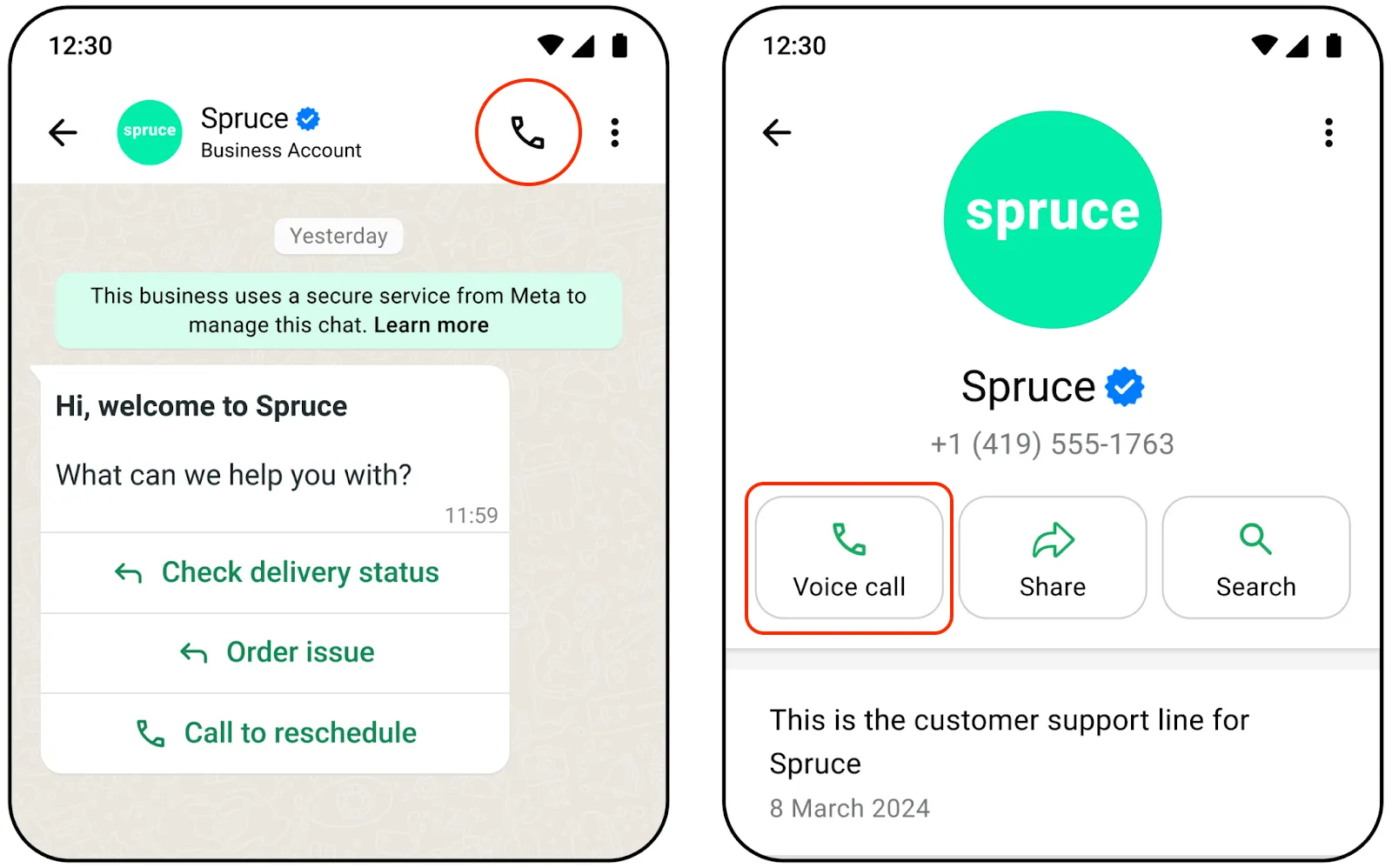
`DISABLE ALL`
The call button icon is hidden in the chat menu bar and the business info page, and all other entry points external to the chat are also disabled. Consumers cannot make unsolicited calls to the business.
Your business can still [send interactive messages](/books/meta-whatsapp/page/send-whatsapp-call-button-messages-and-deep-links-developer-documentation) or [template messages](/books/meta-whatsapp/page/send-whatsapp-call-button-messages-and-deep-links-developer-documentation) with a Calling API CTA button.
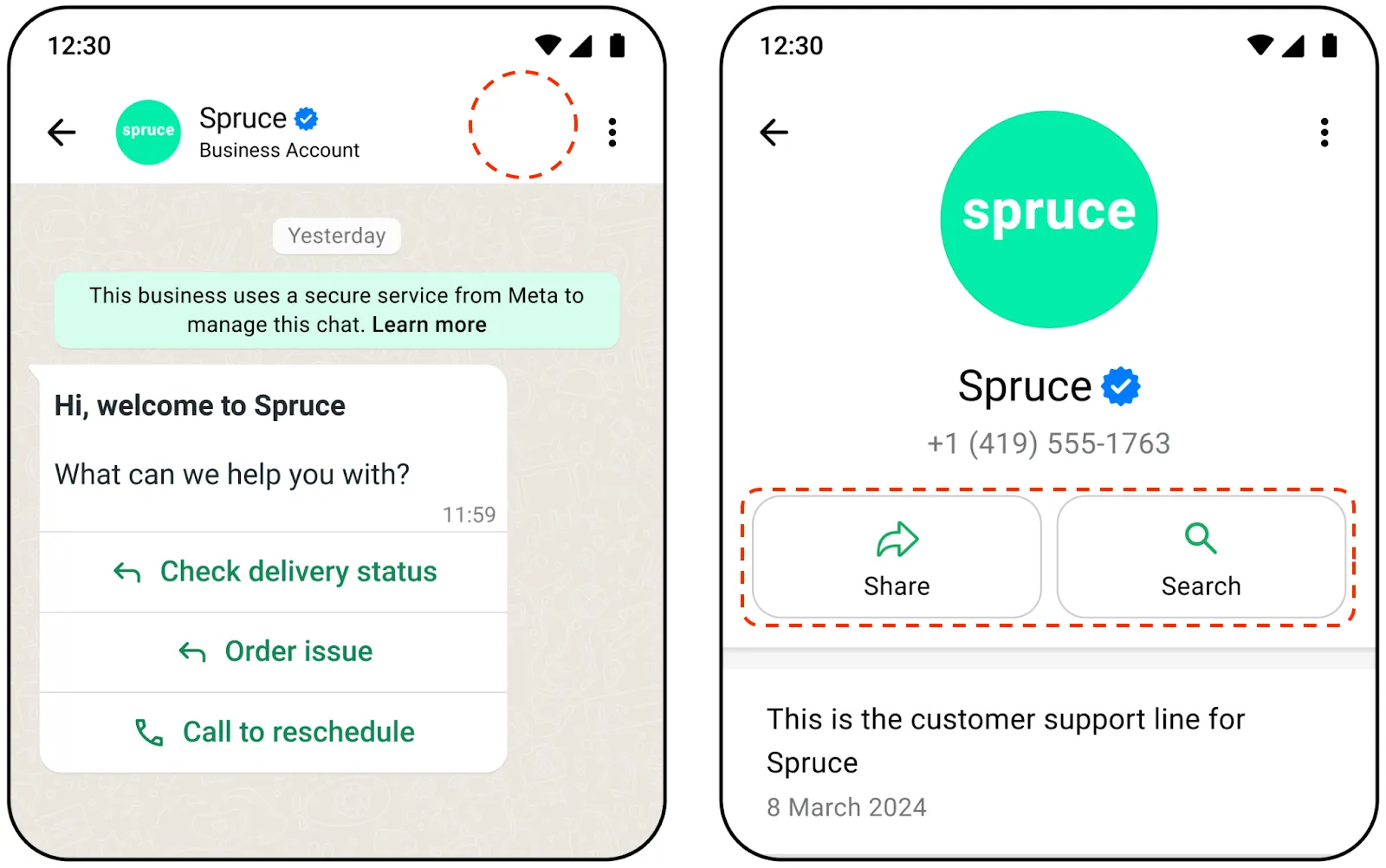
###### Callback permissions
Calling a WhatsApp user requires explicit permission from the user. One way to obtain calling permissions is to request permission when a WhatsApp user calls your business.
You can configure the call permission UI to automatically show in the WhatsApp user’s client app when they call your business number. The user may change their permission selection at any time.
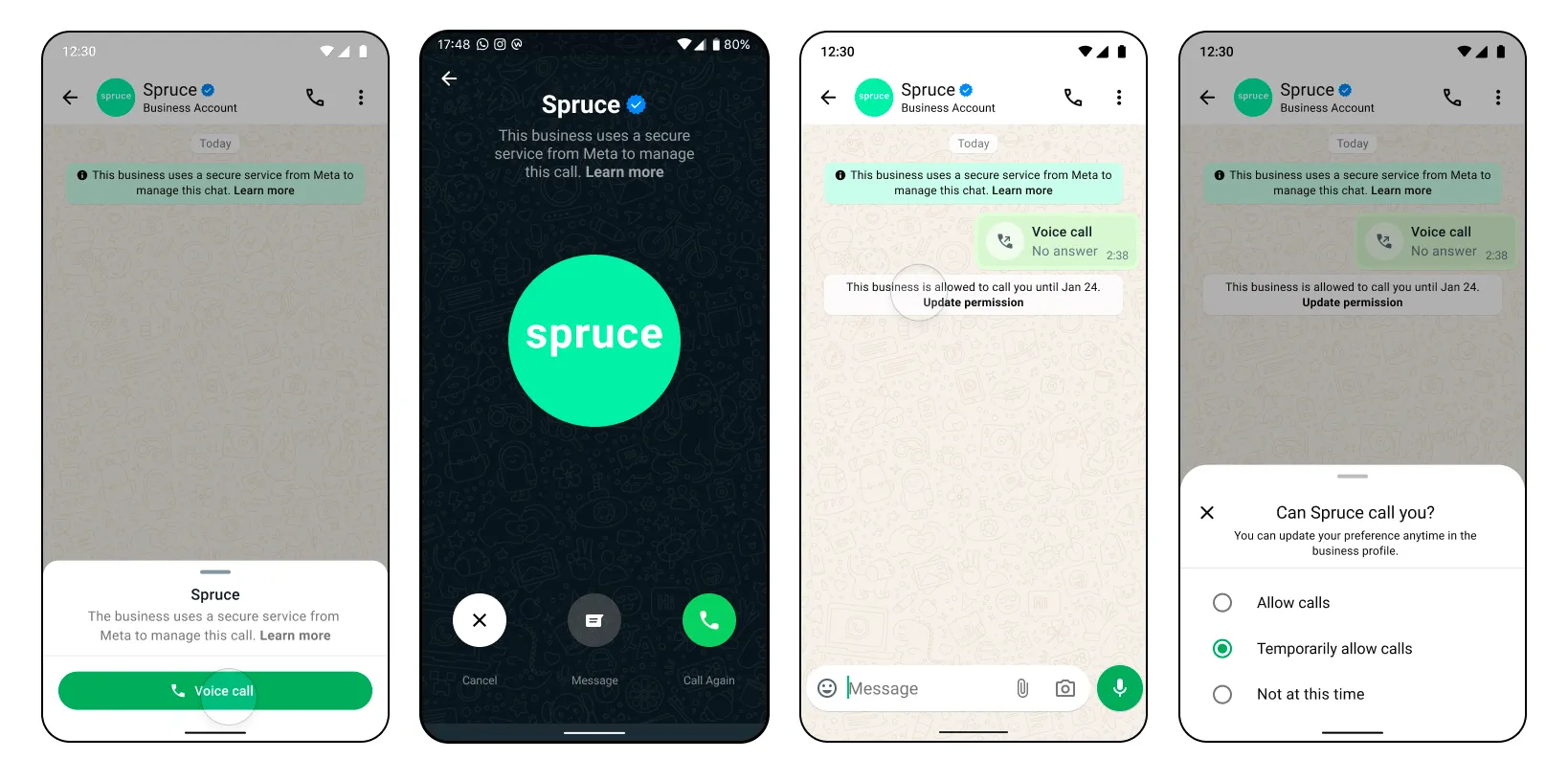
Possible errors that can occur:
Permissions/Authorization errorsInvalid statusInvalid schedule for `call_hours`Holiday given in `call_hours` is a past dateTimezone is invalid in `call_hours``weekly_operating_hours` in `call_hours` cannot be emptyDate format in `holiday_schedule` for call\_hours is invalidMore than 2 entries not allowed in `weekly_operating_hours` schedule in `call_hours`Overlapping schedule in `call_hours` is not allowed[View Calling API Error Codes and Troubleshooting for more information](/books/meta-whatsapp/page/troubleshoot-whatsapp-calling-errors-reference-guide-developer-documentation).
[View general Cloud API Error Codes here](/documentation/business-messaging/whatsapp/support/error-codes).
#### Get phone number calling settings
This endpoint can return information for other Cloud API feature settings.
##### Endpoint parameters
| Parameter | Description | Sample Value |
|---|
| **Required**
The business phone number for which you are getting Calling API settings. [Learn more about formatting phone numbers in Cloud API](/books/meta-whatsapp/page/business-phone-numbers-developer-documentation) | |
##### App permission required
`whatsapp_business_management`: Advanced access is required to use the API for end business clients
The endpoint returns Calling API settings, along with other configuration information for your WhatsApp business phone number.
[Learn more about Calling API settings and their values](/books/meta-whatsapp/page/configure-call-settings-developer-documentation)
Possible errors that can occur:
Permissions/Authorization errors[View Calling API Error Codes and Troubleshooting for more information](/books/meta-whatsapp/page/troubleshoot-whatsapp-calling-errors-reference-guide-developer-documentation)
[View general Cloud API Error Codes here](/documentation/business-messaging/whatsapp/support/error-codes)
When you pre-accept an inbound call, you allow the calling media connection to be established before attempting to send call media through the connection.
When you then call the accept call endpoint, media begins flowing immediately since the connection has already been established.
Pre-accepting calls is recommended because it facilitates faster connection times and avoids [audio clipping issues](/books/meta-whatsapp/page/troubleshoot-whatsapp-calling-errors-reference-guide-developer-documentation).
There is about 30 to 60 seconds after the [Call Connect webhook](#bkmrk-call-connect-webhook-1) is sent for the business to accept the phone call. If the business does not respond, the call is terminated on the WhatsApp user side with a “Not Answered” notification and a [Terminate Webhook](#bkmrk-call-terminate-webho-1) is delivered back to you.
**Note:** Since the WebRTC connection is established before calling the [Accept Call endpoint](#bkmrk-accept-call-1), make sure to flow the call media only after you receive a 200 OK response back.
If call media flows too early, the caller will miss the first few words of the call. If call media flows too late, callers will hear silence.
| Parameter | Description | Sample Value |
|---|
| **Required**
The ID of the phone call. For inbound calls, you receive a call ID from the [Call Connect webhook](#bkmrk-call-connect-webhook-1) when a WhatsApp user initiates the call. | `“wacid.ABGGFjFVU2AfAgo6V-Hc5eCgK5Gh”` |
| **Optional**
The action being taken on the given call ID. Values can be `connect` | `pre_accept` | `accept` | `reject` | `terminate` | |
| **Optional**
Contains the session description protocol (SDP) type and description language. Requires two values: `sdp_type` — (*String*) **Required** “offer”, to indicate SDP offer `sdp` — (*String*) **Required** The SDP info of the device on the other end of the call. The SDP must be compliant with [RFC 8866](https://l.facebook.com/l.php?u=https%3A%2F%2Fdatatracker.ietf.org%2Fdoc%2Fhtml%2Frfc8866&h=AT4RSFrfLLXXKF37xVCfqqRGHvlDHJBDgunPA7j50px7xyvJVuCK4INxmOr3DKEByyuz1glDoijkBxZmRGwqeLrcNOCNbWzh7m-7tcLnAcR19kX7idO43EulK0i2M5JWyFr-i5czyraNSsq3zywGQQ). [Learn more about Session Description Protocol (SDP)](https://l.facebook.com/l.php?u=https%3A%2F%2Fwww.rfc-editor.org%2Frfc%2Frfc8866.html&h=AT4RSFrfLLXXKF37xVCfqqRGHvlDHJBDgunPA7j50px7xyvJVuCK4INxmOr3DKEByyuz1glDoijkBxZmRGwqeLrcNOCNbWzh7m-7tcLnAcR19kX7idO43EulK0i2M5JWyFr-i5czyraNSsq3zywGQQ) [View example SDP structures](#bkmrk-sdp-overview-and-sam-1) | |
Possible errors that can occur:
Invalid `call-id`Invalid `phone-number-id`Error related to your payment methodInvalid Connection info, for example, sdp, iceAccept/Reject an already In Progress/Completed/Failed callPermissions/Authorization errors[View Calling API Error Codes and Troubleshooting for more information](/books/meta-whatsapp/page/troubleshoot-whatsapp-calling-errors-reference-guide-developer-documentation).
[View general Cloud API Error Codes here](/documentation/business-messaging/whatsapp/support/error-codes).
Use this endpoint to connect to a call by providing a call agent’s SDP.
You have about 30 to 60 seconds after the [Call Connect Webhook](#bkmrk-call-connect-webhook-1) is sent to accept the phone call. If your business does not respond, the call is terminated on the WhatsApp user side with a “Not Answered” notification and a [Terminate Webhook](#bkmrk-call-terminate-webho-1) is delivered back to you.
Possible errors that can occur:
Invalid `call-id`Invalid `phone-number-id`Error related to your payment methodInvalid Connection info, for example, sdp, ice, or other connection parametersAccept/Reject an already In Progress/Completed/Failed callPermissions/Authorization errorsSDP answer provided in accept does not match the SDP answer given in the [Pre-Accept endpoint](#bkmrk-pre-accept-call-1) for the same `call-id`[View Calling API Error Codes and Troubleshooting for more information](/books/meta-whatsapp/page/troubleshoot-whatsapp-calling-errors-reference-guide-developer-documentation).
[View general Cloud API Error Codes here](/documentation/business-messaging/whatsapp/support/error-codes).
Use this endpoint to reject a call.
You have about 30 to 60 seconds after the [Call Connect webhook](#bkmrk-call-connect-webhook-1) is sent to accept the phone call. If the business does not respond, the call is terminated on the WhatsApp user side with a “Not Answered” notification and a [Terminate Webhook](#bkmrk-call-terminate-webho-1) is delivered back to you.
| Parameter | Description | Sample Value |
|---|
| **Required**
The ID of the phone call. For inbound calls, you receive a call ID from the [Call Connect webhook](#bkmrk-call-connect-webhook-1) when a WhatsApp user initiates the call. | `“wacid.ABGGFjFVU2AfAgo6V-Hc5eCgK5Gh”` |
| **Optional**
The action being taken on the given call ID. Values can be `connect` | `pre_accept` | `accept` | `reject` | `terminate` | |
Possible errors that can occur:
Invalid `call-id`Invalid `phone-number-id`Accept/Reject an already In Progress/Completed/Failed callPermissions/Authorization errors[View Calling API Error Codes and Troubleshooting for more information](/books/meta-whatsapp/page/troubleshoot-whatsapp-calling-errors-reference-guide-developer-documentation).
[View general Cloud API Error Codes here](/documentation/business-messaging/whatsapp/support/error-codes).
Use this endpoint to initiate a call to a WhatsApp user by providing a phone number and a WebRTC call offer.
Possible errors that can occur:
Invalid `phone-number-id`Permissions/Authorization errorsRequest format validation errors, for example connection info, sdp, iceSDP validation errors[View Calling API Error Codes and Troubleshooting for more information](/books/meta-whatsapp/page/troubleshoot-whatsapp-calling-errors-reference-guide-developer-documentation).
[View general Cloud API Error Codes here](/documentation/business-messaging/whatsapp/support/error-codes).
Use this endpoint to terminate an active call.
This must be done even if there is an `RTCP BYE` packet in the media path. Ending the call this way also ensures pricing is more accurate.
When the WhatsApp user terminates the call, you do not have to call this endpoint. Once the call is successfully terminated, a [Call Terminate Webhook](/books/meta-whatsapp/page/business-initiated-calls-developer-documentation) will be sent to you.
| Parameter | Description | Sample Value |
|---|
| **Required**
The ID of the phone call. For inbound calls, you receive a call ID from the [Call Connect webhook](/books/meta-whatsapp/page/business-initiated-calls-developer-documentation) when a WhatsApp user initiates the call. | `“wacid.ABGGFjFVU2AfAgo6V-Hc5eCgK5Gh”` |
| **Required**
The action being taken on the given call ID. Values can be `connect` | `pre_accept` | `accept` | `reject` | `terminate` | |
Possible errors that can occur:
Invalid `call id`Invalid `phone-number-id`The WhatsApp user has already terminated the callReject call is already in progressPermissions/Authorization errors[View Calling API Error Codes and Troubleshooting for more information](/books/meta-whatsapp/page/troubleshoot-whatsapp-calling-errors-reference-guide-developer-documentation).
[View general Cloud API Error Codes here](/documentation/business-messaging/whatsapp/support/error-codes).
#### Get current call permission state
Use this endpoint to get the call permission state for a business phone number with a single WhatsApp user phone number.
| Parameter | Description | Sample Value |
|---|
| **Required**
The business phone number you are fetching permissions against. [Learn more about formatting phone numbers in Cloud API](/books/meta-whatsapp/page/business-phone-numbers-developer-documentation) | |
| **Required**
The phone number of the WhatsApp user who you are requesting call permissions from. [Learn more about formatting phone numbers in Cloud API](/books/meta-whatsapp/page/business-phone-numbers-developer-documentation) | |
Possible errors that can occur:
Invalid `phone-number-id`If the consumer phone number is uncallable, the api response will be `no_permission`.Permissions/Authorization errors.Rate limit reached. A maximum of 5 requests in a 1 second window can be made to the API.Calling is not enabled for the business phone number.[View Calling API Error Codes and Troubleshooting for more information](/books/meta-whatsapp/page/troubleshoot-whatsapp-calling-errors-reference-guide-developer-documentation)
[View general Cloud API Error Codes here](/documentation/business-messaging/whatsapp/support/error-codes)
### SDP overview and sample SDP structures
Session Description Protocol (SDP) is a text-based format that describes multimedia session characteristics, such as voice and video calls, in real-time communication applications. SDP provides a standardized way to convey information about the session’s media streams, including the type of media, codecs, protocols, and other parameters necessary for establishing and managing the session.
In the context of WebRTC, SDP is used to negotiate the media parameters between the sender and receiver, enabling them to agree on the specifics of the media exchange.
#### Business-initiated sample SDP structures
##### Sample SDP offer structure
```
v=0
o=-36261663187458529552 IN IP4 127.0.0.1
s=-
t=00
a=group:BUNDLE 0
a=extmap-allow-mixed
a=msid-semantic: WMS d8b26053-4474-4eb7-b3c3-c93d6c8c9b2e
m=audio 9 UDP/TLS/RTP/SAVPF 11163908110126
c=IN IP4 0.0.0.0
a=rtcp:9 IN IP4 0.0.0.0
a=ice-ufrag:4g1c
a=ice-pwd:qY/Bb+jQzg5ICn6X4fhJQetk
a=ice-options:trickle
a=fingerprint:sha-25635:47:24:24:9F:93:C4:3E:DB:37:7F:BB:ED:F8:20:B5:AD:AC:DC:35:C2:7D:67:EE:6C:35:54:DF:A6:00:5C:4A
a=setup:actpass
a=mid:0
a=extmap:1 urn:ietf:params:rtp-hdrext:ssrc-audio-level
a=extmap:2 http://www.webrtc.org/experiments/rtp-hdrext/abs-send-time
a=extmap:3 http://www.ietf.org/id/draft-holmer-rmcat-transport-wide-cc-extensions-01
a=extmap:4 urn:ietf:params:rtp-hdrext:sdes:mid
a=sendrecv
a=msid:d8b26053-4474-4eb7-b3c3-c93d6c8c9b2e 5b4d3d96-ea9b-44a8-87e6-11a1ad21a3bc
a=rtcp-mux
a=rtpmap:111 opus/48000/2
a=rtcp-fb:111 transport-cc
a=fmtp:111 minptime=10;useinbandfec=1
a=rtpmap:63 red/48000/2
a=fmtp:63111/111
a=rtpmap:9 G722/8000
a=rtpmap:0 PCMU/8000
a=rtpmap:8 PCMA/8000
a=rtpmap:110 telephone-event/48000
a=rtpmap:126 telephone-event/8000
a=ssrc:2220762577 cname:w/zwpg3jXNiTFTdZ
a=ssrc:2220762577 msid:d8b26053-4474-4eb7-b3c3-c93d6c8c9b2e 5b4d3d96-ea9b-44a8-87e6-11a1ad21a3bc
```
##### Sample SDP answer structure
```
v=0
o=-7418078391020537252 IN IP4 127.0.0.1
s=-
t=00
a=group:BUNDLE 0
a=extmap-allow-mixed
a=msid-semantic: WMS 798a9670-c0d6-47a8-925e-5f082ef4d8a0
a=ice-lite
m=audio 3482 UDP/TLS/RTP/SAVPF 111908110126
c=IN IP4 31.13.65.130
a=rtcp:9 IN IP4 0.0.0.0
a=candidate:27549362801 udp 211393715131.13.65.1303482 typ host generation 0 network-cost 50 ufrag JHqAXFH4HcAY/8
a=candidate:15814963991 udp 21139397112a03:2880:f211:d1:face:b00c:0:699c3482 typ host generation 0 network-cost 50 ufrag JHqAXFH4HcAY/8
a=ice-ufrag:JHqAXFH4HcAY/8
a=ice-pwd:dNNMmR8wUcGezvfBZOO0Qgcwl2m86GP/
a=ice-options:trickle
a=fingerprint:sha-2569C:97:5C:4C:A9:BE:9E:2F:06:94:F5:BB:38:2C:A1:29:B5:69:B8:FA:94:10:56:1D:0B:5D:80:28:C1:FD:F0:F6
a=setup:active
a=mid:0
a=extmap:1 urn:ietf:params:rtp-hdrext:ssrc-audio-level
a=extmap:2 http://www.webrtc.org/experiments/rtp-hdrext/abs-send-time
a=extmap:3 http://www.ietf.org/id/draft-holmer-rmcat-transport-wide-cc-extensions-01
a=sendrecv
a=rtcp-mux
a=rtpmap:111 opus/48000/2
a=rtcp-fb:111 transport-cc
a=fmtp:111 minptime=10;useinbandfec=1
a=rtpmap:9 G722/8000
a=rtpmap:0 PCMU/8000
a=rtpmap:8 PCMA/8000
a=rtpmap:110 telephone-event/48000
a=rtpmap:126 telephone-event/8000
a=ssrc:3407645770 cname:bg8KQDoIk2UJa6sf
a=ssrc:3407645770 msid:798a9670-c0d6-47a8-925e-5f082ef4d8a0 audio#nuxVMf9EAJX
a=ssrc:3407645770 mslabel:798a9670-c0d6-47a8-925e-5f082ef4d8a0
a=ssrc:3407645770 label:audio#nuxVMf9EAJX
```
#### User-initiated sample SDP structures
##### Sample SDP offer structure
```
v=0
o=-76025637897899450802 IN IP4 127.0.0.1
s=-
t=00
a=group:BUNDLE audio
a=msid-semantic: WMS 6932bc1c-db1a-4abe-b437-0c4168be8a13
a=ice-lite
m=audio 40012 UDP/TLS/RTP/SAVPF 111126
c=IN IP4 31.13.65.60
a=rtcp:9 IN IP4 0.0.0.0
a=candidate:19726373201 udp 211393715131.13.65.6040012 typ host generation 0 network-cost 50 ufrag 6k2qP1R6kBfI/2
a=candidate:16522627911 udp 21139397112a03:2880:f211:cf:face:b00c:0:644340012 typ host generation 0 network-cost 50 ufrag 6k2qP1R6kBfI/2
a=ice-ufrag:6k2qP1R6kBfI/2
a=ice-pwd:UApvJw3NcwFRDvIMKdM0vWCdlXah25E9
a=fingerprint:sha-2561B:B6:6B:40:A5:0B:8C:75:0D:8C:CB:90:2F:99:74:1E:26:45:AE:AF:45:C1:51:60:8F:73:C9:2D:10:6D:8A:88
a=setup:actpass
a=mid:audio
a=extmap:1 urn:ietf:params:rtp-hdrext:ssrc-audio-level
a=extmap:2 http://www.webrtc.org/experiments/rtp-hdrext/abs-send-time
a=extmap:3 http://www.ietf.org/id/draft-holmer-rmcat-transport-wide-cc-extensions-01
a=sendrecv
a=rtcp-mux
a=rtpmap:111 opus/48000/2
a=rtcp-fb:111 transport-cc
a=fmtp:111 minptime=10;useinbandfec=1
a=rtpmap:126 telephone-event/8000
a=ssrc:4208138518 cname:gAXq2V9TKltrnapv
a=ssrc:4208138518 msid:6932bc1c-db1a-4abe-b437-0c4168be8a13 audio#R5wfXFcdmT6
a=ssrc:4208138518 mslabel:6932bc1c-db1a-4abe-b437-0c4168be8a13
a=ssrc:4208138518 label:audio#R5wfXFcdmT6
```
##### Sample SDP answer structure
```
v=0
o=-28226442481446439332 IN IP4 127.0.0.1
s=-
t=00
a=group:BUNDLE audio
a=msid-semantic: WMS eb909cf0-87f0-4358-a4c9-7861680d9431
m=audio 9 UDP/TLS/RTP/SAVPF 111126
c=IN IP4 0.0.0.0
a=rtcp:9 IN IP4 0.0.0.0
a=ice-ufrag:X1ho
a=ice-pwd:7fJSbV2N5qWiA5QiDKwK3vuh
a=fingerprint:sha-2562E:35:9F:21:9E:63:72:E5:42:74:76:2D:B3:70:F7:CB:24:14:9B:14:52:71:05:48:DA:4D:67:31:09:58:2A:ED
a=setup:active
a=mid:audio
a=extmap:1 urn:ietf:params:rtp-hdrext:ssrc-audio-level
a=extmap:2 http://www.webrtc.org/experiments/rtp-hdrext/abs-send-time
a=extmap:3 http://www.ietf.org/id/draft-holmer-rmcat-transport-wide-cc-extensions-01
a=sendrecv
a=rtcp-mux
a=rtpmap:111 opus/48000/2
a=rtcp-fb:111 transport-cc
a=fmtp:111 minptime=10;useinbandfec=1
a=rtpmap:126 telephone-event/8000
a=ssrc:330833028 cname:EDc1JutBl8rwHQc2
a=ssrc:330833028 msid:eb909cf0-87f0-4358-a4c9-7861680d9431 ea478c16-d9f7-493c-8cec-19bfac750a36
```
### Sample call connect webhook
##### Call connect webhook
## Troubleshoot WhatsApp Calling Errors - Reference Guide
Updated: Dec 3, 2025
### Standard error response
When you receive an error, in the majority of cases the error shape will look like this:
Use the Calling API error codes list below to identify and resolve calling errors.
The **Call Logs** tab in [WhatsApp Manager](https://business.facebook.com/latest/whatsapp_manager/phone_numbers) provides businesses and partners with a detailed, self-service view of call events to aid in call troubleshooting.
The tab displays a table of recent call logs for your business phone numbers. Each call has a log. Each log can have multiple events representing a Graph API request made by the business or a webhook sent by Meta. Each row represents a call, with different columns highlighted to provide information about each call log.
#### How to view call logs
#### Call logs and events
| Field | Description |
|---|
| Timestamp of when the call occurred. |
| Outbound (Business-initiated) or Inbound (User-initiated). |
| Signaling Protocol used to establish the call (SIP, GRAPH_API). |
| WhatsApp call identifier.
**Note: Please provide this ID when requesting support.** |
| Identifier for the request that initiated the call. |
| Additional information containing a log of events during the lifecycle of the call. |
| Code | Description | Possible Solutions | HTTP Status Code |
|---|
| The Graph API call you are making has an invalid parameter. | Exact error details will be listed in the `error_data` section of the response payload. If it’s an SDP validation related error then the exact issue will be included in the details. | |
`613` Fetch Call Permission For Consumer Phone Number API Limit Hit | Limit reached for requests to the fetch call permission status API. | Try again later or reduce the frequency or amount of requests to the API the app is making. | |
| Interactive Message type, `voice_call` not supported. Supported types [`button`, `list`] | Ensure the sender is in one of the [supported countries](/books/meta-whatsapp/page/faqs-developer-documentation). | |
| Recipient phone number is not in allowed list. The error is thrown for both attempted calls and call permission requests. Only occurs when using public test numbers (PTNs). | Add a recipient phone number to recipient list and try again. | |
`138000` Calling not enabled | Calling APIs are not enabled for this phone number | Calling is not enabled on the business phone number. [Configure call settings to enable Calling API features](/books/meta-whatsapp/page/configure-call-settings-developer-documentation) | |
`138001` Receiver Uncallable | Receiver is unable to receive calls Reasons can include:
The recipient phone number is not a WhatsApp phone number.The recipient has not accepted our new Terms of Service and Privacy Policy.Recipient using an unsupported client. The currently supported clients are Android, iOS, SMB Android and SMB iOS | Confirm with the recipient that they agree to be contacted by you over WhatsApp and are using the latest version of WhatsApp. | |
`138002` Concurrent Calls limit | Limit reached for maximum concurrent calls (1000) for the given number | Try again later or reduce the frequency or amount of API calls the app is making. | |
| A call is already ongoing with the receiver | Try again later when the current call ends. | |
| Error while connecting the call | Try again later or investigate the connection params provided to the API. | |
`138005` Call rate limit exceeded | Limit reached for maximum calls that can be initiated by the business phone number | Try again later or reduce the frequency or amount of API calls the app is making. | |
`138006` No approved call permission found | No approved [call permission](/books/meta-whatsapp/page/obtain-user-call-permissions-developer-documentation) from the recipient | Ensure a call permission has been accepted by the consumer | |
`138007` Connect Timeout error | Call was unable to connect due to a timeout | Business did not apply the offer/answer SDP from Cloud API in time. Connect API was not invoked with the answer SDP in time | |
`138009` Call Permission Request Limit Hit | Limit reached for call permission request sends for the given business and consumer pair | When a business sends more than the limit of call permission requests per time period, Call Permission Requests are rate limited. A connected call with a consumer will reset the limits. | |
`138012` Business Initiated Calls Limit Hit | Limit reached for maximum business initiated calls allowed in 24 hours. Currently 100 connected business initiated calls are allowed within 24 hours. | Exact error details will be listed in the `error_data` section of the response payload. Details will include a timestamp when the next call is allowed. | |
`138013` Business-initiated calling is not available | Business-initiated calling is not available for this business account phone number. | Confirm that Business Initiated calling is available for this business account phone number in the [availability section here](/books/meta-whatsapp/page/cloud-api-calling-developer-documentation). | |
`138014` Calling is temporarily disabled | Calling APIs for this WhatsApp Business Number have been temporarily disabled for having low quality. | Ensure that your outreach to users is valuable and not spam. Retry the action after the account restrictions are lifted. | |
`138015` Calling cannot be enabled | Calling APIs cannot be enabled for this phone number. | Check and make sure [messaging limit](/books/meta-whatsapp/page/messaging-limits-developer-documentation) on your phone number is 2000 or more | |
`138017` Call permission request can’t be sent because a permanent permission already exists. | Call permission request cannot be sent because a permanent permission has already been approved by the user for this business account phone number. | No need to send call permission requests. | |
`138018` WhatsApp Business calling cannot be enabled because technical pre-requisites are not met. | See [prerequisites](/books/meta-whatsapp/page/cloud-api-calling-developer-documentation) for more details | [Configure SIP](/books/meta-whatsapp/page/sip-configuration-guide-whatsapp-business-calling-developer-documentation) or ensure there is at-least one app subscribed to the WhatsApp Business Account that also has subscription to the `calls` webhook field. | |
`138019` Call setup failed | The WhatsApp client failed to set up the call. This error is sent in the call terminate webhook. | | |
`138020` Relay connection failed | The WhatsApp client failed to establish a connection with the relay server. This error is sent in the call terminate webhook. | | |
`138021` Media receive timeout | The WhatsApp client terminated the call due to not receiving any media for a long time. This error is sent in the call terminate webhook. | Confirm that call media is being sent to the relay and try again. | |
`138022` Media transmit timeout | The WhatsApp client terminated the call due to not transmitting any media for a long time. This error is sent in the call terminate webhook. | | |
`138023` Call accepted but terminated with no media signals | The call was accepted but terminated with no media connection signals. Cloud API could not determine if the call was connected. This error is sent in the call terminate webhook. | | |
| An error webhook is sent on user initiated calls when there is no valid payment method attached | This is similar to the [“Business eligibility payment issue”](/documentation/business-messaging/whatsapp/support/error-codes) error in messaging. | |
| Method not allowed. Graph API calls are not allowed for SIP enabled numbers | Use [SIP](/books/meta-whatsapp/page/sip-configuration-guide-whatsapp-business-calling-developer-documentation) for SIP enabled business numbers. | |
Also refer to [SIP specific FAQ](/books/meta-whatsapp/page/faqs-developer-documentation) for additional troubleshooting info
#### Business initiated calls
| SIP status and message | Description | Possible Solutions |
|---|
`400` Asset not found, invalid business phone number | The phone number in the `From` header of the INVITE is invalid and does not correspond to a registered account on WhatsApp Business Platform | Check the phone number and resend the INVITE with the correct `From` header value. See [examples](/books/meta-whatsapp/page/sip-configuration-guide-whatsapp-business-calling-developer-documentation) |
`403` SIP server `foo.com` from INVITE does not match any SIP server configured for phone number id [ID] | Your SIP INVITE to Meta has ‘foo.com’ in the `From` header (for example, `15555551234@foo.com`). But there is no SIP server with that hostname [configured](/books/meta-whatsapp/page/sip-configuration-guide-whatsapp-business-calling-developer-documentation) on the business phone number. | Check your [SIP configuration](/books/meta-whatsapp/page/sip-configuration-guide-whatsapp-business-calling-developer-documentation) and ensure it matches the domain used in the `From` header. The `hostname` in the [SIP configuration](/books/meta-whatsapp/page/sip-configuration-guide-whatsapp-business-calling-developer-documentation) should match the domain in the `From` header of your SIP INVITE. It is also valid for the SIP configuration `hostname` to be a sub-domain of the domain in `From` header. For example, SIP server configured is `bar.foo.com` and the From header is `15555551234@foo.com` |
`403` No Approved Call Permission Found: No approved call permission from the recipient | There is no WhatsApp user with specified number or user has not accepted our new Terms of Service or there is no permission from user to call the business. Meta can’t reveal if a phone number is on WhatsApp with certainty, due to privacy reasons. So this is the same error you’ll receive for multiple reasons. | Double check the user phone number and make sure you obtain the user permission. See [Obtain User Call Permissions ](/books/meta-whatsapp/page/obtain-user-call-permissions-developer-documentation)for more information |
`403` The app [APP_ID] configured for SIP server `example.com` is not authorized for phone number id [ID] | When you configure SIP server on a business phone, Meta extracts the app id from the access token and stores a mapping from the SIP server to that app id. When you send a SIP INVITE, Meta consults that mapping to know which app is making the SIP request. This error means that app does not have `whatsapp_business_messaging` permission on the business phone. | Check that you are using the right app and make sure it has permissions on the business phone. If you’re able to [send message](/books/meta-whatsapp/page/sending-messages-developer-documentation) using the app’s access token, that means the app has the right permission. Otherwise you may need to delete and add your SIP server with the correct app and retry your SIP INVITE. See [Configuring SIP settings](/books/meta-whatsapp/page/sip-configuration-guide-whatsapp-business-calling-developer-documentation). |
`403` Business Initiated Connected Call Per Day Limit Hit | Limit reached for maximum business initiated calls allowed in 24 hours. Currently 5 connected business initiated calls are allowed within 24 hours. | See more info about the [limits](/books/meta-whatsapp/page/obtain-user-call-permissions-developer-documentation) and adjust your calling rate accordingly |
`403` Additional reasons for 403 include
Duplicate call because there can be only one active between a given business and user accountInvalid digest auth responseBusiness eligibility payment issueSDP Validation Error | Read each error for details | Consult earlier sections in this page like [Calling error codes](/books/meta-whatsapp/page/troubleshoot-whatsapp-calling-errors-reference-guide-developer-documentation) |
| SIP INVITEs using IP in request URI are not allowed | Use the correct request URI. See [examples](/books/meta-whatsapp/page/sip-configuration-guide-whatsapp-business-calling-developer-documentation) |
`407` Proxy Authentication Required | Meta mandates digest authentication for your SIP INVITEs and this is the standard challenge response from Meta | Resend the SIP INVITE with digest response. See [examples](/books/meta-whatsapp/page/sip-configuration-guide-whatsapp-business-calling-developer-documentation) |
| The WhatsApp client terminated the call due to not receiving any media for a long time. | See [Media related issues](/books/meta-whatsapp/page/troubleshoot-whatsapp-calling-errors-reference-guide-developer-documentation) |
`480` Temporarily Unavailable | WhatsApp user is not reachable or did not answer the call | Try messaging or calling later. Unanswered calls impact call permissions. [Learn more](/books/meta-whatsapp/page/obtain-user-call-permissions-developer-documentation) |
`486` User declined the call | WhatsApp user declined your call | Try messaging or calling later. Rejected calls impact call permissions. [Learn more](/books/meta-whatsapp/page/obtain-user-call-permissions-developer-documentation) |
| Business canceled their SIP INVITE using SIP CANCEL | Expected return for your SIP INVITE when you CANCEL the INVITE before Meta response to your INVITE |
| | Retry your request after some time or consult Meta support |
| Issue | Description | Possible Solutions |
|---|
Call disconnects after 20 seconds into the call | At the start of the call, if there is no media flowing from business to WhatsApp user for 20 seconds, WhatsApp client will disconnect the call due to no media |
Check your media server to make sure it’s initiating the media session and sending media packetsCheck your firewall to rule out any packet drops at your edgeCapture network traffic using pcap or a similar tool and attach it to the support ticket for further troubleshooting by Meta |
Can’t hear audio and call disconnects after 30 seconds | After the call is connected and established, if there is no media packet from business to WhatsApp user for 30 seconds, WhatsApp client will disconnect the call due to no media reception |
Make sure you’re at-least sending RTCP packets even when there is silence or when you are waiting for user input (for example, IVR)Check your media server to understand why it stops sending media packets to MetaCapture network traffic using pcap or a similar tool and attach it to the support ticket for further troubleshooting by Meta |
### Audio clipping issue and solution
When bridging the WhatsApp Consumer media leg via WebRTC to another media leg, such as [SIP](https://l.facebook.com/l.php?u=https%3A%2F%2Fdatatracker.ietf.org%2Fdoc%2Fhtml%2Frfc3261&h=AT6wIT1U0B7nAgDvd_5gYYUZ8P1NriwWNsk_ok5tZgTWrw2PNmQOCj4_wQCjjnV0xWqbZ_hpd4G832tYZgUXg8MM9npHB77fj6nkXDdDjn70mYgFFeGSMCBZyAJJVCSAmSjbYKWbj59o-MHhRukGuw), it’s important to be aware of potential audio clipping issues and how to prevent them. A common symptom of this issue is that the WhatsApp consumer may miss approximately one second of audio from the business. For instance, if an IVR system is playing a sequence like “1-2-3,” the consumer might only hear “2” or “3.” The extent of audio loss varies based on the specific integration and the severity of the issue.
The sequence diagram below illustrates this problem using an example where the WebRTC leg from the Cloud API is bridged with a SIP media leg. Depending on the SIP vendor and implementation, the media from the SIP User Agent might start playing at step 11, but it won’t reach the WhatsApp consumer until step 18.
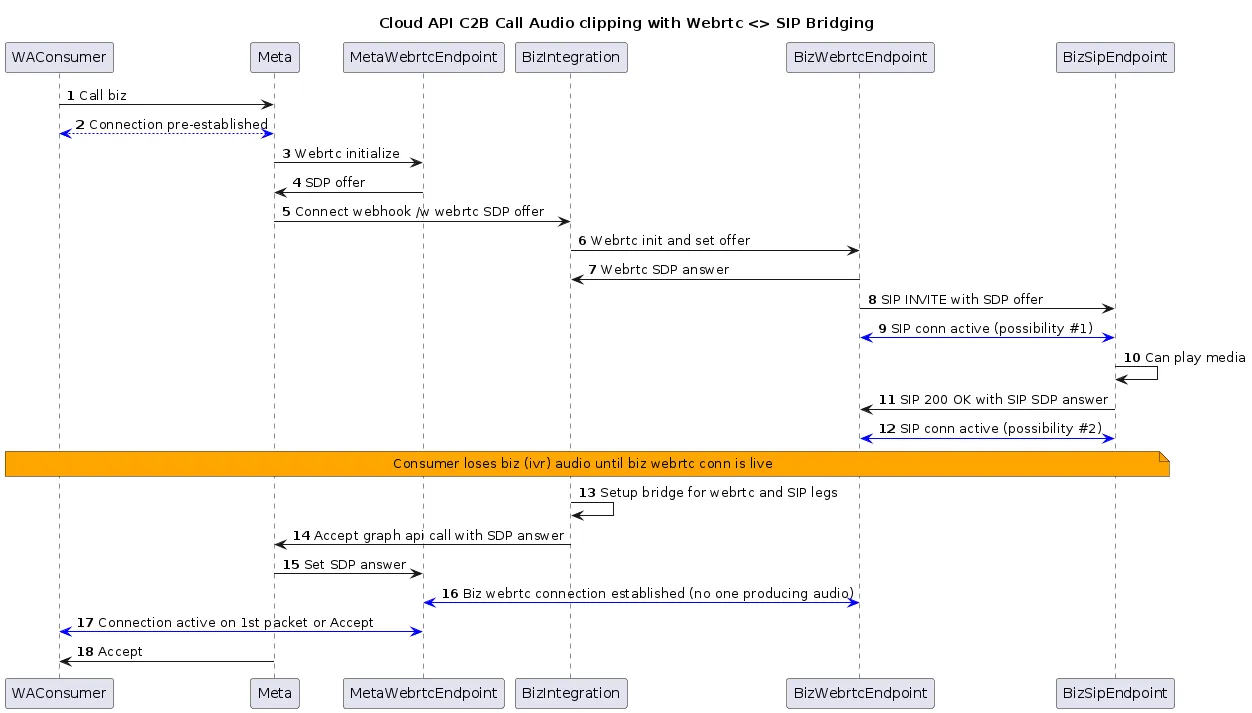 (*Right click image and choose “Open in new tab” for enlarged image*)
##### Components of the sequence diagram
When bridging two media legs, it’s crucial for the media server to synchronize their readiness to prevent audio clipping. In this scenario, the BizWebrtcEndpoint is allowing the SIP User Agent (UA) to transmit media significantly earlier than the WebRTC leg is prepared to receive it. As a result, packets are being dropped at the media server, leading to audio clipping issues.
Below is a high-level summary of alternative approaches to address audio clipping, intended to stimulate discussion and consideration. While each option has its drawbacks, you can assess their feasibility in the context of your specific requirements.
**Use SDES**: [Configure SDES](/books/meta-whatsapp/page/sip-configuration-guide-whatsapp-business-calling-developer-documentation) on your business number instead of DTLS. A common reason for delayed setup of the media leg between your infrastructure and Meta is DTLS handshake completion. Meta cannot complete DTLS handshake until it receives your SDP. You may not be able share your SDP with Meta until your internal endpoint responds to your with their SDP. Common DTLS implementations have a retry interval of 1s, 2s, 4s, and so on. After you send Meta the SDP, there is often a ~3 second delay before we receive your DTLS client hello packet and this is when your internal endpoint is sending media but it is dropped. When you switch to SDES you can directly send SRTP after you send us your SDP.**Delayed Audio Playback:** Instruct the SIP User Agent (UA) to wait for an ACK from BizWebrtcEndpoint before playing audio. The ACK would be sent only after receiving a successful response from the Accept API, followed by an artificial delay. This approach ensures that the WebRTC connection is established before audio playback begins.**Connection State-Based Delay:** Direct the SIP UA to wait until the WebRTC connection state is ‘connected’ before playing audio. This method relies on the WebRTC connection being fully established before audio playback starts.**Buffered Media Packets:** Buffer SIP media packets and send them only after the WebRTC connection is established. This approach ensures that no audio packets are lost due to premature playback.**Silence Insertion:** Insert a brief period of silence into the IVR audio before the actual audio content. This method allows the WebRTC connection to establish itself while the IVR is playing silence, reducing the likelihood of audio clipping.**Pre-accept**: According to the [RFC recommendation](https://l.facebook.com/l.php?u=https%3A%2F%2Fdatatracker.ietf.org%2Fdoc%2Fhtml%2Frfc8839%23name-offer-in-invite&h=AT6wIT1U0B7nAgDvd_5gYYUZ8P1NriwWNsk_ok5tZgTWrw2PNmQOCj4_wQCjjnV0xWqbZ_hpd4G832tYZgUXg8MM9npHB77fj6nkXDdDjn70mYgFFeGSMCBZyAJJVCSAmSjbYKWbj59o-MHhRukGuw), a WebRTC agent, such as BizWebrtcEndpoint, should not transmit media until the ICE process is nearly complete. In our context, this means adopting an ‘optimistic accept’ strategy by invoking the [pre-accept API call](/books/meta-whatsapp/page/api-and-webhook-reference-developer-documentation) even before sending the SIP INVITE. According to SIP RFCs, a User Agent Client (UAC) should be prepared to receive media immediately after sending the INVITE. Therefore, it’s advisable to initiate the WebRTC connection setup process prior to sending the SIP INVITE.These solutions may have varying degrees of complexity and impact on your system. It’s essential to evaluate their feasibility and potential trade-offs in the context of your specific use case.
For support concerning WhatsApp Business Calling API, choose the **WaBiz: Calling API** topic when opening a [Direct Support](https://business.facebook.com/direct-support/) ticket.
## Set Up a Sandbox Account for Calling
Updated: Oct 31, 2025
Sandbox accounts are only available to you if you are a Tech Partner.
A WhatsApp sandbox account is a mock WhatsApp Business Account that you can use to test your Calling API integration. Use a calling sandbox account to test the following features:
Initiate and receive calls using the Calling APIValidate calling webhook eventsSimulate onboarding flows without creating real business assets### Sandbox account calling limits
The following table outlines the calling limits for sandbox accounts. These limits are subject to change.
| Limit | Description | Production number limit | Public test number limit |
|---|
| Number of calls a business is allowed to make on approved permissions. | 100 connected calls per 24 hrs | |
Call Permission Request message limits | Limits the number of call permission request messages that can be sent to the same consumer | 1 request per day
2 requests per week | 25 requests per day
100 requests per week |
| When a business initiated call goes unanswered (In essence, is rejected by the user or missed by the user). | Nudge on 2 consecutive unanswered calls
Revoke permission on 4 consecutive unanswered calls | Nudge on 5 consecutive unanswered calls
Revoke on 10 consecutive unanswered calls |
| Duration a business can call the user after permission is approved. | | |
### Set up a sandbox account
#### Step 1. Access the WhatsApp developer sandbox
#### Step 2. Obtain credentials and identifiers for your sandbox account
#### Step 3. Register your test phone number and subscribe to your WABA
*Prerequisites*
*Ensure that you have the following information from the previous steps:*
*Your sandbox account token string**Your sandbox account WABA ID**Your test phone number ID*To complete these next steps, you will use the [Graph API Explorer tool](https://developers.facebook.com/tools/explorer/).
**Note: Keep this window open as you will use the configuration you created again in later steps in this guide.** Navigate to the [Graph API Explorer tool](https://developers.facebook.com/tools/explorer/).Ensure you are on the latest version of the API.Click **Generate Access Token** and follow the prompts.Under **Permissions**, add the `whatsapp_business_management` and `whatsapp_business_messaging` permissionsIn the endpoint builder, enter `//subscribed_apps`, then click **Submit**. Next, register your test phone number by entering `//register` in the endpoint builder.In the left sidebar, click JSON, then enter the following JSON body, then click Submit: You should receive a standard `success` response:Navigate to the [App Dashboard](https://developers.facebook.com/apps).Click the app you are using with WhatsApp.Select **Use cases** (pencil icon) from the sidebar.Under **Connect with customers through WhatsApp**, click **Customize**.In the left sidebar, click **Configuration**.Under **Callback URL**, add the callback URL for your webhook server. If you do not have a webhook server, you can follow our [instructions to create a test webhook server](/books/meta-whatsapp/page/create-a-test-webhook-endpoint-developer-documentation).Under **Verify token**, add an arbitrary verification string.Click **Verify and save**.On the next page, in the **Select product** dropdown, click **WhatsApp Business Account**.Under **Webhook fields**, in the **calls** row, click the toggle button to subscribe to the `calls` webhook field.### Test business-initiated calling
Before you can test business-initiated calls (BIC), you must provide user calling permissions to your sandbox account.
You can do this on the client device you are using for testing:
On your client device, open WhatsApp.Navigate to the message thread you have with your sandbox business phone number.At the top of the screen, tap the sandbox business phone number.Scroll down and tap **Business Calling Permission**.Tap **Allow calls**.You can now use your Calling API integration to call the client device and test your integration.
[Learn more about how to make business-initiated calls.](/books/meta-whatsapp/page/business-initiated-calls-developer-documentation)
### Test user-initiated calling
You can test user-initiated calls (UIC) on the client device you are using for testing:
On your client device, open WhatsApp.Navigate to the message thread you have with your sandbox business phone number.Tap the phone icon at the top of the screen to call the sandbox business phone number.Confirm a successful call connection.[Learn more about how to handle user-initiated calls.](/books/meta-whatsapp/page/user-initiated-calls-developer-documentation)
## Calling API App Review Guidelines
Updated: Nov 21, 2025
The official page referenced by reviewers is [/docs/permissions#w](https://developers.facebook.com/docs/permissions#w). Use this guide as complementary to that page but treat that page as the official source when in doubt.
This page provides details to improve your chances of a successful App Review specifically for WhatsApp Business Calling API features.
#### For the WhatsApp business management permission
You should clearly show that your application can enable and disable calling features by displaying whether the Call Button icon is visible.
Do this by enabling and disabling calling features, not simply toggling Call Button icon visibility.
[Learn how to enable and disable Calling API features via API](/books/meta-whatsapp/page/configure-call-settings-developer-documentation)[Learn how to enable and disable Calling API features in WhatsApp Manager](/books/meta-whatsapp/page/configure-call-settings-developer-documentation)#### For the WhatsApp business messaging permission
You should clearly demonstrate your application can support **either of the following use cases:**
##### Use case 1: Place a business-initiated call
Share a video of you using your application to place a business-initiated call. Then display a user accepting the call on a WhatsApp mobile client.
##### Use case 2: Receive a user-initiated call
Share a video of a user placing a call to your business phone number. Then show your application receiving the incoming call.
Show either:
The incoming call in the WhatsApp client application UI.The calling webhook as delivered to your application.## Calling API Pricing
Updated: Mar 30, 2026
**All user-initiated calls are free.**
Businesses are charged for calls based on:
Duration of the call (calculated in six-second pulses)Country code of the phone number being calledVolume tier (based on minutes called within the calendar month) using same [tiering accrual](/books/meta-whatsapp/page/pricing-on-the-whatsapp-business-platform-developer-documentation) as messagingNote: Our systems count fractional pulses as one pulse. For example, a 56-second call (9.33 pulses) would be counted as 10 pulses.
For calls that cross pricing tiers (for example from the 0 - 50,000 tier to the 50,001 - 250,000 tier), the entire call is priced at the lower rate (that is, the rate of the higher volume tier).
A valid payment method is required to place calls.
**Note:** Call permission request messages are subject to [per-messaging pricing](/books/meta-whatsapp/page/pricing-on-the-whatsapp-business-platform-developer-documentation).
### Rate cards and volume tiers
These rate cards represent the current rates and volume tiers for the WhatsApp Business Calling API, effective April 1, 2026, based on WhatsApp Business Account timezone.
| Currency | Rates |
|---|
USD | [USD rates](https://l.facebook.com/l.php?u=https%3A%2F%2Fscontent-ams2-1.xx.fbcdn.net%2Fv%2Ft39.8562-6%2F520671944_623223040377923_7736077446508180620_n.csv%3F_nc_cat%3D102%26ccb%3D1-7%26_nc_sid%3Db8d81d%26_nc_ohc%3D5CstYY9T2PYQ7kNvwF9gtBw%26_nc_oc%3DAdrE2OvxRtgOP1CKokXCZC2Wfi5mcvneDr0mF5Qm3C-0xIyd5QqBbge1wdjHBLwkSr0%26_nc_zt%3D14%26_nc_ht%3Dscontent-ams2-1.xx%26_nc_gid%3DacPTWQLYjr5IfuIQgooF6w%26_nc_ss%3D7a389%26oh%3D00_Af2Cdlb8tWPfJvjabF4_8U_TJRcOnklUootXtA_yeL8psA%26oe%3D69D2ADD1&h=AT41H1WOuytwAYdhjYRleJCIukW9qr6eXSiOn1ypVKrgiG1iHvSYlfvN7R0QCsTIuyyBAUY4Xt9Y-btfI-0CCctdfDg22JXisdColYUC4mivu5OgbqrjqaKCZkgdzuV1eXQz2ixwN5XejjGVqchtTA) |
AED | [AED rates](https://l.facebook.com/l.php?u=https%3A%2F%2Fscontent-ams2-1.xx.fbcdn.net%2Fv%2Ft39.8562-6%2F648846205_898495256290027_4967937082771215246_n.csv%3F_nc_cat%3D106%26ccb%3D1-7%26_nc_sid%3Db8d81d%26_nc_ohc%3D5fO05gV4LXMQ7kNvwF7AF-r%26_nc_oc%3DAdrBCNX30cGEcrhIYBux-R21bnxHV3HXaJ2fYCc2Gm8-zlrd-qVOEPA0HLIjecE6P5c%26_nc_zt%3D14%26_nc_ht%3Dscontent-ams2-1.xx%26_nc_gid%3DacPTWQLYjr5IfuIQgooF6w%26_nc_ss%3D7a389%26oh%3D00_Af1g2gP0cK1s931IhqkqrtdIbECR5hPUsVwuKc4ybiPJcg%26oe%3D69D29AD4&h=AT41H1WOuytwAYdhjYRleJCIukW9qr6eXSiOn1ypVKrgiG1iHvSYlfvN7R0QCsTIuyyBAUY4Xt9Y-btfI-0CCctdfDg22JXisdColYUC4mivu5OgbqrjqaKCZkgdzuV1eXQz2ixwN5XejjGVqchtTA) |
ARS | [ARS rates](https://l.facebook.com/l.php?u=https%3A%2F%2Fscontent-ams2-1.xx.fbcdn.net%2Fv%2Ft39.8562-6%2F649505242_913216918145781_2438364102488426678_n.csv%3F_nc_cat%3D108%26ccb%3D1-7%26_nc_sid%3Db8d81d%26_nc_ohc%3D1JbI0ATfpmkQ7kNvwE0kRDf%26_nc_oc%3DAdr7rsFWzc_F-WSFDe-swZULljxf6OW1B-htyHm_vRe39aolRpZkdSyp9H2lDtqSIek%26_nc_zt%3D14%26_nc_ht%3Dscontent-ams2-1.xx%26_nc_gid%3DacPTWQLYjr5IfuIQgooF6w%26_nc_ss%3D7a389%26oh%3D00_Af3ZbzKS1yukEJ6VukVM0wiM7V82MbtC8JopU2vOjz3cXw%26oe%3D69D2AAE3&h=AT41H1WOuytwAYdhjYRleJCIukW9qr6eXSiOn1ypVKrgiG1iHvSYlfvN7R0QCsTIuyyBAUY4Xt9Y-btfI-0CCctdfDg22JXisdColYUC4mivu5OgbqrjqaKCZkgdzuV1eXQz2ixwN5XejjGVqchtTA) |
AUD | [AUD rates](https://l.facebook.com/l.php?u=https%3A%2F%2Fscontent-ams2-1.xx.fbcdn.net%2Fv%2Ft39.8562-6%2F518358957_1395180011780140_6900177198446866717_n.csv%3F_nc_cat%3D106%26ccb%3D1-7%26_nc_sid%3Db8d81d%26_nc_ohc%3DJ0tHxQc8xqcQ7kNvwGNp6Ub%26_nc_oc%3DAdqiod1r2ARAmzGzYVph4O3P1f7DOwS9Qrv-3cF10VktrUwaxbLKM1i_EIT77NtSE8g%26_nc_zt%3D14%26_nc_ht%3Dscontent-ams2-1.xx%26_nc_gid%3DacPTWQLYjr5IfuIQgooF6w%26_nc_ss%3D7a389%26oh%3D00_Af0sEgkKw7ZdPtMBpF-2tmOU0Sy3TIBRMZUFaWWYZWofaA%26oe%3D69D2C906&h=AT41H1WOuytwAYdhjYRleJCIukW9qr6eXSiOn1ypVKrgiG1iHvSYlfvN7R0QCsTIuyyBAUY4Xt9Y-btfI-0CCctdfDg22JXisdColYUC4mivu5OgbqrjqaKCZkgdzuV1eXQz2ixwN5XejjGVqchtTA) |
CLP | [CLP rates](https://l.facebook.com/l.php?u=https%3A%2F%2Fscontent-ams2-1.xx.fbcdn.net%2Fv%2Ft39.8562-6%2F648911379_918236350947527_5918794926127327842_n.csv%3F_nc_cat%3D102%26ccb%3D1-7%26_nc_sid%3Db8d81d%26_nc_ohc%3DJAXkg_J7yPEQ7kNvwG3PQGF%26_nc_oc%3DAdocKqtX5bsb1Kw-O6HdoZjLNC5QyxW8SqVnpwQdot6pmQqS2t0YdtmvMZqBCSy49iE%26_nc_zt%3D14%26_nc_ht%3Dscontent-ams2-1.xx%26_nc_gid%3DacPTWQLYjr5IfuIQgooF6w%26_nc_ss%3D7a389%26oh%3D00_Af2zeQcMpcTNkojnunhtlf4HfS3anFva13N0U4Bcsk7Jyg%26oe%3D69D2B38E&h=AT41H1WOuytwAYdhjYRleJCIukW9qr6eXSiOn1ypVKrgiG1iHvSYlfvN7R0QCsTIuyyBAUY4Xt9Y-btfI-0CCctdfDg22JXisdColYUC4mivu5OgbqrjqaKCZkgdzuV1eXQz2ixwN5XejjGVqchtTA) |
COP | [COP rates](https://l.facebook.com/l.php?u=https%3A%2F%2Fscontent-ams2-1.xx.fbcdn.net%2Fv%2Ft39.8562-6%2F648880301_809165798244063_6053014224710167457_n.csv%3F_nc_cat%3D105%26ccb%3D1-7%26_nc_sid%3Db8d81d%26_nc_ohc%3D0Ap0wQwYONsQ7kNvwHv0_9c%26_nc_oc%3DAdprAN3xGjKme6iDItNk9YkzB4-mqaE_WUI5R2N9zDFmBMsxa2cO7YpJSziC-La4-n4%26_nc_zt%3D14%26_nc_ht%3Dscontent-ams2-1.xx%26_nc_gid%3DacPTWQLYjr5IfuIQgooF6w%26_nc_ss%3D7a389%26oh%3D00_Af21e0byGV5lkuxF3OgIAewp3KX-k8Ra_NAJEwzQoVZwfA%26oe%3D69D2C5D5&h=AT41H1WOuytwAYdhjYRleJCIukW9qr6eXSiOn1ypVKrgiG1iHvSYlfvN7R0QCsTIuyyBAUY4Xt9Y-btfI-0CCctdfDg22JXisdColYUC4mivu5OgbqrjqaKCZkgdzuV1eXQz2ixwN5XejjGVqchtTA) |
EUR | [EUR rates](https://l.facebook.com/l.php?u=https%3A%2F%2Fscontent-ams2-1.xx.fbcdn.net%2Fv%2Ft39.8562-6%2F521916945_1437343154178501_4307701949709939168_n.csv%3F_nc_cat%3D105%26ccb%3D1-7%26_nc_sid%3Db8d81d%26_nc_ohc%3Dqwf5ZwvsjWoQ7kNvwHG57pg%26_nc_oc%3DAdqyJsLCKRigdmcKmgDVKlqsW4iXCh2W3JbxAZv-tv5XilreH3Y-ggyjhknirNkBqvo%26_nc_zt%3D14%26_nc_ht%3Dscontent-ams2-1.xx%26_nc_gid%3DacPTWQLYjr5IfuIQgooF6w%26_nc_ss%3D7a389%26oh%3D00_Af3N86kgM28EzIs_Okw-8arMnZGGXxRr8BKgOfZwZrDzgw%26oe%3D69D2AAE5&h=AT41H1WOuytwAYdhjYRleJCIukW9qr6eXSiOn1ypVKrgiG1iHvSYlfvN7R0QCsTIuyyBAUY4Xt9Y-btfI-0CCctdfDg22JXisdColYUC4mivu5OgbqrjqaKCZkgdzuV1eXQz2ixwN5XejjGVqchtTA) |
GBP | [GBP rates](https://l.facebook.com/l.php?u=https%3A%2F%2Fscontent-ams2-1.xx.fbcdn.net%2Fv%2Ft39.8562-6%2F523820415_1707220083238148_129381165576389329_n.csv%3F_nc_cat%3D111%26ccb%3D1-7%26_nc_sid%3Db8d81d%26_nc_ohc%3DYvD8GDS-gkkQ7kNvwF_H9uJ%26_nc_oc%3DAdpdZulmp4xHZj8-MowRcPDGKz_Gnzd7Ri0ug37d9Jgg_xHxT4BP72FEnFd2M2lkC-Y%26_nc_zt%3D14%26_nc_ht%3Dscontent-ams2-1.xx%26_nc_gid%3DacPTWQLYjr5IfuIQgooF6w%26_nc_ss%3D7a389%26oh%3D00_Af0pqIcdrGNUcflh1dMyQMNcPmTmI2M9PAO2j3ZRLRvc8w%26oe%3D69D2A6F6&h=AT41H1WOuytwAYdhjYRleJCIukW9qr6eXSiOn1ypVKrgiG1iHvSYlfvN7R0QCsTIuyyBAUY4Xt9Y-btfI-0CCctdfDg22JXisdColYUC4mivu5OgbqrjqaKCZkgdzuV1eXQz2ixwN5XejjGVqchtTA) |
IDR | [IDR rates](https://l.facebook.com/l.php?u=https%3A%2F%2Fscontent-ams2-1.xx.fbcdn.net%2Fv%2Ft39.8562-6%2F522403360_1317814323248646_3679642822059879321_n.csv%3F_nc_cat%3D105%26ccb%3D1-7%26_nc_sid%3Db8d81d%26_nc_ohc%3Des00rvtf96sQ7kNvwHZITyd%26_nc_oc%3DAdqujodFNDn-krMHkYAkmVdMxoYNcxwyC00vcfcXMRD8-DofaCfrPP_lw7CyZme18Mw%26_nc_zt%3D14%26_nc_ht%3Dscontent-ams2-1.xx%26_nc_gid%3DacPTWQLYjr5IfuIQgooF6w%26_nc_ss%3D7a389%26oh%3D00_Af0JWJfJtHydEJBpwuXINvNJSSIfciou71CdhLJLWwgNrQ%26oe%3D69D2976E&h=AT41H1WOuytwAYdhjYRleJCIukW9qr6eXSiOn1ypVKrgiG1iHvSYlfvN7R0QCsTIuyyBAUY4Xt9Y-btfI-0CCctdfDg22JXisdColYUC4mivu5OgbqrjqaKCZkgdzuV1eXQz2ixwN5XejjGVqchtTA) |
INR | [INR rates](https://l.facebook.com/l.php?u=https%3A%2F%2Fscontent-ams2-1.xx.fbcdn.net%2Fv%2Ft39.8562-6%2F520297017_2631484657208999_4027192314064932495_n.csv%3F_nc_cat%3D105%26ccb%3D1-7%26_nc_sid%3Db8d81d%26_nc_ohc%3DkZ6bas_OuecQ7kNvwGdw7XR%26_nc_oc%3DAdqPyv9B0ELf332FJPkAEocdN9dl_ggPnNAQeNN21y6ZhNgMOJGa1cLR5n-50MfF6yQ%26_nc_zt%3D14%26_nc_ht%3Dscontent-ams2-1.xx%26_nc_gid%3DacPTWQLYjr5IfuIQgooF6w%26_nc_ss%3D7a389%26oh%3D00_Af3eWxhcWdIEj5x41Os0bquzn_bG-Zo5qXri53sYG1-6sw%26oe%3D69D2BF67&h=AT41H1WOuytwAYdhjYRleJCIukW9qr6eXSiOn1ypVKrgiG1iHvSYlfvN7R0QCsTIuyyBAUY4Xt9Y-btfI-0CCctdfDg22JXisdColYUC4mivu5OgbqrjqaKCZkgdzuV1eXQz2ixwN5XejjGVqchtTA) |
MXN | [MXN rates](https://l.facebook.com/l.php?u=https%3A%2F%2Fscontent-ams2-1.xx.fbcdn.net%2Fv%2Ft39.8562-6%2F597620135_866494415956770_7234843917023384648_n.csv%3F_nc_cat%3D108%26ccb%3D1-7%26_nc_sid%3Db8d81d%26_nc_ohc%3DP89mAFZnt0kQ7kNvwEmQPcC%26_nc_oc%3DAdrhBns1bCxcRlSchi1rJZUt_90TgVS5Ao9J-PeIVMnTWewOSKhNTZgr3mMu5Q0KGOc%26_nc_zt%3D14%26_nc_ht%3Dscontent-ams2-1.xx%26_nc_gid%3DacPTWQLYjr5IfuIQgooF6w%26_nc_ss%3D7a389%26oh%3D00_Af2BLipx8LNdlk-VzVDnaTjbBDJOW7Nw6lNG-167H5PMMA%26oe%3D69D2C65D&h=AT41H1WOuytwAYdhjYRleJCIukW9qr6eXSiOn1ypVKrgiG1iHvSYlfvN7R0QCsTIuyyBAUY4Xt9Y-btfI-0CCctdfDg22JXisdColYUC4mivu5OgbqrjqaKCZkgdzuV1eXQz2ixwN5XejjGVqchtTA) |
MYR | [MYR rates](https://l.facebook.com/l.php?u=https%3A%2F%2Fscontent-ams2-1.xx.fbcdn.net%2Fv%2Ft39.8562-6%2F648897388_1395371015723062_5055864925759962380_n.csv%3F_nc_cat%3D101%26ccb%3D1-7%26_nc_sid%3Db8d81d%26_nc_ohc%3DH31epNpeqq8Q7kNvwGgVzEH%26_nc_oc%3DAdrtQYSf-AVIybNypmF9tAoBWfYCSq-n7Oe3I88E4M0-YxM-5QOG_OimFBXEvA2H5ZQ%26_nc_zt%3D14%26_nc_ht%3Dscontent-ams2-1.xx%26_nc_gid%3DacPTWQLYjr5IfuIQgooF6w%26_nc_ss%3D7a389%26oh%3D00_Af2EUuqNmPTHaANIe9b6Fh67iGpsu0WuDq0o4tQYiKaycQ%26oe%3D69D29B70&h=AT41H1WOuytwAYdhjYRleJCIukW9qr6eXSiOn1ypVKrgiG1iHvSYlfvN7R0QCsTIuyyBAUY4Xt9Y-btfI-0CCctdfDg22JXisdColYUC4mivu5OgbqrjqaKCZkgdzuV1eXQz2ixwN5XejjGVqchtTA) |
PEN | [PEN rates](https://l.facebook.com/l.php?u=https%3A%2F%2Fscontent-ams2-1.xx.fbcdn.net%2Fv%2Ft39.8562-6%2F649417534_814906300941251_8328799228627883398_n.csv%3F_nc_cat%3D104%26ccb%3D1-7%26_nc_sid%3Db8d81d%26_nc_ohc%3DoHhYg1X5pWoQ7kNvwFdDyG0%26_nc_oc%3DAdrC6GCBMfo4AzbElmCzFm_elbIJvb_R5ES47k4tKP49iwslvBOsszGMoXsy7MM4vAA%26_nc_zt%3D14%26_nc_ht%3Dscontent-ams2-1.xx%26_nc_gid%3DacPTWQLYjr5IfuIQgooF6w%26_nc_ss%3D7a389%26oh%3D00_Af34s9lb1uNNxUVGbJ_wfNg_JlO3fmAbdkuk61ovjwew2g%26oe%3D69D2A7A3&h=AT41H1WOuytwAYdhjYRleJCIukW9qr6eXSiOn1ypVKrgiG1iHvSYlfvN7R0QCsTIuyyBAUY4Xt9Y-btfI-0CCctdfDg22JXisdColYUC4mivu5OgbqrjqaKCZkgdzuV1eXQz2ixwN5XejjGVqchtTA) |
SAR | [SAR rates](https://l.facebook.com/l.php?u=https%3A%2F%2Fscontent-ams2-1.xx.fbcdn.net%2Fv%2Ft39.8562-6%2F648849378_1555017505601272_7220357940691092022_n.csv%3F_nc_cat%3D102%26ccb%3D1-7%26_nc_sid%3Db8d81d%26_nc_ohc%3Dc2U4O7oCuIkQ7kNvwFA_tV_%26_nc_oc%3DAdrwOv3icQXKNXowwtwRZ6CipiK20DM112WSODtbGHlHbLdCzL-S-TP3utZtL-VYQo4%26_nc_zt%3D14%26_nc_ht%3Dscontent-ams2-1.xx%26_nc_gid%3DacPTWQLYjr5IfuIQgooF6w%26_nc_ss%3D7a389%26oh%3D00_Af18seoJCLBZRt2YqEF4x7g6cwBTnqCRWjAYfgPxRZcI6A%26oe%3D69D2C8B7&h=AT41H1WOuytwAYdhjYRleJCIukW9qr6eXSiOn1ypVKrgiG1iHvSYlfvN7R0QCsTIuyyBAUY4Xt9Y-btfI-0CCctdfDg22JXisdColYUC4mivu5OgbqrjqaKCZkgdzuV1eXQz2ixwN5XejjGVqchtTA) |
SGD | [SGD rates](https://l.facebook.com/l.php?u=https%3A%2F%2Fscontent-ams2-1.xx.fbcdn.net%2Fv%2Ft39.8562-6%2F649177467_4237098813170442_302583219955884691_n.csv%3F_nc_cat%3D101%26ccb%3D1-7%26_nc_sid%3Db8d81d%26_nc_ohc%3Diq-zckVGudAQ7kNvwEsKLHO%26_nc_oc%3DAdp7YENeXL7win8Bcqw1vyWebjEK79z3JF3hI7GcA95JbkCb_tpm0bRVh3K0WZNOat8%26_nc_zt%3D14%26_nc_ht%3Dscontent-ams2-1.xx%26_nc_gid%3DacPTWQLYjr5IfuIQgooF6w%26_nc_ss%3D7a389%26oh%3D00_Af3-QIIncLV86jvYHqUdDujY34jtcAkoEagxEpQepXaKVg%26oe%3D69D296B9&h=AT41H1WOuytwAYdhjYRleJCIukW9qr6eXSiOn1ypVKrgiG1iHvSYlfvN7R0QCsTIuyyBAUY4Xt9Y-btfI-0CCctdfDg22JXisdColYUC4mivu5OgbqrjqaKCZkgdzuV1eXQz2ixwN5XejjGVqchtTA) |
#### Updates to rate cards
**Previous updates**
Effective April 1, 2026 – 8 new billing currencies introduced: AED (United Arab Emirates), ARS (Argentina), CLP (Chile), COP (Colombia), MYR (Malaysia), PEN (Peru), SAR (Saudi Arabia), SGD (Singapore).Effective January 1, 2026 – MXN (Mexico) rates introduced.### How calling changes the 24 hour customer service window
Currently, when a WhatsApp user messages you, a [24-hour timer called a customer service window](/books/meta-whatsapp/page/sending-messages-developer-documentation) begins, or refreshes.
When you are within the window, your business can send any type of message to the WhatsApp user, which is otherwise not allowed.
With the introduction of the Calling API, the customer service window now also starts or refreshes for calls:
When a WhatsApp user calls you, regardless of if you accept the call or notWhen a WhatsApp user accepts your call.### Get cost and call analytics
You can call the endpoint with a `?fields=call_analytics` query parameter to obtain call analytics for your WhatsApp Business Account (WABA).
The endpoints can provide useful information like cost, counts of completed calls, and average call duration. Learn more about [call analytics](/books/meta-whatsapp/page/analytics-developer-documentation).
## FAQs
Updated: Nov 13, 2025
##### Will calls show up in the insights page on Meta WhatsApp Manager UI?
Call insights will be available in both WhatsApp Manager and the [analytics API](/books/meta-whatsapp/page/analytics-developer-documentation).
##### Are International calls supported like WhatsApp consumer to consumer calls?
Yes.
##### What are the countries supported for calling?
See [Calling Availability](/books/meta-whatsapp/page/cloud-api-calling-developer-documentation) for more info.
##### Can I use toll-free numbers for calling?
Yes, as long as the country code for the toll-free number is in the list of supported countries. See [1-800 and toll free numbers](/books/meta-whatsapp/page/business-phone-numbers-developer-documentation) for details on how to register toll-free numbers on Cloud API.
##### What is the max number of concurrent calls that a single Cloud API account phone number can receive?
Max concurrent calls is 1000. When the rate limit is exceeded, the caller (the WhatsApp user) will get a generic message saying call cannot be placed. No message is played and there is no webhook. This limit is expected to increase and hence chances of this happening are low. Note that the rate limits for messaging API and template creation/update API are separate and unrelated to calling limits.
##### What is the role of BSP vs. end business in overall call flow?
##### Is the voice infrastructure/API for WhatsApp the same for Facebook Messenger?
WhatsApp Calling API is the first public voice API by Meta. Meta may reuse the same API and integration model for other Meta products when and if they offer voice solutions.
##### What is the maximum call duration supported?
There is no call duration limit.
Yes, see [“Configure and use call signalling via session initiation protocol (SIP)”](/books/meta-whatsapp/page/sip-configuration-guide-whatsapp-business-calling-developer-documentation)
##### Can I send/receive text/media messages while a call is in progress?
Yes. The regular [send-message API](/books/meta-whatsapp/page/sending-messages-developer-documentation) can be used while a call is in progress.
No.
Yes. See [biz\_opaque\_callback\_data field in the main API spec](/books/meta-whatsapp/page/api-and-webhook-reference-developer-documentation). Also the existing conversation state provides important context to the business human agent. The call routing subsystem should directly connect the call from WhatsApp consumer to the right agent on the business side. This gives the best customer experience and avoids going through standard IVR
##### How can I raise awareness of the calling feature to WhatsApp users?
##### Is it possible for an AI (for example voicebot) to have a conversation with a customer directly via a WhatsApp call?
Yes. Meta only provides the raw media stream and how it is processed is entirely flexible. Many businesses use automated voicebots including AI bots to answer calls from WhatsApp users. Many AI products in the market offer RTC / Speech APIs and some even have native WebRTC support. The integration approach is similar to integrating WhatsApp Business Calling with call centers for IVR or human agents.
See [WhatsApp Business Solution Terms](https://l.facebook.com/l.php?u=https%3A%2F%2Fwww.whatsapp.com%2Flegal%2Fbusiness-solution-terms&h=AT43EPhM6gwCn-qhTtFbW4UOm_sTCfF1BCkPNifOXwsdaulQaEdcFQw1zp7O_08XPQQBVr8OBmrJ6-03jKaT7XjSyIIqtPmUMt4MNKnQvYTYMMPsuAFaWWmzdM1QiVL5ASLvintnGGD8oUAJWN5UVA) for restrictions in AI use cases.
##### Why is [pre-accepting](/books/meta-whatsapp/page/user-initiated-calls-developer-documentation) user initiated call starting the timer on WhatsApp user side?
Likely because media is being sent before the call is [accepted](/books/meta-whatsapp/page/user-initiated-calls-developer-documentation). WhatsApp clients treat a call as accepted by peer if they receive a media packet or an accept signal whichever comes first.
If the timing of media start cannot be controlled, directly [accept](/books/meta-whatsapp/page/user-initiated-calls-developer-documentation) the call and do not use [pre-accept](/books/meta-whatsapp/page/user-initiated-calls-developer-documentation). The pre-accept is meant to frontload media connection establishment but it does require controlling the timing of media transmission.
##### Is there a status page to track overall health of Calling APIs and view any outages or service incidents?
Yes. See ‘Cloud API Calling’ section at https://metastatus.com/whatsapp-business-api and https://metastatus.com/whatsapp-business-api/history
##### What is the minimum Graph API version for the Calling APIs?
It is v17.0. [See here for general version history](https://developers.facebook.com/docs/graph-api/changelog)
##### Can I use the same user access token for messaging, for calling?
Yes. Whatever works for messaging should work for calling in general.
##### Does the WABA need to have an attached credit line for using Calling APIs?
Yes, a credit line attached to the WABA is required in order to use the Calling API.
##### Does the WABA need to be a verified business for calling?
No. [Business verification](https://www.facebook.com/business/help/2058515294227817?**id=180505742745347) is not a requirement for calling, nor is it required for messaging
##### How does usage of Calling APIs affect my rate limits?
Calling API usage does not count towards messaging rate limits at the moment. The only limit enforced for calling right now is the 1000 concurrent calls limit, but this may change in near future.
##### Is it possible for a WhatsApp Business account be connected to Provider A for Chat and to Provider B for Voice (i.e., two different apps subscribed to the same WhatsApp business Webhook account/phone)?
Yes, it is possible for two partners to operate a single WhatsApp Business API phone number with two separate solutions, like chat and calling.
[See Multi-Solution Conversations for more details](/books/meta-whatsapp/page/how-to-use-multi-solution-conversations-msc-developer-documentation).
Another option is for the voice provider used by another BSP. In this case a Meta app or being a tech provider on Meta is not needed. This architecture is depicted in detail in the section [“Integrating using a third party voice provider”](/books/meta-whatsapp/page/integration-patterns-developer-documentation).
### Graph API Call Signaling FAQ
No.
Meta uses [ICE-lite](https://l.facebook.com/l.php?u=https%3A%2F%2Fdatatracker.ietf.org%2Fdoc%2Fhtml%2Frfc8445%23autoid-21&h=AT43EPhM6gwCn-qhTtFbW4UOm_sTCfF1BCkPNifOXwsdaulQaEdcFQw1zp7O_08XPQQBVr8OBmrJ6-03jKaT7XjSyIIqtPmUMt4MNKnQvYTYMMPsuAFaWWmzdM1QiVL5ASLvintnGGD8oUAJWN5UVA) and the Meta SDP offer always has a single ipv4 and ipv6 address per data stream component. The SDP answer should follow the same format.
As such it is not mandatory to use STUN/TURN to determine the ICE candidates
Meta doesn’t have recommendations. Here are a few ideas just as food for thought in case they are helpful.
Check for any existing VoIP related technology and if so, consult that team. WebRTC relies on SRTP/SRTCP for actual media which is the VoIP media standard.Using STUN/TURN works well in an end user setup with a browser from a personal device. If the integration with the Meta voice APIs involves terminating the media directly on an end user device, the STUN/TURN, and so on, happen directly on that user device. But often, the media does terminate in a partner’s own infra so services like IVR can be offered. In such cases, the BSP infra may have its own ways to allocate an IP and port for VoIP connections, for example using VIP behind a load-balancer, and so on.##### What ICE role should the ICE agent on the business side take?
Always take the CONTROLLING role as the Meta side ICE agent uses ICE-lite ([RFC 8445](https://l.facebook.com/l.php?u=https%3A%2F%2Fdatatracker.ietf.org%2Fdoc%2Fhtml%2Frfc8445%23autoid-21&h=AT43EPhM6gwCn-qhTtFbW4UOm_sTCfF1BCkPNifOXwsdaulQaEdcFQw1zp7O_08XPQQBVr8OBmrJ6-03jKaT7XjSyIIqtPmUMt4MNKnQvYTYMMPsuAFaWWmzdM1QiVL5ASLvintnGGD8oUAJWN5UVA)). Starting with the CONTROLLED role may cause the ICE process to stall and timeout. Even if it does work, it will take more time due to multiple round-trips needed to resolve role conflicts.
##### Can more ICE candidates be added as part of signaling in offer + answer (for example using ICE Trickle)?
Short answer is yes. Cloud API uses [ICE-lite (RFC 8445)](https://l.facebook.com/l.php?u=https%3A%2F%2Fdatatracker.ietf.org%2Fdoc%2Fhtml%2Frfc8445%23autoid-21&h=AT43EPhM6gwCn-qhTtFbW4UOm_sTCfF1BCkPNifOXwsdaulQaEdcFQw1zp7O_08XPQQBVr8OBmrJ6-03jKaT7XjSyIIqtPmUMt4MNKnQvYTYMMPsuAFaWWmzdM1QiVL5ASLvintnGGD8oUAJWN5UVA) and always assumes the controlled [role](https://l.facebook.com/l.php?u=https%3A%2F%2Fdatatracker.ietf.org%2Fdoc%2Fhtml%2Frfc8445%23autoid-26&h=AT43EPhM6gwCn-qhTtFbW4UOm_sTCfF1BCkPNifOXwsdaulQaEdcFQw1zp7O_08XPQQBVr8OBmrJ6-03jKaT7XjSyIIqtPmUMt4MNKnQvYTYMMPsuAFaWWmzdM1QiVL5ASLvintnGGD8oUAJWN5UVA) in ICE. Hence there is no need to send updated candidates to Meta. The ICE Agent can initiate connectivity checks from addresses not included in the SDP and the Meta ICE agent will consider unknown address as a valid candidate, as long as STUN message integrity passes.
##### What is the recommendation on how to determine the ICE candidate?
Meta has global infra presence and Meta will choose the media relay on Meta infra that is closest to the WhatsApp user involved in the call.
On the BSP side, the media server/host (aka targeting) can be chosen based on many parameters including the IP Meta chooses, the country of consumer phone number, and the business phone number. The selection of media server location is an important factor in optimizing the media latency between BSP IP and Meta IP which in turn contributes to higher call quality. At the minimum, the BSP call/media hosting location should be close to the country of the WhatsApp user as determined from the country code of the user’s phone number.
Any targeting implementation on the BSP side should optimize for the candidates IPs on the Meta SDPs and not on the source of signaling endpoints.
##### Is there an API to send a provisional response equivalent to SIP 180 Ringing?
If not, when does the caller’s device start ringing?
Caller (the WhatsApp Consumer app) would already be ringing by the time the webhook is received. There is no need for provisional responses
##### How are the calls secured?
Cloud API uses SRTP for the encryption of media streams [(RTP/SAVPF)](https://l.facebook.com/l.php?u=https%3A%2F%2Fdatatracker.ietf.org%2Fdoc%2Fhtml%2Frfc5124&h=AT43EPhM6gwCn-qhTtFbW4UOm_sTCfF1BCkPNifOXwsdaulQaEdcFQw1zp7O_08XPQQBVr8OBmrJ6-03jKaT7XjSyIIqtPmUMt4MNKnQvYTYMMPsuAFaWWmzdM1QiVL5ASLvintnGGD8oUAJWN5UVA) and the actual SRTP key exchange is initially performed end-to-end with [DTLS-SRTP](https://l.facebook.com/l.php?u=https%3A%2F%2Fdatatracker.ietf.org%2Fdoc%2Fhtml%2Frfc5764&h=AT43EPhM6gwCn-qhTtFbW4UOm_sTCfF1BCkPNifOXwsdaulQaEdcFQw1zp7O_08XPQQBVr8OBmrJ6-03jKaT7XjSyIIqtPmUMt4MNKnQvYTYMMPsuAFaWWmzdM1QiVL5ASLvintnGGD8oUAJWN5UVA).
The webhook URL is configurable. HTTPS is used, so standard load balancing and targeting techniques can be applied to reroute accordingly. A different (aka override or alternate) webhook URL can also be configured per [WhatsApp Business Account](/books/meta-whatsapp/page/managing-webhooks-developer-documentation) and per [business phone number](https://developers.facebook.com/docs/whatsapp/embedded-signup/webhooks/override#set-phone-number-alternate-callback). The webhook is only used for signaling and Meta servers calling the webhook server are located in US. Select the location of the media endpoint based on the country code of the WhatsApp consumer (available on the webhooks) or the ice candidate IPs on SDP sent by Meta. See the above FAQ questions **“What is the recommendation on how to determine the ICE candidate?**” and **“How to reduce media latency of the calls?”** .
Refer to [the WhatsApp Webhooks documentation](/books/meta-whatsapp/page/managing-webhooks-developer-documentation) on this topic. When collapsing the list of IPv4 addresses the result is around 23 prefixes. See below for an example command and output that was run as of December 11, 2024.
```
$ src % whois -h whois.radb.net — '-i origin AS32934' | grep ^route | awk '{print $2}' | grep -iv ':' | cidrmerge
31.13.24.0/21
31.13.64.0/18
45.64.40.0/22
57.141.0.0/21
57.141.8.0/22
57.141.12.0/23
57.144.0.0/14
66.220.144.0/20
69.63.176.0/20
69.171.224.0/19
74.119.76.0/22
102.132.96.0/20
103.4.96.0/22
129.134.0.0/16
147.75.208.0/20
157.240.0.0/16
163.70.128.0/17
163.77.128.0/17
173.252.64.0/18
179.60.192.0/22
185.60.216.0/22
185.89.216.0/22
204.15.20.0/22
```
##### Is it possible to reduce the Meta IP addresses that will call webhook servers at-least for dev-test purposes?
No. But see the above FAQ which deduced about 23 IPv4 prefixes to completely cover all Meta address space for v4.
##### What is the retry policy for calling related webhooks?
Do not assume anything in this regard. The webhook server should determine stale webhooks based on timestamp value and avoid calling Graph APIs to further process them. Existing messaging related [webhooks are retried for up to 7 days](/books/meta-whatsapp/page/managing-webhooks-developer-documentation).
Calling related webhooks will likely have a shorter retry policy but stale webhooks may still be delivered as that may be useful information to a business to know that some consumers tried to reach them.
No. Be prepared to handle duplicate webhooks.
Due to the distributed nature of Meta’s architecture, exactly-once delivery cannot be guaranteed for any webhooks including even messaging related webhooks. Following are some known scenarios where duplicates can occur today.
The Meta HTTPS request to the webhook server timed out after ~20s. In this case, the server thinks it successfully handled a webhook request but from Meta’s side, it failed due to timeout. Meta retries sending this webhook, which then appears as a duplicate.If the phone number has more than 1 app subscribed to the calls field and Meta dispatches webhooks to app1 and app2 in that order. If app2 fails, Meta will retry the whole dispatch so app1 will receive a duplicate webhook. Meta is in the process of fixing this.Failure recovery on Meta queueing infrastructure may result in duplicate webhook sends.There could be other reasons that are currently unknown.##### Do you guarantee ordering of webhooks for a given call?
No. Ordering is not guaranteed due to the distributed nature of Meta’s architecture and retries.
For example the terminate webhook can arrive before the connect webhook if the WhatsApp user hangs up the call immediately after initiating it. Following are other known examples.
The connect webhook is attempted which fails with timeout after ~20s. The ‘terminate webhook’ is sent next. The retry of connect webhook happens after the ‘terminate webhook’. In case of timeout, the webhook server thinks there is no failure but this is seen as failure that warrants a retry.
Similar to messaging, multiple subscriptions with distinct apps associated with distinct callback URLs can be configured. Meta will dispatch all calling webhooks to all configured callback URLs. All URLs are treated as equal and there is no notion of primary/secondary
Yes, this can be done by having 2 different Meta apps - one for messaging and one for calling.
Subscribe the messaging app only to message related webhook subscription fields and the calling app to the calling related subscription fields. The callback URL can be overridden for each of these apps at WABA or phone number level to have different URL override for messages and calls.
In general, using a single app is recommended.
##### Can you share sample curl request for interacting with APIs?
##### How should the SDP params be serialized with carriage returns and a new line?
The session param requires the SDP to be set as a string per the [RFC-8866](https://l.facebook.com/l.php?u=https%3A%2F%2Fdatatracker.ietf.org%2Fdoc%2Fhtml%2Frfc8866&h=AT43EPhM6gwCn-qhTtFbW4UOm_sTCfF1BCkPNifOXwsdaulQaEdcFQw1zp7O_08XPQQBVr8OBmrJ6-03jKaT7XjSyIIqtPmUMt4MNKnQvYTYMMPsuAFaWWmzdM1QiVL5ASLvintnGGD8oUAJWN5UVA) specification which requires CRLF to be used to end a record. Sdp param itself is a string so it should not be further serialized. The legacy connection param however required the [RFC-8866](https://l.facebook.com/l.php?u=https%3A%2F%2Fdatatracker.ietf.org%2Fdoc%2Fhtml%2Frfc8866&h=AT43EPhM6gwCn-qhTtFbW4UOm_sTCfF1BCkPNifOXwsdaulQaEdcFQw1zp7O_08XPQQBVr8OBmrJ6-03jKaT7XjSyIIqtPmUMt4MNKnQvYTYMMPsuAFaWWmzdM1QiVL5ASLvintnGGD8oUAJWN5UVA) compliant SDP string to be within a JSON structure and hence required further serialization.
In short, use “\r\n” for session->SDP param. **Do not use the legacy connection->WebRTC->SDP param.**
##### How do I fix error ‘No fingerprint found in SDP’?
The SDP should have an `a=fingerprint` line when using [DTLS](https://l.facebook.com/l.php?u=https%3A%2F%2Fdatatracker.ietf.org%2Fdoc%2Fhtml%2Frfc6347&h=AT43EPhM6gwCn-qhTtFbW4UOm_sTCfF1BCkPNifOXwsdaulQaEdcFQw1zp7O_08XPQQBVr8OBmrJ6-03jKaT7XjSyIIqtPmUMt4MNKnQvYTYMMPsuAFaWWmzdM1QiVL5ASLvintnGGD8oUAJWN5UVA) as the [SRTP](https://l.facebook.com/l.php?u=https%3A%2F%2Fdatatracker.ietf.org%2Fdoc%2Fhtml%2Frfc3711&h=AT43EPhM6gwCn-qhTtFbW4UOm_sTCfF1BCkPNifOXwsdaulQaEdcFQw1zp7O_08XPQQBVr8OBmrJ6-03jKaT7XjSyIIqtPmUMt4MNKnQvYTYMMPsuAFaWWmzdM1QiVL5ASLvintnGGD8oUAJWN5UVA) key exchange protocol. Make sure to add that line or [configure the business phone number to use SDES](/books/meta-whatsapp/page/sip-configuration-guide-whatsapp-business-calling-developer-documentation) instead. See all the possible [Signaling and media possible configurations](/books/meta-whatsapp/page/sip-configuration-guide-whatsapp-business-calling-developer-documentation).
##### Is the peer to peer connection from Meta to BSP or end business?
Typically it is the BSP but depending on the product offering and architecture it could be end business.
If it is the end business, the BSP would need to programmatically interact with them to obtain the ICE candidates included in the Graph API call to accept the incoming call.
##### What happens if the media stops flowing from one end due to connection issues?
A simple example would be if the [terminate call endpoint fails](/books/meta-whatsapp/page/api-and-webhook-reference-developer-documentation) but the business side stops sending media.
This will lead to lack of RTCP packets which helps detect inactive WebRTC agent and the call will disconnect followed by a [terminate webhook](/books/meta-whatsapp/page/api-and-webhook-reference-developer-documentation).
##### Is the codec always opus/48000?
We also support G.711 (PCMA and PCMU). For opus, the RTP clock rate is set at 48000 in SDP as per [RFC 7587](https://l.facebook.com/l.php?u=https%3A%2F%2Fdatatracker.ietf.org%2Fdoc%2Fhtml%2Frfc7587%23autoid-17&h=AT43EPhM6gwCn-qhTtFbW4UOm_sTCfF1BCkPNifOXwsdaulQaEdcFQw1zp7O_08XPQQBVr8OBmrJ6-03jKaT7XjSyIIqtPmUMt4MNKnQvYTYMMPsuAFaWWmzdM1QiVL5ASLvintnGGD8oUAJWN5UVA). WhatsApp mobile apps only support opus natively, so Meta media infra transcodes opus to other codecs if needed.
##### What else is supported in terms of codecs?
Audio codecs supported: OPUS, PCMA, PCMU (aka G.711)
Yes. See the [DTMF section for details](/books/meta-whatsapp/page/user-initiated-calls-developer-documentation). Most SIP implementations should support processing DTMF coming through the RTP data stream ([reference](https://l.facebook.com/l.php?u=https%3A%2F%2Fvoipnuggets.com%2F2023%2F06%2F12%2Fdifferent-types-of-dtmf-in-sip-and-why-dtmf-via-rfc2833-is-more-reliable%2F&h=AT43EPhM6gwCn-qhTtFbW4UOm_sTCfF1BCkPNifOXwsdaulQaEdcFQw1zp7O_08XPQQBVr8OBmrJ6-03jKaT7XjSyIIqtPmUMt4MNKnQvYTYMMPsuAFaWWmzdM1QiVL5ASLvintnGGD8oUAJWN5UVA)).
##### How many streams are supported in the SDP?
Only one stream is supported in the Offer/Answer SDP.
##### How many tracks are supported in each SDP stream?
Only one audio track is supported in the SDP stream.
##### For a consumer to business call, can WhatsApp consumer apps work with an SDP offer generated by a business agent’s browser?
In this case, the WebRTC agent within the browser should generate an SDP answer, not an offer.
This SDP answer should be supplied back to Meta using the [accept call endpoint](/books/meta-whatsapp/page/api-and-webhook-reference-developer-documentation). Meta cannot work with any other SDP offer than the one it generated and supplied on the webhook.
##### What certificate algorithm is recommended for DTLS?
ECDSA certificates are recommended as they lead to faster cert generation and shorter DTLS handshakes due to [lack of fragmentation](https://l.facebook.com/l.php?u=https%3A%2F%2Fdatatracker.ietf.org%2Fdoc%2Fhtml%2Frfc6347%23autoid-26&h=AT43EPhM6gwCn-qhTtFbW4UOm_sTCfF1BCkPNifOXwsdaulQaEdcFQw1zp7O_08XPQQBVr8OBmrJ6-03jKaT7XjSyIIqtPmUMt4MNKnQvYTYMMPsuAFaWWmzdM1QiVL5ASLvintnGGD8oUAJWN5UVA).
##### Who would initiate the calls after accepting the user-initiated call - The BSP or Meta?
The BSP should initiate the ICE connectivity checks as soon as the BSP decides to accept the call.
This can be done even before calling the accept API but the ICE process will only converge after Meta processes the SDP answer, due to the need for DTLS certificate fingerprint.
##### What are the port numbers used by ICE candidates on Meta’s SDP for allowlisting on firewalls?
Port numbers can be any one from `40012`, `3482`, `3484`, `3478`, `3480`. These are subject to change.
##### How can I generate the WebRTC Accept SDP?
Consult the documentation of the WebRTC library or tool planned for use.
Processing an SDP offer to generate an SDP answer is the primary functionality of any VoIP technology stack.
Meta’s targeting algorithms will choose the Meta relay that receives media from BSP close to the WhatsApp consumer’s location. This media relay is the ice candidate Meta will share in the SDP. Any BSP side targeting should place the BSP media servers in the same region as the consumer. This obviously minimizes latency for calls within the same region, but it will minimize the media packet routes on public internet for international calls.
##### Is there a process of reconnection if there is a temporary network drop on either end of the media leg?
WhatsApp consumer apps will attempt a reconnect and automatically recover that leg of the call once network connectivity is restored.
For the business leg, relatively more stable network conditions are expected. At this time there is no support to re-handshake or re-negotiate SDPs. In any case, the call can terminate after a certain duration of inactivity, after which a terminate webhook is sent.
##### How much bandwidth would be required for the call center to support a given number of concurrent calls?
Per call, roughly 40kbps is needed for codec + 20 kbps overhead
The Opus codec has the ability to dynamically change bandwidth consumed based on network conditions. In general it can offer better audio quality with lower bandwidth consumption, compared to G711 codec.
G711 codec in comparison needs 64 kbps for codec + 20 kbps overhead = 84 kbps per call.
Multiply the above numbers with the expected number of concurrent calls to calculate the cumulative bandwidth required. Example: A 1mbps bandwidth can roughly handle 15 concurrent calls on opus (1000/64) vs. 12 concurrent calls on G711 (1000/84).
To calculate the total data usage, multiply the bandwidth with call duration in seconds. For Opus, it’s a bit more tricky because it has variable bandwidth depending on many factors including available bandwidth estimated using bandwidth estimation, whether local party is talking or silent, and so on. But roughly, a 1 min call on Opus consumes 3.75MB of data vs. the same on G711 takes 4.9MB of data
##### Is it possible to handover / transfer a call from one agent to another during an active call session? In essence, a customer is speaking with Agent A and needs to be transferred to Agent B?
Meta doesn’t have any native support.
Meta is unaware of different agents on the business / partner side, so this is an operation that is doable solely on the partner side. For example, the media flow can be Meta media server to Partner media server to Agent A. When transfer happens, the flow becomes Meta media server to Partner media server to Agent B. So in the both cases, the leg from Meta media server to Partner media server remains constant.
### WhatsApp Consumer Client FAQ
##### When is the call icon in the chat title bar visible on WhatsApp Consumer apps?
It is visible when **all the following conditions are met:**
The business phone number has the calling status set to `ENABLED` in the [call settings API](/books/meta-whatsapp/page/configure-call-settings-developer-documentation).Business phone number `call_icon_visibility` is not `HIDE_IN_CHAT` and not `DISABLE_ALL`The call icon visibility feature is supported in WhatsApp mobile versions 2.24.10.8 and above on Android and iOS.Consumer’s WhatsApp version 2.23.14 or above. All consumers are expected to be on this version or above.[View the call settings API to learn more](/books/meta-whatsapp/page/configure-call-settings-developer-documentation)
##### Why is the call icon in the WhatsApp Consumer app not reflecting the current call settings?
After call configuration is updated, WhatsApp users may take up to 7 days to reflect that configuration although most users refresh much sooner. An immediate refresh in WhatsApp can be forced by entering the chat window with the business and opening the chat info page. Regardless of WhatsApp client behavior, the semantics of settings are still honored on the server side.
Troubleshoot the call icon not showing using the following steps:
Navigate to the chat window for the business and click on the business name or number in the chat title bar. This opens the Business Info screen and forces the app to refresh calling state for the business.Navigate out of the chat window for the business and re-enter.If the expected state is still not visible, kill the WhatsApp app and restart it.Make sure to [get call settings](/books/meta-whatsapp/page/configure-call-settings-developer-documentation) to double confirm expected call settings.##### How long does it take for WhatsApp clients to reflect changes to calling configuration?
It can take up to 7 days although most WhatsApp users should reflect the changes much sooner.
One WhatsApp Business can have chats with any number of 3B+ WhatsApp users. Updates to calling settings sends change notifications to all users that have a chat with this business visible in their WhatsApp Inbox. However notification delivery is best effort so not all users may receive it.
All WhatsApp clients refresh the business information (including calling configuration) every 7 days regardless of getting any change notifications.
In either case (notification driven or 7d refresh), once the local state in WhatsApp client is refreshed, it is reflected in UI only on next enter of the chat screen or chat info screen.
##### Must I create an allowlist of consumer numbers for calling to work?
No.
##### Is it possible to limit calling access to specific or individual WhatsApp users instead of all WhatsApp users?
Example: a lead that’s qualified or a customer who is in premium tier
No. There is no way to control visibility or access of calling on an individual WhatsApp user basis. However the [Call Settings API](/books/meta-whatsapp/page/configure-call-settings-developer-documentation) can be used to set `call_icon_visibility` to `DISABLE_ALL` which will hide call icons to all WhatsApp users. For qualified WhatsApp users, a message with the call CTA button can be sent so only they can call the business by tapping on the button in the message
Providing this type of feature would require Meta to store configuration per WhatsApp user which has higher privacy risk. It will also incur higher operational overhead to maintain large lists of allowlisted WhatsApp users on an ongoing basis.
##### When the call icon is hidden using Call Settings API, is it still possible for consumers to call the business?
Yes.
A user can still call the business from other entry points which are unaffected by the [Call Settings API](/books/meta-whatsapp/page/configure-call-settings-developer-documentation) such as:
Save the business number as a contact and use new callCall logs from Calls tab > RecentCall CTA in messages sent from the businessCall bubble in the chat window that appears following any call between user and businessHence the recommendation is to treat `DISABLE_ALL` only as a broad first level filter and ensure webhooks do any additional filtering based on specific business logic.
##### How will WhatsApp consumers type digits for DTMF?
WhatsApp consumer apps are extended to support a new keypad for business calls.
[Learn more about DTMF support in Calling API](/books/meta-whatsapp/page/user-initiated-calls-developer-documentation)
##### What is the min version of WhatsApp mobile apps that support the voice call button?
##### What is the experience on the WhatsApp consumer side at various points in the call setup flow?
When a WhatsApp consumer calls a business, the local ringback tone starts immediately if the WhatsApp consumer device has internet connectivity.
The call UI shows ‘Calling BUSINESS_NAME’. When Cloud API receives the consumer call request and pre-accepts the call, the call UI changes to ‘Ringing BUSINESS_NAME’. After the accept Graph API call is made, the call UI changes to an active call window showing live timer for the call duration.
##### Is calling supported for end users from WhatsApp Web or WhatsApp Desktop apps?
No. WhatsApp Web does not support consumer-v-consumer or business calls. Desktop apps support only consumer-v-consumer calls at this point.
### Business Initiated Calling FAQ
##### What WhatsApp versions and client platforms support the business initiated calling feature?
WhatsApp Client versions 2.24.14.x and later support the call permission requests and business initiated calling feature.
Both WhatsApp Android and iOS platforms support the feature.
##### How to avoid 138011 in Business Initiated and user initiated conversation while dev/integration/testing?
User Initiated conversation:
Send a message to the Cloud API number from the WhatsApp consumer accountSend any message apart from the call permission message to the userSend a call permission request to the userAccept the call permission requests on the user’s deviceBusiness Initiated conversation:
Send a template message to the user from the businessSend the call permission request to the userAccept the call permission requests on the user’s device##### Is there a way to reset the call permission request limits?
A connected call will reset the call permission limits.
##### What happens if the WhatsApp user has set up Silence Unknown Callers settings?
Business initiated calls bypass ‘Silence Unknown Callers’ settings since the call can only happen after explicit permission provided by the user.
##### Why is my Call Permission Request message rendered differently?
WhatsApp’s renders messages on unsupported client app versions differently than supported ones.
After the WhatsApp user updates their client app, it will be rendered correctly.
##### I received error 138001 after sending a Call Permission Request, what do I do?
[Please view error codes in the troubleshooting page](/books/meta-whatsapp/page/troubleshoot-whatsapp-calling-errors-reference-guide-developer-documentation)
##### Does the permission expire after 24 hour connected calls limit is reached? I am seeing error `138012`.
Limit on connected calls in 24 hours is a time window based running limit. Reaching that limit does not revoke the permission, permission remains open until the full 7 days for temporary allowed permissions or permanently for always allowed permissions. [Call permission rate limit API](/books/meta-whatsapp/page/obtain-user-call-permissions-developer-documentation) provides the exact timestamp when this limit is expires and next call can be made.
Think of this as a rate limit for business initiated calls.
### Session Initiation Protocol (SIP) FAQ
See [SIP Errors](/books/meta-whatsapp/page/troubleshoot-whatsapp-calling-errors-reference-guide-developer-documentation) for SIP specific errors and possible solutions.
##### Why is user initiated call getting disconnected immediately after enabling SIP?
Most likely reason for this is certificate validation error: See [How to test if you have a valid TLS certificate](/books/meta-whatsapp/page/sip-configuration-guide-whatsapp-business-calling-developer-documentation)
##### Why am I not getting SIP INVITE when WhatsApp users calls?
Possible reasons include
TLS certificate validation error: See [How to test if you have a valid TLS certificate](/books/meta-whatsapp/page/sip-configuration-guide-whatsapp-business-calling-developer-documentation)SIP is not configured. [Fetch calling configuration](/books/meta-whatsapp/page/sip-configuration-guide-whatsapp-business-calling-developer-documentation) to make sure SIP is enabledThe app that configured the SIP server does not have `whatsapp_business_messaging` permission on the business phone number. Try to [send a message](/books/meta-whatsapp/page/sending-messages-developer-documentation) using the same business phone number as a way to verify the right permissions are in place.##### Why is our SIP TERMINATE to Meta is not hanging up on WhatsApp user side?
Common reason is TLS handshake failure when the SIP server is trying to establish a TLS session with Meta SIP server. Do a network packet capture of SIP traffic or check the SIP server logs to confirm successful TLS handshake
##### Why is my SIP server continuously responding with 401 Unauthorized for user initiated calls?
Meta supports SIP digest auth for [user initiated calls](/books/meta-whatsapp/page/sip-configuration-guide-whatsapp-business-calling-developer-documentation). When the SIP server responds with 401 Unauthorized (see [example flow](/books/meta-whatsapp/page/sip-configuration-guide-whatsapp-business-calling-developer-documentation)), Meta SIP server will resend the INVITE with proper Authorization header. Make sure the SIP server is configured with username as the business phone number and password as the Meta generated password for the business phone number.
Alternatively, digest auth can be disabled on the SIP server, although this is NOT recommended from a security best practices point of view.
##### Why is my SIP server responding with 488 Not Acceptable Here?
Consult the SIP server documentation or vendor. The likely reason is the SIP server does not support WebRTC ICE (Interactive Connectivity Establishment) protocol. To fix this, [configure the business phone number to use SDES](/books/meta-whatsapp/page/sip-configuration-guide-whatsapp-business-calling-developer-documentation) instead.
##### Is it required to SIP REGISTER business phone number to Meta SIP server?
No. Do not send REGISTER requests to Meta’s SIP server. Doing so is unnecessary resource consumption on both sides. REGISTER requests will fail with 403 Forbidden error. As such Meta’s SIP server owns only meta.vc domain and the only SIP users in that domain are regular WhatsApp consumer users. The WhatsApp Business Numbers belong to the SIP domain configured using the [settings API](/books/meta-whatsapp/page/sip-configuration-guide-whatsapp-business-calling-developer-documentation).
No. Re-INVITES are not supported today. A 500 Internal Server Error is returned from Meta SIP server.
##### Is SIP calling as good as the Cloud Graph API/webhook option? Any reason to pick one over the other?
Yes, there is functional parity between the two options. The best way to identify the best option is to complete a thorough assessment and select based on needs.
##### If SIP is used for calling, are webhooks still needed?
SIP for calling only covers call specific events. For messaging or any non-call specific events, webhooks still need to be used.
No. Any compatible SIP server.