General information
- Pricing
- WhatsApp Mailing
- WhatsApp FAQ
- Conversations update - WhatsApp Business API - February 1, 2022
- Template Payment Update July 1, 2025
- Facebook Business Manager verification
- How to create Facebook Business Manager
- Manual: WhatsApp Business API without verification
- Documents Required for Verification in Facebook Business Manager
- Checklist for Connecting WhatsApp Business API
- Common Reasons for Facebook Business Manager Verification Rejection
- WhatsApp Business API + Facebook Business Manager Checklist
- WhatsApp Business API
- ALERT! Whatsapp Business Account rejected
- ✅ Official WhatsApp Business account badge
- Which phone numbers can I use for WhatsApp Business API?
- How to create a WhatsApp name
- Updated template categories as of October 30
- Message Template Category Guide July 1, 2025
- Templates sending changes from August 1, 2025
- Messaging Limits
Pricing
WhatsApp Mailing
"Customer service window" - 24 hours from the moment of receiving the last message from the client.
If a client starts a WhatsApp conversation, no consent or templates are required within the "Customer service window".
Messages that you send to the client outside of the "Customer service window", including if you want to write first in WhatsApp, must follow a template (HSM - Highly Structured Message) and the client must provide the consent of such messages in advance.
Message templates for sending outside of the "Customer service window" are pre-agreed with WhatsApp. Templates approval is free at any tariff. Templates can be with buttons.
If a customer responds to a template message, a "Customer service window" opens, which does not require templates.
WhatsApp FAQ
The client is active if he sent you a message in this calendar month or you sent them;
The number of received or sent messages is not counted in the tariff;
The number of your operators is not counted in the tariff;
The total number of subscribers per number is not taken into account in the tariff, only active in a calendar month;
Plans 100 & 1000 are added up, you can use, e.g., a tariff for 2300 users;
All prices are fully indicated on the site, there are no additional payments on Facebook or WhatsApp.
Conversations update - WhatsApp Business API - February 1, 2022
Customer relationships are built through conversations
Relationships are about more than a single message. That's why our rates are per 24-hour conversation session to enable businesses to provide the fast and conversational experiences customers want.
Effective February 1, 2022 for all businesses on the WhatsApp Business API

Here's what you need to know
There are two types of conversations on the WhatsApp Business API, each with different rates:
• User-initiated: A conversation that initiates in response to a user message. Any time a business replies to a user within the 24 hour customer service window, that message will be associated with a user-initiated conversation.
• Business-Initiated: A conversation that initiates from a business sending a user a message outside the 24 hour customer service window. Messages that initiate a business-initiated conversation will require a message template.
• All conversations are measured in 24-hour increments or "sessions," as we'll refer to them here
These 24-hour conversation sessions start whenever the first message is delivered by a business, either in response to a user inquiry, or if a business-initiated message template is delivered.
So, how are conversations charged in user-initiated versus business-initiated scenarios?
To get a better understanding of how WhatsApp charges for these conversations, let's take a look at some real world examples of both user-initiated and business-initiated conversations.
Example conversational flows and related charges
For the examples that follow, we'll use a hypothetical user, Anne Bodelac, a customer of Commercial Air, a hypothetical airline, and Uptown Cosmetics, a fictional online beauty retailer. Anne prefers to use WhatsApp to message businesses because it's the fastest way to get the support and information she needs. Commercial Air and Uptown Cosmetics know many of their customers prefer to connect via WhatsApp, so they're ready to respond to inquiries or send important updates via messaging.
User-initiated conversations
Scenario 1: Customer care or general support inquiries in a single 24-hour conversation session
1. Our user, Anne Bodelac, messages Commercial Air with a question about an upcoming reservation. When Commercial Air's reply message is delivered, it starts a user-initiated conversation.
2. There is no charge for individual messages within a 24-hour conversation, and no limit on the number of messages that can be exchanged in a single conversation. This encourages Commercial Air to follow-up with support inquiries in a timely manner, while providing users the ability to exchange as many messages as needed to resolve concerns within the 24-hour session.
3. If Commercial Air continues to exchange messages with Anne after the initial 24-hour conversation session has ended, they'll incur costs related to a new conversation. They'll also be required to send a message template to start a new conversation if it's been more than 24 hours since Anne's last message, which will be charged as a business-initiated conversation.
In this scenario, Anne gets the info she needs about her reservation and Commercial Air pays for one user-initiated conversation

Scenario 2: Customer care or general support inquiries that require multiple 24-hour conversation sessions
1. Anne has a delivery that was supposed to arrive today. She doesn't receive it and checks in with the company she purchased from, Uptown Cosmetics. When Uptown Cosmetics' reply message is delivered, it starts a user-initiated conversation.
2. When the original 24-hour conversation session expires, Anne's inquiry has not yet been resolved. After the initial conversation session expires, Uptown Cosmetics can continue a second conversation with Anne at the user-initiated rate as long as it has not been 24 hours since Anne's last message.
In this scenario, Uptown Cosmetics pays for two user-initiated conversations.


Scenario 3: User-initiated conversation leads to two conversations with a message template required
1. Anne wants to check on an order she placed with Uptown Cosmetics.
2. Uptown Cosmetics has a bot set up to reply to basic order inquiries, and responds to Anne with delivery details. This begins a user-initiated conversation.
3. As a follow up the next day, more than 24 hours since Anne's last message, Uptown Cosmetics sends a message template to let Anne know that her order has been delivered. This begins a business-initiated conversation.
When the Uptown Cosmetics bot replies to Anne more than 24 hours after Anne's last message, it results in a new, business-initiated conversation charge. Uptown Cosmetics also needs to use a message template as is standard when it's been more than 24 hours since the last user message.
In this scenario, Uptown Cosmetics pays for one user-initiated and one business-initiated conversation

Business-initiated conversations
Scenario 4: Business initiates the delivery of a message template
1. When a flight is delayed or its status changes, Commercial Air alerts customers who have opted in to receive notifications using a message template. This starts a business-initiated conversation.
2. Commercial Air can send as many messages as needed during this single 24-hour conversation session and it will result in only one business-initiated conversation charge.
3. After that 24-hour conversation session expires, Commercial Air will incur another business-initiated conversation charge if they want to send Anne another update.
In this scenario, Commercial Air wants to let Anne know that her flight is delayed by 30 minutes.
Commercial Air will be charged for one business-initiated conversation for the delivery of these two message templates as they were both delivered to Anne within one 24-hour conversation session.

Scenario 5: Business-initiated with user reply leading to single conversation
1. When a customer places a new order from Uptown Cosmetics, the online retailer sends a text message to confirm the order has been received, and asks the customer if they'd like to receive notification when it ships. When this message is delivered, it begins a business-initiated conversation.
2. The customer selects Yes and opts into receiving additional order notifications.
In this scenario, Uptown Cosmetics pays for a single business-initiated conversation. If the user replies more than 24 hours after the initial business message delivery and that is followed by a business reply, that will result in a new, user-initiated conversation

Questions and Answers
What is a conversation on WhatsApp?
Conversations on the WhatsApp Business API fall into two categories that are priced differently: user-initiated (think customer care and general support inquiries) and business-initiated (think post purchase notifications). All conversations are measured in 24-hour increments or "sessions," as we'll refer to them here. These 24-hour conversation sessions start whenever the first message is delivered by a business, either in response to a user inquiry, or if a business-initiated message template is delivered.
When can a business send a free-form message?
A business can send free-form messages within 24 hours of the last user message in a conversation. If it's been more than 24 hours since the last user message, a business must send a message template. Delivery of a message template opens a new conversation. Are all conversations paid? The first 1,000 conversations per month for each WhatsApp Business Account (WABA) are free. In addition, conversations will not be charged when a user messages a business using a call-to-action button on Ads that click to WhatsApp or a Facebook Page CTA. How are conversations charged? Charges for conversations are based on the end user's phone number. Rates for business-initiated conversations and user-initiated conversations vary by market (country or region).
Are all conversations paid?
The first 1,000 conversations per month for each WhatsApp Business Account (WABA) are free. In addition, conversations will not be charged when a user messages a business using a call-to-action button on Ads that click to WhatsApp or a Facebook Page CTA.
How are conversations charged?
Charges for conversations are based on the end user's phone number. Rates for business-initiated conversations and user-initiated conversations vary by market (country or region).
Template Payment Update July 1, 2025
WhatsApp Business Platform: Current Rates
Effective July 1, 2025
We charge for all messages that a company sends to its customers.
Fees are only charged for messages that are successfully delivered. Fees are charged based on the following factors:
- Message recipients. The country code determines this in the user's phone number.
- Message category. These can be authentication, service, or marketing messages.
Our company's rates vary depending on the market-category combination.
We offer several options for businesses to get the most benefit at affordable prices.
- We will not charge for messages sent by companies in free form or service message templates in response to their users.
- As their presence on the platform grows, companies will be able to switch to more favorable rates. To do this, use volume levels.
- Companies will have access to “free entry points.” This provides more benefits when users send messages through ads that link to WhatsApp or the Facebook page action button.
Current rates and volume tiers are available on our official website and in our documentation.
The prices listed in this document are current when purchasing from Meta.
Prices between the company (end user) and partners are determined solely between the partner and that company by agreement.
Effective July 1, 2025
Payment is charged for each message when using the WhatsApp Business platform.
How it works
We charge for all template messages sent by a company to users.
For example, when a company sends a user one service message and one marketing message, in this case, a fee is charged for each of the categories represented.
What does this mean?
Prices on the WhatsApp Business platform are similar to those of alternative channels, which also charge for all messages.

More information here.
Effective November 1, 2024
Companies can respond to users for free using a free form.
How does it work?
Companies respond to their users for free. A free form is used for this purpose. It is available for a 24-hour period for customer service.
The 24-hour period for customer service will be reset after each user message.
What does this mean?
Companies can use WhatsApp to communicate with customers for free. This is possible through AI-based dialogue systems.
No fees will be charged for messages sent in free form. 
The customer service window is a built-in 24-hour timer. It starts when the user sends a message. The timer is reset after each new message is sent. Companies can respond to customers for free while the service window is open. This is done using service messages or free-form messages.
Free-form messages are any type of message other than ready-made templates.
More information here.
Effective July 1, 2025
Companies can respond to users for free using free-form messages and service message templates.
How does it work?
When the customer service window remains open, companies can also send service messages free of charge.
What does this mean?
Companies become more flexible and can choose how to respond to users. And this option remains free of charge.

The customer service window is a special 24-hour timer. It starts when the user sends a message. The timer is reset after each new message is sent. Companies can respond to customers for free while the service window is open. They can use service messages or a free form to do this.
More information here.
Effective July 1, 2025
Companies have access to more attractive rates for service messages and authentication messages. This opportunity becomes available as they grow on our platform.
How does it work?
As companies reach higher volume levels (for the current market category), they will automatically gain access to more favorable prices for messages within that level.
What does this mean?
Companies start to save more as they post more service messages and authentication messages using our platform.

A -5% discount is available for second-tier messages and a -10% discount for third-tier messages.
These values are approximate. Detailed information about the published tiers can be found in our documentation.
Volume levels are linked to specific markets and message categories (e.g., Brazil - service messages). The relevant data is published on the website and available in the documentation.
More information here.
Effective June 1, 2023
Companies have access to free entry points to get even more benefits from WhatsApp.
How does it work?
When users send messages to companies from ads that click to WhatsApp or an action button on Facebook, and a company responds within a 24-hour period, it opens access to a 3-day (72-hour) “free access point” window. In this case, message templates will not be charged.
What does this mean?
Companies can take advantage of the access points provided. This will increase the effectiveness of communication with customers via WhatsApp.

This message is in free form. It opens a “free entry point” window for free.
All templates provided in the “free access point” window are also free of charge.
During the 72-hour “free access point” window, companies can send free messages to users using a free form. This is valid while the 24-hour customer support service is open.
More information here.
Effective July 1, 2025
Illustrative example of our rates

If it started with an ad that clicks to WhatsApp and took place during the 72-hour “free entry point window,” then none of the company's messages would have to be paid for.
For reference
- Current prices on the WhatsApp Business platform
Rules for selecting template categories on the WhatsApp Business platform
Facebook Business Manager verification
How to create Facebook Business Manager
How to create Facebook Business Manager
1. Log into your personal Facebook account and create a Business Manager account, follow the link https://business.facebook.com/overview and click the “CREATE ACCOUNT” button, a window for entering company data will open.

Enter the company name, first and last name, e-mail, using the hints above the fields, and click the "Submit" button.

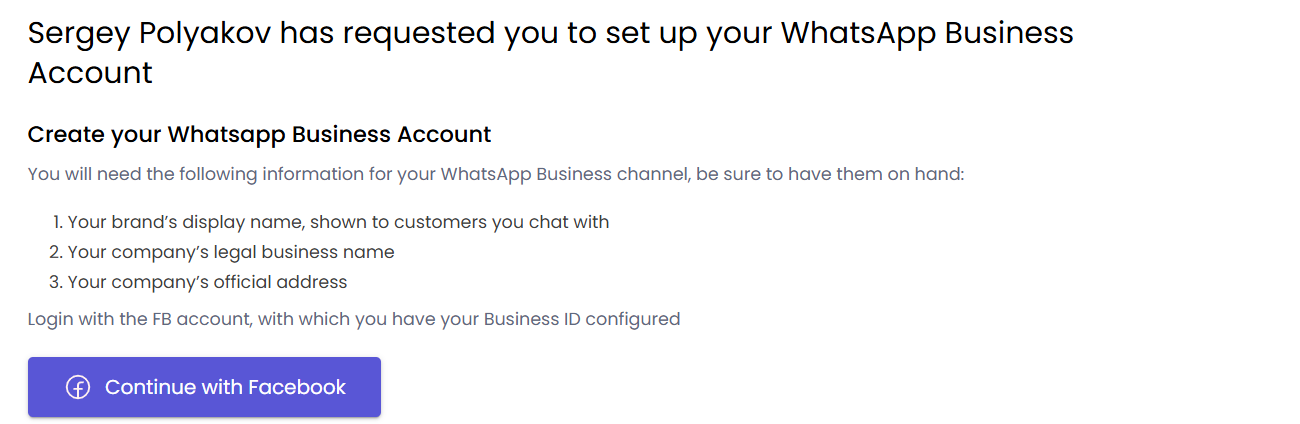
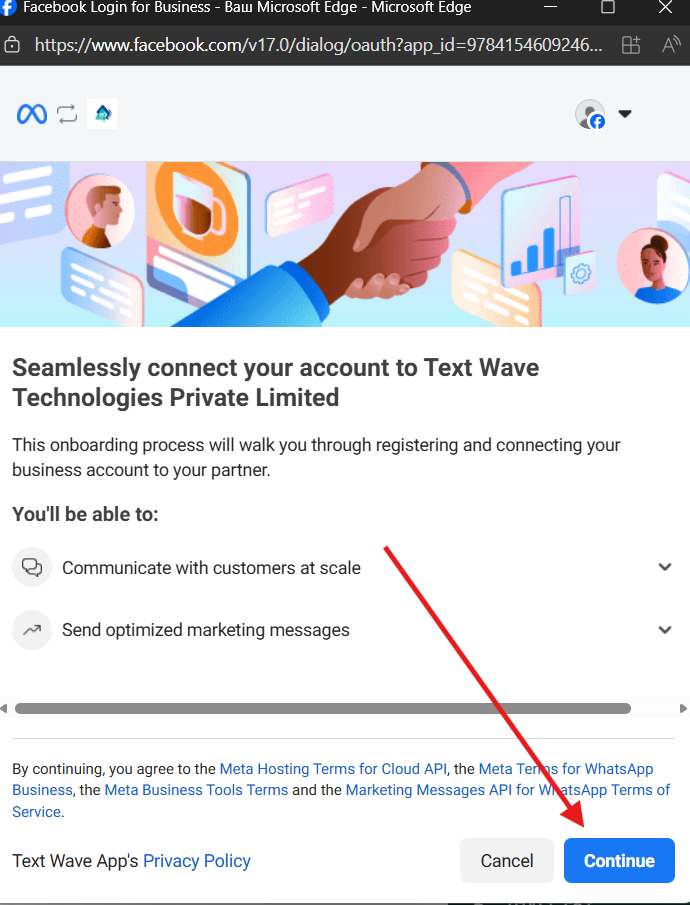
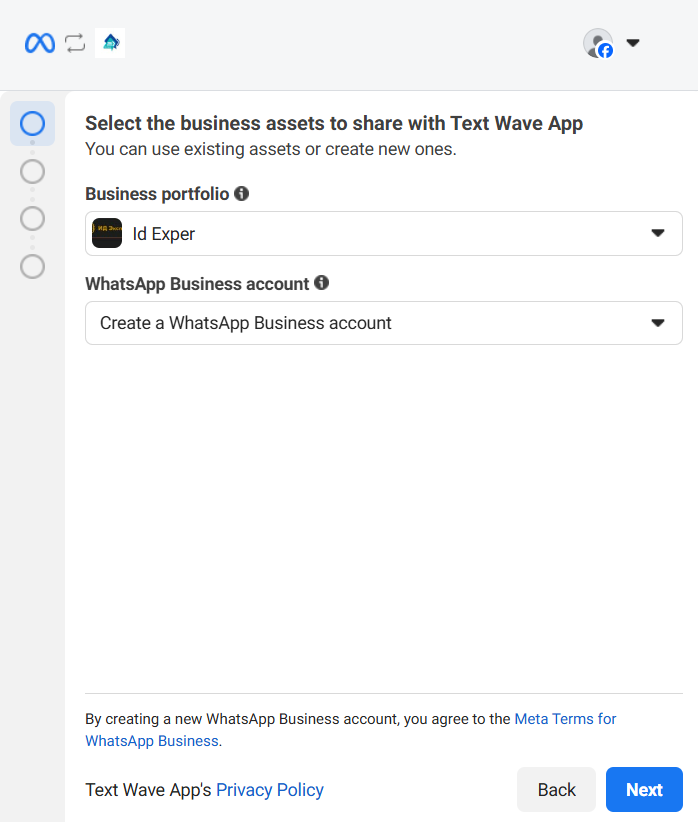
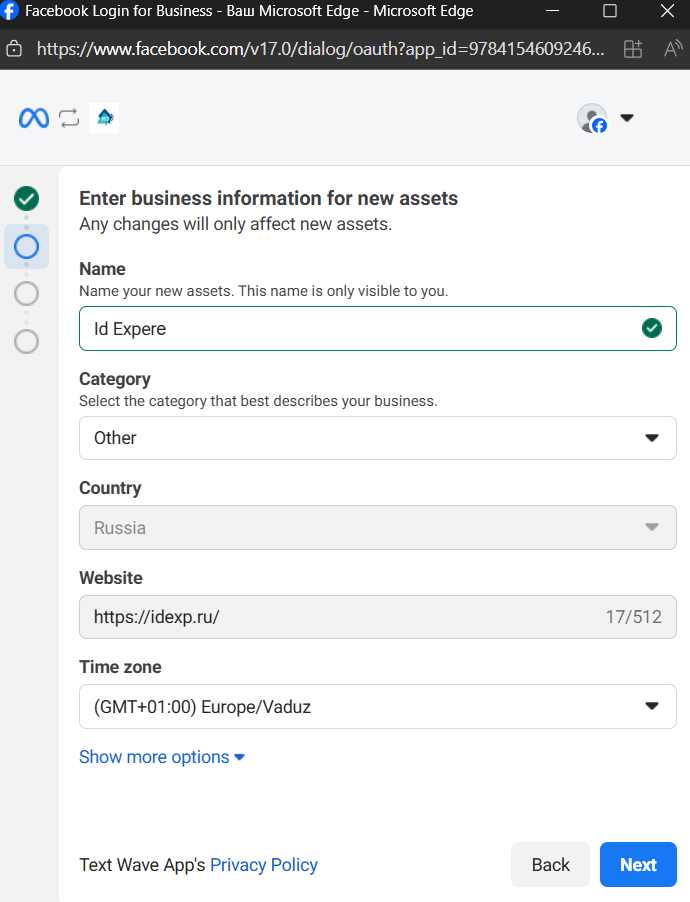
Manual: WhatsApp Business API without verification
0) Press "Continue with Facebook" button
1) Then "Continue"
2) Choose Business portfolio and choose "Create a WhatsApp Business account"
3) Fill in all information and press "Next"
4) Choose "Add a new number" and fill in number that you want to connect
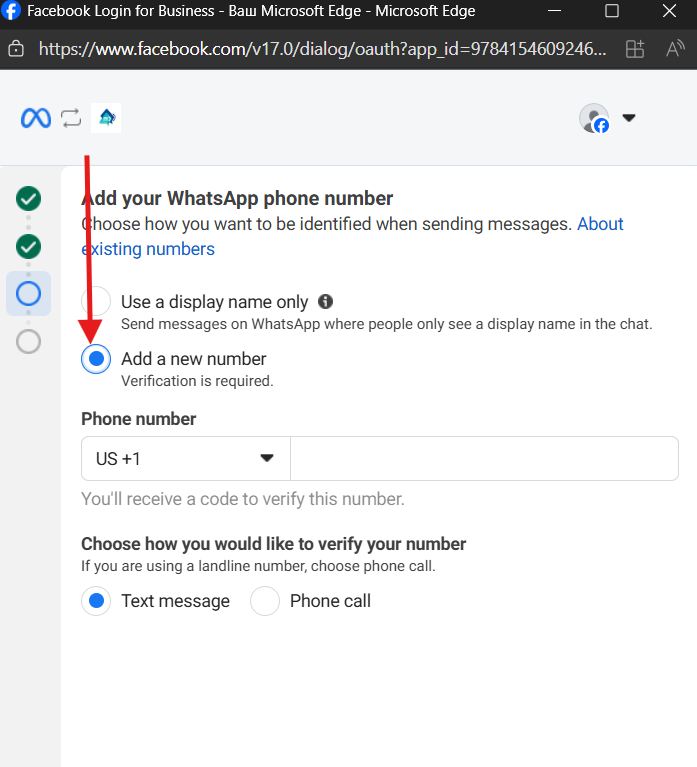
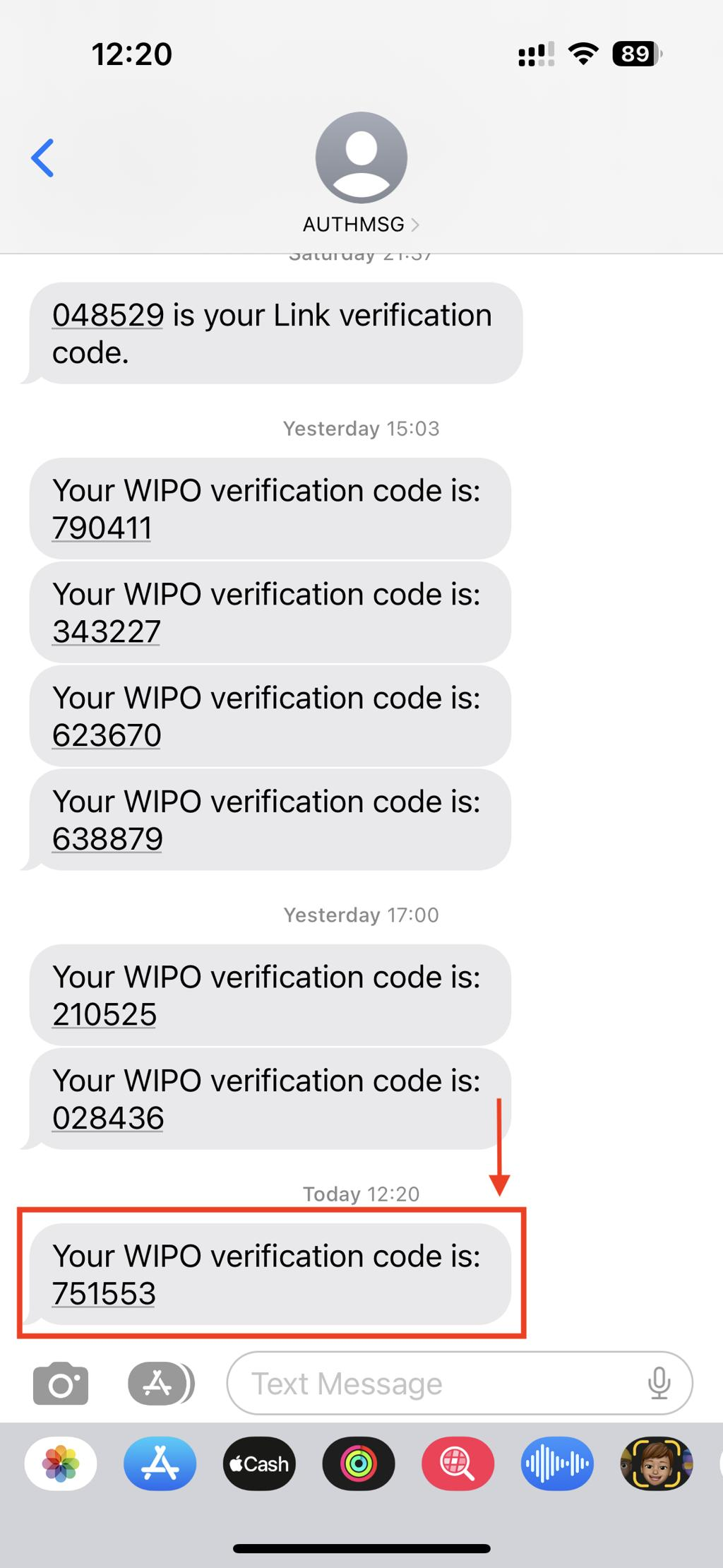
5. Verify number by using SMS\Voice call
Documents Required for Verification in Facebook Business Manager
Documents Required for Verification in Facebook Business Manager
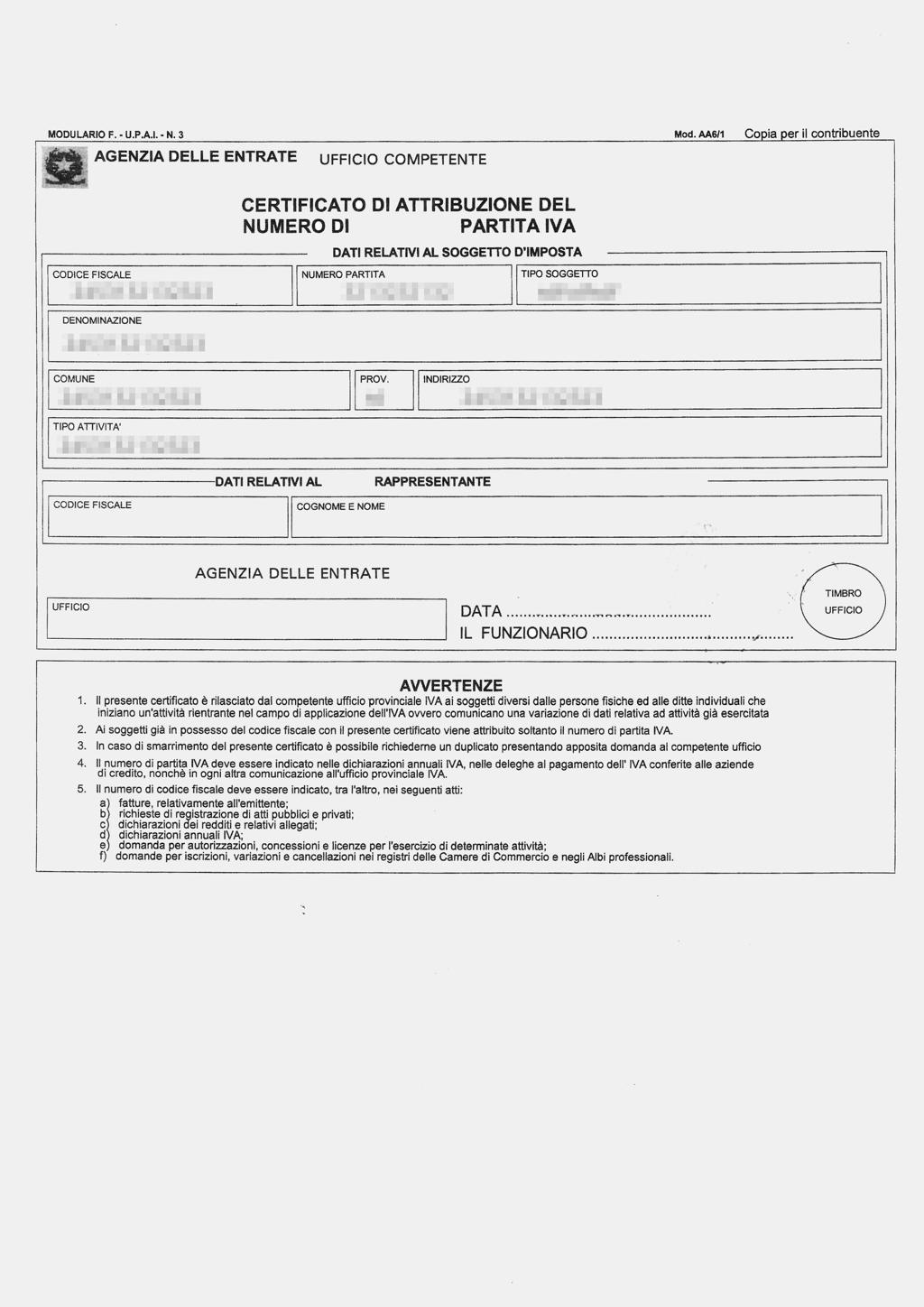
1. Company Registration Documents
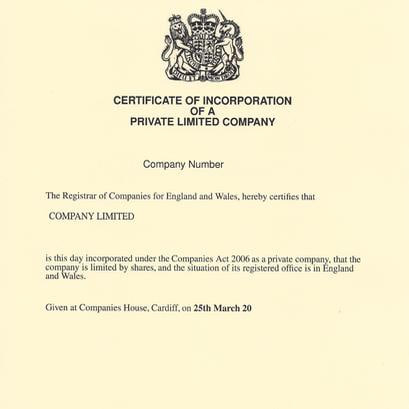
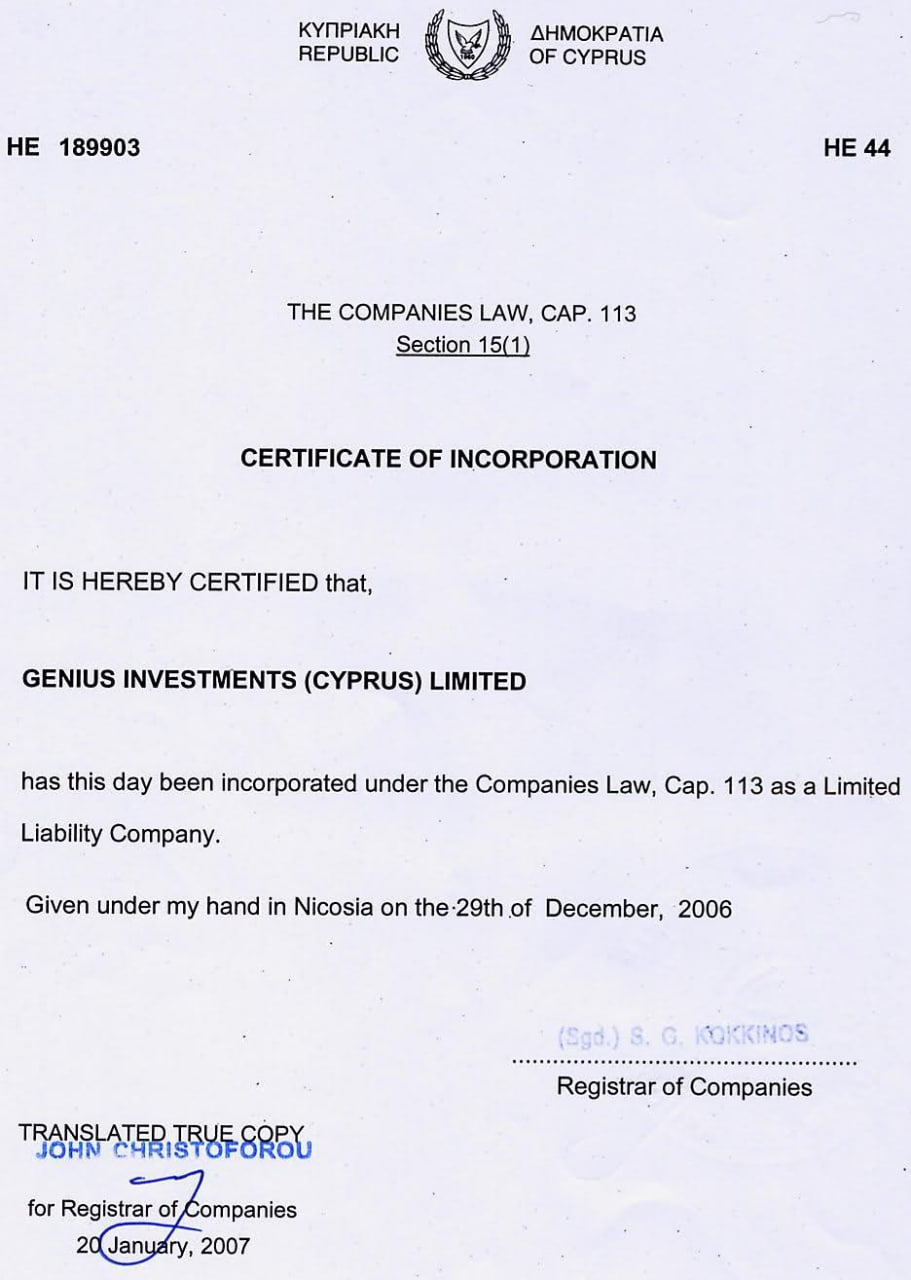
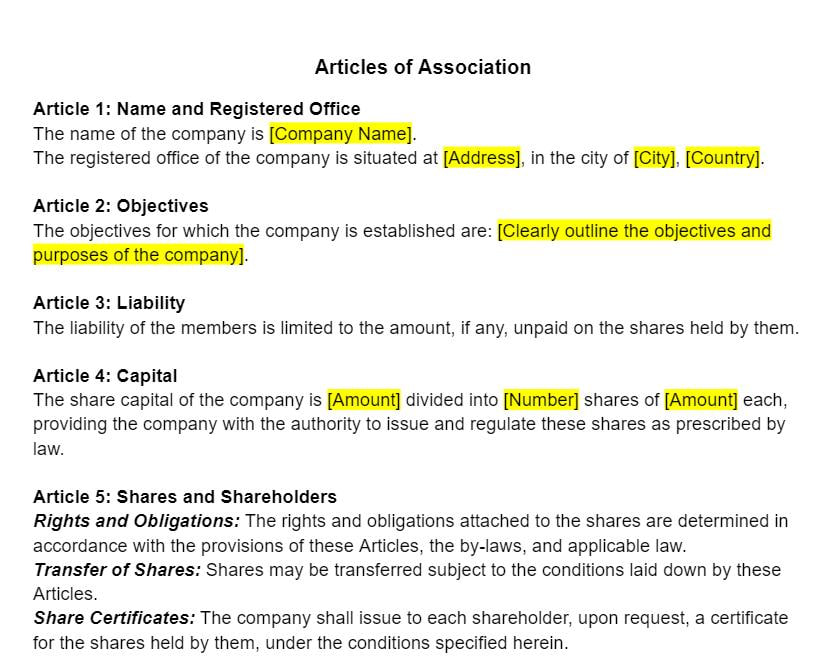
Official documents proving your business is legally registered:
- Certificate of Incorporation / Registration
- Articles of Association
- Extract from Trade Register (e.g., Companies House, Handelsregister, KRS, etc.)
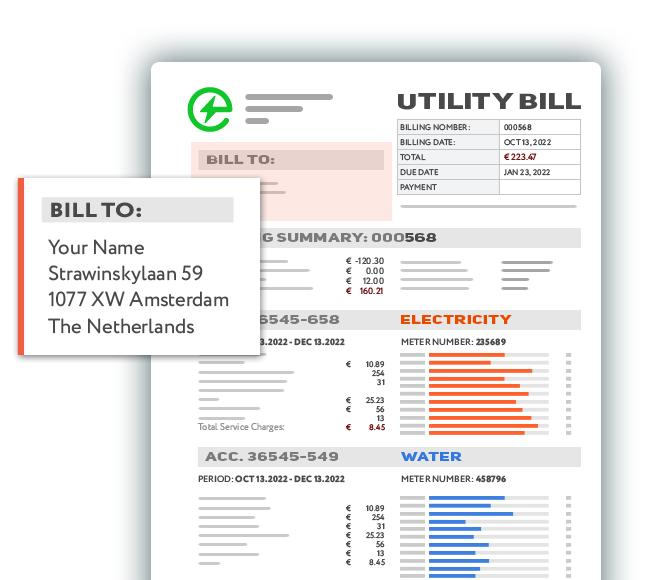
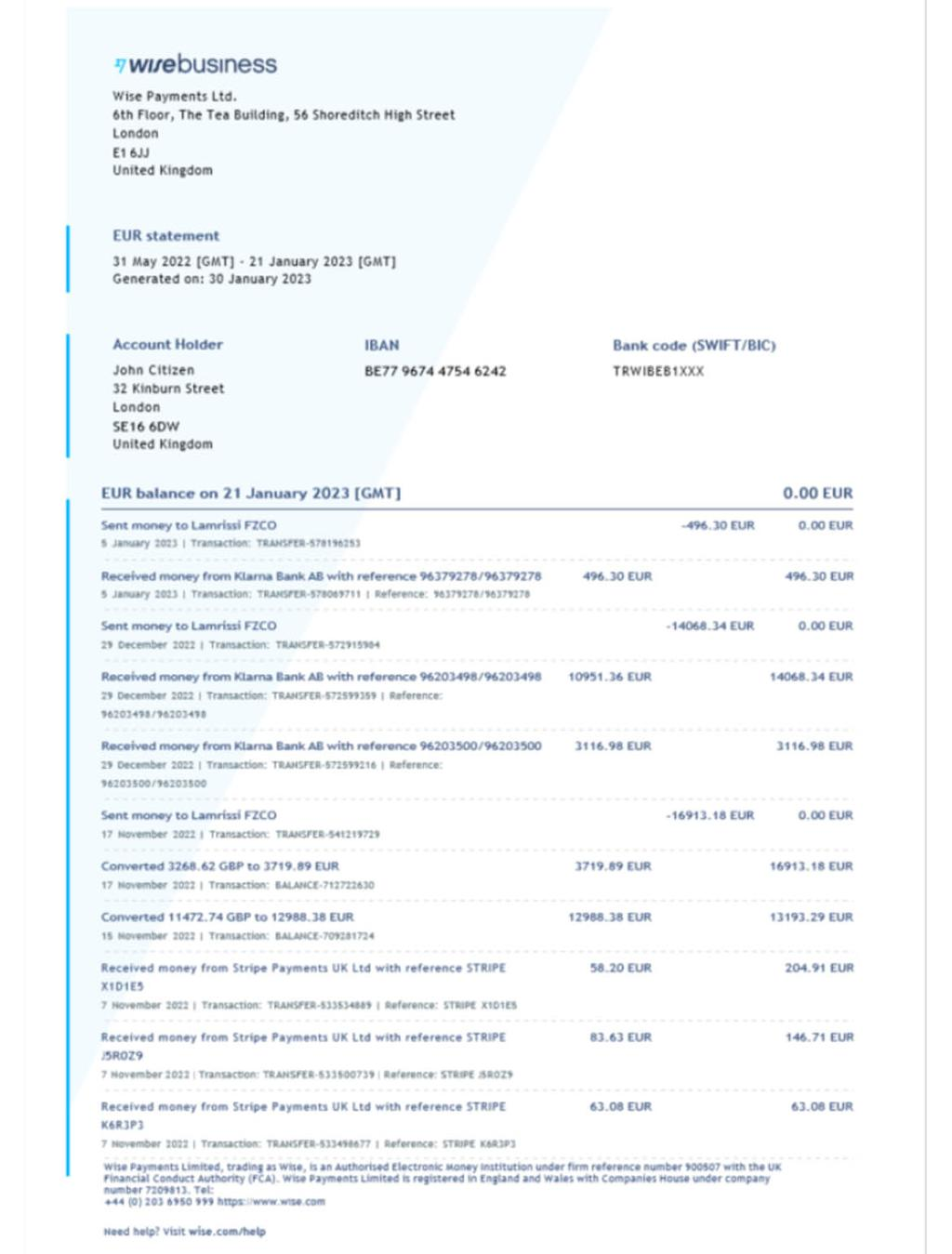
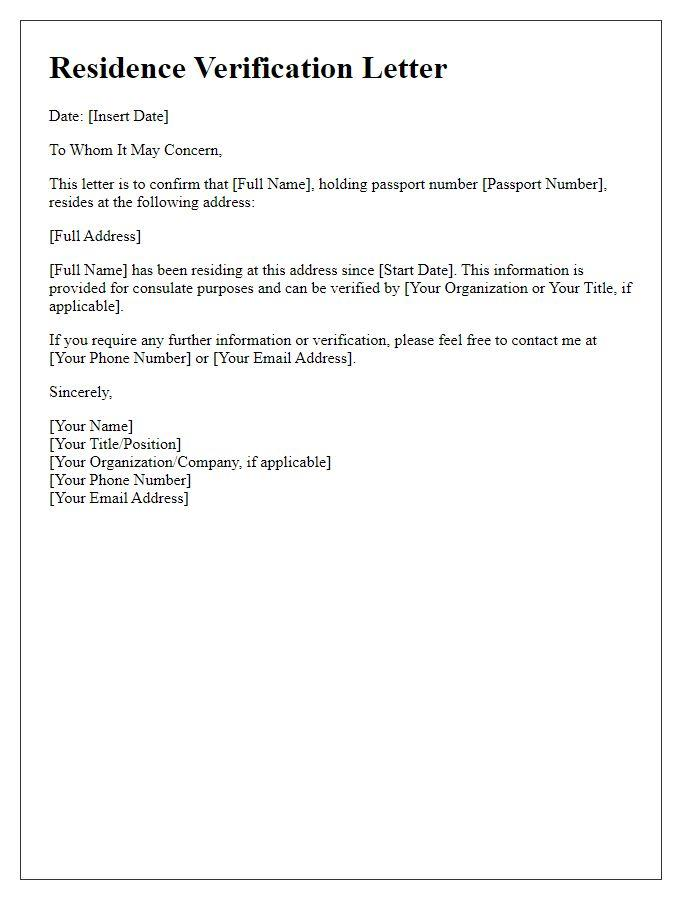
2. Proof of Business Address


The address must match exactly what is listed in Business Manager:
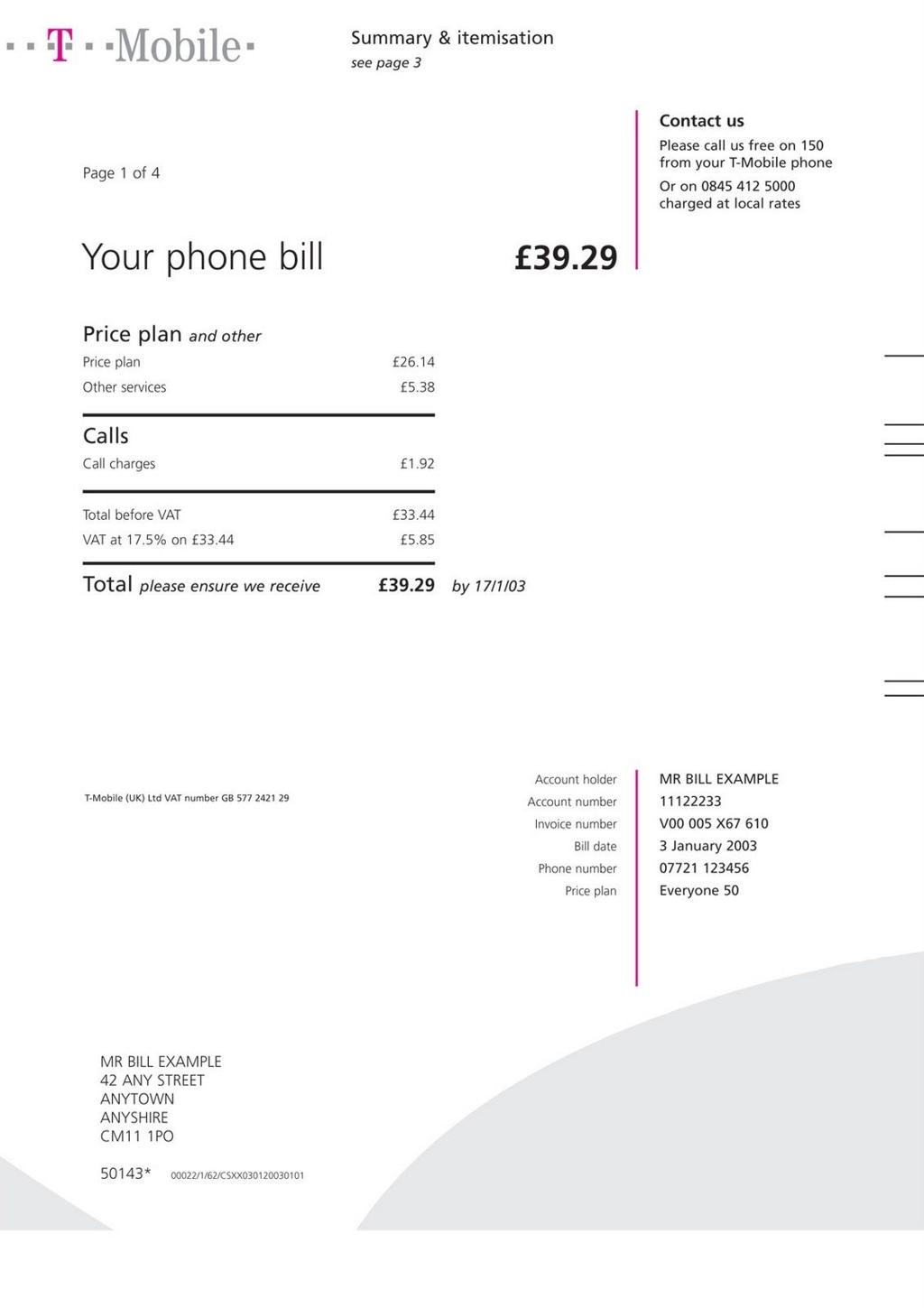
- Utility bill (electricity, water, internet)
- Bank statement
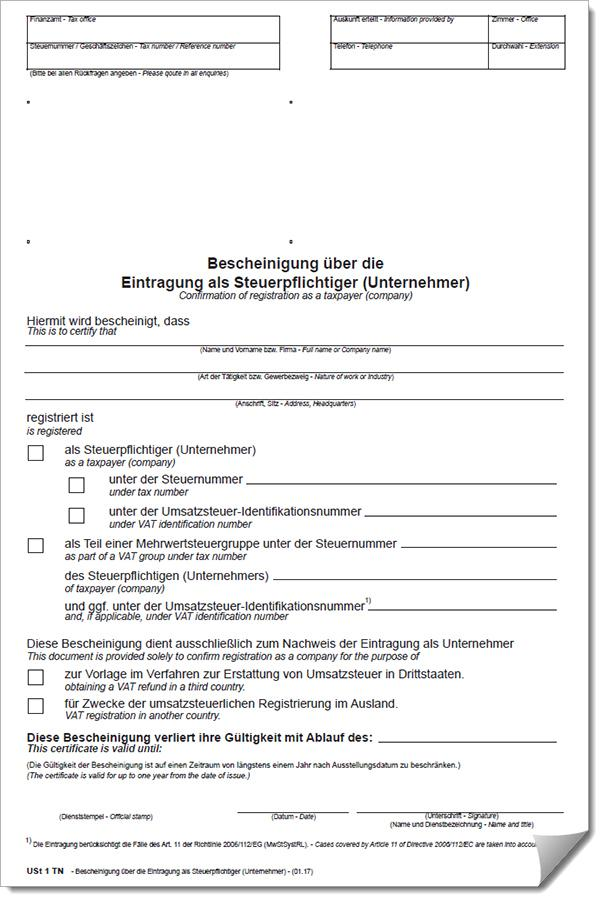
- Tax document
- Official government letter
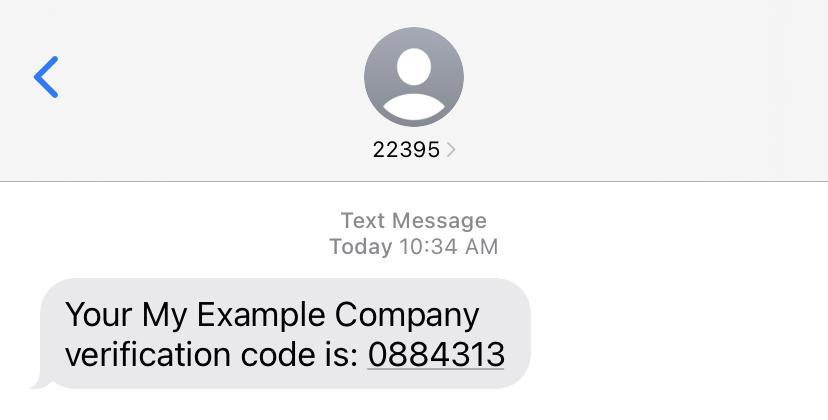
3. Phone Number Verification


Typically completed via:
- SMS or automated call with a verification code from Meta
- In rare cases: phone bill
4. Tax Information / VAT


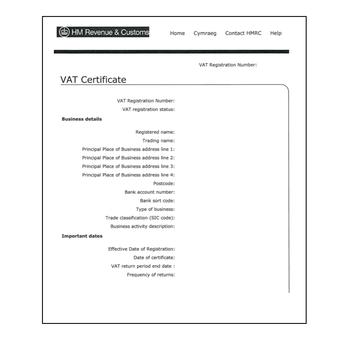
- VAT Certificate (if applicable)
- Company tax number
- Tax registration documents
Important Meta Requirements
- Company name must match exactly across all documents
- Address must be identical (no spelling differences)
- Documents must be in Latin alphabet or officially translated
- Documents should be recent (usually not older than 3 months for bills)
- High-quality scans or PDFs only (no blurry or cropped images)
Country-Specific Notes (Europe)
Different countries use different registries, for example:
- UK — Companies House
- Germany — Handelsregister
- Poland — KRS
- France — INSEE / SIREN
However, Meta applies the same verification standards regardless of country.
Summary
To successfully pass verification, you typically need:
✔ Company registration document
✔ Proof of address
✔ Phone verification
✔ (Optional) VAT / tax document
Checklist for Connecting WhatsApp Business API
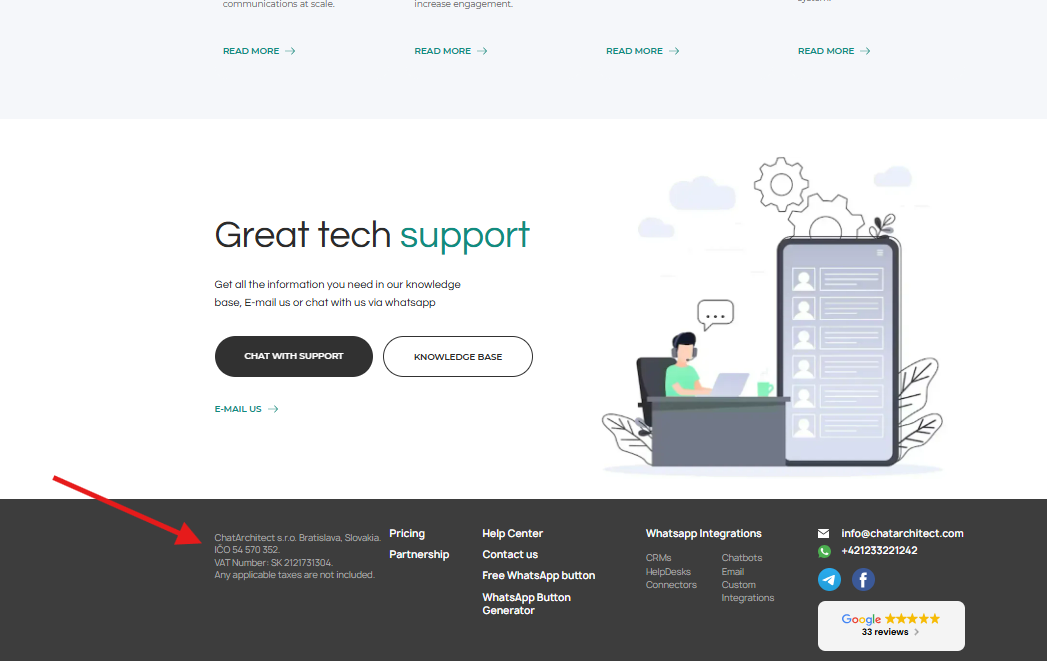
1. You must have a website. At minimum, a one-page landing page that clearly shows what your company does. The website footer must include the legal entity name and registration number ( check example).
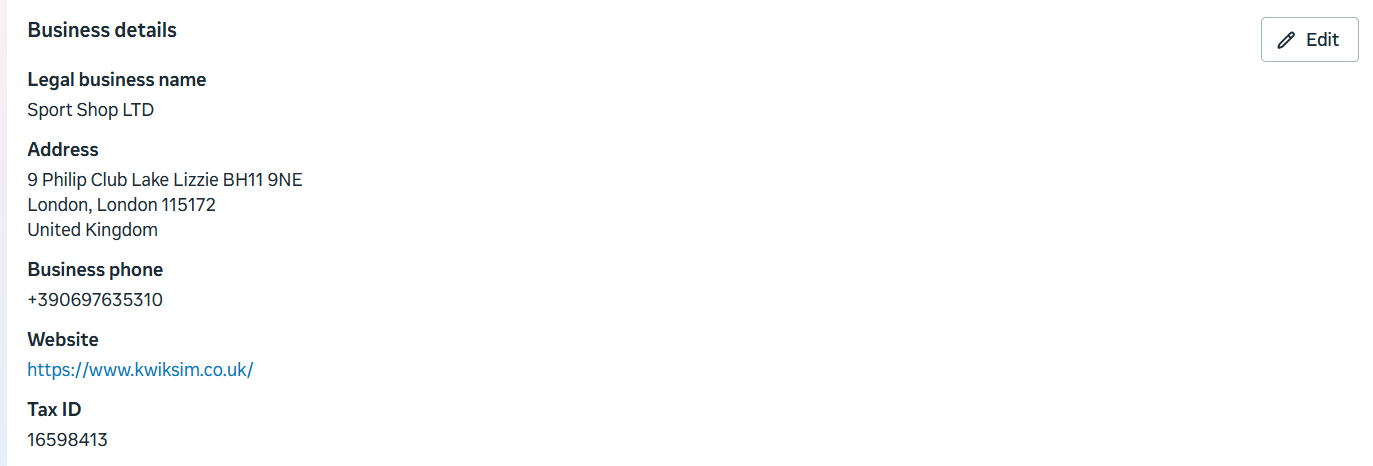
2. Your Business Manager must have all company information fully completed.
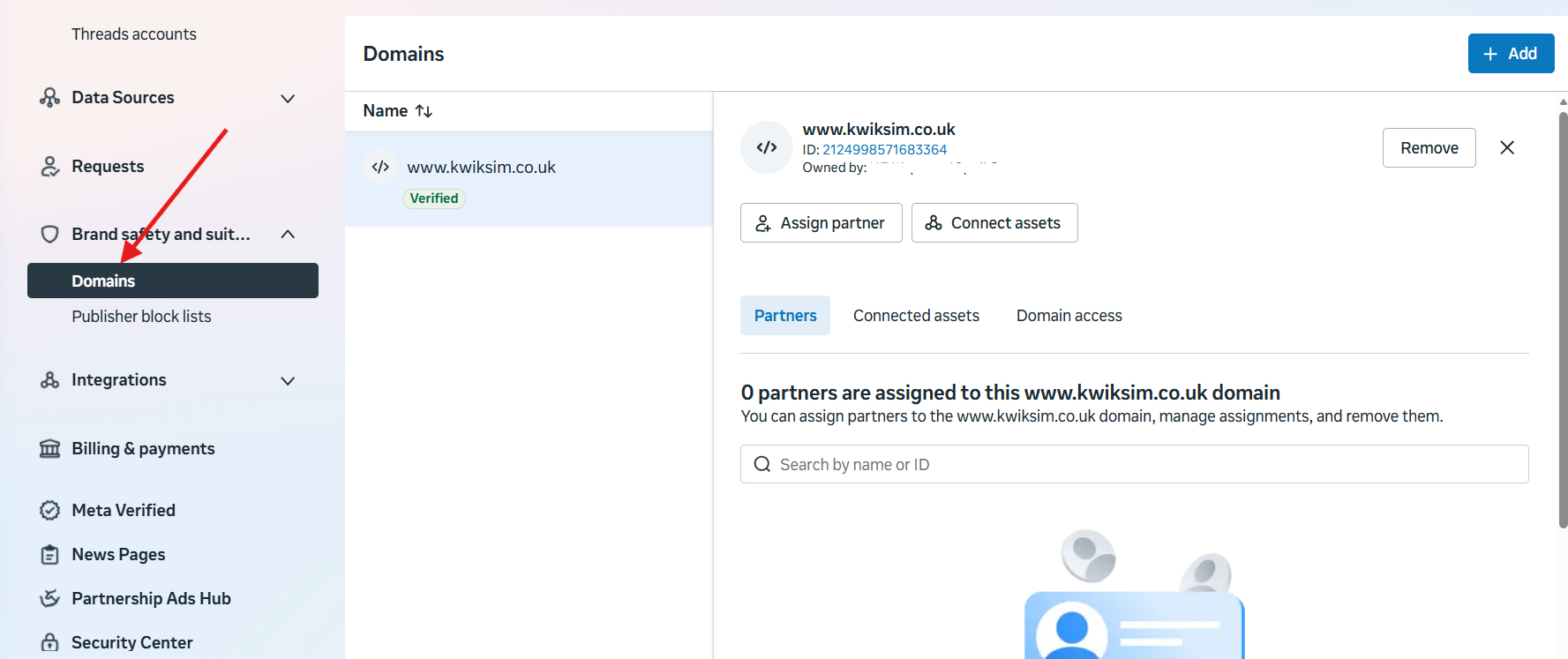
3. Not required, but it is recommended to verify your website domain.
Brand safety and suitability => Domains => Add
These simple steps will help you connect your number to the WhatsApp Business API without encountering any difficulties during the setup process.
Common Reasons for Facebook Business Manager Verification Rejection
Common Reasons for Facebook Business Manager Verification Rejection
Verifying your business in Meta Platforms Business Manager is a crucial step for accessing tools like advertising, WhatsApp Business API, and other advanced features. However, many companies face rejection during the verification process due to avoidable mistakes.
Below are the most common reasons why verification gets denied — and what you should pay attention to before submitting your application.
1. Mismatch in Business Information
One of the most frequent issues is inconsistency between the information provided in Business Manager and the official documents.
Even small differences can cause rejection, such as:
- Missing “LLC” or “Ltd.” in the company name
- Different spelling or formatting
- Address written differently
👉 Make sure all details match exactly across every document and platform.
2. Incomplete Business Profile
If your Business Manager account does not contain full and accurate company information, verification is likely to fail.
Ensure that you have filled in:
- Legal business name
- Registered address
- Phone number
- Website
Incomplete profiles are often automatically rejected.
3. Missing or Weak Website
A website is not always strictly required, but in practice, it plays a major role in approval.
Common issues include:
- No website at all
- A website with little or no information
- No clear explanation of what the company does
👉 Your website should look like a real business presence, not a placeholder.
4. No Legal Information on the Website
Meta expects transparency. If your website does not include legal details, it raises trust issues.
Make sure your website footer includes:
- Legal entity name
- Registration number (e.g., VAT, OGRN, EIN)
- Address
5. Outdated Documents
Some documents (such as utility bills or bank statements) must be recent.
👉 If your documents are older than 3–6 months, they may be rejected.
6. Poor Quality Documents
Blurry, cropped, or low-resolution files are a common reason for failure.
Avoid:
- Photos with glare or shadows
- Cut-off edges
- Illegible text
👉 Always upload clear, high-quality scans.
7. Using Personal Instead of Business Documents
Verification is strictly for businesses, not individuals.
Submitting:
- Personal bank statements
- Personal IDs instead of company registration
can lead to immediate rejection.
8. Unsupported or Unclear Business Type
Some business categories may be restricted or require additional checks.
If your business activity is unclear or falls into a high-risk category, Meta may deny verification.
9. Domain Not Verified
While not always mandatory, failing to verify your domain can sometimes delay or negatively impact the verification process.
👉 Verifying your domain adds credibility and improves your chances of approval.
10. Inconsistent Language or Naming
Using different languages or transliterations across documents can create inconsistencies.
For example:
- Company name in Russian on documents
- Slightly different English version in Business Manager
👉 Stick to one consistent format, preferably matching your official registration.
Final Thoughts
Most verification rejections happen due to small but critical inconsistencies. Before submitting your application, double-check that all your data is aligned, your documents are clear, and your online presence reflects a legitimate business.
Taking a little extra time to prepare can save you days — or even weeks — of delays in getting verified.
WhatsApp Business API + Facebook Business Manager Checklist
🏢 1. Prepare Your Business
Before starting, your company must be officially registered and properly documented.

Make sure you have:
- A registered legal entity (LLC, Ltd., etc.)
- A valid registration number (EIN, VAT, OGRN, etc.)
- A consistent official company name used across all platforms
Consistency is critical — even small mismatches can lead to verification failure.
🌐 2. Create a Website
A website is a key trust signal for Meta and is strongly recommended (often required in practice).


At minimum, your website should include:
- A clear description of your business
- Contact details (email, phone number)
- A footer with:
- Legal company name
- Registration number
- Business address
Even a simple one-page landing page is sufficient if it looks professional and complete.
⚙️ 3. Set Up Facebook Business Manager
Next, create and configure your Business Manager account under Meta.


You must fully complete:
- Legal company name
- Registered address
- Phone number
- Website
Incomplete or inaccurate information is one of the most common reasons for rejection.
📄 4. Verify Your Business
Business verification is a required step to access WhatsApp Business API.


Prepare the following documents:
- Business registration certificate
- Tax ID (if applicable)
- Proof of address (utility bill, bank statement, or lease agreement)
Requirements:
- Documents must be clear and readable
- Information must match your Business Manager exactly
- Some documents must be issued within the last 3–6 months
🔐 5. Verify Your Domain (Recommended)
While not always mandatory, domain verification significantly improves your chances of approval.


Steps:
- Add your domain in Business Manager
- Verify it via DNS, HTML file upload, or meta tag
This step increases trust and strengthens your business profile.
📱 6. Prepare a Phone Number
You’ll need a dedicated phone number to connect to WhatsApp Business API.
Requirements:
- Not actively used in a regular WhatsApp account (or ready for migration)
- Able to receive SMS or voice calls
- Dedicated for business communication
🔌 7. Connect WhatsApp Business API
You will:
- Connect your phone number
- Complete SMS or voice verification
- Link your number to your Business Manager account
💬 8. Set Up Messaging and Automation
After connection, you can configure how you communicate with customers.
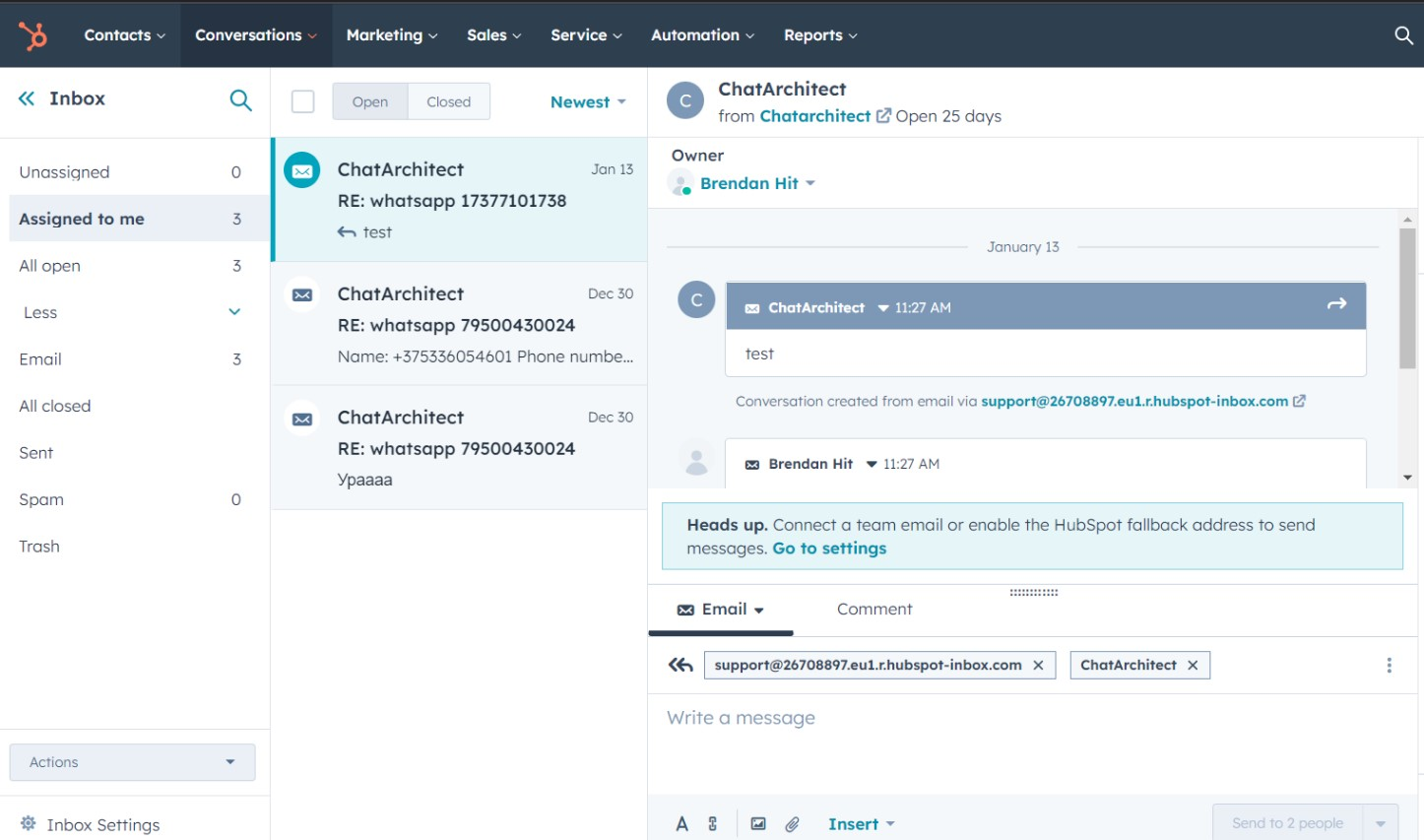
Set up:
- Message templates (required for outbound messages)
- CRM or messaging inbox
- Auto-replies or chatbots (optional)
This is where you unlock the full power of WhatsApp automation.
⚠️ Final Checklist Before Submission
Before starting verification, double-check everything:
- All company data matches across documents and Business Manager
- Website is live and complete
- Documents are high quality and up to date
- Business Manager profile is fully
- Phone number is ready for connection
🚀 Final Result
Once everything is properly set up, you’ll be able to:
- Send and receive messages via WhatsApp API
- Automate customer communication
- Integrate WhatsApp with your CRM (Kommo, HubSpot, etc.)
💡 Conclusion
Connecting WhatsApp Business API is not complicated — but it requires attention to detail. Most issues arise from inconsistencies, missing information, or weak business presence.
By following this checklist step by step, you can complete the setup quickly and avoid unnecessary delays.
WhatsApp Business API
ALERT! Whatsapp Business Account rejected
If your request for WABA is rejected by WhatsApp, this might be because the Business doesn't comply with WhatsApp commerce policy.
For further investigation we request you to confirm/share the below details:
1. Your Business Use Case and vertical.
2. Business Website and Business Facebook Page.
3. Does the Business comply with WhatsApp Commerce and Business Policies - which policy the business complies with.
4. Detailed use-case on how the business will utilize WhatsApp Business API.
Solution:
Your WABA will be approved if your business complies with the WhatsApp commerce policy: https://www.whatsapp.com/legal/commerce-policy/
In case of further doubts, please let us know, we will be happy to help.
✅ Official WhatsApp Business account badge
We will raise an appeal to WhatsApp for the same but for this we will require a few details for the pointers mentioned below so that we can
submit it to WhatsApp for requesting an Official business account for your App.
i) Title: _____________________________________________ (Request for an official business account)
ii) Description about your Business and why do you feel that you need an official account:
iii) WhatsApp Phone Number:
iv) Phone number and Display name:
v) WhatsApp Account ID:
vi) If the business is known under any other name, please provide those names.∙
vii) If the business name is in a language other than English, please provide their business name in the source language.∙
viii) Business Website∙
ix) Facebook Page∙
x) Any other relevant Facebook side information∙ (Optional)
a) Facebook Page Likes:
b) Facebook Page Followers:
xi) Have you enabled two-step verification? :
xii) Have you (if applicable) completed Facebook business verification?
Please Note: If, unfortunately, your official account request gets rejected by WhatsApp, you will not be able to re-request for an official business account to WhatsApp for the same app for a period of 1 - 2 months till this cooling period gets over.
Which phone numbers can I use for WhatsApp Business API?
Any number of any country. Mobile, landline, toll-free.
We don't offer phone numbers, but you can use our partner service: https://zadarma.com/en/?ref=b701d6d65fea82b62c294d77417b02c5
How to create a WhatsApp name
Display Name Guidelines
All display names should have a relationship with your business and should not violate WhatsApp Commerce and Business policies. Having display names compliant with our guidelines is required to send messages using the WhatsApp Business API or to qualify for WhatsApp official business accounts.
Below are principles for display names and guidance for best practices to avoid formatting errors.
Principle | Examples |
|---|---|
Compliance with policies | A display name should not violate WhatsApp Commerce and Business policies. An example for a store that sells wine glasses:
|
Accurate representation of your business | A display name should represent:
|
Consistency with external branding | A display name must have consistent branding with external sources (e.g., a company's website or marketing). An example for a product line named "Fresh Produce Cold Pressed Juices" |
Clear relationship with your business | A display name must have a clear relationship with your business (must be referenced on the business's website or external media references). For example:
|
Formatting Guidelines
Your display name will be rejected if there are formatting errors so it is important to comply with the following rules. (Note: These rules do not apply if a business or an organization already brands this way. In that case, the display name may incorporate punctuation, capitalization, etc. that matches the external branding.)
Formatting Rule | Examples |
|---|---|
A display name may not be in all capitals, must have grammatically correct capitalization, and should match the capitalization used in your business name. | For example:
|
Do not change the spacing from the spacing used in your business name. | An example for a business called "Lil'Cupcakes":
|
Do not add any extra punctuation, emojis, or character symbols (such as trademark designations). | For example:
|
Do not add extra words to your company or brand name unless the words indicate:
| For example:
|
If you add permitted words, the first letter of the word must be capitalized. | For example:
|
A display name must contain a minimum of 3 characters. | An example for a business, "KT Sir":
|
A display name may not be in URL format. | For example:
|
Updated template categories as of October 30
On October 30, Meta updated the criteria for all existing template categories, below we provide examples
Marketing templates
Marketing templates are our most flexible. They can enable businesses to achieve a wide range of goals, from generating awareness to driving sales and more.
Message Objective | Business Goal | Example Templates |
|---|---|---|
Awareness | Generate awareness of your business, products, or services among customers who have subscribed to receive messages from your business on WhatsApp. |
|
Sales | Send general promotional offers to customers related to sales events, coupons or other content intended to drive sales. |
|
Retargeting | Promote relevant offers or other call-to-actions to customers who may have visited your website, used your app, or engaged with your products and services. |
|
App Promotion | Request customers to install or take a specific action with your app. |
|
Build Customer Relationships | Strengthen customer relationships through personalized messages or by prompting new conversations. |
|
Also considered marketing templates are:
1. Templates with mixed content (e.g. Both utility and marketing, such as order update with a promo or offer).
2. Templates whose contents are unclear (e.g., contents are only "{{1}}" or "Congratulations!").
Note: Examples are illustrative only, templates containing similar content or content including this example text may be categorized differently based on their exact content.
Utility templates
Utility templates are typically triggered by a user action or request. They must include specificity about the active or ongoing transaction, account, subscription or interaction to which they relate. For example, an order confirmation must contain an order number.
Message Objective | Business Goal | Example Templates |
|---|---|---|
Opt-In Management on WhatsApp | Confirm opt-in for receiving messages on WhatsApp as a follow-up to opt-in collected via other channels (e.g., website, email). Also confirm opt-out. |
|
Order Management | Confirm, update, or cancel an order or transaction with a customer using specific order or transaction details in the body of your message. |
|
Account Alerts or Updates | Send important account updates, including time-sensitive alerts, safety information, payment reminders, and other information relevant to already-purchased or subscribed products and services. These messages should not intend to upsell or cross-sell new products or services. |
|
Feedback Surveys | Collect feedback on previous orders, interactions or ongoing relationships with customers. These messages should not be about requesting feedback related to potential upsell or cross-sell opportunities. |
|
Continue a Conversation on WhatsApp | Send a message to start an interaction on WhatsApp that began in another channel. These messages should not be initiated without a user having requested the conversation to be moved to WhatsApp. |
|
Authentication templates
Authentication templates enable businesses to authenticate users with one-time passcodes (usually 4-8 digit alphanumeric codes), potentially at multiple steps in the login process (e.g., account verification, account recovery, integrity challenges).
Authentication templates are our most restricted. For a template to be classified as authentication, a business must:
1. Use WhatsApp's preset authentication message templates, which include optional add-ons like security disclaimers and expiry warnings
2. Configure a one-time password button (copy-code or one-tap)
3. Follow content restrictions: URLs, media, and emojis are not allowed for authentication template content or parameters. Additional length restrictions of 15 characters also apply to parameters.
Definition | Examples |
|---|---|
Authentication code |
|
Message Template Category Guide July 1, 2025
Message Template Category Guide
Valid from July 1, 2025
Template Category Guide
We would like to go into more detail about the categories into which we can divide message templates.
Message templates fall into the following categories:
- Marketing – Help companies solve a wide range of problems: from informing customers to increasing sales and audience return. Examples: announcements of new products, services or features; personalized offers and promotions; reminders of unfinished purchases.
- Utility – Used to send non-advertising, but informational messages that were either requested by the user or are of critical importance. Examples: order status, payment notifications, messages about possible fraud.
- Authentication – Used to confirm the user's identity at different stages of interaction with the business. Examples: one-time confirmation codes when creating an account, logging in or restoring access.
- Businesses can only send message templates to users who have opted in to receive WhatsApp messages.
Marketing template category guide
Marketing templates help companies achieve a variety of goals, from keeping customers informed to increasing sales and repeat engagement.
Note: Businesses can only send templates to users who have confirmed their subscription to receive messages via WhatsApp.
Message Purpose | Business Objective | Marketing Template Examples |
AWARENESS | Raise awareness of your business, products, or services among WhatsApp subscribers. | ● Did you know? We've installed a {{new tower}} in your area, which will improve your connection. More information: {{URL}}. ● The {{Celebration}} is coming soon! Come to {{date}} at {{location}} and celebrate with us. More information: {{URL}}. ● Looking for a getaway this fall? We've opened a new resort in {{location}} — the perfect place to recharge. |
SALES | Send promotions, promotions, coupons, and other messages to encourage purchases or renewals. | ● Thanks for your order! Get {{15%}} off your next purchase with promo code {{LOYAL15}}. Learn more: {{URL}}. ● We're {{donations}} short of our {{amount}} goal. Support us: {{URL}}. ● Upgrade to a {{premium cabin}} and get perks like {{more legroom}}, {{priority boarding}}. Learn more: {{URL}}. ● You're {{pre-approved}} for our {{credit card}}! Check out our custom link and get a special {{rate}}: {{URL}}. |
RETARGETING / RE-ENGAGEMENT | Promoting offers, products, services, or other activities to users who have previously visited your site, used your app, or interacted with your brand. Even if the user has specifically requested the message, it is considered marketing. | ● Your subscription ends on {{date}}! Renew here: {{URL}}. ● You forgot your items in your cart! We saved them - checkout: {{URL}}. ● Your credit application is {{pending approval}}. Complete your checkout: {{URL}}. ● We found a {{car}} that matches your search. Learn more: {{URL}}. ● Sorry for the delay in delivering your {{package}}. We have added a {{deposit}} to your account - it is now available. |
APP PROMOTION | Encourage people to install or take action within the app. | ● You can now checkout directly from the app. Download it here: {{URL}}. ● Thanks for joining us! You haven't tried our {{new feature}} yet. Find out more: {{URL}}. ● In-app only: {{20% off}} this week! Use code {{SUMMER20}}. ● Hey {{name}}! Your friend {{name}} has joined us. Send them a welcome message in the app: {{URL}}. |
STRENGTHENING CUSTOMER RELATIONSHIPS | Personal communication with customers, congratulations, reminders and invitations to dialogue. | ● {{Name}}, how could we forget? Happy birthday! Have a great year. ● Let's sum up the year - thank you for being with us! You are our {{valued customer}}. We hope for long-term cooperation. ● Hello! I am your {{virtual assistant}}. I can help you find a product or answer your questions. Write if you need help! |
Templates with mixed content (e.g. order upgrade + promotion) are categorized as marketing.
Templates with unclear content (e.g. just "{{1}}" or "Congratulations!") are also considered marketing.
Note! We have provided examples for illustrative purposes only; templates containing similar content or content that includes this example text. Such templates may be classified differently depending on their exact content.
Guide to the utility template category
Utility templates are intended for sending non-promotional messages. Such messages should not contain advertising or incentive context. They must either be specifically requested by the user (e.g. related to an order, account, transaction, etc.) OR be necessary or critical for the user (e.g. for security or urgent actions).
Note: Businesses can only send templates to users who have confirmed their subscription to receive messages via WhatsApp.
Message Purpose | Business Objective | Utility Template Examples |
SUBSCRIPTION MANAGEMENT | Confirmation of consent to receive messages on WhatsApp, if consent was obtained through other channels (e.g. website, email), or confirmation of refusal. | ● Thank you for your confirmation! You will now receive our notifications on WhatsApp. ● Your unsubscription has been confirmed. We will no longer send you messages on WhatsApp. |
ORDER MANAGEMENT | Confirm, update, or cancel an order/transaction with specific details. Messages must not contain promotional offers, upsells/cross-sells, or calls for renewals. | ● Thank you! Your order {{ID}} has been confirmed. We will notify you when it is shipped. ● Great news! Your package for order {{ID}} is on its way. Tracking number: {{tracking_ID}}, delivery date: {{date}}. ● One of the items from order {{ID}} is temporarily out of stock. We will notify you of the shipping date later. You can cancel here: {{URL}}. ● We have received the item from order {{ID}}. A refund of {{amount}} has been issued. Thank you for choosing us. |
ACCOUNT ALERTS | Send important or urgent notifications related to products/services the user has purchased or subscribed to. No offers, upsells or extensions allowed. | ● Daily account statement {{####}}: Available balance is {{amount}}. ● Reminder: Service {{name}} will be charged on {{date}} to card {{card}}. ● You have {{number}} minutes left on your current plan. Top up your account by {{date}} to avoid being blocked. ● To complete your profile registration, you must upload a photo. Upload it here: {{URL}}. ● Please note: The customer support number has changed to {{number}}. Save it for future reference. |
FEEDBACK SURVEYS | Collect feedback on completed orders, transactions, or interactions. Surveys must be specific and tied to a past action. No generalities. | ● Order has been delivered {{order_ID}}. Have questions? Contact us at {{URL}}. ● Tell us what you thought about your recent visit to {{store}} — your feedback helps us improve. Leave a review at {{URL}}. ● You recently interacted with us about order {{number}}. How did it go? Take a short survey at {{URL}}. |
CONTINUING A CONVERSATION IN WHATSAPP | Transferring an interaction that started in another channel to WhatsApp. The user must express their desire to continue the conversation here. | ● Hello! You contacted us in the chat on the website. I am a WhatsApp virtual assistant. How can I help? ● Hello, {{name}}. We are continuing the dialogue regarding your request ({{problem}}). The case has now moved to the next stage. More details are in your account: {{URL}}. |
Beginning June 1, 2024, companies using the Cloud API can use approved utility templates from the Template Library.
Note: The examples below are for illustrative purposes only. Even if a template contains similar wording, it may be categorized differently depending on the details.
Guide to the utility template category (cont'd)
For a utility template to be considered critical or essential to the user, it must relate to one of the use cases listed below and not contain any advertising or persuasive content.
For a utility template to be considered critical or essential to the user, it must relate to one of the use cases listed below and not contain any advertising or persuasive content.
Note: Businesses can only send templates to users who have confirmed their subscription to receive messages via WhatsApp.
Utility use case | Example template (must meet the definition of "essential or critical to the user") |
Public Safety | ● There is a {{tornado}} storm warning in your area. We recommend staying home until {{time}}. |
Public Services |
|
Public Disruptions | ● A system outage has been detected affecting the {{code}} area. We expect it to be restored by {{date/time}}. We apologize. |
Account or Product Protection | ● Warning: Fraudulent activity has been detected. Review the security measures to protect your {{card}} and {{account}} details at {{URL}}. |
Legal/Compliance | ● Important: You must update your document to {{REAL-ID}} by {{date}} to avoid travel issues. Schedule an appointment at {{office}}. |
Note: The examples below are for illustrative purposes only. Even if a template contains similar wording, it may be categorized differently depending on the details
Note: The examples below are for illustrative purposes only. Even if a template contains similar wording, it may be categorized differently depending on the details.
Authentication template category guide
Authentication templates are used to verify a user's identity (usually using one-time digital codes) and can be used at different stages of the customer journey, including:
- registering a new account;
- confirming access, account recovery, or checking data integrity;
- verifying transactions or orders (new or existing).
Authentication templates are the most strictly regulated. For a template to be classified in this category, it must:
- use WhatsApp's preset authentication templates, which may include additional elements such as expiration warnings or security disclaimers;
- set up an OTP (one-time password) button — "Copy code" or "One click";
- observe content restrictions: links, media files, and emojis are prohibited in both the message body and parameters. Additional requirements: the parameters must not exceed 15 characters.
Starting October 1, 2024, companies using Cloud API will be able to use authentication templates from the Template Library.
Message Purpose | Business Objective | Authentication Template Examples |
AUTHENTICATION | Verify user identity with a one-time code | ● {{1}} is your verification code. |
Note: Businesses can only send templates to users who have confirmed their subscription to receive messages via WhatsApp.
Only authentication templates can be used to send one-time passwords (OTPs) for identity verification purposes.
Details about authentication templates and associated requirements are provided here.
For reference
WhatsApp Business Platform Pricing
Official template guidelines on the WhatsApp Business Platform
Templates sending changes from August 1, 2025
Templates sending changes from August 1, 2025
From August 1, 2025, the procedure for sending templates via WhatsApp Business API has changed. Now all templates are sent together with the ID (only you will see it, your clients will not)
If you use our integration, where there is a list of templates - just select a template from the drop-down list and send. The ID is substituted there automatically.
If you use an integration that does not have a list of templates - copy from our application wtargeted.com/ using a special button, the template will be copied along with the ID

The order for filling in the variable has also changed.
Previously, to send a variable, you had to erase it and fill it with text. Now the variable is filled inside the curly brackets.
As it was before:
You have a template: Good afternoon, {{1}}
You sent it: Good afternoon, client
As it should be now:
You have a template: Good afternoon, {{1}}
How it should be sent: Good afternoon, {{client}}
Messaging Limits
Messaging Limits
Messaging limits are the maximum number of messages you can send to unique WhatsApp user phone numbers, outside of a customer service window, within a moving 24-hour period.
By default, new business phone numbers are limited to 250, but this limit can be increased to:
- 1,000
- 10,000
- 100,000
- Unlimited
How to Increase Your Messaging Limit
You can increase your messaging limit to 1,000 on your own using the following methods. Higher limits, however, can only be achieved through automatic scaling, which happens after your limit has been increased to 1,000.
Note that in order for your business phone number to be eligible for an increase, it must have a connected status, and if your business phone number has a low quality rating, it may stay at 250 until its quality rating improves.
Step 1: Complete Business Verification
Submit your business for business verification. If your business is approved, we will analyze your messaging quality to determine if your messaging activity warrants an increase to your messaging limit. Based on this analysis, we will then either approve or deny a messaging limit increase.
Step 2: Send 1K messages in 30 days
Send 1,000 messages outside of customer service windows to unique WhatsApp user phone numbers in a 30-day moving period using templates with a high quality rating. Once you reach this threshold, we will analyze your messaging quality to determine if your messaging activity warrants an increase to your messaging limit. Based on this analysis, we will then either approve or deny an increase.
Send high-quality messages
If you are rejected for business or identity verification, ensure that you are sending high-quality messages. We will periodically reevaluate your messaging activity and quality and based on this analysis, may approve an increase.
Here are some guidelines for sending high-quality messages:
- Make sure messages follow the WhatsApp Business Messaging Policy.
- Only send messages to users who have opted into receiving messages from your business.
- Make the messages highly personalized and useful to users. Avoid sending open-ended welcome or introductory messages.
- Be mindful of messaging frequency; avoid sending customers too many messages a day. Be thoughtful about informational messages, optimizing for content and length
Once your business phone number's messaging limit has been increased to 1K, each time you send a message to unique WhatsApp user number outside of a customer service window, we will determine if your limit should be increased according to the following criteria:
- your business phone number is connected
- your business phone number quality rating is Medium or High
- in the last 7 days, your business phone number has been used to message X or more unique WhatsApp user phone numbers outside of a customer service window, where X is your business phone number's current messaging limit, divided by 2
If your business phone number meets all conditions, we will increase its limit by one level, 24 hours later. If its quality rating has been set to Flagged for the last 7 days, however, we will decrease its limit by one level, immediately.
Examples
Messaging limit increased from 1K to 10K in 2 days:
Day 1 | Day 2 | Day 3 | Day 4 | |
# of messages sent to unique WhatsApp user phone numbers outside of a customer service window | 500 | 500 | ||
# of messages sent to unique WhatsApp user phone numbers outside of a customer service window in last 7 days | 500* | 1,000 | ||
Messaging limit | 1K | 10K |
* If the 500th message is delivered at 3pm (for example), the messaging limit is increased at 3pm the following day (i.e. 24 hours later).
Messaging limit increased from 1K to 10K in 4 days:
Day 1 | Day 2 | Day 3 | Day 4 | |
# of messages sent to unique WhatsApp user phone numbers outside of a customer service window | 100 | 200 | 200 | 300 |
# of messages sent to unique WhatsApp user phone numbers outside of a customer service window in last 7 days | 100 | 300 | 500* | 800 |
Messaging limit | 1K | 1K | 1K | 10K |
* If the 500th message is delivered at 7pm (for example), the messaging limit is increased at 7pm the following day (i.e. 24 hours later).
Checking your limit
Before your business phone number's messaging limit is increased to 1K, the WhatsApp Manager > Overview > Limits panel displays helpful information about what you can do to increase your limit.


After your business phone number's messaging limit has been increased, the WhatsApp Manager > Account tools > Insights panel will display your business phone number's new limit, including new limits that have been increased as a result of automatic scaling.

Messaging quality
Your messaging quality is based on how messages have been received by recipients over the past seven days and is weighted by recency. It is determined by a combination of quality signals from messages between you and WhatsApp users. Examples include user feedback signals like blocks, reports, mutes, archives, and the reasons users provide when they block a business.
Your business phone number's status, quality rating, and messaging limits are displayed in the WhatsApp Manager > Account tools > Phone numbers panel.
Note that it is normal for numbers with high traffic to experience quality changes within short intervals (even within minutes).